

How to Create a Mobile App for Personal Skill Tracking
A practical guide to building a personal skill tracking mobile app: define the MVP, design screens, pick a tech stack, store data, test, launch, and iterate.
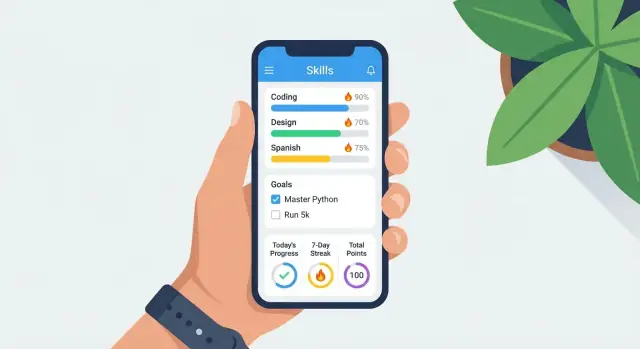
What a Skill Tracking App Should Do (and for Whom)
A skill tracking app is a personal progress app focused on practice—not just “getting things done.” Before you sketch screens or pick a tech stack, define what “skill tracking” means in your product so users can see improvement, not just activity.
Define what “skill tracking” means
Most skill tracking apps combine a few types of signals:
- Practice time: minutes spent (great for instruments, language study, fitness)
- Reps: discrete counts (pages read, problems solved, drills completed)
- Milestones: achieved outcomes (played a song at tempo, passed a level, ran 5K)
- Ratings: perceived quality or difficulty (1–5 “felt hard/easy,” confidence score)
Choosing one primary metric helps keep v1 simple. You can still allow notes, but avoid forcing users to fill in five fields every time they log.
Common user pain points to solve
People don’t usually need another tracker—they need a tracker that removes friction.
They often struggle with:
- Forgetting practice or losing streaks when life gets busy
- Unclear progress (“I’m practicing, but am I improving?”)
- Low motivation, especially when results are slow
- Inconsistent logging because the app feels like extra work
A good habit tracker app reduces these issues by making logging fast, showing progress in a way that feels earned, and providing gentle prompts without becoming annoying.
Clarify who the app is for
Different audiences need different defaults and language:
- Solo learners and hobbyists want simplicity, streaks, and quick wins.
- Professionals often want structured goals, history they can trust, and lightweight reporting.
- Coached learners may want shareable summaries, but that can wait if you’re building an MVP.
Pick one primary audience for v1. Your onboarding, metrics, and reminders should be tailored to that group’s reality.
Set success criteria for v1
Define what “working” means early, so you don’t overbuild. Practical v1 goals for a mobile app planning phase include:
- Weekly active use: e.g., users log at least 2–3 sessions per week
- Retention: users still log in week 4 (a simple cohort check)
- Completion rate: % who set up a skill and record a first entry within 24 hours
These metrics keep the MVP honest: if people aren’t logging consistently, new charts won’t fix it—better flows and less friction will.
Define the MVP and Clear User Stories
An MVP (minimum viable product) for a skill tracking app is the smallest version that reliably helps someone record practice and understand whether they’re improving. The goal isn’t “a complete personal progress app.” The goal is a first release that people actually use week after week.
Start with 2–3 primary user stories
Keep user stories simple and measurable. For a v1 skill tracking app, three core stories usually cover the heart of the product:
- Log practice: “As a user, I want to record a practice session in under 30 seconds so I can keep an accurate history.”
- Set goals: “As a user, I want to set a weekly goal (sessions or minutes) so I know what success looks like.”
- See progress: “As a user, I want to view my progress over time so I feel motivated and can adjust my routine.”
If a feature doesn’t directly support one of these stories, it’s probably not part of your app MVP.
Support 1–2 skills first (reduce scope)
A common mistake in mobile app planning is trying to support every kind of skill from day one—languages, guitar, running, chess, coding—each with different metrics. Instead, pick one skill (or at most two closely related ones) for v1. This keeps your data model, screens, and UI decisions focused.
For example, a single-skill focus might mean you only need one set of metrics (minutes, sessions, and a self-rating). You can expand later once the core logging experience feels effortless.
Decide what the app will not do in v1
Being explicit about exclusions is how you prevent scope creep. Good “not in v1” examples include:
- A social feed, followers, comments, or sharing
- Complex coaching plans or personalized training programs
- Marketplaces (sell lessons, book coaches, paid challenges)
These can be great later, but they often multiply requirements: moderation, accounts, payments, and a much heavier QA burden.
Define measurable outcomes (so progress is real)
Choose a few outcomes that match your core stories and are easy to calculate:
- Streaks (days practiced in a row)
- Hours or minutes practiced (total and per week)
- Sessions completed (count-based progress)
- Level-ups / badges (simple milestones like “10 sessions” or “5 hours”)
This is the backbone of a habit tracker app experience: quick logging, clear goals, and visible progress. Once these are working, you’ll know exactly what to build next—and what to ignore for now.
Choose Your Tracking Model and Metrics
Before you design UI or write code, decide what “progress” means in your app. The tracking model you choose will shape everything: how fast users can log, how motivating charts feel, and how reliable your insights are.
Pick a tracking method that matches the skill
Most skills fit one (or a mix) of these logging styles:
- Sessions: “I practiced Spanish” with a date and optional details. Great for most hobbies.
- Timers: start/stop practice time. Best for deep-work skills (music, coding, studying) but requires good offline handling.
- Check-ins: quick “done/not done” or streak-style logging. Best for daily habits (typing drills, stretching).
- Structured exercises: predefined workouts/drills with fields (sets/reps, tempo, accuracy). Best when users want repeatable routines.
A simple MVP can support sessions + optional timer, then add structured exercises later if users ask for it.
Choose metrics that are useful (not exhausting)
Start with a small set of metrics that can be logged in under 10 seconds:
- Duration (minutes) or count (sessions)
- Difficulty (e.g., 1–5) to show effort, not just volume
- Notes for context (“worked on barre chords”)
- Tags to filter (“grammar”, “scales”, “interviews”)
- Optional: mood/energy if your audience values reflection
Keep most fields optional, and pre-fill defaults (e.g., last used duration) to reduce friction.
Skill creation: templates vs. fully custom
Templates help new users start quickly (“Running”, “Guitar”, “Public speaking”) with sensible default metrics and goals. Fully custom skills appeal to power users.
A practical compromise: templates first, with a “Custom skill” option and editable metrics after creation.
Plan goal types that map to real motivation
Support goals users already think in:
- Daily minutes (e.g., 20 min/day)
- Weekly sessions (e.g., 3 sessions/week)
- Milestone dates (e.g., “Run 5K by June 1”)
Choose one primary goal type per skill to keep progress views clear, then allow advanced users to add more later.
Map the Core Screens and User Flows
Before wireframes or a tech stack, map what people will actually do in your skill tracking app. A clear set of screens and repeatable flows prevents “feature drift” and makes later design decisions (like reminders and stats) much simpler.
Key screens to include
Start with a small, complete loop:
- Onboarding: quick setup (name, goals, notification opt-in) and a simple explanation of how logging works.
- Home: a short list of active skills, today’s prompt (“Log a session?”), and a one-tap shortcut to add an entry.
- Skill detail: the hub for one skill—current goal, recent logs, streak/progress summary, and quick actions.
- Log entry: fast input (time spent, reps, score, notes, tags), plus “save” and “undo” confidence.
- Stats: simple charts and summaries that answer “Am I improving?” without overwhelming new users.
- Settings: reminders, units, data export/backup, privacy controls.
Sketch the primary user flow
Use one “happy path” as your backbone:
Add skill → log → view progress → adjust goal
If this loop is smooth, users will return. If any step is confusing or slow, logging drops off and the app becomes a dead icon.
Navigation: choose one pattern
For most personal progress apps, bottom tabs work well because the core destinations are few and frequent (Home, Stats, Settings). A side menu can hide important actions; a single-feed can work for minimalist designs, but may bury skill-level detail.
Design empty states and first-run tips
Empty screens are your first “coach.” On Home and Skill Detail, show:
- a clear next step (“Add your first skill” / “Log your first session”)
- a one-sentence example log
- a gentle tip explaining what gets tracked and why it matters
These small cues reduce drop-off during the first week—when habits are still forming.
Wireframes and UI Patterns That Encourage Consistent Logging
A skill tracking app only works if people actually log. Before you invest in colors, icons, and polished visuals, create low-fidelity wireframes (paper sketches or grayscale screens). They help you validate what matters most: how quickly someone can record a session, and how clearly they can see progress.
Start with “logging speed” as the main design goal
Make the primary action obvious on every key screen. A good rule: logging should take under 10 seconds.
Keep logging fast with:
- One-tap actions (e.g., “+ 15 minutes,” “Completed,” “Practice done”) for common entries
- Smart defaults (last used duration, last skill, last note visibility)
- Recent items (top 3 skills, last routine, favorite templates) so users don’t hunt through lists
If your wireframe requires a user to choose a skill, set a duration, pick a metric, and confirm every time, it’s too slow. Reduce steps by grouping decisions into a single lightweight “Log” sheet.
Use progress visuals that reward small effort
Logging feels worth it when feedback is instant and understandable. In wireframes, block in simple, consistent progress components:
- Streak calendar for daily continuity (great for motivation)
- Weekly bars for “how much did I practice?” at a glance
- Trend line for longer-term improvement (time spent, reps, rating, or score)
Keep these visuals readable without explanation. If a user can’t tell what’s going up (or down) in two seconds, simplify labels and reduce chart options.
Accessibility basics that increase consistency
Accessibility isn’t a “nice to have”—it reduces friction for everyone.
Bake these into your wireframes early:
- Readable font sizes and spacing (avoid cramped screens)
- High contrast for text and key actions
- Large tap targets (especially for calendars and quick-add buttons)
When your wireframes prioritize speed, clarity, and comfort, you create an interface people can return to daily—without it feeling like a chore.
Pick a Tech Stack Without Overbuilding
A skill tracking app succeeds because it’s easy to use every day—not because it has the most complicated architecture. Pick the simplest stack that supports your MVP user stories and leaves room to grow.
Platform: native vs cross-platform
If you’re shipping quickly with a small team, cross-platform is usually the practical choice.
- Native (Swift for iOS, Kotlin for Android): best OS integration and “feel,” but you build everything twice.
- Cross-platform (Flutter or React Native): one codebase for both platforms, faster iteration, consistent UI.
A good rule: choose Flutter if you want highly consistent visuals and strong performance out of the box; choose React Native if your team is already comfortable with JavaScript/TypeScript and web-style tooling.
If you want to validate an MVP even faster, a vibe-coding platform like Koder.ai can help you go from user stories to a working prototype via chat—then export the source code when you’re ready to move into a traditional repo and release process.
Backend: local-only vs syncing
Decide early whether users must access their data across devices.
- Local-only (no account): simplest, fastest to build, best for privacy. Great for an MVP.
- Sync (account + cloud storage): enables multi-device use and safer recovery, but adds sign-in, security, support, and costs.
If you’re unsure, design the app so it works fully offline first, then add sync later.
Storage: what to use for the MVP
For on-device storage, choose something proven:
- SQLite (often via a library) for maximum control and portability.
- Realm or a similar local database for a smoother developer experience.
If you add syncing, pair local storage with a cloud database (for example, a managed backend service) so you’re not building server infrastructure too soon.
Analytics and crash reporting (privacy-aware)
Add crash reporting and lightweight analytics from day one, so you can spot issues and learn what screens cause drop-off. Keep it privacy-friendly: track events like “created skill” or “logged session,” avoid collecting sensitive text, and offer clear opt-in/out in settings.
Design the Data Model and Calculations
A skill tracking app lives or dies by whether it can answer simple questions reliably: “What did I do?”, “How much?”, and “Am I improving?” A clean data model makes those answers consistent—even when users edit the past.
Core entities to include
Start with a small set of tables/collections you can grow later:
- User: account info, preferences (units, week start day).
- Skill: what the user is tracking (e.g., “Guitar”, “Spanish”).
- Goal: target tied to a skill (e.g., “5 hours/week” or “30 sessions/month”).
- Session/Log: the event the user records (duration, reps, notes, mood, etc.).
- Reminder: schedule and channel (push, email), plus “snooze” behavior.
- Tag: optional labels for filtering (“Technique”, “Vocabulary”).
Keep relationships straightforward: a Skill has many Goals and Logs; a Log can have many Tags.
Timestamps, time zones, and streaks
Store timestamps in UTC plus the user’s time zone (and ideally the zone used when the log was created). Streaks and “daily totals” depend on what “today” means for the user. Also store a normalized local date for fast daily queries.
Derived stats: don’t paint yourself into a corner
Plan calculations you’ll need from day one:
- Weekly totals (sum durations/reps per skill)
- Rolling averages (e.g., last 7/28 days)
- Goal progress (percent complete; on-track vs behind)
Compute these on the fly at MVP scale, or cache summaries if performance becomes an issue.
Edits and deletes without breaking totals
Users will backfill logs and fix mistakes. Treat a Log as the source of truth and make updates safe:
- Support edit and delete explicitly (soft-delete is often safer).
- If you cache summaries, recalculate affected days/weeks whenever history changes.
- Consider an audit trail (created_at, updated_at, deleted_at) to explain changes and debug support issues.
Offline Use, Sync, and Backup Decisions
If your skill tracking app depends on internet access, users will skip logging the moment they’re on a subway, traveling, or conserving data. An offline-first approach removes that friction: every core action—add a practice session, edit a note, view recent stats—should work with no connection.
Offline-first behavior
Treat the device database as the “source of truth.” When the user logs a session, it’s saved locally immediately and the UI updates right away. Sync becomes a background improvement, not a requirement.
Sync strategy and conflict rules
If you support multiple devices, decide early how edits reconcile:
- Latest edit wins: simplest to implement; store
updatedAttimestamps and keep the newest record. - Merge: better for compound data (e.g., adding logs from two devices); you may merge per-field or per-entry.
Make conflicts rare by designing data that’s append-friendly. For example, practice “logs” can be immutable entries, while “goals” and “tags” are editable.
Backups and restore (especially without accounts)
If you don’t require sign-in, offer a straightforward backup path:
- Export/Import: generate a file the user can save (Files app, email, etc.) and restore later.
- Device backup compatibility: ensure data is stored in a way OS backups include it.
Clearly explain what’s backed up and when, and link to details from your privacy page (e.g., /privacy).
Performance: logs and stats at scale
Logs grow quickly. Keep the app snappy by paging log lists (load recent first), caching computed stats (streaks, weekly totals), and recalculating in small batches after sync rather than on every screen render.
Reminders, Motivation, and Habit-Building Features
A skill tracking app only works if people actually log practice. Reminders and motivation features should make logging easier—not guilt users into opening the app.
Choose reminder types (without making it noisy)
Start with a small set of reminder options users instantly understand:
- Scheduled notifications: “Every day at 7:30pm” or “Mon/Wed/Fri at 6pm.”
- Goal deadlines: a reminder tied to a target date (e.g., “10 hours before March 1”).
- Smart nudges (optional in v1): only after a missed pattern, like “You haven’t logged guitar practice in 3 days.” Keep this conservative to avoid feeling intrusive.
If your v1 is simple, scheduled reminders plus a deadline reminder can carry most use cases.
Put users in control: frequency + quiet hours
Let users set:
- Frequency (daily, weekdays, custom days)
- Time of day
- Quiet hours / Do Not Disturb window (e.g., 10pm–8am)
Also include a quick “Pause reminders for 1 week” option. This reduces app deletion when someone gets busy.
Personalize messages (lightly)
Personalization doesn’t need AI. Use the user’s goal and skill name:
“15 minutes toward Spanish listening keeps your weekly goal on track.”
Avoid pressure language (“You failed,” “Don’t break your streak”). Aim for supportive, specific prompts.
Gentle motivation: streaks, milestones, celebrations
Lightweight gamification can help without turning your app into a game:
- Streaks for consistent logging (with a “streak freeze” or grace day if you want to be forgiving)
- Milestones like “5 sessions,” “10 hours,” or “7 days logged”
- Small celebrations (a subtle animation or message) after a log entry
The key is to reward the behavior (logging/practice) and keep the tone encouraging, not competitive.
Privacy, Permissions, and Trust Basics
Trust is a feature. If people feel unsure about what you collect and why, they’ll stop logging—especially when the app contains personal goals, health-adjacent notes, or daily routines.
Collect only what you need
Start with data minimization: capture the smallest set of fields that still supports your core tracking model. If a metric isn’t used in charts, reminders, or summaries, don’t store it “just in case.” This also reduces compliance burden and support risk.
Be clear about local vs cloud storage
Explain storage choices in plain language inside onboarding or Settings.
For example:
- Stored on your phone: logs, notes, streaks, and preferences (works offline).
- Stored in the cloud (if enabled): encrypted backup and sync between devices.
Avoid vague wording like “we may store data to improve services.” Say what you store, where, and the benefit to the user.
Protect sensitive data by default
Even a simple skill tracking app can contain sensitive patterns (work habits, sleep-adjacent routines, rehab exercises). Basic protections should include:
- Relying on device encryption (and using platform secure storage for secrets).
- Secure tokens for sessions; never store passwords in plain text.
- If accounts exist, implement proper authentication (email magic links, OAuth, or well-tested password auth) and rate-limit sign-in attempts.
Also be careful with analytics: log events like “completed session” rather than copying user-entered notes.
Ask for permissions only when necessary
Push notifications, calendar access, and health integrations should be opt-in and requested at the moment the feature is used, not on first launch.
Give users control
Add clear settings to:
- Export data (CSV/JSON)
- Delete entries
- Delete account and cloud backups (where applicable)
Link these from /privacy so they’re easy to find.
Testing, Feedback, and Launch Checklist
Testing is where a skill tracking app proves it can be trusted. If logging feels unreliable—even once—people stop using it. Focus first on the handful of actions users will repeat every day.
Build a simple test plan for key flows
Start with a short list of “must work every time” scenarios and write them down as step-by-step checks. At minimum, cover:
- Onboarding: first launch, permissions prompts, creating an account (or skipping), choosing skills, setting a goal
- Logging: adding a log, editing it, deleting it, attaching notes/tags, and seeing the update reflected in stats
- Goals: creating a goal, updating it, reaching it, and what happens afterward (keep going vs. new goal)
- Reminders: setting reminders, receiving them, tapping through to log, snoozing/turning off
Keep these tests repeatable so you can re-run them before every release.
Test edge cases that break streaks and trust
Skill tracking involves dates, streaks, and totals—small time issues can create big user frustration. Make sure you explicitly test:
- Time zone changes (traveling): logs should stay on the intended day, not “move” unexpectedly
- Daylight saving changes: streaks shouldn’t break or duplicate days
- Missed days: how the UI behaves when there’s a gap (no shaming, clear next step)
- Editing old logs: totals, averages, and streak logic should recalculate correctly
If your app supports offline mode, test “log offline → reopen later → sync” as its own critical scenario.
Run quick usability checks before launch
You don’t need a huge study. Ask 3–5 target users to try the app with a simple script: “Set up a skill, log practice for today, set a reminder, and find your weekly progress.” Watch where they hesitate. Fix wording, button labels, and navigation before you scale.
Prepare a practical launch checklist
Before submitting to app stores, confirm the basics are ready:
- Store listing: app name, description, keywords, category
- Screenshots that show the core loop (track → see progress → stay consistent)
- App icon, splash screen, and privacy disclosures
- Support email and an in-app “Contact support” link
- A short FAQ (you can host it at /help)
- Versioning, crash reporting, and a rollback plan for urgent fixes
Treat launch as the start of learning: ship stable, then improve based on real usage.
Iterate After Launch: Metrics, Roadmap, and Next Features
Launch is the start of the learning phase. A skill tracking app succeeds when people actually log progress repeatedly—so your first job is to measure real behavior, then improve what’s blocking consistency.
Define the post-launch metrics that matter
Keep your dashboard small and actionable. A few metrics usually tell the full story:
- Activation: % of new users who create their first skill and complete their first log (within 24 hours is a good window).
- Retention: users who return after 7 and 30 days.
- Log frequency: average logs per active user per week (this reveals whether your design supports a routine).
- Reminder opt-in rate: how many enable notifications, and whether reminder users retain better.
Tie each metric to a decision. For example, low activation often means your onboarding is too long or the first log is unclear.
Set up a simple feedback loop
Add one lightweight way for users to tell you what’s missing—without forcing a review.
- An in-app “Send feedback” link to /contact
- A short prompt after the 5th log: “What would make tracking easier?”
Make sure feedback includes context (screen name, last action, optional screenshot) so you can fix issues quickly.
Prioritize improvements based on usage, not guesses
Combine qualitative feedback with data. If most users track one skill but rarely return, focus on consistency features (faster logging, better reminders) before adding more complexity.
Plan a roadmap (and keep it flexible)
Common “next features” for a personal progress app include:
- Templates: pre-built skills (language, guitar, running) with suggested metrics
- Insights: streaks, weekly summaries, “best time to log,” progress charts
- Widgets: quick-add log from the home screen
- Integrations: calendar, Health/fitness data, shortcuts/automation
- Subscriptions (optional): only after you’ve proven repeat usage and clear premium value
Ship in small batches, measure the impact, and adjust the roadmap based on what actually increases consistent logging.
FAQ
What is the minimum viable product (MVP) for a skill tracking app?
An MVP should reliably support a complete loop:
- Create a skill
- Log a session in under ~30 seconds
- See progress over time
- Set (and adjust) a simple goal
If a feature doesn’t strengthen logging speed, goal clarity, or progress visibility, leave it out of v1.
What metrics should a skill tracking app track first?
Pick a single primary metric so progress feels clear:
- Time (minutes/hours) for deep practice (music, study)
- Reps (problems, drills, pages) for countable work
- Milestones (passed a level, ran 5K) for outcomes
- Ratings (difficulty/confidence 1–5) to capture effort/quality
You can add notes/tags, but keep most fields optional to avoid logging fatigue.
Why do people stop using skill tracking apps?
Most users drop off because the app adds friction. Common causes include:
- Too many required fields per log
- Confusing progress views (“activity” without meaning)
- Reminders that feel nagging
- Slow flows (too many taps to log)
Design around fast logging, immediate feedback, and gentle prompts.
Who should a skill tracking app be built for in version 1?
Choose one main group for v1 because it affects defaults, language, and features:
- Hobbyists/solo learners: simplicity, streaks, quick wins
- Professionals: trustworthy history, goals, lightweight reporting
- Coached learners: shareable summaries (often later)
Nail one audience’s workflow before expanding.
What core screens should a skill tracking app include?
A strong core set is:
- Onboarding (skill + goal setup)
- Home (today prompt + one-tap log)
- Skill detail (goal, recent logs, streak/progress)
- Log entry (fast input + undo confidence)
- Stats (simple charts that answer “am I improving?”)
- Settings (reminders, privacy, export/backup)
This supports the key loop: Add skill → log → view progress → adjust goal.
How do you make logging fast enough for daily use?
Use patterns that remove repeated decisions:
- Smart defaults (last used duration/skill)
- One-tap quick adds (e.g., “+15 min”)
- A lightweight “Log” sheet instead of multi-step forms
- Recent/favorite skills at the top
Aim for logging in under 10 seconds for common entries.
What progress visuals work best in a personal skill tracking app?
Pick progress components users can understand instantly:
- Streak calendar for consistency
- Weekly bars for volume at a glance
- Trend lines for longer-term change (time, reps, rating)
Keep charts opinionated and limited in v1; too many options usually reduces clarity and usage.
Should a skill tracking app work offline first or require accounts and sync?
Offline-first is often best for consistency:
- Saves logs immediately (no internet required)
- Prevents missed entries while traveling/commuting
- Makes the app feel reliable
If you add sync later, treat it as a background improvement and define simple conflict rules (for example, latest edit wins for editable records).
What tech stack choices are safest for a skill tracking MVP?
At MVP stage:
- Cross-platform (Flutter/React Native): usually fastest to ship with one codebase
- Native (Swift/Kotlin): best platform feel, but double the work
For storage, use a proven local database (SQLite/Realm). Add cloud sync only when multi-device access is a clear requirement.
How do you measure whether the skill tracking app is working after launch?
You need enough data to learn without overbuilding. Practical v1 success criteria include:
- Activation: create a skill + first log within 24 hours
- Weekly active use: 2–3 logs per week
- Retention: users still logging in week 4
- Log frequency: logs per active user per week
If these are weak, prioritize reducing friction and improving the core flow before adding new features.