

Create a Web App for Sales Teams: Leads, Deals & Pipelines
Plan a sales web app step by step: leads, deals, pipeline stages, permissions, dashboards, and integrations. Practical guidance for non-technical teams.
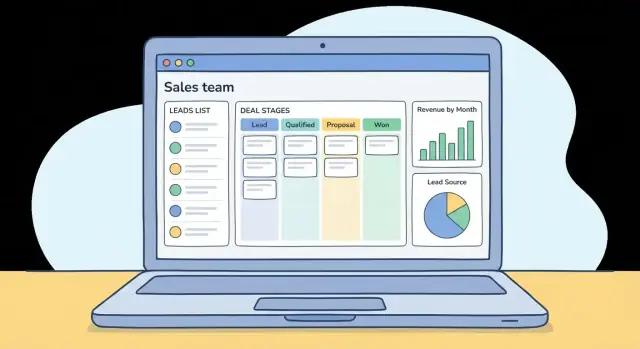
Define the Goal and Who the App Is For
Before you build a single screen, define what your sales web app is meant to fix. Sales teams rarely fail because they lack features—they fail because they lack clarity: who owns what, what happens next, and whether the numbers are trustworthy.
What problems should the app solve?
Start with a short goal statement tied to day-to-day pain:
- Visibility: Can anyone answer “What’s in the deal pipeline right now?” without chasing spreadsheets or Slack messages?
- Follow-ups: Do leads and deals move forward reliably, or do they stall because tasks aren’t created and reminders aren’t clear?
- Forecasting: Can managers trust the forecast, or is it based on stale updates and inconsistent pipeline stages?
If you can’t name the top 2–3 problems, you risk building a CRM basics clone that no one uses.
Who will use it (and what each role needs)
List your primary users and what they must accomplish in under a minute:
- Sales reps: capture leads fast, qualify them, log activities, update deal stage/next step, and never miss follow-ups.
- Managers: review pipeline health, spot stuck deals, coach with context, and forecast without manual cleanup.
- Admins: manage role-based access, required fields, pipeline stages, and data quality rules.
- Sales ops: ensure lead management consistency, handle routing/assignment, reporting definitions, and CRM integrations.
Design decisions get easier when you choose a “primary user.” For many teams, it’s the rep—because adoption drives everything else.
Define success metrics you can measure
Pick metrics that reflect real behavior, not just “we shipped it”:
- Adoption: percentage of active reps updating deals weekly; percentage of leads logged in the system.
- Fewer missed follow-ups: reduction in overdue tasks or untouched leads after X days.
- Faster updates: time from meeting/call to a deal stage update; fewer “end of week” bulk edits.
Tie each metric to a specific feature you plan to ship (tasks, reminders, stage rules, dashboards), so you can confirm what’s working.
What to avoid early on
Common mistakes that hurt sales workflow and adoption:
- Too many fields: every required field increases drop-off; start minimal and add only when reporting truly needs it.
- Unclear pipeline stages: if two reps interpret a stage differently, your sales reporting and forecast are noise.
- Duplicate tools: if reps must update the app and another tracker, the app loses. Decide what becomes the source of truth and integrate the rest.
With a tight goal, clear users, and measurable outcomes, every later decision—data model, pipeline stages, and dashboards—has a solid anchor.
Scope the MVP: Must-Haves vs. Nice-to-Haves
Your MVP is the smallest version of the sales web app that proves the workflow works end-to-end. If a rep can’t take a new lead to a closed deal without workarounds, the MVP is too small. If you’re building email sync, AI suggestions, and a full reporting suite before anyone has used the pipeline, it’s too big.
Start with the core use cases
Aim to support these “daily driver” actions:
- Add a lead (manual entry + basic validation)
- Qualify a lead (status + notes + source)
- Create a deal from a qualified lead (value, expected close date)
- Move deals through stages (with a simple history)
- Close a deal as won/lost (reason required)
Draw a clear MVP line
A practical MVP for most teams includes: lead and deal records, pipeline stages, basic search/filter, and activity notes.
Features that can often wait until you’ve validated adoption:
- Email/calendar sync
- AI scoring or next-step suggestions
- Advanced automations and sequences
- Custom report builders and complex forecasting
- Multi-currency, territory management, commissions
Write user stories in plain language
Keep them short and testable:
- “As a sales rep, I can assign a lead to myself so I know I own follow-up.”
- “As a manager, I can see deals by stage so I can spot bottlenecks.”
- “As an admin, I can import leads from a spreadsheet so we can start quickly.”
Agree on data sources early
Decide what feeds your system from day one: website forms, CSV imports, and which CRM integrations (if any) are required for launch. The MVP should have at least one reliable intake path so new leads arrive consistently, not just during testing.
Design the Data Model (Leads, Deals, Contacts, Activities)
Before you build screens, decide what “things” your app will store and how they relate. A clean data model keeps lead management and your deal pipeline consistent, makes sales reporting easier, and prevents chaos as your team grows.
Key objects you’ll need
Most sales web app MVPs can start with five core objects:
- Lead: a person or company that hasn’t been qualified yet.
- Account/Company: the organization you’re selling to.
- Contact: an individual person (usually tied to a company).
- Deal/Opportunity: a revenue-tracked sales effort in your pipeline stages.
- Activity: a logged action (call, email, meeting, note) tied to a lead/contact/deal.
Activity is the glue that makes the sales workflow trackable.
Relationships that keep your CRM basics sane
Use simple, real-world relationships:
- One company → many contacts (Acme has multiple people involved).
- One company → many deals (renewal and upsell can be separate deals).
- A deal → many activities (all calls/meetings in one place).
- Lead conversion: a Lead can convert into a Contact (and usually an Account/Company) and may create a Deal.
A practical rule: Contacts can exist without a deal; deals should nearly always be tied to a company and a primary contact.
Minimum fields (keep it short at first)
Start with only what your team truly uses:
- Lead: name, email/phone, company name (free text), source, status, owner, created date.
- Company: name, domain (optional), industry (optional), owner.
- Contact: first/last name, email, phone, company (link).
- Deal: name, company (link), amount, expected close date, stage, owner.
- Activity: type, date/time, notes, related record (lead/contact/deal).
You can always add fields later; removing fields users adopted is harder.
Duplicates and merge rules
Duplicates are inevitable—plan early:
- Match on email (contacts/leads) and company domain/name (companies).
- When importing, flag “possible duplicates” instead of blocking saves.
- Define a merge winner rule (e.g., newest activity + non-empty fields win) and always keep an audit trail of merged records.
This foundation prevents messy data long before you build dashboards or CRM integrations.
Map Your Pipeline Stages and Sales Process Rules
Your pipeline is the shared source of truth for what a deal means and what should happen next. If stages are vague (or everyone uses them differently), forecasting and coaching quickly becomes guesswork.
Define standard stages with clear entry/exit criteria
Start with a small set of stages that match how your team actually sells. Typical examples: New, Qualified, Demo/Discovery, Proposal, Negotiation, Closed Won, Closed Lost.
For each stage, write two short definitions:
- Entry criteria: what must be true for a deal to enter this stage (e.g., “decision-maker identified”).
- Exit criteria: what evidence moves it forward (e.g., “demo completed and next meeting booked”).
Keep criteria observable, not based on gut feel. This makes pipeline reviews faster and more consistent.
Add stage rules to protect data quality
A sales web app should guide reps toward complete, usable records. Add lightweight validations when a user tries to move a deal forward, such as:
- Required fields before advancing (e.g., amount, close date, next step)
- A mandatory next step date so deals don’t stall
- Guardrails for backwards moves (allow, but require a note)
These rules prevent “green” pipelines filled with incomplete deals.
Support multiple pipelines (optional)
If your process differs by team, product, or region, consider separate pipelines. The goal isn’t complexity—it’s accuracy. Only split when stages or definitions genuinely differ; otherwise, use fields like “Product Line” for reporting.
Capture closed-won and closed-lost reasons
When a deal closes, require a reason (and optionally a competitor). Over time, this powers better reporting, clearer coaching, and more realistic forecasts—without extra meetings.
Plan the User Experience and Core Screens
A sales web app lives or dies by how quickly people can move from “new lead” to “next action.” Design the experience around daily habits: check today’s tasks, scan pipeline, update a record, move on.
Navigation essentials
Keep the main navigation tight and consistent across the app:
- Leads: capture, qualify, convert
- Deals: active opportunities and next steps
- Pipeline: visual stage movement and totals
- Tasks: personal and team follow-ups
- Reports: performance and forecasting
- Settings: users, roles, fields, integrations
If you add more later, hide it behind “More” rather than expanding the top-level menu.
Core screens to design first
Start with the screens people will touch every hour:
- List views (Leads, Deals, Contacts): sortable columns, clear status badges, and an obvious “Add” button.
- Detail pages: a summary header (owner, stage/status, value), then sections for notes, activities, emails, files.
- Pipeline board: drag-and-drop cards between stages, with quick previews and totals per column.
- Quick add: a lightweight modal or header button to create a lead, deal, or task without leaving the current screen.
Speed features that reduce effort
Sales teams need to find and update records fast:
- Fast search with autocomplete (name, company, email, deal).
- Filters + saved views (e.g., “My hot leads,” “Deals closing this month”).
- Bulk actions for assignment, stage/status changes, and exports.
- Inline edits in lists and on cards (owner, stage, next step, close date).
Add keyboard-friendly actions (e.g., N for new, / to focus search) so power users can move through updates quickly.
Set Up Authentication, Roles, and Data Access
Authentication and access control decide whether your sales web app feels trustworthy—or risky. Keep it simple at first, but make the rules explicit so you don’t end up with “everyone can see everything” by accident.
Start with a small set of roles
Most teams can start with three roles:
- Sales rep: works their own leads and deals.
- Manager: sees the team’s work, reviews performance, and helps unblock deals.
- Admin: manages settings, user provisioning, and data governance.
Resist adding more roles early. Extra roles often hide unclear processes rather than solving them.
Permissions: by object and by field
Define permissions in two layers:
- Object-level permissions (Leads, Deals, Contacts, Activities): view / edit / delete / export.
- Field-level permissions for sensitive data (e.g., deal amount, margin, discount, customer phone): who can view or edit specific fields.
This prevents awkward workarounds like keeping key info in notes or spreadsheets because the app exposes too much.
Team visibility rules that match real selling
Decide which records are:
- Private (only the owner and admins)
- Team-shared (owner + manager + team)
- Company-wide (usually limited to managers/admins)
A common approach: leads can be team-shared, while deals can be private by default with a “share with team” option.
Audit history for critical changes
Sales teams need trust in the numbers. Log an audit history for important updates like stage changes, amount edits, and owner reassignment. Include who changed it, what changed, and when—and make it easy for managers to review during pipeline checks.
Build Lead Capture, Assignment, and Qualification
Lead management is where a sales web app either saves time or creates extra work. The goal is simple: get new leads into the system quickly, route them to the right person, and make it obvious what should happen next.
Lead capture: get data in with minimal friction
Support a few reliable sources from day one:
- Web forms: Keep forms short (name, email/phone, company, source). Use hidden fields for campaign parameters so marketing attribution doesn’t depend on sales reps.
- Manual entry: Sales reps should be able to add a lead in under a minute. Auto-complete common fields (country, industry) and remember defaults.
- CSV import: Make imports forgiving. Show a preview, let users map columns, and warn about duplicates before creating records.
A practical rule: every lead should have at least an owner, a source, and a status—otherwise it gets lost.
Assignment rules: decide who owns the next action
You don’t need complex routing to start, but you do need consistency. Common patterns:
- Round-robin for fairness and speed.
- Territory-based assignment using country/region, industry, or company size.
- Manual queue where new leads land in an “Unassigned” inbox and a manager assigns them.
Add a clear audit trail: when ownership changes, log who changed it and why. This prevents confusion when follow-ups are missed.
Qualification workflow: make statuses actionable
Use a small set of statuses that align with what reps actually do:
- New: captured, no outreach yet.
- Contacted: first touch attempted or completed.
- Qualified: meets your criteria (budget/need/timing—whatever your team uses).
- Disqualified: not a fit, unreachable, or duplicate.
Require a short reason when disqualifying; it improves reporting later without adding much work.
Conversion: turn a lead into real sales records
Define a one-click conversion flow:
- Lead → Contact + Company (Account), creating both if they don’t exist.
- Optionally create a Deal immediately (with an initial stage and value) or let the rep choose.
During conversion, run duplicate checks (same email, domain, or company name) so you don’t fragment customer history across multiple records.
Create Deal Management and Pipeline Movement
Deal management is where your sales web app stops being a database and starts being a daily work tool. The goal: make it effortless to create deals, keep them moving, and make “what happens next” hard to ignore.
Deal creation: from scratch or from a qualified lead
Support two entry points:
- Create a deal from scratch when a rep is working an inbound referral or a partner lead.
- Create a deal from a qualified lead with one click, carrying over contact/company, source, and key notes.
When converting a lead, avoid duplicating records: the deal should reference the existing contact/company, not create new ones silently.
Pipeline movement: board and dropdown
Different people work differently, so provide both:
- A drag-and-drop pipeline board (Kanban style) for fast updates during standups or call blocks.
- A stage dropdown on the deal page for precise updates (and for accessibility and mobile-like layouts).
When a deal changes stage, log it automatically (who, when, from → to). That history is vital for coaching and forecasting.
Prevent stale deals with required next steps
To keep the pipeline honest, require two fields whenever a deal is created or moved forward:
- Next step (short text, e.g., “Send pricing,” “Book technical demo”)
- Follow-up date (the deadline for that next step)
If a rep tries to move a deal without them, show a clear inline prompt. Keep it helpful: suggest common next steps per stage.
Activity timeline linked to each deal
Every deal should have a chronological timeline that combines:
- Calls, emails, meetings
- Notes and file links
- Stage changes and key field edits
This makes deal handoffs smoother and reduces “What’s the context here?” messages. Bonus: allow adding an activity from anywhere and attaching it to the right deal in one click.
Add Tasks, Reminders, and Simple Automation
Tasks are the connective tissue between your pipeline and real work. Without them, deals “move” in the app while follow-ups happen late—or not at all. Keep this feature simple, fast to use, and tied directly to leads and deals.
Task types, due dates, and a daily agenda
Start with a small set of task types that match how reps actually work: Call, Email, Meeting, Demo, and Follow-up. Every task should have a due date/time, an owner, and a link to a Lead or Deal (plus the related Contact).
Add a Daily Agenda view that answers one question: “What do I need to do today?” Include:
- Today’s tasks (sorted by due time)
- Overdue tasks (pinned to the top)
- Upcoming tasks (next 7 days) for quick planning
Reminders that don’t get ignored
Reminders should be predictable and adjustable. Allow a few defaults (e.g., 15 minutes before, 1 hour before, at due time), and let users opt out per task. Pair reminders with an “inbox” style notification list so people can catch up after meetings.
Simple automation: trigger tasks from pipeline stages
One high-impact rule: when a deal enters a stage, create a task. Example:
- Stage → “Demo Scheduled” → create “Send agenda and confirm attendees” due 24 hours before the demo
Keep automation templates admin-managed so your sales process stays consistent.
Notifications that help (not noise)
Focus on a few signals that protect revenue:
- Overdue tasks
- Deal idle for X days (no activity logged)
- Upcoming high-value deal close date with no next step
SLA rules for new leads
If speed-to-lead matters, enforce it with an SLA: “New leads must be contacted within X hours.” Show an SLA timer on the lead, alert the owner as the deadline approaches, and escalate (notify a manager or reassign) if it’s breached. This turns “best practice” into a measurable habit.
Design Dashboards, Reports, and Forecasting
Dashboards and reports should answer a few everyday sales questions fast: “What’s in the pipeline?”, “What changed this week?”, and “Are we on track to hit target?” Keep the first version simple and consistent, then add depth only when teams actually use it.
Sales dashboard basics
Start with a single “Pipeline Overview” view that works for both managers and individual reps.
Include a few core widgets:
- Pipeline value: total deal amount in open stages (optionally split by owner or territory).
- Stage counts and value by stage: how many deals (and how much money) sit in each stage.
- Win rate: a simple ratio (won / closed) for a chosen time period.
- New vs. moved vs. stalled: deals created, advanced, or unchanged for X days.
Keep filters obvious: date range, owner, team, pipeline, and product line (if relevant). Make sure “My pipeline” is one click away.
Forecasting: two practical options
A lightweight sales web app can still offer useful forecasting without complex AI.
Weighted pipeline forecasting multiplies each deal amount by a stage probability (e.g., Proposal 50%, Negotiation 75%). It’s easy to explain and good for trend tracking.
Commit / best-case forecasting gives reps control: each deal can be tagged as Commit, Best-case, or Pipeline. Managers can roll these up by week/month to compare conservative vs. optimistic projections.
If you do weighted forecasting, allow stage probabilities to be configured per pipeline so teams can adjust without code.
Activity reporting that drives behavior
Track basic activity types (calls, emails, meetings) and report them:
- Per rep: activity count and last activity date.
- Per period: daily/weekly totals to spot momentum.
- Activity-to-outcome: optional, but powerful—compare activity levels for won vs. lost deals.
This helps managers coach, not just audit.
Exports and scheduled reports
Offer CSV export on every table report (pipeline list, activity log, closed-won deals). If your audience needs it, add scheduled email reports (e.g., Monday pipeline summary) with a simple subscription toggle and a link back to the live report.
Design reports as “saved views” so users can reuse filters without rebuilding them each time.
Plan Integrations and Data Flow
Integrations are where a sales web app either saves time—or creates more work. Before building, decide what data should be created in your app vs. synced from somewhere else, and define a “source of truth” for each field (owner, company name, deal amount, etc.). This prevents silent overwrites and confusing duplicates.
Email and calendar: capture activity without double entry
Sales teams live in their inbox and calendar. Aim to log key activities (emails sent, meetings held) automatically or with one click. If full sync is too heavy for an MVP, start with: email forwarding to create activities, calendar event import, and a simple “log call/meeting” action tied to a contact or deal.
Lead sources and enrichment (with data quality checks)
List your lead sources: web forms, chat widgets, webinar tools, ad platforms, partner lists. Decide what should happen on arrival:
- Create a lead automatically and tag it with source/campaign
- Run optional enrichment (company info, social profiles)
- Verify data quality (valid email, normalized phone, dedupe by email/domain)
Treat enrichment as “nice-to-have” unless it directly improves qualification.
Closed-won handoff to accounting or contract tools
When a deal becomes closed-won, your app should pass the baton. Define what gets sent to invoicing or contract tools (legal entity, billing contacts, products, payment terms) and when (immediately on close, or after approval). Keep the handoff auditable with a status like “Sent to finance” and a timestamp.
Integration approach: API, webhooks, and fallback options
Prefer APIs for reading/writing data and webhooks for real-time events (new lead, stage change, closed-won). Still plan for import/export (CSV) as a safe fallback for edge cases, migrations, and recovery.
If you want a simple way to document these decisions, add an internal page like /blog/data-flow-checklist for your team.
Choose a Tech Approach, Then Test and Roll Out
Choosing the tech approach is less about chasing trends and more about picking something your team can ship, support, and improve without drama.
A simple, proven architecture
For most sales web apps, start with three clear parts: a web frontend, a backend API, and a database.
- Web frontend: where reps live—pipeline, deal pages, tasks, dashboards.
- Backend API: business rules (stage changes, assignment logic, permissions) in one place.
- Database: structured records for leads, contacts, deals, activities, and audit history.
This setup keeps the app maintainable and makes it easier to add integrations later without rewriting everything.
If you want to accelerate the first working version, a vibe-coding platform like Koder.ai can be a practical shortcut: you describe the workflow (leads → qualification → deals → pipeline → tasks) in chat, and it helps generate a production-ready stack (React frontend, Go backend, PostgreSQL database) with the same building blocks discussed above—plus conveniences like planning mode, source code export, and snapshots/rollback for safer iteration.
Non-functional needs you shouldn’t skip
Agree on basics early:
- Performance: define acceptable page load times for the pipeline and deal screens.
- Uptime expectations: even a small team needs a plan for outages and maintenance windows.
- Backups and recovery: automated daily backups, tested restores, and clear retention rules.
Security essentials
Sales data is sensitive. Start with fundamentals:
- Encrypt data in transit (HTTPS) and at rest where possible.
- Use least-privilege access by default (reps vs. managers vs. admins).
- Secure sessions: short-lived tokens, CSRF protection where applicable, and logout on password changes.
If you’re building for multiple regions, also plan for where data is hosted. Some platforms (including Koder.ai) run on AWS globally and can deploy applications in different countries to support data residency and trans-border transfer requirements—useful when your sales org spans multiple jurisdictions.
Testing and rollout that match real sales work
Testing should mirror how the pipeline is actually used:
- Smoke tests for login, lead capture, and deal creation.
- Role/permission tests (rep can’t view other teams’ deals, manager can).
- Pipeline rule tests (stage transitions, required fields, close reasons).
For rollout, start with a pilot team, run a short training checklist, and set a weekly feedback loop. Ship improvements on a predictable cadence (for example, every 1–2 weeks) so reps trust the app will keep getting better.
FAQ
How do I define the goal of a sales web app so it actually gets used?
Start with a 1–2 sentence goal tied to daily pain, such as improving pipeline visibility, reducing missed follow-ups, or making forecasts trustworthy.
Then pick a primary user (often the sales rep) and define 2–3 measurable success metrics (e.g., % of reps updating deals weekly, reduction in overdue tasks, time from meeting to stage update).
What should be in the MVP for a sales web app (and what should wait)?
Your MVP should support the full workflow from new lead to closed won/lost without workarounds.
A practical MVP usually includes:
- Lead + deal records
- Pipeline stages with history
- Basic search and filters
- Activity notes
Defer heavy features like email sync, AI scoring, advanced automations, and complex report builders until adoption is proven.
What data model should I use for leads, contacts, deals, and activities?
Start with core objects and simple relationships:
- Lead, Company/Account, Contact, Deal/Opportunity, Activity
- One company → many contacts and deals
- One deal → many activities
- Lead conversion into contact/company (and optionally a deal)
Keep minimum fields small (owner, status/stage, amount/close date for deals) and add fields only when reporting truly needs them.
How do I prevent duplicates and handle merging records safely?
Plan dedupe from day one:
- Match contacts/leads primarily by email
- Match companies by domain and/or normalized name
- During imports, flag possible duplicates instead of blocking saves
- Define a merge rule (e.g., keep newest activity, prefer non-empty fields) and keep an audit trail
This prevents fragmented history and unreliable reporting later.
How should I define pipeline stages so forecasting and coaching aren’t guesswork?
Define a small set of stages that match reality (e.g., New → Qualified → Discovery → Proposal → Negotiation → Closed Won/Lost).
For each stage, write:
- Entry criteria (observable conditions)
- Exit criteria (evidence required to move forward)
Add lightweight validations (amount, close date, next step, next step date) to keep the pipeline consistent and forecastable.
What’s the simplest way to set up roles and permissions without creating security gaps?
Start with three roles (rep, manager, admin) and make access rules explicit.
Implement permissions in two layers:
- Object-level: view/edit/delete/export for leads, deals, contacts, activities
- Field-level: restrict sensitive fields like amount, margin, discount, or phone
Also add audit history for critical changes (stage, amount, owner) so teams can trust the numbers.
How should lead capture and assignment work in the first version?
Pick a few reliable intake methods:
- Web forms with minimal fields (name, email/phone, company, source)
- Fast manual entry (under a minute)
- CSV import with column mapping and duplicate warnings
Make sure every lead has an owner, source, and status. For assignment, start with round-robin, territory rules, or an unassigned queue, and log ownership changes with a reason.
How do I keep deals from going stale (next steps, tasks, and reminders)?
Require a next step and follow-up date whenever a deal is created or moves forward.
Then add simple automation that saves effort:
- When a deal enters a stage, auto-create a standard task (admin-managed template)
- Notify only on high-signal events (overdue tasks, deal idle for X days, high-value close date with no next step)
This keeps deals moving without turning notifications into noise.
What forecasting approach should I implement before building complex analytics?
Two lightweight options work well early:
- Weighted pipeline: deal amount × stage probability (configurable per pipeline)
- Commit/best-case: reps tag deals as Commit, Best-case, or Pipeline for rollups
Keep filters obvious (date range, owner, team) and include “stalled deals” views so managers can act, not just observe.
How do I plan integrations without creating double entry or data conflicts?
Decide the source of truth for each key field (owner, company name, deal amount) before syncing anything.
For an MVP, consider lighter options first:
- Email forwarding or one-click logging for activities
- Calendar event import
- Webhooks for key events (new lead, stage change, closed-won)
Always keep CSV import/export as a fallback, and document decisions internally (for example, in a checklist like /blog/data-flow-checklist).