

Create a Travel Agency Website With Tour Listings (Step‑by‑Step)
Learn how to plan, build, and launch a travel agency website with searchable tour listings, booking inquiries, content, SEO, and mobile-ready design.
Clarify Goals, Audience, and What You’ll Sell
Before you touch design or tools, get specific about what your travel agency website must achieve. A site built mainly for booking inquiries will look different from a tour booking website that takes payments online—different pages, buttons, and even how you present availability.
1) Pick the primary goal (and a clear secondary)
Decide whether your #1 goal is:
- Leads (quote requests, calls, WhatsApp messages)
- Online bookings (customers reserve and pay)
- Both (common—but choose which matters most)
This choice drives everything from your homepage headline to how your tour listings are structured.
2) Define what you sell in plain language
Write down your tour “catalog” in customer terms. For example:
- Day trips vs. multi-day packages
- Private vs. group tours
- Seasonal or limited-departure experiences
This helps you plan consistent categories, durations, and price formats—so your itinerary pages don’t feel improvised.
3) Get precise about audience, regions, and languages
List the destinations you actively cover (by country/city/region) and which languages you’ll support. If you’re targeting multiple markets, your travel website design should make language and currency choices easy to find and hard to miss.
4) Set success metrics you can measure
Pick 3–5 numbers you’ll review monthly, such as:
- Inquiries per month (via booking inquiry form)
- Booking rate (inquiries → confirmed)
- Traffic to top destination pages (for travel SEO)
5) Collect competitor examples—with reasons
Save 5–10 sites (not just travel brands—also local agencies) and note what you’d improve: clearer filters, better pricing transparency, simpler checkout, or smoother payment integration for tours. This becomes your practical brief for later decisions.
Plan Your Site Structure and User Journey
A travel agency website works best when visitors can move from “I’m just browsing” to “I’m ready to book” without thinking too hard. Before you design anything, decide what pages you need and how people will flow between them.
Must-have pages (your core funnel)
Start with a simple set of pages that supports your main journey:
- Home: clear value (what you specialize in), top destinations/themes, and a prominent “Browse tours” CTA.
- Tours (listing page): searchable, filterable list of all tours.
- Tour detail: the page that answers questions and drives inquiry/booking.
- About: who runs the tours, what makes you trustworthy.
- Contact: fast ways to reach you (form, email, phone/WhatsApp), plus hours.
These pages should be reachable from the main navigation at all times.
Supporting pages that reduce hesitation
Add pages that handle objections and build confidence:
- FAQs (what’s included, fitness level, cancellation)
- Reviews/Testimonials (or link to third-party profiles)
- Blog/Guides (helpful destination info; see /blog)
- Policies (cancellation, privacy, terms)
Map the journey: search → tour detail → inquiry/booking
Sketch the path you want most visitors to take:
- Land on Home or a destination page.
- Click into Tours and narrow options.
- Open a Tour detail page.
- Submit an inquiry or complete booking.
At each step, keep a single primary action (e.g., “Check availability” or “Request to book”).
Categories and navigation that stay consistent
Plan categories people actually use: destinations, themes (food, culture, wildlife), difficulty, duration, and possibly price range.
Build a navigation menu that stays consistent across pages—typically: Home, Tours, Destinations, About, Contact—so visitors never feel lost.
Design Tour Listings: Cards, Filters, and Sorting
Your tour listing page is the “shop window” of your travel agency website. If visitors can compare options quickly, they’ll click through to details—and eventually book.
What each tour card should show
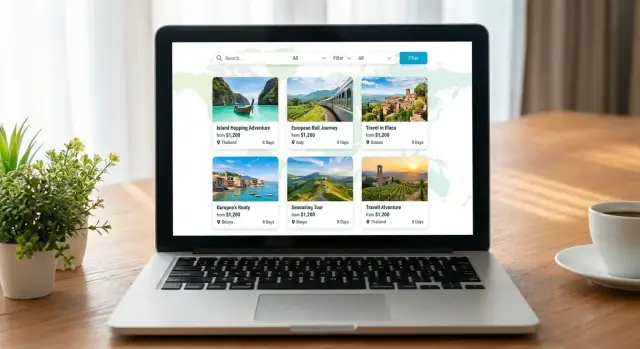
Aim for scannable cards that answer the first questions people ask. A good default set includes: tour name, destination, starting price (clearly marked “from”), duration (e.g., 3 days / 2 nights), next available departure (or “Runs weekly”), and 2–4 short highlights (e.g., “Small groups,” “Hotel included,” “Easy hikes”).
Keep the card layout consistent so comparisons are effortless. If you show reviews, show them everywhere (or nowhere) to avoid biasing the list.
Filters that help people decide
Filters should reduce overwhelm, not create it. Start with the essentials:
- Date (or month/season)
- Price range
- Duration
- Destination (region/city)
- Tour type (family, adventure, cultural, private, etc.)
Make it obvious when filters are active, and add a “Clear all” option. If inventory is limited, consider showing counts (e.g., “Hiking (12)”) so visitors don’t click into dead ends.
Sorting that matches intent
Sorting options should reflect how people shop:
- Price (low to high)
- Popularity (best sellers)
- Newest (recently added)
If you use “Popularity,” define it internally (bookings, inquiries, or curated picks) and be consistent.
Pagination vs. infinite scroll
For large lists, pagination is often better for orientation and sharing (people can return to “page 3”). Infinite scroll can work if you keep filters and sorting sticky and provide a “Back to top” jump.
Clear calls-to-action on every card
Every tour card needs a single primary action: View details (most common). Add a secondary option like Ask a question only if your booking flow is inquiry-based. Avoid competing buttons that slow decision-making.
Build High-Converting Tour Detail Pages
A tour listing gets the click; the detail page gets the booking. Your goal is to answer the “Is this right for me?” questions quickly, then make it easy to take the next step.
Use a consistent tour page template
Keep every tour page structured the same way so visitors can scan and compare:
- Quick overview: who it’s for, highlight experience, duration, location, and price (or “from” price).
- Itinerary: time blocks or day-by-day schedule, with realistic pacing.
- Inclusions/exclusions: what’s covered (tickets, meals, guide, transport) and what’s not.
If you offer variations (private vs. small group, different start points), show them clearly instead of burying them in paragraphs.
Add practical details people look for before they commit
Include the information that reduces back-and-forth emails:
- Meeting point with a clear description (and a map link if relevant)
- Start times and check-in guidance (“arrive 15 minutes early”)
- Accessibility notes (walking distance, stairs, wheelchair suitability)
- What to bring and dress code (especially for weather or religious sites)
- Cancellation policy in plain language
Make the experience feel real
Use a focused gallery (8–15 strong images beat 40 random ones). Add video only when it improves understanding—e.g., a short clip of the boat, trail, or accommodation.
Build trust without overclaiming
Show genuine proof:
- Reviews and ratings (with dates if possible)
- Real operator details and contact options
- Licenses/certifications only if you actually have them
Place CTAs where decisions happen
Add a clear booking/inquiry section near the top (after the headline and key facts) and again at the bottom after the itinerary.
Use action wording like “Check availability” or “Request a quote,” and keep the form short to start.
Create Content That Sells (Without Overselling)
The best tour pages don’t “pitch”—they clarify. When visitors can quickly understand what they’re buying, who it’s for, and what happens next, they’re far more likely to inquire or book.
Start with a consistent tour data checklist
Create a simple template and use it for every tour listing. At minimum, keep these fields consistent:
- Tour title (specific, not vague)
- Location (city/region + country)
- Duration (hours/days, and start/end times if relevant)
- Price (from… / per person, what’s included)
Consistency makes your tour listings easier to scan and compare—and helps you avoid missing critical details.
Write for scanning: highlights + “What to expect”
Lead with 4–6 highlights that read like quick answers (not poetry). Then add a clear What to expect section describing the flow: meeting point, pace, transportation, group size, and what travelers should bring.
A helpful rule: if someone only reads the highlights and “What to expect,” they should still know whether the tour fits them.
Use real photos—and note rights
Prioritize authentic images from your tours, guides, and destinations. If you use partner or customer photos, specify photo rights/credits where needed and keep a record of permission.
Reuse an itinerary format
For multi-day tours, use a repeatable structure like:
- Day 1: Arrival + key activities + overnight
- Day 2: Main experience + meals + options
This makes itinerary pages easier to read and easier for your team to update.
Add tour-specific FAQs to cut repetitive inquiries
Include 5–10 FAQs per tour (pickup, dietary needs, accessibility, cancellation, weather). This reduces back-and-forth and builds confidence before someone hits your booking inquiry form.
Pick Your Platform and How You’ll Manage Updates
The best platform is the one you’ll actually keep updated. Tour prices change, dates fill up, and photos get refreshed—so choose a setup that makes edits easy for whoever will maintain the site.
Website builder vs CMS vs custom build
If you need speed and a predictable cost, a website builder (like Squarespace, Wix, or similar) can work well—especially if you’re starting with a small number of tours.
For more control and long-term flexibility, a CMS (commonly WordPress) is often a good middle ground.
A custom build is worth considering only if you have very specific requirements (complex availability rules, multi-currency logic, or deep integration with an internal system) and a budget for ongoing development.
A modern alternative: build with a vibe-coding platform
If you want the flexibility of “custom” without adopting a heavy development pipeline, a vibe-coding platform like Koder.ai can be a practical middle option. You can describe your travel agency website (tour listings, tour search and filters, booking inquiry form, and even payment integration for tours) in a chat interface, then iterate quickly as your tours and seasons change.
This is especially useful when you need web app behavior—filters, availability logic, lead routing, and admin-style updates—while still keeping costs predictable. Koder.ai supports source code export, deployment/hosting, custom domains, and snapshots/rollback, with pricing tiers from free to enterprise.
Can you manage tours without touching code?
Before you commit, do a “real edit” test:
- Add a new tour with images, inclusions, highlights, and a day-by-day itinerary.
- Update price and hide a sold-out date.
- Reorder tour cards and change the “Featured” tours for the season.
If any of that requires a developer, updates will slow down—and outdated listings hurt trust.
Don’t forget SEO fields and analytics
Make sure you can edit page titles, meta descriptions, headings, and URL slugs per tour and destination page. Also confirm you can add analytics (GA4 or similar), conversion tracking, and cookie settings without hacks.
Mobile performance and image optimization
Tour sites are image-heavy. Choose a platform that automatically compresses images, supports modern formats, and doesn’t create slow mobile pages. Check that tour cards, filters, and inquiry buttons stay fast and easy to tap.
Decide who updates what—and how often
Assign an owner for tour content, pricing/availability, and customer inquiries. A simple update rhythm (weekly checks, seasonal refreshes) prevents old dates and mismatched pricing from sneaking into your listings.
Set Up Booking, Payments, and Availability
Booking is where a tour website turns interest into revenue—so decide early how “instant” you want the experience to be.
Choose: instant booking vs. inquiry requests
If you run fixed-date group departures with limited seats, instant booking usually makes sense: visitors pick a date, reserve spots, and pay.
If your tours are custom, private, or depend on supplier confirmation, an inquiry-first flow can work better: collect dates, group size, hotel class, and special requests, then confirm manually.
Make the next step obvious (e.g., “Request availability” vs. “Book now”) so customers know what to expect.
Payment requirements (if you take money online)
Before integrating payments, write down your rules and display them consistently across tour pages and checkout:
- Deposits vs. full payment: e.g., “20% deposit today, balance due 14 days before departure.”
- Currencies: let users pay in one clear currency (or offer a selector) and state if exchange rates apply.
- Taxes and fees: show what’s included (VAT, park fees, city taxes) and what’s not. Avoid surprise fees at the last step.
If you take partial payments, make the remaining balance and due date visible in the confirmation email and on the booking summary.
Availability: fixed dates, seasonal, or on-request
Most tours fit one of these models:
- Fixed dates: specific departures with remaining seats.
- Seasonal windows: “Runs May–October” with selectable start dates.
- On-request: no calendar promise until you confirm.
Whatever you choose, don’t show “available” unless you can honor it. If availability is manual, say “We’ll confirm within 24 hours.”
Confirmations and follow-up
At minimum, send an automated email that includes: itinerary summary, meeting point, what to pack, cancellation terms, and your contact details.
If you handle bookings manually, send a “request received” email immediately, then a second email once confirmed.
Make cancellation and refunds unmissable
Add a short cancellation summary near the booking button, and link to the full policy (e.g., /cancellations). Use plain language: deadlines, refund percentages, no-show rules, and how customers request changes.
Design and UX for Trust and Mobile Conversions
Good travel website design isn’t about flashy visuals—it’s about helping people feel confident enough to inquire or book. Your tour listings and tour pages should feel consistent, clear, and reassuring on every screen size.
Create a friendly, professional visual style
Pick a small, calm color palette (2–3 core colors) and use it consistently for headings, buttons, highlights, and badges (e.g., “Best seller”). Pair it with one readable body font and one heading font. Keep spacing generous so tour cards, prices, and key details don’t feel cramped.
Consistency matters more than novelty: the same button style should always mean the same action (e.g., “Check availability” vs. “Send inquiry”).
Design mobile-first for browsing and forms
Most travelers browse on mobile. Make tour cards tappable, keep filters usable (sticky or in a bottom sheet), and ensure sorting is easy to find.
On forms, use large input fields, clear labels, and the right keyboard types (email, phone, number). Keep the number of required fields minimal.
Make pricing and actions obvious
Show readable prices with what’s included: per person vs. per group, taxes/fees, and any key exclusions. Avoid surprises—hidden fees erode trust fast.
Use one primary call-to-action per screen (“Book now” or “Request availability”), supported by secondary actions like “Ask a question.”
Add trust elements where decisions happen
Place trust cues near the price and booking area: clear contact options, response time, cancellation highlights, and social proof (reviews, testimonials, partner badges).
If you have a physical office, include an address. Add links to /contact and /terms in the footer.
Improve accessibility (and conversions)
Use strong color contrast, descriptive alt text for key images, and keyboard-friendly forms (visible focus states, logical tab order). Accessible design reduces friction for everyone—and keeps travelers moving toward booking.
SEO for Tours, Destinations, and Local Discovery
SEO for a travel agency website is mostly about matching what people search for with the exact page that answers it—then making that page easy for Google (and humans) to understand.
Target “intent” keywords, not just big destinations
Most bookings start with specific intent: “Lisbon food tour,” “3-day safari from Arusha,” “family-friendly boat trip in Split.” Build pages around combinations of destination + tour type + duration/starting point.
Create a clear hierarchy:
- Category pages (e.g., “Kyoto Day Trips”)
- Individual tour pages (e.g., “Kyoto Highlights Private Day Tour”)
Write unique titles and meta descriptions (every time)
Avoid copying the same template across tours. Your title should quickly answer: Where? What type? Key hook.
Example pattern:
- Title: “Rome Colosseum & Forum Skip-the-Line Tour | Small Group”
- Meta description: “Explore the Colosseum and Roman Forum with an expert guide. Morning and afternoon departures. Free cancellation on selected dates.”
Clean URLs + internal links that help people decide
Use short, readable URLs:
- /tours/rome/colosseum-skip-the-line
- /tours/kyoto/private-day-tour
On each tour page, link to “related” options that genuinely help the visitor choose (and keep them on-site): similar duration, same destination, alternative style.
Also link from destination guides to your best tours (and back). For example, your guide at /destinations/rome can point to top experiences and seasonal picks.
Structured data (only when it’s real)
Add structured data where it fits—especially reviews/ratings, but only if they’re authentic and shown on the page. If you list prices, availability, or operator details, keep them consistent across the page so search engines and travelers see the same story.
Destination guides that earn traffic over time
Tour listings convert; guides attract. Publish practical content that answers local questions: best time to visit, neighborhoods, day-trip ideas, what to pack, local etiquette. Then naturally place tour suggestions where they’re relevant—helpful, not pushy.
Lead Capture: Forms, Chat, and Contact Options
Tour listings bring attention, but lead capture turns that attention into bookings. Your goal is to make it easy for a traveler to raise a hand—without forcing them through a long, fragile checkout flow.
Use a short, tour-aware inquiry form
Place a compact form on every tour detail page (and optionally as a sticky button on mobile). Keep fields minimal, but specific enough to respond quickly:
- Name
- Preferred date(s)
- Number of guests (人数)
- Questions / special requests
Add hidden context automatically (tour name, page URL), so you don’t rely on the traveler to copy details.
Offer the contact methods your customers actually use
Some audiences prefer chat over forms. Give clear options near the primary call-to-action:
- WhatsApp click-to-chat
- Phone number (tap-to-call on mobile)
- Email link
If you use chat, set boundaries (hours, typical reply time). A “We reply within 2 hours” note reduces anxiety and prevents double messages.
Route leads to one place
Nothing kills conversions like missed inquiries. Send all form submissions and chat notifications to a shared inbox (e.g., sales@) or your CRM if you have one. Use simple labels like “New inquiry: Bali 3-day tour” so your team can triage fast.
Set expectations and ask for what you need
Right below the form, tell people what happens next: your response time, whether availability is live, and what details help you confirm (hotel area, pickup point, dietary needs, passport nationality if required).
Optional: newsletter signup (without distracting)
If you run seasonal offers, add a low-friction newsletter box on your /contact page or after a successful inquiry submission—focused on deals and new tours, not spam.
Legal, Security, and Customer Confidence
A tour booking website isn’t just marketing—it’s a place where people share personal details and often money. Clear policies and basic security steps protect your customers, reduce disputes, and increase conversions.
Must-have legal pages (and where to link them)
Include Privacy Policy and Terms as dedicated pages, linked in your footer and near any form or checkout step.
If you collect data for marketing (newsletter signups, remarketing), your Privacy Policy should explain what you collect, why, and how users can request deletion. When in doubt, consult a qualified professional.
Make cancellations and refunds impossible to miss
Don’t hide the rules. Show your refund/cancellation policy:
- On every tour detail page (near pricing)
- In the booking inquiry form or checkout (before submission)
- In the confirmation email
This prevents chargebacks and “I didn’t know” complaints—especially for deposits, minimum group sizes, and weather-dependent activities.
Cookies and tracking: get consent where required
If you use analytics, ads, or embedded maps, add a consent banner that lets visitors accept or reject non-essential cookies. Keep links to /privacy-policy and /cookie-policy (if you have one) close to the banner.
Security basics that build trust
- Use HTTPS everywhere (a padlock in the browser).
- Protect your admin with strong passwords and, ideally, two-factor authentication.
- Limit editor access: give teammates only the permissions they need.
- Reduce spam on inquiry forms with CAPTCHA, email verification, and rate limits.
Small details—real contact info, clear policies, and a secure experience—often matter as much as the tours themselves.
Testing, Launch, and Ongoing Improvement
A travel agency website with tour listings can look perfect and still lose bookings if the basics don’t work on real devices. Treat launch day as a controlled release: test what matters, track results, and keep improving.
Test on multiple devices and browsers
Check your site on iPhone and Android (at least one small screen), plus desktop. Don’t forget Safari and Chrome—many “it works on my laptop” issues are Safari-only.
Focus on everyday actions:
- Opening the tour listings quickly on mobile data
- Using tour search and filters without the page jumping around
- Reading itinerary pages without horizontal scrolling
Verify the critical flow end-to-end
Run a “real customer” path several times:
Search → tour page → inquiry/booking.
On each step, confirm:
- Filters and sorting update results correctly (no missing tours, no duplicates)
- Tour cards show the essentials (price, duration, location, next availability if you display it)
- Tour detail pages load fast and the primary call-to-action is always obvious
- The booking inquiry form sends to the right email(s) and you receive all needed details
If you support online payments, complete at least one test transaction end-to-end, then refund it.
Set up analytics and conversion tracking
Before launch, make sure you can answer: “Which tour listings generate the most inquiries?”
At minimum, track:
- Form submissions (thank-you page view or submit event)
- Bookings (confirmation page/event)
- Clicks on key contact options (phone, WhatsApp, email)
Keep your setup simple, and name events clearly so non-technical teammates can read reports.
Use a launch checklist—and a rollback plan
A short checklist prevents last-minute mistakes:
- Backup/export site and database
- Confirm domain, SSL, and emails work
- Check metadata for key tours (titles, descriptions)
- Re-check top pages: home, tour listings, 3–5 best-selling tours, contact
Also decide your rollback plan: if something breaks, will you revert to yesterday’s backup or temporarily disable online booking and route people to the inquiry form?
If your platform supports snapshots (for example, Koder.ai provides snapshots and rollback), make that part of your release process so you can revert quickly without scrambling.
Plan ongoing improvements (weekly/monthly)
After launch, make updates part of your routine:
- Add new tours and refresh tour listings with seasonal highlights
- Collect and publish reviews on tour pages for trust
- Update your blog and destination pages to support travel SEO
- Review analytics monthly and adjust filters, labels, and CTAs
If you sell packages with different tiers, consider adding a simple pricing page and linking it from key pages (for example, /pricing) so customers can self-qualify before contacting you.
FAQ
Should my travel agency website focus on inquiries, online bookings, or both?
Choose one primary goal and a clear secondary.
- If you want leads, optimize for fast contact: short inquiry forms, click-to-call/WhatsApp, strong trust cues.
- If you want online bookings, prioritize availability selection, payment steps, and confirmation emails.
Then set 3–5 monthly metrics (e.g., inquiries, inquiry→booking rate, traffic to top destination pages) so you can improve based on data—not opinions.
What are the must-have pages for a travel agency website with tour listings?
A solid baseline funnel is:
- Home
- Tours (listing)
- Tour detail
- About
- Contact
Add supporting pages to reduce hesitation:
- FAQs
- Reviews/Testimonials
- Policies (cancellation, privacy, terms)
- Blog/Guides (for ongoing SEO), e.g. /blog
Keep these reachable from main navigation so visitors never have to “hunt” for the next step.
How should I structure tour categories and navigation so people don’t get lost?
Start with categories customers actually use, and keep them consistent everywhere:
- Destination (country/region/city)
- Duration
- Date/season
- Tour type (private, group, family, adventure, cultural)
- Price range
Avoid creating 20+ filters on day one. Add only what helps decisions, and include a visible “Clear all” so users can reset quickly.
What information should every tour card show on the listing page?
Each card should answer the first comparison questions at a glance:
- Tour name + destination
- From price (clearly labeled)
- Duration
- Next availability (or “Runs weekly/seasonal”)
- 2–4 short highlights (e.g., small groups, hotel included)
Use a single primary CTA like View details. Keep the card layout consistent so visitors can compare options without re-learning the page.
What filters and sorting options work best for tour listings?
Use filters to reduce overwhelm, not increase it:
- Offer essentials first (date/season, price, duration, destination, tour type).
- Make active filters obvious and add “Clear all.”
- If your platform supports it, show counts (e.g., “Private (8)”) to avoid dead-end clicks.
For large inventories, pagination is often easier to navigate and share than infinite scroll.
What makes a tour detail page convert better (inquiries or bookings)?
Use a consistent template so visitors can scan:
- Quick overview (who it’s for, duration, location, from price)
- Itinerary (day-by-day or time blocks)
- Inclusions/exclusions
- Practical details: meeting point, start times, accessibility, what to bring
- Trust: real reviews, operator details, clear contact options
Place the booking/inquiry CTA near the top (after key facts) and again after the itinerary.
When should I use instant booking versus an inquiry form?
Pick based on how your product is delivered:
- Instant booking: best for fixed-date departures with limited seats.
- Inquiry-first: best for custom/private tours or supplier-confirmed itineraries.
Whatever you choose, label it clearly:
- “Book now” implies confirmation and payment.
- “Request availability” implies manual confirmation.
If it’s manual, set a response promise like “We’ll confirm within 24 hours.”
What should a high-performing tour inquiry form include?
Make the form short, but “tour-aware”:
- Name
- Preferred date(s)
- Number of guests
- Questions/special requests
Capture context automatically (tour name + page URL) so the traveler doesn’t have to paste details. Route all leads to one shared inbox or CRM, and display expectations right below the form (reply time, what details help you confirm).
What do I need to decide before adding online payments and availability?
Before integrating payments, define and display your rules consistently:
- Deposit vs full payment (and balance due date)
- Currency (and whether exchange rates apply)
- Taxes/fees included vs excluded
Send confirmation emails that repeat the essentials (itinerary summary, meeting point, cancellation terms, contact info). If you support online payments, do at least one real end-to-end test transaction and then refund it.
What legal, security, and tracking essentials should a tour website have at launch?
At minimum, include dedicated pages and link them in the footer and near forms/checkout:
- Privacy Policy
- Terms
- Cancellation/Refund policy (e.g., /cancellations)
Security basics that reduce risk and build trust:
- HTTPS everywhere
- Strong passwords + 2FA for admins
- Limited editor permissions
- Spam protection (CAPTCHA/rate limits)
Also track key conversions (form submits, bookings, phone/WhatsApp clicks) so you can see which tours actually generate revenue.