

How to Build a Web App for Centralized Notification Control
Learn how to design and build a web app that centralizes notifications across channels, with routing rules, templates, user preferences, and delivery tracking.
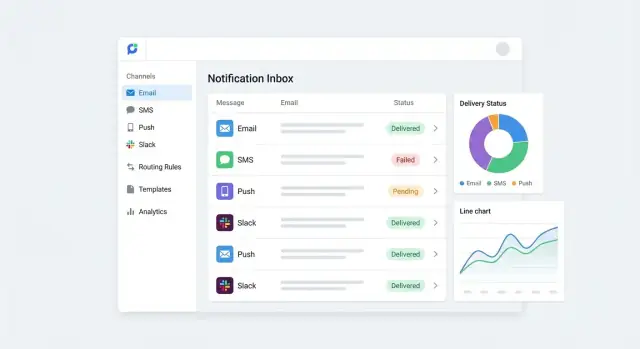
What centralized notification management solves
Centralized notification management means treating every message your product sends—emails, SMS, push, in-app banners, Slack/Teams, webhook callbacks—as part of one coordinated system.
Instead of each feature team building its own “send a message” logic, you create a single place where events enter, rules decide what happens, and deliveries are tracked end to end.
The pain it removes
When notifications are scattered across services and codebases, the same problems recur:
- Duplicated logic: multiple teams re-implement retries, rate limits, unsubscribes, and formatting.
- Inconsistent messaging: the same “password reset” or “invoice ready” message differs by channel or product area, confusing users and support.
- Missing audit trails: when a customer says “I never got it,” it’s hard to answer what was sent, to whom, when, and why.
Centralization replaces ad-hoc sending with a consistent workflow: create an event, apply preferences and rules, pick templates, deliver via channels, and record outcomes.
Who benefits
A notification hub typically serves:
- Admins: configure channels, templates, routing, and compliance rules without redeploys.
- Support teams: search and verify delivery attempts, troubleshoot failures, and respond with confidence.
- Product teams: ship features faster by emitting events rather than building new notification pipelines.
- End users: control preferences (opt-in/out, quiet hours, channels) with predictable results.
What success looks like
You’ll know the approach is working when:
- Incident volume drops because retries, throttling, and fallback channels are standardized.
- Changes (copy edits, routing tweaks, new recipients) take minutes—not a release cycle.
- Reporting is clear: delivery rates by channel, time-to-deliver, failure reasons, and who changed what.
Requirements and scope: channels, use cases, constraints
Before you sketch architecture, get specific about what “centralized notification control” means for your organization. Clear requirements keep the first version focused and prevent the hub from turning into a half-built CRM.
Define your notification types (and why they differ)
Start by listing the categories you’ll support, because they drive rules, templates, and compliance:
- Transactional: password resets, receipts, account changes. Usually mandatory and time-sensitive.
- Marketing: promotions, newsletters, product announcements. Always opt-in/opt-out sensitive.
- Alerts: security warnings, outages, suspicious activity. Often urgent and may bypass some preferences.
- Reminders: appointments, renewals, incomplete tasks. Timing windows and throttling matter.
Be explicit about which category each message belongs to—this will later prevent “marketing disguised as transactional.”
Choose channels: support now vs later
Pick a small set you can operate reliably from day one, and document “later” channels so your data model won’t block them.
Support now (typical MVP): email + one real-time channel (push or in-app) or SMS if your product depends on it.
Support later: chat tools (Slack/Teams), WhatsApp, voice, postal, partner webhooks.
Also write down channel constraints: rate limits, deliverability requirements, sender identities (domains, phone numbers), and cost per send.
Set non-goals to protect scope
Centralized notification management is not the same as “everything customer-related.” Common non-goals:
- No full contact database enrichment (keep users/recipients minimal).
- No campaign builder with segmentation, A/B tests, or analytics dashboards.
- No ticketing/escalation workflows (integrate with existing tools instead).
Compliance and retention requirements
Capture the rules early so you don’t retrofit later:
- Opt-in/consent by channel and by notification type (especially marketing).
- Unsubscribe handling (one-click where required) and suppression lists.
- Retention: how long to store message content vs. metadata (e.g., 30/90/365 days).
- Auditability: who changed templates, routing, or preferences—and when.
If you already have policies, link to them internally (e.g., /security, /privacy) and treat them as acceptance criteria for the MVP.
High-level architecture of a notification hub
A notification hub is easiest to understand as a pipeline: events go in, messages come out, and every step is observable. Keeping responsibilities separated makes it simpler to add channels later (SMS, WhatsApp, push) without rewriting everything.
Core components
1) Event intake (API + connectors). Your app, services, or external partners send “something happened” events to a single entry point. Typical intake paths include a REST endpoint, webhooks, or direct SDK calls.
2) Routing engine. The hub decides who should be notified, through which channel(s), and when. This layer reads recipient data and preferences, evaluates rules, and outputs a delivery plan.
3) Templating + personalization. Given a delivery plan, the hub renders a channel-specific message (email HTML, SMS text, push payload) using templates and variables.
4) Delivery workers. These integrate with providers (SendGrid, Twilio, Slack, etc.), handle retries, and respect rate limits.
5) Tracking + reporting. Every attempt is recorded: accepted, sent, delivered, failed, opened/clicked (when available). This powers admin dashboards and audit trails.
Sync vs. async processing
Use synchronous processing only for lightweight intake (e.g., validate and return 202 Accepted). For most real systems, route and deliver asynchronously:
- Queue after intake to protect your app from provider outages and traffic spikes.
- Separate queues per channel or priority (transactional vs. marketing) to avoid one stream starving another.
Environments and configuration
Plan for dev/staging/prod early. Store provider credentials, rate limits, and feature flags in environment-specific configuration (not in templates). Keep templates versioned so you can test changes in staging before they affect production.
Who owns rules and content?
A practical split is:
- Engineers own event schemas, integrations, and guardrails (timeouts, retries, idempotency).
- Admins or ops own routing rules and template copy, with approval workflows for high-risk channels.
This architecture gives you a stable backbone while keeping day-to-day messaging changes out of deployment cycles.
Event model and data contracts
A centralized notification management system lives or dies by the quality of its events. If different parts of your product describe the “same” thing in different ways, your hub will spend its life translating, guessing, and breaking.
Define a clear event schema
Start with a small, explicit contract that every producer can follow. A practical baseline looks like:
- event_name: stable identifier (e.g.,
invoice.paid,comment.mentioned) - actor: who triggered it (user ID, service name)
- recipient: who it’s for (user ID, team ID, or a list)
- payload: the business fields needed to compose the message (amount, invoice_id, comment_excerpt)
- metadata: context for routing and operations (tenant/workspace ID, timestamp, source, locale hints)
This structure keeps event-driven notifications understandable and supports routing rules, templates, and delivery tracking.
Version your contracts (don’t fear change)
Events evolve. Prevent breakage by versioning them, for example with schema_version: 1. When you need a breaking change, publish a new version (or a new event name) and support both for a transition period. This matters most when multiple producers (backend services, webhooks, scheduled jobs) feed one hub.
Validate, sanitize, and make events idempotent
Treat incoming events as untrusted input, even from your own systems:
- Validate required fields and types; reject or quarantine malformed events.
- Sanitize payload strings to prevent injection or formatting issues when rendering templates (HTML emails, Slack/Teams markdown, SMS).
- Add an idempotency key (e.g.,
idempotency_key: invoice_123_paid) so retries don’t create duplicate sends across multi-channel notifications.
Strong data contracts reduce support tickets, speed up integrations, and make reporting and audit logs far more reliable.
Users, recipients, and notification preferences
A notification hub only works if it knows who someone is, how to reach them, and what they’ve agreed to receive. Treat identity, contact data, and preferences as first-class objects—not incidental fields on a user record.
Recipients vs. users
Separate a User (an account that logs in) from a Recipient (an entity that can receive messages):
- A user can have multiple recipients (work email, personal email, SMS number, Slack handle).
- A recipient can be a shared destination like a team mailbox or on-call rotation, not a single person.
For each contact point, store: value (e.g., email), channel type, label, owner, and verification status (unverified/verified/blocked). Also keep metadata like last verified time and verification method (link, code, OAuth).
Preferences: channel, topic, and time
Preferences should be expressive but predictable:
- By topic (e.g., Billing, Security, Deployments)
- By channel (Email, SMS, Push, Slack)
- Quiet hours (recipient-local timezone), with exceptions for critical alerts
Model this with layered defaults: organization → team → user → recipient, where lower levels override higher ones. That lets admins set sane baselines while individuals control personal delivery.
Consent, opt-outs, and proof
Consent is not just a checkbox. Store:
- Opt-in/opt-out timestamps per channel and topic
- Source of consent (UI, API, import), plus actor (user/admin/system)
- Unsubscribe reasons (free text or enum) and suppression expiry if temporary
- Evidence when required (double opt-in token, webhook callback, signed record)
Make consent changes auditable and easy to export from a single place (e.g., /settings/notifications), because support teams will need it when users ask “why did I get this?” or “why didn’t I?”
Routing rules: who gets what, where, and when
Routing rules are the “brain” of a centralized notification hub: they decide which recipients should be notified, through which channels, and under what conditions. Good routing reduces noise without missing critical alerts.
Rule inputs (the “when” and “who”)
Define the inputs your rules can evaluate. Keep the first version small but expressive:
- Event type (e.g.,
invoice.overdue,deployment.failed,comment.mentioned) - User segment (role, plan, team, region, ownership—who is eligible to receive it)
- Severity/priority (info, warning, critical)
- Time window (business hours vs. after-hours; quiet hours)
- Locale (to select the right template language and formatting)
These inputs should be derived from your event contract, not typed manually by admins per notification.
Rule actions (the “how”)
Actions specify delivery behavior:
- Choose channel(s): email, SMS, push, Slack/Teams, webhook, in-app inbox
- Throttle/digest: limit repeats (e.g., “max 1 per 30 min”) or batch non-urgent messages
- Escalate: if not acknowledged within X minutes, route to an on-call rotation
- Route to on-call: integrate schedules so after-hours incidents go to the right person
Priority, fallback, and failure handling
Define an explicit priority and fallback order per rule. Example: try push first, then SMS if push fails, then email as a last resort.
Tie fallback to real delivery signals (bounced, provider error, device unreachable), and stop retry loops with clear caps.
Safe editing and review workflow
Rules should be editable through a guided UI (dropdowns, previews, and warnings), with:
- Draft vs. published states
- Peer review/approval for high-impact changes
- Simulation mode (show “who would get this?” on sample events)
- Audit trail linking each change to an admin and timestamp
Templates and localization for consistent messaging
Templates are where centralized notification management turns “a bunch of messages” into a coherent product experience. A good template system keeps tone consistent across teams, reduces errors, and makes multi-channel delivery (email, SMS, push, in-app) feel intentional rather than improvised.
Template structure: predictable, channel-aware
Treat a template as a structured asset, not a blob of text. At minimum, store:
- Subject/title (email subject, push title, in-app header)
- Body (HTML + plaintext for email; short/long variants for push/SMS)
- Variables (typed placeholders like
{{first_name}},{{order_id}},{{amount}}) - Formatting rules (allowed markup per channel, max lengths, link policies)
Keep variables explicit with a schema so the system can validate that an event payload provides everything required. This prevents sending half-rendered messages like “Hi {{name}}”.
Localization: locale selection and missing translations
Define how the recipient’s locale is chosen: user preference first, then account/org setting, then a default (often en). For each template, store translations per locale with a clear fallback policy:
- If
fr-CAis missing, fall back tofr. - If
fris missing, fall back to the template’s default locale. - If any required translation is missing, block sending for that locale or switch to default and log the fallback in delivery metadata.
This makes missing translations visible in reporting instead of silently degrading.
Preview and test-send flow (admins + QA)
Provide a template preview screen that lets an admin pick:
- a channel (email/SMS/push)
- a locale
- a sample event payload (real captured event or mocked JSON)
Render the final message exactly as the pipeline will send it, including link rewriting and truncation rules. Add a test-send that targets a safe “sandbox recipient list” to avoid accidental customer messaging.
Versioning and approvals to prevent accidents
Templates should be versioned like code: every change creates a new immutable version. Use statuses such as Draft → In review → Approved → Active, with optional role-based approvals. Rollbacks should be one click.
For auditability, record who changed what, when, and why, and link it to delivery outcomes so you can correlate spikes in failures with template edits (see also /blog/audit-logs-for-notifications).
Channel integrations and delivery pipeline
A notification hub is only as dependable as its last mile: the channel providers that actually deliver email, SMS, and push messages. The goal is to make each provider feel “plug-in,” while keeping delivery behavior consistent across channels.
Integrate one provider per channel (to start)
Begin with a single, well-supported provider for each channel—e.g., SMTP or an email API, an SMS gateway, and a push service (APNs/FCM via a vendor). Keep integrations behind a common interface so you can swap or add providers later without rewriting business logic.
Each integration should handle:
- Authentication and request signing
- Payload mapping (your message → provider format)
- Provider-specific constraints (attachment limits, sender IDs, opt-out headers)
Build a delivery pipeline, not just API calls
Treat “send notification” as a pipeline with clear stages: enqueue → prepare → send → record result. Even if your app is small, a queue-based worker model prevents slow provider calls from blocking your web app and gives you a place to implement retries safely.
A practical approach:
- Web app writes a “delivery job” to a queue
- Workers pull jobs, call the provider, then store the outcome
- Optional webhooks update status asynchronously (some providers confirm later)
Standardize status and error handling
Providers return wildly different responses. Normalize them into a single internal status model such as: queued, sent, delivered, failed, bounced, suppressed, throttled.
Store the raw provider payload for debugging, but base dashboards and alerts on the normalized status.
Retries, backoff, rate limits, and batching
Implement retries with exponential backoff and a maximum attempt limit. Only retry transient failures (timeouts, 5xx, throttling), not permanent ones (invalid number, hard bounce).
Respect provider rate limits by adding per-provider throttling. For high-volume events, batch where the provider supports it (e.g., bulk email API calls) to reduce cost and improve throughput.
Tracking, status, and reporting dashboards
A centralized notification hub is only as trustworthy as its visibility. When a customer says “I never got that email,” you need a fast way to answer: what was sent, through which channel, and what happened next.
Define clear delivery states
Standardize a small set of delivery states across channels so reporting stays consistent. A practical baseline is:
- queued (accepted and waiting to send)
- sent (handed off to a provider)
- delivered (confirmed delivered when the channel supports it)
- bounced (permanent delivery failure, usually email)
- failed (couldn’t send due to errors or provider rejection)
- opened (if available) (tracked by some email providers; often not available for SMS/push)
Treat these as a timeline, not a single value—each message attempt can emit multiple status updates.
Build a searchable message log
Create a message log that’s easy for support and operations to use. At minimum, make it searchable by:
- recipient (user ID, email, phone)
- event (e.g.,
invoice.paid,password.reset) - time range (sent today, last 7 days)
Include key details: channel, template name/version, locale, provider, error codes, and retry count. Make it safe by default: mask sensitive fields (e.g., partially redact email/phone) and restrict access via roles.
Correlate messages with upstream events
Add trace IDs to connect each notification back to the triggering action (checkout, admin update, webhook). Use the same trace ID in:
- the original event record
- the notification request
- all delivery attempts and status updates
This turns “what happened?” into a single filtered view rather than a multi-system hunt.
Dashboards that actually help
Focus dashboards on decisions, not vanity metrics:
- Volume by channel and event (spot spikes)
- Failures by provider, template, and reason (find outages and bad data)
- Top templates by send count and failure rate (prioritize improvements)
Add drill-down from charts into the underlying message log so every metric is explainable.
Security, access control, and auditability
A notification hub touches customer data, provider credentials, and messaging content—so security needs to be designed in, not bolted on. The goal is simple: only the right people can change behavior, secrets stay secret, and every change is traceable.
Role-based access control (RBAC)
Start with a small set of roles and map them to the actions that matter:
- Admin: manage org settings, users, and retention policies.
- Notification Manager: edit routing rules, templates, and localization strings.
- Integration Manager: add/update channel provider keys (email/SMS/push), webhooks, and callback URLs.
- Viewer/Auditor: read-only access to dashboards and audit trails.
Use “least privilege” defaults: new users should never be able to edit rules or credentials until explicitly granted.
Secrets handling and credential rotation
Provider keys, webhook signing secrets, and API tokens must be treated as secrets end-to-end:
- Encrypt secrets at rest (KMS/managed key vault) and restrict decryption to the delivery service.
- Support rotation without downtime (store multiple active keys, version them, and allow staged cutovers).
- Redact sensitive fields in logs and error traces; avoid logging message bodies if they can contain PII.
Audit logs you can trust
Every configuration change should write an immutable audit event: who changed what, when, from where (IP/device), and before/after values (with secret fields masked). Track changes to routing rules, templates, provider keys, and permission assignments. Provide simple export (CSV/JSON) for compliance reviews.
Retention and deletion requests
Define retention per data type (events, delivery attempts, content, audit logs) and document it in the UI. Where applicable, support deletion requests by removing or anonymizing recipient identifiers while keeping aggregate delivery metrics and masked audit records.
UX for admins and end users
A centralized notification hub succeeds or fails on usability. Most teams won’t “manage notifications” daily—until something breaks or an incident hits. Design the UI for fast scanning, safe changes, and clear outcomes.
Admin console: the pages that matter
Rules should read like policies, not code. Use a table with “IF event… THEN send…” phrasing, plus chips for channels (Email/SMS/Push/Slack) and recipients. Include a simulator: pick an event and see exactly who would receive what, where, and when.
Templates benefit from a side-by-side editor and preview. Let admins toggle locale, channel, and sample data. Provide template versioning with a “publish” step and a one-click rollback.
Recipients should support both individuals and groups (teams, roles, segments). Make membership visible (“why is Alex in On-call?”) and show where a recipient is referenced by rules.
Provider health needs an at-a-glance dashboard: delivery latency, error rate, queue depth, and last incident. Link each issue to a human-readable explanation and next actions (e.g., “Twilio auth failed—check API key permissions”).
End-user settings: control without confusion
Keep preferences lightweight: channel opt-ins, quiet hours, and topic/category toggles (e.g., “Billing,” “Security,” “Product updates”). Show a plain-language summary at the top (“You’ll get security alerts by SMS, anytime”).
Include unsubscribe flows that are respectful and compliant: a one-click unsubscribe for marketing, and clear messaging when critical alerts can’t be turned off (“Required for account security”). If a user disables a channel, confirm what changes (“No more SMS; email remains enabled”).
Operational tools for real-world incidents
Operators need tools that are safe under pressure:
- Re-send with guardrails (rate limits, confirmation, and “send to original recipients only” by default)
- Cancel scheduled notifications with an audit trail
- Suppress noisy event sources temporarily (time-boxed)
- Incident mode to override routing (e.g., escalate to on-call) and pause non-essential messages
Empty states and errors people can act on
Empty states should guide setup (“No rules yet—create your first routing rule”) and link to the next step (e.g., /rules/new). Error messages should include what happened, what it affected, and what to do next—without internal jargon. When possible, offer a quick fix (“Reconnect provider”) and a “copy details” button for support tickets.
MVP plan, testing, and rollout strategy
A centralized notification hub can grow into a big platform, but it should start small. The goal of the MVP is to prove the end-to-end flow (event → routing → template → send → track) with the fewest moving parts, then expand safely.
If you want to accelerate the first working version, a vibe-coding platform like Koder.ai can help you stand up the admin console and core API quickly: build the React-based UI, a Go backend with PostgreSQL, and iterate in a chat-driven workflow—then use planning mode, snapshots, and rollback to keep changes safe as you refine rules, templates, and audit logs.
A minimal MVP that still proves the concept
Keep the first release intentionally narrow:
- One event type (e.g., “password reset requested” or “invoice paid”).
- One channel (often email) with a single provider integration.
- Basic templates with simple variables (name, date, amount) and a plain fallback message.
- A tiny admin UI to view sends and statuses (queued/sent/failed).
This MVP should answer: “Can we reliably send the right message to the right recipient and see what happened?”
Testing that protects delivery and trust
Notifications are user-facing and time-sensitive, so automated tests pay off quickly. Focus on three areas:
- Routing tests: given an event and recipient preferences, assert the chosen channel(s) and suppression rules.
- Templating tests: render templates with sample data, validate required variables, and ensure escaping (avoid broken HTML or malformed SMS text).
- Retry and failure tests: simulate provider timeouts and errors, confirm retry policy, idempotency (no duplicates), and dead-letter handling.
Add a small set of end-to-end tests that send to a sandbox provider account in CI.
Rollout without surprises
Use staged deployment:
- Shadow mode: process events and generate “would-send” records, but do not deliver.
- Gradual traffic: start with internal users, then a small percentage of production events.
- Fallback to legacy: if the hub fails, automatically route back to the previous sending path until issues are resolved.
Roadmap after the MVP
Once stable, expand in clear steps: add channels (SMS, push, in-app), richer routing, improved template tooling, and deeper analytics (delivery rates, time-to-deliver, opt-out trends).
FAQ
What is centralized notification management in a web app context?
Centralized notification management is a single system that ingests events (e.g., invoice.paid), applies preferences and routing rules, renders templates per channel, delivers via providers (email/SMS/push/etc.), and records outcomes end to end.
It replaces ad-hoc “send an email here” logic with a consistent pipeline you can operate and audit.
How do I know if my product needs a notification hub?
Common early signals include:
- Multiple teams re-implementing retries, throttling, unsubscribes, and formatting
- Users seeing inconsistent wording for the same action across channels/features
- Support being unable to answer “was it sent?” quickly because logs are scattered
- Frequent incidents when a provider degrades (no queue, no fallback, no standard retries)
If these are recurring, a hub usually pays for itself quickly.
Which channels should I support first (and which can wait)?
Start with a small set you can operate reliably:
- Email plus one real-time channel (push or in-app), or SMS if it’s core to your product
Document “later” channels (Slack/Teams, webhooks, WhatsApp) so your data model can extend without breaking changes, but avoid integrating them in the MVP.
What should the MVP include to prove centralized notification control works?
A practical MVP proves the full loop (event → route → template → deliver → track) with minimal complexity:
- One event type (e.g., password reset, invoice paid)
- One channel (often email) and one provider
- Basic templating with required variables validation
- A message log with
queued/sent/failedat minimum
The goal is reliability and observability, not feature breadth.
What event schema should I standardize on for notifications?
Use a small, explicit event contract so routing and templates don’t rely on guesswork:
event_name(stable)actor(who triggered it)recipient(who it’s for)payload(business fields needed for the message)metadata(tenant, timestamp, source, locale hints)
Add schema_version and an idempotency key so retries don’t create duplicates.
How do I prevent duplicate notifications across retries and channels?
Idempotency prevents duplicate sends when producers retry or when the hub retries.
Practical approach:
- Require an
idempotency_keyper event (e.g.,invoice_123_paid) - Deduplicate at intake and/or at delivery-job creation
- Store decisions (routing plan + template version) tied to that key
This is especially important for multi-channel and retry-heavy flows.
How should I model users, recipients, and notification preferences?
Separate identity from contact points:
- User: account that logs in
- Recipient: an addressable endpoint (email, phone, device token, Slack identity) or a group (team mailbox/on-call rotation)
Track verification status per recipient (unverified/verified/blocked) and use layered defaults for preferences (org → team → user → recipient).
What compliance and consent features should be built in from day one?
Model consent per channel and notification type, and make it auditable:
- Opt-in/opt-out timestamps, source, and actor
- Unsubscribe handling (including one-click where required)
- Suppression lists and expiry for temporary suppressions
- Retention rules for content vs. metadata
Keep a single exportable view of consent history so support can answer “why did I get this?” reliably.
How do I track delivery status consistently across different providers?
Normalize provider-specific outcomes into a consistent internal state machine:
queued,sent,delivered,failed,bounced,suppressed,throttled
Store raw provider responses for debugging, but drive dashboards and alerts off normalized statuses. Treat status as a timeline (multiple updates per attempt), not a single final value.
What admin tooling and safeguards prevent mistakes in routing and templates?
Use safe operations patterns and guardrails:
- Draft vs. published for rules/templates, plus approvals for high-impact changes
- Simulation (“who would get this?”) before publishing
- One-click rollback via versioned templates
- Controlled re-send (confirmation, rate limits, default to original recipients)
- Temporary suppression and “incident mode” to pause non-essential messages
Back everything with immutable audit logs of who changed what and when.