

How to Create a Web App for Centralized Policy Management
Learn how to design and build a web app for centralized policy management with versioning, approvals, access control, attestations, and audits.
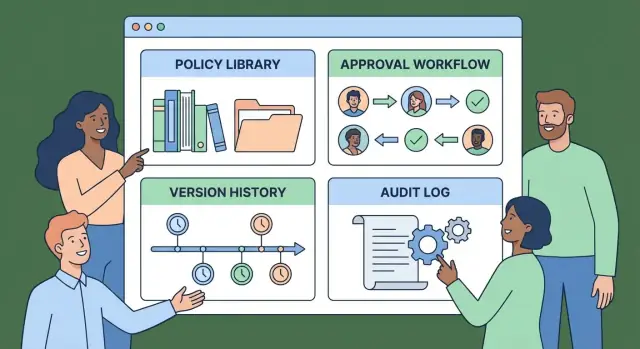
What Centralized Policy Management Should Solve
Centralized policy management means having one trusted place where your organization creates, maintains, publishes, and proves understanding of policies. It’s less about “storing documents” and more about controlling the full policy lifecycle: who owns each policy, which version is current, who approved it, and who has acknowledged it.
The problems you’re trying to eliminate
Most organizations feel pain long before they call it “policy management.” Common issues include:
- Scattered sources of truth: Policies live in shared drives, email threads, PDFs, wikis, and HR tools—no one knows where the latest copy is.
- Outdated versions in circulation: Employees bookmark old links or download PDFs; auditors find mismatches across teams.
- Unclear ownership: “Who maintains this?” becomes a recurring meeting topic, and policies quietly expire.
- Slow, informal review cycles: Approvals happen in chat or email, with no consistent checklist or record.
- Poor adoption: Employees can’t find relevant policies quickly, or don’t understand what changed.
A policy management web app should directly reduce these failures by making the current version obvious, assigning clear responsibility, and standardizing review and publishing.
Who the system must serve
Design for at least four user types from day one:
- Policy owners (write and update)
- Reviewers/approvers (legal, security, HR, leadership)
- Employees (read, search, acknowledge)
- Auditors/compliance (verify history and evidence)
Each group has a different definition of “working”: owners want easy edits, employees want fast answers, and auditors want proof.
Choosing an initial scope that ships
Start with a constrained domain so you can deliver real workflow and reporting—not just a repository. A common approach is to begin with IT/security policies (high change frequency, clear controls), then expand to HR and broader corporate policies once the basics are proven.
Your first release should answer two questions instantly:
- What is the current policy?
- How do we know it was reviewed and communicated?
Core Requirements: Lifecycle, Ownership, and Accountability
A centralized policy management app succeeds or fails on three basics: every policy has a clear lifecycle, a named owner, and a way to prove accountability. Without these, you’ll end up with outdated documents, unclear responsibilities, and painful audits.
A policy lifecycle you can’t “forget”
Treat policies as living assets with defined states: Draft → In Review → Approved → Published → Retired. Each transition should be intentional (and usually permissioned), so a draft can’t silently become “official,” and a retired policy can’t be accidentally reused.
Include at least:
- A visible status badge and last-updated date
- Scheduled review dates (e.g., every 12 months)
- A clear “what happens next” prompt (submit for review, request approval, publish)
Ownership that’s explicit (and transferable)
Every policy needs a single accountable owner (person or role), plus optional contributors. Ownership should be easy to transfer when people change roles, without losing history.
Define policy types and categories early—HR, security, finance, vendor management, etc. Categories drive permissions, review routing, and reporting. If you skip this, your repository becomes a dumping ground that nobody can navigate.
Accountability: attestations, audits, and reporting
Centralization is valuable only if you can show who knew what, and when.
Attestations should answer:
- Who must acknowledge (all staff, specific departments, or custom groups)
- How often (on publish, annually, after major changes)
- Reminders and escalation (automatic nudges, overdue notifications)
For audit needs, record who changed what, when, and why. “Why” matters—capture a short reason for change and, when relevant, a link to a ticket or incident reference.
Support reporting that management and auditors actually ask for: overdue reviews, unpublished drafts stuck in review, attestation completion by team, and recent high-impact changes across key categories.
User Roles and Access Control (RBAC)
RBAC is how your app answers two questions consistently: who can do what (actions like edit or approve) and who can see what (which policies are visible to which employees). Getting this right early prevents accidental edits, approval shortcuts, and “shadow copies” of policies living outside the system.
Minimum roles to support
A practical first set of roles looks like this:
- Admin: manages org settings, users, and role assignments; can grant/revoke access and recover from mistakes.
- Policy Owner: creates and edits drafts for assigned policies, responds to review feedback, initiates approval.
- Reviewer/Approver: can comment, request changes, and approve (or reject) a version.
- Employee/Reader: read-only access to published policies targeted to them.
- Auditor (read-only): can view published policies and compliance evidence, without editing or approvals.
Actions: permissions that matter
Define permissions around the real workflow steps: create, edit draft, submit for review, approve, publish, unpublish, and manage targets. Tie permissions to roles, but keep room for exceptions (e.g., a specific person can own only HR policies).
Visibility targeting (department/location)
Most policy repositories need targeted distribution. Model visibility using attributes like department, location, employment type, or subsidiary. Make targeting explicit and auditable: a published policy should clearly show who it applies to.
Authentication choice: SSO vs email/password
For many organizations, SSO (SAML/OIDC) reduces support issues and improves access control. For a first release, email/password can be acceptable if you add basics like password resets and MFA options—just be clear about the upgrade path.
Edge cases to define upfront
Write down rules that prevent conflicts of interest and “approval theater,” such as:
- Owners can’t self-approve their own changes.
- Admins shouldn’t silently bypass approvals (require a recorded reason if they do).
- Role changes should not rewrite history (past actions remain attributed to the original user and role at the time).
Data Model: Policies, Versions, and Metadata
A centralized policy app lives or dies by its data model. If you get the structure right, everything else—workflows, search, attestations, and audits—becomes easier to build and maintain.
The “Policy” record: the stable identity
Think of a Policy as the container that stays the same even as the content evolves. Useful fields to include:
- Title and short summary (what it is, who it affects)
- Owner (person or team responsible)
- Status (Draft, In Review, Approved, Published, Retired)
- Category (HR, Security, Finance, etc.)
- Effective date (when the published version applies)
- Review cadence (e.g., every 12 months) plus next review date (can be derived)
Keep these fields lightweight and consistent—users rely on them to understand a policy at a glance.
Storing policy content: pick a primary format
You generally have three viable options:
- Rich text editor: best for browser-based editing and consistent formatting.
- Markdown: great for fast editing and clean diffs.
- File upload (PDF/DOCX): easiest for migration, but harder to search and compare.
Many teams support file uploads initially, then move to rich text/Markdown as maturity grows.
Versioning: immutable versions + a “current” pointer
Use immutable PolicyVersion records (version number, created time, author, content snapshot). The parent Policy points to the current_version_id. This avoids overwriting history and makes approvals and audits cleaner.
Attachments, references, and metadata for discovery
Model Attachments (files) and References (URLs to standards, procedures, training modules) as separate linked records so they can be reused and updated.
Invest in metadata: tags, applicable departments/regions, and keyword fields. Good metadata enables fast search and filters—often the difference between a repository people trust and one they avoid.
Workflow Design: Drafts, Reviews, and Approvals
A policy repository becomes useful when the path from “new idea” to “official policy” is predictable. Your workflow should be strict enough to satisfy compliance, but simple enough that busy reviewers don’t avoid it.
A simple state machine (that people will actually follow)
Start with a small set of statuses that are visible everywhere (list view, policy page header, and notifications): Draft → In Review → Approved → Published → Retired.
Make transitions explicit and permissioned:
- Draft → In Review: author requests review and selects required approvers.
- In Review → Approved: criteria met (all required approvals collected).
- Approved → Published: publisher (or policy owner) releases to the audience.
- Published → Retired: replaces or deprecates the policy with a reason.
Avoid hidden states. If you need nuance, use tags like Needs Legal or Blocked by Evidence rather than extra statuses.
Approvals: steps, required approvers, and flexible routing
Model approvals as steps with a list of required approvers. This lets you support:
- Sequential approvals (e.g., Owner → Legal → Security)
- Parallel approvals (e.g., Legal and Security at the same time)
Each step should define completion rules, such as “2 of 3 approvers” or “all approvers.” Keep it configurable per policy type using templates.
Comments, change requests, and task assignments
Reviewers need a structured way to say “not yet.” Provide:
- Inline comments (anchored to a section) and general comments (for overall feedback)
- A Change Request action that blocks approval until resolved
- Task assignments (who needs to do what) with due dates and lightweight checklists
This turns review into a to-do flow instead of an email thread.
SLAs and reminders to prevent stalled reviews
Stalled reviews are usually a workflow design problem. Add:
- Optional SLAs per step (e.g., “Legal review due in 5 business days”)
- Automatic reminders (approver nudges, author nudges when changes are requested)
- An escalation path (notify backup approver or policy owner)
Pair reminders with a clear “why you’re receiving this” message and a single-click route back to the pending item.
Make status unmistakable
Every policy page should show: current status, current step, who is waiting, what’s blocking progress, and the next action available to the viewer. If someone can’t tell in five seconds what to do next, the workflow will leak into chat and email.
Audit Trails and Evidence for Reviews
An audit trail isn’t just a “nice to have” for a centralized policy repository—it’s what turns your workflow into defensible evidence. If someone asks, “Who approved this policy, when, and based on what?”, your app should answer in seconds.
What to log (and how detailed)
Aim for a full, event-based audit log entry on every meaningful action:
- Actor: user ID, display name, role at the time, and (optionally) department
- Action: created, edited, submitted for review, approved, rejected, published, archived, attested, etc.
- Timestamp: stored in UTC, displayed in the user’s timezone
- Object: policy ID, version number, section, attachment ID, comment ID
- Before/after: store the diff or snapshots of changed fields (title, owner, status), not just “edited”
This helps you reconstruct history without relying on memory or screenshots.
Capturing decisions and rationale
Approvals should generate explicit evidence:
- Decision (approved/rejected) and who made it
- Notes for context (why it was approved)
- Rejection reasons (a required field is often useful)
- Optional: reviewer checklist completion, references to supporting documents
Treat reviewer comments and decision notes as first-class records linked to a specific policy version.
Making logs tamper-evident
Even if you trust admins, auditors will ask how you prevent “quiet edits.” A practical approach:
- Use append-only audit records (no updates/deletes via the app)
- Restrict direct database access and log admin actions separately
- Consider periodic hash chaining (store a hash of each event plus the previous hash) so changes are detectable
Exports that don’t leak sensitive data
Auditors often want offline evidence. Provide exports like CSV (for analysis) and PDF (for filing), with redaction controls:
- Role-based export permissions
- Option to exclude sensitive fields (internal notes, personal data)
- Include policy identifiers, version, timestamps, and decision history
Retention and recordkeeping
Define retention by record type: audit events, approvals, attestations, and archived policy versions. Align defaults to internal needs, and document them clearly (for example, keep approval evidence longer than draft edits).
Publishing, Distribution, and Attestations
Publishing is the moment a policy stops being “a document in progress” and becomes an obligation for real people. Treat publishing as a controlled event: it triggers distribution, creates required acknowledgements (attestations), and starts the clock on due dates.
Distribution rules that match how the company works
Avoid one-size-fits-all blasts. Let admins define policy distribution rules by group, department, role, location/region, or a combination (e.g., “All EU employees” or “Engineering + Contractors”). Keep rules readable and testable: before publishing, show a preview list of who will receive the policy and why.
Notifications: reach people where they are
Support email and in-app notifications from day one. Chat notifications (Slack/Teams) can come later, but design your notification system so channels are pluggable.
Make notifications actionable: include the policy title, due date, estimated read time (optional), and a direct link to the attestation screen.
Attestations with due dates, reminders, and escalation
Each recipient should get a clear requirement: “Read and acknowledge by <date>.” Store the due date on the assignment, not just on the policy.
Automate reminders (e.g., 7 days before, 2 days before, due date, and overdue). Add escalation paths that reflect management structure: after X days overdue, notify the employee’s manager and/or compliance owner.
Employee view: “My required policies”
Give every user a simple dashboard:
- My required policies (pending, due soon, overdue)
- Completed (with completion date)
This view drives adoption because it turns compliance into a checklist, not a scavenger hunt.
UX for Findability and Adoption
A centralized policy management web app only works if people can quickly find the right policy, trust what they’re reading, and complete required actions (like acknowledgements) without friction. UX decisions here have a direct impact on compliance.
Information architecture that matches how people search
Start with a clear policy library page that supports multiple mental models:
- Categories (e.g., Security, HR, Finance), plus optional tags (e.g., “remote work”, “vendors”)
- Filters people actually use: department, region, audience, status (published/archived), effective date
- Saved searches and “recently viewed” so employees don’t re-hunt the same documents every quarter
Search that understands real language
Search should feel instant and forgiving. Two features matter most:
- Highlights in results (show the matching sentence, not just a title)
- Synonyms and acronyms, so “MFA” finds “multi-factor authentication,” and “PII” finds “personal data.” Keep a lightweight synonym list editable by admins.
Readable policy pages people can scan
Policies are long; reading UX should reduce effort:
- A generated table of contents with anchored headings
- Related policies (e.g., “Password Policy” → “Access Control Standard”) and “last updated” metadata
- A printable view for audits or offline review (clean formatting, no navigation clutter)
Accessibility and mobile: non-negotiable basics
Make every policy page usable with keyboard navigation, correct heading structure, and sufficient contrast. On mobile, prioritize “read + acknowledge” flows: large tap targets, persistent progress/TOC, and a single, clear acknowledgement action that works well on small screens.
Architecture and Tech Stack Choices
A centralized policy management app doesn’t need exotic infrastructure to work well. The goal is predictable behavior: fast search, reliable approvals, and a clean audit history. A simple, well-understood architecture will usually outperform a “clever” one in day-to-day maintenance.
Start with a simple shape
A practical default is:
- Web frontend for authors, reviewers, and admins
- API (or server-rendered app) that enforces permissions and workflow rules
- Database for policies, versions, metadata, and events
- Search for fast findability across titles, tags, and full text
You can implement this as a single codebase (monolith) and still keep clear boundaries between UI, business logic, and storage. Monolith-first is often the best choice for an MVP because it’s easier to test and deploy.
Choose a “boring” stack your team can own
Pick technologies your team already ships confidently. Consistency matters more than novelty.
Common, maintainable options include:
- Backend: Node.js (Express/Nest), Python (Django/FastAPI), or .NET
- Frontend: React/Vue, or server-rendered pages if your team prefers simpler UX
- Database: Postgres is a strong default for relational data and reporting
- Search: start with Postgres full-text search; add OpenSearch/Elasticsearch later if needed
If you want to move faster without reinventing your delivery pipeline, a vibe-coding platform like Koder.ai can help you scaffold an internal web app with core flows (RBAC, workflows, dashboards) via chat, then export the source code for review and long-term ownership.
Decide on single-tenant vs multi-tenant early
Even if you launch with one customer, decide whether you might support multiple organizations.
- Single-tenant: simpler data isolation, easier customizations
- Multi-tenant: lower operational cost per customer, but stricter tenant isolation and more careful authorization
If multi-tenant is likely, design tenant-aware IDs and queries from day one so you don’t rewrite everything later.
File storage and secure downloads
Policies often include attachments (PDFs, spreadsheets, evidence). Plan for:
- Separate object storage (e.g., S3-compatible) rather than storing files in the database
- Pre-signed, time-limited download links and strict access checks
- Virus scanning and file-type restrictions if you expect external uploads
Background jobs for the “unseen” work
Some tasks shouldn’t run during a user click:
- Reminder emails for reviews and attestations
- Scheduled exports (PDF packs, audit bundles)
- Search indexing and re-indexing after updates
A simple queue + worker setup keeps the app responsive and makes these tasks reliable.
Security Basics You Must Build In
Security can’t be a “phase two” item for a centralized policy repository: policies often include internal controls, incident procedures, vendor details, and other information you don’t want broadly visible.
Authentication: start simple, design for SSO later
If you can’t ship SSO on day one, a secure email/password flow is acceptable—provided it’s done carefully.
Use proven libraries for password hashing (e.g., Argon2/bcrypt), rate-limit login attempts, and add protection against credential stuffing. Structure your identity layer so you can add SAML/OIDC later without rewriting your permissions model.
Least-privilege access to sensitive policies
Not every employee needs access to every policy draft. Implement role-based access control so the default is “no access,” then grant the minimum permissions required.
A practical approach is:
- Workspace/department membership controls visibility
- Per-policy access overrides for sensitive documents (e.g., HR, Security)
- Separate permissions for view, comment, edit, and approve
Encryption: in transit and at rest
Require TLS for all traffic (including internal admin routes). At rest, encrypt both:
- The primary database (or at minimum, volumes/disks)
- File storage for attachments (vendor contracts, evidence files)
Plan for key management: who can rotate keys, how often, and what happens during rotation.
Input validation and safe file handling
Treat every form field and upload as hostile until validated. Validate server-side (not only in the browser), sanitize rich text inputs, and store files outside the web root.
For uploads, enforce type and size limits, virus scan where feasible, and generate safe filenames rather than trusting user-provided names.
Admin controls: session limits, MFA, and recovery
Add session timeouts and forced re-authentication for sensitive actions (like changing permissions). Even if MFA isn’t required at launch, design your auth flow to support it (TOTP and recovery codes are a common baseline).
Define account recovery up front: who can reset access, how identity is verified, and how those events are logged for later review.
Integrations and Migration Strategy
Integrations can make a policy management web app feel native in your organization—but they can also slow delivery if you treat them as mandatory. Design for integrations from day one while keeping them optional so you can ship the first version quickly.
Identity and access: start with groups
Most teams already manage people and permissions in an identity provider. Add connectors for Google Workspace and Microsoft Entra ID so you can:
- Sync groups (e.g., “Engineering”, “Managers”, “All Contractors”) and map them to roles
- Auto-provision users on first sign-in
- Deprovision access when an account is disabled
Keep the initial scope to group sync and basic profile fields. More advanced rules (dynamic groups, multiple tenants) can wait.
Migration: import what you already have
A centralized repository only works if you can get existing documents into it without weeks of manual copying. Provide a migration flow that:
- Imports from Drive and SharePoint
- Preserves key metadata you can reliably infer (title, last modified date, owner, folder path)
- Lets an admin review and assign a policy type/template before publishing
Expect messy files. Build a “needs attention” queue rather than blocking the whole import.
HR updates via webhook or API
Employee status changes drive access and attestations. Offer a simple webhook or API endpoint so an HR system can send events like “employee terminated” or “department changed.” This can trigger automatic role updates, remove attestations from inactive users, and reassign ownership.
Reporting exports for GRC tools
Even if you don’t integrate directly with a GRC platform initially, make reporting portable:
- Export to CSV for audits and periodic reporting
- Provide API endpoints for policies, versions, approvals, and attestations
Document these under /docs/integrations so buyers know you’ll fit into their reporting workflow.
MVP Scope, Launch Plan, and Iteration
A policy management web app can quickly grow into a big program. The easiest way to ship something useful is to define a tight MVP that supports the full policy lifecycle loop end-to-end: create, review, publish, attest, and prove what happened.
Define a practical MVP (what must ship)
Your MVP should cover the core “happy path” for centralized policy management:
- Policy library (repository): a single place to store policies with clear categories, owners, and status.
- Policy version control: immutable versions, a readable change summary, and the ability to compare versions.
- Policy approval workflow: draft → review → approval with role-based access control so the right people can edit vs approve.
- Publishing: a “current effective version” view that employees can trust.
- Policy distribution and attestations: assign policies to groups, collect acknowledgements, and track overdue attestations.
- Policy audit trail: who changed what, who approved, who acknowledged, and when.
Keep templates and advanced automation optional for later. You can still include a few starter policy templates as seeded content to reduce blank-page friction.
If you’re building this in-house, consider using Koder.ai to accelerate the MVP: you can describe the workflow (states, approvals, attestations, audit log) in chat, iterate quickly, and then export the source code for security review and compliance sign-off.
Set up environments and basic CI/CD
Ship with three environments from day one: dev, staging, and production. Staging should mirror production enough to validate permissions, approval workflow behavior, and email/notification flows.
For CI/CD, aim for simple and reliable:
- Automated tests on every merge
- One-click deploy to staging
- Gated deploy to production (manual approval is fine initially)
Monitoring and usage metrics that matter
You don’t need a complex observability stack to start, but you do need answers when something breaks.
Track:
- Uptime and basic response times
- Error tracking (backend exceptions and frontend crashes)
- Key product metrics: policies published per month, average review time, attestation completion rates, and search queries with no results
Those metrics will tell you where adoption is failing: findability, workflow bottlenecks, or unclear ownership.
Rollout plan and training for policy owners
Start with a pilot group (one department or a handful of policy owners). Provide short, task-based materials:
- “How to create and submit a policy for review”
- “How to approve and publish”
- “How to assign attestations and follow up”
Make sure every policy has an explicit owner and backup owner before migrating more content.
Iterate based on feedback
After launch, prioritize improvements that remove repeated friction:
- Better search and filters (status, owner, effective date)
- More templates and structured metadata
- Lightweight analytics dashboards for owners and compliance teams
- Additional integrations (HRIS for groups, SSO, ticketing, e-sign tools)
If you keep the MVP focused on accountability and proof—approval workflow + audit trail + attestations—you’ll have a compliance policy repository people can run day to day.
FAQ
What should centralized policy management actually solve (beyond storing documents)?
Centralized policy management should control the full lifecycle—draft → review → approval → publish → retire—and make it easy to prove:
- which version is current
- who owns it
- who approved it (and when)
- who acknowledged it (and when)
If it’s only a document repository, you’ll still have outdated copies, unclear ownership, and weak audit evidence.
What’s a practical scope for an MVP that can ship quickly?
Start with a domain that has frequent updates and clear compliance needs—commonly IT/security policies. This helps you validate:
- versioning and approvals
- targeting and attestations
- audit trails and reporting
Once the workflow is proven, expand to HR and broader corporate policies without redesigning the core model.
Which user roles should the system support from day one?
Plan for at least four groups from day one:
- Policy owners (authoring, updates)
- Reviewers/approvers (legal, security, HR, leadership)
- Employees/readers (find, read, acknowledge)
- Auditors/compliance (verify evidence and history)
Each role needs a different “happy path,” so design screens and permissions around those paths—not around storage.
What RBAC roles and permission rules matter most?
A workable baseline includes:
- Admin: manage org settings, users, role assignments
- Policy Owner: create/edit drafts, respond to feedback, initiate review
- Reviewer/Approver: comment, request changes, approve/reject
- Employee/Reader: read published policies targeted to them
- Auditor (read-only): view published policies and evidence
Also define guardrails early, like owners can’t self-approve and admin bypasses require a recorded reason.
How should policies and versions be modeled in the database?
Treat a Policy as the stable container and PolicyVersion as immutable snapshots. A common, audit-friendly approach is:
Policyholds metadata (owner, category, status, cadence, targeting)PolicyVersionholds content + author + timestamp + version numberPolicy.current_version_idpoints to the active version
This prevents overwriting history and makes approvals and audits much cleaner.
What’s the best way to store policy content: rich text, Markdown, or PDFs?
Pick one primary format and optimize around it:
- Rich text editor: best for consistent in-browser authoring
- Markdown: great for clean diffs and fast editing
- File uploads (PDF/DOCX): easiest for migration, weaker search/diffing
Many teams start with file uploads for import speed, then add rich text/Markdown for long-term maintainability and search.
How do you design a policy review and approval workflow that doesn’t stall?
Keep statuses few and explicit: Draft → In Review → Approved → Published → Retired. Make transitions permissioned and visible, and avoid hidden states.
For approvals, model them as configurable steps:
- sequential (Owner → Legal → Security)
- parallel (Legal and Security together)
Include “request changes” as a first-class action that blocks approval until resolved.
What should an audit trail include to satisfy compliance and audits?
Log event-based audit entries for every meaningful action, including:
- actor (user + role at the time)
- action (submitted, approved, published, attested, etc.)
- timestamp (store UTC, display local)
- object (policy/version/comment/attachment)
- before/after (diff or snapshots for key fields)
Make audit logs append-only, record admin actions separately, and consider hash chaining to make tampering detectable.
How should publishing, distribution, and attestations work in a centralized policy app?
Publishing should trigger controlled distribution and acknowledgements:
- define the audience (department/location/role/groups)
- preview who will receive it (and why) before publishing
- create per-user attestation assignments with due dates
- automate reminders and escalation (e.g., notify manager after X days overdue)
Also provide an employee dashboard: My required policies (pending/due soon/overdue) and Completed with timestamps.
What architecture and security basics should you build in from the start?
A “boring” architecture is usually best for an MVP:
- web UI + API (or server-rendered app)
- Postgres for core data
- Postgres full-text search initially (add OpenSearch/Elasticsearch later)
- object storage for attachments with pre-signed, time-limited links
- background jobs for reminders, exports, and indexing
Decide early whether you’ll be single-tenant or multi-tenant, because it affects authorization and data isolation everywhere.