

Create a Web App for Centralized Client SLA Reporting
Learn how to plan, build, and launch a multi-client web app that collects SLA data, normalizes metrics, and delivers dashboards, alerts, and exportable reports.
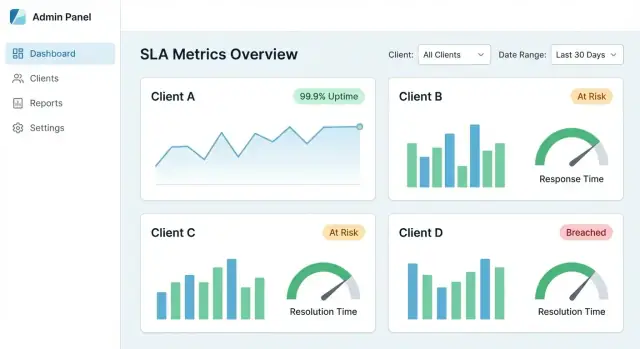
What Centralized SLA Reporting Should Solve
Centralized SLA reporting exists because SLA evidence rarely lives in one place. Uptime may sit in a monitoring tool, incidents in a status page, tickets in a helpdesk, and escalation notes in email or chat. When each client has a slightly different stack (or different naming conventions), monthly reporting turns into manual spreadsheet work—and disagreements about “what really happened” become common.
Who uses it (and what they need)
A good SLA reporting web app serves multiple audiences with different goals:
- Account managers need quick, client-ready summaries they can trust, plus exports for QBRs.
- Support leads and service owners need drill-downs to validate calculations and find root causes.
- Client stakeholders need clear, readable metrics with unambiguous definitions—and a way to audit which incidents and tickets were included.
The app should present the same underlying truth at different levels of detail, depending on the role.
Core outcomes to aim for
A centralized SLA dashboard should deliver:
- One source of truth for SLA metrics, incidents, and supporting evidence.
- Faster reporting (minutes, not days) through consistent calculations and reusable templates.
- Fewer disputes by showing exactly how each metric was calculated and which events contributed.
In practice, every SLA number should be traceable to raw events (alerts, tickets, incident timelines) with timestamps and ownership.
Set boundaries: what counts as “SLA” here
Before building anything, define what is in scope and out of scope. For example:
- Does “availability” exclude planned maintenance?
- Are third-party outages counted or reported separately?
- What is the official clock: client local time, UTC, or contract time zone?
Clear boundaries prevent debates later and keep reporting consistent across clients.
Primary workflows the app must support
At minimum, centralized SLA reporting should support five workflows:
- View client SLA performance for a selected period.
- Filter by client, service, region, contract, or severity.
- Export (PDF/CSV) for sharing and archiving.
- Schedule automated reports to stakeholders.
- Audit any metric back to the events and rules behind it.
Design around these workflows from day one and the rest of the system (data model, integrations, and UX) stays aligned with real reporting needs.
Define SLA Metrics, Rules, and Reporting Periods
Before you build screens or pipelines, decide what your app will measure and how those numbers should be interpreted. The goal is consistency: two people reading the same report should reach the same conclusion.
Pick the SLA metrics you’ll support
Start with a small set that most clients recognize:
- Uptime / availability (e.g., 99.9% per month)
- Response time (time to first human reply, or first meaningful update)
- Resolution time (time until the issue is solved and confirmed)
Be explicit about what each metric measures and what it doesn’t. A short definitions panel in the UI (and a link to /help/sla-definitions) prevents misunderstandings later.
Write the calculation rules in plain language
Rules are where SLA reporting usually breaks. Document them in sentences your client could validate, then translate them into logic.
Cover the essentials:
- Business hours vs 24/7: Which calendar applies to each service/client?
- Holidays: Which region’s holidays apply, and how are they maintained?
- Exclusions: planned maintenance, client-caused delays, waiting-on-customer, third‑party outages
- Start/stop events: what timestamp starts the clock; what event stops it
Decide reporting periods and breach thresholds
Choose default periods (monthly and quarterly are common) and whether you’ll support custom ranges. Clarify the time zone used for cutoffs.
For breaches, define:
- Thresholds per service (e.g., uptime target differs by tier)
- Overrides per client (custom contracts)
- Whether breaches trigger on single incidents, aggregate results, or both
Document the data sources per metric
For each metric, list the required inputs (monitoring events, incident records, ticket timestamps, maintenance windows). This becomes your blueprint for integrations and data quality checks.
Map Your Data Sources and Integration Options
Before you design dashboards or KPIs, get clear on where SLA evidence actually lives. Most teams discover their “SLA data” is split across tools, owned by different groups, and recorded with slightly different meanings.
Common source systems to inventory
Start with a simple list per client (and per service):
- Monitoring/observability (ping checks, synthetic monitors, APM): uptime signals and timestamps
- Incident management (PagerDuty/Opsgenie equivalents): incident lifecycle, severity, acknowledgements
- Ticketing/helpdesk (Jira Service Management, Zendesk, ServiceNow): response/resolve times, customer-impact fields
- Status pages (public or internal): declared incidents and scheduled maintenance windows
- Cloud/provider logs (optional): load balancer health, audit trails for outages
For each system, note the owner, retention period, API limits, time resolution (seconds vs minutes), and whether data is client-scoped or shared.
Choose integration methods (and mix them)
Most SLA reporting web apps use a combination:
- API pulls for historical backfills and nightly reconciliations
- Webhooks/event streams for near-real-time updates and faster breach detection
- CSV imports for smaller clients, legacy tools, or one-time migrations
A practical rule: use webhooks where freshness matters, and API pulls where completeness matters.
Define a canonical event format early
Different tools describe the same thing in different ways. Normalize into a small set of events your app can rely on, such as:
incident_opened/incident_closeddowntime_started/downtime_endedticket_created/first_response/resolved
Include consistent fields: client_id, service_id, source_system, external_id, severity, and timestamps.
Time zones and missing coverage
Store all timestamps in UTC, and convert on display based on the client’s preferred time zone (especially for monthly reporting cutoffs).
Plan for gaps too: some clients won’t have status pages, some services won’t be monitored 24/7, and some tools may lose events. Make “partial coverage” visible in reports (e.g., “monitoring data unavailable for 3 hours”) so SLA results aren’t misleading.
Design Multi-Client and Multi-Tenant Architecture
If your app reports SLAs for multiple customers, architecture decisions determine whether you can scale safely without cross-client data leaks.
Define what “client” means in your system
Start by naming the layers you need to support. A “client” might be:
- Tenant (company/account): the main customer boundary
- Sub-accounts: departments or brands under one tenant
- Environments: prod/stage/regions
- Services: API, web app, database, support queue
Write these down early, because they affect permissions, filters, and how you store configuration.
Choose a multi-tenancy model
Most SLA reporting apps pick one of these:
- Shared database + tenant IDs: one set of tables, every row tagged with
tenant_id. It’s cost-effective and simpler to operate, but requires strict query discipline. - Separate databases per tenant: stronger isolation and easier per-tenant retention policies, but higher operational overhead (migrations, monitoring, backups) and harder cross-tenant admin views.
A common compromise is shared DB for most tenants and dedicated DBs for “enterprise” customers.
Enforce strict data isolation everywhere
Isolation must hold across:
- Queries and dashboards: always scope by tenant, not just UI filters
- Exports and scheduled emails: ensure the export job runs with a tenant context
- Background jobs: retries and queues must carry
tenant_idso results can’t be written to the wrong tenant
Use guardrails such as row-level security, mandatory query scopes, and automated tests for tenant boundaries.
Support client-specific SLA configurations
Different clients will have different targets and definitions. Plan for per-tenant settings like:
- SLA targets (e.g., 99.9% uptime, 1-hour response)
- Included services and endpoints
- Business hours, holidays, and time zones
- Severity mappings and exclusion rules (maintenance windows)
Safe client switching for internal users
Internal users often need to “impersonate” a client view. Implement a deliberate switch (not a free-form filter), display the active tenant prominently, log switches for audit, and prevent links that could bypass tenant checks.
Build a Data Model for Raw Events and SLA Results
A centralized SLA reporting web app lives or dies on its data model. If you model only “SLA % per month,” you’ll struggle to explain results, handle disputes, or update calculations later. If you model only raw events, reporting becomes slow and expensive. The goal is to support both: traceable raw evidence and fast, client-ready rollups.
Core entities to model
Keep a clean separation between who is being reported on, what is being measured, and how it’s calculated:
- Client: the organization receiving reports.
- Service: a system or component (API, website, helpdesk queue).
- SLA definition: rules like uptime target, response time target, business hours, exclusions, and measurement method.
- Incident / ticket: human-tracked records (from ITSM tools) that may explain downtime or response delays.
- Measurement / event: machine events (monitoring checks, status updates, log-derived signals).
Store raw events and derived results
Design tables (or collections) for:
- Raw events: immutable records from source systems (monitoring alerts, status page incidents, ticket status transitions). Keep original IDs and payload snapshots when possible.
- Normalized facts: your standardized representation (e.g., “service_down started_at/ended_at”).
- SLA results: computed outputs at different grains—per incident, daily, weekly, monthly.
- Rollups: pre-aggregated daily/monthly totals to make the centralized SLA dashboard fast (e.g., downtime minutes, valid minutes, excluded minutes).
Version your calculations
SLA logic changes: business hours update, exclusions get clarified, rounding rules evolve. Add a calculation_version (and ideally a “rule set” reference) to every computed result. That way, old reports can be reproduced exactly even after improvements.
Add audit fields for trust and troubleshooting
Include audit fields where they matter:
- source_system, source_record_id, and import_job_id
- timestamps like ingested_at, normalized_at, calculated_at
- created_by/updated_by for user edits (with a change log for manual overrides)
Evidence and attachments
Clients often ask “show me why.” Plan a schema for evidence:
- links to postmortems, status pages, or ticket threads
- file attachment metadata (name, type, storage key)
- mapping evidence to incidents and to specific SLA periods
This structure keeps the app explainable, reproducible, and fast—without losing the underlying proof.
Create a Reliable Data Pipeline and Normalization Layer
If your inputs are messy, your SLA dashboard will be too. A reliable pipeline turns incident and ticket data from multiple tools into consistent, auditable SLA results—without double-counting, gaps, or silent failures.
Split the pipeline into clear stages
Treat ingestion, normalization, and rollups as separate stages. Run them as background jobs so the UI stays fast and you can retry safely.
- Ingestion jobs pull raw events (tickets, incidents, status changes) and store them unchanged.
- Normalization jobs standardize fields and map them to your SLA-ready vocabulary.
- Rollup jobs compute daily/weekly/monthly SLA metrics and cache results for dashboards and exports.
This separation also helps when one client’s source is down: ingestion can fail without corrupting existing calculations.
Make retries safe with idempotency
External APIs time out. Webhooks can be delivered twice. Your pipeline must be idempotent: processing the same input more than once should not change the outcome.
Common approaches:
- Use a source event ID (or a hash of key fields) as a unique key.
- Keep a processing ledger (event_id + client + source + timestamp) to detect duplicates.
- Design rollups to be rebuildable for a time window (e.g., “recompute last 14 days”) instead of incrementing counters blindly.
Normalize names so metrics mean the same thing
Across clients and tools, “P1,” “Critical,” and “Urgent” might all mean the same priority—or not. Build a normalization layer that standardizes:
- Service names (e.g., “Payments API” vs “Payments”)
- Priorities / severities
- Ticket statuses (e.g., “Resolved” vs “Done” vs “Closed”)
Store both the original value and the normalized value for traceability.
Validate inputs and quarantine suspicious records
Add validation rules (missing timestamps, negative durations, impossible status transitions). Don’t drop bad data silently—route it into a quarantine queue with a reason and a “fix or map” workflow.
Show a data freshness indicator
For each client and source, compute “last successful sync,” “oldest unprocessed event,” and “rollup up-to date through.” Display this as a simple data freshness indicator so clients trust the numbers and your team spots issues early.
Authentication, Roles, and Access Control
If clients use your portal to review SLA performance, authentication and permissions need to be designed as carefully as the SLA math. The goal is simple: every user sees only what they should—and you can prove it later.
Roles that match real workflows
Start with a small, clear set of roles and expand only when you have strong reasons:
- Admin: manages tenants/clients, integrations, users, and global settings.
- Internal analyst: views all client data, investigates incidents, builds reports, but can’t change security settings.
- Client viewer: read-only access to their own dashboards and exports.
- Client editor: can manage their org’s users, notification preferences, and (optionally) report templates.
Keep least privilege as the default: new accounts should land in viewer mode unless explicitly promoted.
SSO first, passwords second
For internal teams, SSO reduces account sprawl and offboarding risk. Support OIDC (common with Google Workspace/Azure AD/Okta) and, where required, SAML.
For clients, offer SSO as an upgrade path, but still allow email/password with MFA for smaller organizations.
Per-client isolation and fine-grained controls
Enforce tenant boundaries at every layer:
- Every query and export must be scoped to a client ID.
- Add project/service-level permissions if a client has multiple business units.
- Restrict access to sensitive artifacts (raw tickets, notes, attachments) separately from summary SLA results.
Audit logs and secure onboarding
Log access to sensitive pages and downloads: who accessed what, when, and from where. This helps with compliance and client trust.
Build an onboarding flow where admins or client editors can invite users, set roles, require email verification, and revoke access instantly when someone leaves.
Dashboard UX: Filters, Drill-Downs, and Clear Definitions
A centralized SLA dashboard succeeds when a client can answer three questions in under a minute: Are we meeting SLAs? What changed? What caused the misses? Your UX should guide them from a high-level view to evidence—without forcing them to learn your internal data model.
The “main view” that earns trust
Start with a small set of tiles and charts that match common SLA conversations:
- SLA compliance (%) for the selected period (current vs previous)
- Trend line (daily/weekly) to show improvement or drift
- Top breaches ranked by impact (minutes over SLO, penalties, or affected users)
Make each card clickable so it becomes a doorway to details, not a dead end.
Filters that feel predictable
Filters should be consistent across all pages and “stick” as users navigate.
Recommended defaults:
- Client → Service → Environment (prod/stage)
- Date range with quick picks (Last 7/30/90 days, This month)
- Severity / priority (especially useful when mixing incidents and tickets)
Show active filter chips at the top so users always understand what they’re viewing.
Drill-down from summary to evidence
Every metric should have a path to “why.” A strong drill-down flow:
- Compliance chart → click a low point
- List of contributing incidents/tickets for that slice
- Detail page showing timestamps, status changes, links to source records, and notes
If a number can’t be explained with evidence, it will be questioned—especially during QBRs.
Clear definitions (no ambiguity)
Add tooltips or an “info” panel for every KPI: how it’s calculated, exclusions, time zone, and data freshness. Include examples like “Maintenance windows excluded” or “Uptime measured at the API gateway.”
Shareable views with stable links
Make filtered views shareable via stable URLs (e.g., /reports/sla?client=acme&service=api&range=30d). This turns your centralized SLA dashboard into a client-ready reporting portal that supports recurring check-ins and audit trails.
Automated Reports, Exports, and Client-Ready Summaries
A centralized SLA dashboard is useful day-to-day, but clients often want something they can forward internally: a PDF for leadership, a CSV for analysts, and a link they can bookmark.
Offer the right report formats
Support three outputs from the same underlying SLA results:
- PDF: a clean, branded summary for stakeholders
- CSV: row-level data (by service, region, or contract) for deeper analysis
- Live link reports: a secure URL to the same view in your portal, always up to date
For link-based reports, make filters explicit (date range, service, severity) so the client knows exactly what the numbers represent.
Scheduled delivery by client and cadence
Add scheduling so each client can receive reports automatically—weekly, monthly, and quarterly—sent to a client-specific list or a shared inbox. Keep schedules tenant-scoped and auditable (who created it, last sent time, next run).
If you need a simple starting point, launch with a “monthly summary” plus a one-click download from /reports.
QBR/MBR-ready templates
Build templates that read like QBR/MBR slides in written form:
- Highlights (uptime, top improvements)
- Breaches (what happened, duration, impact)
- Notes (planned maintenance, follow-ups)
Compliance notes, exceptions, and approvals
Real SLAs include exceptions (maintenance windows, third-party outages). Let users attach compliance notes and flag exceptions that require approval, with an approval trail.
Tenant isolation and permissions
Exports must respect tenant isolation and role permissions. A user should only export the clients, services, and time periods they’re allowed to view—and the export should match the portal view exactly (no extra columns leaking hidden data).
Alerts and Notifications for SLA Breaches
Alerts are where an SLA reporting web app turns from “interesting dashboard” into an operational tool. The goal isn’t to send more messages—it’s to help the right people react early, document what happened, and keep clients informed.
Choose alert types that match how SLAs fail
Start with three categories:
- Impending breach: you’re trending toward missing the target (e.g., burn rate suggests uptime will fall below 99.9% by period end, or remaining response-time budget is low).
- Confirmed breach: the SLA is definitively missed for the defined reporting period.
- Data pipeline failure: missing data, delayed imports, or integration errors that could invalidate reporting.
Tie each alert to a clear definition (metric, time window, threshold, client scope) so recipients can trust it.
Pick channels—and make them client-aware
Offer multiple delivery options so teams can meet clients where they already work:
- Email for executives and client-facing teams
- Slack / MS Teams for on-call and operations
- Webhook to trigger internal systems (PagerDuty, ServiceNow, custom incident tooling)
For multi-client reporting, route notifications using tenant rules (e.g., “Client A breaches go to Channel A; internal breaches go to on-call”). Avoid sending client-specific details to shared channels.
Reduce noise: deduplication, quiet hours, and escalation
Alert fatigue will kill adoption. Implement:
- Deduplication (collapse repeated triggers into one active alert)
- Quiet hours (delay non-urgent notifications outside business hours)
- Escalation (if not acknowledged in X minutes, notify a wider group)
Make alerts actionable with acknowledgment and notes
Each alert should support:
- Acknowledgment (who owns it)
- Resolution notes (what happened, link to incident/ticket, client comms summary)
This creates a lightweight audit trail you can reuse in client-ready summaries.
Simple rules editor per client
Provide a basic rules editor for per-client thresholds and routing (without exposing complex query logic). Guardrails help: defaults, validation, and preview (“this rule would have triggered 3 times last month”).
Performance, Security, and Compliance Basics
A centralized SLA reporting web app quickly becomes mission-critical because clients use it to judge service quality. That makes speed, safety, and evidence (for audits) as important as the charts themselves.
Performance that scales by tenant
Large clients can generate millions of tickets, incidents, and monitoring events. To keep pages responsive:
- Use pagination everywhere (tables, event lists, drill-down views). Avoid loading all results by default.
- Cache common queries like “last 30 days uptime by service” or “top breach reasons.” Time-bound caching (e.g., 5–15 minutes) often keeps data feeling fresh while cutting database load.
- Pre-aggregate SLA results for heavy views (monthly summaries, per-service uptime, breach counts). Compute these on a schedule or after ingestion so dashboards don’t recalculate from raw events on every page.
Data retention and archiving
Raw events are valuable for investigations, but keeping everything forever increases cost and risk.
Set clear rules such as:
- Keep normalized raw events for a shorter period (e.g., 90–180 days).
- Keep SLA results and summaries longer (e.g., 2–7 years) for trend reporting and contracts.
- Archive old raw events to cheaper storage (object storage or cold tiers) with a documented retrieval process.
Security fundamentals clients expect
For any client reporting portal, assume sensitive content: customer names, timestamps, ticket notes, and sometimes PII.
- Encrypt data in transit (HTTPS/TLS) and at rest (database and backups). Treat API tokens and integration credentials as secrets, stored in a vault or managed secrets service.
- Add rate limiting and input validation on public endpoints (login, exports, API). This reduces abuse, accidental overload, and common injection-style attacks.
Compliance and audit readiness
Even if you’re not aiming for a specific standard, good operational evidence builds trust.
Maintain:
- Immutable audit logs (logins, exports, permission changes, integration changes).
- Backups with restore testing (not just “we back up”). Schedule periodic restore drills and record outcomes.
- Basic data access policies: who can see what, how long data is kept, and how deletion requests are handled.
Launch Plan, Monitoring, and Iteration Roadmap
Launching an SLA reporting web app is less about a big-bang release and more about proving accuracy, then scaling repeatably. A strong launch plan reduces disputes by making results easy to verify and easy to reproduce.
1) Start with a pilot client (and validate accuracy)
Pick one client with a manageable set of services and data sources. Run your app’s SLA calculations in parallel with their existing spreadsheets, ticket exports, or vendor portal reports.
Focus on common mismatch areas:
- Time zone and reporting period boundaries (month-end cutoffs)
- What counts as downtime vs. degraded service
- How maintenance windows are treated
Document differences and decide whether the app should match the client’s current approach or replace it with a clearer standard.
2) Operationalize onboarding with a checklist
Create a repeatable onboarding checklist so each new client experience is predictable:
- Data source access (API keys, scopes, IP allowlists)
- Mapping rules (service names, ticket categories, incident severity)
- SLA definition confirmation (targets, exclusions, rounding)
- Test run + sign-off (sample period, known incidents)
- Owner assignment (who can approve changes)
A checklist also helps you estimate effort and support discussions on /pricing.
3) Add monitoring for trust and supportability
SLA dashboards are only credible if they’re fresh and complete. Add monitoring for:
- Scheduled job failures and retries
- API rate-limit errors and authentication failures
- Stale data (no events ingested for X hours)
- Unexpected drops/spikes in incident volume
Send internal alerts first; once stable, you can introduce client-visible status notes.
4) Iterate based on clarity, not just features
Collect feedback on where confusion happens: definitions, disputes (“why is this a breach?”), and “what changed” since last month. Prioritize small UX improvements like tooltips, change logs, and clear footnotes on exclusions.
5) Build faster with a modern development workflow
If you want to ship an internal MVP quickly (tenant model, integrations, dashboards, exports) without spending weeks on boilerplate, a vibe-coding approach can help. For example, Koder.ai lets teams draft and iterate on a multi-tenant web app via chat—then export the source code and deploy. That’s a practical fit for SLA reporting products, where the core complexity is domain rules and data normalization rather than one-off UI scaffolding.
You can use Koder.ai’s planning mode to outline entities (tenants, services, SLA definitions, events, rollups), then generate a React UI and a Go/PostgreSQL backend foundation you can extend with your specific integrations and calculation logic.
6) Publish a short roadmap
Keep a living doc with next steps: new integrations, export formats, and audit trails. Link to related guides on /blog so clients and teammates can self-serve details.
FAQ
What problem should centralized SLA reporting actually solve?
Centralized SLA reporting should create one source of truth by pulling uptime, incidents, and ticket timelines into a single, traceable view.
Practically, it should:
- Reduce monthly reporting from days to minutes
- Make every number auditable back to raw events
- Prevent disputes by showing the calculation rules and included/excluded events
Which SLA metrics should an app support first?
Start with a small set most clients recognize, then expand only when you can explain and audit them.
Common starting metrics:
- Availability/uptime (per service, per period)
- Time to first response (human reply or meaningful update)
- Time to resolution (confirmed solved)
For each metric, document what it measures, what it excludes, and the data sources required.
How do you define SLA calculation rules so clients trust them?
Write rules in plain language first, then convert them into logic.
You typically need to define:
- Business hours vs 24/7 calendars (per client/service)
- Holiday calendars and ownership
- Exclusions (maintenance, waiting-on-customer, third-party)
- Start/stop timestamps (what event starts the clock; what ends it)
If two people can’t agree on the sentence version, the code version will be disputed later.
What’s the best way to handle time zones and reporting cutoffs?
Store all timestamps in UTC, then convert for display using the tenant’s reporting time zone.
Also decide upfront:
- What time zone defines period cutoffs (e.g., month-end)
- How to handle DST changes
- Whether reports use contract time zone vs stakeholder local time
Be explicit in the UI (e.g., “Reporting period cutoffs are in America/New_York”).
Should SLA integrations use API pulls, webhooks, or CSV imports?
Use a mix of integration methods based on freshness vs completeness:
- Webhooks/event streams for near-real-time updates and faster breach detection
- API pulls for backfills and reconciliation
- CSV imports for small clients or legacy tools
A practical rule: use webhooks where freshness matters, API pulls where completeness matters.
What is a canonical event format and why do you need one?
Define a small canonical set of normalized events so different tools map to the same concepts.
Examples:
incident_opened/incident_closeddowntime_started/downtime_endedticket_created/first_response/resolved
Include consistent fields like tenant_id, service_id, source_system, external_id, severity, and UTC timestamps.
How do you prevent cross-client data leaks in a multi-tenant SLA app?
Pick a multi-tenancy model and enforce isolation beyond the UI.
Key protections:
- Scope every query, export, and scheduled job by
tenant_id - Use guardrails like row-level security or mandatory query scopes
- Log and audit tenant switching for internal users
Assume exports and background jobs are the easiest places to accidentally leak data if you don’t design for tenant context.
What data model supports both fast dashboards and auditability?
Store both raw events and derived results so you can be fast and explainable.
A practical split:
- Immutable raw events (with source IDs and payload snapshots)
- Normalized facts your app relies on consistently
- Computed SLA results (per incident/day/month)
- Pre-aggregated rollups for dashboards and exports
Add a calculation_version so past reports can be reproduced exactly after rule changes.
How do you build a reliable ingestion and rollup pipeline without double-counting?
Make the pipeline staged and idempotent:
- Ingest raw events unchanged
- Normalize into your canonical format
- Roll up into cached daily/monthly results
For reliability:
- Deduplicate via source event IDs or hashed keys
- Rebuild rollups for a time window (e.g., “recompute last 14 days”)
- Quarantine suspicious records (missing timestamps, negative durations) instead of dropping them silently
What alerts and notifications are most useful for SLA reporting?
Include three alert categories so the system is operational, not just a dashboard:
- Impending breach (burn-rate or remaining budget warnings)
- Confirmed breach (period definitively missed)
- Data pipeline failure (stale or missing inputs)
Reduce noise with deduplication, quiet hours, and escalation, and make each alert actionable with acknowledgment and resolution notes.