

Create a Web App to Track Competitive Intelligence Signals
Step-by-step guide to plan, build, and launch a web app that monitors competitors, pricing, news, and customer signals—without overengineering.
Start With Clear Goals and Use Cases
A competitive intelligence web app is only useful if it helps someone make a decision faster (and with fewer surprises). Before you think about scraping, dashboards, or alerts, get specific about who will use the app and what actions it should trigger.
Define the primary users
Different teams scan competitors for different reasons:
- Product wants early signals about roadmap shifts, feature launches, integrations, and packaging.
- Marketing watches messaging changes, positioning, landing pages, campaigns, and content themes.
- Sales cares about pricing pages, case studies, objection handling, and new target verticals.
- Founders/strategy track broader moves like funding, partnerships, geographic expansion, or new categories.
Pick one primary persona to optimize for first. A competitor monitoring dashboard that tries to satisfy everyone on day one usually ends up too generic.
List the decisions your app should support
Write down the decisions that will be made from the signals you collect. Examples:
- Do we respond to a pricing move (discounting, new tier, usage-based pricing)?
- Do we adjust positioning because a competitor shifted messaging or target segment?
- Do we pursue/avoid a partnership because they launched an integration or joined an ecosystem?
If a signal can’t be linked to a decision, it’s likely noise—don’t build tracking around it yet.
Choose 3–5 core signals to start
For a SaaS MVP, start with a small set of high-signal changes that are easy to review:
- Price & packaging (tier changes, limits, add-ons)
- Messaging (homepage headlines, value props, comparison pages)
- Hiring (key roles, team expansion clues)
- Reviews (new complaints/praise trends)
- Funding/press (new rounds, acquisitions)
You can later expand into traffic estimates, SEO movements, or ad activity—after the workflow proves value.
Set success criteria
Define what “working” looks like in measurable terms:
- Time saved per week compared to manual checks
- Fewer missed changes (e.g., “no major pricing change goes unnoticed”)
- Faster reactions, like shortening the time from competitor change → internal decision
These goals will guide every later choice: what to collect, how often to check, and which alerts and notifications are worth sending.
Choose What to Monitor: Competitors, Sources, and Signals
Before you build any pipeline or dashboard, decide what “good coverage” means. Competitive intelligence apps fail most often not because of tech, but because teams track too many things and can’t review them consistently.
Map your competitor set (and the neighbors)
Start with a simple map of players:
- Direct competitors: sell a similar product to the same buyer.
- Indirect competitors: solve the same problem with a different approach.
- Substitutes: alternatives your buyer might choose instead of buying your category.
- Adjacent players: partners, platforms, or tools that influence purchase decisions.
Keep the list small at first (e.g., 5–15 companies). You can expand once you’ve proven that your team reads and acts on the signals.
Create a source inventory (where signals show up)
For each company, list the sources where meaningful changes are likely to appear. A practical inventory often includes:
- Websites (home page, pricing, product pages)
- Changelogs / release notes
- Documentation / developer portals
- App stores / browser extensions
- Job boards and LinkedIn hiring pages
- Social channels (founder posts, product announcements)
- Review sites (G2, Capterra) and community forums
Don’t aim for completeness. Aim for “high signal, low noise.”
Decide “must track” vs “nice to have”
Tag every source as:
- Must track: if it changes, you want to know quickly (pricing page, changelog, key landing pages).
- Nice to have: useful context, but not worth interrupting someone’s day (most social posts, generic blog content).
This classification drives alerting: “must track” feeds real-time alerts; “nice to have” belongs in digests or a searchable archive.
Set update-frequency expectations per source
Write down how often you expect changes, even if it’s only a best guess:
- Daily: pricing pages, job boards, app store reviews
- Weekly: changelogs, documentation sections
- Monthly: positioning pages, case studies
This helps you tune crawl/poll schedules, avoid wasted requests, and spot anomalies (e.g., a “monthly” page changing three times in a day may indicate an experiment worth reviewing).
Define what counts as a “signal”
A source is where you look; a signal is what you record. Examples: “pricing tier renamed,” “new integration added,” “enterprise plan introduced,” “hiring for ‘Salesforce Admin’,” or “review rating drops below 4.2.” Clear signal definitions make your competitor monitoring dashboard easier to scan and your market signals tracking more actionable.
Pick a Data Collection Approach (APIs, Feeds, Scraping, Manual)
Your data collection method determines how fast you can ship, how much you’ll spend, and how often things will break. For competitive intelligence, it’s common to mix multiple approaches and normalize them into one signal format.
Common options (and when they fit)
APIs (official or partner APIs) are usually the cleanest sources: structured fields, predictable responses, and clearer terms of use. They’re great for things like pricing catalogs, app store listings, ad libraries, job boards, or social platforms—when access exists.
Feeds (RSS/Atom, newsletters, webhooks) are lightweight and reliable for content signals (blog posts, press releases, changelogs). They’re often overlooked, but they can cover a lot of ground with minimal engineering.
Email parsing is useful when the “source” only arrives via inbox (partner updates, webinar invites, pricing promos). You can parse subject lines, sender, and key phrases first, then progressively extract richer fields.
HTML fetch + parsing (scraping) offers maximum coverage (any public page), but it’s the most fragile. Layout changes, A/B tests, cookie banners, and bot protection can break extraction.
Manual entry is underrated for early-stage accuracy. If analysts are already collecting intel in spreadsheets, a simple form can capture the highest-value signals without building a complex pipeline.
Trade-offs to weigh
- Speed to launch: feeds/manual are fastest; APIs are medium; scraping is often slowest to stabilize.
- Cost: APIs may have usage fees; scraping may require proxy/headless tooling; manual costs time.
- Reliability: APIs/feeds tend to be steadier; scraping breaks more often.
- Maintenance burden: scraping and email parsing require ongoing tuning; APIs can change versions; feeds can disappear.
Plan for source variability
Expect missing fields, inconsistent naming, rate limits, pagination quirks, and occasional duplicates. Design for “unknown” values, store raw payloads when possible, and add simple monitoring (e.g., “last successful fetch” per source).
A minimum viable ingestion plan
For a first release, pick 1–2 high-signal sources per competitor and use the simplest method that works (often RSS + manual entry, or one API). Add scraping only for sources that truly matter and can’t be covered another way.
If you want to move faster than a traditional build cycle, this is also a good place to prototype in Koder.ai: you can describe the sources, event schema, and review workflow in chat, then generate a working React + Go + PostgreSQL app skeleton with an ingestion job, signal table, and basic UI—without committing to a heavy architecture up front. You can still export the source code later if you decide to run it in your own pipeline.
Design the Data Model for Signals and Change Events
A competitive intelligence app becomes useful when it can answer one question quickly: “What changed, and why should I care?” That starts with a consistent data model that treats every update as a reviewable event.
Define a common “event” object
Even if you collect data from very different places (web pages, job boards, press releases, app stores), store the result in a shared event model. A practical baseline is:
- source (where it came from: URL, feed, API)
- entity (who/what it’s about: competitor, product, executive)
- timestamp (when you observed it)
- field_changed (price, headline, feature name, team size)
- old_value / new_value (what changed)
- confidence (how sure you are, especially for fuzzy matches)
This structure keeps your pipeline flexible and makes dashboards and alerts much easier later.
Add a lightweight taxonomy for fast triage
Users don’t want a thousand “updates”—they want categories that map to decisions. Keep taxonomy simple at first and tag each event with one or two types:
Pricing, feature, messaging, people, partnerships, and risk.
You can expand later, but avoid deep hierarchies early; they slow down review and create inconsistent tagging.
Handle duplicates and near-duplicates
Competitive news is often reposted or mirrored. Store a content fingerprint (hash of normalized text) and a canonical URL when possible. For near-duplicates, keep a similarity score and group them into a single “story cluster” so users don’t see the same item five times.
Store evidence so changes are reviewable
Every event should link to proof: evidence URLs and a snapshot (HTML/text extract, screenshot, or API response). This turns “we think the pricing changed” into a verifiable record and lets teams audit decisions later.
Plan the System Architecture and Tech Stack
A competitive intelligence app works best when the plumbing is simple and predictable. You want a clear flow from “something changed on the web” to “a reviewer can act on it,” without coupling everything into one fragile process.
A simple, reliable architecture
A practical baseline looks like this:
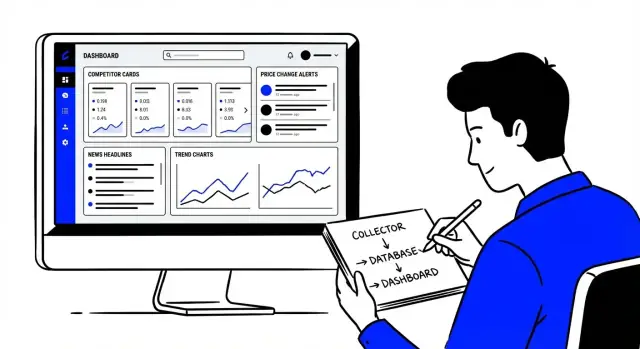
- Scheduler: triggers jobs (every hour/day, per source)
- Collectors: fetch data from APIs, RSS, pages, or files
- Processing: normalize, extract fields, dedupe, and compute diffs
- Database: store raw captures and processed “signals”
- API: serves signals, history, and metadata to the UI
- UI: dashboards, reviews, and alert settings
Keeping these as separate components (even if they run in one codebase at first) makes it easier to test, retry, and replace pieces later.
Pick a “boring” stack your team can run
Prefer tools your team already knows and can deploy confidently. For many teams that means a mainstream web framework + Postgres. If you need background jobs, add a standard queue/worker system rather than inventing one. The best stack is the one you can maintain at 2 a.m. when a collector breaks.
Store raw vs. processed data (and set retention)
Treat raw captures (HTML/JSON snapshots) as audit trail and debugging material, and processed records as what the product actually uses (signals, entities, change events).
A common approach: keep processed data indefinitely, but expire raw snapshots after 30–90 days unless they’re tied to important events.
Background jobs, retries, and failure handling
Sources are unstable. Plan for timeouts, rate limits, and format changes.
Use background workers with:
- exponential backoff retries
- per-source throttling
- dead-letter handling for repeated failures
- clear logs/metrics so you can see what’s failing and why
This prevents a single flaky site from breaking the whole pipeline.
Build the Ingestion Pipeline and Change Detection
Your ingestion pipeline is the “factory line” that turns messy external updates into consistent, reviewable events. If you get this part right, everything downstream—alerts, dashboards, reporting—gets simpler.
Build small collectors with consistent outputs
Avoid one giant crawler. Instead, create small, source-specific collectors (e.g., “Competitor A pricing page,” “G2 reviews,” “App release notes RSS”). Each collector should output the same basic shape:
- source (where it came from)
- entity (which competitor/product)
- timestamp (when you checked)
- extracted fields (price, plan name, headline, etc.)
- raw snapshot (HTML/text/JSON you can reference later)
This consistency is what lets you add new sources without rewriting your whole app.
Make it reliable: rate limits, backoff, and health checks
External sources fail for normal reasons: pages load slowly, APIs throttle you, formats change.
Implement per-source rate limiting and retries with backoff (wait longer after each failure). Add basic health checks such as:
- last successful run time
- error rate over the last N runs
- “empty data” detection (e.g., you suddenly extracted zero prices)
These checks help you spot quiet failures before they create gaps in your competitive timeline.
Detect meaningful changes (not just noise)
Change detection is where “data collection” becomes “signal.” Use methods that match the source:
- Hashing: store a hash of the cleaned text/JSON; if it changes, something changed.
- Field diffs: compare key fields (price, plan limits, headline) and record exactly what changed.
- DOM/text comparison: for web pages, compare the main content area after stripping navigation and boilerplate.
Store the change as an event (“Price changed from $29 to $39”) alongside the snapshot that proves it.
Log every run for debuggability
Treat every collector run like a tracked job: inputs, outputs, duration, and errors. When a stakeholder asks, “Why didn’t we catch this last week?”, run logs are how you answer confidently—and fix the pipeline fast.
Turn Raw Data Into Actionable Signals
Collecting pages, prices, job posts, release notes, and ad copy is only half the work. The app becomes useful when it can answer: “What changed, how much does it matter, and what should we do next?”
Score each change so the important items rise to the top
Start with a simple scoring method you can explain to teammates. A practical model is:
- Impact: Would this affect revenue, positioning, or customer retention?
- Relevance: Is it tied to your product area, segment, or active deals?
- Confidence: How sure you are this is a real change (not a parsing glitch)?
- Recency: How fresh it is, and whether it’s trending (repeated similar changes).
Turn those into a single score (even a 1–5 scale per factor) and sort feeds by score instead of time.
Filter noise before it reaches humans
Most “changes” are meaningless: timestamps, tracking params, footer tweaks. Add simple rules that cut review time:
- Ignore minor text changes below a threshold (e.g., small character diffs).
- Track only key pages (pricing, product, docs, status, careers), not everything.
- Whitelist key elements like plan names, price numbers, feature tables, and headlines.
Let humans add the missing context
Signals become decisions when people can annotate them. Support tagging and notes (e.g., “enterprise push,” “new vertical,” “matches Deal #1842”), plus lightweight status like triage → investigating → shared.
Use watchlists for what must not be missed
Add watchlists for critical competitors, specific URLs, or keywords. Watchlists can apply stricter detection, higher default scores, and faster alerting—so your team sees the “must-know” changes first.
Add Alerts, Digests, and Workflows
Alerts are where a competitive intelligence app either becomes genuinely useful—or gets muted after day two. The goal is simple: send fewer messages, but make each one easy to trust and act on.
Choose channels that match how teams work
Different roles live in different tools, so offer multiple notification options:
- Email for executives and asynchronous review
- Slack / Microsoft Teams for fast-moving product, sales, and growth teams
- In-app inbox for a clean audit trail and read/unread status
- Webhooks to push events into CRMs, ticketing, or automation tools
A good default is: Slack/Teams for high-priority changes, and the in-app inbox for everything else.
Let users set thresholds, not just “on/off” alerts
Most signals aren’t binary. Give users simple controls to define what “important” means:
- Price change % (e.g., alert only when pricing moves by 5%+)
- Keyword matches (e.g., “SOC 2”, “AI agent”, “HIPAA”) with include/exclude terms
- Counts over time (e.g., “more than 10 new job postings in 7 days”)
Keep setup lightweight by shipping sensible presets like “Pricing change,” “New feature announcement,” or “Hiring spike.”
Add digest mode to reduce alert fatigue
Real-time alerts should be the exception. Offer daily/weekly digests that summarize changes by competitor, topic, or urgency.
A strong digest includes:
- Top 3–5 notable changes
- A grouped list of the rest (so nothing is lost)
- One-click actions: follow competitor, mute source, raise threshold
Include evidence so alerts don’t feel speculative
Every alert should answer: what changed, where, and why you think it matters.
Include:
- The exact field that changed (price, headline, feature list)
- The before/after text or values
- A timestamp and source link
- A link to a stored snapshot (e.g., /signals/12345) so anyone can verify it later
Finally, build basic workflows around alerts: assign to an owner, add a note (“Impact on our Enterprise tier”), and mark resolved. That’s how notifications turn into decisions.
Build Dashboards That Support Fast Review
A competitor monitoring dashboard isn’t a “pretty report.” It’s a review surface that helps someone answer four questions quickly: what changed, where did it come from, why does it matter, and what should we do next.
Design the core views around decisions
Start with a small set of views that match how your team works:
- Timeline view: a chronological feed of changes (pricing updates, new pages, messaging shifts, hiring spikes). Make each card scannable: competitor, change type, severity, and timestamp.
- Competitor profile: a single place to see the latest state (current pricing, key claims, positioning, notable launches) plus recent changes.
- Category trends: aggregate signals across competitors (e.g., “AI assistant” messaging appearing more often, freemium plans increasing).
- Saved searches: reusable filters like “Pricing page changes” or “Security/Compliance messaging.”
Make drill-down effortless
Every summary should open into source evidence—the exact page snapshot, press release, ad creative, or job post that triggered the signal. Keep the path short: one click from card → evidence, with highlighted diffs where possible.
Build comparison into the layout
Fast review often means side-by-side. Add simple comparison tools:
- Pricing tables across competitors (plan names, key limits, add-ons)
- Feature and benefit claims (short messaging snippets)
- “What’s new” deltas since last month
Prioritize clarity over density
Use consistent labels for change types and a clear “so what” field: impact on positioning, risk level, and a suggested next step (reply, update collateral, alert sales). If it takes more than a minute to understand a card, it’s too heavy.
Enable Collaboration and Reporting
A competitive intelligence web app only pays off when the right people can review signals, discuss what they mean, and turn them into decisions. Collaboration features should reduce back-and-forth—without creating new security headaches.
Accounts, roles, and teams
Start with a simple permissions model that matches how work actually happens:
- Viewer: can browse the dashboard, open signal details, and subscribe to alerts.
- Editor: can create and maintain watchlists, tag signals, add notes, and mark items as reviewed.
- Admin: can manage users, teams, integrations, and export/sharing settings.
If you support multiple teams (e.g., Product, Sales, Marketing), keep ownership clear: who “owns” a watchlist, who can edit it, and whether signals can be shared across teams by default.
Shared watchlists, comments, and assignments
Make collaboration happen where the work is:
- Shared watchlists for competitors, products, keywords, and sources—so everyone monitors the same set of signals.
- Threaded comments on a signal or change event to capture context (“This pricing page change matches the new packaging rumor”).
- Assignments with lightweight workflow states (New → Investigating → Done). Even a simple assignee + due date prevents “someone should look at this” from becoming “no one did.”
Tip: store comments and assignments on the signal item rather than the raw data record, so discussions stay readable even if the underlying data updates.
Reporting and exports with access controls
Reporting is where your system becomes useful to stakeholders who don’t log in daily. Offer a few controlled ways to share:
- CSV export for analysts who want to pivot and filter.
- PDF digest for leadership updates.
- Shareable links for a specific dashboard view or saved report, with expiration and role-based access.
Keep exports scoped: respect team boundaries, hide restricted sources, and include a footer with date range and filters used.
Audit trail for trust
Competitive intelligence often includes manual entries and judgment calls. Add an audit trail for edits, tags, status changes, and manual additions. At minimum, record who changed what and when—so teams can trust the data and resolve disagreements quickly.
If you later add governance features, the audit trail becomes the backbone for approvals and compliance (see /blog/security-and-governance-basics).
Handle Security, Privacy, and Data Governance
A competitive intelligence app quickly becomes a high-trust system: it stores credentials, tracks who knew what and when, and may ingest content from many sources. Treat security and governance as product features, not afterthoughts.
Least-privilege access (and safer secrets)
Start with role-based access control (RBAC): admins manage sources and integrations; analysts view signals; stakeholders get read-only dashboards. Keep permissions narrow—especially for actions like exporting data, editing monitoring rules, or adding new connectors.
Store secrets (API keys, session cookies, SMTP credentials) in a dedicated secrets manager or your platform’s encrypted configuration, not in the database or Git. Rotate keys and support per-connector credentials so you can revoke a single integration without disrupting everything.
Privacy by design: avoid personal data
Competitive intelligence rarely requires personal data. Don’t collect names, emails, or social profiles unless you have a clear, documented need. If you must ingest content that may include personal data (e.g., press pages with contact details), minimize what you store: keep only the fields needed for the signal, and consider hashing or redacting.
Document collection rules and provenance
Write down where data comes from and how it’s collected: API, RSS, manual uploads, or scraping. Record timestamps, source URLs, and collection method so each signal has traceable provenance.
If you scrape, honor site rules where applicable (rate limits, robots directives, terms). Build in respectful defaults: caching, backoff, and a way to disable a source quickly.
Compliance-ready controls (without slowing the MVP)
Add a few basics early:
- Retention settings per workspace (e.g., keep raw pages 30 days, keep extracted events 1 year)
- Access logs (who viewed/exported what, and when)
- Data deletion tools (delete a source, delete a workspace, purge raw archives)
These controls make audits and customer security reviews much easier later—and they prevent your app from becoming a data dumping ground.
Test, Deploy, and Iterate Without Overbuilding
Shipping a competitive intelligence web app is less about building every feature and more about proving the pipeline is reliable: collectors run, changes are detected correctly, and users trust the alerts.
Test collectors before production data
Collectors break when sites change. Treat each source like a small product with its own tests.
Use fixtures (saved HTML/JSON responses) and run snapshot comparisons so you notice when a layout change would alter parsing results. Keep a “golden” expected output for each collector, and fail the build if the parsed fields drift unexpectedly (for example, price becomes empty, or a product name shifts).
When possible, add contract tests for APIs and feeds: validate schemas, required fields, and rate-limit behavior.
Monitor the pipeline like a customer would
Add health metrics early so you can spot silent failures:
- Success rate per source and per run
- Latency from collection → normalization → change detection
- Missing runs (scheduled job didn’t execute)
- Queue depth/backlog and retry counts
Turn these into a simple internal dashboard and one “pipeline degraded” alert. If you’re unsure where to start, create a lightweight /status page for operators.
Deploy with safety rails
Plan environments (dev/staging/prod) and keep configuration separate from code. Use migrations for your database schema, and practice rollbacks.
Backups should be automated and tested with a restore drill. For collectors, version your parsing logic so you can roll forward/back without losing traceability.
If you build this in Koder.ai, features like snapshots and rollback can help you iterate safely on the workflow and UI as you test alert thresholds and change-detection rules. When you’re ready, you can export the code and run it wherever your organization needs.
Iterate from an MVP, not a wish list
Start with a narrow set of sources and one workflow (e.g., weekly pricing changes). Then expand:
Add sources gradually, improve scoring and deduplication, and learn from user feedback on what signals they actually act on—before building more dashboards or complex automation.
FAQ
What should I define before building a competitive intelligence web app?
Start by writing down the primary user (e.g., Product, Sales, Marketing) and the decisions they’ll make from the app.
If you can’t connect a tracked change to a decision (pricing response, positioning update, partnership move), treat it as noise and don’t build it into the MVP yet.
Who should the app be built for first?
Pick one primary persona to optimize for first. A single workflow (like “pricing and packaging review for Sales”) will produce clearer requirements for sources, alerts, and dashboards.
You can add secondary personas later once the first group consistently reviews and acts on signals.
What are the best competitive signals to track in an MVP?
Start with 3–5 high-signal categories that are easy to review:
- Price & packaging
- Messaging (homepage/value props)
- Hiring (key roles)
- Reviews (trend shifts)
- Funding/press
Ship these first, then expand into more complex signals (SEO, ads, traffic estimates) after the workflow proves valuable.
How many competitors should I monitor at the start?
Keep the initial set small (often 5–15 companies) and group them by:
- Direct competitors
- Indirect competitors
- Substitutes
- Adjacent players
The goal is “coverage you’ll actually review,” not a comprehensive market map on day one.
How do I choose which sources to monitor?
Build a source inventory per competitor, then mark each source as:
- Must track (alerts-worthy): pricing, changelog, key landing pages
- Nice to have (digest/searchable): most social posts, generic blog content
This one step prevents alert fatigue and keeps the pipeline focused on what drives decisions.
Should I use APIs, feeds, scraping, or manual input?
Use the simplest method that reliably captures the signal:
- APIs: most structured and stable when available
- RSS/Atom/newsletters: fast to ship for content and release notes
- Email parsing: for inbox-only updates (promos, partner notes)
- Scraping: maximum coverage but highest breakage/maintenance
- Manual entry: excellent early on for accuracy and speed
Many teams succeed by mixing 2–3 methods and normalizing them into one event format.
What data model works best for competitive intelligence signals?
Model everything as a change event so it’s reviewable and comparable across sources. A practical baseline:
- source (URL/feed/API)
- entity (competitor/product)
- timestamp
- field_changed
- old_value / new_value
- confidence
This keeps downstream work (alerts, dashboards, triage) consistent even when ingestion methods differ.
How do I detect meaningful changes without drowning in noise?
Combine multiple techniques depending on the source:
- Hashing of cleaned content to detect “something changed”
- Field diffs for structured items (price, tier limits, headline)
- DOM/text comparison after removing boilerplate (nav/footer)
Also store evidence (snapshot or raw payload) so users can verify that a change is real and not a parsing glitch.
How do I prioritize signals so users see what matters most?
Use a simple, explainable scoring system so the feed sorts by importance, not just time:
- Impact (revenue/positioning risk)
- Relevance (to your segment/deals)
- Confidence (parser reliability)
- Recency (and repetition)
Pair scoring with basic noise filters (ignore tiny diffs, whitelist key elements, focus on key pages) to reduce review time.
How should alerts, digests, and governance work in a CI app?
Make alerts rare and trustworthy:
- Use thresholds (price change %, keyword rules, hiring spike counts)
- Offer digest mode (daily/weekly) for non-urgent updates
- Include proof: before/after values, timestamp, source link, and a snapshot link
For governance basics, add RBAC, secrets handling, retention, and access logs early (see /blog/security-and-governance-basics).