

How to Build a Web App for Cross-System Data Reconciliation
Learn how to plan, build, and launch a web app that reconciles data across systems with imports, matching rules, exceptions, audit trails, and reporting.
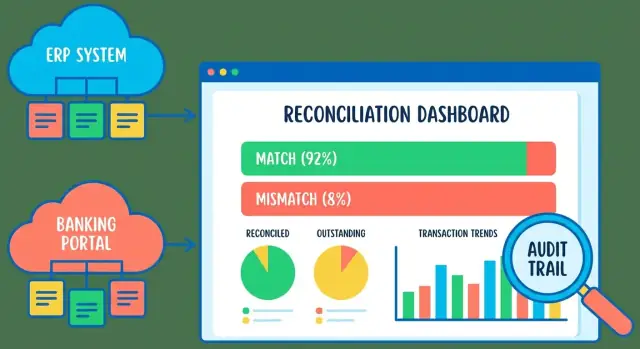
What Cross-System Data Reconciliation Means
Reconciliation is the act of comparing the “same” business activity across two (or more) systems to make sure they agree. In plain terms, your app is helping people answer three questions: what matches, what’s missing, and what’s different.
A reconciliation web app typically takes records from System A and System B (often created by different teams, vendors, or integrations), lines them up using clear record matching rules, and then produces results people can review and act on.
Common reconciliation use cases
Most teams start here because the inputs are familiar and the benefits are immediate:
- Payments vs. invoices: confirm that customer payments map to the right invoices, and spot short pays, overpays, or unapplied cash.
- Shipments vs. orders: verify that what was shipped matches what was ordered, including partial shipments and backorders.
- Payroll vs. timesheets: ensure hours submitted were paid correctly, catching missing approvals or incorrect rates.
These are all examples of cross-system reconciliation: the truth is distributed, and you need a consistent way to compare it.
The core outputs your app should produce
A good data reconciliation web app doesn’t just “compare”—it produces a set of outcomes that drive the workflow:
- Matched items: records the app can confidently pair (or group) across systems, according to your rules.
- Unmatched items: records present in one system but not the other (yet). These often represent timing differences, missing data, or import problems.
- Adjustments: documented actions taken to resolve differences—like writing off a small variance, correcting a reference ID, or splitting one payment across multiple invoices.
These outputs feed directly into your reconciliation dashboard, reporting, and downstream exports.
What “success” looks like
The goal isn’t to build a perfect algorithm—it’s to help the business close the loop faster. A well-designed reconciliation process leads to:
- Faster close: fewer manual spreadsheets and back-and-forth during week-end or month-end.
- Fewer errors: early data import and validation plus data quality checks catch issues before they become exceptions.
- Traceable decisions: every match and adjustment is explainable later through approvals and an audit trail.
If users can quickly see what matched, understand why something didn’t, and document how it was resolved, you’re doing reconciliation right.
Define Scope, Data Sources, and Success Metrics
Before you design screens or write matching logic, get clear on what “reconciliation” means for your business and who will rely on the outcome. A tight scope prevents endless edge cases and helps you choose the right data model.
Identify source systems (and their owners)
List every system involved and assign an owner who can answer questions and approve changes. Typical stakeholders include finance (general ledger, billing), operations (order management, inventory), and support (refunds, chargebacks).
For each source, document what you can realistically access:
- How you’ll extract data (CSV export, API, database view)
- Which fields are available (IDs, amounts, dates, status, currency)
- Data freshness and known quality issues (late updates, duplicates)
A simple “system inventory” table shared early can save weeks of rework.
Choose reconciliation frequency and volume expectations
Your app’s workflow, performance needs, and notification strategy depend on cadence. Decide whether you reconcile daily, weekly, or month-end only, and estimate volumes:
- Records per run (e.g., 5k invoices/day, 200k payments/month)
- Peak periods (month-end close, promotions)
- How long users can wait for results (minutes vs. overnight)
This is also where you decide whether you need near-real-time imports or scheduled batches.
Define success criteria everyone agrees on
Make success measurable, not subjective:
- Acceptable mismatch rate (e.g., <0.5% of transactions need review)
- Time to resolve exceptions (e.g., 80% closed within 2 business days)
- Reporting outputs required (summary totals, aging, close package exports)
Capture constraints early
Reconciliation apps often touch sensitive data. Write down privacy requirements, retention periods, and approval rules: who can mark items “resolved,” edit mappings, or override matches. If approvals are required, plan for an audit trail from day one so decisions are traceable during reviews and month-end close.
Understand Your Data and Normalize It
Before you write matching rules or workflows, get clear on what a “record” looks like in each system—and what you want it to look like inside your app.
Typical record shapes
Most reconciliation records share a familiar core, even if field names differ:
- Identifiers: internal ID, external reference, invoice/transaction number, counterparty ID
- Dates: transaction date, posting date, settlement date
- Amounts: gross/net, tax, fees, currency, sign (debit/credit)
- Status fields: authorized/posted/voided/refunded, open/closed
- Reference fields: memo/description, batch ID, bank trace number
The messy realities you need to plan for
Cross-system data is rarely clean:
- Missing or unreliable IDs (e.g., bank statement lines with no invoice number)
- Different date formats and timezones ("2025-12-01" vs "12/1/25", local time vs UTC)
- Rounding and precision differences (2 vs 4 decimals; tax rounding rules)
- Duplicates and reversals (a charge + a separate reversal; repeated exports)
- Different signs (one system stores refunds as negative, another as separate type)
Define a canonical internal model
Create a canonical model that your app stores for every imported row, regardless of source. Normalize early so matching logic stays simple and consistent.
At minimum, standardize:
- amount_minor (e.g., cents) + currency
- normalized_date (ISO-8601, timezone decided and documented)
- normalized_reference (trim, uppercase, remove extra whitespace)
- source_system + source_record_id (for traceability)
Document field mapping per source
Keep a simple mapping table in the repo so anyone can see how imports translate into the canonical model:
| Canonical field | Source: ERP CSV | Source: Bank API | Notes |
|---|---|---|---|
| source_record_id | InvoiceID | transactionId | Stored as string |
| normalized_date | PostingDate | bookingDate | Convert to UTC date |
| amount_minor | TotalAmount | amount.value | Multiply by 100, round consistently |
| currency | Currency | amount.currency | Validate against allowed list |
| normalized_reference | Memo | remittanceInformation | Uppercase + collapse spaces |
This upfront normalization work pays off later: reviewers see consistent values, and your matching rules become easier to explain and trust.
Design the Import Pipeline (Files, APIs, and Validation)
Your import pipeline is the front door to reconciliation. If it’s confusing or inconsistent, users will blame the matching logic for problems that actually started at ingestion.
Support multiple import methods without creating three different systems
Most teams start with CSV uploads because they’re universal and easy to audit. Over time, you’ll likely add scheduled API pulls (from banking, ERP, or billing tools) and, in some cases, a database connector when the source system can’t export reliably.
The key is to standardize everything into one internal flow:
- Ingest (upload/pull/connect)
- Validate (structure and business rules)
- Parse/normalize (dates, currency, decimals, IDs)
- Persist (raw + parsed)
- Summarize (what happened, what needs attention)
Users should feel like they’re using one import experience, not three separate features.
Validation that prevents bad data from becoming “mystery mismatches”
Do validation early and make failures actionable. Typical checks include:
- Required fields: transaction date, amount, currency, reference IDs
- Types and parsing: date parsing (with timezone assumptions), numeric fields, booleans
- Ranges: negative amounts allowed? maximum values? reasonable dates?
- Currency codes: enforce ISO codes, catch typos (e.g., “US$” vs “USD”)
Separate hard rejects (can’t import safely) from soft warnings (importable but suspicious). Soft warnings can flow into your exception management workflow later.
Idempotent imports: re-uploading should be safe
Reconciliation teams re-upload files constantly—after fixing mappings, correcting a column, or extending the date range. Your system should treat re-imports as a normal operation.
Common approaches:
- Compute a file fingerprint (hash of the raw bytes) and reject duplicates, or mark as “already imported.”
- Use a source record key (e.g., combination of source system + external transaction ID) and upsert.
- When no stable external ID exists, generate a deterministic key from selected fields (date + amount + counterparty + reference), but be explicit about collision risk.
Idempotency isn’t just about duplicates—it’s about trust. Users need confidence that “try again” won’t make the reconciliation worse.
Store raw input and parsed records for traceability
Always keep:
- The raw input (file, API response snapshot, or extract metadata)
- The parsed/normalized records you actually reconcile
This makes debugging much faster (“why was this row rejected?”), supports audits and approvals, and helps you reproduce results if matching rules change.
Import summaries users can act on
After every import, show a clear summary:
- Total rows received
- Accepted rows
- Rejected rows
- Top rejection reasons (with counts)
Let users download a “rejected rows” file with the original row plus an error column. This turns your importer from a black box into a self-serve data quality tool—and it reduces support requests dramatically.
Create Matching Rules That People Can Trust
Matching is the heart of cross-system reconciliation: it determines which records should be treated as “the same thing” across sources. The goal isn’t just accuracy—it’s confidence. Reviewers need to understand why two records were linked.
Use clear matching levels
A practical model is three levels:
- Exact match (strong): keys line up with no ambiguity.
- Fuzzy match (likely): close enough that it’s probably correct, but should be reviewable.
- No match (unknown): nothing reasonable found; treat as an exception.
This makes downstream workflow simpler: auto-close strong matches, route likely matches to review, and escalate unknowns.
Define keys first, then sensible fallbacks
Start with stable identifiers when they exist:
- Primary key: external ID (invoice ID, transaction ID, order number).
When IDs are missing or unreliable, use fallbacks in a defined order, for example:
- date + amount + reference
- date + amount + counterparty
Make this ordering explicit so the system behaves consistently.
Handle tolerances without hiding problems
Real data differs:
- Rounding: allow small amount tolerances (e.g., ±0.01 or currency-specific rules).
- Time zones: compare in a canonical timezone, or allow a defined window (e.g., ±24h for timestamps).
- Partial shipments/payments: support one-to-many and many-to-one matches where totals align.
Keep rules configurable, but controlled
Put rules behind admin configuration (or a guided UI) with guardrails: version rules, validate changes, and apply them consistently (e.g., by period). Avoid allowing edits that silently change historical outcomes.
Make matches explainable
For every match, log:
- the rule name/version that produced it,
- the keys compared and their values,
- the tolerances applied (if any),
- a match score/level.
When someone asks “Why did this match?”, the app should answer in one screen.
Build the Reconciliation Workflow and Statuses
A reconciliation app works best when it treats work as a series of sessions (runs). A session is a container for “this reconciliation effort,” often defined by a date range, a month-end period, or a specific account/entity. This makes results repeatable and easy to compare over time (“What changed since last run?”).
A simple, trustworthy status model
Use a small set of statuses that reflect how work actually progresses:
Imported → Matched → Needs review → Resolved → Approved
- Imported: data arrived and passed basic validation.
- Matched: the system found a confident match (rule-based or high-score).
- Needs review: ambiguous matches, missing records, or rule conflicts.
- Resolved: a human took an action to explain the difference.
- Approved: a reviewer signs off the session (or a subset, like an account).
Keep statuses tied to specific objects (e.g., transaction, match group, exception) and roll them up to the session level so teams can see “how close we are to done.”
Manual actions that make review practical
Reviewers need a few high-impact actions:
- Confirm match when the suggestion is correct.
- Split/merge when one record maps to many, or many to one.
- Create an adjustment to document fees, timing differences, or corrections.
- Add a note to capture the why, not just the what.
Prevent silent edits
Never let changes disappear. Track what changed, who changed it, and when. For key actions (override a match, create an adjustment, change an amount), require a reason code and free-text context.
Design for collaboration
Reconciliation is teamwork. Add assignments (who owns this exception) and comments for handoffs, so the next person can pick up without re-investigating the same issue.
Design the Dashboard and Review Experience
A reconciliation app lives or dies by how quickly people can see what needs attention and confidently resolve it. The dashboard should answer three questions at a glance: What’s left? What’s the impact? What’s getting old?
Start with a “status-first” overview
Put the most actionable metrics at the top:
- Counts by status (Unmatched, Suggested Match, Needs Review, Resolved, Ignored)
- Total value unmatched (and optionally “at risk” value based on aging)
- Aging buckets (e.g., 0–2 days, 3–7, 8–30, 30+), so nothing quietly stalls
Keep labels in business terms people already use (e.g., “Bank Side” and “ERP Side,” not “Source A/B”), and make each metric clickable to open the filtered worklist.
Make search and filters feel instant
Reviewers should be able to narrow work in seconds with fast search and filters such as:
- System/source, date range, amount range
- Status, owner/assignee, exception type
- High-value toggle (e.g., “Show top 50 by amount”)
If you need a default view, show “My Open Items” first, then allow saved views like “Month-end: Unmatched > $1,000.”
Record drilldown: side-by-side comparison
When someone clicks an item, show both sides of the data next to each other, with differences highlighted. Include the matching evidence in plain language:
- Key fields used (date, amount, reference, customer/vendor)
- Any tolerance applied (e.g., “Amount within $0.02”)
- Linked history (previous actions, comments, attachments)
Bulk actions for common outcomes
Most teams resolve issues in batches. Provide bulk actions like Approve, Assign, Mark as Needs Info, and Export list. Make confirmation screens explicit (“You’re approving 37 items totaling $84,210”).
A well-designed dashboard turns reconciliation into a predictable daily workflow instead of a scavenger hunt.
Add Roles, Approvals, and Audit Trail
A reconciliation app is only as trusted as its controls. Clear roles, lightweight approvals, and a searchable audit trail turn “we think this is right” into “we can prove this is right.”
Keep roles simple (but explicit)
Start with four roles and grow only if you must:
- Viewer: read-only access to dashboards, reports, and record details.
- Reconciler: can match/unmatch records, add notes, and propose adjustments.
- Approver: can approve or reject high-impact actions and close a period.
- Admin: manages users, data sources, configuration, and permission boundaries.
Make role capabilities visible in the UI (e.g., disabled buttons with a short tooltip). This reduces confusion and prevents accidental “shadow admin” behavior.
Add approval gates for high-impact actions
Not every click needs approval. Focus on actions that change financial outcomes or finalize results:
- Creating adjustments (e.g., fee corrections)
- Recording write-offs or manual exceptions
- Marking a reconciliation final/closed for a period
A practical pattern is a two-step flow: Reconciler submits → Approver reviews → System applies. Store the proposal separately from the final applied change so you can show what was requested versus what happened.
Build a complete audit trail (and make it usable)
Log events as immutable entries: who acted, when, what entity/record was affected, and what changed (before/after values where relevant). Capture context: source file name, import batch ID, matching rule version, and the reason/comment.
Provide filters (date, user, status, batch) and deep links from audit entries back to the affected item.
Plan exportable evidence
Audits and month-end reviews often require offline evidence. Support exporting filtered lists and a “reconciliation packet” that includes summary totals, exceptions, approvals, and the audit trail (CSV and/or PDF). Keep exports consistent with what users see on the /reports page to avoid mismatched numbers.
Handle Exceptions, Errors, and Notifications
Reconciliation apps live or die by how they behave when something goes wrong. If users can’t quickly understand what failed and what to do next, they’ll fall back to spreadsheets.
Make error messages actionable
For every failed row or transaction, surface a plain-English “why it failed” message that points to a fix. Good examples include:
- Missing required field (e.g., invoice number)
- Invalid currency/format (e.g., “USD” with a trailing space)
- Duplicate row (same external ID appears twice in the same import)
Keep the message visible in the UI (and exportable), not buried in server logs.
Separate data errors from system errors
Treat “bad input” differently from “the system had a problem.” Data errors should be quarantined with guidance (what field, what rule, what expected value). System errors—API timeouts, auth failures, network outages—should trigger retries and alerting.
A useful pattern is to track both:
- Run status (Succeeded / Succeeded with issues / Failed)
- Item status (Matched / Unmatched / Needs review / Blocked by error)
Retry and quarantine
For transient failures, implement a bounded retry strategy (e.g., exponential backoff, max attempts). For bad records, send them to a quarantine queue where users can correct and reprocess.
Keep processing idempotent: re-running the same file or API pull shouldn’t create duplicates or double-count amounts. Store source identifiers and use deterministic upsert logic.
Notifications without oversharing
Notify users when runs complete, and when items exceed aging thresholds (e.g., “unmatched for 7 days”). Keep notifications lightweight and link back to the relevant view (for example, /runs/123).
Avoid leaking sensitive data in logs and error messages—show masked identifiers and store detailed payloads only in restricted admin tooling.
Reporting, Exports, and Month-End Close Support
Reconciliation work only “counts” when it can be shared: with Finance for close, with Ops for fixes, and with auditors later. Plan reporting and exports as first-class features, not an afterthought.
Operational reporting people actually use
Operational reports should help teams reduce open items quickly. A good baseline is an Unresolved Items report that can be filtered and grouped by:
- Age (e.g., 0–7, 8–30, 31–60, 60+ days)
- Value / impact (amount, quantity, or risk score)
- Owner (who must act next)
- Category (missing record, duplicate, mismatched amount, invalid reference, timing difference)
Make the report drillable: clicking a number should take reviewers straight to the underlying exceptions in the app.
Month-end close outputs
Close needs consistent, repeatable outputs. Provide a period close package that includes:
- Final matched totals per system (and the “agreed” total)
- Adjustments posted (manual actions, write-offs, reclasses)
- A variance summary: starting variance → resolved during period → remaining variance
It helps to generate a “close snapshot” so the numbers don’t change if someone keeps working after the export.
Exports for downstream tools
Exports should be boring and predictable. Use stable, documented column names and avoid UI-only fields.
Consider standard exports like Matched, Unmatched, Adjustments, and Audit Log Summary. If you support multiple consumers (accounting systems, BI tools), keep a single canonical schema and version it (e.g., export_version). You can document formats on a page like /help/exports.
A simple reconciliation health view
Add a lightweight “health” view that highlights recurring source issues: top failing validations, most common exception categories, and sources with rising unmatched rates. This turns reconciliation from “fixing rows” into “fixing root causes.”
Security, Privacy, and Performance Basics
Security and performance can’t be “added later” in a reconciliation app, because you’ll be handling sensitive financial or operational records and running repeatable, high-volume jobs.
Authentication, access control, and sessions
Start with clear authentication (SSO/SAML or OAuth where possible) and implement least-privilege access. Most users should only see the business units, accounts, or source systems they’re responsible for.
Use secure sessions: short-lived tokens, rotation/refresh where applicable, and CSRF protection for browser-based flows. For admin actions (changing matching rules, deleting imports, overriding statuses), require stronger checks such as re-authentication or step-up MFA.
Protecting sensitive data
Encrypt data in transit everywhere (TLS for the web app, APIs, file transfer). For encryption at rest, prioritize the riskiest data: raw uploads, exported reports, and stored identifiers (e.g., bank account numbers). If full database encryption isn’t practical, consider field-level encryption for specific columns.
Set retention rules based on business requirements: how long to keep raw files, normalized staging tables, and logs. Keep what you need for audits and troubleshooting, and delete the rest on a schedule.
Performance planning that keeps users happy
Reconciliation work is often “bursty” (month-end close). Plan for:
- Indexing on keys used for filtering and matching (dates, external IDs, account, amount, status)
- Pagination everywhere—never load thousands of rows into a single screen
- Background jobs for expensive work (imports, normalization, matching, re-matching)
- Caching for summary counts and dashboard cards (but keep row-level data live)
Safeguards against abuse and accidents
Add rate limiting for APIs to prevent runaway integrations, and enforce file size limits (and row limits) for uploads. Combine this with validation and idempotent processing so retries don’t duplicate imports or inflate counts.
Testing, Deployment, and Ongoing Maintenance
Testing a reconciliation app isn’t just “does it run?”—it’s “will people trust the numbers when the data is messy?” Treat testing and operations as part of the product, not an afterthought.
Test matching logic with real-world edge cases
Start with a curated dataset from production (sanitized) and build fixtures that reflect how data actually breaks:
- Duplicates (same invoice posted twice, different IDs)
- Partials (split payments, partial shipments)
- Rounding and currency conversions (1–2 cent differences)
- Date drift (timezone shifts, posting date vs transaction date)
- Near matches (typos, truncated references)
For each, assert not only the final match result, but also the explanation shown to reviewers (why it matched, which fields mattered). This is where trust is earned.
Add end-to-end tests for the whole lifecycle
Unit tests won’t catch workflow gaps. Add end-to-end coverage for the core lifecycle:
Import → validate → match → review → approve → export
Include idempotency checks: re-running the same import should not create duplicates, and re-running a reconciliation should produce the same results unless inputs changed.
Deploy with safe environments and migrations
Use dev/staging/prod with production-like staging data volumes. Prefer backward-compatible migrations (add columns first, backfill, then switch reads/writes) so you can deploy without downtime. Keep feature flags for new matching rules and exports to limit blast radius.
Monitoring and maintenance
Track operational signals that affect close timelines:
- Failed import/match jobs and retry counts
- Slow queries and queue backlogs
- Reconciliation run duration and time spent “waiting for review”
Schedule routine reviews of false positives/negatives to tune rules, and add regression tests whenever you change matching behavior.
Rollout plan
Pilot with one data source and one reconciliation type (e.g., bank vs ledger), get reviewer feedback, then expand sources and rule complexity. If your product packaging differs by volume or connectors, link users to /pricing for plan details.
Building Faster with Koder.ai (Optional)
If you want to get from spec to a working reconciliation prototype quickly, a vibe-coding platform like Koder.ai can help you stand up the core workflow—imports, session runs, dashboards, and role-based access—through a chat-driven build process. Under the hood, Koder.ai targets common production stacks (React on the frontend, Go + PostgreSQL on the backend) and supports source code export and deployment/hosting, which fits well with reconciliation apps that need clear audit trails, repeatable jobs, and controlled rule versioning.
FAQ
What is cross-system data reconciliation?
It compares records that describe the same activity in two or more systems. The app shows what matches, what is missing, and what differs so users can resolve issues without relying on spreadsheets.
What can a reconciliation web app compare?
Teams often reconcile payments against invoices, shipments against orders, or payroll against timesheets. Any process where records live in separate systems can use the same approach.
What should I define before building the app?
Start by defining the source systems, record volume, reconciliation schedule, and acceptable mismatch rate. Assign an owner for each source so someone can confirm field meanings and data issues.
Why do I need a canonical data model?
Convert each source into one internal format before matching. Standardize dates, currencies, amounts in minor units, references, source names, and source record IDs.
Should the app support CSV uploads or APIs?
Let users upload CSV files first, then add API pulls or database connections when needed. Send every method through the same validation, normalization, storage, and summary flow.
How should matching rules work?
Use stable external IDs first. When they are unavailable, compare a defined combination such as date, amount, and reference, then send uncertain results to review.
Can the app handle partial payments and rounding differences?
Small rules can cover rounding differences and date shifts, such as a one-cent amount difference or a 24-hour time window. Record every tolerance the app used so reviewers can see why it suggested a match.
What workflow statuses should I use?
Use simple statuses such as Imported, Matched, Needs review, Resolved, and Approved. Apply them to records or match groups, then roll them up to each reconciliation run.
What should an audit trail include?
Store the raw import, normalized record, matching rule version, user actions, approvals, reason codes, and before-and-after values. Users need this history to investigate a result and support reviews.
What belongs on a reconciliation dashboard?
Show open item counts, unmatched value, aging, status, owner, and source. Let users filter quickly, inspect both records side by side, assign work, and perform bulk approvals with a clear confirmation.