

How to Create a Web App for Cross-Team Dependency Tracking
Learn how to plan and build a web app for cross-team dependency tracking: data model, UX, workflows, alerts, integrations, and rollout steps.
Clarify the Dependency Problem You’re Solving
Before you design screens or choose a tech stack, get crisp on what “dependency” means in your organization. If people use the word to describe everything, your app will end up tracking nothing well.
Define “dependency” in plain terms
Write a one-sentence definition everyone can repeat, then list what qualifies. Common categories include:
- Work item: another team must build a feature, fix a bug, or deliver a ticket.
- Deliverable: a document, dataset, design, or asset needed to proceed.
- Decision: an agreement or sign-off that unblocks implementation.
- Environment/access: credentials, infrastructure, test environments, or approvals.
Also define what is not a dependency (e.g., “nice-to-have improvements,” general risks, or internal tasks that don’t block another team). This keeps the system clean.
Identify who the app is for
Dependency tracking fails when it’s built only for PMs or only for engineers. Name your primary users and what each needs in 30 seconds:
- Team leads / engineering managers: what’s blocking delivery and who owns the next move.
- PMs / program managers: handoff dates, commitments, and escalation paths.
- Engineers: the exact ask, context, and acceptance criteria.
- Leadership / operations: predictable delivery, fewer surprises, and trend-level reporting.
Choose success metrics you can measure
Pick a small set of outcomes, like:
- Fewer “surprise blockers” discovered late in a sprint or release cycle
- Shorter time from dependency creation → accepted ownership
- Higher on-time handoffs against agreed dates
- Clear ownership (fewer items with “TBD” assignees)
List the pain points you’ll eliminate
Capture the problems your app must solve on day one: stale spreadsheets, unclear owners, missed dates, hidden risks, and status updates scattered across chat threads.
Map Dependencies, States, and Definitions
Once you’re aligned on what you’re tracking and who it’s for, lock down the vocabulary and lifecycle. Shared definitions are what turn “a list of tickets” into a system that reduces blockers.
Start with dependency types you’ll support
Pick a small set of types that covers most real situations, and make each type easy to recognize:
- Blocked-by: Team A cannot deliver until Team B completes something.
- Provides-to: Team B is supplying an artifact/service that Team A will consume.
- Waiting-on: Similar to blocked-by, but often time-bound (approval, access, decision).
- Shared resource: Teams contend for the same people, environment, budget, or vendor.
- Sequence constraint: Work must happen in a specific order even if no team is “blocked.”
The goal is consistency: two people should classify the same dependency the same way.
Define the minimum attributes (and enforce them)
A dependency record should be small but complete enough to manage:
- Owner team (responsible for delivery)
- Requester team (needs the outcome)
- Due date (when the requester needs it)
- Status (see lifecycle below)
- Risk level (e.g., Low/Medium/High)
- Notes (context, assumptions)
- Links to source work (Jira issue, doc, PR, incident, etc.)
If you allow creating a dependency without an owner team or due date, you’re building a “concern tracker,” not a coordination tool.
Agree on lifecycle states and what triggers movement
Use a simple state model that matches how teams actually work:
Proposed → Accepted → In progress → Ready → Delivered/Closed, plus Rejected.
Write down state-change rules. For example: “Accepted requires an owner team and an initial target date,” or “Ready requires evidence.”
Make “done” unambiguous
For closure, require all of the following:
- Acceptance criteria: what counts as complete
- Sign-off: who confirms it (name/team)
- Evidence/link: PR, release note, screenshot, doc, or ticket
- Timestamp: when it was accepted/closed
These definitions become the backbone of your filters, reminders, and status reviews later.
Design a Simple Data Model That Scales
A dependency tracker succeeds or fails based on whether people can describe reality without fighting the tool. Start with a small set of objects that match how teams already talk, then add structure where it prevents confusion.
Core objects (keep them boring)
Use a handful of primary records:
- Team: the group that owns work or provides a dependency.
- Project/Initiative: a container for work with a clear outcome.
- Work item: the unit people execute (feature, task, epic, ticket link).
- Dependency: a promise between a requester and a provider.
- Milestone/Release: a date-driven checkpoint that dependencies can block.
Avoid creating separate types for every edge case. It’s better to add a few fields (e.g., “type: data/API/approval”) than split the model too early.
Relationships that reflect real coordination
Dependencies often involve multiple groups and multiple tasks. Model this explicitly:
- Teams ↔ Dependencies: many-to-many (a dependency can have multiple provider teams; a team can be involved in many dependencies).
- Dependencies ↔ Work items: many-to-many (one dependency can block several work items; one work item can rely on several dependencies).
This prevents brittle “one dependency = one ticket” thinking and makes roll-up reporting possible.
Auditability: make changes trustworthy
Every primary object should include audit fields:
- Created by / created at, updated by / updated at
- Change history (what changed and when)
- Comments (decisions and context)
- Attachments/links (specs, docs, Jira issues, meeting notes)
Lightweight support for external dependencies
Not every dependency has a team in your org chart. Add an Owner/Contact record (name, org, email/Slack, notes) and allow dependencies to point to it. That keeps vendor or “other department” blockers visible without forcing them into your internal team structure.
Define Roles, Ownership, and Permissions
If roles aren’t explicit, dependency tracking turns into a comment thread: everyone assumes someone else is responsible, and dates get “adjusted” without context. A clear role model keeps the app trustworthy and makes escalation predictable.
Core roles (keep them simple)
Start with four everyday roles and one administrative role:
- Requester: creates a dependency request and supplies the “why,” required-by date, and acceptance criteria.
- Owner: the single accountable person responsible for delivering (or formally rejecting) the dependency.
- Approver: confirms commitment when a dependency impacts capacity, scope, or release planning.
- Viewer: can follow progress and comment, but can’t change commitments.
- Admin: manages configuration (teams, permissions, templates), not day-to-day decisions.
Ownership rules that prevent ambiguity
Make the Owner required and singular: one dependency, one accountable owner. You can still support collaborators (contributors from other teams), but collaborators should never replace accountability.
Add an escalation path when an Owner doesn’t respond: first ping the Owner, then their manager (or team lead), then a program/release owner—based on your org’s structure.
Permissions: protect commitments, not visibility
Separate “editing details” from “changing commitments.” A practical default:
- Requester can create, add context, and propose dates; can’t set “Committed” without approval.
- Owner can update status, add delivery notes, and propose new dates; can close only when acceptance criteria are met.
- Approver can set commitment states (Committed/Rejected) and approve date changes.
- Viewer can see and comment; no edits.
If you support private initiatives, define who can see them (e.g., only involved teams + Admin). Avoid “secret dependencies” that surprise delivery teams.
RACI guidance in the UI
Don’t hide accountability in a policy doc. Show it on every dependency:
- Accountable (A): Owner
- Responsible (R): Collaborators (optional)
- Consulted (C): Approver and impacted teams
- Informed (I): Viewers/watchers
Labeling “Accountable vs Consulted” directly in the form reduces misrouting and makes status reviews faster.
Plan UX: Views Teams Will Actually Use
A dependency tracker only works if people can find their items in seconds and update them without thinking. Design around the most common questions: “What am I blocking?”, “What’s blocking me?”, and “Is anything about to slip?”
Core screens to ship early
Start with a small set of views that match how teams talk about work:
- Dependency list: a filterable table for “all open dependencies” with quick actions.
- Dependency detail: one place to understand the request, status, owners, dates, and history.
- Team view: everything a team owes and is waiting on, with clear priorities.
- Initiative view: dependencies grouped under a project/release so leads can spot risk.
- Timeline: lightweight date view for due dates and expected handoffs (keep it simple—this isn’t a full Gantt tool).
Make creation and updates frictionless
Most tools fail at the “daily update.” Optimize for speed:
- Templates and default fields (common dependency types, pre-filled SLA/due-date rules).
- Inline editing on the list and detail pages (no modal forms for simple changes).
- Keyboard-friendly controls for power users (tab order, quick save, predictable shortcuts).
Make status impossible to misread
Use color plus text labels (never color alone) and keep the vocabulary consistent. Add a prominent “Last updated” timestamp on every dependency, and a stale warning when it hasn’t been touched for a defined period (for example, 7–14 days). This nudges updates without forcing meetings.
Reduce meetings by capturing context
Every dependency should have a single thread that contains:
- Comments and progress updates
- Decisions (with date and who agreed)
- Links to supporting work (tickets, docs)
When the detail page tells the full story, status reviews become faster—and many “quick syncs” disappear because the answer is already written down.
Build Workflows for Requests, Updates, and Closure
A dependency tracker succeeds or fails on the everyday actions it supports. If teams can’t quickly request work, respond with a clear commitment, and close the loop with proof, your app turns into a “FYI board” instead of an execution tool.
Core workflow: request → decision → commitment
Start with a single “Create request” flow that captures what the providing team needs to deliver, why it matters, and when it’s needed. Keep it structured: requested due date, acceptance criteria, and a link to the relevant epic/spec.
From there, enforce an explicit response state:
- Accept (committed to a due date)
- Decline (with a required reason)
- Propose new date (counter-offer with explanation)
This avoids the most common failure mode: silent “maybe” dependencies that look fine until they blow up.
SLA-style expectations that prevent staleness
Define lightweight expectations in the workflow itself. Examples:
- Response within X business days after a request is created
- Update cadence (e.g., weekly, or whenever status changes)
- Mark as stale if there’s no update for Y days and the due date is within Z days
The goal isn’t policing; it’s keeping commitments current so planning stays honest.
Updates with change control (without bureaucracy)
Allow teams to set a dependency to At risk with a short note and next step. When someone changes a due date or status, require a reason (a dropdown + free text). This single rule creates an audit trail that makes retrospectives and escalations factual, not emotional.
Closure that proves the work is actually done
“Close” should mean the dependency is satisfied. Require evidence: a link to a merged PR, released ticket, document, or an approval note. If closure is fuzzy, teams will “green” items early to reduce noise.
Bulk actions for weekly planning
Support bulk updates during status reviews: select multiple dependencies and set the same status, add a shared note (e.g., “re-planned after Q1 reset”), or request updates. This keeps the app fast enough to use in real meetings, not just after them.
Add Alerts and Notifications Without Creating Spam
Notifications should protect delivery, not distract people. The easiest way to create noise is to alert everyone about everything. Instead, design alerts around decision points (someone needs to act) and risk signals (something is drifting).
Start with a small set of high-value triggers
Keep your first version focused on events that change the plan or require an explicit response:
- New request created (owner team gets notified)
- Acceptance needed (a dependency has been assigned and awaits confirmation)
- Date changed (either side adjusts promised/needed dates)
- Status at risk / blocked (risk flag raised, blockers added)
- Stale updates (no update in X days for an active dependency)
Each trigger should map to a clear next step: accept/decline, propose a new date, add context, or escalate.
Deliver through the channels teams already check
Default to in-app notifications (so alerts are tied to the dependency record) plus email for anything that can’t wait.
Offer optional chat integrations—Slack or Microsoft Teams—but treat them as delivery mechanisms, not the system of record. Chat messages should deep-link back to the item (for example, /dependencies/123) and include the minimum context: who needs to act, what changed, and by when.
Reduce noise with preferences and digests
Provide team-level and user-level controls:
- Immediate alerts for acceptance, blocked, overdue
- Digest mode (daily/weekly) for low-urgency updates like minor date shifts or comments
- Grouping and deduplication (one summary per dependency per time window)
This is also where “watchers” matter: notify the requester, the owning team, and any explicitly added stakeholders—avoid broad broadcasts.
Escalate only when patterns indicate risk
Escalation should be automated but conservative: alert when a dependency is overdue, when the due date is pushed repeatedly, or when a blocked status has no update for a defined period.
Route escalations to the right level (team lead, program manager) and include the history so the recipient can act quickly without chasing context.
Choose Integrations That Remove Duplicate Work
Integrations should eliminate re-entry, not add setup overhead. The safest approach is to start with the systems teams already trust (issue trackers, calendars, and identity), keep the first version read-only or one-way, then expand only after people rely on it.
Start with one issue tracker
Pick a primary tracker (Jira, Linear, or Azure DevOps) and support a simple link-first flow:
- A dependency record stores a tracker URL and key (e.g.,
PROJ-123). - Your app pulls status (Open/In Progress/Done), assignee, and due date on a schedule.
- Updates remain in the tracker initially; your app reflects them.
This avoids “two sources of truth” while still giving dependency visibility. Later, add optional two-way sync for a small subset of fields (status, due date), with clear conflict rules.
Add calendar milestones (read-only first)
Milestones and deadlines are often maintained in Google Calendar or Microsoft Outlook. Start by reading events into your dependency timeline (e.g., “Release Cutoff”, “UAT Window”) without writing anything back.
Read-only calendar sync lets teams keep planning where they already do it, while your app shows impacts and upcoming dates in one place.
Make access painless with SSO
Single sign-on reduces onboarding friction and permission drift. Choose based on customer reality:
- Google Workspace (common for smaller orgs)
- Microsoft Entra ID (common for enterprise)
- Okta (common for mixed environments)
If you’re early, ship one provider first and document how to request others.
Offer a small, well-documented API + webhooks
Even non-technical teams benefit when internal ops can automate handoffs. Provide a few endpoints and event hooks with copy-paste examples.
# Create a dependency from a release checklist
curl -X POST /api/dependencies \
  -H "Authorization: Bearer $TOKEN" \
  -d '{"title":"API contract from Payments","trackerUrl":"https://jira/.../PAY-77"}'
Webhooks like dependency.created and dependency.status_changed let teams integrate with internal tools without waiting on your roadmap. For more, link to /docs/integrations.
Create Dashboards and Reports for Status Reviews
Dashboards are where a dependency app earns its keep: they turn “I think we’re blocked” into a clear, shared picture of what needs attention before the next check-in.
Dashboards for different audiences
A single “one size fits all” dashboard usually fails. Instead, design a few views that match how people run meetings:
- Team lead view: shows dependencies your team owes and is waiting on, with a focus on due dates, current status, and next action.
- Program view: groups dependencies by initiative/release and highlights cross-team bottlenecks (where multiple items wait on the same team or milestone).
- Exec summary: a compact roll-up: total open dependencies, how many are at risk, what’s newly overdue, and the top 3 blockers. Keep it skimmable.
Reports that drive decisions (not busywork)
Build a small set of reports people will actually use in reviews:
- Overdue dependencies: sorted by days overdue and severity/risk.
- Top blocking teams: who has the most dependencies waiting on them (and trends over time).
- Upcoming milestones at risk: milestones in the next 2–4 weeks with dependencies still open or flagged “at risk.”
Each report should answer: “Who needs to do what next?” Include owner, expected date, and last update.
Filters that matter
Make filtering fast and obvious, because most meetings start with “show me just…”
Support filters like team, initiative, status, due date range, risk level, and tags (e.g., “security review,” “data contract,” “release train”). Save common filter sets as named views (e.g., “Release A — next 14 days”).
Export and sharing
Not everyone will live in your app all day. Provide:
- CSV export for lightweight analysis and one-off sharing.
- Shareable links to a filtered dashboard or report (e.g., a program view for the weekly sync). Keep links internal and stable, like /reports/overdue?team=payments.
If you offer a paid tier, keep admin-friendly sharing controls and point to /pricing for details.
Pick a Practical Tech Stack and Architecture
You don’t need a complex platform to ship a dependency tracking web app. An MVP can be a simple three-part system: a web UI for humans, an API for rules and integrations, and a database for the source of truth. Optimize for “easy to change” over “perfect.” You’ll learn more from real usage than from months of upfront architecture.
A simple MVP stack
A pragmatic starting point looks like this:
- Web UI: React, Vue, or server-rendered pages (Rails/Django) if you want faster CRUD screens.
- API: Node (Express/Nest), Python (FastAPI/Django), or Rails—pick what your team already supports.
- Database: Postgres is usually the best default for relational data like dependencies, owners, statuses, and timestamps.
If you expect Slack/Jira integration soon, keep integrations as separate modules/jobs that talk to the same API, rather than letting external tools write directly to the database.
If you want to get to a working product quickly without standing up everything from scratch, a vibe-coding workflow can help: for example, Koder.ai can generate a React web UI and a Go + PostgreSQL backend from a chat-based spec, then let you iterate using planning mode, snapshots, and rollback. You still own the architecture decisions, but you can shorten the path from “requirements” to “usable pilot,” and export the source code when you’re ready to take it fully in-house.
Technical basics you’ll be glad you added
- Authentication: SSO (SAML/OIDC) if available; otherwise secure email login.
- Logging: structured request logs plus error tracking so you can debug “why did this change?”
- Rate limits: protect the API from noisy integrations and accidental loops.
- Backups: automated daily backups and tested restores (don’t skip the restore test).
Performance and data hygiene
Most screens are list views: open dependencies, blockers by team, changes this week. Design for that:
- Add indexes for common filters (status, owning team, due date, updated_at).
- Use pagination everywhere.
- Provide search (basic Postgres full-text is often enough).
Privacy and trust
Dependency data can include sensitive delivery details. Use least-privilege access (team-level visibility where appropriate) and keep audit logs for edits—who changed what, and when. That audit trail reduces debate in status reviews and makes the tool feel reliable.
Rollout Plan: Pilot, Migrate, and Drive Adoption
Rolling out a dependency tracking web app is less about features and more about changing habits. Treat the rollout as a product launch: start small, prove value, then scale with a clear operating rhythm.
1) Start with a focused pilot
Pick 2–4 teams working on one shared initiative (for example, a release train or a single customer program). Define success criteria you can measure in a few weeks:
- Fewer “unknown” blockers during status reviews
- Shorter time from “dependency raised” to “owner assigned”
- Higher on-time delivery for the pilot initiative
Keep the pilot configuration minimal: only the fields and views required to answer, “What’s blocked, by whom, and by when?”
2) Migrate from spreadsheets without importing chaos
Most teams already track project dependencies in spreadsheets. Import them, but do it intentionally:
- Map columns to fields (dependency description, requesting team, owning team, due date, status, blocker reason)
- Clean duplicates and normalize team names before import
- Decide what to do with “historical” rows (often better archived than migrated)
Run a short “data QA” pass with pilot users to confirm definitions and fix ambiguous entries.
3) Drive adoption with a lightweight playbook
Adoption sticks when the app supports an existing cadence. Provide:
- A 15–20 minute training with 2–3 realistic example dependencies
- A weekly update routine (e.g., every Tuesday before cross-team sync)
- A clear rule: dependencies without an owner or due date are not “logged,” they’re incomplete
If you’re building quickly (for instance, iterating the pilot in Koder.ai), use environments/snapshots to test changes to required fields, states, and dashboards with the pilot teams—then roll forward (or roll back) without disrupting everyone.
4) Build a feedback loop and iterate
Track where people get stuck: confusing fields, missing statuses, or views that don’t answer review questions. Review feedback weekly during the pilot, then adjust fields and default views before inviting more teams. A simple “Report an issue” link to /support helps keep the loop tight.
Avoid Pitfalls and Plan the Next Iteration
Once your dependency tracking app is live, the biggest risks aren’t technical—they’re behavioral. Most teams don’t abandon tools because they “don’t work,” but because updating them feels optional, confusing, or noisy.
Common failure modes (and how to prevent them)
Too many fields. If creating a dependency feels like filling out a form, people will delay it or skip it. Start with a minimal set of required fields: title, requesting team, owning team, “next action,” due date, and status.
Unclear ownership. If it’s not obvious who must act next, dependencies become status threads. Make “owner” and “next action owner” explicit, and display them prominently.
No update habits. Even a great UI fails if items go stale. Add gentle nudges: highlight stale items in lists, send reminders only when a due date is near or the last update is old, and make updates easy (one-click status change plus a short note).
Notification overload. If every comment pings everyone, users will mute the system. Default to “watchers” who opt in, and send summaries (daily/weekly) for low urgency.
Guardrails that keep the system healthy
Treat “next action” as a first-class field: every open dependency should always have a clear next step and a single accountable person. If it’s missing, the item shouldn’t look “complete” in key views.
Also define what “done” means (e.g., resolved, no longer needed, or moved to another tracker) and require a short closure reason to avoid zombie items.
Governance: keep taxonomy from drifting
Decide who owns your tags, team list, and categories. Typically it’s a program manager or ops role with lightweight change control. Set a simple retirement policy: archive old initiatives automatically after X days closed, and review unused tags quarterly.
Roadmap ideas for the next iteration
After adoption stabilizes, consider upgrades that add value without adding friction:
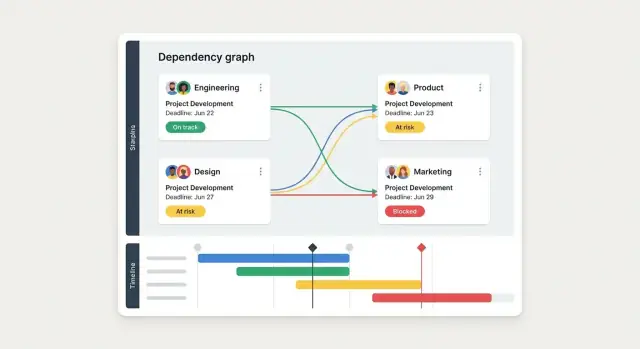
- Dependency graph view for complex releases and multi-team work
- Risk scoring (e.g., aging, missed due dates, high-impact tags)
- SLA analytics to spot chronic bottlenecks and set expectations
- Templates per department so common dependency types are one-click to create
If you need a structured way to prioritize enhancements, tie each idea to a review ritual (weekly status meeting, release planning, incident retros) so improvements are driven by real usage—not guesses.
FAQ
What counts as a “dependency” in a cross-team tracking app?
Start with a one-sentence definition everyone can repeat, then list what qualifies (work item, deliverable, decision, environment/access).
Also write down what does not count (nice-to-haves, general risks, internal tasks that don’t block another team). This keeps the tool from becoming a vague “concern tracker.”
Who should a dependency tracking web app be built for?
At minimum, design for:
- Team leads/engineering managers: what’s blocking delivery and who owns the next move
- PMs/program managers: commitments, handoffs, and escalation paths
- Engineers: the exact ask, context, and acceptance criteria
- Leadership/ops: fewer surprises and trend-level reporting
If you build for only one group, the others won’t update it—and the system will go stale.
What statuses should a dependency go through?
Use a small, consistent lifecycle such as:
- Proposed → Accepted → In progress → Ready → Delivered/Closed
- Rejected (for declined requests)
Then define rules for state changes (e.g., “Accepted requires an owner team and a target date,” “Ready requires evidence”). Consistency matters more than complexity.
What are the minimum fields every dependency should have?
Require only what you need to coordinate:
- Owner team (provider)
- Requester team
- Due date (needed-by)
- Status
- Risk level (Low/Medium/High)
- Notes/context
- Links to source work (ticket/doc/PR)
If you allow missing owner or due date, you’ll collect items that can’t be acted on.
How do you make “done” unambiguous so dependencies don’t get closed early?
Make “done” provable. Require:
- Acceptance criteria
- Sign-off (who confirms)
- Evidence/link (PR, release note, doc, approval)
- Timestamp of closure
This prevents early “green status” updates just to reduce noise.
What roles and ownership rules prevent ambiguity?
Define four everyday roles plus admin:
- Requester: creates the request and provides why/when/criteria
- Owner: single accountable person who delivers or rejects
- Approver: confirms commitments that impact capacity/scope
- Viewer: can follow and comment, but can’t change commitments
- Admin: manages configuration
Keep “one dependency, one owner” to avoid ambiguity; use collaborators for helpers, not accountability.
What screens and views should an MVP include?
Start with views that answer daily questions:
- Dependency list (filterable table with quick actions)
- Dependency detail (context, owners, dates, history)
- Team view (what we owe vs what blocks us)
- Initiative/release view (grouped risk)
- Simple timeline for due dates/handoffs
Optimize for fast updates: templates, inline editing, keyboard-friendly controls, and a prominent “Last updated.”
How do you set up notifications without creating spam?
Alert only on decision points and risk signals:
- New request created (notify owner team)
- Acceptance needed
- Date changed
- Status set to at risk/blocked
- Stale item (no update in X days with due date approaching)
Use watchers instead of broadcasting, support digest mode, and deduplicate notifications (one summary per dependency per time window).
Which integrations are most valuable early on?
Integrate to remove duplicate entry, not to create a second source of truth:
- Start with one issue tracker (Jira/Linear/Azure DevOps) and pull key fields (status, assignee, due date)
- Keep it read-only or one-way at first; add two-way sync only for a small set of fields with conflict rules
- Add SSO early to reduce onboarding friction
- Provide a small API + webhooks (e.g.,
dependency.created,dependency.status_changed)
Keep chat (Slack/Teams) as a delivery channel that deep-links back to the record, not the system of record.
How should you roll out the app and migrate from spreadsheets?
Run a focused pilot before scaling:
- Pick 2–4 teams on one shared initiative
- Define measurable success (fewer surprise blockers, faster owner assignment, higher on-time handoffs)
- Migrate spreadsheets carefully (normalize team names, dedupe, archive old rows)
- Add a lightweight operating cadence (weekly updates before the cross-team sync)
Treat “no owner or due date” as incomplete, and iterate based on where users get stuck.