

Create a Web App for Customer Escalations & Priority Support
Learn how to plan, design, and build a web app that routes escalations, enforces SLAs, and keeps priority support organized with clear workflows and reporting.
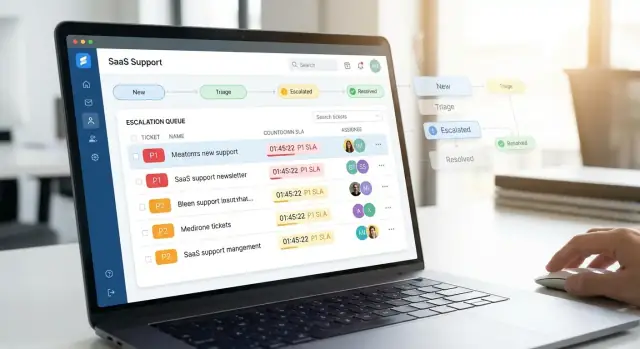
Clarify the Escalation Workflow and Goals
Before you build screens or write code, decide what your app is for and what behavior it should enforce. Escalations aren’t just “angry customers”—they’re tickets that require faster handling, higher visibility, and tighter coordination.
What counts as an escalation?
Define escalation criteria in plain language so agents and customers don’t have to guess. Common triggers include:
- An outage or severe degradation
- A VIP or contracted “priority support” customer
- A looming SLA breach (or repeated breaches)
- A security-, billing-, or legal-impacting issue
Also define what is not an escalation (for example, how-to questions, feature requests, minor bugs) and how those requests should be routed instead.
Roles and responsibilities
List the roles your workflow needs and what each role can do:
- Agent: triages and resolves, updates the ticket, follows playbooks
- Lead: reviews escalations, reassigns work, approves priority changes
- Manager: owns reporting, customer communication standards, escalation policy
- On-call: receives urgent alerts and takes immediate ownership after hours
- Customer admin: submits and tracks tickets, adds internal stakeholders
Write down who owns the ticket at every step (including handoffs) and what “ownership” means (response requirement, next update time, and authority to escalate).
Channels to support first
Start with a small set of inputs so you can ship sooner and keep triage consistent. Many teams begin with email + web form, then add chat once SLAs and routing are stable.
Goals and success metrics
Pick measurable outcomes the app should improve:
- First response time (overall and for escalations)
- Resolution time or time-to-mitigation for incidents
- Reopen rate and “pinged for update” count
- Missed SLA rate and time spent unowned
These decisions become your product requirements for the rest of the build.
Design the Data Model for Tickets, SLAs, and Escalations
A priority support app lives or dies by its data model. If you get the foundations right, routing, reporting, and SLA enforcement become simpler—because the system has the facts it needs.
Start with ticket “basics” (what agents must always know)
At minimum, each ticket should capture: requester (a contact), company (customer account), subject, description, and attachments. Treat the description as the original problem statement; later updates belong in comments so you can see how the story evolved.
Add escalation-specific fields (what makes this “priority”)
Escalations need more structure than general support. Common fields include severity (how bad), impact (how many users/what revenue), and priority (how fast you’ll respond). Add an affected service field (e.g., Billing, API, Mobile App) so triage can route quickly.
For deadlines, store explicit due times (like “first response due” and “resolution/next update due”), not just an “SLA name.” The system can compute these timestamps, but agents should see the exact times.
Model relationships for real work
A practical model usually includes:
- Customers → many Contacts
- Customers → many Tickets
- Tickets → many Comments (internal + public)
- Tickets → many Tasks (checklist items, follow-ups)
This keeps collaboration clean: conversations in comments, action items in tasks, and ownership on the ticket.
Define status states (and keep them consistent)
Use a small, stable status set like: New, Triaged, In Progress, Waiting, Resolved, Closed. Avoid “almost the same” statuses—every extra state makes reporting and automation less reliable.
Decide what must be immutable for audits
For SLA tracking and accountability, some data should be append-only: created/updated timestamps, status-change history, SLA start/stop events, escalation changes, and who made each change. Prefer an audit log (or event table) so you can reconstruct what happened without guesswork.
Set Priority Levels and SLA Rules
Priority and SLA rules are the “contract” your app enforces: what gets handled first, how fast, and who is accountable. Keep the scheme simple, document it clearly, and make it hard to override without a reason.
A simple priority scheme (P1–P4)
Use four levels so agents can classify quickly and managers can report consistently:
- P1 — Critical outage / severe impact: The product is down, data loss is happening, or a security incident is suspected. Multiple users or an entire customer account is blocked.
- P2 — Major degradation: Core features are partially broken, workarounds are limited, and business impact is high but not total.
- P3 — Standard issue: A single user or a non-core feature is affected. A workaround exists. Many tickets should land here.
- P4 — Low urgency / requests: How-to questions, minor bugs, feature requests, billing questions that don’t block usage.
Define “impact” (how many users/customers) and “urgency” (how time-sensitive) in your UI to reduce mislabeling.
Define SLAs by plan, customer tier, and priority
Your data model should allow SLAs to vary by customer plan/tier (e.g., Free/Pro/Enterprise) and priority. Typically, you track at least two timers:
- First response SLA (time to acknowledge and start owning)
- Resolution SLA or next-update SLA (time to solve or provide a meaningful update)
Example: Enterprise + P1 might require a first response in 15 minutes, while Pro + P3 could be 8 business hours. Keep the rules table visible to agents and link it from the ticket page.
Business hours, 24/7, and holiday calendars
Support SLAs often depend on whether the plan includes 24/7 coverage.
- For business-hours SLAs, store a working schedule (timezone, weekdays, start/end times).
- For 24/7 SLAs, the clock always runs.
- Add a holiday calendar (per region if needed) so timers don’t “breach” on days nobody is expected to work.
Make the ticket show both “SLA remaining” and the schedule it’s using (so agents trust the timer).
SLA pauses, “waiting on customer,” and breach handling
Real workflows need pauses. A common rule: pause SLA when the ticket is Waiting on customer (or Waiting on third party), and resume when the customer replies.
Be explicit about:
- Which statuses pause which SLA timers
- Whether pauses apply to response SLA, resolution SLA, or both
- What happens when a breach occurs (e.g., auto-escalate priority, page on-call, notify a manager, tag the ticket “SLA Breached”)
Avoid silent breaches. Breach handling should create a visible event in the ticket history.
Who gets alerted before and after a breach
Set at least two alert thresholds:
- Pre-breach warning (e.g., 50% and 80% of SLA consumed): notify the ticket owner and the owning team channel.
- Breach alert: notify on-call (for P1/P2), team lead, and optionally customer success for high-tier accounts.
Route alerts based on priority and tier so people don’t get paged for P4 noise. If you want more detail, connect this section to your on-call rules in /blog/notifications-and-on-call-alerting.
Build Triage, Routing, and Ownership Logic
Triage and routing are where a priority support app either saves time—or creates confusion. The goal is simple: every new request should land in the right place quickly, with a clear owner and an obvious next step.
Create a triage inbox agents can trust
Start with a dedicated triage inbox for unassigned or needs-review tickets. Keep it fast and predictable:
- Default sort by urgency signals (priority, SLA due time, customer tier)
- Filters for product area, region/timezone, channel (email/chat/web), and “VIP” accounts
- A “No owner / No category” view that highlights data-quality gaps
A good inbox minimizes clicks: agents should be able to claim, re-route, or escalate from the list without opening every ticket.
Define routing rules (and keep them explainable)
Routing should be rule-based, but readable by non-engineers. Common inputs:
- Product area (selected by user, detected from form, or inferred from tags)
- Keywords in subject/body (e.g., “outage”, “invoice”, “SSO”)
- Customer tier (standard vs. priority)
- Region (route to timezone-aligned teams)
Store the “why” for every routing decision (e.g., “Matched keyword: SSO → Auth team”). That makes disputes easy to resolve and improves training.
Manual override and escalation paths
Even the best rules need an escape hatch. Allow authorized users to override routing and trigger escalation paths like:
Agent → Team lead → On-call
Overrides should require a short reason and create an audit entry. If you have on-call alerting later, link escalation actions to it (see /blog/notifications-and-on-call-alerting).
Dedupe and link related work
Duplicate tickets waste SLA time. Add lightweight tools:
- Suggest possible duplicates based on customer + similar subject + time window
- Let agents link tickets to a parent incident (“related to INC-123”)
Linked tickets should inherit status updates and public messaging from the parent.
Ownership rules: one name, one queue
Define clear ownership states:
- Single assignee (one accountable person)
- Team queue (unassigned within a team; use when handoffs are frequent)
- Handoff (explicit transfer with notes and a new SLA checkpoint if needed)
Make ownership visible everywhere: list view, ticket header, and activity log. When someone asks “Who has this?”, the app should answer instantly.
Create a Support Dashboard That Agents Can Use Fast
A priority support app succeeds or fails in the first 10 seconds an agent spends in it. The dashboard should answer three questions immediately: what needs attention now, why, and what can I do next.
Key views agents actually use
Start with a small set of high-utility views rather than a maze of tabs:
- Queue (worklist): the default view with filters for priority, SLA status, channel, product area, and assignee.
- Ticket detail: opened in one click, with context and actions above the fold.
- Customer profile: a compact view of account tier, recent escalations, active incidents, and key contacts.
- SLA board: a time-based view that highlights what will breach soon, not just what is already late.
Visual cues that reduce cognitive load
Use clear, consistent signals so agents don’t have to “read” every row:
- Priority chips (P1–P4) with accessible color + text (never color-only).
- SLA countdown (e.g., “45m to first response”) and a “breach risk” indicator.
- Blockers badges (Waiting on customer, Waiting on engineering, Needs approval) so stuck work is visible.
Keep typography simple: one primary accent color, and a tight hierarchy (title → customer → status/SLA → last update).
Fast actions and triage speed
Every ticket row should support quick actions without opening the full page:
- Assign / reassign, escalate, change priority, request info, set blocker, add internal note.
Add bulk actions (assign, close, apply tag, set blocker) to clear backlogs quickly.
Keyboard, accessibility, and “no surprises”
Support keyboard shortcuts for power users: / to search, j/k to move, e to escalate, a to assign, g then q to return to the queue.
For accessibility, ensure sufficient contrast, visible focus states, labeled controls, and screen-reader friendly status text (e.g., “SLA: 12 minutes remaining”). Also make the table responsive so the same flow works on smaller screens without hiding critical fields.
Notifications and On-Call Alerting
Notifications are the “nervous system” of a priority support app: they turn ticket changes into timely action. The goal isn’t to notify more—it’s to notify the right people, in the right channel, with enough context to respond.
Map the notification types
Start with a clear set of events that trigger messages. Common, high-signal types include:
- Assignment: ticket is assigned or re-assigned to an agent or team
- Mention: someone @mentions an agent in an internal note
- SLA warning: a ticket is approaching first response or resolution targets
- SLA breach: a target is missed (with reason if known)
- Escalation: priority increases, an executive/customer is added, or an incident is declared
Each message should include the ticket ID, customer name, priority, current owner, SLA timers, and a deep link to the ticket.
Choose channels without losing control
Use in-app notifications for day-to-day work, and email for durable updates and handoffs. For true on-call scenarios, add SMS/push as an optional channel reserved for urgent events (like a P1 escalation or imminent breach).
Prevent alert fatigue
Alert fatigue kills response time. Add controls such as grouping, quiet hours, and deduplication:
- Group repeated SLA warnings into a single thread
- Dedupe “assignment changed” flurries within a short window
- Respect quiet hours with an override for critical incidents
Templates + delivery history
Provide templates for both customer-facing updates and internal notes so tone and completeness stay consistent. Track delivery status (sent, delivered, failed) and keep a notification timeline per ticket for auditability and follow-ups. A simple “Notifications” tab on the ticket detail page makes this easy to review.
Ticket Detail Page: Collaboration and Communication
The ticket detail page is where escalation work actually happens. It should help agents understand context in seconds, coordinate with teammates, and communicate with the customer without mistakes.
Separate what customers see vs. what stays internal
Make the composer explicitly choose Customer Reply or Internal Note, with different styling and a clear preview. Internal notes should support quick formatting, links to runbooks, and private tags (e.g., “needs engineering”). Customer replies should default to a friendly template and show exactly what will be sent.
Threaded conversation + safe attachments
Support a chronological thread that includes emails, chat transcripts, and system events. For attachments, prioritize safety:
- Virus scanning and file type allowlists
- Size limits and expiring download links
- Redaction warnings for sensitive data (tokens, passwords)
If you display customer-provided files, make it clear who uploaded them and when.
Macros, quick replies, and saved steps
Add macros that insert pre-approved responses plus troubleshooting checklists (e.g., “collect logs,” “restart steps,” “status page wording”). Let teams maintain a shared macro library with version history so escalations stay consistent and compliant.
A timeline of key events
Alongside messages, show a compact event timeline: status changes, priority updates, SLA pauses/resumes, assignee transfers, and escalation level shifts. This prevents “what changed?” back-and-forth and helps with post-incident review.
Collaboration tools that don’t create noise
Enable @mentions, followers, and linked tasks (engineering ticket, incident doc). Mentions should notify only the right people, and followers should get summaries when the ticket materially changes—not every keystroke.
Security, Privacy, and Permissions
Security isn’t a “later” feature for an escalation app: escalations often contain customer emails, screenshots, logs, and internal notes. Build guardrails early so agents can move fast without oversharing data or losing trust.
Role-based access control (RBAC) that matches real support work
Start with a small set of roles you can explain in one sentence each (for example: Agent, Team Lead, On-Call Engineer, Admin). Then define what each role can view, edit, comment on, reassign, and export.
A practical approach is “default deny” permissions:
- Escalation visibility: restrict by team, queue, and customer account (e.g., only Enterprise queue agents can open Enterprise escalations).
- Edit rights: allow agents to update status and add notes, but limit SLA changes, priority overrides, and escalation cancellations to leads/admins.
- Sensitive fields: treat customer PII (email, phone), security logs, and attachments as separate permissions.
Privacy by design: least-privilege defaults
Collect only what your workflow needs. If you don’t need full message bodies or full IP addresses, don’t store them. When you do store customer data, make it clear which fields are required vs. optional, and avoid copying data from other systems unless you have a reason.
For access patterns, assume “support agents should see the minimum to solve the ticket.” Use account scoping and queue scoping before adding complex rules.
Protect the basics: authentication, sessions, and CSRF
Use proven authentication (SSO/OIDC if possible), require strong passwords when passwords are used, and support multi-factor authentication for elevated roles.
Harden sessions:
- Secure, HttpOnly cookies; short session lifetimes for admin actions
- Rotation on login and privilege changes
- CSRF protection for state-changing requests
Secrets, audit logs, and sensitive access
Store secrets in a managed secret store (not in source control). Log access to sensitive data (who viewed an escalation, downloaded an attachment, exported a ticket), and make audit logs tamper-resistant and searchable.
Retention and exports (without overpromising)
Define retention rules for tickets, attachments, and audit logs (e.g., delete attachments after N days, retain audit logs longer). Provide exports for customers or internal reporting, but avoid claiming specific compliance certifications unless you can verify them. A simple “data export” flow plus an admin-only “delete request” workflow is a good start.
Choose a Tech Stack and Architecture
Your escalation app will only be effective if it’s easy to change. Escalation rules, SLAs, and integrations evolve constantly, so prioritize a stack your team can maintain and hire for.
Pick a stack that fits your team
Choose familiar tools over “perfect” ones. A few common, proven combinations:
- React + Node.js (Express/NestJS): good if you want a highly interactive dashboard and lots of real-time UI.
- Django (Python): strong admin tooling, fast CRUD development, great for workflow-heavy apps.
- Rails (Ruby): excellent conventions for building ticketing-style products quickly.
If you already run a monolith elsewhere, matching that ecosystem often reduces onboarding time and operational complexity.
If you want to move faster without committing to a large engineering build up front, you can also prototype (and iterate) the workflow in a vibe-coding platform like Koder.ai—especially for standard pieces like a React-based agent dashboard, a Go/PostgreSQL backend, and the job-driven SLA/notification logic that’s common in support systems.
Data storage: relational first, search where it helps
For core records—tickets, customers, SLAs, escalation events, assignments—use a relational database (Postgres is a common default). It gives you transactions, constraints, and reporting-friendly queries.
For fast searching across subject lines, conversation text, and customer names, consider adding a search index later (e.g., Elasticsearch/OpenSearch). Keep it optional at first: start with Postgres full-text search, then graduate if you outgrow it.
Background jobs are non-negotiable
Escalation apps depend on time-based and integration work that shouldn’t run in a web request:
- SLA timers and breach checks
- Notifications (email/SMS/push)
- On-call paging
- Syncing messages from email/chat/CRM
Use a job queue (e.g., Celery, Sidekiq, BullMQ) and make jobs idempotent so retries don’t create duplicate alerts.
Define APIs early and keep them consistent
Whether you choose REST or GraphQL, define resource boundaries up front: tickets, comments, events, customers, and users. A consistent API style makes integrations and the UI move faster. Also plan for webhook endpoints from the start (signing secrets, retries, and rate limits).
Hosting and environments
Run at least dev/staging/prod. Staging should mirror prod settings (email providers, queues, webhooks) with safe test credentials. Document deployment and rollback steps, and keep configuration in environment variables—not in code.
Integrations: Email, Chat, CRM, and Webhooks
Integrations turn your escalation app from “another place to check” into the system your team actually works in. Start with the channels your customers already use, then add automation hooks so other tools can react to escalation events.
Email: inbound parsing, outbound sending, threading
Email is usually the highest-impact integration. Support inbound forwarding (e.g., support@) and parse:
- From/To/Cc, subject, body (prefer plain-text fallback), and attachments
- Message-ID and In-Reply-To for threading
- Customer domain and signature hints for contact discovery
For outbound, send from the ticket (reply/forward) and preserve threading headers so replies return to the same ticket. Store a clean conversation timeline: show what the customer saw, not internal notes.
Chat tools (optional): convert messages into tickets
For chat (Slack/Teams/intercom-style widgets), keep it simple: convert a conversation into a ticket with a clear transcript and participants. Avoid syncing every message by default—offer an “Attach last 20 messages” button so agents control noise.
CRM/customer directory sync: identify tier and contacts
CRM sync is how you make “priority support” automatic. Pull company, plan/tier, account owner, and key contacts. Map CRM accounts to your tenants so new tickets can inherit priority rules immediately.
Webhooks for key events
Provide webhooks for events like ticket.escalated, ticket.resolved, and sla.breached. Include a stable payload (ticket ID, timestamps, severity, customer ID) and sign requests so receivers can verify authenticity.
Document and streamline setup
Add a small admin flow with test buttons (“Send test email”, “Verify webhook”). Keep docs in one place (e.g., /docs/integrations) and show common troubleshooting steps like SPF/DKIM issues, missing threading headers, and CRM field mapping.
Testing, Monitoring, and Reliability
A priority support app becomes the “source of truth” during tense moments. If SLA timers drift, routing misfires, or permissions leak data, trust evaporates quickly. Treat reliability as a feature: test what matters, measure what’s happening, and plan for failure.
Test the rules that drive urgency
Focus automated tests on the logic that changes outcomes:
- SLA calculations: start/stop conditions, business hours, pauses, breach thresholds, and “next due” timestamps.
- Routing and ownership: triage rules, round-robin/skill-based assignment, and escalation triggers.
- Permissions: role-based access control for queues, ticket details, internal notes, and customer-visible messages.
Add a small suite of end-to-end tests that mimic an agent’s workflow (create ticket → triage → escalate → resolve) to catch broken assumptions between UI and backend.
Seed data and realistic scenarios
Create seed data that’s useful beyond demos: a few customers, multiple tiers (standard vs. priority), varied priorities, and tickets in different states. Include tricky cases like re-opened tickets, “waiting on customer,” and multiple assignees. This makes triage practice meaningful and helps QA reproduce edge cases quickly.
Observability: know before customers tell you
Instrument the app so you can answer: “What failed, for whom, and why?”
- Error tracking for exceptions in SLA/routing jobs.
- Structured logs with ticket IDs, rule IDs, and correlation IDs.
- Performance monitoring on critical pages and background workers.
Load testing and safe recovery
Run load tests on high-traffic views like queues, search, and dashboards—especially around shift changes.
Finally, prepare your own incident playbook: feature flags for new rules, database migration rollback steps, and a clear procedure to disable automations while keeping agents productive.
Launch Plan, Reporting, and Iteration
A priority support web app is only “done” once agents trust it under pressure. The best way to get there is to launch small, measure what actually happens, and iterate in tight loops.
Start with an MVP that proves the workflow
Resist the urge to ship every feature. Your first release should cover the shortest path from “new escalation” to “resolved with accountability”:
- A triage queue with clear sorting (priority, SLA due, customer tier)
- A ticket detail page that supports fast updates and internal notes
- Visible SLA timers (first response and resolution/next update, if applicable)
- Basic alerts for impending breaches and status changes
If you’re using Koder.ai, this MVP shape maps cleanly to its common defaults (React UI, Go services, PostgreSQL), and the ability to snapshot and roll back can be useful while you’re still tuning SLA math, routing rules, and permission boundaries.
Pilot with a small team and review weekly
Roll out to a pilot group (one region, one product line, or one on-call rotation) and run a weekly feedback review. Keep it structured: what slowed agents down, what data was missing, what alerts were noisy, and where escalation management broke down (handoffs, unclear ownership, or misrouted tickets).
A practical tactic: keep a lightweight changelog inside the app so agents see improvements and feel heard.
Add reporting that drives action, not vanity
Once you have consistent usage, introduce reports that answer operational questions:
- SLA compliance: breach rate by priority, customer tier, and channel
- Escalation volume: trends over time and spikes after releases
- Top drivers: tags/reasons correlated with escalations
- Agent load: open tickets per agent and time-to-first-touch
These reports should be easy to export and easy to explain to non-technical stakeholders.
Iterate on rules and macros using real outcomes
Routing and triage rules will be wrong at first—and that’s normal. Tune triage rules based on misroutes, resolution times, and feedback from on-call. Do the same for macros and canned responses: remove ones that don’t reduce time, and refine those that improve incident communication and clarity.
Publish a simple roadmap and help resources
Keep your roadmap short and visible inside the product (“Next 30 days”). Link to help content and FAQs so training doesn’t become tribal knowledge. If you maintain public-facing info, keep it discoverable via internal links like /pricing or /blog so teams can self-serve updates and best practices.
FAQ
What should count as an escalation in a priority support app?
Write criteria in plain language and bake them into the UI. Typical escalation triggers include:
- Outage or severe degradation
- VIP / priority-support contract
- Imminent or repeated SLA breaches
- Security, billing, or legal-impacting issues
Also document what isn’t an escalation (how-to questions, feature requests, minor bugs) and where those should be routed instead.
Which roles should you define, and how do you assign ownership?
Define roles by what they can do in the workflow, then map ownership at every step:
- Agent: triage, resolve, update ticket, follow playbooks
- Lead: approve priority changes, reassign work, review escalations
- Manager: policy, reporting, customer communication standards
- On-call: urgent after-hours ownership and paging response
- Customer admin: submit/track tickets, add stakeholders
For each status, specify who owns the ticket, required response/update times, and who has authority to escalate or override routing.
Which support channels should you build first (email, web, chat)?
Start with a small set so triage stays consistent and you can ship faster—commonly email + web form. Add chat after:
- SLAs are stable
- Routing rules are working
- Ownership and handoffs are clear
This reduces early complexity (threading, transcript syncing, real-time noise) while you validate the core escalation workflow.
What fields are essential in the ticket and escalation data model?
At minimum, each ticket should store:
- Requester (contact) and company (account)
- Subject, description, attachments
- Status, assignee/queue, timestamps
For escalations, add structured fields like severity, impact, priority, and affected service (e.g., API, Billing). For SLAs, store explicit due timestamps (e.g., first response due, resolution/next update due) so agents can see exact deadlines.
How should statuses and audit history be designed for reliable SLA reporting?
Use a small, stable status set (e.g., New, Triaged, In Progress, Waiting, Resolved, Closed) and define what each status means operationally.
To make SLAs and accountability auditable, keep an append-only history for:
- Status changes (who/when)
- SLA start/stop and pause/resume events
- Priority/escalation changes
An event table or audit log lets you reconstruct what happened without relying on “current state” guesses.
How do you set priority levels and SLA rules that agents will follow?
Keep priority simple (e.g., P1–P4) and tie SLAs to customer tier/plan + priority. Track at least two timers:
- First response SLA: time to acknowledge and take ownership
- Resolution or next-update SLA: time to fix or provide a meaningful update
Make overrides possible but controlled: require a reason and record it in the audit history so reporting stays credible.
How do you handle business hours, holidays, and SLA pauses like “waiting on customer”?
Model time explicitly:
- Business-hours SLAs: store timezone, working days, start/end times
- 24/7 SLAs: clock always runs
- Holiday calendars: prevent false breaches when nobody is expected to work
Define which statuses pause which timers (commonly Waiting on customer/third party) and what happens on breach (tag, notify, auto-escalate, page on-call). Avoid “silent” breaches—create a visible ticket event.
What’s the best way to implement triage, routing rules, and manual overrides?
Build a triage inbox for unassigned/needs-review tickets with sorting by priority + SLA due time + customer tier. Keep routing rule-based and explainable using signals like:
- Product area (form field, tag, or inference)
- Keywords (e.g., “SSO”, “invoice”, “outage”)
- Customer tier and region/timezone
Store the reason for each routing decision (e.g., “Matched keyword: SSO → Auth team”) and allow authorized overrides with a required note and audit entry.
What should the dashboard and ticket list prioritize for agent speed?
Optimize for the first 10 seconds:
- A default queue/worklist with filters (priority, SLA risk, channel, product area, assignee)
- Clear row-level cues: priority chip (not color-only), SLA countdown, blocker badges
- Fast actions from the list: assign, escalate, change priority, request info, add internal note
Add bulk actions for backlog cleanup, plus keyboard shortcuts for power users and accessibility basics (contrast, focus states, screen-reader-friendly status text).
How do you handle security (RBAC, privacy) and reliability (testing/monitoring) in an escalation app?
Secure escalation data early with practical guardrails:
- RBAC with “default deny” and queue/account scoping
- Separate permissions for sensitive fields (PII, logs, attachments) and for high-impact actions (SLA/priority overrides)
- Tamper-resistant, searchable audit logs for sensitive access (views, downloads, exports)
For reliability, automate tests around the rules that change outcomes (SLA calculations, routing/ownership, permissions), and run background jobs for timers and notifications with idempotent retries to avoid duplicate alerts.