

How to Create a Web App for Feature Request Voting
Plan, build, and launch a web app where users submit feature ideas, vote, and admins triage requests with clear rules, statuses, and reporting.
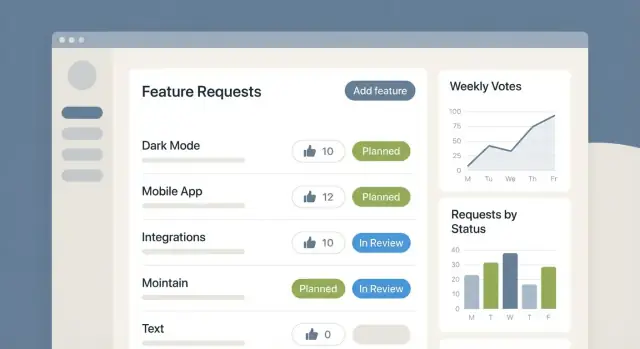
Define Goals and the Core Workflow
Before you design screens or pick a database, decide what “feature request voting” is supposed to accomplish for your product team. A voting portal can be:
- a discovery tool (surface the biggest pain points),
- a prioritization input (compare demand across themes), or
- a communication channel (show progress and reduce repetitive emails).
If you don’t pick the primary purpose, you’ll end up with unclear rules and noisy data.
Who is it for?
Be explicit about the audience and whether they share the same space:
- Customers: bring real-world problems and urgency, but may need moderation.
- Internal teams (Sales, Support, Success): add context and revenue impact, but can over-represent a few accounts.
- Beta users: provide detailed, high-signal feedback, but won’t reflect the wider market.
- Everyone: works best when roles and visibility rules are clear.
Core user workflow (what people must be able to do)
At minimum, users should be able to submit a request, vote, comment, follow updates, and search existing ideas.
Search matters more than it sounds: it prevents duplicates and makes the portal feel useful even when someone doesn’t post anything.
Core admin workflow (what your team must be able to do)
Your product team needs a lightweight triage loop:
- merge duplicates
- change status (e.g., “Under Review,” “Planned,” “In Progress,” “Shipped”)
- tag/categorize
- export data for planning
If any of these steps require manual work outside the app, the system won’t stay current.
Define success upfront
Pick measurable outcomes such as:
- Adoption: active voters and repeat visitors
- Idea quality: fewer duplicates, clearer descriptions
- Time saved: fewer support tickets, faster triage
These goals will drive later decisions, from voting rules to admin tooling.
User Roles, Sign-In, and Permissions
Your voting app will only feel “fair” if people understand who can do what—and if abuse is difficult without making legitimate users jump through hoops. Start with a small set of roles and the permissions attached to each.
Common roles (and what they can do)
- Visitor: can browse the public board and read request details. Consider letting visitors filter and search, but restrict actions like posting and voting.
- Signed-in user: can create feature requests, upvote, comment (if you support comments), and follow updates.
- Moderator: can merge duplicates, edit titles/tags for clarity, and hide low-quality or abusive content.
- Admin: can change statuses (Planned/In Progress/Shipped), manage categories, configure rules, and access reporting.
A simple permission model (e.g., can_vote, can_post, can_moderate, can_admin) is easier to maintain than hard-coding logic throughout the app.
Sign-in options: pick what matches your audience
For most feature request portals, email magic link is the lowest-friction option and avoids password resets. Password login is familiar but adds support overhead. SSO (SAML/OIDC) is usually optional and best reserved for B2B plans that require it.
If you already have an app with accounts, reuse that identity system so users don’t need a separate login.
Anonymous voting: useful, but limit it
Anonymous voting can boost participation, but it’s easier to game. If you allow it, add guardrails like:
- one vote per browser session plus server-side checks
- stricter rate limits for anonymous users
- require sign-in to create a new request or to comment
Minimal profile data to store
Keep profiles lightweight:
- name (display name)
- email (for login + notifications)
- organization (optional; helpful for B2B)
- plan tier (if relevant for weighting, segmentation, or prioritization)
Only collect what you’ll actually use; it reduces privacy risk and makes onboarding faster.
Rate limits that stop spam without blocking real users
Add basic throttles such as “X votes per minute” and “Y new requests per day.” Apply stricter limits to new accounts and anonymous users, and relax them for trusted users (older accounts, verified email, known organizations).
When a user hits a limit, show a clear message and retry time instead of a generic error.
Design the Data Model: Requests, Votes, Statuses
A feature request portal lives or dies by its data model. If your records are consistent, you can sort, filter, de-duplicate, and report without endless manual cleanup.
Feature request: the core fields
Start with the smallest set that still captures intent:
- Title: short, specific, searchable.
- Description: the “why” plus context (who needs it, what problem it solves).
- Category: a single primary bucket (e.g., Billing, Mobile, Integrations) to keep filtering simple.
- Attachments (optional): screenshots or docs; store metadata (filename, size, uploader) and a secure file reference.
Add backend-friendly fields that pay off later: created_by, created_at, updated_at, and a canonical_request_id (useful for merging duplicates).
Votes: pick a model you can explain
Your vote table usually links user_id → request_id, but the rules differ:
- One vote per user: simplest and clearest.
- Vote credits: each user has a limited budget (e.g., 10 credits) they can distribute; store credits_spent per vote.
- Weighted votes: useful for B2B (admins can weight by plan tier); store weight and keep an audit trail.
Whichever you choose, enforce uniqueness (e.g., one active vote per user per request) so totals stay trustworthy.
Statuses: model progress, not promises
A practical status model is: New → Under Review → Planned → In Progress → Shipped, plus Won’t Do.
Store status, status_updated_at, and optionally status_reason (especially for Won’t Do). Consider a lightweight status_history log for transparency and reporting.
Tags, categories, and discussion rules
Use categories for top-level filtering and tags for flexible labels (e.g., “enterprise”, “UI”, “API”). Tags should be many-to-many.
For comments and reactions, define what’s allowed: comments attached to a request, editing within a time window, and reactions either limited to a small set (e.g., 👍/👎) or disabled entirely to avoid noise.
Include moderation fields like is_hidden and hidden_reason so you can manage quality without deleting data.
Plan the User Experience and Key Screens
A feature request portal succeeds or fails on clarity: people should quickly understand what the product team needs, what’s already been asked, and how to participate. Design a small set of screens that guide users from “I have an idea” to “I can see what’s happening with it.”
Home / feed: help users orient quickly
Your home screen is a decision page. It should answer:
- “What are others asking for?”
- “Where should I start?”
Include simple feed modes such as Trending and Newest. If you offer a “For you” view, keep it optional and explain why items appear (e.g., based on tags a user follows).
Show lightweight context on each card: title, short summary, status, vote count, and a hint of activity (recent comment or update).
Request detail page: make the story obvious
The detail page should read like a mini case file. Lead with a crisp problem statement (what the user is trying to achieve), then supporting details.
Include:
- votes and a clear “why this matters” summary
- comments for discussion and clarifications
- status and a visible history/timeline of updates
Keep key actions easy to find: Vote, Follow, and Copy/share link.
Submission flow: reduce vague, duplicate requests
Most low-quality requests come from unclear prompts. Use a short template that nudges users to write usable input:
- What problem are you solving?
- Who is affected?
- What outcome would “better” look like?
As they type, surface suggested similar requests so users can upvote instead of creating duplicates.
Search and filters: the “find before you post” habit
Make search prominent on every page. Add filters that match how people think: category, status, tags, and timeframe (e.g., last 30 days).
Keep the filter UI compact, and let users share filtered views via URL for quick collaboration.
Handle Duplicates and Content Quality
Duplicate requests are inevitable: different users describe the same need with different words, or request a feature that already exists. Handling duplicates well keeps your board readable and makes voting meaningful.
Define duplicates and merging rules
Start with a clear definition: a “duplicate” is a request that asks for the same outcome for the same user group, even if the implementation differs.
If two posts are “related but distinct” (e.g., same area of the product but different use cases), keep them separate and add a relation tag instead of merging.
When you merge, pick a canonical request (usually the clearest title, best description, or oldest post with the most activity) and convert the others into “Merged into #123” records.
Make merges visible and understandable
Show the merged relationship to users on both sides:
- On the duplicate: a banner linking to the canonical request
- On the canonical: a small “Merged from X requests” section with links
This avoids confusion and reduces “Where did my post go?” support tickets.
Decide what happens to votes
Move votes to the canonical request automatically, and preserve attribution (“Your vote was moved to…”) so users don’t feel erased.
Keep an audit trail (who merged, when, and why) for moderators.
Prevent duplicates at submission time
As the user types a title, suggest similar requests using basic search (title + tags) and show the top matches with vote counts. A gentle prompt like “Is one of these the same?” can reduce duplicates dramatically.
Use a consistent moderation checklist
Give moderators a short checklist:
- clear title
- one problem per request
- useful context
- no private data
- correct category
- merge/relate/approve decision
Consistency builds trust and keeps the idea management queue manageable.
Set Voting Rules and Anti-Abuse Measures
Voting is the engine of a feature request portal, so define rules that are easy to understand and hard to game. Predictable mechanics also reduce support tickets (“why did my idea drop?”) and make the board feel fair.
Pick a voting model
Start by choosing what a “vote” means:
- Upvote-only: simplest and most common for a user suggestions board.
- Up/down votes: helps separate “nice-to-have” from “please don’t,” but can create negativity.
- Priority points: each user gets a small budget (for example, 10 points) to distribute across requests. This encourages tradeoffs and can produce higher-quality product roadmap input.
Set constraints that discourage abuse
At minimum, enforce one vote per request per user. If you allow downvotes or points, apply equivalent limits (one downvote, or a fixed points budget).
Add lightweight friction where it matters:
- Cooldowns for rapid voting or account actions (prevents “vote storms”).
- Bot checks on suspicious patterns (CAPTCHA only when triggered).
- Rate limits per IP/device for anonymous traffic.
Decide whether votes are reversible
Let users change or remove votes in most cases—needs change, and reversibility reduces frustration.
If you use priority points, reversibility is essential so users can reallocate as your product evolves.
Make sorting transparent
Sorting shapes behavior, so disclose it. If “Top” is based on votes, say so. If “Trending” uses recent activity, explain that too.
Consider offering multiple views: “Top,” “Newest,” and “Recently Updated,” with clear labels.
Encourage thoughtful voting
Consider limits like X votes per week (or a points refresh each month). Paired with good triage workflow, this nudges users to back what matters most instead of clicking everything.
Build Admin Tools for Triage and Moderation
Admin tools are what keep a feature request portal usable once submissions start flowing. Without them, the backlog becomes a mix of duplicates, vague ideas, and heated threads that drain your team’s time.
Start with a clear moderation queue
Give admins a single place to review:
- new submissions before they go fully public (optional)
- items flagged by users (spam, abuse, off-topic)
- requests that look like duplicates (matched by title/keywords)
Each item should show the request summary, author, vote count, similar requests, and recent comments so a moderator can decide quickly.
Enable bulk actions for fast triage
Most admin work is repetitive. Add bulk actions so moderators can select multiple requests and apply changes in one go:
- tag (e.g., “Integrations”, “Billing”, “Mobile”)
- change status (Planned, Under Review, Not Planned, Shipped)
- merge duplicates into a canonical request
- close with a reason and optional link to a related request
This is especially useful after product launches when feedback spikes.
Keep internal notes separate from public discussion
Public comments are for users. Admins need a private space for context: links to support tickets, revenue impact, technical constraints, and decision rationale.
Make internal notes visible only to staff and keep them clearly separated from the public thread to avoid accidental posting.
Add an audit log for accountability
Track key actions like status changes, merges, and deletions with timestamp and actor. When a customer asks “Why did this disappear?” you’ll have a reliable history.
Make reporting painless with simple exports
A basic CSV export (filtered by status, tag, date range, or votes) helps for roadmap meetings and stakeholder updates—without forcing everyone into the admin UI.
Notifications and Subscriptions
Notifications are how your feature request portal stays useful after the first visit. Done well, they reduce repeat questions (“Any updates?”) and keep users engaged without flooding inboxes.
What to notify users about
Start with a small set of events that map to real expectations:
- Status changes (e.g., “Planned”, “In Progress”, “Released”)
- New comments on a request they follow
- Mentions (optional) when someone is @-tagged in a comment
Keep the copy specific: include the request title, the new status, and a direct link back to the thread.
Subscriptions: make following the default
Let people follow/subscribe to a request with one click. Consider auto-subscribing a user when they:
- submit a new request
- vote on a request
- leave a comment
This simple rule cuts down on repeated support tickets because users can self-serve updates.
In-app vs. email
Use in-app notifications for fast feedback loops (badge count, notification drawer). Use email for important, less frequent changes—especially status updates.
To avoid spamming users, offer digest emails (daily or weekly) that bundle multiple updates. A digest is also a good default for users who follow many requests.
Preferences and unsubscribe controls
Every email should include an unsubscribe link, and the app should have clear notification preferences (e.g., “Only status changes”, “All activity”, “Digest only”). Link to them from a settings page such as /settings/notifications.
Good notification hygiene builds trust—and trust increases participation.
Connect Voting to Roadmap and Release Updates
Voting only feels meaningful when people can see what happened next. The simplest way to close the loop is to connect your feature request portal to a lightweight roadmap and a changelog—both driven by the same request statuses.
Tie requests to a public roadmap (optional)
If you publish a roadmap at /roadmap, base it on status buckets that are easy to understand: “Under Review,” “Planned,” “In Progress,” and “Shipped.” Keep the mapping consistent so users learn what each status means.
Not everything needs to be public. A common compromise is: show high-level themes publicly, keep exact dates and internal projects private. This prevents accidental overpromising while still giving voters product roadmap input they can trust.
Link shipped work back to the original votes
When something ships, let admins mark the request as “Shipped” and attach a release reference.
Ideally, the shipped feature page shows:
- the original request title and summary
- total votes (and maybe top comments)
- a short “What changed” note from the team
This turns your upvoting system into a visible feedback triage workflow rather than a dead-end suggestion box.
Publish a changelog that references requests
At /changelog, create entries for releases and link each entry to related requests (and vice versa). For example: “Added SSO for teams (related: #123, #98).”
Users who supported an idea can quickly confirm it landed, and new visitors can browse outcomes before submitting duplicates.
Decide what’s public vs. private
Make an explicit policy: which statuses are visible, whether vote counts are public, and whether internal notes stay admin-only. Clear boundaries keep your idea management process predictable.
Analytics and Reporting That Help Decisions
Analytics in a feature request voting app isn’t about vanity metrics—it’s about making trade-offs visible. The right dashboards help you answer three questions quickly:
- What are users asking for?
- Who is asking?
- How urgent is it for the product team to respond?
The core metrics to track
Start with a small set you can trust:
- Submissions: new requests per day/week, and how that changes after releases
- Votes: total votes, votes per request, and vote growth over time
- Active users: people who viewed, voted, or commented (not just signed in)
- Time-to-triage: how long it takes to move a request from “New” to an owned status
Time-to-triage is especially useful because it reflects internal health: if it spikes, users feel ignored even when your roadmap is strong.
Themes, categories, and segmentation
Add reporting that surfaces patterns:
- Top categories (by submissions and by votes)
- Recurring themes using tags or lightweight topic labels
If you have customer metadata (plan, industry, account size), segment by it. A request with fewer votes may still matter if it’s heavily supported by a strategic segment.
Catch abuse without turning into a security project
A few anomaly views go a long way:
- vote bursts on a single request
- many votes from the same network identifier (only if you store it)
- new accounts voting immediately and only once
Turn dashboards into a weekly habit
Set a weekly review: top movers, aging “New” requests, and the top themes. Document outcomes (“merged,” “planned,” “not now”) so reporting reflects decisions—not just activity.
Security, Privacy, and Compliance Basics
Security is easiest to add when you decide on it early. A feature request portal handles accounts, user-generated content, and “signals” like votes—so you need baseline protections before you invite real users.
Account and session safety
If you support passwords, store them using a modern hashing algorithm (e.g., bcrypt/argon2) and never store plaintext.
Prefer short-lived sessions with secure cookies (HTTP-only, Secure, and a sensible SameSite setting). For forms that change data (submitting ideas, voting, commenting), add CSRF protection so other sites can’t trigger actions on your users’ behalf.
Validate input and prevent XSS
Treat every feature request, comment, and title as untrusted input:
- validate on the server: length limits, allowed characters, required fields
- render content safely: escape HTML by default, and only allow formatting (like Markdown) if you sanitize it
- be careful with links: prevent
javascript:URLs and similar tricks
This protects users from injected scripts (XSS) and keeps your UI stable.
Abuse controls and monitoring
Voting systems attract spam and “vote storms.” Add rate limiting for:
- new submissions (per account and optionally per IP)
- comments/replies
- votes/unvotes
Pair this with basic monitoring (spikes, repeated failures, repeated duplicate submissions). Even simple limits can keep moderation manageable.
Privacy: collect less, explain clearly
Decide what personal data you store and why (email for sign-in, display name for attribution, IP for abuse prevention, etc.). Keep it minimal, document retention (how long you keep logs), and make it easy to find in your privacy notice.
If you serve users in regulated regions, plan for GDPR/CCPA basics: access requests, deletion requests, and a clear purpose for each field.
Admin-only deletion policy
Create a consistent rule set admins follow:
- when to remove content (spam, harassment, personal data)
- whether you “soft delete” (hide but retain for audits) or “hard delete”
- how you communicate removals to the submitter
Consistency reduces accusations of bias when ideas get removed.
Choose a Tech Stack and Plan the MVP Launch
A feature request portal succeeds more from clear rules and fast iteration than from fancy architecture. Pick a stack your team can ship and support confidently.
Pick a stack that matches your team
Choose one “boring” path end-to-end:
- Frontend: React/Next.js, Vue/Nuxt, or a server-rendered approach (Rails, Django templates) if your team prefers it.
- Backend: Node (Nest/Express), Rails, Django, or Laravel.
- Database: Postgres is a strong default for requests, votes, and audit logs.
- Hosting: managed platforms reduce ops work for an MVP.
Optimize for developer familiarity, not theoretical performance.
If your goal is to validate the workflow quickly (submission → search → voting → status updates → moderation) without building everything from scratch, a vibe-coding platform like Koder.ai can help you generate the initial web app via chat, iterate on the UX, and export source code when you’re ready. Koder.ai is designed for full applications (React on the web, Go + PostgreSQL on the backend, and Flutter for mobile) and supports practical product work like deployment/hosting, custom domains, and snapshots with rollback.
Deployment basics: environments, migrations, backups
Set up dev → staging → production early so you can test voting rules without risking real data.
Plan for:
- schema migrations (and a rollback strategy)
- automated backups for the database
- basic monitoring (errors + uptime)
Automated tests for the tricky parts
Even a small app needs tests around the logic that affects trust:
- voting limits (per user, per time period)
- duplicate merging behavior (vote transfer, redirects)
- permission checks (admin vs. regular user)
Define MVP scope (and what to postpone)
A good MVP usually includes: create request, search, upvote, status updates, and admin moderation.
Common “later” items: SSO, vote weighting, deep integrations (Jira/Linear), advanced analytics, and custom roles.
Launch plan: start small, learn quickly
Invite a pilot group (power users + internal teammates), publish clear guidelines, and watch how people actually submit and vote.
Run a short feedback cycle, fix friction, then expand access. A lightweight /pricing or /blog update page can help set expectations and share progress.
FAQ
What is the main goal of a feature request voting web app?
Start by choosing the portal’s primary purpose:
- Discovery (find the biggest pain points)
- Prioritization input (compare demand across themes)
- Communication (show progress and reduce “any updates?” messages)
Then define success metrics (adoption, fewer duplicates, time-to-triage). Those goals should drive voting rules, statuses, and admin tooling.
What features should the user workflow include at MVP?
A practical minimum user workflow is:
- Submit a request
- Vote
- Comment (optional)
- Follow updates
- Search existing ideas
Make search prominent so users upvote existing requests instead of creating duplicates.
What admin capabilities are essential to keep the portal usable?
At minimum, your team needs tools to:
- Merge duplicates into a canonical request
- Change status (Under Review → Planned → In Progress → Shipped, plus Won’t Do)
- Tag/categorize requests
- Export data (CSV) for planning
If any of these require manual work outside the app, the board will drift out of date.
What roles and permissions should a feature request portal have?
A simple, maintainable model is:
- Visitor: browse/search
- Signed-in user: post, vote, comment, follow
- Moderator: edit for clarity, merge duplicates, hide abusive/low-quality content
- Admin: manage statuses, categories, rules, and reporting
Implement permissions as flags (e.g., can_vote, can_post, can_moderate, can_admin) to avoid brittle role logic.
Which sign-in method works best for a voting portal?
Common options are:
- Email magic link: lowest friction, minimal support overhead
- Password login: familiar, but adds reset/support burden
- SSO (SAML/OIDC): best as a B2B/enterprise add-on
If you already have an account system, reuse it so users don’t need a separate login.
Should I allow anonymous voting, and how do I prevent abuse?
You can allow it, but add guardrails because it’s easier to game:
- Limit to one vote per browser session plus server-side checks
- Apply stricter rate limits for anonymous traffic
- Require sign-in to create requests or comment
This keeps participation high without turning moderation into a full-time job.
What data fields should a feature request include?
Keep the request entity small but consistent:
- Title (searchable)
- Description (the “why” and context)
- Category (single primary bucket)
- Attachments (optional; store metadata + secure reference)
Add backend fields like created_by, created_at, updated_at, and canonical_request_id to support merging and reporting.
How should I model votes in the database?
Pick one model you can explain clearly:
- One vote per user per request (simplest)
- Vote credits/points (fixed budget per user; store
credits_spent) - Weighted votes (B2B tiers; store
weightand keep an audit trail)
Regardless of model, enforce uniqueness (one active vote per user per request) so totals stay trustworthy.
What’s the best way to handle duplicate feature requests?
Define duplicates as “same outcome for the same user group,” even if the wording differs.
Operationally:
- Select a canonical request
- Convert others into “Merged into #123” records
- Move votes to the canonical request automatically
- Show the relationship both ways (banner on duplicate; “Merged from X” on canonical)
Keep an audit trail (who merged, when, why) to reduce disputes.
How do notifications and subscriptions keep users engaged without spamming them?
Use a small set of notifications users expect:
- Status changes
- New comments on followed requests
- Mentions (optional)
Make following easy (often auto-follow on submit/vote/comment) and offer controls:
- In-app notifications for quick feedback
- Email for important updates
- Optional daily/weekly digests
- Clear unsubscribe and preferences (e.g.,
/settings/notifications)