

How to Build a Web App for Influencer Campaign Management
Learn how to plan and build a web app that manages influencer campaigns, contracts, payments, and performance metrics—from data model to dashboards.
Clarify Goals and MVP Scope
Before you pick features, get clear on who the app is for and what “done” looks like. Influencer campaign management touches multiple teams, and each one measures success differently.
Define your primary users
Start with a simple list of roles and what they need from day one:
- Brand or agency managers: plan campaigns, assign creators, track deliverables, see results
- Creators: accept briefs, upload links/assets, view deadlines, confirm payment status
- Finance: track approvals, invoices, payouts, and exceptions
- Legal: manage contract templates, approvals, and audit trails
If you try to satisfy everyone equally in v1, you usually end up with a busy UI that nobody loves. Pick a primary user (often the campaign manager) and design outward.
Write down core outcomes (not features)
A useful framing is: “After using this app, we can…”
- Run campaigns end-to-end without spreadsheets
- Get contracts signed without chasing email threads
- Track performance and report ROI with confidence
Choose an MVP with sharp edges
Define what must be true for a campaign to run inside your MVP: campaign setup, creator roster, deliverables checklist, basic contract + payment status, and a simple performance view. Everything else (advanced automations, deep integrations, custom dashboards) can wait.
If you want to validate the workflow quickly, a vibe-coding platform like Koder.ai can help you prototype these core screens and flows via chat (campaign setup → deliverables → approvals → payout status) before you commit to a large engineering backlog.
Set product success metrics
Agree on measurable targets, such as:
- Time saved per campaign (setup, follow-ups, reporting)
- Fewer errors (missing links, wrong rates, missed deadlines)
- Faster payouts (approval-to-payment time)
These metrics keep scope decisions grounded when “nice-to-have” requests appear.
User Flows and Requirements Checklist
Before screens and databases, align on how work moves through your app. A clear user flow prevents “custom” features that are really just missing basics.
Map the end-to-end workflow
Write the happy path in plain language, from first contact to final report:
Discover → Outreach → Brief → Contract → Content production → Review/Approval → Publish → Pay → Report.
For each step, capture: who does it (brand, agency, creator), what they need to see, and what proof is required (e.g., a link to a post, screenshots, or platform analytics).
Define statuses (your app’s backbone)
Statuses make filtering, automation, and reporting possible. Document required states for:
- Campaigns: Draft, Recruiting, In-flight, Reporting, Closed
- Creators: New, Contacted, Negotiating, Signed, Active, Paused, Blacklisted
- Deliverables: Requested, In progress, Submitted, Needs changes, Approved, Published
- Invoices/Payments: Pending, Approved, Scheduled, Paid, Failed
Keep them minimal at first—every extra status adds UI and edge cases.
Capture constraints and rules
List the non-negotiables that affect planning:
- Budgets (total, per creator, per deliverable) and currency/tax handling
- Timelines (brief due date, publish window, embargoes)
- Deliverable counts and platforms (TikTok/Reels/YouTube/Stories)
- Approval rules (who can approve, what happens if late)
Collect reporting requirements early
Agree on how clients expect to slice results:
By campaign, creator, platform, and date range—plus the exact metrics that matter (reach, views, clicks, conversions) and what “success” means for each campaign.
Data Model: Campaigns, Creators, Deliverables, and Metrics
A clear data model prevents two common failures in an influencer campaign management app: losing track of who owes what, and arguing about what “worked.” Start by naming the core entities and the minimum fields each must have.
Core entities (the “tables” you’ll live in)
At a minimum, plan for: Brand/Client, Campaign, Creator/Influencer, Deliverable, Contract, Payment, Asset/File, and Metric.
Keep each entity focused. For example, a Campaign holds the brief, dates, budget, and goals; a Creator holds profile details, rates, and contact info; a Deliverable holds platform, due date, status, and a link to the content.
Relationships that match real work
Model relationships explicitly:
- One Campaign → many Creators (a campaign roster)
- One Creator → many Deliverables (posts, stories, videos)
- One Contract per Creator–Campaign (terms vary per creator even within the same campaign)
This structure makes it easy to answer questions like “Which creators are late?” or “Which deliverables are approved but unpaid?”
Audit fields you’ll be grateful for later
Add created_by, created_at/updated_at, and a lightweight status history (who changed what, when). Include notes on Campaigns, Creators, Deliverables, and Payments so context doesn’t get buried in email threads.
Files: briefs, proofs, invoices
Decide whether you’ll store files in-app or store links to external storage. Either way, attach files to the right record (e.g., content proofs to Deliverables, invoices to Payments) and capture metadata like version, uploader, and approval status.
Multi-client agencies: separate tenants from day one
If you serve multiple brands or agency clients, add a tenant/client identifier to every record and enforce it in queries. Retrofitting separation later is expensive and risky.
Information Architecture and UI Wireframes
Good information architecture keeps campaign work from scattering across tabs, spreadsheets, and chat threads. Before you design visuals, map the “objects” users touch most—campaigns, creators, deliverables, contracts, payments, and results—then decide where each object lives and what the default navigation should be.
Key screens to wireframe first
Start with a small set of screens that cover 80% of daily tasks:
- Campaign list: sortable table with quick stats (budget, live posts, next due date) and saved views
- Campaign detail: the hub for everything related to one campaign
- Creator profile: contact details, platforms, rates, past collaborations, notes, and documents
- Contract view: template selection, redlines, approval status, and signature tracking
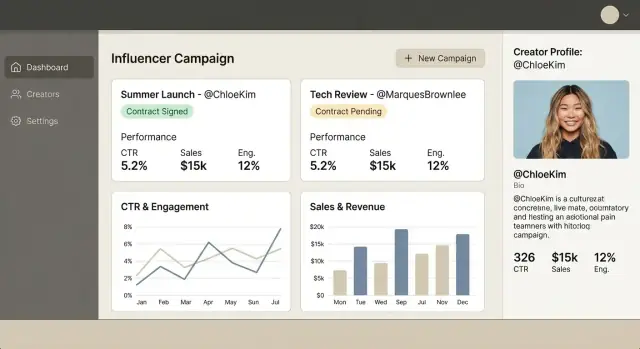
- Reporting dashboard: simple charts plus “what changed since last week”
A single source of truth: the campaign timeline
In the campaign detail screen, design a timeline that aggregates every meaningful event in one place: outreach sent, brief approved, contract signed, content uploaded, edits requested, post went live, invoice received, payment sent.
Make it filterable (e.g., “only approvals” or “only payments”) so teams can quickly answer, “Where are we stuck?”
Search, filters, and saved views
Influencer teams live in lists, so design fast filtering from day one:
- Platform, status, date range, budget range
- Tags (e.g., “UGC,” “whitelisted,” “rush”), owner, client
- Full-text search across campaign name, creator handle, and notes
Add saved views like “Needs approval,” “Posts due this week,” or “Waiting on invoice.”
Bulk actions that actually save time
Plan bulk actions directly in the list UI: send outreach emails, update statuses, export selected rows, and prepare payment batches.
Keep bulk steps explicit (review → confirm → log to timeline) so changes are traceable and client questions are easy to answer later.
Campaign Planning and Workflow Management
Campaign planning is where an influencer campaign management app stops being a spreadsheet and starts being a system. The goal is to make every campaign repeatable: the team knows what to do next, creators know what’s expected, and clients can see progress without chasing updates.
Start with a campaign brief template
Create a standard brief that becomes the “source of truth” for everyone involved. Keep it structured so it can power checklists and reports later:
- Goals (awareness, clicks, sales), target audience, and key message/talking points
- Brand safety rules (do/don’t language, competitor exclusions, required disclosures)
- Creative references and approval expectations
Plan deliverables as a timeline, not a note
Deliverables should be first-class objects with clear details:
- Post type (Reel, Story, YouTube integration), quantity, due date/time zone
- Revision limits and what counts as a revision
- Required links, hashtags, UTM parameters, and tagging requirements
This enables reminders, capacity planning, and later performance comparisons by deliverable type.
Build approvals into the workflow
Model the real steps creators and brand teams follow:
- Draft submission (assets + captions + link previews)
- Feedback loop (comments, change requests, versioning)
- Final approval (who approved, when, what changed)
- Publish confirmation (live URL, screenshot, post timestamp)
Add budget controls early
Track budget in three states—planned vs. committed vs. paid—and trigger alerts when a campaign is trending over plan (e.g., added deliverables, rush fees, extra revisions). This keeps finance surprises from showing up after the content is live.
Contracts: Templates, Approvals, and E‑Signature Options
Contracts are where influencer campaigns succeed or fail operationally: one missing usage-rights clause can turn “great content” into a legal headache. Treat contracts as structured data, not just PDFs.
Store the terms as fields (not only a file)
Alongside an uploaded document, capture key terms in your database so they’re searchable, reportable, and reusable:
- Rate and payment terms (flat fee, commission, split payments)
- Deliverables (platform, count, format, deadlines)
- Usage rights (where, how long, paid amplification allowed)
- Exclusivity/non-compete windows
- Timeline milestones and cancellation terms
This lets your team filter “creators with 6‑month exclusivity” or auto-check whether planned paid ads violate usage rights.
Templates + variables = faster, fewer mistakes
Start with a few templates (e.g., TikTok post, multi-post bundle, affiliate-only). Support variables such as creator name, campaign name, dates, deliverable list, and payment schedule.
A simple “preview” view helps non-legal teammates sanity-check before sending.
If you have an internal approval step, model it explicitly (who must approve, in what order, and what happens if someone rejects).
Track contract states and version history
At minimum, track: drafted → sent → signed, plus expired and amended.
Every edit should create a version with a timestamp and author (“who changed what”) and preserve prior files/terms for auditability.
E‑signature: choose the right starting point
You have two realistic paths:
- Integrate an e-sign provider for a smoother signing flow and better evidence
- Start simple with upload + signer confirmation (checkbox + timestamp), then upgrade later
Whichever you choose, store the signed artifact, signing date, and any amendments as separate linked records so campaign ops can find the current contract in one click.
Payments and Finance Tracking
Payments are where influencer programs often get messy: scattered spreadsheets, unclear “what’s owed,” and last-minute chasing. A good web app keeps money movement auditable without turning you into a payments processor.
Collect payment details safely
If you need creator payout details, prefer redirecting to a trusted provider or using tokenized collection (e.g., via a payment platform’s hosted form). Avoid storing sensitive data like full bank details or card numbers unless you have a compliance reason and the expertise to handle it.
Store only what you need for operations:
- Payout method (e.g., bank transfer, PayPal) and a masked identifier
- Billing contact info for invoice requests
- Tax/VAT fields if relevant (as text documents/attachments)
Milestones, terms, and invoices
Model payments as milestones tied to campaign deliverables: upfront, on approval, on publish, and net terms (e.g., Net 15/30). Each milestone should show amount, currency, due date, and trigger event.
For invoicing, support “invoice requests” rather than forcing a single format:
- Generate an invoice template or request email
- Allow attachments (creator invoice PDFs) and internal notes
- Link invoices to milestones so finance and account teams see the same truth
Payout statuses and reconciliation
Add payout status tracking: pending → submitted → paid, with failure states (failed/refunded) and a reason field.
Include CSV exports for accounting and a reconciliation log (who matched a payout to a bank entry, when, and what changed) to reduce end-of-month surprises.
Performance Metrics and Attribution Setup
If you can’t trust the numbers, you can’t manage the campaign. Start by choosing a small, clear set of metrics you’ll track everywhere—then expand only when the team agrees on definitions.
Decide what you measure (and what it means)
Pick primary metrics by objective:
- Awareness: reach, impressions, views
- Engagement: likes, comments, saves, engagement rate (define the formula)
- Traffic: clicks, landing page sessions
- Sales: conversions, revenue, ROAS
Write short tooltips in the app that define each metric and the reporting window (for example: “7 days after posting”). This prevents “Why doesn’t your impression count match mine?” conversations.
Implement attribution that works in real life
Support multiple attribution methods because creators and platforms vary:
- UTM links (auto-generated per creator + per deliverable)
- Promo codes (unique code per creator)
- Affiliate links (trackable IDs)
- Dedicated landing pages per creator
Store these as first-class objects tied to each deliverable so you can answer: “Which Story drove the conversions?” not just “Which creator?”
Handle data gaps without breaking reporting
Not every platform allows full API access. Plan for:
- Manual entry with required fields and validation
- Screenshot uploads as evidence (with date and deliverable reference)
- API imports where available, with “source” labels (manual vs import)
Rollups: deliverable → creator → campaign
Track metrics per deliverable, then roll them up to creator and campaign totals. Keep both raw values and calculated rates so reports stay consistent as data updates.
Integrations: Social Data, Email, Affiliate, and Tracking Tools
Integrations are where an influencer campaign management app stops being “another spreadsheet” and starts saving real time. The goal isn’t to connect everything—it’s to connect the few systems your team already trusts.
Essential integrations to prioritize
Start with the tools that directly affect daily execution:
- Email + calendar (Gmail/Outlook, Google/Microsoft Calendar) to log outreach, schedule content dates, and reduce manual follow-ups
- E-signature (DocuSign/HelloSign/Dropbox Sign) so contract status is visible inside the campaign timeline
- Link tracking (UTM builders, short links) so every deliverable has a trackable URL tied to a creator and post
- Affiliate platforms (Impact, CJ, ShareASale, etc.) to pull commission, orders, and coupon usage
- Social metrics (Instagram, TikTok, YouTube) for reach, views, engagement, and post URLs
Import/export flows that teams actually use
Plan “escape hatches” from day one:
- Import creator lists and tags from CSV to seed your creator CRM
- Export campaign briefs and creator assignments for internal reviews
- Export reporting CSVs for finance teams and client portals
Reliability: webhooks, rate limits, retries
Where available, prefer webhooks (e.g., contract signed, affiliate conversion posted) instead of polling.
For APIs you must poll, add rate limiting, backoff retries, and clear error messages so a temporary outage doesn’t break reporting.
Multi-client settings (per tenant)
Store integration tokens and defaults per client/tenant: connected accounts, tracking templates, approved domains, and who can authorize connections. That keeps permissions clean and prevents cross-client data leaks.
Roles, Permissions, and Creator Access
Permissions are where an influencer campaign management app either stays tidy—or turns into a shared spreadsheet with anxiety. Define roles early, then translate them into clear, testable rules.
Core roles to plan for
Most teams fit into a few predictable buckets:
- Admin: manages org settings, integrations, and user access
- Campaign manager: owns briefs, timelines, approvals, and creator comms
- Analyst: can view performance data, attribution, and export reports
- Finance: manages payouts, invoices, tax fields, and payment status
- Client viewer: read-only access to selected campaigns and reports
Permission rules that prevent surprises
Write permissions in plain language first, then implement role-based access control (RBAC) with exceptions only when truly necessary. Typical rules include:
- Contracts: view/download limited to admin + campaign manager + finance; clients see only signed PDFs if allowed
- Budgets and rates: editable by admin/finance; campaign managers may request changes but not finalize
- Content approvals: campaign manager approves; clients can comment/approve only on assigned campaigns
- Exports: limit to analyst/admin; log every export
Creator portal (optional, but valuable)
If you support creator access, keep it focused: upload drafts, view the brief, confirm deliverables, and see payment status.
Avoid exposing internal notes, other creators, or full budgets.
Activity logs for accountability
Add an activity trail for key actions (contract edits, approvals, payout changes, exports). It reduces disputes and makes audits far easier when a client asks, “Who approved this, and when?”
Dashboards and Reporting that Clients Understand
A client dashboard should answer three questions quickly: Is the campaign on track? What did we publish? What did we get? The goal isn’t to show every metric—it’s to support decisions and avoid surprises.
Core dashboards to build first
Start with an internal “campaign health” view that your team can check daily:
- Deliverables on time: upcoming, due soon, overdue, and “needs approval” counts
- Budget pacing: committed vs paid vs remaining, plus a simple pace indicator (ahead/on/behind)
- Top creators and posts: best-performing creators, plus the content links clients will ask for
Keep each card clickable so users can drill down to the underlying creator, deliverable, or post.
Client report views that tell a story
Clients usually want a clean summary plus evidence. Provide a client-facing report with:
- Summary KPIs: reach/impressions, engagement, clicks, conversions (only what you can defend)
- Content library: post links, screenshots/preview, publish dates, and deliverable status
- Outcomes and learnings: what worked, what didn’t, and the next recommendation
Filters, comparisons, and exports
Add filters that reflect how clients think:
- Platform, time period, creator tier, content type, paid vs organic
- Comparisons like “this month vs last month” or “TikTok vs Instagram”
For sharing, support PDF summary exports (client-ready) and CSV raw exports (analyst-friendly). Make PDFs reflect the same filters the client selected.
Make metrics self-explanatory
Use tooltips and inline definitions for anything ambiguous (e.g., “Engagement rate = engagements ÷ impressions”). If attribution is partial, label it clearly (e.g., “Tracked conversions”). This keeps reporting confident and readable for non-technical stakeholders.
Tech Stack and Architecture for a Maintainable Web App
A maintainable influencer campaign management app is less about “perfect” tech and more about picking defaults your team can ship and support.
Choose a stack your team can move fast with
Start from skills you already have, then optimize for clarity:
- Frontend: React/Next.js or Vue/Nuxt for a snappy UI (campaign timelines, creator profiles, deliverables)
- Backend: Node (NestJS/Express), Python (Django/FastAPI), or Ruby on Rails—choose what your team can debug at 2 a.m.
- Database: Postgres is a strong default for a creator CRM and campaign performance tracking (relational data + reporting)
If you’re aiming to ship faster with a modern default stack, Koder.ai is aligned with common production choices (React on the frontend, Go on the backend, and PostgreSQL). It can be a practical way to get an MVP into users’ hands quickly, then export the source code when you’re ready to take over long-term development.
Plan the “unseen” infrastructure early
Your app will quickly need supporting services:
- Hosting: managed platforms (e.g., container hosting or PaaS) for predictable deploys
- File storage: store contracts, W‑9/W‑8 forms, and briefs in object storage; save only URLs in the database
- Background jobs: generate reports, sync social metrics, and send reminders without slowing the UI
- Email sending: use a transactional provider for invites, approvals, and payment notifications
Decide multi-tenant architecture upfront
If multiple brands/clients use the app, choose a clear tenant boundary from day one:
- Single database with a
tenant_idon every row (fastest to build) - Separate schemas or databases per tenant (stronger isolation, more ops)
Ship safely with feature flags
Use feature flags to roll out new integrations for influencer tools, metrics, or attribution step-by-step—especially when clients rely on monthly reporting.
Document APIs as a product
Even if you start monolithic, document endpoints early (OpenAPI is ideal): campaigns, creators, contracts, deliverables, and metrics.
Clean API docs reduce rework when you add UTM and affiliate attribution, new dashboards, or partner integrations later.
Security, Privacy, and Compliance Basics
Security isn’t a “later” feature for an influencer campaign management app—you’ll store contracts, payment details, emails, and performance data. A few foundational decisions early will save you painful rework.
Protect accounts (login, SSO, MFA)
Start with a secure login flow and a clear plan for account recovery. If your customers are agencies or brands, support SSO (SAML/OAuth) when you can; otherwise, use a proven authentication provider.
Offer MFA (authenticator app, not just SMS) for admins and finance roles. Enforce basic password policies (length, breached-password checks) and lock down repeated failed login attempts.
Secure data (encryption + least privilege)
Always use TLS (encryption in transit). For encryption at rest, use what your database/cloud supports, and encrypt sensitive fields when needed (e.g., tax IDs).
Apply least-privilege access: users should only see campaigns and creators they’re assigned to. Combine this with role-based access control so payments, contracts, and exports are restricted to approved roles.
Handle personal data carefully
Track consent for marketing emails and store only what you truly need. Define retention rules (e.g., delete inactive creator profiles after X months) and support deletion requests for privacy laws like GDPR/CCPA.
Backups and disaster recovery
Automate backups, test restores monthly, and document a basic recovery plan: who is on call, expected downtime, and what data can be recovered.
A simple release security checklist
Before each release, verify: permissions changes, audit logs for contract/payment actions, API key rotation where relevant, and an access review (especially for former employees/contractors).
Testing, Launch, and Iteration Plan
A good influencer campaign management app fails in predictable places: contracts get edited mid-stream, creators post late, metrics arrive incomplete, and finance teams want split payments. Your test and launch plan should mirror real campaign messiness.
1) Test the core “happy path” workflows
Start with end-to-end scenarios that match daily usage:
- Create a campaign, add creators (or import), assign deliverables and due dates
- Generate and send a contract, capture approval/signature, store the final version
- Track deliverables (draft → approved → posted), collect links and screenshots
- Pull basic metrics, then generate a client-ready report
Automate these as smoke tests so every release tells you whether the app still works.
2) Add QA for edge cases you’ll see every week
Manually test (and later automate) situations like:
- Late posts and rescheduled due dates (including notifications)
- Contract changes after signature (versioning, re-approval rules)
- Partial payments, split payouts, refunds, and payment status mismatches
- Missing metrics (private accounts, deleted posts, API delays) and fallback entry
3) Prepare onboarding that reduces support tickets
Ship a sample campaign with realistic creators, deliverables, and a prebuilt report. Include a few templates (contract, briefing checklist) and short in-app guidance (tooltips or a 3-step checklist) so first-time users can succeed without training.
4) Launch as a focused beta, then iterate by behavior
Recruit a small set of beta users, schedule weekly feedback, and keep a visible roadmap.
Measure adoption with product analytics: which screens are used, where users drop off, and how long key tasks take. Prioritize fixes that remove friction from the main workflow before adding new features.
If you’re iterating quickly, snapshots and rollback can be especially helpful during beta. Platforms like Koder.ai support this style of rapid experimentation (ship → measure → adjust) without turning every iteration into a multi-week release cycle.
FAQ
What should be included in the MVP for an influencer campaign management web app?
Start by choosing a primary user (often the campaign manager) and writing 2–3 outcomes the app must enable (e.g., “run campaigns end-to-end without spreadsheets”). Then define the minimum set of objects and screens required for a campaign to run:
- Campaign setup (brief, dates, budget)
- Creator roster
- Deliverables checklist with due dates and status
- Basic contract + payment status
- Simple performance view
Anything that doesn’t unblock that “happy path” (deep integrations, advanced automations, custom dashboards) is a v2 feature.
How do I choose the right statuses for campaigns, creators, deliverables, and payments?
Use statuses as the “backbone” for filtering, automation, and reporting. Keep them minimal so you don’t create UI clutter and edge cases.
A practical starting set:
- Campaigns: Draft, Recruiting, In-flight, Reporting, Closed
- Creators: New, Contacted, Negotiating, Signed, Active, Paused, Blacklisted
- Deliverables: Requested, In progress, Submitted, Needs changes, Approved, Published
- Payments: Pending, Approved, Scheduled, Paid, Failed
Make every status change loggable (who changed what, when) so timelines and audits work later.
What data model do I need to avoid chaos later?
Model what you need to answer day-to-day questions like “who’s late?” and “what’s approved but unpaid?”
Minimum core entities:
- Brand/Client, Campaign, Creator, Deliverable
- Contract, Payment, Asset/File, Metric
Key relationships:
- One campaign → many creators
- One creator → many deliverables
- One contract per creator–campaign pair
Add audit fields early (created_by, timestamps, status history) and attach notes to reduce “lost context” in email threads.
How should I handle multi-client agencies and multi-tenancy from the start?
Plan tenant separation on day one by adding a tenant/client identifier to every record and enforcing it in queries.
Two common approaches:
- Single DB +
tenant_idon every row: fastest to build - Separate schemas/DBs per tenant: stronger isolation, more ops overhead
Also store integrations and defaults per tenant (connected accounts, tracking templates, who can authorize connections) to prevent cross-client data leaks.
Should contracts be stored as PDFs only, or as structured data too?
Store the contract file, but also store key terms as structured fields so they’re searchable and reportable.
Fields worth capturing:
- Rate + payment terms (flat fee, split payments, commission)
- Deliverables (platform, count, deadlines)
- Usage rights and paid amplification permission
- Exclusivity/non-compete windows
- Cancellation terms and key milestones
This enables filters like “6‑month exclusivity” and quick checks that planned usage doesn’t violate rights.
What’s the simplest reliable approach to e-signature in v1?
For v1 you have two viable options:
- Integrate an e-sign provider (best evidence, smooth workflow)
- Start simple (upload + signer confirmation checkbox + timestamp)
Whichever you choose, track states like drafted → sent → signed, and keep version history (timestamp + author). Store the signed artifact and any amendments as separate linked records so teams can always find the current contract quickly.
How do I track payouts without turning the app into a payments processor?
Avoid storing sensitive banking/card data unless you have the compliance expertise. Prefer a trusted provider’s hosted or tokenized collection.
Operational data to store safely:
- Payout method + masked identifier
- Billing contact info
- Tax/VAT forms as attachments (when needed)
Model payments as milestones tied to deliverables (upfront/on approval/on publish) with statuses (pending → paid + failure reasons), and include CSV exports plus a reconciliation log for finance.
How do I set up performance metrics and attribution without endless disputes?
Pick a small set of metrics and write definitions in the UI (including the reporting window, e.g., “7 days after posting”).
Support multiple attribution methods because platforms vary:
- UTM links (per creator and per deliverable)
- Promo codes (unique per creator)
- Affiliate links (trackable IDs)
- Dedicated landing pages
Store attribution objects per deliverable, allow manual entry with validation, and label sources (manual vs import) so reporting stays defensible.
Which integrations should I build first, and how do I keep them reliable?
Prioritize integrations that remove daily busywork:
- Email + calendar for outreach logging and scheduling
- E-sign for contract status in the campaign timeline
- Link tracking/UTM generation per deliverable
- Affiliate platforms for commission + orders
- Social metrics imports where available
Design “escape hatches” (CSV import/export), and make integrations resilient with webhooks where possible, rate limiting, retries, and clear error states when an API is down.
What permissions, security, and testing steps are essential before launch?
Use RBAC with a small set of roles and explicit rules (contracts, budgets, approvals, exports). Add least-privilege campaign assignment so users only see what they should.
Security basics that pay off quickly:
- MFA for admin/finance, secure account recovery, lockout on repeated failures
- TLS in transit, encryption at rest, and field-level protection for sensitive data
- Activity logs for contract edits, approvals, payout changes, and exports
Test with end-to-end scenarios (campaign → contract → deliverables → publish → pay → report) plus weekly edge cases (late posts, contract amendments, missing metrics, split payments).