

How to Create a Web App for Internal Announcements & Polls
Learn how to plan, build, and launch a web app for internal announcements and polls, including roles, workflows, data model, security, and rollout tips.
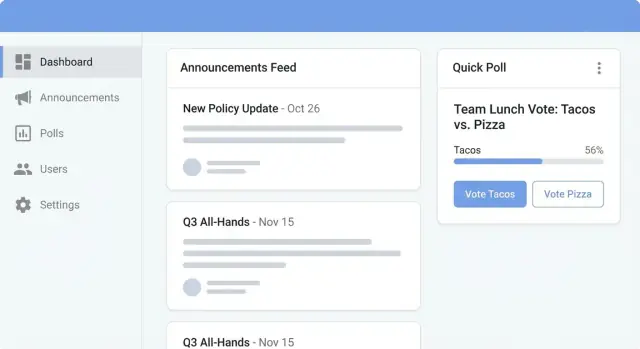
Define the goals and scope
Before picking features or tools, get clear on what “good” looks like for your internal announcements web app. A tight scope keeps the first release simple—and makes it easier to prove value quickly.
What are you trying to fix?
Most teams build an employee polling tool and announcements hub for a few practical reasons:
- Timely updates: critical messages (policy changes, outages, office closures) need to reach the right people fast.
- Fewer missed messages: reduce reliance on scattered email threads or chat posts that disappear.
- Faster feedback loops: quick pulse polls help leaders spot issues early and adjust.
Write down the top 3 problems you want the app to solve, in plain language. If you can’t explain them in a sentence, the scope is probably too wide.
Define primary users (and what each needs)
Identify who will use the system day-to-day:
- Employees want a simple feed, clear calls-to-action, and confidence their votes are private when promised.
- Team leads may need to target updates to their groups and run lightweight pulse checks.
- Admins (HR/comms) need publishing control, scheduling, audience targeting, and an admin dashboard for communications.
Being explicit here prevents “everyone needs everything” decisions that complicate role-based access control later.
Capture your key use cases
List the real scenarios you expect in the first 60–90 days:
- Policy updates that require acknowledgement
- Maintenance alerts with time windows and follow-ups
- Event invites with attendance polls
- One-question pulse checks (e.g., workload, morale)
If a use case doesn’t map to a measurable outcome, park it for a later version.
Choose success metrics that match the goal
Pick a small set of metrics you’ll review monthly:
- View rate per announcement (by team/location)
- Vote rate and completion rate for polls
- Time-to-read (how quickly people open after publish)
- Sentiment trends from pulse questions (tracked over time)
These metrics turn “we launched it” into “it’s working,” and they’ll guide later decisions on notifications and reminders without spamming users.
List must-have features for announcements and polls
Before you pick a tech stack, get crystal-clear on the features that make the app useful on day one. Internal comms fail most often because posts are hard to find, targeted poorly, or polls feel untrustworthy.
Announcements: publishing people will actually use
Start with a clean editor that supports rich text (headings, links, bullet lists) so messages don’t turn into unreadable walls of text.
Add attachments (PDFs, images, policies) with sensible limits and virus scanning. Keep storage predictable by allowing “link to file” as an alternative.
Make content easy to manage with:
- Categories (e.g., HR, IT, Facilities), plus optional tags
- Pinning for critical updates (limit how many can be pinned)
- Expiry dates so old announcements disappear from the “current” feed but remain searchable
Polls: trusted feedback with clear rules
Polls should be quick to answer and clear about what happens next.
Support single-choice and multiple-choice questions, and make close dates mandatory so polls don’t linger forever.
Offer two identity modes:
- Anonymous (encourages honesty; store only the vote)
- Named (useful for opt-in events; show who voted)
Also decide results visibility per poll: instant after voting, after close, or only for admins.
Targeting, search, and filters
A good internal announcements web app needs targeting so people see what matters:
- Company-wide
- Departments
- Locations
- Teams (or project groups)
Finally, make information retrievable: search plus filters by category, author, date, and tags. If employees can’t find last month’s policy update in 10 seconds, they’ll stop trusting the intranet announcements feed.
Plan roles, permissions, and governance
Clear roles and governance keep an internal announcements web app useful and trusted. Without them, people either can’t publish what they need—or everything turns into noise.
Define the core roles
Start with three simple roles and expand only when you have a real need:
- Admins (Comms/HR/IT): create and edit announcements, approve submissions, moderate comments, manage categories, and set publishing rules.
- Managers/Team leads: publish announcements to their teams (or specific locations/projects), create team polls, and view team-level participation (not individual answers unless explicitly allowed).
- Employees: read announcements, react, vote in polls, subscribe to categories, and report inappropriate content.
Build a permissions model that won’t surprise anyone
Use role-based access control (RBAC) as the default: permissions are assigned to roles, roles are assigned to users. Keep the permission list small and action-based (e.g., announcement.publish, poll.create, comment.moderate, category.manage).
Then add exceptions carefully:
- Scoped permissions: “Managers can post only to their own teams.”
- Temporary overrides: a time-limited “campaign publisher” role for a quarterly initiative.
- Emergency controls: admins can unpublish and lock comments immediately.
Governance: decide what “good” looks like
Document lightweight rules that match how your company communicates:
- Approval thresholds (e.g., company-wide posts require admin approval; team posts don’t).
- Category ownership (each category has a named owner and backup).
- Comment policy (allowed content, moderation SLAs, escalation path).
- Auditability: log who created, edited, approved, published, or removed content—this protects both employees and moderators.
If you keep these decisions simple and visible, the app stays credible and easy to run.
Design content workflows and moderation
A clear workflow keeps announcements timely and trustworthy, and it prevents polls from turning into “who posted this?” confusion. The goal is to make publishing easy for authors, while giving comms or HR enough control to maintain quality.
Announcement workflow: Draft → Review → Publish
Start with a simple status flow:
- Draft: authors can write, save, and preview. Drafts aren’t visible to regular employees.
- Review: the content is “ready,” and reviewers get notified. Review should focus on clarity, audience, and policy compliance.
- Publish: the announcement becomes visible in the chosen channels (company-wide, department, location) and starts its notification schedule.
Make the handoff frictionless: include a checklist in the review screen (correct category, audience set, attachments checked, inclusive language).
Approval rules that match your org
Not every post needs a gatekeeper. Create straightforward rules by category and audience size:
- Requires approval: executive updates, policy changes, legal/compliance, company-wide announcements.
- Optional approval: team-level updates, social events, office notices.
Add time limits and escalation so posts don’t stall. Example: if no decision in 24 hours, reassign to a backup reviewer; if still pending after 48 hours, notify the category owner.
Edit history and transparency
Store a version history for every announcement:
- Show employees the latest published version by default.
- Optionally display “Edited on…” plus a short change note.
- Keep older versions accessible to admins for audits and disputes.
This avoids confusion when details (dates, locations) change after publishing.
Poll lifecycle: Draft → Open → Closed → Archived
Polls benefit from a strict lifecycle:
- Draft: build questions, set anonymity, audience, and open/close dates.
- Open: votes are accepted; edits should be limited to prevent moving goalposts.
- Closed: voting stops; results are calculated and displayed based on permissions.
- Archived: kept for reporting and comparisons, but removed from active lists.
Moderation tools that prevent headaches
Even internal apps need guardrails. Provide a moderation queue for flagged content, plus basic controls: hide/unhide, lock comments (if supported), and a searchable audit trail of who changed what and when.
Create a simple data model
A simple data model keeps your app easy to build and easy to change later. Start with the minimum entities you need to publish announcements, run polls, and understand engagement—then add complexity only when a real use case demands it.
Core entities
Announcement
At minimum, model announcements with: title, body, author, audience, tags, status (draft/scheduled/published/archived), publish_at, and expires_at.
Keep “audience” flexible. Instead of hard-coding departments, consider an audience rule that can target groups (e.g., All, Location: Berlin, Team: Support). That will save you migrations later.
Poll
A poll needs: question, options, audience, an anonymity flag, plus open/close dates.
Decide early whether a poll belongs to an announcement (common pattern) or can stand alone. If you expect “announcement + poll” posts, a simple announcement_id on Poll is enough.
Engagement tracking (with privacy in mind)
Read receipts are usually optional. If you implement them, store a per-user viewed_at timestamp (and optionally “first_viewed_at” and “last_viewed_at”). Be explicit about privacy: read tracking can feel like surveillance, so limit access (e.g., admins see aggregates; only certain roles see per-user data) and add a retention policy.
Voting rules
For Votes, enforce “one vote per user per poll” at the database level (unique constraint on poll_id + user_id). If you support multi-select polls, change the rule to “one vote per option” (unique on poll_id + user_id + option_id) and store a flag on Poll that defines allowed behavior.
Don’t forget auditability
Even a lightweight audit log (who published, edited, closed a poll) helps with trust and moderation, without making the model complicated.
Sketch the user experience (UX) and screens
Good UX for an internal announcements web app is mostly about reducing friction: employees should find what matters in seconds, and communicators should publish without worrying about layout.
Core navigation
Keep the primary navigation predictable and shallow:
- Home feed: the default view with the latest announcements and active polls.
- Categories: a simple way to filter (e.g., HR, IT, Facilities, Leadership). Categories should be consistent and limited.
- Poll list: a dedicated page for “open,” “closing soon,” and “closed” polls.
- Admin area: visible only to permitted roles (drafts, scheduling, targeting, moderation).
A sticky top bar with search and a “New” indicator helps returning users immediately see what changed.
Announcement card design
Treat each announcement as a scannable card:
- Clear headline (one line if possible)
- Audience label (e.g., “All Staff,” “Warehouse,” “Managers”)
- Publish date/time (and “Updated” when edited)
Add a short preview, plus a “Read more” expansion to avoid long walls of text in the feed.
Poll screens and results rules
Polling should feel fast and final:
- One question per screen (or a clear multi-question stepper)
- Large, tappable options; show a vote confirmation (“Your vote was recorded”)
- Define results visibility rules: immediate results, after voting, after poll closes, or admins-only
Accessibility basics
Build trust by getting the basics right: sufficient color contrast, full keyboard support (tab order, focus states), and readable typography (sensible line length, clear hierarchy). These small choices make the app usable for everyone, including on mobile and in noisy work environments.
Choose a practical tech stack and architecture
Pick a stack your team can ship and maintain, not the most fashionable combination. Internal announcements and polls are a classic CRUD-style app with some extras (roles, moderation, notifications), so you’ll get the best results by keeping the architecture simple and predictable.
Frontend: optimize for speed of change
For most teams, React or Vue are safe choices if you already use them. If you want maximum simplicity, server-rendered pages (Rails/Django/.NET MVC) can reduce moving parts and make permissioned screens easier to reason about.
A good rule: if you don’t need highly dynamic interactions beyond poll voting and basic filtering, server rendering is often enough.
Backend: choose what you can operate confidently
Your backend should make authorization, validation, and auditability straightforward. Solid options include:
- Node.js (fast iteration, big ecosystem)
- Django (excellent admin patterns, batteries included)
- Ruby on Rails (productive CRUD, strong conventions)
- .NET (great enterprise fit, strong tooling)
A “modular monolith” (one deployable app with clear modules like Announcements, Polls, Admin) usually beats microservices here.
If you’re trying to ship an internal tool quickly without rebuilding your entire pipeline, a vibe-coding platform like Koder.ai can be a practical shortcut: you describe the announcements feed, polls, RBAC, and admin dashboard in chat, then iterate on the generated React frontend and Go + PostgreSQL backend. It’s especially useful for getting a working pilot in front of HR/comms fast, while still keeping the option to export source code later.
Data + API: keep it boring (and documented)
Use PostgreSQL for relational data such as users, roles, announcements, poll questions, options, and votes. Add Redis only if you need caching, rate limits, or background job coordination.
For the API, REST works well with predictable, readable endpoints; GraphQL can help when you expect many different clients and complex screen data needs. Either way, document it and keep naming consistent so frontend and admin tools don’t drift.
Handle authentication, security, and privacy
Security decisions are hard to change later, so it’s worth setting a few clear rules before you build features.
Authentication: use SSO when you can
If your company already uses an identity provider (Okta, Azure AD, Google Workspace), prefer SSO via OIDC (most common) or SAML. It reduces password risk, makes offboarding automatic, and lets people sign in with the account they already use.
If SSO isn’t available, use email/password with standard protections: strong hashing, rate limiting, account lockouts, and optional MFA. Keep the “forgot password” flow simple and secure.
Authorization: RBAC on every endpoint
Define roles early (for example: Employee, Editor, Comms Admin, IT Admin). Then enforce role-based access control (RBAC) everywhere—not just in the UI. Every API endpoint and admin action should check permissions (create announcement, publish, pin, create poll, view results, export data, manage users, etc.).
A practical rule: if a user can’t do something by calling the API directly, they can’t do it from the app.
Data privacy: collect less, offer anonymity
Polls often touch sensitive topics. Support anonymous polls where responses are stored without user identifiers, and be explicit about what “anonymous” means (e.g., admins can’t see who voted).
Minimize personal data: typically you only need name, email, department, and role (pulled from SSO if possible). Set retention rules (for example: delete raw poll responses after 12 months, keep only aggregated counts).
Audit logs: make admin actions traceable
Keep an audit trail for key events: who published/edited/deleted an announcement, who closed a poll early, who changed permissions, and when. Make logs searchable in the admin area and protect them from edits.
Add notifications without spamming users
Notifications are only helpful when they feel timely and respectful. For internal announcements and polls, aim for “high signal, low noise”: notify people about what they opted into, summarize the rest, and stop once they’ve acted.
Use a mix of channels (and make each one earn its place)
In-app notifications work best for awareness while someone is already in the tool. Send a small, dismissible notification when there’s a new announcement in a category the user subscribes to (e.g., “IT Updates” or “HR Policies”). Link straight to the item and show the category so it’s easy to judge relevance.
Email digests prevent inbox overload. Offer daily/weekly summaries that bundle new announcements and open polls, rather than sending one email per post. Include quick actions (“View”, “Vote”) to reduce friction.
Reminders that respect attention
Poll reminders should be intentional, not automatic spam:
- Reminders: nudge non-responders shortly before the poll closes, with strict limits (for example, max 1–2 reminders per poll).
- Stop reminders immediately after a user votes.
- Avoid reminders for “FYI” polls where participation isn’t required.
Let users control the noise
Give people clear controls so they can tune relevance:
- Preferences: users choose categories to follow and notification frequency.
- Add “mute” options (mute a category for 30 days, mute all during vacation).
- Support quiet hours for email and push-like alerts.
A simple /settings/notifications page that’s easy to understand will do more for adoption than any clever algorithm.
Build reporting and analytics
Reporting is what turns your internal announcements web app from a posting board into a communications tool you can improve. Keep analytics focused on decisions: what people saw, what they engaged with, and where messages aren’t landing.
Announcement performance
In the admin dashboard for communications, start with a simple “announcement scorecard” per post:
- Views (unique viewers and total views)
- Reactions (counts and top reaction types)
- Comments count (only if comments are enabled)
- Read rate over time (e.g., % viewed in 24h, 72h, 7d)
Show these metrics alongside basic context: publish date, audience segment, and channel (homepage, email, Slack/Teams bridge if you have one). This helps you compare similar announcements without guesswork.
Poll metrics that actually help
For your employee polling tool, focus on participation and clarity:
- Participation rate: votes ÷ eligible audience
- Option breakdown: counts and percentages per option
- Trend over time: participation and outcomes by week/month (useful for recurring pulse polls)
If you offer anonymous polls, keep results aggregated and avoid “small group” insights that could reveal identities.
Segmented reporting (with privacy)
Segmented reporting (by department or location) can improve targeting for intranet announcements and surveys, but add guardrails:
- Only show segment breakdowns when the segment size is above a minimum threshold (e.g., 10+ responses).
- For anonymous polls, never expose per-user data—store and report only aggregates.
Exports and sharing
CSV export is handy for admins who need to brief leadership or combine results with other tools. Keep exports permissioned via role-based access control, and log export actions in audit logs so governance stays clear.
Test, deploy, and monitor the app
Shipping an internal announcements web app isn’t just “does it work?” It’s “does it work for the right people, with the right visibility, every time?” A short, repeatable checklist will save you from embarrassing mis-targeted posts or polls.
Testing checklist (what to verify before rollout)
Focus on scenarios that match real usage, not just happy paths:
- Permissions and role-based access control: admins can publish and edit; moderators can approve; regular employees can’t see drafts or restricted posts.
- Targeting rules: announcements and polls appear only for the intended locations, departments, or groups.
- Anonymous polls: confirm anonymity is preserved in exports, analytics, and audit logs (no accidental identifiers).
- Edge cases: expired announcements, edited polls mid-run, users with multiple roles, deleted attachments, and time zones.
Content quality checks
Treat content as part of the product:
- Broken links and formatting issues (especially on mobile screens)
- Attachment size/type limits, and what happens when limits are exceeded
- Accessibility basics: readable headings, clear button labels, sufficient contrast
Deployment: staging → production
Use a staging environment with realistic data and test accounts. For production rollout, plan:
- A short maintenance window (if needed) and a clear rollback option
- Data migration steps (seed roles, default groups, initial announcements)
- A “soft launch” to one department before company-wide access
If you’re using a managed build-and-ship approach (for example, generating the app in Koder.ai), prioritize the same rollout discipline: staging first, clear change tracking, and a rollback path (snapshots/rollback are especially helpful when iterating quickly).
Monitoring after launch
Set up lightweight monitoring from day one:
- Error tracking for frontend and backend exceptions
- Uptime checks on core endpoints (login, feed load, vote submission)
- Basic performance metrics: page load time, API latency, and slow database queries
If you have to pick one rule: monitor the user journey, not just the servers.
Drive adoption and keep it useful over time
A well-built announcements and polls app still fails if people don’t trust it, remember it, or see value in opening it. Adoption is less about “launch day” and more about creating steady habits: predictable posts, clear ownership, and lightweight training.
Launch plan: start small, then scale
Begin with a pilot group that represents different roles (HR/comms, managers, frontline staff). Run it for 2–3 weeks with a clear checklist: can they find announcements quickly, vote in a poll in under a minute, and understand what’s expected of them?
Collect feedback in two ways: a short in-app survey after key actions (posting, voting) and a weekly 15-minute check-in with pilot champions. Then roll out in phases (e.g., one department at a time), using what you learned to update categories, defaults, and notification settings.
Training that respects people’s time
Keep training materials short and practical:
- One-page guides with screenshots (“How to vote,” “How to subscribe to a category”)
- A “how to post” template: title, summary, audience, call-to-action, end date
- A short manager script for team meetings (“Here’s where to find updates and what we expect you to do”)
Governance: make ownership visible
Adoption grows when content is consistent. Define posting guidelines (tone, length, when to use polls vs. announcements), assign category owners (HR, IT, Facilities), and set a cadence (e.g., weekly roundup + urgent posts as needed). If you have an admin area, show category owner names so people know who to contact.
Iterate using real usage signals
Treat the app like a product: maintain a backlog, prioritize based on data (views, poll completion rates, time-to-read) and qualitative feedback, and ship small improvements regularly. If “All-company” posts get ignored, test tighter targeting; if polls have low completion, shorten them or clarify the purpose and closing date.
FAQ
How do I define the right scope for an internal announcements and polls app?
Start by writing the top 3 problems you want to solve (e.g., missed critical updates, scattered channels, slow feedback). Then define a narrow first release that supports those problems end-to-end: publish → target → notify → measure.
A practical scope is “announcements feed + simple polls + basic admin controls” with clear success metrics.
Who are the core users, and what does each role need from the app?
Typical primary users are:
- Employees: read a clean feed, search past posts, vote quickly, manage notification preferences.
- Managers/team leads: target posts to their teams, run pulse polls, see participation trends.
- Admins (HR/comms/IT): control publishing, scheduling, approvals, audience targeting, moderation, and reporting.
Write down what each role must do weekly; everything else is a “later” feature.
What are the must-have announcement features for day one?
For announcements, prioritize:
- Rich-text editor (links, lists)
- Categories/tags, pinning (with limits), expiry dates
- Attachments with size limits and virus scanning (or “link to file”)
- Targeting (company/department/location/team)
- Search + filters
If employees can’t find and trust information fast, adoption will stall.
What poll features matter most to build trust and participation?
Keep polls fast, explicit, and time-bound:
- Single- and multiple-choice questions
- Mandatory close date (so polls don’t linger)
- Clear anonymity mode: anonymous (store only vote) vs named (for opt-in events)
- Results visibility rules: after vote, after close, or admins-only
Also enforce “one vote per user” (or per option for multi-select) at the database level.
How should roles and permissions (RBAC) be structured?
Use RBAC (role-based access control) with small, action-based permissions (e.g., announcement.publish, poll.create, comment.moderate). Add constraints like:
- Scoped permissions: managers can publish only to their teams
- Approval rules: company-wide posts require admin review
- Emergency controls: admins can unpublish/lock quickly
Enforce permissions in the API, not just in the UI.
What content workflow should I implement for announcements and polls?
A simple workflow keeps quality high without slowing everything down:
- Announcements: Draft → Review → Publish (with approval rules by category/audience)
- Polls: Draft → Open → Closed → Archived (limit edits once open)
Add a review checklist (audience set, category correct, attachments verified, inclusive language) and escalation if approvals stall.
What does a simple, future-proof data model look like for this app?
Start with the minimum entities:
- Announcement: title, body, author, audience rule, tags, status, publish/expires timestamps
- Poll: question, options, audience, anonymity flag, open/close dates (optionally linked via
announcement_id) - Vote: enforce uniqueness (e.g.,
poll_id + user_id), adjust for multi-select if needed - Audit log: who published/edited/closed/changed permissions
Keep “audience” flexible (rules/groups) to avoid frequent schema migrations.
How do I handle authentication, security, and privacy—especially for anonymous polls?
Use SSO if available (OIDC/SAML via Okta, Azure AD, Google Workspace). If not, implement email/password with:
- Strong password hashing
- Rate limiting and lockouts
- Optional MFA
For privacy, collect minimal profile fields, support truly anonymous polls (no user identifiers), and define retention (e.g., delete raw responses after a fixed period, keep aggregates).
How can I add notifications without spamming employees?
Aim for “high signal, low noise”:
- In-app notifications for subscribed categories
- Email digests daily/weekly instead of one email per post
- Reminders only for non-responders near poll close (cap at 1–2), and stop immediately after voting
Give users controls in /settings/notifications: category follows, frequency, mute, and quiet hours.
What analytics and reporting should I build to prove the app is working?
Track metrics that drive decisions:
- Announcements: view rate, time-to-read, reactions/comments (if enabled), read rate over 24h/72h/7d
- Polls: participation rate, option breakdown, trends over time
For segmented reporting, add privacy guardrails (minimum group sizes like 10+). Log exports in audit logs, and keep analytics focused on improving targeting and content quality.