

How to Create a Web App for Internal Approval Flows (No Code)
Learn how to build an internal approvals web app without custom code: map steps, design forms, set roles, automate routing, add audit trails, and launch safely.
What an internal approval web app needs to do
An internal approval web app is a system for moving a request from “someone needs something” to “a decision was made—and we can prove it later.” The best ones do a few core jobs consistently, even when the exact process varies by team.
The core flow to support
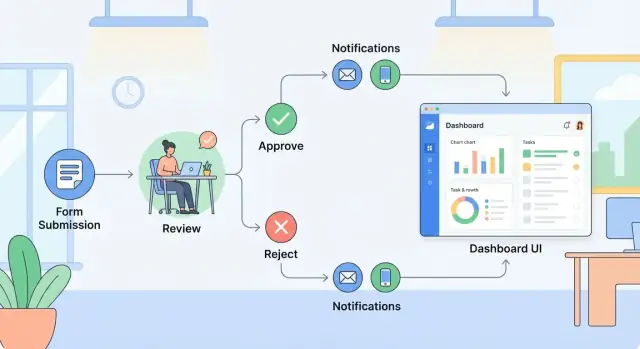
Most internal approval flows include:
- Request submission: a form that captures the right details (and attachments) up front
- Review: one or more people validate the info, ask questions, or request changes
- Approve / reject: a clear decision with an optional reason and next steps
- Recordkeeping: storing the request, decision, timestamps, and comments in one place
Common real-world examples
You’ll see the same pattern across many processes:
- Purchase requests (budget owner → finance → manager)
- Content sign-off (draft → legal → brand → publish)
- Access requests (employee → manager → IT)
- Policy exceptions (requester → compliance → leadership)
Why no-code is often enough
No-code tools are often a good fit because they let teams ship quickly, iterate weekly, and keep ownership with the people who run the process. You can build forms, routing rules, notifications, and dashboards without waiting for a traditional development queue.
When you may still want engineering help
Bring in engineers if you have edge cases like highly conditional routing (many branches), strict data residency needs, custom SSO constraints, or complex integrations that require middleware and robust error handling. In many orgs, no-code can still handle the UI while engineering fills the gaps.
If you want something closer to “custom” without committing to a full build, a vibe-coding platform like Koder.ai can sit in between: you describe the workflow in chat, and it generates the app (commonly React on the frontend, Go + PostgreSQL on the backend) with options like source-code export, deployment/hosting, snapshots, and rollback—useful when your approval process starts simple but needs to harden over time.
Choose a process and define the outcome
Before you open a builder, pick one internal approval workflow to tackle first. The goal is to prove value quickly, then reuse the same pattern for other approval flows.
Start with the “high pain, low complexity” flow
A good first candidate usually has:
- Lots of back-and-forth in email or chat
- A clear “yes/no” decision at the end
- A small number of approvers (1–3) and repeatable steps
Examples: purchase requests under a threshold, time-off approvals, content/legal review for a specific template, or basic vendor onboarding.
Define the trigger (what starts the process)
Be specific about what “submission” means in your form-to-approval process:
- Who submits: a requester, a manager, or a shared team inbox?
- Required data: what fields are mandatory to make a decision (amount, cost center, vendor name, due date, justification)?
- Attachments: what files are expected (quote, contract draft, screenshot)?
If approvers routinely ask for the same missing detail, make it required in v1.
List stakeholders and decision points
Write down every person (or role) involved and where decisions happen: reviewers, approvers, finance, legal, and any delegates for vacations. Also note “edge” decisions like “send back for edits” or “request more info,” since those drive most follow-ups.
Set success criteria (how you’ll know it worked)
Pick 2–3 measurable outcomes:
- Shorter cycle time (e.g., from 5 days to 2)
- Fewer follow-ups (fewer “Where is this?” messages)
- Clear status visibility (requesters can self-serve the latest status)
With a defined start, finish, and success metrics, the rest of your workflow automation choices become much easier.
Map the approval path before you build
Before you touch a builder, map the approval path on one page. This prevents “almost works” workflows—where requests get stuck, routed to the wrong person, or bounce around without a clear end.
Write it as plain steps
Start with a simple backbone you can read aloud:
Submit → Review → Approve/Reject → Close
For each step, name who does it (role or team), what they need to see, and what they can decide. If you can’t describe a step in one sentence, it’s usually hiding multiple actions that should be separated.
Decide: serial or parallel reviews
Clarify whether reviews happen:
- Serial: one after another (Requester → Manager → Finance). Best when order matters.
- Parallel: multiple reviewers at once (Security + Legal). Best when speed matters.
Parallel flows need a rule for “done”: all must approve, any one can approve, or majority. Pick one now—changing it later often forces a rebuild.
Define rejection behavior
A rejection can mean:
- Edit and resubmit: request returns to the submitter with comments, keeping history.
- Stop: request closes as rejected, and any new attempt starts fresh.
Choose what’s correct for compliance and reporting. “Edit and resubmit” is common, but you should still record the original decision.
Add exceptions that happen in real life
Map the non-happy paths upfront:
- Urgent path: a fast lane with extra visibility or fewer steps
- Out-of-office: backup approver or delegation rule
- Timeouts: reminders, escalation, or auto-reassign after X days
If you capture these on paper first, the build becomes configuration instead of guesswork.
Design the data you will capture and store
A no-code approval app works best when the data model is simple, consistent, and easy to report on later. Before you build screens, decide what records you’re storing and how they relate.
Start with a small core data model
For most internal approval workflows, you can cover 90% of needs with a few tables (or collections):
- Request: the main item being approved (purchase, policy exception, travel, hiring, etc.)
- Person: requester and approvers (often pulled from your directory)
- Department: used for routing, budgeting, or reporting
- Approval decision: each step’s outcome (who decided, what they decided, when)
- Comments: discussion notes tied to a request (and sometimes to a specific decision)
Keep Request as the single source of truth. Everything else should point back to it.
Required vs. optional fields (keep v1 minimal)
Define the must-have fields needed to route and decide. Typical required fields are:
- Request title/summary
- Requester (Person)
- Department
- Amount / impact (if relevant)
- Needed-by date
- Reason / justification
Everything else can start optional. You can always add fields later once you see what approvers actually ask for.
Attachments and retention expectations
Decide upfront what documents must be stored (quotes, contracts, screenshots) and for how long.
- If attachments are evidence for the decision, store them with the Request.
- Set a retention rule (e.g., keep for 12–24 months for operational requests, longer if finance/legal requires it).
- Clarify whether users can delete/replace attachments after submission.
Standardize statuses
Use a small, clear status set so everyone interprets progress the same way:
Draft → Submitted → In Review → Approved / Rejected → Completed
Avoid inventing too many custom statuses early. A consistent status field makes filtering, reminders, and reporting much easier.
Build user-friendly forms and pages
A good approval app succeeds or fails on usability. If people dread submitting a request or can’t tell what’s happening next, they’ll fall back to email.
The core screens you actually need
Most internal approval workflows can be covered with a small set of pages:
- Request form: where someone submits a new request
- Request detail: one place to read the request, see status, and take actions
- Approver inbox: a queue of items waiting for me
- Admin settings: manage categories, thresholds, templates, and routing inputs
Keep the navigation simple: “New request”, “My requests”, “Needs my approval”, and “Settings” (for admins).
Forms that ask less, but capture better data
Start with the minimum required fields, then use conditional fields to keep the form short. For example: only show “Vendor details” if “Purchase type = New vendor”, or show “Reason for exception” only if a policy checkbox is unchecked.
This is where no-code tools shine: you can show/hide sections based on dropdowns, amounts, or department—without creating separate forms.
Make status and next step obvious
On every request record, display:
- Current status (e.g., Draft → Submitted → Manager review → Finance review → Approved/Rejected)
- Who it’s with right now
- What happens next (including any threshold that might trigger an extra approval)
A simple progress indicator plus a “Waiting on: <name/role>” line eliminates most “Any update?” messages.
Reduce back-and-forth with guidance and validation
Add short helper text and examples directly under tricky fields (“Attach the signed quote (PDF)”, “Use cost center like 4102-Operations”). Use validation to prevent avoidable rework: required attachments for certain request types, allowed ranges for amounts, and clear error messages.
The goal is fewer clarifying questions, faster decisions, and cleaner records for reporting.
Set roles, permissions, and routing rules
If your approval app is a building, roles and permissions are the locks and keys. Routing rules are the hallway signs that make sure each request lands on the right desk—without manual chasing.
Define the core roles (and keep them consistent)
Start with a small set of roles you’ll reuse across workflows:
- Requester: creates and submits the request (e.g., purchase, policy exception, time-off)
- Reviewer: checks completeness and context; can send back for changes
- Approver: makes the decision for a step (manager, department head, budget owner)
- Finance / HR: specialist approvers for cost, compliance, or people-related rules
- Admin: maintains the workflow, fields, and access; typically not an approver
Write down what each role can do in plain language before you touch the builder.
Add permissions per step (view, comment, edit, approve)
Approvals break when everyone can see or edit everything. Define permissions at each stage:
- Who can view the request and attachments?
- Who can comment (and whether comments are visible to the requester)?
- Who can edit fields (usually requester before submit; limited edits during review)?
- Who can approve/reject, and can they request changes instead?
A practical default: once submitted, lock key fields (amount, vendor, dates), and allow edits only via a “send back” action.
Use team-based routing so requests follow the org chart
Hard-coding names doesn’t scale. Prefer routing rules like:
- Manager of the requester approves first
- Then route to the department budget owner if amount exceeds a threshold
- Add Finance if GL code is selected or spend type requires oversight
- Add HR for people-related requests (contractor access, compensation changes)
This keeps the workflow accurate even when people join, leave, or change teams.
Plan for delegation and backups to prevent stalls
Approvals often stall due to vacations and inbox overload. Add:
- Delegation (approver can assign a delegate for a date range)
- Backup approvers (if no action in X days, route to an alternate)
- Escalation rules (notify manager-of-approver after a timeout)
These rules protect throughput without sacrificing control.
Automate tasks, notifications, and reminders
Automation is what turns a simple form into a dependable internal approval workflow. The goal is straightforward: when a request changes status, the next person should instantly get the right task—without manual chasing or copy-pasting links.
Automate routing on status changes
Set up rules like: Draft → Submitted → Manager Review → Finance Review → Approved/Rejected. Each status change should automatically:
- Assign the request to the next approver (or a queue/team inbox)
- Update ownership (who “has the ball”)
- Lock or unlock fields (e.g., requesters can’t edit the amount after submission)
Keep routing rules readable. If you need exceptions (e.g., “If amount > $5,000, add CFO approval”), define them as clear conditions tied to data fields.
Add notifications people will actually notice
At minimum, send two kinds of messages:
- “Needs your review”: includes the request title, amount/type, due date, and a direct link to the approval page
- “Decision made”: notifies the requester and any watchers, with the decision, approver name, and comments
Use the channels your company already checks—email plus Slack/Teams if available. Keep messages short and consistent so they don’t feel like noise.
Reminders and escalation after a deadline
Approvals stall when no one is accountable for time. Add:
- A reminder X hours/days before the due date
- A second reminder after the due date
- Escalation to a backup approver or manager if there’s no action after N days
Make escalations predictable (and visible) so approvers trust the system.
Guardrails to prevent duplicates and missing approvals
Automation should also stop common failure modes:
- Block duplicate requests by checking key fields (e.g., vendor + invoice number)
- Require mandatory fields before submission
- Prevent “skip steps” by only allowing status changes through buttons like Approve/Reject (not free-text editing)
These guardrails reduce rework and ensure every request follows the same path.
Add dashboards and tracking for visibility
An approval app only works when everyone can see what’s waiting, what’s stuck, and what’s done—without asking around. Dashboards turn “Where is this request?” into a self-serve answer.
Start with an approvals inbox
Create a single place reviewers can trust every day. Your inbox view should include:
- Items assigned to me (with priority and current step)
- Due soon (based on SLA or a requested-by date)
- Overdue (highlighted, with escalation rules handled elsewhere)
Keep each row actionable: requester, department, amount/type, submitted date, due date, and one-click approve/reject.
Add search and filters that match real questions
Most follow-ups are predictable: “Show me all pending requests from Sales this month,” or “Find the PO I submitted last Tuesday.” Build filters for:
- Requester (and/or requester team)
- Department or cost center
- Status (draft, submitted, in review, approved, rejected, cancelled)
- Date range (submitted, updated, due)
If your tool supports it, add saved views like “My team’s pending” or “Finance queue.”
Track cycle time and bottlenecks—without exposing sensitive details
Dashboards don’t need to show every field to be useful. Focus on operational metrics:
- Average time to first response
- Average total cycle time
- Requests stuck per step (e.g., “Manager approval”)
- Volume trends (weekly/monthly)
Use aggregated counts and durations so leaders can spot slow steps without seeing confidential request content.
Plan exports and reporting early
Even if you’re not using a BI tool yet, make reporting easy:
- CSV export for filtered lists (e.g., “Approved last quarter”)
- A simple “reporting” table/view for finance or compliance
- If available, scheduled reports sent to a shared mailbox
This reduces ad-hoc requests and helps you prove the workflow is improving over time.
Include audit trails and governance from day one
If approvals affect spending, risk, or customer commitments, you need evidence—not just “Approved” as a final status. Governance is easiest (and cheapest) to add while you’re designing the workflow, not after people already rely on it.
Build an audit trail that answers real questions
Your app should record a clear history of who did what, and when. At minimum, log:
- Status changes (Submitted → Approved/Rejected → Cancelled)
- Comments added by approvers
- Field edits (what changed, old value/new value)
- Reassignments or delegation (who approved on someone’s behalf)
Make the audit log viewable to admins and reviewers, but don’t expose it to everyone by default.
Require meaningful approval and rejection notes
Approvals with no context create confusion later. Add an optional comment on approval, and a required “reason for rejection” field. This prevents vague “Rejected” outcomes and makes resubmissions faster because the requester knows what to fix.
A practical pattern:
- Rejection requires a reason (dropdown + free text)
- The reason is included in the notification and stored in the record
- Resubmission creates a new version, keeping the history intact
Data access controls: least privilege by design
Use a least-privilege approach so people only see what they need:
- Requesters can see their own requests
- Approvers can see requests assigned to them (and optionally their team)
- Finance/Legal can see specific categories
- Admins can manage settings and view full history
If your tool supports row-level permissions, use them. If not, separate sensitive workflows into distinct apps.
Basic compliance: retention, deletion, and access reviews
Decide early how long to keep records (e.g., 1–7 years depending on policy), how deletions work (soft-delete is often safer), and who reviews access quarterly. Document these rules in a short internal page and link it from the app (for example: /policies/approvals).
Connect to your existing tools (without heavy engineering)
Approval flows rarely live on an island. The fastest way to get adoption is to plug your app into the systems people already use: login, HR data, finance records, ticketing queues, and messaging.
Start with identity (SSO or a user directory)
If your company already uses Google Workspace, Microsoft Entra ID (Azure AD), Okta, or similar, enable SSO so employees don’t need a new password.
Beyond convenience, SSO helps with access control: you can map groups (e.g., “Finance”, “People Ops”, “IT”) to roles in your approval app, reducing manual admin and lowering the risk of the wrong person seeing sensitive requests.
Pull context from source systems (HR, finance, ticketing, CRM)
Most approval requests need reference data:
- HR: employee name, manager, department, cost center
- Finance/ERP: vendor details, budget codes, PO numbers
- Ticketing: request type, priority, existing incident/change
- CRM: account owner, deal size, contract stage
Use native connectors where available so your forms can auto-fill fields and your routing rules can make better decisions (for example, route by department or spend threshold).
Use webhooks/APIs when there’s no connector
If your tool doesn’t have a built-in integration, you can still connect without building an entire custom application. Many platforms let you:
- Send a webhook when a request is submitted/approved/rejected
- Call an external API to create or update a record (e.g., create a ticket, update a CRM field)
Keep the payload simple: request ID, requester, decision, timestamp, and the key fields needed by the target system.
Plan for errors: retries, alerts, and a manual fallback
Integrations fail—tokens expire, APIs rate-limit, fields change. Build in:
- Automatic retries with a clear “failed” status
- Alerts to an admin channel (email/Slack/Teams)
- A manual fallback (e.g., a button to re-run the sync, or a queue an admin can process)
This prevents “approved but never executed” outcomes, which erode trust quickly.
Test, launch, and improve the workflow
Testing an internal approval workflow isn’t just “does the button work?” It’s whether real people can move real requests from start to finish without confusion or workarounds.
Test with real scenarios (not happy paths)
Create a small set of realistic requests and run them through the full process:
- Approvals and rejections (including “reject with changes” if you support it)
- Edits after submission (what changes are allowed, and who can make them)
- Attachments (file size limits, naming, required documents)
- Delegation and out-of-office coverage (what happens when an approver is away)
Watch for bottlenecks: unclear fields, missing context for approvers, and steps that force people back into email or chat to understand what they’re approving.
Run a pilot and collect feedback weekly
Start with a small group—one team or one request type—and keep the pilot long enough to hit edge cases (typically 2–4 weeks). Schedule a short weekly check-in and track feedback in one place (a form or shared doc). Prioritize fixes that reduce back-and-forth: field clarity, routing rules, and notification timing.
Write simple guidance that people will actually read
Keep documentation short and practical:
- Which screen to use for submitting vs. reviewing
- What a “good” request looks like (examples of strong descriptions and attachments)
- Response expectations (e.g., when to comment vs. reject)
Publish it where users already go (for example, an internal page like /help/approvals).
Roll out gradually and improve using data
Expand one group at a time. Use early metrics—cycle time, rejection reasons, time spent in each step—to refine rules and form fields. Small iterations (weekly or biweekly) keep trust high and prevent the workflow from turning into a workaround magnet.
Common mistakes and how to avoid them
Even with no-code tools, approval flows get messy without a few guardrails. These are the failure modes that most often slow teams down—and practical ways to prevent them.
1) Starting too big (too many steps or fields)
A common instinct is to capture every detail “just in case.” The result is a form nobody wants to fill out and an approval path that’s hard to maintain.
Start simple: the minimum fields needed to make a decision, and the shortest approval path that still meets policy. Launch it, watch where people get stuck, then add only what’s clearly needed.
2) Unclear ownership for rules and access
Routing rules, approver lists, and role-based access need a clear owner. If nobody owns the workflow, exceptions pile up, access becomes outdated, and approvals get blocked when someone changes roles.
Assign a named process owner (and a backup). Put rule changes behind a lightweight change process (even a short checklist), and schedule a monthly review of approver groups and permissions.
3) Missing visibility for requesters
If requesters can’t see status or the next approver, they will chase people manually—defeating the purpose of automation.
Include a status page with: current stage, last updated time, next approver (or team), and an estimated SLA. Add a simple dashboard view so managers can spot bottlenecks.
4) No escape hatch for exceptions and urgent items
Real workflows have edge cases: urgent requests, out-of-office approvers, or policy exceptions.
Build in safe exception handling: an “urgent” flag that triggers a defined fast path, delegation rules, and a controlled override that requires a reason and is recorded in the audit trail.
If you anticipate frequent changes to the workflow logic (new thresholds, extra approvers, or new request types), consider a build approach that’s easy to iterate without losing governance. For example, teams use Koder.ai to generate and evolve internal workflow apps quickly from a chat-based spec, while still keeping the option to export source code and enforce tighter controls as the process matures.
FAQ
What’s the best first internal approval process to build?
Start with one workflow that is high pain, low complexity:
- Lots of back-and-forth today (email/chat)
- A clear yes/no decision
- Only 1–3 approvers
Examples include purchase requests under a threshold, time-off approvals, or a basic access request flow. Prove value, then reuse the same pattern for other approvals.
What fields should an approval request form include?
Capture the minimum data needed to route and decide. Common required fields:
- Title/summary
- Requester
- Department or cost center
- Amount/impact (if relevant)
- Needed-by date
- Justification
If approvers repeatedly ask for a detail (like vendor name or a quote), make it required in v1.
What pages are essential in a no-code approval web app?
Most apps need only a few core screens:
- New request form
- Request detail page (status, comments, attachments, actions)
- Approver inbox (“needs my approval” queue)
- Admin/settings (routing inputs, thresholds, templates)
Keep navigation simple so users can reliably find “New request,” “My requests,” and “Needs my approval.”
What statuses should I use for internal approvals?
Use a small, standardized status set so filtering, reminders, and reporting are easy:
- Draft
- Submitted
- In Review
- Approved / Rejected
- Completed
If you need more detail, show the current step (e.g., “Manager review”) as a separate field rather than inventing many statuses.
Should my approval flow be serial or parallel?
Pick based on whether order matters or speed matters:
- Serial (one after another): best when each step depends on the previous one.
- Parallel (multiple at once): best when you want faster turnaround.
For parallel reviews, define the completion rule early: all must approve, any one, or majority—changing this later often forces rework.
How should I handle rejections and resubmissions?
Decide what “rejected” means for your process:
- Edit and resubmit: send back to requester with comments, preserving history.
- Stop: close as rejected; a new attempt starts a fresh request.
Even with edit/resubmit, keep an audit record of the original decision and rejection reason.
How do roles and permissions typically work in an approval app?
Define roles and permissions per stage:
- Requester: create/submit; edit only before submit
- Reviewer: comment; request changes
- Approver: approve/reject (optionally comment required)
- Admin: manage routing, fields, and access
A practical guardrail: once submitted, lock key fields (amount/vendor/dates) and only allow changes via a “send back” action.
How do I set up routing rules that scale as the org changes?
Use organization-based rules instead of hard-coding names:
- Route to the requester’s manager first
- Add budget owner if amount exceeds a threshold
- Add Finance/HR/Legal based on category, spend type, or selected codes
This keeps routing accurate when people change roles or teams.
How do I prevent approvals from getting stuck when someone is out of office?
Add stall-prevention rules from the start:
- Delegation (date-range delegates for vacations)
- Reminders before/after due dates
- Escalation after N days (backup approver or manager-of-approver)
Make escalation behavior visible and consistent so the system feels predictable, not arbitrary.
What should an audit trail and governance include for internal approvals?
Log enough detail to answer “who did what, when, and why”:
- Status changes with timestamps
- Approval decisions (approver, outcome, comment)
- Field edits (old/new values)
- Reassignments and delegation
Also set retention expectations early (e.g., 12–24 months for operational requests, longer for finance/legal) and use least-privilege access so users only see what they need.