

Create a Web App to Track Internal Policy Acceptances
Learn how to plan and build a web app that tracks employee policy acknowledgements with roles, reminders, version history, and audit-ready reports.
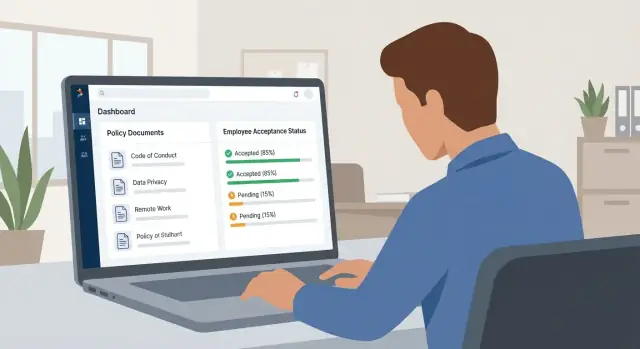
What Policy Acceptance Tracking Solves
Policy acceptance tracking is the process of recording that a specific person has acknowledged a specific internal policy, under a specific version, at a specific time. Think “employee policy acknowledgements,” but stored in a way that’s searchable, consistent, and easy to prove later.
Who uses it (and why)
Different teams care for different reasons:
- HR: handbook updates, workplace conduct, remote work, benefits, and leave rules.
- IT/Security: acceptable use, password/2FA standards, device management, and data handling.
- Legal/Compliance: regulatory policies, conflicts of interest, and whistleblower procedures.
- Managers: confirming their team has completed required acknowledgements—especially after changes.
Why email and PDF sign-offs break down
Email threads and “reply to confirm” workflows feel simple—until you need clean proof.
Common failure modes include:
- Lost or scattered evidence: replies sit in personal inboxes, shared mailboxes, or old tickets.
- No version control: you can’t prove which exact wording someone accepted after updates.
- Weak reporting: answering “who hasn’t acknowledged the latest update?” becomes manual work.
- Hard to audit: pulling a reliable record for an internal review or external audit can take days.
The goal of a tracking app
Your web app should produce audit-ready acceptance records: a clear, tamper-resistant answer to:
- Who accepted
- Which policy
- Which version
- When (and ideally from which system/session)
This is often a practical e-signature alternative for internal policies where a formal signature tool would be overkill.
Set expectations: start small
Start with an MVP that captures the essentials (policy, version, user, timestamp) and supports basic reminders. Once that works, add automation (SSO, access control, escalations) and stronger reporting and exports as needs mature.
Define Requirements and Stakeholders
Before you design screens or pick a tech stack, align on who the system is for and what “accepted” means legally and operationally in your organization. This prevents rework later when HR, Security, and Legal notice gaps.
Identify the stakeholders (and their goals)
Most policy acceptance tracking tools serve four core audiences:
- Employees: need a clear, fast way to access a policy and acknowledge it on any device.
- Policy owners (HR, Security, Legal, Finance): need to publish updates, target the right audience, and see completion.
- Admins (IT, People Ops): manage users, groups, integrations, and exceptions (leavers, contractors, name changes).
- Auditors / managers: need evidence—who accepted what, when, and under which version—without being able to edit records.
Capture each group’s success criteria. For example, Security may care about “acceptance within 7 days of hire,” while HR may care about “applies to specific locations.”
Define what counts as “acceptance”
Be explicit about the required proof level:
- Checkbox + Submit (common baseline): “I have read and agree” with a timestamp.
- Typed name: adds intent and reduces “accidental click” arguments.
- OTP / re-auth step: useful for higher-risk policies without a full e-signature.
- E-signature alternative: if Legal requires stronger non-repudiation, document the minimum controls (identity verification, tamper-evident logs).
Write down the rule: is acceptance valid if the policy text was available but not opened? Or must the user scroll/view?
List policy types and scope
Start with the policies you know you’ll track: Code of Conduct, Information Security, Remote Work, NDA addendum, and any local/regulatory acknowledgements. Note whether policies differ by country, entity, role, or employment type (employee vs contractor).
Compliance requirements to support
At minimum, confirm expectations for:
- Audit trail and immutability of acceptance events
- Retention duration (and what happens after it)
- Exports (CSV/PDF) and who can generate them
- Evidence needed for internal reviews vs external audits
If you already have related processes (onboarding checklists, HRIS workflows), note them now so you can design for integration later.
Map the Acceptance Workflow
A clear workflow keeps acknowledgements consistent and audit-friendly. Start with the simplest path, then add optional steps only when you have a reason (regulatory, risk, or training needs).
The simplest end-to-end flow
-
Publish policy: An admin marks a policy as “Active” and sets an effective date.
-
Notify employees: The system sends an email/Slack/Teams message with a link to the policy.
-
Employee accepts: The employee logs in, reads the policy, and clicks “I acknowledge.” Record the timestamp and the policy version.
-
Report: Compliance or HR views completion rates and exports a list of acceptances.
This flow is enough for many organizations—especially when you can reliably prove who accepted which version when.
Optional steps to consider
Quizzes or comprehension checks
Use a short quiz when the policy affects safety, finance, or regulated conduct. Store quiz score and pass/fail, and decide whether acceptance is allowed without passing.
Re-accept on updates
When a policy changes, decide whether it’s a minor edit (no re-accept) or a material change (requires re-accept). A practical approach is to trigger re-accept only when the publisher selects “requires acknowledgement” for the new version.
Manager follow-up
If you need manager visibility, add a lightweight view where managers see who is overdue and can nudge or record exceptions.
Acceptance windows and escalations
Define a standard acceptance window (for example, 14 days from notification) and escalation rules such as:
- Reminder after 7 days if not accepted
- Second reminder after 12 days
- Escalate at day 14 to manager or HR
Keep exceptions explicit: leave-of-absence, contractors, or role-based exclusions.
Should acceptance gate access?
For higher-risk policies, you may require acknowledgement before using certain tools (e.g., expense system, customer data platform). If you do this, document it in the workflow: “If overdue, restrict access” vs. “Allow access but escalate.” Choose the least disruptive option that still reduces risk.
Policy Content, Versioning, and Change Control
If you want acceptance records that hold up in an audit or internal review, each acceptance must point to an exact, unchanging policy version. “I accepted the Code of Conduct” is vague; “I accepted Code of Conduct v3.2 (effective 2025-01-01)” is verifiable.
Treat each published policy version as immutable
Policies often get edited after publishing (typos, formatting fixes, clarifications). If your app only stores “the latest text,” older acceptances can silently shift underneath employees’ records.
Instead, create a new version every time the policy is published and store that version as read-only:
- Save an immutable snapshot (commonly a generated PDF), or
- Save the rendered HTML exactly as shown at acceptance time (and lock it).
This makes “what the employee saw” reproducible later, even if the policy is updated.
Metadata to capture with every version
Keep policy content separate from policy identity. A stable Policy ID (e.g., HR-COC-001) ties all versions together.
For each published version, store:
- Version number (v1.0, v1.1, etc.)
- Effective date (when it applies)
- Owner (team/person responsible)
- Change summary (plain-language “what changed”)
This metadata also builds trust: employees can see what’s new and why they’re being asked to acknowledge again.
Define re-acceptance rules (major vs. minor)
Not every edit should trigger a new acceptance cycle. Define a simple rule set:
- Major change (meaning, obligations, penalties, safety steps): require re-acceptance.
- Minor change (formatting, broken links, spelling): no re-acceptance.
Implement this as a “re-accept required” flag per version, with a short reason shown on the acceptance screen.
Data Model: What You Need to Store
A clear data model is what makes policy acceptance tracking reliable, searchable, and audit-ready. The goal is simple: at any time you should be able to answer “who needed to accept what, by when, and what proof do we have?”
Core tables/objects
At minimum, plan for these objects (names can vary by tech stack):
- Users: employee identity (often synced from HR or your IdP). Include employee ID, email, name, status (active/terminated), and optional attributes like department, location, and manager.
- Policies: the long-lived “container” (e.g., Code of Conduct). Include title, owner, category, and status (draft/published/retired).
- PolicyVersions: each published revision. Store version number, published date, effective date, and a content reference (HTML/markdown or file storage pointer).
- Assignments: who must accept which PolicyVersion. This is where targeting happens (by department/location, by group, or specific users), plus due date and rules.
- Acceptances: the acknowledgement event, tied to user + policyVersion + assignment.
- Reminders (optional): scheduled notifications, last sent time, escalation level.
Status and targeting
Model status per user per version, not just per policy:
- pending (assigned but not accepted)
- accepted (accepted this version)
- expired (acceptance no longer valid due to a newer required version)
- exempt (explicitly not required, with a reason)
To support targeted assignments, store department/location either on the User record or via join tables (Departments, Locations, UserDepartments).
Evidence fields (your “proof”)
In Acceptances, capture:
- acceptance timestamp (server time)
- policyVersionId (the exact text accepted)
- optional IP address and user agent (only if your privacy policy allows)
- acceptance method (web, mobile, kiosk)
- optionally, an “I agree” statement/version hash if you want extra integrity checks
Authentication, Roles, and Access Control
A policy acceptance app is only as trustworthy as its identity and permissions. You want every “I agree” tied to the right person, and you want clear controls over who can change what.
Sign-in options
For most mid-size and large organizations, use Single Sign-On so identities match your HR/IT source of truth:
- SSO (OIDC or SAML): best for centralized access, fewer passwords, and easier offboarding.
- Email + password: acceptable for small organizations without an identity provider, but add MFA if possible.
If you support both, prefer SSO when available and keep password login as a fallback for contractors or pilot teams.
Roles and permissions
Keep roles simple and aligned to real responsibilities:
- Employee: can view assigned policies, acknowledge/accept, and see their own history.
- Policy owner: can create and edit drafts, propose updates, and monitor completion for their policies.
- Admin: manages users, assigns owners, configures settings, and controls publishing.
- Auditor (read-only): can search records and export reports, but cannot modify policies or assignments.
Access rules that prevent mistakes
Define a few hard rules in your authorization layer:
- Only admins can publish a policy version (or unpublish/retire).
- Owners can draft and request approval, but cannot rewrite history after publishing.
- Auditors can export, but exports should be logged and ideally scoped (date range, department).
Offboarding and record retention
When a user leaves, do not delete acceptance records. Instead:
- Deactivate the account (or rely on IdP disablement).
- Preserve acceptances with immutable references (user ID + display name/email at the time).
- Restrict access to departed users’ profiles to admins/auditors while keeping historical evidence audit-ready.
UX Screens Your App Should Include
Good UX turns “we have a policy portal” into “people actually complete acknowledgements on time.” Keep the number of screens small, make next steps obvious, and make it easy to prove what happened later.
Employee screens
1) My Policies (dashboard)
This is the home screen most people will use. Show assigned policies with:
- Due date and urgency (e.g., “Due in 5 days”)
- Status (Not started / Opened / Accepted)
- A clear primary action (“Review & accept”)
Add simple filters for “Overdue” and “Completed,” plus search for larger organizations.
2) Read & Accept
Keep the reading experience distraction-free. Include the policy title, version, effective date, and a prominent acknowledgment section at the end.
If you display a PDF, make it readable on mobile: a responsive viewer, zoom controls, and a fallback “Download PDF” link. Consider also offering an HTML version for accessibility.
3) Acceptance History
Employees should be able to see what they accepted and when. Include policy name, version, acceptance date/time, and a link to the accepted version. This reduces support requests like “Can you confirm I completed this?”
Admin / owner screens
1) Policy editor
Admins need to create a policy record, upload content, and write a short summary (“What changed?”) for future re-acceptance cycles.
2) Publish & assign audience
Separate drafting from publishing. The publish screen should make it hard to accidentally send the wrong version and should clearly show who will be assigned (departments, locations, roles, or “all employees”).
Manager screen (optional)
A simple “Team Completion” page is often enough: completion rate, overdue list, and a one-click way to send follow-ups.
Accessibility basics
Use clear, plain language in UI labels, ensure keyboard navigation works, support screen readers (proper headings and button labels), and keep contrast high. Design mobile-first layouts so employees can complete acknowledgements without a laptop.
Audit Trail and Proof of Acceptance
An audit trail is only useful if it’s credible. Auditors (and internal investigators) want a tamper-resistant story: which policy version was presented, who received it, what actions happened, and when.
What makes an audit trail credible
A strong trail has four characteristics:
- Immutable events: once recorded, events shouldn’t be edited or deleted. If something needs “fixing,” add a new event that explains the correction.
- Trusted timestamps: record server-side timestamps (and time zone) for every event. Client-side times can be manipulated.
- Actor identity: store who did the action (employee, manager, admin, or system), plus identifiers like user ID and authentication method.
- Context: capture policy ID + exact version shown, and the assignment scope (team, location, role) that caused the user to be targeted.
Events you should log
At minimum, capture:
- Policy published (including version number and effective date)
- Assignment created/changed (who was assigned, and by which rule or admin action)
- Reminder sent (channel, recipient, and template/version used)
- Acceptance submitted (user, timestamp, policy version, and whether it was on web/mobile)
You can also add events like “policy archived,” “user deactivated,” or “deadline changed,” but keep the core events consistent and searchable.
Safeguards that protect audit-ready records
Avoid features that undermine trust:
- Do not allow deleting acceptances from the UI or database. If a record is invalid, mark it as voided with a reason and log who voided it.
- Corrections via admin notes: let admins attach a note/event (e.g., “User reported wrong account; acceptance re-attributed”) rather than editing the original acceptance.
- Evidence fields: IP address (where appropriate), user agent, and a submission hash can strengthen proof without requiring a full e-signature.
Read receipts vs. acceptance proof
A “read” signal (page opened, scrolled, time-on-page) is a read receipt. It can help with training and UX, but it doesn’t prove agreement.
An acceptance is stronger because it records an explicit action (checkbox + submit, typed name, or “I acknowledge” button) tied to a specific policy version. Optimize around explicit acknowledgements and treat read receipts as supplemental metadata.
Notifications, Reminders, and Escalations
Notifications are the difference between “we published a policy” and “we can prove employees accepted it.” Treat messaging as part of the workflow, not an afterthought.
Pick channels that match how people work
Most teams use more than one channel:
- Email for formal, searchable records
- Slack/Teams for quick action and higher response rates
- In-app notifications for users already in the portal (especially admins and managers)
Let admins enable/disable channels per policy campaign so low-risk updates don’t spam the company.
Design reminder rules (and when to stop)
A good cadence is predictable and limited. Example: send an initial notice, a reminder after 3 days, then weekly until the due date.
Define stop conditions clearly:
- Stop immediately after acceptance (or after a recorded exemption)
- Stop after the campaign closes
- Stop after a user is deprovisioned or no longer in scope
For overdue users, add escalation steps (employee → manager → compliance mailbox). Escalations should be time-based (e.g., 7 days overdue) and always include the due date.
Use templates that drive action
Create templates that automatically include:
- Policy name
- Version/effective date
- Due date (if applicable)
- A single action link to the acceptance screen (e.g., /policies/123/accept)
Keep copy short, specific, and consistent across channels.
Don’t forget localization
If your workforce is multilingual, store template translations and send based on the user’s preferred language. At minimum, localize subject lines and calls-to-action, and fall back to a default language when a translation is missing.
Reporting, Dashboards, and Exports
Reporting is where your policy acceptance tracking app becomes a practical compliance tool. The goal isn’t to bury people in charts—it’s to answer recurring questions quickly: “Are we done?”, “Who’s late?”, and “Can we prove it for this specific policy version?”
Key metrics that matter
Start with metrics that map directly to action:
- Completion rate for each policy version (accepted / assigned)
- Overdue users (count and list), ideally grouped by manager or team
- Acceptances over time (daily/weekly trend)
- Optional: Time-to-accept (median days from assignment to acceptance)
Keep these metrics visible on a single dashboard so HR/Compliance can see status at a glance.
Filters and drill-downs
Make every number clickable so users can drill into the underlying people and records. Common filters:
- Department / team
- Location / site
- Policy and policy version
- Date range (assignment date, due date, or acceptance date)
- Status (accepted, pending, overdue, exempt)
If you support contractors or multiple worker types, add a filter for worker type only if it’s needed for assignments and reporting.
Exports and “audit packets”
Exports are often the fastest way to satisfy an internal audit request:
- CSV export for spreadsheet analysis (include stable IDs, timestamps, and policy version)
- PDF export for a human-readable summary
- Audit packet view per policy version: a single page that bundles essentials—policy title + version, publication/effective dates, who was assigned, who accepted (with timestamps), and who is still pending/overdue
Design the audit packet so it can be saved as PDF in one click. If you have a separate audit-trail page, link it from the packet (for example: “View full event history”).
Avoid over-collection
Reporting shouldn’t encourage collecting extra personal data “just in case.” Only report what you need to prove acceptance and manage follow-ups:
- Prefer department/location over sensitive attributes.
- Avoid exposing personal details beyond what’s required (name, work email/ID).
- Keep free-text fields out of exports unless they’re essential and controlled.
A lean reporting layer is easier to secure and usually more than enough for compliance.
Security, Privacy, and Data Retention
A policy acceptance app becomes a source of truth during audits and HR disputes, so treat it like a system of record. Make security and retention decisions explicit, documented, and easy to explain.
Security basics (the non-negotiables)
Use HTTPS everywhere (including internal environments) and enable HSTS so browsers won’t downgrade to HTTP.
Harden sessions: secure, httpOnly cookies, short idle timeouts for admin users, CSRF protection, and safe password reset flows (even if you primarily use SSO). Log out across devices when someone is offboarded.
Apply least-privilege access. Most employees only need to view policies and submit acknowledgements. Reserve policy publishing, version changes, and exports for a small set of roles, and review those assignments periodically.
Privacy: collect only what you can justify
Avoid “nice-to-have” tracking (precise device fingerprints, continuous location, excessive IP history) unless you have a clear compliance reason. For many organizations, storing the user ID, timestamp, policy version, and minimal metadata is enough.
If you do record IP address or user agent for fraud prevention, be transparent: state what you capture, why, and how long you keep it. Make sure internal notices and privacy documentation match the app’s actual behavior.
Data retention (and making it provable)
Define retention by record type: policy documents, acceptance events, admin actions, and exports. Keep acceptance records for a period that matches your legal/HR requirements, then delete or anonymize them consistently.
Document retention settings in an admin-readable place (and ideally an internal page like /security) so you can answer “how long do you keep this?” without digging through code.
Backups and disaster recovery
Back up both the database and uploaded policy files, and test restores on a schedule. Keep an audit-friendly backup trail (when, where, and whether it succeeded). To help prove integrity after recovery, store immutable identifiers for records (unique IDs and created-at timestamps) and restrict who can overwrite or purge data.
Build Plan: MVP Scope, Tech Choices, and Testing
Start with an MVP that proves compliance value
Your first release should answer one question: “Can we prove who accepted which policy version, and when?” Keep everything else optional.
MVP scope (4–6 weeks for a small team):
- Admin can create a policy, publish a version, and select the audience (all employees or specific groups).
- Employee can view assigned policies and click “I acknowledge” (with timestamp).
- System stores versioned acceptance records and produces a simple export (CSV) for audits.
- Basic reminders (e.g., email after 3 and 7 days) and a completion dashboard.
If you want to move faster than a traditional build, a vibe-coding workflow can help: for example, Koder.ai lets you generate the core app (React UI, Go backend, PostgreSQL) from a chat-driven specification, then iterate with planning mode, snapshots/rollback, and source-code export when you’re ready to own the codebase.
A simple, practical stack
Pick a stack that’s easy to hire for and straightforward to deploy:
- Server: Node.js (NestJS or Express) or Python (Django).
- Database: PostgreSQL.
- UI: React (Next.js) or a server-rendered Django UI if you want fewer moving parts.
- Background jobs: BullMQ (Node) or Celery (Python) for reminders and escalations.
- Auth: SSO via OIDC/SAML (start with OIDC if possible).
Build in phases (so you don’t stall)
Phase 1 (MVP): acknowledgements, versioning, exports, basic reminders.
Phase 2: HRIS directory sync (e.g., Workday/BambooHR) for automatic provisioning and group mapping; manager views; escalations.
Phase 3: richer reporting, API integrations, and policy authoring improvements.
Integration ideas: sync user attributes from HRIS nightly; create tickets in Jira/ServiceNow when deadlines pass; expose plan tiers and limits on /pricing; add a related explainer post like /blog/policy-versioning-best-practices.
Testing checklist (don’t skip these)
- Role permissions: admins vs managers vs employees; enforce least-privilege access.
- Version re-accept: publish a new policy version and confirm users must acknowledge again; old acceptances remain immutable.
- Reminders: correct recipients, timing, stop conditions, and no reminders after acceptance.
- Export accuracy: CSV reflects the correct version, timestamps, and user identifiers; matches dashboard totals.
- Edge cases: terminated employee removed via HRIS sync; user changes departments; policy audience changes mid-cycle.
FAQ
What is policy acceptance tracking, and how is it different from email or PDF sign-offs?
Policy acceptance tracking records an explicit acknowledgement tied to a specific person, a specific policy version, and a specific timestamp. It’s designed to be searchable and audit-ready—unlike email replies or scattered PDFs, which are hard to version, report on, and prove later.
What should count as a valid “acceptance” in the app?
Start with the minimum proof you need:
- Checkbox + submit (baseline)
- Typed name (stronger intent)
- Re-auth/OTP step (higher-risk policies)
Decide and document whether “policy was accessible” is enough, or whether you require viewing/scrolling before the acknowledgement button enables.
Why do I need immutable policy versions for audit-proof acceptances?
Versioning is what makes your evidence defensible. Each published policy should create an immutable version (e.g., v3.2 effective 2025-01-01), and acceptances must reference that version. Otherwise, edits to “the latest text” can silently change what someone supposedly agreed to.
What core tables or objects should the database include?
A practical MVP data model usually includes:
- Users
- Policies (stable identity like HR-COC-001)
- PolicyVersions (immutable snapshots)
- Assignments (who must accept which version, by when)
- Acceptances (the event record)
- Reminders (optional, but useful)
This structure lets you answer: who was targeted, what version they needed, and what proof exists.
What evidence fields should an acceptance record store?
At minimum, store:
- Server-side timestamp (with time zone)
- User ID and policyVersionId
- Acceptance method (web/mobile/kiosk)
Optionally (if justified by privacy policy): IP address and user agent. Avoid storing extra personal data “just in case.”
How should authentication and roles be set up for a policy acceptance app?
Use SSO (OIDC/SAML) when possible so identity matches your source of truth and offboarding is reliable. Keep roles simple:
- Employee: view/accept assigned policies
- Policy owner: draft and monitor (no rewriting history)
- Admin: publish, assign, manage settings
- Auditor: read-only search/export
Also log exports and restrict who can publish or retire versions.
What’s the simplest end-to-end acceptance workflow to implement?
Typical workflow:
- Publish a policy version (with effective date)
- Assign the audience and due date
- Notify via email/Slack/Teams
- Employee accepts; record timestamp + version
- Report and export completion
Add optional steps only when needed (quiz, manager follow-up, escalations).
How do reminders and escalations usually work without spamming people?
Define a standard window (e.g., 14 days) and automate a limited cadence:
- Initial notice
- Reminder after X days
- Escalate at due date (manager/HR/compliance)
Stop reminders immediately on acceptance, exemption, deprovisioning, or campaign close. Keep exceptions explicit (leave, contractors, out-of-scope roles).
What UX screens are must-haves for employees and admins?
Essential employee-facing screens:
- My Policies dashboard (due date, status, primary CTA)
- Read & Accept (title, version, effective date, clear acknowledgement)
- Acceptance History (what, which version, when, link to accepted version)
Admin screens should separate drafting from publishing/assignment to prevent sending the wrong version.
What reporting and export features make the app useful for compliance and audits?
Core reports should answer: “Are we done?”, “Who’s late?”, and “Can we prove this version?” Include:
- Completion rate per policy version
- Overdue list (grouped by manager/team)
- Filters by department, location, status, date range
- CSV export with stable IDs, version, timestamps
Consider an “audit packet” view per policy version that can be saved as a PDF for reviews.