

Create a Web App for Internal Surveys and Feedback: Guide
Learn how to plan, design, and build a web app for internal surveys and feedback—roles, anonymity, workflows, analytics, security, and rollout steps.
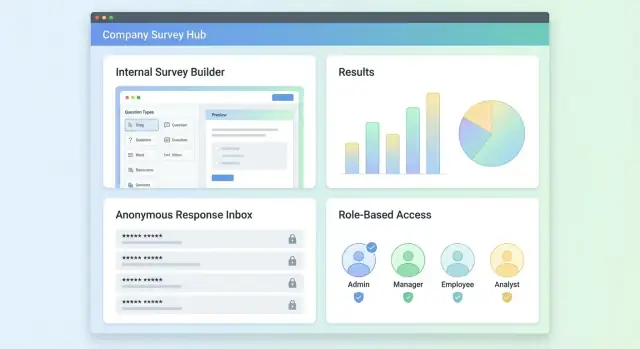
Goals and Scope of an Internal Survey App
An internal survey app should turn employee input into decisions—not just “run surveys.” Before choosing features, define the problem you’re solving and what “done” looks like.
What problems should it cover?
Start by naming the survey types you expect to run regularly. Common categories include:
- Pulse checks (quick, recurring temperature reads on morale, workload, change readiness)
- Engagement or culture surveys (deeper, periodic diagnostics)
- Suggestions and open feedback (always-on channel with lightweight triage)
- 360 feedback (structured input across peers, direct reports, and managers)
- Post-event or post-training surveys (short, time-bound evaluation)
Each category implies different needs—frequency, anonymity expectations, reporting depth, and follow-up workflows.
Who are the stakeholders?
Clarify who will own, operate, and trust the system:
- HR / People Ops: runs programs, needs segmentation and longitudinal trends
- Managers: needs actionable insights for their team without violating privacy
- Employees: needs a low-friction experience and confidence their feedback is handled responsibly
- IT / Security: needs identity, access control, retention rules, and auditability
Write down stakeholder goals early to prevent feature creep and avoid building dashboards no one uses.
Define success metrics
Set measurable outcomes so you can judge the app’s value after rollout:
- Participation rate (overall and by department/location)
- Time-to-insight (from launch to usable results)
- Time-to-action (from insight to assigned follow-ups)
- Completion time (how long a typical respondent spends)
- Action tracking (percentage of surveys that result in documented next steps)
Constraints and guardrails
Be explicit about constraints that affect scope and architecture:
- Anonymity requirements (true anonymity vs. confidential with restricted access)
- Compliance and retention (e.g., data minimization, deletion schedules)
- Budget and timeline (MVP vs. full program needs)
A tight first version is usually: create surveys, distribute them, collect responses safely, and produce clear summaries that drive follow-up actions.
Users, Roles, and Key Use Cases
Roles and permissions determine whether the tool feels credible—or politically risky. Start with a small set of roles, then add nuance only when real needs appear.
Core roles (and what each needs)
Employee (respondent)
Employees should be able to discover surveys they’re eligible for, submit responses quickly, and (when promised) trust that responses can’t be traced back to them.
Manager (viewer + action owner)
Managers typically need team-level results, trends, and follow-up actions—not raw row-level responses. Their experience should focus on understanding themes and improving their team.
HR/Admin (program owner)
HR/admin users usually create surveys, manage templates, control distribution rules, and view cross-organization reporting. They also handle exports (when allowed) and audit requests.
System admin (platform owner)
This role maintains integrations (SSO, directory sync), access policies, retention settings, and system-wide configuration. They should not automatically see survey results unless explicitly granted.
Typical user journeys
Create survey → distribute: HR/admin selects a template, adjusts questions, sets eligible audiences (e.g., department, location), and schedules reminders.
Respond: Employee receives an invite, authenticates (or uses a magic link), completes the survey, and sees a clear confirmation.
Review results: Managers see aggregated results for their scope; HR/admin sees org-wide insights and can compare groups.
Act: Teams create follow-up actions (e.g., “improve onboarding”), assign owners, set dates, and track progress.
Access model: who can do what
Define permissions in plain language:
- Create: usually HR/admin; sometimes managers for pulse checks.
- View results: by scope (team, department, org) and by minimum group size.
- Export: restricted to HR/admin, often requiring an approval or audit log.
Common pitfalls to avoid
A frequent failure is letting managers see results that are too granular (e.g., breaking down to a 2–3 person subgroup). Apply minimum reporting thresholds and suppress filters that could identify individuals.
Another is unclear permissions (“Who can see this?”). Every results page should show a short, explicit access note like: “You’re viewing aggregated results for Engineering (n=42). Individual responses are not available.”
Survey Design: Question Types, Logic, and Templates
Good survey design is the difference between “interesting data” and feedback you can act on. In an internal survey app, aim for surveys that are short, consistent, and easy to reuse.
Common survey types to support
Your builder should start with a few opinionated formats that cover most HR and team needs:
- Pulse surveys (quick monthly/biweekly check-ins)
- eNPS (employee Net Promoter Score) for engagement tracking
- Onboarding surveys (e.g., after week 2 and week 6)
- Exit surveys (structured reasons + open comments)
- Training feedback (content, instructor, applicability)
- Incident or project follow-ups (what happened, what changed, what’s needed)
These types benefit from consistent structure so results can be compared over time.
Question types: keep the core set simple
A solid MVP question library usually includes:
- Single choice (clear, fast to answer)
- Multiple choice (when more than one option can be true)
- Rating scale (e.g., 1–5 agreement, satisfaction, confidence)
- Free text (for context, suggestions, examples)
Make the preview show exactly what respondents will see, including required/optional markers and scale labels.
Branching logic: use it, but lightly
Support basic conditional logic such as: “If someone answers No, show a short follow-up question.” Keep it to simple rules (show/hide individual questions or sections). Overly complex branching makes surveys harder to test and harder to analyze later.
Templates and versioning
Teams will want to reuse surveys without losing history. Treat templates as starting points and create versions when publishing. That way, you can edit next month’s pulse survey without overwriting the previous one, and analytics stay tied to the exact questions that were asked.
Localization (optional)
If your teams span regions, plan for optional translations: store per-question text by locale and keep answer choices consistent across languages to preserve reporting.
Anonymity and Trust: Designing for Honest Feedback
Trust is a product feature. If employees aren’t sure who can see their answers, they’ll either skip the survey or “answer safely” instead of honestly. Make visibility rules explicit, enforce them in reporting, and avoid accidental identity leaks.
Choose clear anonymity modes
Support three distinct modes and label them consistently across the builder, invite, and respondent screens:
- Fully anonymous: no identity is stored with responses. Avoid collecting indirect identifiers (email, IP, device fingerprint). If you must prevent duplicates, use a one-time token validated without being stored next to the response.
- Confidential (HR-only): identity is stored, but access is restricted to a small set of roles (e.g., HR admins). Managers see only aggregated results.
- Identified: responders are visible to authorized roles (useful for follow-ups, onboarding check-ins, or service desk surveys).
Prevent re-identification in reporting
Even without names, small groups can “out” someone. Enforce minimum group sizes everywhere results are broken down (team, location, tenure band, manager):
- Set a minimum group size (commonly 5–10) before showing any breakdown.
- If a filter drops below the threshold, show “Not enough responses to protect anonymity” and disable exports for that slice.
- Apply the same rule to trend charts (e.g., week-by-week for a small department).
Handle free-text safely
Comments are valuable—and risky. People may include names, project details, or personal data.
- Add guidance text above comment fields (“Avoid names or identifiable details”).
- Offer an optional moderation queue for confidential/anonymous surveys, where HR can redact identifying details before managers see comments.
- Consider basic automated checks (e.g., flag emails/phone numbers) to route comments for review.
Log actions without logging identities
Maintain audit trails for accountability, but don’t turn them into a privacy leak:
- Log admin actions (survey created/edited, visibility settings changed, report exported, reminders sent).
- In anonymous mode, avoid logging “who responded” or linking response IDs to identity.
- If you store access logs, keep them separate from survey response data and limit retention.
Use plain, upfront UX copy
Before submission, show a short “Who can see what” panel that matches the selected mode. Example:
Your responses are anonymous. Managers will only see results for groups of 7+ people. Comments may be reviewed by HR to remove identifying details.
Clarity reduces fear, increases completion rates, and makes your feedback program credible.
Distribution, Authentication, and Reminders
Getting a survey in front of the right people—and only once—matters as much as the questions. Your distribution and login choices directly affect response rate, data quality, and trust.
Invitation methods (meet people where they work)
Support multiple channels so admins can choose what fits the audience:
- Email invitations with a clear CTA button and the closing date
- Slack/Teams messages (DMs or channel posts) for faster engagement
- Intranet links for always-on discovery (useful for ongoing pulse surveys)
Keep messages short, include time-to-complete, and make the link one tap away.
Authentication options (balance friction and privacy)
For internal surveys, common approaches are:
- SSO (SAML/OAuth): best for enterprise environments; reduces support issues.
- Magic links: low friction, especially for frontline staff without regular desktop access.
- Employee ID–based access: workable when SSO isn’t available, but requires careful handling so “anonymous” surveys don’t feel identifiable.
Be explicit in the UI about whether a survey is anonymous or identified. If a survey is anonymous, don’t ask users to “log in with their name” unless you clearly explain how anonymity is preserved.
Reminders that help, not spam
Build reminders as a first-class feature:
- Allow scheduled nudges (e.g., 3 days after invite, then weekly)
- Add frequency caps (no more than X reminders per survey)
- Provide opt-out rules for non-required surveys, while still allowing required/compliance surveys to enforce reminders
Closing dates and late submissions
Define behavior up front:
- What happens after closing: block new responses, allow edits, or accept late submissions
- Display clear messaging (“This survey closed on…”), and link to /help if someone needs an exception
Preventing duplicate responses
Combine methods:
- Tokenized links (single-use or re-usable per user)
- Session tracking so accidental refreshes don’t create new entries
- A friendly “You’ve already responded” screen with the option to review/modify if the survey allows edits
UX and UI: Builder, Respondent Flow, and Admin Console
Great UX matters most when your audience is busy and not particularly interested in “learning a tool.” Aim for three experiences that feel purpose-built: the survey builder, the respondent flow, and the admin console.
Survey builder UI (for creators)
The builder should feel like a checklist. A left-side question list with drag-and-drop ordering works well, with the selected question shown in a simple editor panel.
Include essentials where people expect them: required toggles, help text (what the question means and how answers will be used), and quick controls for scale labels (e.g., “Strongly disagree” → “Strongly agree”). A persistent Preview button (or split-view preview) helps creators catch confusing wording early.
Keep templates lightweight: let teams start from a “Pulse check,” “Onboarding,” or “Manager feedback” template and edit in place—avoid multi-step wizards unless they meaningfully reduce errors.
Respondent flow (for employees)
Respondents want speed, clarity, and confidence. Make the UI mobile-friendly by default, with readable spacing and touch targets.
A simple progress indicator reduces drop-off (“6 of 12”). Provide save and resume without drama: autosave after each answer, and make the “Resume” link easy to find from the original invite.
When logic hides/shows questions, avoid surprise jumps. Use small transitions or section headers so the flow still feels coherent.
Admin console (for owners and admins)
Admins need control without hunting through settings. Organize around real tasks: manage surveys, select audiences, set schedules, and assign permissions.
Key screens usually include:
- Survey list (draft / scheduled / live / closed)
- Audience management (groups, filters, imports)
- Schedule + reminder settings
- Permissions (who can create, publish, view results)
Accessibility, errors, and empty states
Cover the basics: full keyboard navigation, visible focus states, sufficient contrast, and labels that make sense without context.
For errors and empty states, assume non-technical users. Explain what happened and what to do next (“No audience selected—choose at least one group to schedule”). Provide safe defaults and undo where possible, especially around sending invites.
Data Model and Information Architecture
A clean data model keeps your survey app flexible (new question types, new teams, new reporting needs) without turning every change into a migration crisis. Keep a clear separation between authoring, distribution, and results.
Core entities
At minimum you’ll want:
- Users: profile, status, auth identifiers, and role(s)
- Groups/Teams: membership table so users can belong to multiple groups
- Surveys: title, description, owner, status (draft/open/closed), settings (anonymous, allow edits, retention)
- Questions: belongs to survey, type, order, optional logic metadata
- Invitations: who was invited, channel, token, sent/reminded timestamps, completion state
- Responses: one “response session” per invitation (or per user) plus answer records
Information architecture follows naturally: a sidebar with Surveys and Analytics, and within a survey: Builder → Distribution → Results → Settings. Keep “Teams” separate from “Surveys” so access control stays consistent.
Raw answers vs aggregated reporting
Store raw answers in an append-friendly structure (e.g., an answers table with response_id, question_id, typed value fields). Then build aggregated tables/materialized views for reporting (counts, averages, trend lines). This avoids recalculating every chart on every page load while preserving auditability.
If anonymity is enabled, separate identifiers:
responsesholds no user referenceinvitationsholds the mapping, with stricter access and shorter retention
Retention, exports, and attachments
Make retention configurable per survey: delete invitation links after N days; delete raw responses after N months; keep only aggregates if needed. Provide exports (CSV/XLSX) aligned with those rules (/help/data-export).
For attachments and links in answers, default to deny unless there’s a strong use case. If allowed, store files in private object storage, scan uploads, and record only metadata in the database.
Search and indexing (optional)
Free-text search is useful, but it can undermine privacy. If you add it, limit indexing to admins, support redaction, and document that search may increase the risk of re-identification. Consider “search within a single survey” instead of global search to reduce exposure.
Tech Stack and System Architecture
A survey app doesn’t need exotic technology, but it does need clear boundaries: a fast UI for building and answering surveys, a reliable API, a database that can handle reporting, and background workers for notifications.
Recommended stack examples
Pick a stack your team can operate confidently:
- Frontend: React or Vue (component-based builders work well here)
- Backend: Node.js (Nest/Express), Django, or Rails
- Database: Postgres (strong for relational data and analytics-friendly queries)
- Cache/queue (optional but common): Redis
If you expect heavy analytics, Postgres still holds up well, and you can add a data warehouse later without rewriting the app.
If you want to prototype the full stack quickly (UI, API, database, and auth) from a requirements doc, Koder.ai can accelerate the build using a chat-based workflow. It’s a vibe-coding platform that generates production-oriented apps (commonly React + Go + PostgreSQL) with features like planning mode, source code export, and snapshots/rollback—useful when you’re iterating on an internal tool with sensitive permissions and privacy rules.
System architecture (high level)
A practical baseline is a three-tier setup:
- Web client (admin + respondents)
- API service (business rules, authorization, validation)
- Database (surveys, questions, assignments, responses)
Add a worker service for scheduled or long-running tasks (invites, reminders, exports) to keep the API responsive.
API design: REST vs GraphQL
REST is usually the simplest choice for internal tools: predictable endpoints, easy caching, straightforward debugging.
Typical REST endpoints:
POST /surveys,GET /surveys/:id,PATCH /surveys/:idPOST /surveys/:id/publishPOST /surveys/:id/invites(create assignments/invitations)POST /responsesandGET /surveys/:id/responses(admin-only)GET /reports/:surveyId(aggregations, filters)
GraphQL can be helpful if your builder UI needs many nested reads (survey → pages → questions → options) and you want fewer round-trips. It adds operational complexity, so use it only if the team is comfortable.
Background jobs and scheduled work
Use a job queue for:
- Sending invites and reminder email/Slack messages
- Closing surveys automatically at an end date
- Generating exports (CSV/PDF) and precomputing report summaries
File storage and CDN (exports/attachments)
If you support file uploads or downloadable exports, store files outside the database (e.g., S3-compatible object storage) and serve them via a CDN. Use time-limited signed URLs so only authorized users can download.
Environments and configuration
Run dev / staging / prod separately. Keep secrets out of code (environment variables or a secrets manager). Use migrations for schema changes, and add health checks so deployments fail fast without breaking active surveys.
Analytics, Reporting, and Action Workflows
Analytics should answer two practical questions: “Did we hear from enough people?” and “What should we do next?” The goal isn’t flashy charts—it’s decision-ready insight that leaders can trust.
Dashboards that show participation (without over-interpreting)
Start with a participation view that’s easy to scan: response rate, invite coverage, and distribution over time (daily/weekly trend). This helps admins spot drop-offs early and tune reminders.
For “top themes,” be careful. If you summarize open-text comments (manually or with automated theme suggestions), label it as directional and let users click through to underlying comments. Avoid presenting “themes” as facts when the sample is small.
Safe breakdowns by department or location
Breakdowns are useful, but they can expose individuals. Reuse the same minimum-group thresholds you define for anonymity everywhere you slice results. If a subgroup is under the threshold, roll it into “Other” or hide it.
For smaller organizations, consider a “privacy mode” that automatically raises thresholds and disables overly granular filters.
Exports with role-based controls
Exports are where data often leaks. Keep CSV/PDF exports behind role-based access controls and log who exported what and when. For PDFs, optional watermarking (name + timestamp) can discourage casual sharing without blocking legitimate reporting.
Turning qualitative feedback into work
Open-ended responses need a workflow, not a spreadsheet.
Provide lightweight tools: tagging, theme grouping, and action notes attached to comments (with permissions so sensitive notes aren’t visible to everyone). Keep the original comment immutable and store tags/notes separately for auditability.
Action tracking and follow-through
Close the loop by letting managers create follow-ups from insights: assign an owner, set a due date, and track status updates (e.g., Planned → In Progress → Done). An “Actions” view that links back to the source question and segment makes progress review straightforward during check-ins.
Security, Privacy, and Compliance Checklist
Security and privacy aren’t add-ons for an internal surveys app—they shape whether employees trust the tool enough to use it honestly. Treat this as a checklist you can review before launch and at every release.
Security basics (table stakes)
Use HTTPS everywhere and set secure cookie flags (Secure, HttpOnly, and an appropriate SameSite policy). Enforce strong session management (short-lived sessions, logout on password change).
Protect all state-changing requests with CSRF defenses. Validate and sanitize input on the server (not just the browser), including survey questions, open-text responses, and file uploads (if any). Add rate limiting for login, invitation, and reminder endpoints.
Access control (RBAC + least privilege)
Implement role-based access control with clear boundaries (e.g., Admin, HR/Program Owner, Manager, Analyst, Respondent). Default every new feature to “deny” until explicitly permitted.
Apply least privilege in the data layer too—survey owners should only access their own surveys, and analysts should get aggregated views unless explicitly granted response-level access.
If your culture requires it, add approvals for sensitive actions such as enabling anonymity modes, exporting raw responses, or adding new survey owners.
Encryption and secrets
Encrypt data in transit (TLS) and at rest (database and backups). For especially sensitive fields (e.g., respondent identifiers or tokens), consider application-layer encryption.
Store secrets (DB credentials, email provider keys) in a secrets manager; rotate them regularly. Never log access tokens, invitation links, or response identifiers.
Privacy and compliance considerations
Decide data residency early (where the database and backups live) and document it for employees.
Define retention rules: how long to keep invitations, responses, audit logs, and exports. Provide a deletion workflow that’s consistent with your anonymity model.
Be DPA-ready: maintain a list of subprocessors (email/SMS, analytics, hosting), document processing purposes, and have a contact point for privacy requests.
Testing and verification
Add unit and integration tests for permissions: “Who can view what?” and “Who can export what?” should be covered.
Test privacy edge cases: small-team thresholds, forwarded invitation links, repeated submissions, and export behavior. Run periodic security reviews and keep an audit log of admin actions and sensitive data access.
MVP Plan, Rollout Strategy, and Iteration Roadmap
A successful internal survey app isn’t “done” at launch. Treat the first release as a learning tool: it should solve a real feedback need, prove reliability, and earn trust—then expand based on usage.
MVP scope (what to ship first)
Keep the MVP focused on the full loop from creation to insight. At minimum, include:
- A simple survey builder (core question types, basic branching if you already have it)
- Distribution via shareable link and/or email invitations
- Response collection with clear status (open/closed) and basic export
- Basic reporting: response rate, simple charts per question, and a comments view
Aim for “fast to publish” and “easy to answer.” If admins need a training session just to send a survey, adoption will stall.
If you’re resource-constrained, this is also where tools like Koder.ai can help: you can describe roles, anonymity modes, reporting thresholds, and distribution channels in planning mode, generate an initial app, and iterate quickly—while still retaining the option to export source code and run it in your own environment.
Pilot rollout (prove value with one team)
Start with a pilot in a single team or department. Use a short pulse survey (5–10 questions) and set a tight timeline (e.g., one week open, results reviewed in the following week).
Include a couple of questions about the tool itself: Was it easy to access? Did anything feel confusing? Did anonymity expectations match reality? That meta-feedback helps you fix friction before a wider launch.
Change management (how to drive adoption)
Even the best product needs internal clarity. Prepare:
- A short announcement describing the “why,” what data is collected, and who can see what
- An internal FAQ that explains anonymity, timelines, and how results are used
- A lightweight manager briefing: how to interpret results, how to communicate actions, and what not to do (e.g., trying to identify individuals)
If you have an intranet, publish a single source of truth (e.g., /help/surveys) and link to it from invitations.
Monitoring during rollout
Track a small set of operational signals every day during the first runs: deliverability (bounces/spam), response rate by audience, app errors, and page performance on mobile. Most drop-offs happen at login, device compatibility, or unclear consent/anonymity copy.
Iteration roadmap (what to add next)
Once the MVP is stable, prioritize improvements that reduce admin effort and increase actionability: integrations (HRIS/SSO, Slack/Teams), a templates library for common surveys, smarter reminders, and more advanced analytics (trends over time, segmentation with privacy thresholds, and action tracking).
Keep your roadmap tied to measurable outcomes: faster survey creation, higher completion rates, and clearer follow-through.
FAQ
What should an internal survey app be designed to do (beyond “run surveys”)?
Start by listing the recurring survey categories you need (pulse, engagement, suggestions, 360, post-event). For each, define:
- frequency and typical length
- anonymity mode expectations
- required reporting depth (org vs team)
- follow-up workflow (actions, owners, due dates)
This prevents building a generic tool that fits none of your real programs.
Which roles should the app support, and what access should each role have?
Use a small, clear set of roles and scope results by default:
- Employee: discover eligible surveys, respond quickly, see clear privacy messaging.
- Manager: view aggregated team results and manage follow-up actions (not raw responses).
- HR/Admin: create surveys, manage templates/audiences, view org-wide reporting, control exports.
- System admin: manage SSO/directory/retention and platform settings; doesn’t automatically get results access.
Write permissions in plain language and show an access note on results pages (e.g., “Aggregated results for Engineering (n=42)”).
What success metrics should we define before building?
Track a few measurable outcomes:
- participation rate (overall and by group)
- time-to-insight (launch → usable results)
- time-to-action (insight → assigned follow-ups)
- median completion time
- percentage of surveys with documented next steps
Use these to judge value after rollout and to prioritize what to build next.
What anonymity options should an internal survey app offer?
Support explicit modes and label them consistently in builder, invites, and the respondent UI:
- Fully anonymous: store no identity with responses; avoid indirect identifiers (IP/device).
- Confidential (HR-only): identity stored but restricted; managers see aggregates only.
- Identified: responders are visible (useful for onboarding check-ins or service surveys).
Also add a short “Who can see what” panel before submission so the promise is unambiguous.
How do we prevent re-identification in reporting and filters?
Enforce privacy rules everywhere results can be sliced:
- set a minimum reporting threshold (commonly 5–10)
- hide breakdowns and disable exports when a filter drops below the threshold
- apply the same rule to trend charts (small groups over time can reveal individuals)
Show clear messaging like “Not enough responses to protect anonymity.”
How should we handle free-text comments safely?
Treat comments as high value/high risk:
- add guidance above comment fields (“Avoid names or identifiable details”)
- provide an optional moderation/redaction queue before managers see comments
- optionally flag emails/phone numbers for review
Keep original comments immutable and store tags/notes separately for auditability.
What distribution and authentication methods work best for internal surveys?
Offer multiple invite channels and keep messages short (time-to-complete + close date):
- email invites
- Slack/Teams messages
- intranet/discovery links
For authentication, common options are SSO, magic links, or employee ID–based access. If the survey is anonymous, explain how anonymity is preserved even if users authenticate to prevent duplicates.
What UX features matter most for creators, respondents, and admins?
Include these essentials:
- Builder: drag-and-drop question ordering, required toggles, help text, and a true preview.
- Respondent flow: mobile-first layout, progress indicator, autosave + resume, clear confirmation.
- Admin console: survey statuses (draft/scheduled/live/closed), audience selection, reminders, permissions.
Invest in empty states and error messages that tell non-technical users exactly what to do next.
What data model choices keep the app flexible and reporting fast?
Use a small set of core entities and separate authoring, distribution, and results:
- users, groups/teams, surveys, questions
- invitations/tokens (delivery + dedupe)
- responses + answers (append-friendly)
Store raw answers in a typed answers structure, then build aggregates/materialized views for reporting. For anonymous surveys, keep identity mappings (if any) separated and tightly controlled.
What’s a realistic MVP and rollout plan for an internal survey app?
Ship an MVP that completes the loop from creation to insight:
- basic builder (core question types; simple branching if needed)
- distribution via link and/or email
- response collection with open/closed status and basic export
- basic reporting (response rate, per-question charts, comments view)
Pilot with one team using a 5–10 question pulse for one week, then review results the next week. Include a couple questions about tool access and whether anonymity expectations matched reality.