

Create a Web App for Contract Review and Version Control
Learn how to plan, design, and build a web app for legal contract review with version control, comments, approvals, audit trails, and secure access.
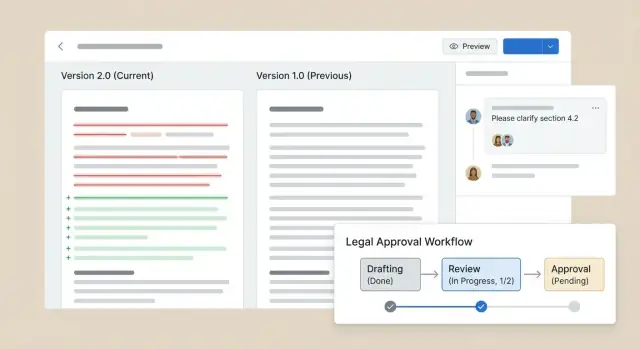
Define the Problem and Key Use Cases
Before you sketch screens or pick a tech stack, get specific about the problem you’re solving. “Contract review” can mean anything from cleaning up a one-page NDA to coordinating a complex multi-party agreement with strict approval rules. Clear use cases keep your product from turning into a generic document tool that no one fully trusts.
Define the users (and their constraints)
Start by naming the real roles involved and what each one needs to do—often under time pressure:
- Legal team: wants consistency, low risk, and an auditable trail of who changed what and why.
- Sales: wants speed, clear next steps, and minimal back-and-forth.
- Procurement: needs policy compliance, vendor visibility, and standardized terms.
- External counsel / counterparties: need limited access, clear commenting, and simple sharing without exposing internal documents.
When you write these down, also capture constraints like “must work on mobile,” “external users shouldn’t see internal notes,” or “approvals must be captured before signature.”
List the core jobs to be done
Your MVP should support a tight loop of activities that happen repeatedly:
- Review: read the latest version, highlight issues, ask questions.
- Redline: propose edits, track changes, and keep the prior text recoverable.
- Approve: route to the right stakeholders with a clear decision record.
- Sign: move from “approved” to “executed” without losing the history.
- Store & retrieve: find the executed copy fast, with the full context preserved.
If a job requires jumping between email, shared drives, and chat threads to “finish,” it’s a strong candidate for your app.
Decide what “version” means in your product
A contract can have multiple “truths” depending on the stage. Define your version states up front so everyone has the same mental model:
- Draft: early internal iteration (often messy, high churn).
- Revision: a numbered sequence of changes shared across parties.
- Executed copy: the signed, final agreement that should be locked down.
This definition later drives permissions (who can edit), retention (what can be deleted), and reporting (what counts as “final”).
Set success metrics that align with business outcomes
Pick metrics you can measure without guesswork. Examples:
- Turnaround time: median time from request → approval → signature.
- Fewer errors: fewer missing clauses, wrong entity names, or outdated templates.
- Better visibility: fewer “Where is this?” messages; more contracts with a clear status and owner.
These metrics guide tradeoffs later—like investing in better search, a clearer workflow, or stricter role-based access control.
Scope the MVP Features
An MVP for a contract review web app should do a few things extremely well: keep documents organized, make edits and feedback easy to follow, and move a contract from “draft” to “signed” with a clear audit trail. If you try to solve every legal edge case on day one, teams will still fall back to email.
The “must-have” MVP workflow
Start with one primary journey: upload a contract, invite reviewers, capture changes and comments, then approve and finalize.
Key MVP features to include:
- Upload and organize documents (DOCX/PDF): Create a contract record, attach the original file, and store each new version as the review progresses.
- Tracked changes, comments, and @mentions: Reviewers need to propose edits, leave contextual comments, and notify specific people without switching tools.
- Side-by-side version comparison and change summaries: A simple diff view plus a plain-language “what changed” summary reduces back-and-forth and prevents missed edits.
- Approval workflow with status (Draft/Review/Approved/Signed): Make the current state obvious, restrict who can advance status, and record timestamps for each transition.
- Search and filters across contracts and clauses: Find agreements by counterparty, status, date, and key terms; basic clause-level search is enough for MVP.
What to postpone (on purpose)
Defer heavy automation such as advanced clause playbooks, AI-assisted rewriting, complex integrations, and multi-step conditional routing. These are valuable, but only after your core collaboration loop is reliable.
MVP success criteria
Define measurable outcomes: reviewers can understand the latest version in seconds, approvals are traceable, and teams can locate any contract or key clause quickly—without email threads.
Design the Data Model for Contracts and Versions
A contract review app lives or dies by how well it separates “what the contract is” from “how it changes over time.” A clean data model also makes permissions, search, and auditability much easier later.
Start with a workspace-first structure
Model the top level as Workspaces (or “Clients/Teams”), then Matters/Projects inside each workspace. Within a matter, support folders for familiar organization, plus tags for cross-cutting grouping (e.g., “NDA,” “Renewal,” “High Priority”).
For each Contract, store structured metadata that users can filter on without opening a file:
- Parties (counterparty, internal entity)
- Effective date, signature date, renewal/termination dates
- Status (Draft, In Review, Approved, Signed)
- Owner, business unit
Keep metadata flexible by using a small set of fixed fields plus a “custom fields” table (key + type + value) per workspace.
Separate the contract record from versions and conversations
Think in three layers:
- Contract (record): the identity, metadata, and current state.
- File Versions: every uploaded/imported document is a new version with its own storage pointer (blob ID), checksum, created_by, created_at, and optional label (e.g., “Vendor draft v2”). Never overwrite; always append.
- Discussion Threads & Comments: comments should attach to a specific version (and optionally an anchor like paragraph/selection). This prevents “orphaned” feedback when the document changes.
This separation allows one contract to have many versions and many threads, without mixing “document history” with “conversation history.”
Make audit events immutable
Create an AuditEvent log that records actions as append-only events: who did what, when, from where (optional IP/user agent), and on which entity (contract/version/comment/permission). Examples: “version_uploaded,” “comment_added,” “status_changed,” “permission_granted,” “export_generated.”
Store enough context to be defensible in disputes, but avoid duplicating entire documents in the audit log.
Plan retention and export from day one
Add fields for retention policy at the workspace/matter level (e.g., retain 7 years after close). For audits or litigation, provide export primitives: export contract metadata, all versions, comment threads, and the audit trail as a single package. Designing these entities early saves painful migrations later.
Plan Security, Permissions, and Access Control
Security in a contract review app is mostly about two things: controlling who can see each document, and controlling what they can do with it. Make these rules explicit early, because they will shape your database model, UI, and audit trail.
Role-based access (RBAC)
Start with simple, recognizable roles and map them to actions:
- Admin: manage users, matters, templates, retention policies, and org-wide settings.
- Editor: upload drafts, edit/redline, respond to comments, propose new versions.
- Reviewer: comment, suggest edits (if allowed), approve/reject steps in a workflow.
- Viewer: read-only access (often internal stakeholders).
Define permissions at the action level (view, comment, edit, download, share, approve) so you can evolve roles later without rewriting the app.
Matter-level permissions and guest access
Most legal teams work by matter/deal. Treat a “matter” as the primary security boundary: users are granted access to matters, and documents inherit that access.
For external guests (counterparties, outside counsel), use restricted accounts:
- Access only to specific matters/documents
- Time-limited access links (optional)
- Clear labeling in the UI so internal users don’t overshare
Confidentiality controls
Even with access checks, prevent accidental leakage:
- Download restrictions for sensitive matters (view-in-app only)
- Watermarking on previews/exports (user email + timestamp)
- Disable copy/paste on web previews if your threat model requires it (with the usability tradeoff understood)
Authentication options
Support password login by default, but plan for stronger options:
- SSO (SAML/OIDC) for companies that manage identity centrally
- 2FA for admins and guest users, or as an org-wide policy
Keep all permission decisions server-side, and log access/permission changes for later investigation.
Implement Redlining and Version Comparison
Redlining is the heart of a contract review web app: it’s where people understand what changed, who changed it, and whether they agree. The key is choosing a comparison approach that stays accurate while remaining readable for non-lawyers.
Choose your diff method
There are two common approaches:
-
DOCX-based diffs: You compare the underlying Word structure (runs, paragraphs, tables). This tends to preserve formatting and numbering, and matches how lawyers already work. The trade-off is complexity—DOCX is not “just text,” and small formatting tweaks can create noisy diffs.
-
Plain-text / clause-based diffs: You normalize content into clean text (or discrete clauses) and diff that. This can produce cleaner, more stable comparisons, especially if your product emphasizes clause library management. The trade-off is losing some layout fidelity (tables, headers, trackable formatting changes).
Many teams combine them: DOCX-aware parsing to extract stable text blocks, then diff those blocks.
Handle real-world edits (not just insert/delete)
Contracts rarely change linearly. Your document comparison diff should detect:
- Insertions and deletions (basic)
- Moved text (e.g., a clause relocated from Section 8 to Section 12)
- Replacements (treat as delete + insert, but present as a single “edited” action when possible)
Reducing “diff noise” matters: normalize whitespace, ignore trivial formatting shifts, and preserve section numbering where you can.
Comments anchored to exact text
Support comments attached to a range (start/end offsets) within a specific version, plus a fallback “rehydration” strategy if the text shifts (e.g., re-anchor via nearby context). Each comment should also feed the audit trail: author, timestamp, version, and resolution status.
A readable change summary
Non-lawyers often need the headline, not the markup. Add a “Change Summary” panel that groups tracked changes by section and type (Added/Removed/Modified/Moved), with plain-language snippets and quick links that jump to the exact location.
Build Review Collaboration and Workflow
A contract review web app succeeds or fails on how smoothly people can collaborate. The goal is to make it obvious who needs to do what, by when, and what changed, while preserving a defensible history.
Inline collaboration that doesn’t get messy
Support inline comments anchored to a clause, sentence, or selected text. Treat comments as first-class objects: threads, @mentions, and file/version references.
Add clear controls to resolve and reopen threads. Resolved comments should stay discoverable for compliance, but collapse by default so the document stays readable.
Notifications matter, but they must be predictable. Prefer event-based rules (assigned to you, mentioned, your clause changed) and daily digests over constant pings. Let users tune preferences per contract.
Assignments, checklists, and ownership
Use lightweight assignments for sections or tasks (e.g., “Payment terms review”) and allow a checklist with organization-specific gates like “Legal approved” or “Security approved.” Keep checklists tied to a specific version so approvals remain meaningful even with tracked changes for contracts.
Statuses and gates for a clean approval workflow
Define a small, understandable state machine: Draft → In Review → Approved → Executed (customizable per organization). Enforce gates: only certain roles can move a contract forward, and only when required checklist items are complete.
Pair this with role-based access control and immutable event logs (who changed status, who approved, when).
Reminders and deadlines without spamming
Add due dates at the contract and assignment level, with escalation rules (e.g., reminder 48 hours before, then on the due date). If a user is inactive, notify the assignee’s manager or fallback reviewer—without blasting the whole channel.
If you later add e-signature integration, align “Ready for signature” as a final gated status. See also /blog/contract-approval-workflow for deeper patterns.
Add Search, Metadata, and Clause Management
Search is what turns a folder of contracts into a working system. It helps legal teams answer simple questions quickly (“Where is our limitation of liability clause?”) and supports operational questions (“Which vendor agreements expire next quarter?”).
Full-text search that works on real contracts
Implement full-text search across both uploaded files and extracted text. For PDFs and Word docs, you’ll need a text extraction step (and ideally OCR for scanned PDFs) so searches don’t fail on image-based documents.
Keep results usable by highlighting matched terms and showing where they appear (page/section if possible). If your app supports versions, search should allow users to choose whether they’re searching the latest approved version, all versions, or a specific snapshot.
Metadata filtering and saved views
Full-text search is only half the story. Metadata makes contract work manageable at scale.
Common filters include:
- Contract type (MSA, SOW, NDA)
- Counterparty / vendor
- Effective date, renewal date, expiration date
- Owner (legal owner, business owner)
- Status (Draft, In Review, Approved, Signed)
- Jurisdiction / governing law
From there, add saved views—pre-built or user-defined queries that behave like smart folders. For example: “Vendor MSAs expiring soon” or “NDAs missing signature.” Saved views should be shareable across a team and respect permissions, so a user never sees contracts they can’t access.
Clause tagging and a reusable clause library
Clause management is where review becomes faster over time. Start by letting users tag clauses within a contract (e.g., “Termination,” “Payment,” “Liability”) and store those tagged snippets as structured entries:
- Clause text (and optional variables like {NoticePeriod})
- Approved status and last-approved date
- Jurisdiction/company policy notes
- Alternate versions (fallback language)
A simple clause library enables reuse in new drafts and helps reviewers spot deviations. Pair it with search so a reviewer can find “indemnity” clauses across the library and across executed contracts.
Bulk actions and exports for reporting
Teams often need to act on groups of contracts: update metadata, assign an owner, change status, or export a list for reporting. Support bulk actions on search results, plus exports (CSV/XLSX) that include key fields and an audit-friendly timestamp. If you offer scheduled reports later, design exports now so they’re consistent and predictable.
Choose File Handling and Integrations
Contracts live in other tools long before they reach your app. If file handling and integrations are awkward, reviewers will keep emailing attachments—and version control will quietly fall apart.
Upload, convert, and preview (DOCX/PDF)
Start by supporting the two formats people actually send: DOCX and PDF. Your web app should accept uploads, normalize them, and render a fast in-browser preview.
A practical approach is to store the original file, then generate:
- A preview format (often PDF or HTML) for quick reading
- Extracted text for search and clause detection
- Structural metadata (headings, page mapping) to anchor comments and redlines
Be explicit about what happens when a user uploads a “scanned PDF” (image-only). If you plan OCR, surface it as a processing step so users understand why text search may be delayed.
Email import and external sharing
Many contracts arrive through email. Consider a simple inbound email address (e.g., contracts@yourapp) that creates a new document or appends a new version when someone forwards a thread.
For external parties, prefer share links over attachments. A link-based flow can still preserve your version history: each upload via the link becomes a new version, with the sender captured as “external contributor” and a timestamp for your audit trail.
Integrations to prioritize
Focus on integrations that remove copying and re-uploading:
- E-signature (DocuSign/Adobe Sign): send the “approved” version for signature and pull back the executed PDF
- CRM (Salesforce/HubSpot): connect contracts to deals/accounts and reflect status changes
- Cloud storage (Google Drive/Dropbox/SharePoint): import/export and keep a single source of truth
Webhooks and API for sync
Expose a small set of reliable events and endpoints: contract.created, version.added, status.changed, signed.completed. This lets other systems synchronize status and files without brittle polling, while keeping your contract review web app as the authoritative timeline.
Design the UI for Clarity and Speed
A contract review tool succeeds or fails on whether a busy reviewer can answer two questions quickly: what changed and what do you need from me. Design the UI around those moments, not around file management.
A guided review flow (for non-technical users)
Make the default experience a simple, step-by-step review rather than a blank editor. A good flow is: open contract → see summary of changes and open items → review changes in order → leave comments/decisions → submit.
Use clear calls to action like “Accept change”, “Request edit”, “Resolve comment”, and “Send for approval”. Avoid jargon such as “commit” or “merge.”
Side-by-side compare that’s actually readable
For version comparison, provide a side-by-side view with:
- Clear highlighting for additions, deletions, and moved text
- A jump-to-change list (like “12 changes”) with filters (e.g., “financial,” “delivery,” “liability”)
- Sticky section headers so users don’t get lost in long documents
When users click a change in the list, scroll to the exact location and briefly pulse-highlight it so they know what they’re looking at.
Consistent naming and version labels
People trust what they can track. Use consistent labels such as v1, v2, plus optional human labels like “Vendor edits” or “Internal legal cleanup.” Display the version label everywhere: in the header, compare picker, and activity feed.
Accessibility and speed basics
Support keyboard navigation (tab order, shortcuts for next/previous change), readable contrast, and scalable text. Keep the interface fast: render long contracts in chunks, preserve scroll position, and autosave comments without interrupting reading.
Select a Practical Architecture and Tech Stack
The best architecture for a contract review web app is usually the one your team can ship, secure, and maintain. For most products, start with a modular monolith (one deployable app, clearly separated modules) and only split into services when scale or team size truly requires it.
Backend: API, database, file storage, background jobs
A typical setup looks like:
- API: REST or GraphQL (many teams choose REST for simplicity). Use a mainstream framework (Node.js/NestJS, Python/Django, Ruby on Rails, or Java/Spring) so hiring and security practices are straightforward.
- Database: PostgreSQL is a strong default for legal document version control—great for relational data (users, matters, contracts, versions, approvals) plus full-text search if needed later.
- File storage: Store source files (DOCX/PDF) and generated artifacts (preview PDFs, diffs) in object storage like S3-compatible storage. Keep only metadata in the database.
- Background jobs: Use a queue (Redis + BullMQ, Sidekiq, Celery, or similar) for expensive tasks: rendering previews, generating comparison diffs, OCR, and syncing integrations.
Frontend: viewer, editor surface, real-time updates
Most teams use React (or Vue) plus a document viewing layer (PDF viewer) and an editor surface for redlining. Real-time presence and updates can be done with WebSockets (or SSE) so reviewers see new comments and status changes without refresh.
Audit logging and event sourcing for key actions
Legal teams expect an audit trail for legal documents. Implement append-only audit logs for events like “uploaded,” “shared,” “commented,” “approved,” and “exported.” You can go “event sourcing-lite”: store immutable events, then build current state from them (or keep read models) for reliable history.
Trade-offs: monolith vs services, build vs buy for editor/diff
- Monolith vs services: a monolith reduces operational overhead and keeps permissions consistent; services add deployment complexity but help when heavy processing (diff/render) needs separate scaling.
- Build vs buy: redlining and document comparison diff are deceptively hard. Buying/embedding (CKEditor 5, ProseMirror-based solutions, OnlyOffice/Collabora for DOCX) can accelerate delivery. Building gives full control, but expect significant time for edge cases (tables, numbering, tracked changes import/export).
Fast prototyping option: build the first internal version with Koder.ai
If your goal is to validate workflow and permissions quickly, a vibe-coding platform like Koder.ai can help you get a working prototype (React frontend + Go/PostgreSQL backend) from a chat-driven spec. It’s especially useful for scaffolding your contract data model, RBAC, audit events, and basic screens—then exporting the source code when you’re ready to harden diffing, OCR, and compliance-grade controls.
Handle Compliance, Privacy, and Data Governance
Contract review tools live and die by trust. Even if your product is “just” internal, treat security and governance as core product requirements—because contracts often contain pricing, personal data, and negotiation history.
Encryption: files and metadata
Use TLS for all network traffic, and encrypt stored data at rest. Don’t stop at the document blobs: encrypt sensitive metadata too (party names, renewal dates, approver notes), because metadata is often easier to query and exfiltrate.
If you store files in object storage, enable server-side encryption and ensure encryption keys are managed centrally (and rotated). If you handle redlines as separate artifacts, apply the same controls to those derived files.
Tenant segregation and least privilege
If you support multiple workspaces (customers, departments, subsidiaries), implement strict data segregation by tenant. This should be enforced at the data layer (not only in UI filters), with every query scoped to a tenant/workspace identifier.
Apply least privilege everywhere: default roles should have minimal access, and elevated actions (export, delete, share links, admin settings) should be explicit permissions. Tie this to your role-based access control model so audit logs are meaningful.
Backups, restore drills, and disaster recovery
Backups are only useful if you can restore them. Define:
- Backup frequency and retention for both the database and file storage
- Restore time objectives (how quickly you need to recover)
- Regular restore drills (e.g., quarterly) to validate the process
Document who can trigger restores and how you prevent accidental overwrites.
Compliance basics: logging and vendor reviews
Maintain an audit trail for security and compliance: log authentication events, permission changes, document access/downloads, and key workflow actions. Review third-party vendors (storage, email, e-signature integration) for security posture, data location, and breach processes before going live.
Testing, Deployment, and Ongoing Maintenance
A contract review web app lives or dies on trust: users need confidence that tracked changes for contracts are accurate, permissions are enforced, and every step in the contract approval workflow is recorded correctly. Treat testing and operations as core product features, not finishing touches.
What to test before you ship
Start with high-risk behaviors:
- Diff accuracy: verify insertions/deletions, moved text, whitespace, numbering, and edge cases like long tables or repeated clauses. Include “round-trip” tests (apply edits → save → reload → compare) to catch formatting drift.
- Permissions and role-based access control: ensure users can’t view, comment, export, or approve outside their role. Test both UI restrictions and direct API access.
- Workflow transitions: validate allowed status changes (e.g., Draft → Review → Approved), required approvers, and that an audit trail is written for every transition.
Performance and load testing
Contract files get big, and versions add up. Run load tests that simulate:
- Large documents (hundreds of pages)
- Many concurrent reviewers adding comments
- Deep version chains and frequent document comparison diff operations
Track p95 latency for key actions: open document, generate diff, search, and export.
Monitoring and operational readiness
Instrument end-to-end monitoring for:
- Errors: API failures, diff generation exceptions, permission denials
- Latency: document open, diff jobs, search queries
- Background queues: backlog size, job retries, dead-letter counts
Create runbooks for common incidents (stuck diff job, failed conversion, degraded search). Add a lightweight status page at /status.
Release plan and maintenance
Ship with a controlled rollout: invite a small set of beta users, capture feedback inside the app, and iterate weekly. Keep releases small and reversible (feature flags help). Ongoing maintenance should include dependency patching, security reviews, periodic access audits, and regression tests for secure contract collaboration and e-signature integration.
FAQ
What’s the right MVP scope for a contract review web app?
Start with a tight, repeatable loop:
- Upload a contract (DOCX/PDF)
- Invite reviewers
- Capture redlines + comments
- Route approvals with clear status
- Produce and store an executed, locked final copy
If users still have to “finish” the job in email or shared drives, your MVP is missing a core step.
How do I define the key use cases so the product doesn’t become a generic document tool?
Define the roles and their constraints early (legal, sales, procurement, external counsel). Then map each role to a small set of jobs-to-be-done:
- Review
- Redline
- Approve
- Sign
- Store & retrieve
This prevents building a generic document tool that lacks the workflow and trust features legal teams need.
How should I define “version” in a contract version control product?
Treat “version” as a set of explicit states with different rules:
- Draft: high churn, internal iteration
- Revision: numbered, shareable changes across parties
- Executed copy: signed final, locked down
Those definitions drive permissions (who can edit), retention (what can be deleted), and reporting (what counts as “final”).
What data model works best for contracts, versions, and comments?
Use a three-layer model:
- Contract (record): identity + metadata + current status
- FileVersion: append-only versions (blob pointer, checksum, created_by/at, label)
- CommentThread/Comment: attached to a specific version (optionally anchored to a selection)
This keeps document history and conversation history consistent, even as files change.
What should an audit trail include in a legal contract review app?
Make audit logging append-only and immutable. Log events such as:
version_uploadedcomment_addedstatus_changedpermission_grantedexport_generated
Store enough context to be defensible (who/what/when/where), but don’t duplicate full document contents inside the audit log.
How should permissions and RBAC be structured for internal and external users?
Start simple with role-based access control (RBAC) and action-level permissions:
- Actions like view, comment, edit, download, share, approve
- Roles like Admin, Editor, Reviewer, Viewer
Make a matter/project the primary security boundary so documents inherit access rules, and keep all permission checks server-side with logging.
How can I safely support external counterparties and outside counsel?
Use restricted guest accounts (or tightly-scoped share links) with:
- Access limited to specific matters/documents
- Optional time limits
- Clear UI labeling to prevent oversharing
Add safeguards like watermarking exports, download restrictions for sensitive matters, and careful separation of internal notes vs external-visible comments.
What’s the best approach to redlining and document comparison diffs?
Pick a diff strategy aligned to what users expect:
- DOCX-aware diffs preserve formatting and numbering but can be noisy
- Plain-text/clause diffs are cleaner but lose layout fidelity
In practice, many teams parse DOCX into stable blocks, normalize whitespace/formatting, and diff those blocks to reduce noise and improve readability.
How do I prevent comments from becoming “orphaned” when versions change?
Anchor comments to a specific version plus a text range (start/end) and store surrounding context for resilience. When text shifts, use a re-anchoring strategy (nearby context matching) rather than “floating” comments.
Also track resolution state (open/resolved/reopened) and include comment actions in the audit log for compliance.
How should search and metadata filtering work in a contract repository?
Combine full-text search with structured metadata:
- Extract text from DOCX/PDF (add OCR for scanned PDFs)
- Highlight results with page/section cues when possible
- Filter by status, counterparty, dates, owner, contract type, governing law
Add saved views (smart folders) that are shareable and permission-aware so users never see results they shouldn’t access.