

Create a Web App to Manage Customer Consent & Preferences
Step-by-step guide to design, build, and deploy a consent & preference management web app with clear UX, audit logs, APIs, and strong security.
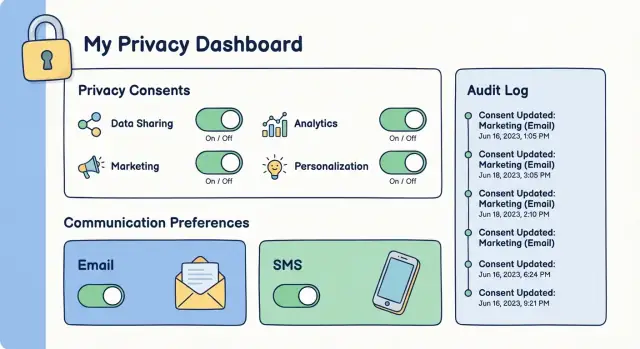
Define Goals, Scope, and Consent Types
Before you design screens or write code, get precise about what you’re building—and what you’re not. “Consent” and “preferences” sound similar, but they often have different legal and operational meanings. Getting these definitions right early prevents confusing UX and brittle integrations later.
Consent vs. preferences (in plain terms)
Consent is a permission you must be able to prove later (who agreed, to what, when, and how). Examples include agreeing to receive marketing emails or allowing tracking cookies.
Preferences are user choices that shape experience or frequency (weekly vs. monthly updates, topics they care about). You should still store them reliably, but they’re usually not the same as a legal opt-in.
Decide the scope: channels, topics, and collection points
Write down what you’ll manage on day one:
- Channels: email, SMS, push notifications, in-app messages, phone calls
- Topics: product updates, newsletters, promotions, event invites, partner offers
- Where choices are collected: signup, checkout, lead forms, account settings, in-app prompts, support interactions
A common pitfall is mixing marketing consent with transactional messages (like receipts or password resets). Keep them separate in your definitions, data model, and UI.
Identify stakeholders and ownership
A consent management web app touches multiple teams:
- Marketing (campaign rules, subscription preferences)
- Product (in-app prompts, preference center)
- Support (handling changes, troubleshooting)
- Legal/compliance (definitions, retention, proof requirements)
Assign a clear owner for decisions, and define a lightweight process for updates when rules, vendors, or messaging change.
Set success metrics you can measure
Pick a few measurable outcomes, such as fewer spam complaints, fewer unsubscribes caused by confusion, faster retrieval of GDPR consent records, fewer support tickets about subscription preferences, and reduced time-to-provide proof of consent when requested.
Map Requirements to Privacy Rules (GDPR/CCPA Basics)
Translate privacy rules into practical product requirements. This section is a high-level orientation, not legal advice—use it to shape features, then confirm details with counsel.
What your app should support (minimum viable compliance)
At a functional level, a consent management web app usually needs to handle:
- Opt-in (e.g., marketing emails, SMS, cookies where required)
- Opt-out (e.g., “Do not sell/share my personal information”)
- Granular choices (channels, topics, frequency)
- Proof (a defensible record of what the user agreed to)
- Easy withdrawal (changing your mind should be as easy as opting in)
Key regional differences (simplified)
- GDPR (EU/UK) focuses on having a valid “lawful basis.” For many marketing and cookie use cases, that means clear, affirmative consent and the ability to withdraw.
- ePrivacy rules (varies by country, often aligned with EU guidance) commonly affect cookies and similar tracking, pushing you toward explicit choices for non-essential tracking.
- CCPA/CPRA (California) emphasizes opt-out rights for “sale” or “sharing” of personal information, plus limits around sensitive data and stronger transparency requirements.
What to record: who, what, when, how, and why
Your consent records should capture:
- Who: user ID (and/or email/phone), plus account/tenant context
- What: purpose(s) and channels (e.g., “product updates via email”)
- When: timestamp, timezone, and effective date
- How: UI source (preference center, checkout), method (checkbox, double opt-in), and version of notice/policy shown
- Why: lawful basis/purpose label and any regional flag (GDPR consent vs. CCPA opt-out)
Retention and auditability
Define data retention policies for consent records and the audit log for consent (often retained longer than marketing data). Keep only what you need, protect it, and document retention periods. If you’re unsure, add a “needs legal decision” placeholder and link it to your internal policy docs (or /privacy if public).
Final policy decisions—especially what counts as “sale/share,” cookie categorization, and retention—should be reviewed with counsel.
Design the Data Model and Consent Record Schema
A consent management web app lives or dies by its data model. If the schema can’t answer “who agreed to what, when, and how?”, you’ll struggle with compliance, customer support, and integrations.
Core entities to model
Start with a few clear building blocks:
- Customer/Identity: the person (or account) you recognize
- Identifier: email, phone, internal user ID, device ID—stored as separate rows so you can support multiples
- Purpose: why you process data (e.g., “marketing emails”, “order updates”, “analytics”)
- Channel: email, SMS, push, phone
- Preference: the user’s choices per purpose/channel (e.g., subscribed/unsubscribed, frequency)
- Consent record: the legal event that grants or withdraws permission
This separation keeps your preference center flexible while still producing clean GDPR consent records and CCPA opt-out signals.
Versioning: what text did they accept?
Store the exact notice/policy version tied to each decision:
notice_idandnotice_version(or a content hash)- locale (EN/FR), if you show localized text
- the specific checkbox label or disclosure snippet shown
That way, when wording changes, older consents remain provable.
Evidence (proof) fields
For each consent event, record evidence appropriate for your risk level:
- timestamp (UTC) and timezone if relevant
- source (web, iOS, support agent), plus source page/path
- user agent
- IP address only if you have a clear need and retention policy
Identity merges and withdrawal flags
People sign up twice. Model merges by linking multiple identifiers to one customer and recording a merge history.
Represent reversals explicitly:
status: granted / withdrawnwithdrawn_atand reason (user action, admin request)- dedicated flags for withdraw consent and do not sell/share to support CCPA opt-out alongside subscription preferences
Create the Preference Center UX That Users Understand
A preference center only works if people can quickly answer one question: “What will you send me, and how do I change it?” Aim for clarity over cleverness, and keep decisions reversible.
Choose the right entry points
Make it easy to find and consistent wherever users interact with you:
- Embedded widget inside key pages (checkout, account settings)
- Hosted preference center page linked from every email footer and SMS help flow (e.g., /preferences)
- In-app screen for logged-in users (Settings → Notifications / Privacy)
Use the same wording and structure across all three so users don’t feel like they’ve landed somewhere unfamiliar.
Write choices in plain language (and avoid traps)
Use short labels like “Product updates” or “Tips and how-tos,” and include a one-line description when needed. Avoid legalese.
Don’t use pre-checked boxes for consent where regulations or platform rules require affirmative action. If you must ask for multiple permissions, separate them clearly (e.g., marketing emails vs. SMS vs. sharing data with partners).
Offer granular preferences plus a simple exit
Let people opt in by topic and, if relevant, by channel (Email, SMS, Push). Then provide an easy global unsubscribe that is always visible.
A good pattern is:
- “Unsubscribe from all marketing” (single action)
- Topic toggles (fine-grained)
- Channel toggles (where applicable)
Confirm intent (without adding friction)
For email signups, use double opt-in where needed: after the user selects preferences, send a confirmation email that activates the subscription only after they click the link. On the page, explain what happens next.
Build for accessibility from day one
Ensure everything works with keyboard navigation, has clear focus states, sufficient contrast, and labels that screen readers can interpret (e.g., toggle labels that describe the outcome: “Receive weekly digest emails: On/Off”).
Build the Backend API for Consent and Preferences
Your backend API is the source of truth for what a customer has agreed to and what they want to receive. A clean, predictable API also makes it easier to connect your preference center to email, SMS, and CRM tools without creating conflicting states.
Define the core endpoints
Keep the surface area small and explicit. A typical set looks like:
- Read preferences:
GET /api/preferences(orGET /api/users/{id}/preferencesfor admin use) - Update preferences:
PUT /api/preferencesfor replacing the current set (clearer than partial updates) - Withdraw consent:
POST /api/consents/{type}/withdraw(separate from “update” so it’s never accidental)
Make sure each consent type is named plainly (e.g., email_marketing, sms_marketing, data_sharing).
Make updates idempotent (safe to retry)
Browsers and integrations will retry requests. If a retry creates a second “unsubscribe” event, your audit trail gets messy. Support idempotency by accepting an Idempotency-Key header (or a request_id field) and storing the outcome so the same request produces the same result.
Validate inputs and allowed states
Reject anything you wouldn’t want to defend later:
- Only accept known fields; ignore nothing silently
- Enforce allowed values (
granted,denied,withdrawn) and valid transitions - Avoid hidden fields that change meaning (for example, a checkbox that also toggles “data sharing”)
Consistent errors and rate limiting
Return predictable error shapes (e.g., code, message, field_errors) and avoid leaking details. Rate-limit sensitive endpoints like consent withdrawal and account lookup to reduce abuse.
Document it with examples
Publish an internal API reference with copy-paste requests and responses (for the frontend and integrations). Keep it versioned (e.g., /api/v1/...) so changes don’t break existing clients.
Secure the App: Auth, Authorization, and Data Protection
Security is part of consent: if someone can hijack an account or spoof a request, they can change preferences without permission. Start by protecting identity, then lock down every action that modifies consent.
Authenticate users without adding friction
Use an approach that fits your audience and risk level:
- Session login (email + password) with strong password rules and optional MFA
- Magic links for low-friction access (time-limited, single-use, device-aware)
- SSO/SAML/OIDC for B2B portals where company identity providers are the source of truth
Also add protections against account takeover: rate-limit login attempts, notify users of sensitive changes, and consider step-up verification before changing high-impact settings (e.g., marketing opt-in across all channels).
Enforce authorization on every endpoint
Treat the UI as untrusted. Your backend must verify:
- The requester is authenticated
- The requester is allowed to act on that specific user/subject (no “edit by email” shortcuts)
- The action matches the consent rules you defined earlier (e.g., who can change what, and when)
Harden browser-facing endpoints with CSRF protection for cookie-based sessions, strict CORS rules (allow only your origins), and explicit checks on IDs to prevent horizontal privilege escalation.
Encrypt and minimize data
Encrypt data in transit (HTTPS) and at rest. Collect the smallest set of fields needed to operate your preference center—often you can avoid storing raw identifiers by using internal IDs or hashed lookup keys. Set and enforce data retention policies for old logs and inactive accounts.
Log securely and protect public forms
Audit logging is essential, but keep logs safe: don’t store full session tokens, magic-link tokens, or unnecessary personal data. For public-facing subscription forms, add CAPTCHA or throttling to reduce bot sign-ups and preference-tampering attempts.
Implement Audit Logs and Proof of Consent
Audit logs are your receipt that a person gave (or withdrew) permission. They’re also how you explain what happened during a complaint, a regulator inquiry, or an internal incident review.
What to record for each change
Every consent or preference update should produce an append-only audit event that captures:
- Previous value and new value (e.g., marketing_email: true → false)
- Actor type and identity: user, admin, automated sync, API key/service account
- Timestamp (store in UTC) and source (preference center, checkout, webhook, support tool)
- Context that supports proof: policy/version shown, capture method (checkbox, double opt-in), and the user identifier used at the time
This level of detail lets you reconstruct the full history—not just the latest state.
Keep evidence reliable: separate audit vs. operational logs
Operational logs (debug, performance, errors) rotate quickly and are easy to filter or drop. Audit logs should be treated as evidence:
- Store them separately from app logs
- Make them append-only (no updates; only new events)
- Add integrity controls (e.g., restricted write paths, retention rules, optional hashing/chain-of-custody metadata)
Make audits usable: search and export
An audit trail is only helpful if you can retrieve it. Provide searchable views by user ID, email, event type, date range, and actor. Also support export (CSV/JSON) for investigations—while keeping exports watermarked and traceable.
Lock down access and exports
Audit data often includes identifiers and sensitive context. Define strict access controls:
- Only approved roles can view audit events or download exports
- Admin views should show “why” access is needed (ticket/reference field)
- Log every export as its own audit event (who, what scope, when)
Done well, audit logs turn consent management from “we think we did the right thing” into “here is the proof.”
Integrate with Email, SMS, and CRM Systems
Your consent management web app only works if every downstream system (email, SMS, CRM, support tools) reliably respects the latest customer choices. Integration is less about “connecting APIs” and more about ensuring preferences don’t drift over time.
Pick a simple event format for downstream tools
Treat preference changes as events you can replay. Keep the payload consistent so every tool can understand it. A practical minimum is:
- who (customer/user ID, plus email/phone when relevant)
- topic (e.g., Product Updates, Billing, Promotions)
- channel (email, SMS, phone)
- action (opt-in, opt-out, unsubscribe-all)
- legal basis (e.g., consent, legitimate interest)
- timestamp (UTC) and actor (user, admin, system)
This structure helps build proof of consent while keeping integrations straightforward.
Sync rules: make messaging follow the latest preference
When a user updates your preference center, push the change immediately to your email/SMS providers and your CRM. For providers that don’t support your exact taxonomy, map your internal topics to their list/segment model and document the mapping.
Decide which system is the source of truth. Typically, it should be your consent API, with tools like ESPs and CRMs acting as caches.
Handle edge cases that break trust
Operational details matter:
- Bounces and suppressed contacts: if an email is hard-bounced or an address is on a suppression list, keep the suppression status visible in your app so teams don’t “re-subscribe” accidentally
- Blocked or invalid numbers: SMS providers may mark numbers as unreachable; don’t keep attempting sends even if consent exists
- Provider-level global unsubscribes: treat these as higher priority than campaign-level settings
Reconcile drift with a scheduled job
Even with webhooks, systems drift (failed requests, manual edits, outages). Run a daily reconciliation job that compares your consent records to provider states and fixes discrepancies, while writing an audit entry for any automated correction.
Handle User Requests: Access, Deletion, and Corrections
Your consent app isn’t finished until it can handle real customer requests safely: “Show me what you have,” “Delete me,” and “Fix that.” These are core expectations under GDPR (access/rectification/erasure) and align with CCPA-style rights (including opt-out and deletion).
Right to access: export consent history
Provide a self-serve export that’s easy to understand and easy to deliver to support if the user can’t access their account.
Include in the export:
- A timeline of consent events (opt-in, opt-out, preference changes)
- What the user agreed to (purpose + channel, e.g., marketing email)
- When, where, and how: timestamp, source (web form, preference center, support), and proof signals (e.g., double opt-in confirmation)
Keep the format portable (CSV/JSON) and name it clearly, like “Consent history export.”
Deletion and anonymization—without losing allowed evidence
When a user asks to delete, you often still need limited records for legal compliance or to prevent re-contact. Implement two paths:
- Hard delete for data that has no retention requirement
- Anonymization/pseudonymization for consent evidence you’re allowed to keep (e.g., replace identifiers with a one-way hash, retain timestamps and policy version)
Pair this with data retention policies so evidence isn’t kept forever.
Corrections and support workflows (with approvals)
Build admin tools for support tickets: search by user, view current preferences, and submit changes. Require a clear identity verification step (email challenge, existing-session check, or documented manual verification) before any export, deletion, or edit.
High-risk actions should use an approval workflow (two-person review or role-based approval). Log every action and approval in an audit trail so you can answer “who changed what, when, and why.”
Test the Consent Flow End-to-End
Testing a consent management web app isn’t just “does the toggle move?” It’s proving that every downstream action (emails, SMS, exports, audience syncs) respects the latest customer choice, including under stress and edge cases.
Write tests for the rules that must never fail
Start with automated tests around your highest-risk rules—especially anything that could trigger unwanted outreach:
- Opt-out should block sends everywhere (marketing email, SMS, push, and any resend/campaign retry jobs)
- “Transactional” vs. “marketing” categories should behave exactly as your policy states
- Double opt-in should require confirmation before activating a subscription
A helpful pattern is to test “given consent state X, system action Y is allowed/blocked,” using the same decision logic your sending systems call.
Test concurrency and ordering
Consent changes happen at awkward times: two browser tabs open, a user clicks twice, a webhook arrives while an agent edits preferences.
- Test concurrency: two updates at once should not corrupt state
- Verify “last write wins” (or your chosen rule) is consistent and auditable
- Confirm you don’t lose metadata like timestamp, source, region, or policy version when updates collide
Add UI tests for real user behavior
The preference center is where mistakes are easiest:
- Add UI tests for toggles, confirmations, and error states
- Confirm clear success messaging and that the page reflects the stored state after refresh
- Test accessibility basics (keyboard navigation, focus states, readable labels)
Run security and regional scenario checks
Consent data is sensitive and often tied to identity:
- Run security checks (dependency scanning, basic penetration testing)
- Test regional scenarios (different defaults, wording, and required notices), including what happens when a user changes country/region or you can’t determine it
End-to-end testing should include at least one “full journey” script: sign up → confirm (if required) → change preferences → verify sends are blocked/allowed → export proof of consent.
Deploy, Monitor, and Maintain Reliability
A consent app isn’t “set and forget.” People rely on it to reflect their choices accurately, every time. Reliability is mostly operational: how you deploy, how you observe failures, and how you recover when something goes wrong.
Separate environments (and keep data safe)
Use clear separation between dev, staging, and production. Staging should be production-like (same integrations, same configuration shape), but avoid copying real personal data. If you need realistic payloads for testing, use synthetic users and anonymized identifiers.
Treat migrations as high-risk events
Consent history is a legal record, so plan database migrations carefully. Avoid destructive changes that rewrite or collapse historical rows. Prefer additive migrations (new columns/tables) and backfills that preserve the original event trail.
Before you ship a migration, verify:
- old consent records still validate correctly
- timestamps and sources (web form, API, import) remain intact
- roll-forward scripts don’t re-interpret historical values
Monitor what matters (especially sync failures)
Set up monitoring and alerts for:
- failed syncs to email/SMS/CRM tools (queue backlogs, retries)
- API error rates and latency spikes on consent endpoints
- unusual drops in recorded consent events (can indicate a broken form)
Make alerts actionable: include the integration name, error code, and a sample request ID for quick debugging.
Plan a rollback that protects user choices
Have a rollback strategy for releases that accidentally flip defaults, break the preference center, or mis-handle opt-outs. Common patterns include feature flags, blue/green deploys, and quick “disable writes” switches that stop updates while keeping reads available.
If you’re building this system on a rapid iteration cycle, features like snapshots and rollback can be especially useful. For example, on Koder.ai you can prototype the React preference center and a Go + PostgreSQL consent API, then roll back safely if a change affects consent capture or audit logging.
Keep a runbook and update it
Maintain lightweight documentation: release steps, alert meanings, on-call contacts, and incident checklists. A short runbook turns a stressful outage into a predictable procedure—and helps you prove you acted quickly and consistently.
Common Pitfalls and How to Avoid Them
Even a well-built consent management web app can fail in the details. These pitfalls show up late (often during legal review or after a customer complaint), so it’s worth designing against them early.
1) Hidden coupling between systems
A common failure mode is letting downstream tools quietly overwrite choices—e.g., your ESP flips a user back to “subscribed” after an import, or a CRM workflow updates consent fields without context.
Avoid it by making your app the source of truth for consent and subscription preferences, and treating integrations as listeners. Prefer event-based updates (append-only events) over periodic syncs that can clobber state. Add explicit rules: who is allowed to change what, and from which system.
2) Over-collection (especially IP/device)
It’s tempting to log everything “just in case,” but collecting IP address, device fingerprints, or precise location can raise your compliance burden and risk.
Keep GDPR consent records focused on what you need to prove consent: user identifier, purpose, timestamp, policy/version, channel, and action. If you store IP/device data, document why, limit retention, and restrict access.
3) Defaults and dark patterns
Pre-checked boxes, confusing toggles, bundled purposes (“marketing + partners + profiling”), or hard-to-find opt-outs can invalidate consent and harm trust.
Use clear labels, neutral design, and safe defaults. Make opt-out as easy as opt-in. If you use double opt-in, ensure the confirmation step is tied to the same purpose(s) and policy text.
4) Policy text changes without re-consent
Your policy text, purpose descriptions, or vendor list will change. If your system can’t track versions, you won’t know which users agreed to what.
Store a policy/version reference with each consent event. When changes are material, trigger re-consent and keep the old proof intact.
5) Not deciding “build vs. buy” early
Building gives control, but it’s ongoing work (audits, edge cases, vendor changes). Buying can reduce time-to-value but may limit customization.
If you’re evaluating options, map requirements first, then compare total cost and operational effort. If you want to move quickly without giving up code ownership, a vibe-coding platform like Koder.ai can help you spin up a working preference center (React), backend services (Go), and a PostgreSQL schema with audit events—then export the source code when you’re ready to take it into your existing pipeline.
If you want a faster path, see /pricing.
FAQ
What’s the first step in building a consent and preferences web app?
Start by separating legal consent (permission you must prove later) from preferences (choices about topics/frequency). Then define day-one scope:
- Channels (email/SMS/push/etc.)
- Purposes/topics (product updates, promotions, analytics, data sharing)
- Collection points (signup, checkout, settings, support)
Finally, assign ownership (Product/Marketing/Legal) and pick measurable success metrics (fewer complaints, faster proof retrieval).
What’s the difference between consent and preferences?
Consent is a legally meaningful permission you need to evidence: who agreed to what, when, and how.
Preferences are experience choices (topics, frequency) that should be stored reliably but usually don’t equal a legal opt-in.
Keep them separate in both definitions and UI so you don’t accidentally treat a preference toggle like a compliant consent record.
What are the minimum compliance capabilities to plan for (GDPR/CCPA basics)?
Most apps need, at minimum:
- Opt-in where required (marketing email/SMS, certain cookies)
- Opt-out flows (e.g., “Do not sell/share my personal information”)
- Granular choices (by channel and topic)
- Proof/audit trail (append-only history)
- Easy withdrawal (as easy as opting in)
Treat this as product requirements input and confirm final interpretations with counsel.
What data should a consent record include to be provable?
Capture the “five W’s” of consent:
- Who: user/customer ID and relevant identifiers (email/phone)
- What: purpose(s) and channel(s)
- When: timestamp (UTC) and effective date/timezone if needed
- How: source (page/path, app/platform), method (checkbox, double opt-in), plus notice/policy version
- Why: purpose label/lawful basis marker (and any regional flag like GDPR vs CCPA)
This is what makes consent defensible later.
How should I design the data model for consent and preference management?
Model consent as events and preferences as current state, typically with:
- Customer/Identity + multiple Identifiers (email, phone, internal ID)
- Purpose and Channel tables
- Preference state per purpose/channel
- Consent records as legal events (granted/withdrawn)
Add merge history for duplicate signups and explicit withdrawal fields (withdrawn_at, reason) so reversals are unambiguous.
Why is policy/notice versioning important, and how do I implement it?
Store exactly what they saw when they decided:
notice_id+notice_version(or content hash)- Locale (if localized)
- The specific checkbox/disclosure text shown
When wording changes, you can prove older consents without rewriting history, and you can trigger re-consent only when changes are material.
What UX patterns make a preference center easy to understand (and compliant)?
Common UX patterns that reduce confusion:
- Clear entry points: hosted page (e.g.,
/preferences), in-app settings, embedded widget - Plain-language labels (no bundled purposes)
- Granular toggles by topic/channel plus a visible “unsubscribe from all marketing”
- No pre-checked boxes where affirmative action is required
- Accessibility from day one (keyboard, focus, contrast, screen-reader labels)
Aim for reversible decisions and consistent wording everywhere.
What backend endpoints should a consent/preference API expose?
A practical core API set:
GET /api/preferencesto read current statePUT /api/preferencesto replace state explicitlyPOST /api/consents/{type}/withdrawfor irreversible/legal withdrawal actions
Make updates idempotent (via Idempotency-Key/request_id) and validate allowed states/transitions so you don’t accept changes you can’t defend later.
How do I keep email/SMS/CRM tools in sync with the latest consent state?
Treat preference changes as replayable events and define a consistent payload:
- Who (user/customer ID, plus email/phone when relevant)
- Topic/purpose + channel
- Action (opt-in/opt-out/unsubscribe-all)
- Legal basis marker
- Timestamp (UTC) and actor (user/admin/system)
Make your consent API the source of truth, push changes immediately to ESP/SMS/CRM, and run a daily reconciliation job to detect and fix drift (with audit entries for automated corrections).
What security and audit logging practices matter most for consent apps?
Use a layered approach:
- Strong auth (sessions, magic links, or SSO) plus rate limiting and change notifications
- Authorization on every endpoint (no “edit by email” shortcuts)
- CSRF protection for cookie sessions and strict CORS
- Encryption in transit/at rest and data minimization (don’t collect IP/device unless you have a documented need)
- Separate, append-only audit logs with restricted access and logged exports
Security failures can become consent failures if attackers can change choices.