

How to Create a Web App for Customer Success Plans
Learn how to build a web app to create, track, and update customer success plans: data model, workflows, dashboards, integrations, and security.
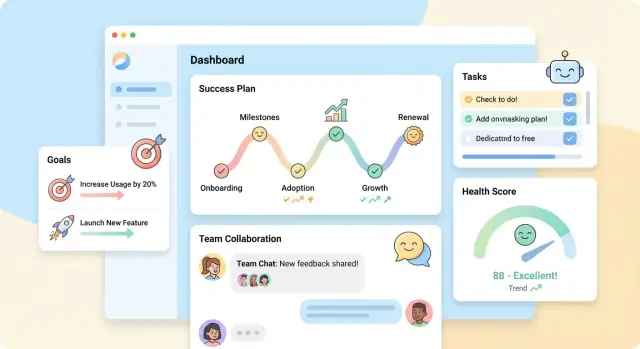
Start With Goals, Users, and the MVP
Before you design screens or pick tools, get specific about what a customer success plan means in your organization. For some teams it’s a shared document of goals and next steps; for others it’s a structured workflow that ties objectives to product adoption, support trends, and renewal timelines. If you don’t align on the definition, your app will drift into a generic notes tool.
Define the outcomes (not the features)
Write down the business results the app should influence. Typical outcomes include:
- Renewals: fewer surprises near renewal dates, clearer accountability on commitments
- Adoption: measurable progress on key product behaviors and milestones
- Expansion: identified value moments and agreed-upon growth paths
- Risk reduction: early detection and a consistent response playbook
Keep the outcomes measurable. “Increase adoption” becomes clearer when it’s tied to a metric like “% of active seats” or “weekly usage of Feature X.”
Identify your users and their jobs-to-be-done
List who will use the app and what they need in 30 seconds:
- CSMs: build plans quickly, track progress, prep for calls
- Managers: see plan quality, risks, and coverage across accounts
- Sales/AMs: understand commitments, timing, and expansion signals
- Customers (optional): view shared goals, owners, and next steps
This step prevents conflicting requirements (for example, CSM speed vs. manager governance).
Set the MVP boundary
Define what must exist for “version 1” to be valuable. A practical MVP usually includes: creating a plan from a template, assigning owners, tracking a small set of milestones, and a simple status view per account.
Everything else (advanced scoring, deep integrations, QBR exports) can be a future phase. A crisp rule: the MVP should support one repeatable workflow end-to-end for one team, with minimal manual workarounds.
Design the Customer Success Plan Workflow
A customer success plan works best when it mirrors the customer lifecycle and makes the “next best action” obvious. Before you design screens or data fields, design the flow: what triggers work, who does it, and what outcome you’re aiming for.
Map the lifecycle you’ll support
Most teams can start with a simple sequence and refine later:
- Onboarding → Adoption → Value → Renewal → Expansion
For each stage, define (1) the customer goal, (2) the CS team’s objective, and (3) the signals that the stage is progressing. This keeps the plan from becoming a static document and turns it into a working checklist tied to outcomes.
Capture the key moments (and make them hard to miss)
Build your workflow around the moments that reliably drive coordination:
- Kickoff meeting
- Training sessions
- Milestones (first value, feature rollout, stakeholder alignment)
- QBRs / executive reviews
- Renewal window and decision date
- Expansion conversations and pilots
These moments should create tasks, reminders, and plan updates automatically (or at least consistently) so the plan stays current without relying on memory.
Decide what must be structured vs. what can be notes
Structured fields are essential when you want filtering, reporting, or automation. Free-form notes are essential when nuance matters.
Use structured fields for: stage, owners, dates, success criteria, risks, status, next meeting date, and renewal details.
Use free-form notes for: meeting context, political dynamics, objections, and the “why” behind decisions.
A good rule: if you’d ever say “show me all customers where…” it should be a structured field.
Define what “done” looks like
Plans fail when completion is vague. Set clear completion criteria such as:
- Required milestones completed (e.g., training + first value)
- Success metrics agreed and tracked
- Risks logged with mitigation steps
- Next review scheduled
When “done” is explicit, your app can guide users with progress indicators, reduce churn from missed steps, and make handoffs smoother.
Create a Simple Data Model (What to Store)
A customer success plan app succeeds or fails on what it stores. If your data model is too “clever,” the team won’t trust it. If it’s too thin, you can’t report progress or prepare for renewals. Start with a small set of entities that match how CSMs talk about work.
Core entities (keep it boring)
Accounts and Contacts are your foundation. Everything else should attach cleanly to an account.
Your plan structure can be simple:
- Plan: the active success plan for an account (often one at a time)
- Goals: what the customer is trying to achieve
- Milestones: major checkpoints that prove progress
- Tasks: the concrete actions that move milestones forward
- Risks: anything that could block outcomes (adoption gaps, stakeholder churn, legal delays)
Relationships you’ll rely on
Model the hierarchy so it’s easy to navigate in the UI and in reports:
- One plan per account (at minimum for the MVP)
- Many goals per plan
- Many milestones per goal (or per plan—pick one and stay consistent)
- Many tasks per milestone
This makes it straightforward to answer common questions: “What’s the next milestone for this goal?” “Which tasks are overdue?” “What risks threaten the renewal?”
Fields that make the app usable
For each entity, include a few practical fields that power filtering and accountability:
- Owner (person responsible)
- Due date (and optionally start date)
- Status (e.g., Not started / In progress / Blocked / Done)
- Priority (Low/Medium/High)
- Expected value (revenue impact, time saved, or KPI target—keep it flexible)
Also add notes and attachments/links where it matters (goals, milestones, risks). CSMs will paste meeting summaries, docs, and customer emails.
History and audit: don’t skip it
Plans are shared across teams, so you need lightweight audit trails:
- Created by, created at
- Last updated by, last updated at
- A simple change log for key fields (owner, due date, status, expected value)
Even a basic activity feed (“Alex changed Task status to Done”) reduces confusion, prevents double-work, and helps managers understand what actually happened before a QBR.
Plan the Screens: Dashboard, Plan Builder, and Templates
Good screens make a customer success plan feel alive: people can see what matters, update it quickly, and trust it during customer calls. Aim for three core areas—Dashboard, Plan Builder, and Templates—then add search and filters so teams can actually find and use plans.
Dashboard: a fast account overview
The dashboard should answer, in seconds, “What do I need to do next?” For each account, surface the essentials:
- Plan status (Draft / Active / At risk / Completed)
- Next meeting date and a clear agenda link (even if it’s just a note field)
- Open risks and who owns them
- Key goals and whether they’re on track
Keep it scannable: a few metrics, a short list of urgent items, and one prominent “Update plan” button.
Plan Builder: timelines, milestones, and tasks
The Plan Builder is where the work happens. Design it around a simple flow: confirm goals → define milestones → assign tasks → track progress.
Include:
- A timeline of milestones (with due dates and dependencies if needed)
- Task lists grouped by milestone or workstream (Onboarding, Adoption, Expansion)
- Goal progress indicators (percent complete, or a simple On Track / Watch / Off Track)
Small UX details matter: inline editing, quick reassignment of owners, and a “last updated” stamp so people know the plan isn’t stale.
Templates: reusable starting points
Templates prevent every CSM from reinventing the wheel. Offer a library of success plan templates by segment (SMB vs. Enterprise), lifecycle stage (Onboarding vs. Renewal), or product line.
Let users clone a template into an account plan, then customize fields like goals, milestones, and standard tasks. Keep templates versioned so teams can improve them without breaking existing plans.
Search and filters that match how teams work
Plans should be easy to find by the way work is organized:
- Filter by owner, stage, renewal month, and risk level
- Add search across account name, goals, and key stakeholders
If you need one “power move,” add a saved view like “My renewals in 60 days” to drive daily adoption.
Add Health Scores, Risks, and Alerts
Health scores and alerts turn a success plan from a static document into something your team can actively run. The goal isn’t a perfect number, but an early-warning system that’s explainable and actionable.
Choose health score inputs you can defend
Start with a small set of signals that represent adoption and relationship quality. Common inputs include:
- Product usage: active users, key feature adoption, frequency, depth (e.g., weekly actions)
- Support tickets: volume, severity, time-to-first-response, reopen rate
- NPS / CSAT: the most recent score plus trend (last 90 days)
- Sentiment: CSM notes tagged as positive/neutral/negative, call summaries, or survey comments
Keep the scoring model simple at first (for example, a 0–100 score with 4–6 weighted inputs). Most teams also store the score breakdown so anyone can see why a customer is “72,” not just that they are.
Manual overrides (with accountability)
Your app should allow a CSM to override the calculated health score—because context matters (leadership change, procurement delays, product outage). Make overrides safe:
- Require an override reason (dropdown + free text)
- Store who changed it, when, and how long it should apply (e.g., expires in 14 days)
- Show both values: Calculated vs Adjusted
This keeps trust high and prevents “greenwashing.”
Risk flags that map to action
Add clear, binary flags that trigger specific playbooks. Good starter flags:
- Missed milestones (plan dates slipping by X days)
- Low adoption (key feature below threshold)
- Executive sponsor missing (no sponsor contact assigned or no meeting in 90 days)
Each flag should link to the relevant section of the plan (milestones, adoption goals, stakeholders) so the next step is obvious.
Alerts and reminders people won’t ignore
Automate reminders for upcoming renewals and key dates:
- Renewal in 90/60/30 days (with tasks suggested)
- QBR due date approaching
- Milestone due in 7 days or overdue
Send alerts where your team already works (in-app + email, and later Slack/Teams). Keep frequency adjustable per role to avoid alert fatigue.
Build Action Tracking and Collaboration
A success plan only works if the activities around it are visible and easy to maintain. The app should make it effortless to record what happened, what’s next, and who owns it—without forcing the team into heavy project-management behavior.
Activity tracking (the paper trail)
Support lightweight logging for calls, emails, meetings, and notes, all tied directly to the customer success plan (and optionally to a goal or milestone within the plan). Keep entry fast:
- One-click “Log call/meeting/email” from the plan view
- Quick fields: date/time, participants, channel, summary, outcome, next step
- Attachments or links (e.g., call recording URL) where relevant
Make activities searchable and filterable by type and date, and show a simple timeline on the plan so anyone can catch up in two minutes.
Tasks that actually get done
Tasks should be assignable to a person (or team), have due dates, and support recurring check-ins (weekly onboarding touchpoint, monthly adoption review). Keep the task model simple:
- Status: Open / Done / Blocked
- Due date + reminder
- Optional recurrence rules (e.g., “every 30 days”)
When a task is marked complete, prompt for a short completion note and allow it to generate a follow-up task automatically.
Calendar integration: sync selectively
Calendar sync is useful, but only when it’s predictable. A safe approach is to sync scheduled meetings created in the app (and only those), rather than trying to mirror every calendar event.
Avoid syncing:
- Private/internal events unrelated to the customer
- Free-form notes that belong in the app, not the calendar
If you support bi-directional sync, make conflicts explicit (e.g., “calendar event updated—apply changes?”).
Collaboration that stays organized
Add comments on the plan, goals, tasks, and activities. Include @mentions to notify teammates and “internal-only notes” that never appear in customer-facing exports (like QBR outputs). Keep notifications configurable so people can opt into what matters.
A good rule: collaboration features should reduce side-channel chatter (DMs, scattered docs), not create another inbox.
Set Up Roles, Permissions, and Sharing
Roles and permissions decide whether your success plan feels trustworthy or chaotic. The goal is simple: the right people can update the plan quickly, and everyone else can view what they need without accidentally changing it.
Start with clear internal roles
Most teams can cover 90% of needs with a small set of roles:
- CSM: owns the plan day-to-day; updates goals, tasks, and milestones
- CS manager: oversees multiple accounts; can adjust standards (templates, health scoring rules) and approve major changes
- Sales: read access plus limited collaboration (e.g., add renewal notes), but not edit core delivery milestones
- Support: contribute context (tickets, trends) and add action items, but not change commercial goals
- Admin: manages users, permissions, integrations, and global settings
Keep role names human and familiar; avoid “Role 7” style systems.
Define permissions by real actions
Instead of a long matrix, focus on a few high-impact actions:
- Edit goals (create/update/remove)
- Close milestones (mark done, add evidence)
- Change health score (and the reason)
- Edit templates (standard fields and sections)
- Share/export (generate a customer-facing view)
A practical approach: let CSMs edit the plan and close milestones, but reserve health score changes for CSM + manager (or require manager approval) so it doesn’t become purely subjective.
Set data boundaries: who can see which accounts
Most apps need team-based access plus account ownership rules:
- Users belong to one or more teams (e.g., SMB, Enterprise, Region)
- Each account has an owner (primary CSM) and optional collaborators
- Default rule: users can access accounts owned by their team; managers can access all accounts in their org unit
This prevents accidental cross-team visibility and keeps navigation clean.
Customer-facing sharing (optional, but powerful)
Offer two modes:
- Shared plan view: a read-only page for the customer with selected sections (goals, milestones, next steps). Consider expiring links and audit logs.
- Exported summary: PDF or slide-friendly output for email and QBRs.
Make sharing granular: a CSM can share the plan, but only admins can enable external access globally. If you build QBR outputs later, link the two experiences via /reports so users don’t duplicate work.
Integrations: CRM, Product Usage, and Support Data
A customer success plan app is only as useful as the data it can trust. Integrations keep plans current without forcing CSMs to copy/paste details across tools.
CRM sync: decide the source of truth
Start with the CRM fields that drive your day-to-day workflow: account owner, renewal date, contract term, ARR, segment, and key contacts.
Be explicit about where edits are allowed:
- CRM as source of truth for commercial fields (ARR, renewal date). Your app should treat these as read-only and refresh them regularly.
- Your app as source of truth for success-plan-only content (objectives, milestones, risks, playbooks).
- For shared fields (e.g., “Success stage”), pick one system to write and the other to mirror—avoid bi-directional updates unless you truly need them.
Product usage data: the events you actually need
Usage data gets messy fast, so focus on a small set of events that support adoption metrics in a success plan:
- Activation events (first value moment)
- Core feature adoption (key actions that indicate real usage)
- Frequency/recency signals (last active date, weekly active users)
- License utilization (seats purchased vs. seats active)
Convert raw events into simple, human-readable metrics your dashboard can explain (“3 of 5 core features adopted”).
Support signals that feed risk indicators
Support systems are an early warning system. Pull signals like:
- Open ticket count and aging
- Severity/priority (urgent tickets)
- Escalations and SLA breaches
- CSAT trends for the account
Then map them to your risk model (“Urgent ticket open > 7 days” → raise risk, notify owner).
Integration approach: API-first with reliable sync
Use an API-first design and support multiple sync styles:
- Webhooks for near-real-time updates (owner changes, ticket priority changes)
- Scheduled sync for backfills and systems without webhooks
- Error handling with retries, rate-limit awareness, and a visible “sync status” log so CSMs know what’s fresh
If you later add more connectors, keep the integration layer consistent so new systems plug into the same data model and health score logic.
Reporting and QBR Outputs That People Will Use
Reports only matter if people can act on them in a meeting. For a customer success plan app, that means two layers of output: (1) a clean, customer-facing QBR summary and (2) a leader view that answers “are we covered, and where are we at risk?”
The QBR summary view (customer-facing)
Make the QBR page feel like a narrative, not a spreadsheet. A practical structure is:
- Goals and outcomes: which goals were achieved, in progress, or blocked—plus a short “what changed since last QBR”
- Adoption and value: a small set of product usage metrics tied to each goal (avoid vanity charts)
- Risks: clearly labeled items with an owner and a mitigation plan
- Next steps: the upcoming milestones and dates both sides agreed to
Keep the metrics explainable. If you calculate a health indicator, show the inputs (“Usage down 20%” + “2 open critical tickets”) rather than a mysterious number. This helps CSMs defend the story and helps customers trust it.
Export options people actually use
Support three outputs because different stakeholders have different workflows:
- PDF export for exec stakeholders who want a one-pager
- Shared link (permissioned) for collaborating before and after the meeting
- Slides-friendly format (copy-ready blocks or a simple PPTX layout) so teams can drop the summary into their existing deck without reformatting
Make exports consistent: same sections, same titles, same ordering. That reduces prep time and keeps meetings focused.
Reporting for leaders (internal)
Leader reporting should answer a few repeatable questions:
- Plan coverage: which accounts have an active plan, and which are missing one
- Overdue milestones: accounts where key actions are slipping
- Renewal risk: a simple, explainable roll-up based on flagged risks, overdue items, and recent adoption trends
If you have a dashboard elsewhere (like a CRM), consider linking out with relative navigation (e.g., /reports/qbr, /reports/coverage) so the app remains the source of truth for success plans while still fitting existing routines.
Implementation Plan: Stack, Build Steps, and Testing
A good implementation plan keeps your first release small, reliable, and easy to maintain. The goal isn’t to pick perfect tech—it’s to ship a usable Customer Success Plan app that your team trusts.
Pick a stack your team can support
Choose tools your team already knows, even if they’re not the newest. Maintainability beats novelty.
A common, practical setup:
- Web UI: React or Vue (or server-rendered Rails/Django if your team prefers)
- API: Node/Express, Django, Rails, Laravel, or Go
- Database: Postgres (easy relational modeling for plans, tasks, and templates)
- Auth: OAuth/SAML via a provider (or your existing identity system)
If you’re a small team, fewer moving parts helps: a monolith with server-rendered pages can be faster to build than separate frontend/backend apps.
A faster path: build the MVP with Koder.ai
If your goal is to ship a working internal tool (or an early customer-facing version) quickly, a vibe-coding platform like Koder.ai can accelerate the build without turning your app into a rigid no-code project.
A practical approach is to use Koder.ai to:
- Generate the first version of the React dashboard and plan builder from your workflow description
- Stand up a Go API with a PostgreSQL schema matching the entities above (accounts, plans, goals, milestones, tasks, risks)
- Iterate in a “planning mode” first (so you validate flows and permissions before you lock UI)
- Use snapshots/rollback during early rollout to recover fast when templates, permissions, or scoring rules change
When you’re ready, you can export the source code, deploy/host, and attach custom domains—useful if you want the speed of a chat-driven build but still need a standard engineering ownership model.
Build steps (keep v1 narrow)
Start with an API + web UI, but keep the first version focused:
- Define v1 workflows: create a plan from a template, assign owners, track actions, mark milestones.
- Implement the data model and API: CRUD for accounts, plans, plan items, and comments.
- Add the minimum UI: dashboard list + plan detail + plan builder.
- Wire in one integration (optional for v1): import accounts from your CRM, read-only at first.
Ship “boring and reliable” over feature-heavy. It’s better to have one plan flow that works every time than five partial ones.
Testing basics that prevent surprises
Focus tests on failure points that break trust:
- Key workflows: create/edit a plan, add actions, complete milestones, export/share
- Permissions: role-based access (who can view, edit, share) and edge cases like removed users
- Data sync scenarios: duplicate records, partial sync failures, retries, and ID mapping with the CRM
A mix of automated API tests plus a few end-to-end UI tests for the top workflows is usually enough for v1.
Deployment: environments, backups, monitoring
Plan for:
- Environments: dev/staging/prod with safe test data in staging
- Backups: automated daily backups and a restore drill
- Monitoring & logs: uptime checks, error tracking, and searchable logs for sync jobs
These basics make rollouts smoother and reduce time spent debugging production issues.
Security, Privacy, and Rollout
A customer success plan app will hold notes, goals, renewal risks, and sometimes sensitive contract or support details. Treat security and privacy as product features, not “later” tasks.
Security essentials (start with secure defaults)
Use strong authentication and predictable authorization rules from day one.
- Authentication: support SSO (SAML/OIDC) if your customers require it, and offer email + MFA as a baseline.
- Authorization: enforce role-based access at the API level (not just in the UI). Common roles: Admin, CSM, Read-only, and optional Exec.
- Secure defaults: new workspaces should default to private, with sharing explicitly enabled. Disable public links unless you have a clear use case.
Protect customer data
Aim for “least access, least data, least time.”
- Encryption: TLS in transit; encrypt sensitive fields at rest where practical.
- Access logs: keep an audit trail of logins, exports, role changes, and plan views/edits. Make it easy to answer “who saw what, when?”
- Least-privilege roles: restrict exports, bulk downloads, and integration credentials to Admins. Separate “can edit plans” from “can manage integrations.”
Compliance and data rights
Even if you’re not pursuing a formal certification yet, align with common expectations.
- Retention rules: define how long you keep deleted plans, comments, and activity logs.
- Deletion: support workspace-level deletion and per-customer deletion if you store customer identifiers.
- Export requests: provide a self-serve export (CSV/PDF) and document it; this also helps when customers evaluate your /pricing tiers.
Rollout and adoption
Rollout succeeds when CSMs can deliver value in the first week.
Start with 2–3 templates (onboarding, adoption, renewal) and a short guided setup that creates the first plan in minutes. Run a pilot with a few CSMs, collect feedback, then expand.
Publish a quick internal playbook and a short “how we use templates” article in /blog to keep habits consistent. If you’re experimenting with faster build cycles, consider using Koder.ai’s snapshots and rollback during the pilot—so you can iterate on templates and permissions quickly without disrupting the team.
FAQ
What should the MVP of a customer success plan web app include?
Start by aligning on the outcome you want to influence (renewal predictability, adoption milestones, risk reduction), then design one repeatable workflow end-to-end.
A solid v1 is usually: create a plan from a template → assign owners → track a small set of milestones/tasks → see a simple per-account status view.
Why do I need to define outcomes before designing features?
Because “success plan” means different things in different orgs. If you don’t define it upfront, you’ll build a generic notes tool.
Write down measurable outcomes (e.g., “% active seats” or “weekly usage of Feature X”) so the app stores and surfaces what matters.
Who are the core users of a customer success plan app?
Start with the people who need an answer in under 30 seconds:
- CSMs: build/update plans fast, prep for calls
- Managers: visibility into plan quality, coverage, and risks
- Sales/AMs: commitments, timing, expansion signals
- Customers (optional): shared goals, owners, next steps
This keeps you from optimizing for one role (governance) at the expense of another (speed).
What lifecycle stages should the workflow support?
Most teams can begin with: Onboarding → Adoption → Value → Renewal → Expansion.
For each stage, define the customer goal, your CS objective, and the signals that prove progress. That turns the plan into a working checklist instead of a static document.
Which parts of a success plan should be structured data vs free-form notes?
Use structured fields anywhere you’ll want filtering, reporting, or automation (stage, owner, due dates, status, renewal date, risk level).
Use notes for nuance (meeting context, stakeholder politics, objections, “why” behind decisions). A quick test: if you’d say “show me all customers where…,” make it structured.
What is a simple data model for a customer success plan app?
Keep the initial data model “boring” and account-centric:
- Account, Contact
- Plan
- Goal
- Milestone
- Task
- Risk
Model clear relationships (plan → goals → milestones → tasks) so you can answer operational questions like “what’s overdue?” and “what threatens renewal?”
What screens should the first version include?
Build the three core areas:
- Dashboard: plan status, next meeting date, urgent risks, key goals
- Plan Builder: goals → milestones → tasks, with inline editing and “last updated”
- Templates: segment/stage-based templates that can be cloned and versioned
Add search and filters that match daily work (owner, stage, renewal month, risk level).
How should health scores and risk flags work in the app?
Start with a small set of explainable inputs (usage, support tickets, NPS/CSAT, sentiment) and keep the model simple.
Store the score breakdown, allow manual overrides with an override reason + expiration, and show both Calculated and Adjusted values to prevent “greenwashing.”
How do roles, permissions, and customer sharing typically work?
Default to a few familiar internal roles (CSM, CS Manager, Sales, Support, Admin) and define permissions as real actions (edit goals, close milestones, change health score, edit templates, share/export).
For customer-facing sharing, offer a read-only shared view with granular section selection and auditability, plus exports for QBRs.
What integrations matter most, and how should syncing work?
Decide the source of truth early:
- CRM owns commercial fields (ARR, renewal date, owner) and your app mirrors them
- Your app owns plan content (goals, milestones, risks)
Use webhooks where possible, scheduled sync for backfills, and a visible sync status/error log so users can trust what’s current.