

How to Create a Web App for Enterprise Feature Requests
Learn how to plan, build, and launch a web app that captures enterprise feature requests, routes approvals, prioritizes roadmaps, and reports progress.
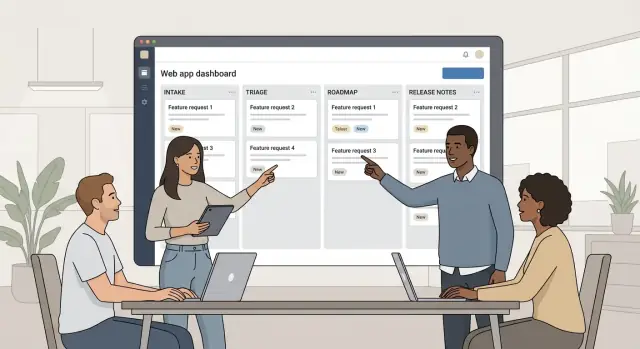
Clarify Goals and Stakeholders
Before you sketch screens or pick a tech stack, get specific about the problem your feature request web app is supposed to solve. “Collect feedback” is too broad; enterprises already have email threads, spreadsheets, CRM notes, and support tickets doing that (usually poorly). Your job is to replace the chaos with a single, reliable system of record.
Define the problem you’re solving
Most teams build an enterprise feature request management app to fix three pain points:
- Central intake: one place to capture requests from every channel without losing context.
- Prioritization: a consistent way to evaluate impact, effort, and strategic fit.
- Visibility: clearer status and decisions for internal teams and (sometimes) customers.
Write a one-sentence problem statement, such as:
We need a feature request web app that consolidates requests across teams, reduces duplicates, and supports a transparent feature triage workflow.
Identify stakeholders and target users
A common mistake is designing for “the product team” only. In B2B product management, multiple groups need to submit, enrich, and consume requests:
- Customers: want a simple product feedback portal, updates, and confidence their request was understood.
- Customer Success / Sales: need quick logging, account linking, and a way to track promises and risk.
- Support: needs tighter linkage to tickets and repeatable categorization.
- Product: needs deduping, tagging, scoring, and roadmap prioritization.
- Engineering: wants clarity on scope, constraints, and why something matters.
- Leadership: wants reporting, trend insights, and alignment to strategic bets.
Decide early which of these are true “users” of the app versus “consumers” of reports.
Define outcomes and success metrics
Be explicit about the outcomes you’re optimizing for:
- Fewer duplicates and clearer canonical requests
- Faster triage and fewer stalled items
- Better decision quality and less back-and-forth
- Improved trust: stakeholders understand outcomes, even when the answer is “not now”
Then attach measurable success metrics, for example:
- Time-to-triage: median hours/days from intake to first review
- Coverage: % of requests categorized (theme + product area + account)
- Decision clarity: % with a documented decision and rationale
- Satisfaction: short quarterly survey for CS/Product/Support stakeholders
These goals will guide everything that follows: your data model, roles and permissions, voting and insights, and what you automate later (like release notes automation).
Choose the Right Request Intake Model
Your intake model determines who can submit requests, how much context you capture upfront, and how “safe” the system feels for enterprise customers. The best choice is usually a mix, not a single door.
Public vs. private portal
A public portal works when your product is largely standardized and you want to encourage broad participation (e.g., SMB + enterprise). It’s great for discoverability and self-serve submission, but it requires careful moderation and clear expectations about what will (and won’t) be built.
A private portal is often better for enterprise. It lets customers submit requests without worrying that competitors will see their needs, and it supports account-specific visibility. Private portals also reduce noise: fewer “nice-to-have” ideas, more actionable requests tied to contracts, deployments, or compliance.
Internal-only intake (and why it still matters)
Even with a portal, many enterprise requests originate elsewhere: emails, quarterly business reviews, support tickets, sales calls, and CRM notes. Plan for an internal intake path where a PM, CSM, or Support lead can quickly create a request on behalf of a customer and attach the original source.
This is where you standardize messy inputs: summarize the ask, capture affected accounts, and tag urgency drivers (renewal, blocker, security requirement).
Who can view what
Enterprise feature requests can be sensitive. Design for per-customer visibility, so one account can’t see another account’s requests, comments, or votes. Also consider internal partitions (e.g., Sales can see status, but not internal prioritization notes).
Duplicates and “me too” requests
Duplicates are inevitable. Make it easy to merge requests while preserving:
- who asked (accounts and contacts)
- evidence and attachments
- votes or “me too” signals
A good rule: one canonical request, many linked supporters. That keeps triage clean while still showing demand.
Design the Feature Request Data Model
A good data model makes everything else easier: cleaner intake, faster triage, better reporting, and fewer “what did they mean?” follow-ups. Aim for a structure that captures business context without turning submission into a form marathon.
Core request fields (what + why)
Start with the essentials you’ll need to evaluate and later explain decisions:
- Title: short, searchable, and customer-friendly.
- Problem statement: what’s not working today.
- Impact: the measurable consequence (time lost, revenue risk, compliance exposure).
- Affected users: roles and teams (e.g., “AP clerks,” “security admins”).
- Attachments: screenshots, screen recordings, spreadsheets, or error logs.
Tip: store attachments as references (URLs/IDs) rather than blobs in your primary database to keep performance predictable.
Customer context (so “priority” is defensible)
Enterprise requests often depend on who asked and what’s at stake. Add optional fields for:
- Account (customer/org) and key contacts
- ARR tier (if relevant to your business model)
- Contract dates (optional): renewal date, start/end, or “at risk” flags
Keep these fields optional and permissioned—some users shouldn’t see revenue or contract metadata.
Tags, categories, and normalization
Use tags for flexible labeling and categories for consistent reporting:
- Product area (Billing, Reporting, Admin)
- Platform (Web, iOS, API)
- Compliance (SOC 2, HIPAA, GDPR)
- Integrations (Salesforce, Okta)
Make categories controlled lists (admin-managed), while tags can be user-generated with moderation.
Templates that improve quality
Create templates for common request types (e.g., “New integration,” “Reporting change,” “Security/compliance”). Templates can prefill fields, suggest required details, and reduce back-and-forth—especially when requests are submitted through a product feedback portal.
Plan User Roles, Permissions, and Auditability
Enterprise feature request management breaks down quickly when everyone can change everything. Before you build screens, define who’s allowed to submit, view, edit, merge, and decide—and make those rules enforceable in code.
Define customer-facing roles
Start with a simple set of roles that match how B2B accounts work:
- Submitter: can create requests, comment, attach files (if allowed), and view updates for their account.
- Viewer: read-only access to the portal; can follow requests and receive notifications.
- Account admin: manages users within their company (invite/remove), controls visibility settings (e.g., “private to our account”), and can submit on behalf of others.
A practical rule: customers can propose and discuss, but they shouldn’t be able to rewrite history (status, priority, or ownership).
Define internal roles that match the workflow
Internal teams need finer control because feature requests touch product, support, and engineering:
- Triager: cleans up submissions, requests more info, tags, and de-duplicates.
- Product owner: owns prioritization, status decisions, and roadmap linkage.
- Engineer: estimates effort, flags technical constraints, and links to delivery work.
- Support agent: submits on behalf of customers and keeps them informed.
- Admin: configures fields, integrations, security settings, and global policies.
Permission examples (make them explicit)
Write permission rules like test cases. For example:
- Only triagers/product owners can merge duplicate requests.
- Only product owners can change status to “Planned / In Progress / Shipped.”
- Only product owners/admins can edit priority or score (others can suggest).
- Support agents can edit customer-facing summaries, but not internal-only notes.
- Customers can view only their account’s requests unless a request is marked “public.”
Audit trails aren’t optional
Enterprises will ask “who changed this and why?” Capture an immutable audit log for:
- Status and priority changes (before/after values)
- Field edits (tags, owner, linked accounts)
- Merges and unmerges
- Comments, edits, and deletions (with redaction rules)
Include timestamps, actor identity, and source (UI vs API). This protects you during escalations, supports compliance reviews, and builds trust when multiple teams collaborate on the same request.
Build a Clear Workflow from Intake to Decision
A feature request app succeeds when everyone can answer two questions quickly: “What happens next?” and “Who owns it?” Define a workflow that is consistent enough for reporting, but flexible enough for edge cases.
Start with a simple, explicit status set
Use a small set of statuses that map to real decisions:
- New (captured, not yet assessed)
- Needs info (blocked on clarifying details)
- Under review (being evaluated)
- Planned (approved for delivery, not started)
- In progress (engineering work underway)
- Shipped (delivered and communicated)
- Declined (decided not to do)
Keep statuses mutually exclusive, and make sure each one has clear exit criteria (what must be true to move forward).
Define a triage checklist your team can follow
Triage is where enterprise requests can get messy, so standardize it:
- Validate: confirm the request is a product problem and not a support issue.
- Merge duplicates: detect similar requests and consolidate to one canonical item.
- Categorize: product area, customer segment, urgency, and compliance relevance.
- Assign owner: a named person responsible for moving it to a decision.
This checklist can be surfaced directly in the admin UI so reviewers don’t rely on tribal knowledge.
Add approval gates for high-risk categories
For certain categories (e.g., data exports, admin controls, identity, integrations), require an explicit security/compliance review before moving from Under review → Planned. Treat this as a gate with a recorded outcome (approved, rejected, approved with conditions) to avoid surprises late in delivery.
Enforce SLAs and reminders to prevent stagnation
Enterprise queues rot without timeboxes. Set automatic reminders:
- If Needs info has no response after X days, prompt the requester; after Y days, close as stale.
- If New isn’t triaged within X business days, notify the triage owner.
- If Under review exceeds a threshold, escalate to the product lead.
These guardrails keep your pipeline healthy and your stakeholders confident that requests won’t disappear.
Prioritization and Scoring That Works for Enterprises
Enterprise feature requests rarely fail because of a lack of ideas—they fail because teams can’t compare requests fairly across accounts, regions, and risk profiles. A good scoring system creates consistency without turning prioritization into a spreadsheet contest.
Pick a voting model that matches your sales motion
Start with voting because it captures demand quickly, then constrain it so popularity doesn’t replace strategy:
- One vote per user is simple and works when many end users participate.
- Weighted votes per account fits B2B reality (e.g., larger contracts or strategic customers).
- Both can work: show “users asking” and “accounts asking” side by side to avoid over-weighting a single chatty organization.
Collect structured impact, not just opinions
Alongside the request description, collect a few required fields that help you compare across teams:
- Revenue risk / retention impact (e.g., churn risk, expansion potential)
- Time saved / efficiency (for customers and internal teams)
- Compliance or contractual requirement (including deadlines)
Keep the options constrained (dropdowns or small numeric ranges). The goal is consistent signals, not perfect precision.
Separate urgency from importance
Urgency is “how soon must we act?” Importance is “how much does it matter?” Track them separately so the loudest or most panicked request doesn’t automatically win.
A practical approach: score importance from impact fields, score urgency from deadline/risk, then display both as a simple 2x2 view (high/low).
Make decisions explainable with rationale fields
Every request should include a visible decision rationale:
- Planned/Declined reason (short, specific)
- What would change the decision (e.g., “If more regulated customers request this”)
This reduces repeat escalation and builds trust—especially when the answer is “not now.”
UX Pages to Include (Portal, Admin, and Reporting)
Great enterprise feature-request apps feel “obvious” because the key pages map to how customers ask, and how internal teams decide. Aim for a small set of pages that serve different audiences well: requesters, reviewers, and leaders.
Customer portal: fast discovery and confidence
The portal should help customers quickly answer two questions: “Has someone already asked for this?” and “What’s happening with it?”
Include:
- A request list with status filters (e.g., Under Review, Planned, In Progress, Shipped), plus search that works on titles and keywords.
- Lightweight sorting (Most recent, Most discussed, Most relevant) to reduce duplicate submissions.
Keep the language neutral. Status labels should inform without implying a commitment.
Request detail page: shared context in one place
The request detail page is where conversations happen and where confusion is either resolved—or amplified.
Make room for:
- A clear summary of the ask and business context (who it impacts, why it matters).
- Comments and threaded Q&A so product teams can clarify requirements.
- A timeline of updates (e.g., “Reviewed,” “Need more info,” “Planned for investigation”).
- Related requests to connect similar needs and guide users toward consolidation.
If you support voting, show it here, but avoid turning it into a popularity contest—context should outrank counts.
Internal dashboard: triage, ownership, and visibility
Internally, teams need a queue that reduces manual coordination.
The dashboard should show:
- New/triage queue with quick actions (merge duplicates, request more info, set owner).
- Duplicate detection and linking so insights aggregate instead of fragment.
- Ownership, last activity, and aging reports (what’s stuck, what’s getting attention).
Roadmap view: communicate direction without promises
Enterprises expect a roadmap view, but it must be designed to avoid accidental commitments.
Use a theme-based view by quarter (or “Now / Next / Later”), with room for dependency notes and “subject to change” messaging. Link each theme back to the underlying requests to preserve traceability without overpromising delivery dates.
Security, Authentication, and Compliance Basics
Enterprise customers will judge your feature request web app as much by its security posture as by its UX. The good news: you can cover most expectations with a small set of well-understood building blocks.
Authentication: meet enterprises where they are
Support SSO via SAML (and/or OIDC) so customers can use their identity provider (Okta, Azure AD, Google Workspace). For smaller customers and internal stakeholders, keep email/password (or magic link) as a fallback.
If you offer SSO, also plan for:
- Just-in-time user provisioning (create users on first login)
- Domain enforcement (optional: only allow @customer.com)
- A clear break-glass admin flow for lockouts
Access control: isolation first, then structure
At minimum, implement account-level isolation (a tenant model): users from Customer A must never see Customer B’s requests.
Many B2B products also need an optional workspace layer so large customers can separate teams, products, or regions. Keep permissions simple: Viewer → Contributor → Admin, plus an internal “Product Ops” role for triage.
Data protection basics: the non-negotiables
- Encrypt in transit (HTTPS everywhere)
- Hash passwords with a modern algorithm (Argon2/bcrypt) and strong policies
- Encrypt sensitive fields at rest when appropriate (tokens, PII)
- Reliable backups with tested restores and a defined RPO/RTO
Compliance: be ready for audits and requests
Even if you’re not pursuing formal certifications yet, design for common requirements:
- Audit logs for key actions (status changes, merges, permission edits)
- Retention rules (delete or anonymize after X months if required)
- Export requests (tenant export for security reviews and data portability)
Security isn’t a single feature—it’s a set of defaults that make enterprise adoption easier and procurement faster.
Integrations Your Teams Will Expect
Enterprise feature request management rarely lives in one tool. If your app can’t connect to the systems teams already use, requests will get copied into spreadsheets, context will be lost, and trust will drop.
Delivery tracking (Jira, Linear, Azure DevOps)
Most teams will want a two-way link between a request and the work item that ships it:
- Create an issue/ticket from an approved request (and store the external ID).
- Sync key fields back: status, assignee, target sprint/release, and links to PRs.
- Keep the “source of truth” clear: your app for customer-facing status; the tracker for engineering execution.
A practical tip: avoid syncing every field. Sync the minimum needed to keep stakeholders informed, and show a deep link to the ticket for details.
CRM context (Salesforce, HubSpot)
Product decisions often hinge on account value and renewal risk. CRM sync helps you:
- Attach requests to accounts/opportunities and surface ARR, stage, renewal date.
- Show “who asked” in business terms (top accounts, strategic segments).
- Report on influence: requests tied to won/lost deals.
Be careful with permissions—sales data is sensitive. Consider a “CRM summary” view rather than full record mirroring.
Support tools (Zendesk, Intercom)
Support teams need a one-click path from ticket → request.
Support integrations should capture conversation links, tags, and volume signals, and prevent duplicate requests by suggesting existing matches during creation.
Notifications (Email, Slack, Teams)
Status changes are where adoption is won.
Send targeted updates (watchers, requesters, account owners) for key events: received, under review, planned, shipped. Let users control frequency, and include clear CTAs back to the portal (e.g., /portal/requests/123).
Pick a Practical Tech Stack and Architecture
Your architecture should match how quickly you need to ship, how many internal teams will maintain the app, and how “enterprise” your customer expectations are (SSO, audit trails, integrations, reporting). The goal is to avoid building a complex platform before you’ve proven the workflow.
Stack options: monolith vs. API + SPA
Start with a modular monolith if you want speed and simplicity. A single codebase (e.g., Rails, Django, Laravel, or Node/Nest) with server-rendered pages or light JS is often enough for intake, triage, and admin reporting. You can still structure it in modules (Intake, Workflow, Reporting, Integrations) so it evolves cleanly.
Choose API + SPA (e.g., FastAPI/Nest + React/Vue) when you expect multiple clients (portal + admin + future mobile), separate frontend/backend teams, or heavy UI interactivity (advanced filtering, bulk triage). The tradeoff is more moving parts: auth, CORS, versioning, and deployment complexity.
Build faster without locking yourself in
If you want to validate workflow and permissions quickly, consider using a vibe-coding platform like Koder.ai to generate an internal MVP from a structured spec (intake → triage → decision → portal). You describe roles, fields, and statuses in chat (or in Planning Mode), and iterate rapidly without hand-wiring every screen from scratch.
For teams that care about ownership and portability, Koder.ai supports source code export and end-to-end deployment/hosting options, which can be useful once your pilot proves what the system needs.
Database: prioritize workflows and reporting
A relational database (PostgreSQL, MySQL) is usually the best fit because feature request systems are workflow-heavy: statuses, assignments, approval steps, audit logs, and analytics all benefit from strong consistency and SQL reporting.
If you later need event-based analytics, add a warehouse or event stream—but keep the operational system relational.
Search: start simple, scale deliberately
Early on, database search is fine: indexed text fields, basic ranking, and filters (product area, customer, status, tags). Add a dedicated search engine (Elasticsearch/OpenSearch/Meilisearch) when you hit real pain: thousands of requests, fuzzy matching, faceted search at speed, or cross-tenant performance constraints.
File uploads: attachments done safely
Requests often include screenshots, PDFs, and logs. Store uploads in object storage (S3/GCS/Azure Blob) rather than the app server. Add virus/malware scanning (e.g., scanning on upload via a queue worker) and enforce limits: file type allowlists, size caps, and retention policies.
If customers demand compliance features, plan for encryption at rest, signed URLs, and a clear download audit trail.
Build an MVP and Iterate with Real Users
An enterprise feature request web app succeeds (or fails) based on whether busy people actually use it. The fastest way to get there is to ship a small MVP, put it in front of real stakeholders, then iterate based on observed behavior—not guesses.
What to include in the MVP (and what to cut)
Keep the first version focused on the shortest path from “request submitted” to “decision made.” A practical MVP scope usually includes:
- Intake: a simple form (internal and/or customer-facing) that captures the essentials.
- De-dupe: basic matching so teams don’t triage the same request 20 times.
- Statuses: a small set like New → Under review → Planned → Shipped → Not planned.
- Basic portal: a place customers can submit, view, and follow their requests.
- Admin dashboard: triage queue, search/filter, merge duplicates, and edit fields.
Avoid “nice-to-haves” until you see consistent usage. Features like advanced scoring models, roadmaps, granular permissions, and SSO are valuable, but they also add complexity and can lock you into the wrong assumptions early.
Pilot rollout: learn with a few accounts first
Start with a pilot group—a handful of internal product stakeholders and a small set of customer accounts that represent different segments (enterprise, mid-market, high-touch, self-serve). Give them a clear way to participate and a lightweight success metric, such as:
- % of requests submitted through the portal (vs. email)
- time from request to first status update
- duplicate rate over time
Once the workflow feels natural for the pilot, expand gradually. This reduces the risk of forcing a half-baked process onto the whole organization.
Create a feedback loop for the tool itself
Treat the app as a product. Add a “Feedback about this portal” entry point for customers, and run a short internal retro every couple of weeks:
- What fields do we always ask for in comments (and should become structured fields)?
- Where do requests stall in the workflow?
- Which status updates reduce follow-up emails?
Small improvements—clearer labels, better defaults, and smarter de-dupe—often drive adoption more than big new modules.
Launch, Adoption, and Ongoing Governance
A feature request web app only works if people trust it and use it. Treat launch as an operational change, not just a software release: define owners, set expectations, and establish the rhythm for updates.
Operational ownership (make it explicit)
Decide who runs the system day-to-day and what “done” means at each step:
- Daily triage owner: typically Product Ops, a support lead, or a rotating PM on duty. They dedupe new requests, tag accounts, and route to the right product area.
- Decision owners: usually product leadership (or a product council) approves status changes that affect commitments (e.g., “Planned” → “In Progress”).
- Update owner: assign someone to write customer-facing updates (often PM + Support/CS). The goal is clarity and consistency, not long essays.
Document this in a lightweight governance page and keep it visible in the admin area.
Customer communication (predictable beats)
Adoption rises when customers see a reliable feedback loop. Set a standard cadence for:
- Status updates: short, plain-language notes tied to meaningful changes (why it matters, what changed, what’s next).
- Release notes process: decide how releases get linked back to requests, who publishes them, and when. Even a weekly “shipping summary” builds credibility.
Avoid silent changes. If a request is declined, explain the reasoning and, when possible, suggest alternatives or workarounds.
Analytics that show backlog health
Operational metrics keep the system from becoming a graveyard. Track:
- Top themes (what keeps recurring across accounts)
- Time-to-decision (intake → accepted/declined)
- Backlog health (age distribution, stale items, reopen rates)
Review these monthly with stakeholders to spot bottlenecks and improve your feature triage workflow.
Next steps
If you’re evaluating an enterprise feature request management approach, book a demo or compare options on /pricing. For implementation questions (roles, integrations, or governance), reach out via /contact.
FAQ
What’s the first step before building an enterprise feature request web app?
Start with a one-sentence problem statement that’s narrower than “collect feedback,” such as consolidating intake, reducing duplicates, and making triage decisions transparent.
Then define measurable outcomes (e.g., time-to-triage, % categorized, % with decision rationale) so your workflow, permissions, and reporting have a clear target.
Who are the key stakeholders I should design for?
Treat it as a system used by multiple groups:
- Customers (portal + updates)
- Sales/CS (account context, renewals, promises)
- Support (ticket linkage, categorization)
- Product (dedupe, scoring, decisions)
- Engineering (constraints, estimates)
- Leadership (trend reporting)
Decide which groups are full “users” vs. report “consumers,” because that drives permissions and UI.
Should I use a public portal, a private portal, or internal-only intake?
Most enterprise teams use a mix:
- A private customer portal for account-safe submission and visibility
- Internal intake for requests originating in email, QBRs, support tools, and CRM notes
A hybrid approach reduces noise while still capturing everything in a single system of record.
How do I prevent customers from seeing each other’s feature requests?
Implement account-level isolation by default so Customer A can’t see Customer B’s requests, comments, or votes.
Add internal partitioning too (e.g., Sales can see status but not internal prioritization notes). Keep “public” requests as an explicit opt-in flag, not the default.
What’s the best way to handle duplicates and “me too” requests?
Use a canonical-request model:
- One primary request (the “source of truth”)
- Many linked supporters (“me too” requests, accounts, contacts)
- Merge/unmerge that preserves evidence, attachments, and vote/support signals
This keeps triage clean while still showing demand and customer impact.
What fields should my feature request data model include?
Capture enough to evaluate and explain decisions without turning submission into a form marathon:
- Title, problem statement, impact, affected users, attachments
- Optional customer context: account, ARR tier, renewal/risk flags (permissioned)
- Controlled categories for reporting (product area/platform/compliance) plus flexible tags
Templates for common request types can improve quality without adding friction.
How should roles, permissions, and audit trails work in an enterprise setup?
Define roles and write permissions like test cases. Common patterns:
- Customers can submit/comment/follow, but can’t change status, priority, or ownership
- Only triagers/product owners can merge duplicates
- Only product owners can move items to “Planned / In progress / Shipped”
Add an immutable audit log for status/priority changes, merges, permission edits, and comment deletion/redaction.
What workflow statuses and triage process work well for enterprise requests?
Use a small, mutually exclusive status set with clear exit criteria, for example:
- New → Needs info → Under review → Planned → In progress → Shipped → Declined
Standardize triage with a checklist (validate, dedupe, categorize, assign owner) and add approval gates for high-risk areas like security/compliance. Add SLA reminders so queues don’t stagnate.
How do I prioritize requests fairly across many enterprise accounts?
Combine demand signals with structured impact so popularity doesn’t override strategy:
- Voting model: per-user, per-account weighted, or both (show “users asking” and “accounts asking”)
- Structured fields: retention/revenue risk, time saved, compliance deadline
- Track urgency separately from importance (e.g., a simple 2x2 view)
Require a decision rationale field (“why planned/declined” and “what would change the decision”).
What should I include in an MVP, and how should I roll it out?
A practical MVP focuses on the shortest path from submission to decision:
- Intake form (internal and/or portal)
- Basic de-dupe
- Simple statuses
- Customer portal to submit/view/follow
- Admin dashboard for triage, merge, search/filter
Pilot with a few accounts and measure adoption (portal submission rate, time to first update, duplicate rate), then iterate based on real usage.