

How to Create a Web App for External Consultant Access
Learn how to build a web app that securely provisions, reviews, and revokes external consultant access with roles, approvals, time limits, and audit logs.
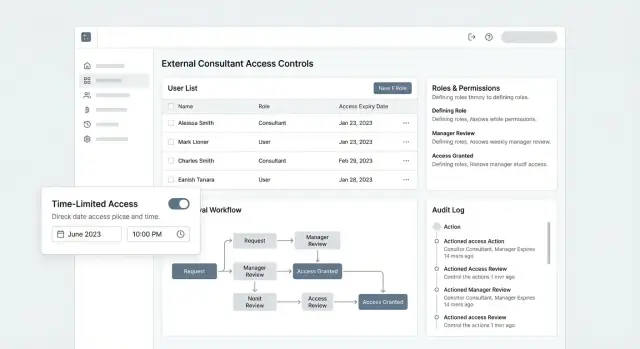
What “Consultant Access” Really Means
“Consultant access” is the set of permissions and workflows that let non-employees do real work in your systems—without turning them into permanent users who accumulate privileges over time.
Consultants typically need access that’s:
- External (they authenticate as a separate identity, not a shared team login)
- Project-bound (tied to a specific client, project, or engagement)
- Time-limited (it should end automatically unless renewed)
- Auditable (every action can be traced back to a person and an approval)
The problem you’re solving
Employees are managed by HR lifecycle and internal IT processes. Consultants often sit outside that machinery, yet still need access quickly—sometimes for a few days, sometimes for a quarter.
If you treat consultants like employees, you get slow onboarding and messy exceptions. If you treat them casually, you get security gaps.
Common risks to design against
Over-permissioning is the default failure mode: someone grants “temporary” broad access so work can start, and it never gets reduced. Stale accounts are the second: access remains active after the engagement ends. Shared credentials are the worst-case: you lose accountability, can’t prove who did what, and offboarding becomes impossible.
Goals for a consultant access web app
Your app should optimize for:
- Fast onboarding with a clear owner and minimal back-and-forth
- Least privilege by default (access starts narrow, expands only with justification)
- Clear accountability (requester, approver, and consultant identity are explicit)
- Easy offboarding that reliably removes access everywhere
What the app should manage (scope)
Be explicit about what “access” covers in your organization. Common scope includes:
- Applications (internal tools, ticketing, dashboards)
- Data (datasets, files, records, exports)
- Environments (prod vs. staging vs. dev)
- Clients/projects (which client data a consultant can see, and under what role)
Define consultant access as a product surface with rules—not as ad-hoc admin work—and the rest of your design decisions become much easier.
Requirements Checklist and Stakeholders
Before you design screens or pick an identity provider, get clear on who needs access, why, and how it should end. External consultant access fails most often because requirements were assumed instead of written down.
Stakeholders (and what each one cares about)
- Internal sponsor (project owner): wants the consultant productive quickly, without creating extra support work.
- IT/Security admin: needs a consistent way to enforce policies (SSO/MFA expectations, logging, time limits) and to respond to incidents.
- Consultant (external user): needs a simple sign-in and only the tools/data required for their deliverables.
- Approver (manager, client lead, or data owner): needs confidence that access requests are legitimate and limited to the right project.
Clarify early who is allowed to approve what. A common rule: the project owner approves access to the project, while IT/security approves exceptions (e.g., elevated roles).
Core workflow to support end-to-end
Write your “happy path” in one sentence and then expand it:
Request → approve → provision → review → revoke
For each step, capture:
- What information must be provided (project, role, start/end date, justification)
- Who is responsible (requester vs. sponsor vs. IT/security)
- Expected turnaround time (same day, 24 hours, 3 business days)
- What happens on failure (missing info, denied request, expired window)
Constraints you should document
- Multiple clients/projects: one consultant may work on several projects—must not see cross-client data.
- Limited time windows: access should expire automatically, with a clear renewal process.
- Compliance needs: retention of approvals and audit history, proof of periodic reviews, and fast revocation when contracts end.
- Support model: who resets access, handles locked accounts, and answers “why can’t I see this?”
Success metrics (so you can prove it works)
Pick a few measurable targets:
- Time to onboard (request submitted → access usable)
- % accounts reviewed on schedule (monthly/quarterly access reviews)
- Time to revoke (termination/contract end → access removed everywhere)
These requirements become your acceptance criteria for the portal, approvals, and governance later in the build.
Data Model: Users, Projects, Roles, and Policies
A clean data model is what keeps “consultant access” from turning into a pile of one-off exceptions. Your goal is to represent who someone is, what they can touch, and why—while making time limits and approvals first-class concepts.
Core objects (what you store)
Start with a small set of durable objects:
- Users: both employees and external consultants. Include identity attributes (email, name), user type (internal/external), and status.
- Organizations: the consultant’s firm and your internal business units, if relevant.
- Projects: the unit of work that access is granted against (client account, engagement, case, site).
- Resources: what’s protected (documents, tickets, reports, environments). You can model these as typed records, or as a generic “resource” with a type field.
- Roles: human-friendly permission bundles (e.g., “Consultant Viewer,” “Consultant Editor,” “Finance Approver”).
- Policies: the rules that constrain roles (allowed resource types, data scope, IP/device requirements, time limits).
Relationships (how access is expressed)
Most access decisions boil down to relationships:
- User ↔ Project membership: a join table like
project_membershipsthat indicates a user belongs to a project. - Role assignments: a separate join table like
role_assignmentsthat grants a role to a user within a scope (project-wide, or specific resource group). - Exceptions: model these explicitly (e.g.,
policy_exceptions) so you can audit them later, instead of burying them in ad-hoc flags.
This separation lets you answer common questions: “Which consultants can access Project A?” “What roles does this user have, and where?” “Which permissions are standard vs. exceptions?”
Time-bound access (make temporary the default)
Temporary access is easier to govern when the model enforces it:
- Add start/end timestamps on memberships and/or role assignments.
- Store renewal rules (who can renew, max duration, renewal count).
- Include a grace period field if you want a short window for handover (e.g., read-only for 48 hours).
State changes (track the lifecycle)
Use a clear status field for memberships/assignments (not just “deleted”):
- pending (requested, not yet approved)
- active
- suspended (temporarily blocked)
- expired (end date passed)
- revoked (ended early by an admin)
These states make workflows, UI, and audit logs consistent—and they prevent “ghost access” from lingering after the engagement ends.
Access Control Design (RBAC + Guardrails)
Good consultant access is rarely “all or nothing.” It’s a clear baseline (who can do what) plus guardrails (when, where, and under which conditions). This is where many apps fail: they implement roles, but skip the controls that keep those roles safe in real life.
Start with RBAC: simple roles per project
Use role-based access control (RBAC) as your foundation. Keep roles understandable and tied to a specific project or resource, not global across the whole app.
A common baseline is:
- Viewer: can read project data and download approved artifacts.
- Editor: can create/update items within the project (e.g., upload deliverables, comment, update status).
- Admin: can manage project settings and assign roles for that project.
Make the “scope” explicit: Viewer on Project A does not imply anything about Project B.
Add guardrails with ABAC-style conditions
RBAC answers “what can they do?” Guardrails answer “under what conditions is it allowed?” Add attribute-based checks (ABAC-style) where risk is higher or requirements vary.
Examples of conditions that are often worth implementing:
- Project attributes: allow access only to projects in a consultant’s assigned client account or region.
- Location / network: require a trusted network (or block high-risk geographies) for sensitive exports.
- Device posture: restrict actions unless the session meets your security requirements (e.g., MFA completed, managed device).
- Time windows: allow access only during the engagement dates or business hours.
These checks can be layered: a consultant might be an Editor, but exporting data could require being on a trusted device and within an approved time window.
Least-privilege by default, exceptions by process
Default every new external user to the lowest role (usually Viewer) with minimal project scope. If someone needs more, require an exception request with:
- the specific permission(s) needed,
- the project(s) impacted,
- a written justification,
- an expiration date.
This prevents “temporary” access from quietly becoming permanent.
Break-glass access (and how it’s controlled)
Define a break-glass path for emergencies (e.g., a production incident where a consultant must act quickly). Keep it rare and explicit:
- approved by a designated on-call owner (or two-person approval for high-risk actions),
- time-limited (minutes/hours, not days),
- fully logged with who, what, when, and why.
Break-glass should feel inconvenient—because it’s a safety valve, not a shortcut.
Authentication: SSO, MFA, and Secure Session Handling
Authentication is where “external” access can either feel seamless—or become a persistent risk. For consultants, you want friction only where it reduces real exposure.
Choose your identity approach: local accounts vs SSO
Local accounts (email + password) are quick to ship and work for any consultant, but they create password-reset support and increase the chance of weak credentials.
SSO (SAML or OIDC) is usually the cleanest option when the consultant belongs to a firm with an identity provider (Okta, Entra ID, Google Workspace). You get centralized login policies, easier offboarding on their side, and fewer passwords in your system.
A practical pattern is:
- Default to SSO when a consultant’s company is onboarded.
- Fall back to local accounts for independent consultants.
If you allow both, make it explicit which method is active for each user to avoid confusion during incident response.
MFA without “security theater” (and without weak recovery)
Require MFA for all consultant sessions—prefer authenticator apps or security keys. SMS can be a fallback, not a first choice.
Recovery is where many systems accidentally weaken security. Avoid permanent “backup email” bypasses. Instead, use a limited set of safer options:
- One-time recovery codes shown once at enrollment
- Admin-assisted reset that requires identity verification and is fully logged
- Device re-enrollment that forces MFA again
Invite flows: expiring links and domain controls
Most consultants join via an invite. Treat the invite link like a temporary credential:
- Short expiration (e.g., 24–72 hours)
- Single-use, tied to the email address invited
- Rate-limited attempts and clear error messaging
Add domain allow/deny lists per client or project (e.g., allow @partnerfirm.com; block free email domains when needed). This prevents misdirected invites from turning into accidental access.
Session security: keep tokens short and revocable
Consultants often use shared machines, travel, and switch devices. Your sessions should assume that reality:
- Use short-lived access tokens
- Rotate refresh tokens and revoke them on suspicious activity
- Offer “log out of all devices” for users and admins
Tie session validity to role changes and approvals: if a consultant’s access is reduced or expires, active sessions should end quickly—not at the next login.
Request and Approval Workflow
A clean request-and-approval flow prevents “quick favors” from turning into permanent, undocumented access. Treat every consultant access request like a small contract: clear scope, clear owner, clear end date.
The request form: capture intent, not just identity
Design the form so requesters can’t be vague. At minimum, require:
- Project (or client engagement) the consultant will work on
- Requested role (mapped to your standard roles, not free text)
- Duration (start date + end date, with an explicit time zone)
- Business justification (one paragraph explaining why and what work is blocked without access)
If you allow multiple projects, make the form project-specific so approvals and policies don’t get mixed.
Approver routing: make ownership explicit
Approvals should follow accountability, not org charts. Common routing:
- Project owner (confirms the consultant should work on this project)
- Security or IT (confirms the role is appropriate and aligns with least privilege)
- Client contact (optional, if the client must authorize third-party access)
Avoid “approve by email.” Use an in-app approval screen that shows what will be granted and for how long.
SLAs, reminders, and escalation
Add lightweight automation so requests don’t stall:
- Reminders for pending approvals (e.g., after 24 hours)
- Notifications for upcoming expirations (e.g., 7 days before end date)
- Escalation to an alternate approver if the primary approver is unavailable
Record every decision
Every step should be immutable and queryable: who approved, when, what changed, and which role/duration was authorized. This audit trail is your source of truth during reviews, incidents, and client questions—and it keeps “temporary” access from becoming invisible.
Provisioning and Time-Limited Access
Provisioning is where “approved on paper” becomes “usable in the product.” For external consultants, the goal is speed without overexposure: give only what’s needed, for only as long as it’s needed, and make changes easy when work shifts.
Automate the default path
Start with a predictable, automated flow tied to the approved request:
- Role assignment: map each approved engagement type to a role (e.g., Finance Analyst – Read Only, Implementation Partner – Project Admin).
- Group membership: add the consultant to the right groups so permissions stay consistent across projects.
- Resource permissions: automatically grant access only to the specified projects, workspaces, or datasets—not the whole tenant.
Automation should be idempotent (safe to run twice) and should produce a clear “provisioning summary” that shows what was granted.
Support manual steps (with checklists)
Some permissions live outside your app (shared drives, third-party tools, customer-managed environments). When you can’t automate, make manual work safer:
- Provide a step-by-step checklist with owner, due date, and verification (e.g., “Confirm folder access,” “Confirm VPN profile,” “Confirm billing code”).
- Require the fulfiller to mark each step completed and capture evidence when appropriate (ticket link, screenshot reference, or system record ID).
Time-limited access with renewal prompts
Every consultant account should have an end date at creation. Implement:
- Auto-expiration: access is revoked automatically at the end date (not just “disabled in theory”).
- Renewal prompts: notify the consultant and internal sponsor ahead of time (e.g., 14 days and 3 days prior) with a one-click renewal request.
- Grace rules: avoid silent extensions; if work must continue, it should go through the same approval logic.
Mid-engagement changes: upgrades, scope shifts, suspensions
Consultant work evolves. Support safe updates:
- Role upgrades/downgrades with a reason and approval trail.
- Scope changes (add/remove projects) without re-onboarding from scratch.
- Suspensions for pause periods (security review, contract gap) that preserve history but remove access immediately.
Audit Logs, Monitoring, and Alerts
Audit logs are your “paper trail” for external access: they explain who did what, when, and from where. For consultant access management, this isn’t just a compliance checkbox—it’s how you investigate incidents, prove least privilege, and resolve disputes quickly.
A practical audit log schema
Start with a consistent event model that works across the app:
- actor: who initiated the action (user ID, role, org)
- target: what was affected (project ID, file ID, user ID)
- action: canonical verb (INVITE_SENT, ROLE_GRANTED, DATA_EXPORTED)
- timestamp: server-side time (UTC)
- ip: source IP (plus user agent if available)
- metadata: JSON for context (policy ID, previous/new values, reason codes, request ticket)
Keep actions standardized so reporting doesn’t become guesswork.
Events worth logging (minimum set)
Log both “security events” and “business-impact events”:
- Invites sent/accepted/expired, account activation, password reset
- Logins, logouts, session refresh, failed login attempts
- MFA enrollment/changes, MFA failures, SSO assertion failures
- Role or policy changes (including who approved and why)
- Access to sensitive views, exports/downloads, and API key usage
- Admin actions: user deactivation, project reassignment, bulk changes
Monitoring and alert triggers
Audit logs are more useful when paired with alerts. Common triggers:
- Unusual login patterns (new country/device, impossible travel, off-hours spikes)
- Repeated failed MFA or login attempts (possible account takeover)
- Privilege escalation (consultant role upgraded, new admin granted)
- Large or repeated exports, especially from restricted projects
Export and retention
Provide audit export in CSV/JSON with filters (date range, actor, project, action), and define retention settings per policy (e.g., 90 days default, longer for regulated teams). Document access to audit exports as a privileged action (and log it). For related controls, see /security.
Access Reviews and Ongoing Governance
Granting access is only half the job. The real risk builds quietly over time: consultants finish a project, switch teams, or stop logging in—yet their accounts keep working. Ongoing governance is how you keep “temporary” access from becoming permanent.
Build review dashboards people will actually use
Create a simple review view for sponsors and project owners that answers the same questions every time:
- Active consultants by project and role
- Last activity (and last sensitive action, if relevant)
- Access expiry date and remaining time
- Pending approvals, renewals, and exceptions
Keep the dashboard focused. A reviewer should be able to say “keep” or “remove” without opening five different pages.
Add attestations (owner confirmation)
Schedule attestations—monthly for high-risk systems, quarterly for lower-risk ones—where the owner confirms each consultant still needs access. Make the decision explicit:
- Re-approve for a defined period (e.g., 30/60/90 days)
- Downgrade role (least privilege)
- Revoke access
To reduce busywork, default to “expires unless confirmed” rather than “continues forever.” Tie attestations to accountability by recording who confirmed, when, and for how long.
Use inactivity rules without breaking work
Inactivity is a strong signal. Implement rules like “suspend after X days with no sign-in,” but add a courtesy step:
- Notify the sponsor/owner before suspension or revocation
- Provide a one-click “extend” option with a new expiry date
- Automatically revoke if there’s no response
This prevents silent risk while avoiding surprise lockouts.
Track exceptions and revisit them on a timer
Some consultants will need unusual access (extra projects, broader data, longer durations). Treat exceptions as temporary by design: require a reason, an end date, and a scheduled re-check. Your dashboard should highlight exceptions separately so they’re never forgotten.
If you need a practical next step, link governance tasks from your admin area (e.g., /admin/access-reviews) and make it the default landing page for sponsors.
Offboarding: Revocation That Actually Sticks
Offboarding external consultants isn’t just “disable the account.” If you only remove their app role but leave sessions, API keys, shared folders, or secrets untouched, access can persist long after the engagement ends. A good web app treats offboarding as a repeatable procedure with clear triggers, automation, and verification.
Define clear offboarding triggers
Start by deciding what events should automatically start the offboarding flow. Common triggers include:
- Contract end date (scheduled in advance)
- Project completion (a project marked “closed”)
- Policy violations (security incident, failed access review, HR/legal request)
Your system should make these triggers explicit and auditable. For example: a contract record with an end date, or a project state change that creates an “Offboarding required” task.
Automate revocation, not just “remove permissions”
Revocation needs to be comprehensive and fast. At minimum, automate:
- Disable the user account (or mark as inactive) in your app
- Remove all roles/groups that grant access to projects, data, or admin functions
- Revoke active sessions and tokens (web sessions, refresh tokens, API tokens)
If you support SSO, remember that SSO termination alone may not kill existing sessions in your app. You still need server-side session invalidation so a consultant can’t keep working from an already authenticated browser.
Handle data handover and secret cleanup
Offboarding is also a data hygiene moment. Build a checklist so nothing sits in personal inboxes or private drives.
Typical items to cover:
- Deliverables and work artifacts: ensure they’re uploaded to the project space and ownership is assigned to an internal user
- Credential rotation: rotate any credentials the consultant could have known (database passwords, API keys, service accounts)
- Shared secrets cleanup: remove them from shared vault entries, shared folders, distribution lists, and chat channels
If your portal includes file upload or ticketing, consider an “Export handover package” step that bundles relevant documents and links for the internal owner.
Verify closure with a final audit record
A sticky revocation includes verification. Don’t rely on “it should be fine”—record that it happened.
Useful verification steps:
- Confirm the consultant has zero active roles and no project memberships
- Confirm all sessions/tokens were revoked and no tokens remain valid
- Create a final offboarding audit event (who initiated it, when it ran, what was removed, any exceptions)
This final audit entry is what you’ll use during access reviews, incident investigations, and compliance checks. It turns offboarding from an informal chore into a dependable control.
Implementation Blueprint: APIs, UI, Testing, and Deployment
This is the build plan that turns your access policy into a working product: a small set of APIs, a simple admin/reviewer UI, and enough tests and deployment hygiene that access doesn’t fail silently.
If you’re trying to get a first version into stakeholders’ hands fast, a vibe-coding approach can be effective: you describe the workflow, roles, and screens, and iterate from working software instead of wireframes. For example, Koder.ai can help teams prototype an external user portal (React UI, Go backend, PostgreSQL) from a chat-based specification, then refine approvals, expiry jobs, and audit views with snapshots/rollback and source code export when you’re ready to move into a formal SDLC.
API surface (keep it boring and consistent)
Design endpoints around the objects you already defined (users, roles, projects, policies) and the workflow (requests → approvals → provisioning):
- Users & roles:
GET /api/users,POST /api/users,GET /api/roles,POST /api/roles - Access requests:
POST /api/access-requests,GET /api/access-requests?status=pending - Approvals:
POST /api/access-requests/{id}/approve,POST /api/access-requests/{id}/deny - Provisioning/expiry:
POST /api/grants,PATCH /api/grants/{id}(extend/revoke),GET /api/grants?expires_before=... - Audit:
GET /api/audit-logs?actor=...&project=...(read-only; never “edit” logs)
On the UI side, aim for three screens:
- Consultant portal (what they can access, expiry date, request access)
- Approver inbox
- Admin console (roles, policies, grants, audit search)
Security basics you implement everywhere
Validate input on every write endpoint, enforce CSRF protection for cookie-based sessions, and add rate limiting to login, request creation, and audit search.
If you support file uploads (e.g., statements of work), use allowlisted MIME types, virus scanning, size limits, and store files outside the web root with random names.
Testing plan (permission bugs are product bugs)
Cover:
- Permission tests: “can/can’t” by role, project, and policy constraints
- Workflow tests: request → approve → grant created → notifications
- Time-based expiration: access stops at expiry, and “extend” requires approval
Deployment notes
Separate dev/staging/prod, manage secrets in a vault (not env files in git), and encrypt backups. Add a recurring job for expiry/revocation and alert if it fails.
If you want a checklist-style companion, link your team to /blog/access-review-checklist, and keep pricing/packaging details on /pricing.
Final checklist: what “good” looks like
A consultant access web app is doing its job when it produces the same outcomes every time:
- Every consultant has a unique identity, MFA, and a project-bound scope.
- Every access grant has an owner, an approver, a reason, and an end date.
- Expiry and revocation are automated (including session/token invalidation).
- Exceptions are visible, time-bound, and revisited.
- Logs are consistent enough to investigate incidents without guesswork.
Build the smallest version that enforces those invariants, then iterate on convenience features (dashboards, bulk operations, richer policies) without weakening the core controls.
FAQ
What is a consultant access web app?
It is a portal that gives external consultants a personal account, a limited role, access to specific projects, and an end date. It replaces shared logins and informal admin requests with a tracked process.
Why should consultants have individual accounts?
Give each consultant their own identity so you can see who signed in, what they changed, and when their access ends. Shared credentials remove that accountability and make offboarding unreliable.
How do I limit a consultant to the right project?
Use project-scoped roles such as Viewer, Editor, and Project Admin. Start with the lowest role that lets the consultant complete the assigned work, then require approval for broader access.
How should temporary access expire?
Every grant should include a start date and end date. When the end date arrives, the app should remove roles, project membership, active sessions, and tokens automatically.
What should an access request include?
A request should state the consultant, project, role, dates, and reason for access. Route project approval to the project owner and send higher-risk requests to IT or security for review.
Do consultants need MFA?
Require MFA for every external account, preferably through an authenticator app or security key. Keep session tokens short-lived and let admins revoke all active sessions when access changes.
Should I use SSO or local accounts for consultants?
Use SSO when the consultant's company can sign in through its own identity provider. Offer a local account only when SSO is unavailable, and make MFA mandatory for that path too.
What should the audit log record?
Record invites, sign-ins, MFA changes, approvals, role changes, exports, and revocations. Each record should show the actor, target, action, server time, source IP, and relevant reason or policy details.
How often should consultant access be reviewed?
Ask project owners to confirm access on a regular schedule, such as monthly for sensitive systems or quarterly for lower-risk work. Let them renew for a set period, reduce the role, or revoke access.
What does complete consultant offboarding involve?
Disable the account, remove every role and group, revoke browser sessions and API tokens, and check shared folders and secrets. Then save a final audit record showing what the offboarding flow removed.