

How to Build a Web App for Product Pricing Experiments
Plan, design, and ship a web app to manage pricing experiments: variants, traffic splits, assignment, metrics, dashboards, and safe rollout guardrails.
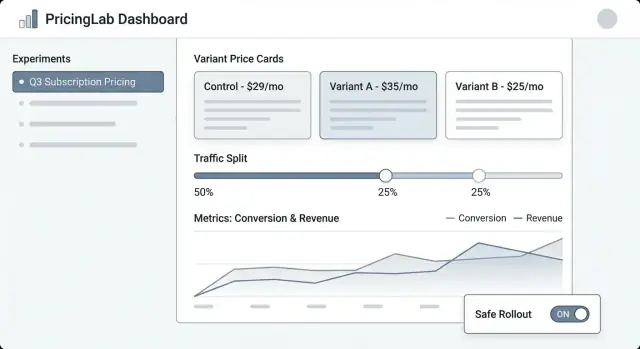
What a Pricing Experiment Manager Should Do
Pricing experiments are structured tests where you show different prices (or packaging) to different groups of customers and measure what changes—conversion, upgrades, churn, revenue per visitor, and more. It’s the pricing version of an A/B test, but with extra risk: a mistake can confuse customers, create support tickets, or even violate internal policies.
A pricing experiment manager is the system that keeps these tests controlled, observable, and reversible.
The problems this app should solve
Control: Teams need a single place to define what’s being tested, where, and for whom. “We changed the price” is not a plan—an experiment needs a clear hypothesis, dates, targeting rules, and a kill switch.
Tracking: Without consistent identifiers (experiment key, variant key, assignment timestamp), analysis becomes guesswork. The manager should ensure every exposure and purchase can be attributed to the right test.
Consistency: Customers shouldn’t see one price on the pricing page and a different one at checkout. The manager should coordinate how variants are applied across surfaces so the experience is coherent.
Safety: Pricing mistakes are expensive. You need guardrails like traffic limits, eligibility rules (e.g., new customers only), approval steps, and auditability.
Who uses it
- Product to plan experiments, define success metrics, and decide what ships.
- Growth/Marketing to iterate on offers and messaging tied to price.
- Finance to enforce revenue rules, discount policies, and reporting needs.
- Support to understand what a customer saw and resolve disputes quickly.
- Engineering to integrate pricing changes safely and predictably.
What we’re building (and what we’re not)
This post focuses on an internal web app that manages experiments: creating them, assigning variants, collecting events, and reporting results.
It is not a full pricing engine (tax calculation, invoicing, multi-currency catalogs, proration, etc.). Instead, it’s the control panel and tracking layer that makes price testing safe enough to run regularly.
Scope, Requirements, and Non-Goals
A pricing experiment manager is only useful if it’s clear what it will—and will not—do. Tight scope keeps the product easy to operate and safer to ship, especially when real revenue is on the line.
Minimum requirements (must-have capabilities)
At a minimum, your web app should let a non-technical operator run an experiment end to end:
- Create experiments with a name, hypothesis, target product(s), target segment(s), and planned duration.
- Define variants (e.g., “Control: $29”, “Treatment: $35”), including currency, billing period, and any eligibility rules.
- Start / pause / stop an experiment, with clear status and effective timestamps.
- View results at a basic level: conversion, revenue per visitor, average order value, plus confidence/uncertainty indicators.
If you build nothing else, build these well—with clear defaults and guardrails.
Supported experiment types (keep it intentional)
Decide early which experiment formats you’ll support so the UI, data model, and assignment logic stay consistent:
- A/B tests (one control vs one treatment) as the primary path.
- Multivariate / multi-armed tests (multiple price points) for teams that need more than two options.
- Holdout groups (e.g., 5% sees baseline pricing) to measure long-term or system-wide effects.
- Gradual rollout (ramping traffic over time) to reduce risk while learning.
Non-goals (what you are explicitly not building)
Be explicit to prevent “scope creep” that turns an experiment tool into a fragile business-critical system:
- Not a billing system replacement (invoicing, taxes, proration, refunds).
- Not a full BI platform (free-form data exploration, custom SQL, data warehouse modeling).
- Not complex ML optimization (dynamic pricing engines, reinforcement learning, auto-tuning).
Success criteria
Define success in operational terms, not just statistical ones:
- Decision-ready insights: a product manager can confidently choose “ship / revert / iterate.”
- Low operational risk: safe defaults, easy rollback, and controlled exposure.
- Auditability: who changed what, when, and why—suitable for finance and compliance review.
Data Model: Experiments, Variants, and Assignments
A pricing experiment app lives or dies by its data model. If you can’t reliably answer “what price did this customer see, and when?”, your metrics will be noisy and your team will lose trust.
Key entities to model
Start with a small set of core objects that map to how pricing actually works in your product:
- Product: what is being sold (e.g., “Analytics Suite”).
- Plan: a packaging tier (e.g., Starter, Pro, Enterprise).
- Price: the actual amount and billing rules (currency, interval, country/VAT rules, effective dates).
- Customer: the unit of analysis (account, user, workspace—pick one and stick to it).
- Segment: a reusable definition (e.g., “US only”, “Self-serve”, “New customers”).
- Experiment: the container with scope, hypothesis, start/end, and targeting.
- Variant: each treatment (Variant A = current price, Variant B = new price).
- Assignment: the record that a customer was placed into a specific variant.
- Event: tracked actions (page_view, checkout_started, subscription_created, upgrade).
- Metric: a computed definition (conversion rate, ARPA, revenue per visitor, churn).
Identifiers and time fields you’ll want later
Use stable identifiers across systems (product_id, plan_id, customer_id). Avoid “pretty names” as keys—they change.
Time fields are just as important:
- created_at for everything.
- starts_at / ends_at on experiments for reporting windows.
- decision_date (or decided_at) to mark when the experiment result was accepted.
Also consider effective_from / effective_to on Price records so you can reconstruct pricing at any point in time.
Relationships that make attribution possible
Define relationships explicitly:
- Experiment → Variants (one-to-many).
- Customer → Assignments (one-to-many, but often limited to one active assignment per experiment).
- Event → Customer + Experiment + Variant.
Practically, this means an Event should carry (or be joinable to) customer_id, experiment_id, and variant_id. If you only store customer_id and “look up the assignment later,” you risk wrong joins when assignments change.
Immutability: keep history, don’t overwrite it
Pricing experiments need an audit-friendly history. Make key records append-only:
- Prices should be versioned, not updated in place.
- Assignments should never be edited to “fix” data; if you must change exposure, create a new record and close the old one.
- Decisions (winner, rationale, decision_date) should be preserved even if you later re-run a similar test.
This approach keeps your reporting consistent and makes governance features like audit logs straightforward later on.
Experiment Workflow and Lifecycle
A pricing experiment manager needs a clear lifecycle so everyone understands what’s editable, what’s locked, and what happens to customers when the experiment changes state.
Recommended lifecycle
Draft → Scheduled → Running → Stopped → Analyzed → Archived
- Draft: Create the experiment, variants, target audience, and success metrics. Nothing is served to customers.
- Scheduled: A start time (and optional end time) is set. The system validates readiness and can notify stakeholders.
- Running: Assignment and price delivery are live. Most fields should lock to prevent accidental mid-test changes.
- Stopped: The experiment no longer assigns new users, and you choose how to treat existing users.
- Analyzed: Results are finalized, documented, and shared.
- Archived: Read-only storage for compliance and future reference.
Required fields and validation per state
To reduce risky launches, enforce required fields as the experiment progresses:
- Before Scheduled: owner, scope (products/regions/plans), variants and price points, exposure/traffic split, start/end times.
- Before Running: hypothesis, primary metric(s), guardrails (e.g., churn, refunds, support tickets), minimum sample size or run-time rule, rollback plan, and tracking/event schema confirmation.
- Before Analyzed: final data snapshot time, analysis notes, and decision (ship/iterate/reject).
Approval gates and overrides
For pricing, add optional gates for Finance and Legal/Compliance. Only approvers can move Scheduled → Running. If you support overrides (e.g., urgent rollback), record who overrode, why, and when in an audit log.
What “Stop” means operationally
When an experiment is Stopped, define two explicit behaviors:
- Freeze assignments: stop assigning new users; keep existing users pinned to their last assigned variant.
- Serving policy: either keep serving the last seen price (stability for customers mid-journey) or revert to baseline (fast rollback).
Make this a required choice at stop time so the team can’t stop an experiment without deciding customer impact.
Variant Assignment and Traffic Splitting
Getting assignment right is the difference between a trustworthy pricing test and confusing noise. Your app should make it easy to define who gets a price, and ensure they keep seeing it consistently.
Consistent assignment (the “sticky” rule)
A customer should see the same variant across sessions, devices (when possible), and refreshes. That means assignment must be deterministic: given the same assignment key and experiment, the result is always the same.
Common approaches:
- Hash-based assignment: compute a hash of
(experiment_id + assignment_key)and map it to a variant. - Stored assignment: write the assigned variant to a database table for later retrieval (useful when you need auditing or complex overrides).
Many teams use hash-based assignment by default and store assignments only when required (for support cases or governance).
Choosing an assignment key
Your app should support multiple keys, because pricing can be user-level or account-level:
- user_id: best when pricing is individual and users can log in reliably.
- account_id / org_id: best for B2B pricing so everyone in the same company sees the same price.
- anonymous cookie/device ID: useful before login, with an upgrade path to merge into
user_idafter signup/login.
That upgrade path matters: if someone browses anonymously and later creates an account, you should decide whether to keep their original variant (continuity) or reassign them (cleaner identity rules). Make it a clear, explicit setting.
Traffic splitting and ramp-ups
Support flexible allocation:
- 50/50 for simple A/B tests
- Weighted splits (e.g., 90/10) for risk control
- Ramp-up schedules (e.g., 1% → 5% → 25% → 50%) with dates/times
When ramping, keep assignments sticky: increasing traffic should add new users to the experiment, not reshuffle existing ones.
Edge cases you must handle
Concurrent tests can collide. Build guardrails for:
- Mutually exclusive groups (only one pricing experiment active per user/account)
- Priority rules (if two experiments target the same customer, which wins?)
- Exclusions (internal staff, support/test accounts, regions, plans, existing contracts)
A clear “Assignment preview” screen (given a sample user/account) helps non-technical teams verify the rules before launch.
Integrating Prices into Your Product Safely
Pricing experiments fail most often at the integration layer—not because the experiment logic is wrong, but because the product shows one price and charges another. Your web app should make “what the price is” and “how the product uses it” very explicit.
Separate price definition from price delivery
Treat price definition as the source of truth (the variant’s price rules, effective dates, currency, tax handling, etc.). Treat price delivery as a simple mechanism to fetch the chosen variant’s price via an API endpoint or SDK.
This separation keeps the experiment management tool clean: non-technical teams edit definitions, while engineers integrate a stable delivery contract like GET /pricing?sku=....
Decide where the price is computed
There are two common patterns:
- Server-side at checkout (recommended for charging): compute the final payable amount on the server to avoid inconsistencies and tampering.
- Client-side for display: okay for showing estimated prices, but it should be backed by server-calculated totals at purchase.
A practical approach is “display on client, verify and compute on server,” using the same experiment assignment.
Be strict about currencies, taxes, and rounding
Variants must follow the same rules for:
- currency selection (user locale vs billing country)
- tax inclusion (VAT included vs added)
- rounding (per item vs per invoice)
Store these rules alongside the price so every variant is comparable and finance-friendly.
Plan safe fallbacks
If the experiment service is slow or down, your product should return a safe default price (usually the current baseline). Define timeouts, caching, and a clear “fail closed” policy so checkout doesn’t break—and log fallbacks so you can quantify impact.
Metrics, Events, and Attribution Basics
Pricing experiments live or die by measurement. Your web app should make it hard to “ship and hope” by requiring clear success metrics, clean events, and a consistent attribution approach before an experiment can launch.
Pick primary metrics (the “decision metrics”)
Start with one or two metrics you will use to decide the winner. Common pricing choices:
- Conversion rate (e.g., visitor → checkout, trial → paid)
- Revenue per visitor (RPV) (captures price and conversion together)
- ARPA/ARPU (useful for subscription tiers)
- Churn / retention (only if you can measure it within a reasonable window)
A helpful rule: if teams argue about the result after the test, you probably didn’t define the decision metric clearly enough.
Add guardrails (the “don’t break the business” metrics)
Guardrails catch damage that a higher price might cause even if short-term revenue looks good:
- Refund rate and chargebacks
- Support tickets (billing, confusion, complaints)
- Payment failures (card declines, 3DS issues)
- Trial-to-paid drop (pricing changes can affect intent)
Your app can enforce guardrails by requiring thresholds (e.g., “refund rate must not increase by more than 0.3%”) and by highlighting breaches on the experiment page.
Define an event schema your app can trust
At minimum, your tracking must include stable identifiers for the experiment and variant on every relevant event.
{
  "event": "purchase_completed",
  "timestamp": "2025-01-15T12:34:56Z",
  "user_id": "u_123",
  "experiment_id": "exp_earlybird_2025_01",
  "variant_id": "v_price_29",
  "currency": "USD",
  "amount": 29.00
}
Make these properties required at ingestion time, not “best effort.” If an event arrives without experiment_id/variant_id, route it to an “unattributed” bucket and flag data quality issues.
Choose attribution windows (and handle delayed outcomes)
Pricing outcomes are often delayed (renewals, upgrades, churn). Define:
- Attribution window: e.g., “count purchases within 7 days of first exposure”
- Exposure rule: first exposure vs. last exposure (first is usually safer for pricing)
- Delayed metrics: show a “preliminary” result quickly, but keep a “final” state that updates when the window closes
This keeps teams aligned on when a result is trustworthy—and prevents premature calls.
UX and Screens for Non-Technical Teams
A pricing experiment tool only works if product managers, marketers, and finance can run it without needing an engineer for every click. The UI should answer three questions fast: What’s running? What will change for customers? What happened and why?
Core screens to include
Experiment list should feel like an operations dashboard. Show: name, status (Draft/Scheduled/Running/Paused/Ended), start/end dates, traffic split, primary metric, and owner. Add a visible “last updated by” and timestamp so people trust what they’re seeing.
Experiment detail is the home base. Put a compact summary at the top (status, dates, audience, split, primary metric). Below that, use tabs like Variants, Targeting, Metrics, Change log, and Results.
Variant editor needs to be straightforward and opinionated. Each variant row should include price (or price rule), currency, billing period, and a plain-English description (“Annual plan: $120 → $108”). Keep it hard to accidentally edit a live variant by requiring confirmation.
Results view should lead with the decision, not just charts: “Variant B increased checkout conversion by 2.1% (95% CI …).” Then provide supporting drill-downs and filters.
Design for clarity (and confidence)
Use consistent status badges and show a timeline of key dates. Display the traffic split as both a percentage and a small bar. Include a “Who changed what” panel (or tab) that lists edits to variants, targeting, and metrics.
Guardrails and validation
Before allowing Start, require: at least one primary metric selected, at least two variants with valid prices, a defined ramp plan (optional but recommended), and a rollback plan or fallback price. If something’s missing, show actionable errors (“Add a primary metric to enable results”).
Quick actions that save time
Provide safe, prominent actions: Pause, Stop, Ramp up (e.g., 10% → 25% → 50%), and Duplicate (copy settings into a new Draft). For risky actions, use confirmations that summarize impact (“Pausing freezes assignments and stops exposure”).
Prototyping the internal tool faster
If you want to validate workflows (Draft → Scheduled → Running) before investing in a full build, a vibe-coding platform like Koder.ai can help you spin up an internal web app from a chat-based spec—then iterate quickly with role-based screens, audit logs, and simple dashboards. It’s especially useful for early prototypes where you want a working React UI and a Go/PostgreSQL backend you can later export and harden.
Dashboards and Reporting That Drive Decisions
A pricing experiment dashboard should answer one question quickly: “Should we keep this price, roll it back, or keep learning?” The best reporting isn’t the fanciest—it’s the easiest to trust and explain.
The essentials to put above the fold
Start with a small set of trend charts that update automatically:
- Conversion rate over time (with a clear “experiment started” marker)
- Revenue per visitor (or average order value, depending on your business)
- Refunds/cancellations if pricing affects retention
Under the charts, include a variant comparison table: Variant name, traffic share, visitors, purchases, conversion rate, revenue per visitor, and the delta vs control.
For confidence indicators, avoid academic wording. Use plain labels like:
- “Early read” (not enough data)
- “Leaning better / leaning worse” (directional)
- “High confidence” (decision-ready)
A short tooltip can explain that confidence increases with sample size and time.
Segment breakdowns that prevent bad rollouts
Pricing often “wins” overall but fails for key groups. Make segment tabs easy to switch:
- New vs returning customers
- Region (country/state)
- Device (mobile/desktop)
- Plan tier (or product category)
Keep the same metrics everywhere so comparisons feel consistent.
Anomaly warnings you can act on
Add lightweight alerts directly on the dashboard:
- Sudden conversion drop after a price change
- Revenue spike that may be caused by tracking bugs or one-time events
- Data gaps (events stopped, unusually low traffic, delayed ingestion)
When an alert appears, show the suspected window and a link to the raw event status.
Exports and sharing for fast alignment
Make reporting portable: a CSV download for the current view (including segments) and a shareable internal link to the experiment report. If helpful, link a short explainer like /blog/metric-guide so stakeholders understand what they’re seeing without scheduling another meeting.
Permissions, Audit Logs, and Governance
Pricing experiments touch revenue, customer trust, and often regulated reporting. A simple permission model and a clear audit trail reduce accidental launches, quiet “who changed this?” arguments, and help you ship faster with fewer reversals.
Roles that match how teams work
Keep roles easy to explain and hard to misuse:
- Viewer: read-only access to experiment setup, current status, and reports.
- Editor: can draft experiments (variants, copy, eligibility rules) but cannot start/stop or change traffic splits in production.
- Approver: can review and approve a draft, and perform production actions (start, stop, ramp traffic) within guardrails.
- Admin: manages roles, global settings, and emergency controls.
If you have multiple products or regions, scope roles by workspace (e.g., “EU Pricing”) so an editor in one area can’t impact another.
Audit logs you can trust
Your app should log every change with who, what, when, ideally with “before/after” diffs. Minimum events to capture:
- Variant definitions (price, currency, billing period), traffic splits, start/stop, and targeting rules.
- Approval actions (requested, approved, rejected) and rollbacks.
- Data-source changes (which revenue or event stream is being used).
Make logs searchable and exportable (CSV/JSON), and link them directly from the experiment page so reviewers don’t hunt. A dedicated /audit-log view helps compliance teams.
Protecting sensitive information
Treat customer identifiers and revenue as sensitive by default:
- Mask raw identifiers (hashing, tokenization) and limit access to revenue breakdowns.
- Restrict segmentation rules that could reveal protected attributes.
- Store secrets (API keys, warehouse credentials) outside the main database.
Comments and decision notes
Add lightweight notes on each experiment: the hypothesis, expected impact, approval rationale, and a “why we stopped” summary. Six months later, these notes prevent rerunning failed ideas—and make reporting far more credible.
Testing and Quality Checks Before Launch
Pricing experiments fail in subtle ways: a 50/50 split drifts to 62/38, one cohort sees the wrong currency, or events never make it into reports. Before you let real customers see a new price, treat the experiment system like a payment feature—validate behavior, data, and failure modes.
Assignment consistency and split accuracy
Start with deterministic test cases so you can prove the assignment logic is stable across services and releases. Use fixed inputs (customer IDs, experiment keys, salt) and assert the same variant is returned every time.
customer_id=123, experiment=pro_annual_price_v2 -> variant=B
customer_id=124, experiment=pro_annual_price_v2 -> variant=A
Then test distribution at scale: generate, say, 1M synthetic customer IDs and check that the observed split stays within a tight tolerance (e.g., 50% ± 0.5%). Also verify edge cases like traffic caps (only 10% enrolled) and “holdout” groups.
Validate event collection end-to-end
Don’t stop at “the event fired.” Add an automated flow that creates a test assignment, triggers a purchase or checkout event, and verifies:
- the event is accepted by the collector
- it’s stored with the right experiment/variant fields
- it appears in the reporting query with correct timestamps and deduping
Run this in staging and in production with a test experiment limited to internal users.
QA tools for non-technical checks
Give QA and PMs a simple “preview” tool: enter a customer ID (or session ID) and see the assigned variant and the exact price that would render. This catches mismatched rounding, currency, tax display, and “wrong plan” issues before launch.
Consider a safe internal route like /experiments/preview that never alters real assignments.
Simulate failures and bad configurations
Practice the ugly scenarios:
- Event pipeline down: UI still works; metrics show a warning banner and an “incomplete data” badge.
- Experiment service unavailable: product falls back to the control price (and logs the fallback).
- Bad configuration (overlapping experiments, invalid price): block publish with clear validation errors.
If you can’t confidently answer “what happens when X breaks?”, you’re not ready to ship.
Launch, Monitoring, and Iteration Plan
Launching a pricing experiment manager is less about “shipping a screen” and more about ensuring you can control blast radius, observe behavior quickly, and recover safely.
Deployment approach: reduce risk on day one
Start with a launch path that matches your confidence and your product constraints:
- Staged rollout: enable experiments for a small percentage of eligible traffic, then expand in steps (e.g., 1% → 10% → 50%).
- Feature flag: gate the entire pricing experiment system behind a flag so you can turn it off without redeploying. This is especially useful while integrations stabilize.
- Internal beta: restrict experiments to employees or test accounts to validate assignment, price rendering, and checkout integrity before exposing real customers.
Monitoring: what to watch during the first hours
Treat monitoring as a release requirement, not a “nice to have.” Set alerts for:
- Error rates: API failures, checkout errors, and pricing-service exceptions.
- Latency: p95/p99 for price fetch, assignment, and checkout pages.
- Event volume: sudden drops or spikes in key events (view price, add to cart, purchase).
- Missing attribution: purchases without experiment/variant IDs, or variant IDs that don’t match the assignment log.
Runbooks: fast pause and revert
Create a written runbook for operations and on-call:
- A global kill switch to pause all experiments.
- A revert to baseline pricing path (cached baseline prices, safe defaults).
- Clear ownership: who approves pausing, who communicates impact, and how you record the incident.
Iteration after MVP
After the core workflow is stable, prioritize upgrades that unlock better decisions: targeting rules (geo, plan, customer type), stronger stats and guardrails, and integrations (data warehouse, billing, CRM). If you offer tiers or packaging, consider exposing experiment capabilities on /pricing so teams understand what’s supported.
FAQ
What is a pricing experiment manager, and what problem does it solve?
It’s an internal control panel and tracking layer for pricing tests. It helps teams define experiments (hypothesis, audience, variants), serve a consistent price across surfaces, collect attribution-ready events, and safely start/pause/stop with auditability.
It’s intentionally not a full billing or tax engine; it orchestrates experiments around your existing pricing/billing stack.
What are the minimum features an MVP should include?
A practical MVP includes:
- Experiment + variant creation (currency, billing period, eligibility)
- Deterministic, sticky assignment (user/org/cookie)
- Start/pause/stop with effective timestamps and a kill switch
- Basic results (conversion, revenue per visitor, AOV) with uncertainty/confidence cues
- Guardrails (traffic caps, exclusions, validation) and an audit log
If these are reliable, you can iterate on richer targeting and reporting later.
What data model entities matter most for accurate attribution?
Model the core objects that let you answer: “What price did this customer see, and when?” Typically:
- Experiment, Variant, Assignment
- Customer (or account/org), Segment
- Price (versioned with effective dates)
- Event (must carry experiment_id + variant_id, not just customer_id)
Avoid mutable edits to key history: version prices and append new assignment records instead of overwriting.
How should the experiment lifecycle work to reduce risk?
Define a lifecycle such as Draft → Scheduled → Running → Stopped → Analyzed → Archived.
Lock risky fields once Running (variants, targeting, split) and require validation before moving states (metrics selected, tracking confirmed, rollback plan). This prevents “mid-test edits” that make results untrustworthy and create customer inconsistency.
How do you assign customers to variants reliably (sticky assignment)?
Use sticky assignment so the same customer gets the same variant across sessions/devices when possible.
Common patterns:
- Hash-based: hash
(experiment_id + assignment_key)into a variant bucket - Stored assignment: write the chosen variant to a database for audit/support and complex overrides
Many teams do hash-first and store assignments only when needed for governance or support workflows.
What should be the assignment key: user_id, account_id, or anonymous cookie?
Pick a key that matches how customers experience pricing:
- org_id/account_id for B2B (everyone at the company sees the same price)
- user_id for individual pricing when login is reliable
- anonymous cookie/device ID for pre-login browsing
If you start anonymous, decide an explicit “identity upgrade” rule at signup/login (keep the original variant for continuity vs reassign for cleanliness).
When you stop an experiment, what happens to existing customers?
Treat “Stop” as two separate decisions:
- Freeze assignments: stop enrolling new customers; keep existing customers pinned
- Serving policy: either keep serving the last seen price (stability) or revert to baseline (fast rollback)
Make the serving policy a required choice when stopping so teams can’t stop a test without acknowledging customer impact.
How do you prevent customers from seeing one price but being charged another?
Ensure the same variant drives both display and charging:
- Use the experiment manager as the source of truth for price definition
- Provide a stable delivery contract (API/SDK) used by pricing page and checkout
- Compute final payable amounts server-side at checkout (client-side can be display-only)
Also define a safe fallback if the service is slow/down (usually baseline pricing) and log every fallback for visibility.
What metrics and events should you track for pricing experiments?
Require a small, consistent event schema where every relevant event includes experiment_id and variant_id.
You’ll typically define:
- Primary decision metrics (e.g., conversion rate, revenue per visitor)
- Guardrails (refunds, support tickets, payment failures)
- Attribution window and exposure rule (often “first exposure” + a 7–14 day window)
If an event arrives without experiment/variant fields, route it to an “unattributed” bucket and flag data quality issues.
How do permissions, approvals, and audit logs fit into pricing experiments?
Use a simple role model and a complete audit trail:
- Roles: Viewer, Editor, Approver, Admin (optionally scoped by product/region)
- Audit logs with who/what/when and before/after diffs for variants, targeting, split, start/stop, approvals
- Notes for hypothesis, rationale, and decision outcomes
This reduces accidental launches and makes finance/compliance reviews—and later retrospectives—much easier.