

How to Create a Web App for Service Outage Communications
Learn how to plan, build, and launch a web app that manages outage updates across channels, with templates, approvals, audit logs, and clear incident timelines.
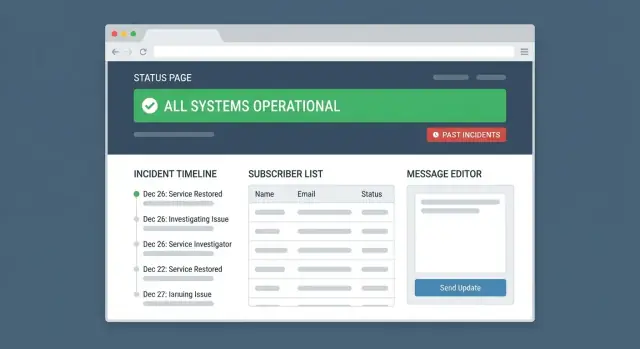
What an outage communications web app should solve
A service outage communications web app exists to do one job extremely well: help your team publish clear, consistent updates quickly—without guessing what was said where, or who approved it.
When incidents happen, the technical fix is only half the work. The other half is communication: customers want to know what’s impacted, what you’re doing, and when they should check back. Internal teams need a shared source of truth so support, success, and leadership aren’t improvising messages.
The goal: consistent, fast, accurate updates
Your app should reduce “time to first update” and keep every subsequent update aligned across channels. That means:
- A single place to draft and publish incident updates
- Clear status definitions (e.g., Investigating, Identified, Monitoring, Resolved)
- Automatic timestamps and an incident timeline so nobody backdates or loses context
Speed matters, but accuracy matters more. The app should encourage writing that is specific (“API requests are failing for EU customers”) rather than vague (“We are experiencing issues”).
The audience: customers, internal teams, partners
You’re not writing for one reader. Your app should support multiple audiences with different needs:
- Customers/end users: impact, workarounds, next update time
- Internal teams (support, sales, execs): broader context, expected volume, talking points
- Partners/integrations: technical details, API status, SLA-related notes
A practical approach is to treat your public status page as the “official story,” while allowing internal notes and partner-specific updates that don’t need to be public.
Typical pain points you’re eliminating
Most teams start with chat messages, ad-hoc docs, and manual emails. Common failures include scattered updates, inconsistent wording, and missed approvals. Your app should prevent:
- Channel drift: the status page says one thing, email says another, social says nothing
- Approval bottlenecks: nobody knows who can publish, so updates stall
- No historical record: after the incident, you can’t reconstruct what was communicated and when
What you’ll build by the end (MVP to v1)
By the end of this guide, you’ll have a clear plan for an MVP that can:
- Create and manage incidents tied to services/components
- Publish structured updates through a repeatable workflow
- Notify subscribers reliably, with an audit log of what went out
Then you’ll extend it into a v1 with stronger permissions, audience targeting, integrations, and reporting—so incident communication becomes a process, not a scramble.
Requirements: users, workflows, and channels
Before you design screens or pick a tech stack, define who the app is for, how an incident moves through the system, and where messages will be published. Clear requirements here prevent two common failure modes: slow approvals and inconsistent updates.
User roles (and what each must be able to do)
Most teams need a small set of roles with predictable permissions:
- Incident commander: create an incident, set severity, assign owners, approve/publish updates, mark resolved.
- Engineering/on-call: add technical notes, propose update text, adjust impacted services, attach timelines.
- Support: view internal context, reuse approved wording, respond to customers using the latest public update.
- Comms/PR: edit language for clarity, enforce templates, manage social posts, ensure tone consistency.
- Admin: manage services, templates, channels, subscriber lists, and access controls.
A practical requirement: make it obvious what’s draft vs approved vs published, and by whom.
Incident flow (state transitions you can implement)
Map the end-to-end lifecycle as explicit states:
detect → confirm → publish → update → resolve → review
Each step should have required fields (e.g., impacted services, customer-facing summary) and a clear “next action” so people don’t improvise under pressure.
Channels (where updates must stay in sync)
List every destination your team uses and define the minimum capabilities for each:
- Status page (canonical source)
- Email and SMS (subscriber notifications)
- Chat (Slack/Teams for internal coordination)
- Social (optional but common)
- In-app banner (high visibility during outages)
Decide upfront whether the status page is the “source of truth” and other channels mirror it, or whether some channels can carry extra context.
Response times and quality checks (without promising SLAs)
Set internal targets like “first public acknowledgement within X minutes after confirmation,” plus lightweight checks: required template, plain-language summary, and an approval rule for high-severity incidents. These are process goals—not guarantees—to keep messaging consistent and timely.
Data model: incidents, services, updates, and statuses
A clear data model keeps outage communications consistent: it prevents “two versions of the truth,” makes timelines easy to follow, and gives you reliable reporting later.
Core entities (and why they matter)
At minimum, model these entities explicitly:
- Service: what customers recognize (e.g., “API”, “Dashboard”, “Billing”).
- Component: optional, finer-grained parts of a service (e.g., “EU region”, “Database”). Components help when only part of a service is affected.
- Incident: the container for an event that impacts one or more services/components.
- Update: a time-stamped message in the incident timeline (what you publish to users).
- Status: both incident state and service/component impact level (keep them distinct).
- Audience: who should receive messages (all users, enterprise customers, internal-only, specific regions).
- Channel: where updates go (status page, email, SMS, Slack, webhook, etc.).
- Template: reusable message structures for speed and consistency.
Incident states and timeline structure
Use a small, predictable set of incident states: investigating → identified → monitoring → resolved.
Treat Updates as an append-only timeline: each update should store the timestamp, author, state at the time, visible audiences, and the rendered content sent to each channel.
Add “milestone” flags on updates (e.g., start detected, mitigation applied, full recovery) so the timeline is readable and report-friendly.
Relationships for clearer context
Model many-to-many links:
- Incident ↔ Service/Component (an incident can affect multiple services).
- Incident ↔ Audience (targeted communications).
- Incident ↔ Related incidents (parent/child or “similar to”) to reduce confusion during cascading failures.
This structure supports accurate status pages, consistent subscriber notifications, and a dependable communication audit log.
Key screens and user experience
A good outage communications app should feel calm even when the incident isn’t. The key is to separate public consumption from internal operations, and to make the “next right action” obvious on every screen.
Public status page (for customers)
The public page should answer three questions within seconds: “Is it down?” “What’s affected?” “When will I know more?”
Show a clear overall state (Operational / Degraded / Partial Outage / Major Outage), followed by any active incidents with the most recent update at the top. Keep update text readable, with timestamps and a short incident title.
Add a compact history view so customers can confirm whether issues are recurring without forcing them to search. A simple filter by component (e.g., API, Dashboard, Payments) helps customers self-diagnose.
Internal incident dashboard (for your team)
This is the “control room.” It should prioritize speed and consistency:
- Create incident: select impacted services/components, severity, and customer-facing title.
- Incident timeline: a reverse-chronological list of updates with author, channel, and status.
- Schedule update: set a future publish time to avoid forgetting the next checkpoint.
Make the primary action button contextual: “Post update” during an active incident, “Resolve incident” when stable, “Start new incident” when none are open. Reduce typing by pre-filling common fields and remembering recent selections.
Subscriber center (opt-in/out with preferences)
Subscriptions should be simple and privacy-respecting. Let users:
- Choose channels (email, SMS, webhook)
- Pick topics/components (only Payments, only API, etc.)
- Pause notifications or unsubscribe with one click
Confirm what they’ll receive (“Only Major Outages for API”) to prevent surprise notifications.
Admin screens (keep complexity out of the incident flow)
Admins need dedicated screens for setup so responders can focus on writing updates:
- Services/components: names, grouping, public visibility
- Message templates: pre-approved wording for common scenarios
- Users & roles: who can draft, approve, publish
- Integrations: monitoring hooks, support tools, outbound channels
A small UX detail that pays off: include a read-only preview of how an update will look on each channel, so teams catch formatting issues before publishing.
Publishing workflow: templates, approvals, and scheduling
During an outage, the hardest part isn’t writing perfect prose—it’s publishing accurate updates quickly, without creating confusion or skipping internal checks. Your app’s publishing workflow should make “send the next update” feel as fast as sending a chat message, while still supporting governance when it matters.
Templates that match the incident lifecycle
Start with a few opinionated templates aligned to common stages: Investigating, Identified, Monitoring, and Resolved. Each template should pre-fill a clear structure: what users are experiencing, what you know, what you’re doing, and when you’ll update next.
A good template system also supports:
- Variable placeholders (service name, region, ETA, incident ID)
- Guardrails like character limits for SMS and subject lines for email
- “Next update” defaults (e.g., 15–30 minutes) to set expectations
Draft → review → publish (optional)
Not every update needs approval. Design approvals as a per-incident (or per-update) toggle:
- Low-risk incidents: on-call can publish immediately.
- High-impact or regulated: require review by comms, legal, or leadership.
Keep the flow lightweight: a draft editor, a single “Request review” action, and clear reviewer feedback. Once approved, publishing should be one click—no copying text across tools.
Scheduling for maintenance and delayed announcements
Scheduling is essential for planned maintenance and coordinated announcements. Support:
- Maintenance windows with start/end times and automatic reminders
- Delayed publishing (e.g., “publish at 09:00 local time”) for coordinated rollouts
- A visible queue so teams can see what’s scheduled, what’s pending approval, and what’s already live
To reduce mistakes further, add a final preview step that shows exactly what will be published to each channel before it goes out.
Multi-channel delivery without inconsistent messaging
When an incident is active, the biggest risk isn’t silence—it’s mixed messages. A customer who sees “degraded” on your status page but “resolved” on social will lose confidence fast. Your web app should treat every update as one source of truth, then publish it consistently everywhere.
One update, many outputs
Start with a single canonical message: what’s happening, who’s affected, and what customers should do. From that shared copy, generate channel-specific variants (Status Page, email, SMS, Slack, social) while keeping the meaning aligned.
A practical pattern is “master content + per-channel formatting”:
- Master fields: title, summary, impact, next update time
- Per-channel fields: subject line, SMS short version, social hashtags, formatting (Markdown vs plain text)
Safeguards that prevent costly mistakes
Multi-channel publishing needs guardrails, not just buttons:
- Character counts per channel (e.g., SMS, social), with warnings before send
- Link previews and validation (broken links are common under pressure)
- Plain-text fallback for channels that strip formatting
- Required fields checks (e.g., “next update time” must be set)
Avoid duplicates and post-publish drift
Incidents get chaotic. Build protections so you don’t send the same update twice or edit history accidentally:
- Idempotency keys or “already sent” locks per channel
- A clear “published” state that makes updates read-only, forcing edits to be a new update
- Scheduled sends with a visible queue and cancellation window
Store delivery results for review
Record delivery outcomes per channel—sent time, failures, provider response, and audience size—so you can answer, “Did customers actually receive this?” later and improve your process.
Subscriptions and audience targeting
A status page is useful even without subscribers, but subscriptions are what turn it into a real communication system. The goal is simple: let people choose what they want to hear about, deliver it at a reasonable cadence, and make opting out effortless.
Subscriber opt-in and preference management
Start with a clear opt-in flow that sets expectations:
- Double opt-in for email: after a user submits their address, send a confirmation link before adding them to the list. This reduces spam complaints and improves deliverability.
- Preference center: a single page where subscribers can choose channels (email/SMS/push), pick services they care about, and update contact details.
Keep the copy specific (“Get updates for Payments and API incidents”) rather than generic (“Receive notifications”).
Audience targeting (so updates reach the right people)
Not every incident affects everyone. Build targeting rules that match how customers understand your product:
- By service/component (e.g., API, Dashboard, Payments)
- By region (US/EU/APAC) when infrastructure is regionalized
- By customer tier (Free/Pro/Enterprise) if entitlements differ
- By tags (e.g., “beta”, “legacy”, “partner”) when you have that metadata
When publishing an update, the sender should see a preview like: “This will notify 1,240 subscribers: API + EU + Enterprise.” That one line prevents most accidental over-notifications.
Notification fatigue controls
Subscribers leave when messages feel noisy. Two safeguards help:
- Rate limiting: cap notifications per incident (for example, no more than one every 15 minutes unless severity increases).
- Quiet hours: allow subscribers to suppress non-critical messages overnight, while still receiving critical outage alerts.
Unsubscribe handling per channel
Unsubscribe should be one click, work immediately, and be channel-specific:
- Email unsubscribe link that doesn’t require login
- SMS “STOP” handling (and “START” re-subscribe)
- Push notification toggles inside the app
Record unsubscribes and preference changes as part of your communication audit log so support can answer, “Why didn’t I get notified?” without guessing.
Security, permissions, and audit trails
Outage communication is high-impact: a single mistaken edit can create confusion for customers, support teams, and executives. Your MVP should treat security and governance as core product features, not add-ons.
Authentication: use SSO
Pick Single Sign-On (SSO) (OIDC/SAML) so only employees with company-managed accounts can access the tool. This reduces password resets, improves offboarding (disable the corporate account and access disappears), and makes it easier to enforce policies like MFA.
Keep a small “break-glass” path for emergencies (e.g., one admin account stored in a password manager), but use it rarely and log it heavily.
Role-based access control (RBAC)
Define roles around the outage workflow:
- Admin: manage org settings, services, integrations, and roles.
- Editor/Responder: draft incident updates, edit impacted services, attach internal notes.
- Approver/Publisher: publish updates to customers and close incidents.
- Viewer: read-only access for stakeholders (support, leadership) without editing risk.
Make permissions specific. For example, allow Editors to update an incident timeline but prevent them from changing “affected services” unless they’re on the owning team. If you have multiple products, add service-level permissions so teams can only edit what they own.
Audit log that stands up to scrutiny
An audit log should record every meaningful action: edits, publishes/unpublishes, schedule changes, template changes, and permission updates.
Capture: who did it, when, what changed (before/after), incident/service affected, and metadata like IP address and user agent. Make the log searchable and exportable, and prevent users from deleting entries.
Retention and exports
Set clear retention defaults (commonly 12–36 months) and allow longer retention for regulated customers.
Provide exports in CSV/JSON for incident records and audit logs, with a documented process for compliance requests. If data must be deleted, do it predictably (e.g., automated policy) and log the deletion event itself.
Integrations: monitoring, support systems, and webhooks
Integrations are what turn your outage communications app from a manual “type-and-publish” tool into a reliable part of incident response. For an MVP, focus on a few high-leverage connections and design them so they fail safely.
Integration types to support
Start with four categories:
- Monitoring alerts (Datadog, Prometheus/Alertmanager, CloudWatch): detect events and feed context into an incident draft.
- Ticketing/support systems (Jira Service Management, ServiceNow, Zendesk): link incidents to internal tickets and sync key fields like severity and owner.
- Chat tools (Slack, Microsoft Teams): post updates into an incident channel and allow responders to trigger actions (e.g., “draft update”).
- Webhook API for everything else: partners, internal tooling, and custom automation.
Inbound webhooks: auto-create incidents and draft updates
Inbound webhooks should allow trusted systems to:
- Create an incident (service, impacted regions, initial status, source alert).
- Attach signals (alert IDs, graphs/URLs, runbook links).
- Draft an update without publishing (so humans can review wording and audience).
Make idempotency a first-class feature (e.g., Idempotency-Key header) so repeated alerts don’t create duplicate incidents.
Outbound webhooks: react to published updates
Outbound webhooks trigger when an update is published, edited, or resolved. Typical uses:
- Notify internal automation (open/close a ticket, update a war-room topic, create a post-incident task list).
- Keep a data warehouse in sync for reporting.
Failure handling: retries, DLQ, manual resend
Treat delivery failures as normal:
- Use retries with exponential backoff and clear limits.
- Send exhausted deliveries to a dead-letter queue with the full payload and last error.
- Provide a manual resend button in the UI, plus a delivery log for auditing and support.
This approach keeps messaging consistent even when downstream systems are unreliable.
Architecture choices for an MVP that scales
You can ship a reliable outage communications app without over-engineering. The trick is to make a few structural decisions that keep you safe today and flexible later.
Separate the public site from internal admin
Treat the public status experience and the internal incident console as different products.
The public side should be fast, cache-friendly, and resilient under heavy traffic (when everyone refreshes during an outage). Keep it read-only, with minimal dependencies, and avoid exposing admin routes or APIs directly.
The admin side can be behind authentication, with richer interactions and integrations. If you deploy both from the same codebase, still separate routes, permissions, and infrastructure concerns (e.g., stricter rate limits and additional logging for admin).
Choose a stack that stays simple
Two common MVP options work well:
- Server-rendered app (SSR): great for public pages and a straightforward admin UI. Fewer moving parts, easy SEO, and simple caching.
- SPA + API: useful if you expect a highly interactive admin console. Keep the API small and versioned from day one.
If you’re unsure, SSR often wins early because it reduces complexity and operational overhead.
If you want to move faster from “requirements” to a working console and status page, a vibe-coding platform like Koder.ai can help you prototype the full workflow in days: a React-based admin UI, a Go API, and a PostgreSQL data model for incidents/updates/subscribers. Planning mode is especially useful for mapping roles, states, and channel rules before you generate screens, and snapshots/rollback can reduce risk when you iterate on publishing logic.
Database basics: use relational tables
A relational database (Postgres/MySQL) fits incident workflows nicely: services, incidents, updates, subscribers, and audit logs all have clear relationships.
Design for append-only updates (don’t overwrite history). That makes incident timelines accurate and makes reporting easier later.
Background jobs for notifications (and retries)
Don’t send email/SMS/push inside web requests. Use background jobs for:
- fan-out sending (large subscriber lists)
- retries with backoff when providers fail
- webhook delivery and signature verification
- scheduled updates (publish at a set time)
This keeps the app responsive during peak incident activity and prevents “double sends” when someone refreshes the admin page.
Reporting, incident history, and post-incident communication
Once the incident is resolved, your communications app should switch from “broadcast mode” to “learning and evidence mode.” Good reporting helps you prove you communicated responsibly, answer customer questions quickly, and improve future response.
Operational metrics that matter
Focus on a small set of metrics that reflect communication quality, not just system uptime:
- Time to first publish: how long it takes from incident creation (or alert received) to the first public update.
- Update frequency: average time between updates while an incident is active, compared to your internal guideline (e.g., every 30 minutes).
- Delivery success rate: for each channel (email, SMS, push, webhook), track sent vs. delivered vs. bounced/failed.
Pair these with simple charts and a per-incident “communication scorecard” so teams can spot patterns without digging through logs.
Incident history that customers and support can use
An incident history page should work for two audiences: external users looking for context and internal teams handling tickets.
Make it searchable and filterable by:
- Service or component
- Date range
- Severity/status (Investigating/Identified/Monitoring/Resolved)
- Tag (e.g., “database,” “network,” “maintenance”) if you support tags
Each incident page should show a clean timeline of updates, including who published each update and which channels it went to (internal view). This becomes your default reference link for support responses.
Post-incident notes (optional public)
Not every organization wants to publish a full postmortem, but a short post-incident note can reduce repeat questions.
Consider a structured template with:
- What happened (plain language)
- Customer impact (who/what was affected, time window)
- What we did (high-level remediation)
- Next steps (preventive actions or monitoring improvements)
Support both private and public visibility, with approvals if you require them.
Exporting timelines for reports and support
Make it easy to export an incident timeline (including timestamps and update text) to common formats such as CSV or PDF.
Exports should include:
- Incident metadata (ID, services, start/end times)
- Update list in chronological order
- Channel delivery summary and failures
This is useful for customer success, compliance reviews, and attaching context to support tickets without copying and pasting from multiple tools.
If you’re building this on Koder.ai, source code export can be handy once the workflow stabilizes—your team can take the generated React/Go/PostgreSQL project, run a deeper security review, and deploy it into your standard environment.
Testing, launch checklist, and communication guidelines
Before you put an outage communications app in front of customers, test it like it’s production—because during an incident, it effectively is.
Testing checklist (the “incident day” rehearsal)
Run a short tabletop exercise with real roles (on-call, comms, approver) and verify:
- Permissions: who can create incidents, publish updates, edit templates, and view subscriber data. Confirm least-privilege defaults.
- Publishing flow: drafts vs. published states, approvals, scheduled posts, and the “unpublish/rollback” path.
- Delivery retries: simulate email/SMS/push failures and confirm retry/backoff behavior, deduplication (no double-sends), and clear operator alerts.
- Unsubscribe and preferences: one-click unsubscribe, topic/service-level preferences, and immediate suppression across every channel.
Also test time zones, mobile layout for the status page, and high-traffic caching behavior (a status page often gets more traffic than your marketing site during an outage).
Operational readiness
Treat the app as a critical system:
- Backups of incident history, templates, and subscriber preferences.
- Monitoring and alerting on publish latency, queue depth, and channel provider errors.
- A documented rollback plan (feature flags or a simple “read-only mode” that keeps the status page up while you disable admin actions).
Communication guidelines (write like a calm human)
Good updates are short and consistent:
- Start with an impact statement (“Users in EU may see checkout failures”).
- Share what’s known, what’s unknown, and what’s being done—avoid speculation.
- Always include when the next update will arrive, even if there’s no change.
Launch plan
Launch in stages: enable internal-only incidents first, then turn on the public status page, and finally enable subscriptions once you’re confident in unsubscribe flows and rate limits.
If you need a low-friction way to validate the whole workflow end-to-end, you can build and host an MVP on Koder.ai (Free/Pro/Business/Enterprise tiers) and iterate quickly with planning mode, then use snapshots/rollback as you harden permissions and delivery reliability.
FAQ
What is an outage communications web app, and why do teams need one?
An outage communications web app is a dedicated tool for creating, approving, and publishing incident updates as a single source of truth across channels (status page, email/SMS, chat, social, in-app banners). It reduces “time to first update,” prevents channel drift, and preserves a reliable timeline of what was communicated and when.
How do you prevent inconsistent messaging across status page, email, SMS, and chat?
Treat the public status page as the canonical story, then mirror that update into other channels.
Practical safeguards:
- Keep updates append-only (don’t edit published history; post a new update)
- Use master content + per-channel formatting (same meaning, different length/format)
- Store per-channel delivery results so you can verify what was actually sent
Which user roles should an MVP support?
Common roles include:
- Incident commander: creates incidents, sets severity, approves/publishes, resolves
- Engineering/on-call: adds technical notes, proposes update text, updates impacted services
- Support: consumes internal context and reuses approved wording
- Comms/PR: edits for clarity and tone, manages templates and social
- Admin: manages services, templates, channels, integrations, and access
Make it obvious what’s draft vs approved vs published, and by whom.
What incident workflow states should the app implement?
A simple, explicit lifecycle prevents improvisation:
- detect → confirm → publish → update → resolve → review
Enforce required fields at each step (for example: impacted services, customer-facing summary, and “next update time”) so responders can’t publish vague or incomplete updates under pressure.
What core data model do you need for incidents and updates?
Start with these entities:
- Service (API, Dashboard, Billing)
- Component (optional finer granularity like region/database)
- Incident (the event container)
- Update (time-stamped message in the timeline)
- Status (keep incident state separate from service/component impact level)
- Audience (public, internal-only, region/tier)
- Channel (status page, email, SMS, Slack, webhook)
- Template (reusable structure)
This model supports clear timelines, targeted notifications, and durable reporting.
Which incident statuses work best for a public timeline?
Use a small, predictable set: Investigating → Identified → Monitoring → Resolved.
Implementation tips:
- Store status on each update (what the state was when you posted)
- Keep the timeline append-only with immutable published entries
- Add optional milestones (e.g., mitigation applied, full recovery) to improve readability
How should templates be designed to speed up accurate updates?
Build a few templates mapped to the lifecycle (Investigating/Identified/Monitoring/Resolved) with fields like:
- What users are experiencing
- Who is affected (region/tier/service)
- What you’re doing now
- Workarounds (if any)
- Next update time
Add guardrails such as SMS character limits, required fields, and placeholders (service/region/incident ID).
When should updates require approval, and how do you keep approvals from slowing you down?
Make approvals configurable by severity or incident type:
- Low-risk incidents: responders can publish immediately
- High-impact/regulatory incidents: require a reviewer (comms/legal/leadership)
Keep it lightweight: one Request review action, visible reviewer feedback, and one-click publish after approval—no copying text between tools.
What should the subscriber center and audience targeting include?
Minimum, privacy-respecting subscription features:
- Double opt-in for email
- A preference center to choose channels (email/SMS/webhook) and topics (service/component)
- One-click unsubscribe (plus SMS STOP handling)
To reduce fatigue:
- Rate limit notifications per incident
- Support quiet hours for non-critical updates
- Preview the audience size before sending (e.g., “Notifies 1,240 subscribers”).
What security, permissions, and audit logging does this kind of app require?
Prioritize:
- SSO (OIDC/SAML) for employee access, plus a logged break-glass account
- RBAC with least privilege (Admin, Editor/Responder, Approver/Publisher, Viewer)
- A tamper-resistant audit log (who/when/what changed, before/after, incident affected)
- Retention defaults (commonly 12–36 months) and exports (CSV/JSON)
This protects against accidental publishes and makes post-incident reviews defensible.