

How to Build a Web App for Vendor Security Review Management
Step-by-step guide to designing and launching a web app that streamlines vendor security reviews: intake, questionnaires, evidence, risk scoring, approvals, and reporting.
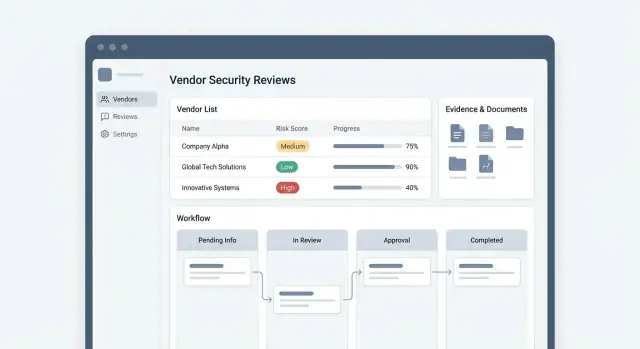
Goals, Users, and Scope of Vendor Security Reviews
Before you design screens or pick a database, align on what the app is supposed to achieve and who it’s for. Vendor security review management fails most often when different teams use the same words (“review,” “approval,” “risk”) to mean different things.
Who will use the app
Most programs have at least four user groups, each with different needs:
- Security / GRC: owns the review process, questions, evidence requirements, and final risk decision.
- Procurement / Vendor Management: needs fast intake, clear status, and renewal visibility so purchasing isn’t blocked at the last minute.
- Legal / Privacy: focuses on data processing terms, DPA/SCCs, breach notification, and where data is stored.
- Vendor contacts: want a simple portal to answer questions once, upload evidence, and respond to follow-ups without long email threads.
Design implication: you’re not building “one workflow.” You’re building a shared system where each role sees a curated view of the same review.
What “vendor security review” means at your company
Define the boundaries of the process in plain language. For example:
- Does a review cover only SaaS tools, or also consultants, agencies, and hosting providers?
- Is the goal to confirm baseline controls, or to quantify risk and approve exceptions?
- Are you reviewing the vendor (company-wide) or the service (a specific product and how you use it)?
Write down what triggers a review (new purchase, renewal, material change, new data type) and what “done” means (approved, approved with conditions, rejected, or deferred).
Current pain points to eliminate
Make your scope concrete by listing what hurts today:
- Status trapped in email threads and private inboxes
- Spreadsheets that get out of sync, with no single source of truth
- Missing or stale evidence (SOC 2, ISO, pen test) and no expiry tracking
- Unclear handoffs between Security, Procurement, and Legal
- No consistent way to record decisions, exceptions, or compensating controls
These pain points become your requirements backlog.
Success metrics that keep the project honest
Pick a few metrics you can measure from day one:
- Cycle time (intake → decision) by vendor tier
- On-time completion rate vs SLAs
- Count of overdue reviews and average overdue days
- Rework rate (reviews sent back to vendors for missing info)
If the app can’t report these reliably, it’s not actually managing the program—it’s just storing documents.
Workflow Design: From Intake to Approval
A clear workflow is the difference between “email ping-pong” and a predictable review program. Before you build screens, map the end-to-end path a request takes and decide what must happen at each step to reach an approval.
Map the end-to-end flow
Start with a simple, linear backbone you can extend later:
Intake → Triage → Questionnaire → Evidence collection → Security assessment → Approval (or rejection).
For each stage, define what “done” means. For example, “Questionnaire complete” might require 100% of required questions answered and an assigned security owner. “Evidence collected” might require a minimum set of documents (SOC 2 report, pen test summary, data flow diagram) or a justified exception.
Define entry points (how reviews start)
Most apps need at least three ways to create a review:
- New vendor request: initiated by Procurement, IT, or a business owner
- Renewal: automatically created based on a review expiration date
- Incident-triggered review: created when a vendor breach or material change occurs
Treat these as different templates: they can share the same workflow but use different default priority, required questionnaires, and due dates.
Statuses, SLAs, and ownership
Make statuses explicit and measurable—especially the “waiting” states. Common ones include Waiting on vendor, In security review, Waiting on internal approver, Approved, Approved with exceptions, Rejected.
Attach SLAs to the status owner (vendor vs internal team). That lets your dashboard show “blocked by vendor” separately from “internal backlog,” which changes how you staff and escalate.
Automation vs human judgment
Automate routing, reminders, and renewal creation. Keep human decision points for risk acceptance, compensating controls, and approvals.
A useful rule: if a step needs context or tradeoffs, store a decision record rather than trying to auto-decide it.
Core Data Model: Vendors, Reviews, Questionnaires, Evidence
A clean data model is what lets the app scale from “one-off questionnaire” to a repeatable program with renewals, metrics, and consistent decisions. Treat the vendor as the long-lived record, and everything else as time-bound activity attached to it.
Vendor (the durable profile)
Start with a Vendor entity that changes slowly and is referenced everywhere. Useful fields include:
- Business owner (internal sponsor), department, and primary contacts
- Criticality / tier (e.g., low/medium/high) and “in production” status
- Data types handled (PII, payment data, health data, source code, etc.)
- Systems / integrations they touch (SSO, data warehouse, support tooling)
- Contract basics (start/end dates) so renewals can be automated later
Model data types and systems as structured values (tables or enums), not free text, so reporting stays accurate.
Review (a point-in-time assessment)
Each Review is a snapshot: when it started, who requested it, scope, tier at the time, SLA dates, and the final decision (approved/approved with conditions/rejected). Store decision rationale and links to any exceptions.
Questionnaire (templates and responses)
Separate QuestionnaireTemplate from QuestionnaireResponse. Templates should support sections, reusable questions, and branching (conditional questions based on earlier answers).
For each question, define whether evidence is required, allowed answer types (yes/no, multi-select, file upload), and validation rules.
Evidence and artifacts
Treat uploads and links as Evidence records tied to a review and optionally to a specific question. Add metadata: type, timestamp, who provided it, and retention rules.
Finally, store review artifacts—notes, findings, remediation tasks, and approvals—as first-class entities. Keeping a full review history enables renewals, trend tracking, and faster follow-up reviews without re-asking everything.
Roles, Permissions, and Vendor Access
Clear roles and tight permissions keep a vendor security review app useful without turning it into a data-leak risk. Design this early, because permissions affect your workflow, UI, notifications, and audit trail.
The core roles to model
Most teams end up needing five roles:
- Requester: starts a review (often Procurement, IT, or a business owner), tracks status, and answers context questions (what data the vendor touches, intended use, contract value).
- Reviewer: runs the assessment, requests evidence, follows up, and proposes a decision.
- Approver: formally accepts the risk outcome (approve, approve-with-conditions, reject), typically Security leadership, Legal, or Risk.
- Vendor respondent: completes questionnaires and uploads evidence.
- Admin: manages templates, integrations, role assignments, and global settings.
Keep roles separate from “people.” The same employee might be a requester on one review and a reviewer on another.
Permissioning for sensitive evidence
Not all review artifacts should be visible to everyone. Treat items like SOC 2 reports, penetration test results, security policies, and contracts as restricted evidence.
Practical approach:
- Separate review metadata (vendor name, status, renewal date) from restricted attachments.
- Add an evidence-level visibility flag (e.g., “All internal users,” “Review team only,” “Legal + Security only”).
- Log every access to restricted files (view/download) for accountability.
Safe vendor access (and isolation)
Vendors should only see what they need:
- Limit vendor accounts to their own organization and their own requests.
- Provide a dedicated portal view: assigned questionnaires, upload requests, and messaging—nothing else.
- Disable cross-vendor search and hide internal comments by default.
Delegation, backups, and continuity
Reviews stall when a key person is out. Support:
- Delegates (temporary coverage with the same permissions)
- Approval backups (secondary approvers after an SLA threshold)
- A clear “reassign review” action with a mandatory reason, captured in the audit log
This keeps reviews moving while preserving least-privilege access.
Intake and Triage: Forms, Routing, and Prioritization
A vendor review program can feel slow when every request starts with a long questionnaire. The fix is to separate intake (quick, lightweight) from triage (decide the right path).
Pick a few intake channels (and make them consistent)
Most teams need three entry points:
- Internal request form for employees (Procurement, Legal, Engineering) to initiate a review
- Procurement ticket (e.g., Jira/Service Desk) that can automatically create a review record
- API intake for tooling that already knows when a new vendor is being onboarded
No matter the channel, normalize requests into the same “New Intake” queue so you don’t create parallel processes.
Collect the minimum up front
The intake form should be short enough that people don’t guess. Aim for fields that enable routing and prioritization:
- Vendor name and website
- Business owner (internal requester) and department
- What the vendor will do (category/use case)
- Data types involved (PII, payment data, health data, none)
- Access level (production access, internal-only, no access)
- Go-live date / purchasing deadline
Defer deep security questions until you know the review level.
Add triage rules that create clear paths
Use simple decision rules to classify risk and urgency. For example, flag as high priority if the vendor:
- Processes PII or payment data
- Gets production access or privileged integration access
- Is critical to operations (billing, authentication, core infrastructure)
Auto-route to the right queue and approver
Once triaged, automatically assign:
- The correct review template (lite vs full)
- The right queue (e.g., Security, Privacy, Compliance)
- An approver based on data type, region, or business unit
This keeps SLAs predictable and prevents “lost” reviews sitting in someone’s inbox.
Questionnaires and Evidence Collection UX
The UX for questionnaires and evidence is where vendor security reviews either move quickly—or stall. Aim for a flow that’s predictable for internal reviewers and genuinely easy for vendors to complete.
Start with reusable templates by risk tier
Create a small library of questionnaire templates mapped to risk tier (low/medium/high). The goal is consistency: the same vendor type should see the same questions every time, and reviewers shouldn’t rebuild forms from scratch.
Keep templates modular:
- A short “baseline” set (company info, data handling, access controls)
- Add-on sections for higher-risk cases (incident response, SDLC, pentesting, subcontractors)
When a review is created, pre-select the template based on tier, and show vendors a clear progress indicator (e.g., 42 questions, ~20 minutes).
Make evidence submission flexible (uploads + links)
Vendors often already have artifacts like SOC 2 reports, ISO certificates, policies, and scan summaries. Support both file uploads and secure links so they can provide what they have without friction.
For each request, label it in plain language (“Upload SOC 2 Type II report (PDF) or share a time-limited link”) and include a short “what good looks like” hint.
Track freshness and automate reminders
Evidence isn’t static. Store metadata alongside each artifact—issue date, expiry date, coverage period, and (optionally) reviewer notes. Then use that metadata to drive renewal reminders (both for the vendor and internally) so the next annual review is faster.
Be vendor-friendly: guidance and due dates
Every vendor page should answer three questions immediately: what’s required, when it’s due, and who to contact.
Use clear due dates per request, allow partial submission, and confirm receipt with a simple status (“Submitted”, “Needs clarification”, “Accepted”). If you support vendor access, link vendors directly to their checklist rather than generic instructions.
Risk Scoring, Exceptions, and Decision Recording
A review isn’t finished when the questionnaire is “complete.” You need a repeatable way to translate answers and evidence into a decision that stakeholders can trust and auditors can trace.
A scoring approach that stays understandable
Start with tiering based on the vendor’s impact (e.g., data sensitivity + system criticality). Tiering sets the bar: a payroll processor and a snack-delivery service should not be evaluated the same way.
Then score within the tier using weighted controls (encryption, access controls, incident response, SOC 2 coverage, etc.). Keep the weights visible so reviewers can explain outcomes.
Add red flags that can override the numeric score—items like “no MFA for admin access,” “known breach with no remediation plan,” or “cannot support data deletion.” Red flags should be explicit rules, not reviewer intuition.
Exceptions without losing control
Real life requires exceptions. Model them as first-class objects with:
- Type: compensating control, limited-scope access, temporary approval
- Owner: who accepts the risk
- Expiration: date-based, with renewal reminders
- Conditions: required changes (e.g., enable SSO within 60 days)
This lets teams move forward while still tightening risk over time.
Record decisions and required follow-ups
Every outcome (Approve / Approve with conditions / Reject) should capture rationale, linked evidence, and follow-up tasks with due dates. This prevents “tribal knowledge” and makes renewals faster.
A simple risk summary for stakeholders
Expose a one-page “risk summary” view: tier, score, red flags, exception status, decision, and next milestones. Keep it readable for Procurement and leadership—details can stay one click deeper in the full review record.
Collaboration, Approvals, and Audit Trail
Security reviews stall when feedback is scattered across email threads and meeting notes. Your app should make collaboration the default: one shared record per vendor review, with clear ownership, decisions, and timestamps.
Comments, @mentions, and notes
Support threaded comments on the review, on individual questionnaire questions, and on evidence items. Add @mentions to route work to the right people (Security, Legal, Procurement, Engineering) and to create a lightweight notification feed.
Separate notes into two types:
- Internal notes (only your organization): triage thoughts, risk rationale, negotiation points, and reminders.
- Vendor-visible notes: clarifications and requests the vendor can act on.
This split prevents accidental oversharing while keeping the vendor experience responsive.
Approvals, including conditional approval
Model approvals as explicit sign-offs, not a status change someone can edit casually. A strong pattern is:
- Approve
- Reject
- Approve with conditions (a remediation plan)
For conditional approval, capture: required actions, deadlines, who owns verification, and what evidence will close the condition. This lets the business move forward while keeping risk work measurable.
Tasks, owners, and optional ticket sync
Every request should become a task with an owner and due date: “Review SOC 2,” “Confirm data retention clause,” “Validate SSO settings.” Make tasks assignable to internal users and (where appropriate) vendors.
Optionally sync tasks to ticketing tools like Jira to match existing workflows—while keeping the vendor review as the system of record.
A complete audit trail
Maintain an immutable audit trail for: questionnaire edits, evidence uploads/deletions, status changes, approvals, and condition sign-offs.
Each entry should include who did it, when, what changed (before/after), and the reason when relevant. Done well, this supports audits, reduces rework at renewal, and makes reporting credible.
Integrations: SSO, Ticketing, Messaging, and Storage
Integrations decide whether your vendor security review app feels like “one more tool” or a natural extension of existing work. The goal is simple: minimize duplicate data entry, keep people in the systems they already check, and ensure evidence and decisions are easy to find later.
SSO for internal users (and simple vendor access)
For internal reviewers, support SSO via SAML or OIDC so access aligns with your identity provider (Okta, Azure AD, Google Workspace). This makes onboarding and offboarding reliable and enables group-based role mapping (for example, “Security Reviewers” vs “Approvers”).
Vendors usually shouldn’t need full accounts. A common pattern is time-bound magic links scoped to a specific questionnaire or evidence request. Pair that with optional email verification and clear expiration rules to reduce friction while keeping access controlled.
Ticketing integrations for remediation
When a review results in required fixes, teams often track them in Jira or ServiceNow. Integrate so reviewers can create remediation tickets directly from a finding, prefilled with:
- vendor name and review ID
- affected system/product
- required control and due date
- severity and recommended acceptance criteria
Sync back the ticket status (Open/In Progress/Done) to your app so review owners can see progress without chasing updates.
Messaging: Slack/Teams for due dates and approvals
Add lightweight notifications where people already work:
- upcoming due dates for questionnaires and evidence uploads
- approval requests with one-click deep links to the review
- reminders when SLAs are nearing breach
Keep messages actionable but minimal, and allow users to configure frequency to avoid alert fatigue.
Document storage (with access controls)
Evidence often lives in Google Drive, SharePoint, or S3. Integrate by storing references and metadata (file ID, version, uploader, timestamp) and enforcing least-privilege access.
Avoid copying sensitive files unnecessarily; when you do store files, apply encryption, retention rules, and strict per-review permissions.
A practical approach is: evidence links live in the app, access is governed by your IdP, and downloads are logged for auditability.
Security and Privacy Requirements for the Web App
A vendor review tool quickly becomes a repository for sensitive material: SOC reports, pen test summaries, architecture diagrams, security questionnaires, and sometimes personal data (names, emails, phone numbers). Treat it like a high-value internal system.
Protect evidence uploads
Evidence is the biggest risk surface because it accepts untrusted files.
Set clear constraints: file type allowlists, size limits, and timeouts for slow uploads. Run malware scanning on every file before it’s available to reviewers, and quarantine anything suspicious.
Store files encrypted at rest (and ideally with per-tenant keys if you serve multiple business units). Use short-lived, signed download links and avoid exposing direct object storage paths.
Apply secure defaults everywhere
Security should be the default behavior, not a configuration option.
Use least privilege: new users should start with minimal access, and vendor accounts should only see their own requests. Protect forms and sessions with CSRF defenses, secure cookies, and strict session expiration.
Add rate limiting and abuse controls for login, upload endpoints, and exports. Validate and sanitize all inputs, especially free-text fields that may be rendered in the UI.
Logging and auditability for sensitive actions
Log access to evidence and key workflow events: viewing/downloading files, exporting reports, changing risk scores, approving exceptions, and modifying permissions.
Make logs tamper-evident (append-only storage) and searchable by vendor, review, and user. Keep an “audit trail” UI so non-technical stakeholders can answer “who saw what, and when?” without digging through raw logs.
Retention, deletion, and legal holds
Define how long you keep questionnaires and evidence, and make it enforceable.
Support retention policies by vendor/review type, deletion workflows that include files and derived exports, and “legal hold” flags that override deletion when needed. Document these behaviors in product settings and internal policies, and ensure deletions are verifiable (e.g., deletion receipts and admin audit entries).
Reporting, Dashboards, and Renewal Management
Reporting is where your review program becomes manageable: you stop chasing updates in email and start steering work with shared visibility. Aim for dashboards that answer “what’s happening now?” plus exports that satisfy auditors without manual spreadsheet work.
Dashboards that drive action
A useful home dashboard is less about charts and more about queues. Include:
- Review pipeline by status (Intake, In Progress, Waiting on Vendor, Waiting on Approver, Approved/Rejected)
- Overdue items (questionnaires, evidence requests, approvals) with clear owners and due dates
- High-risk vendors and “high-risk + blocked” reviews that need escalation
Make filters first-class: business unit, criticality, reviewer, procurement owner, renewal month, and integration-connected tickets.
For Procurement and business owners, provide a simpler “my vendors” view: what they’re waiting on, what’s blocked, and what’s approved.
Audit-ready exports
Audits usually ask for proof, not summaries. Your export should show:
- Who approved what, when, and why (decision, risk score at the time, exception text)
- What evidence was reviewed (filename/link, version, timestamps)
- Complete audit trail of key events (submitted, requested changes, re-opened)
Support CSV and PDF exports, and allow exporting a single vendor “review packet” for a given period.
Renewal calendar and reminders
Treat renewals as a product feature, not a spreadsheet.
Track evidence expiry dates (e.g., SOC 2 reports, pen tests, insurance) and create a renewal calendar with automated reminders: vendor first, then internal owner, then escalation. When evidence is renewed, keep the old version for history and update the next renewal date automatically.
Rollout Plan, MVP Scope, and Iteration Roadmap
Shipping a vendor security review app is less about “building everything” and more about getting one workflow working end-to-end, then tightening it with real usage.
MVP scope (what to ship first)
Start with a thin, reliable flow that replaces spreadsheets and inbox threads:
- Intake: a single form to request a review (vendor name, service, data types, business owner, target go-live date).
- Questionnaire: send a standard questionnaire and track status (sent, in progress, submitted).
- Evidence upload: a basic evidence area per review (SOC 2, pen test, policies) with expiry dates.
- Decision: record outcome (approve/approve with conditions/reject), key risks, and required follow-ups.
Keep the MVP opinionated: one default questionnaire, one risk rating, and a simple SLA timer. Fancy routing rules can wait.
If you want to accelerate delivery, a vibe-coding platform like Koder.ai can be a practical fit for this kind of internal system: you can iterate on the intake flow, role-based views, and the workflow states via chat-driven implementation, then export the source code when you’re ready to take it fully in-house. That’s especially useful when your “MVP” still needs real-world basics (SSO, audit trail, file handling, and dashboards) without a months-long build cycle.
Pilot first, then expand
Run a pilot with one team (e.g., IT, Procurement, or Security) for 2–4 weeks. Pick 10–20 active reviews and migrate only what’s needed (vendor name, current status, final decision). Measure:
- time from intake → decision
- % reviews missing evidence at decision time
- reviewer and vendor “stuck points” (where they drop off)
Iterate weekly (small releases, visible wins)
Adopt a weekly cadence with a short feedback loop:
- 15-minute check-in with pilot users
- one improvement to reduce friction (template text, fewer fields, clearer vendor instructions)
- one improvement to reduce risk (required fields for decision notes, evidence expiry reminders)
Documentation that prevents support tickets
Write two simple guides:
- Admin guide: how to edit questionnaires, manage users, and close reviews.
- Vendor guide: how to answer questions, upload evidence, and what “approved with conditions” means.
Roadmap: what to add next
Plan phases after the MVP: automation rules (routing by data type), a fuller vendor portal, APIs, and integrations.
If pricing or packaging affects adoption (seats, vendors, storage), link stakeholders to /pricing early so rollout expectations match the plan.
FAQ
What should we define before building a vendor security review management app?
Start by aligning on shared definitions and boundaries:
- What counts as a “vendor” (SaaS only vs also agencies/consultants/hosting)
- Whether you’re reviewing the company or a specific service + your usage
- What triggers a review (new purchase, renewal, material change, incident)
Write down what “done” means (approved, approved with conditions, rejected, deferred) so teams aren’t optimizing for different outcomes.
Who are the typical users of a vendor security review app?
Most programs need distinct, role-based experiences for:
- Security/GRC (process owner, assessment, decision)
- Procurement/vendor management (intake speed, status, renewals)
- Legal/privacy (DPAs/SCCs, data location, breach terms)
- Vendor contacts (portal for questionnaires, evidence, follow-ups)
Design as one shared system with curated views per role, not one single workflow screen.
What workflow stages should the app support end-to-end?
A common backbone is:
Intake → Triage → Questionnaire → Evidence collection → Security assessment → Approval (or rejection)
For each stage, define completion criteria (e.g., required questions answered, minimum evidence provided or an approved exception). This makes statuses measurable and reporting reliable.
How should a review start (intake) in the system?
Support at least three entry points:
- New vendor request (employee/procurement initiated)
- Renewal (auto-created from expiration dates)
- Incident-triggered review (breach or material change)
Use templates per entry type so defaults (priority, questionnaires, due dates) match the situation without manual setup every time.
How do we design statuses and SLAs so delays are easy to diagnose?
Use explicit statuses and assign ownership to each “waiting” state, for example:
- Waiting on vendor
- In security review
- Waiting on internal approver
- Approved / Approved with exceptions / Rejected
Attach SLAs to the current owner (vendor vs internal). That lets dashboards distinguish external blockers from internal backlog.
What core data model entities should we build first?
Treat the vendor profile as durable and everything else as time-bound activity:
- Vendor: long-lived profile (tier, data types, integrations, contacts, contract dates)
- Review: point-in-time snapshot (scope, tier at time, SLA dates, decision + rationale)
- Questionnaire: templates separate from responses; support validation and conditional questions
- Evidence: records with metadata (type, timestamp, expiry/coverage) and links to questions
This structure enables renewals, metrics, and consistent decision history.
How do we give vendors access without creating a data-leak risk?
Build strong isolation and least-privilege access:
- Vendors can only access their own organization and assigned requests
- Provide a dedicated vendor portal view (assigned questionnaires, uploads, messages)
- Hide internal notes by default and disable cross-vendor search
For low-friction access, consider time-bound magic links scoped to a specific request, with clear expiration rules.
What’s the best way to handle evidence uploads and document “freshness”?
Make evidence a first-class object with controls:
- Allow uploads and secure links; label requests in plain language
- Capture issue/expiry dates, coverage period, and reviewer notes
- Add evidence-level visibility (e.g., review team only; legal+security only)
- Log view/download actions for restricted artifacts
This prevents stale documents, supports renewals, and improves audit readiness.
How should we implement risk scoring and decision recording?
Use a simple, explainable model:
- Tier first (impact based on data sensitivity + criticality)
- Score within tier using weighted controls (encryption, access controls, IR, SOC coverage)
- Add explicit red-flag rules that override numeric scores (e.g., no admin MFA)
Always store the decision record (rationale, linked evidence, follow-ups) so stakeholders and auditors can see why the outcome was reached.
What’s a realistic MVP and rollout plan for this kind of app?
Start with an MVP that replaces spreadsheets and email threads:
- Single intake form
- One standard questionnaire flow with clear statuses
- Evidence area per review with expiry dates
- Decision capture (approve/conditional/reject) + follow-up tasks
Pilot with 10–20 active reviews for 2–4 weeks, measure cycle time and stuck points, then iterate weekly with small friction- and risk-reducing improvements.