

Create a Web App to Detect Usage Drops & Churn Risk
Learn how to build a web app that detects customer usage drops, flags churn risk signals, and triggers alerts, dashboards, and follow-up workflows.
What You’re Building and Why It Matters
This project is a web app that helps you spot meaningful customer usage drops early—before they turn into churn. Instead of waiting for a renewal conversation to discover a problem, the app surfaces a clear signal (what changed, when, and by how much) and prompts the right team to respond.
The goal: earlier detection, better retention
Usage declines often show up weeks before a cancellation request. Your app should make those declines visible, explainable, and actionable. The practical aim is simple: reduce churn by catching risk sooner and responding consistently.
Who it’s for (and what each group needs)
Different teams look for different “truths” in the same data. Designing with these users in mind keeps the app from becoming just another dashboard.
- Customer Success needs a prioritized view of accounts that require attention, plus enough context to start informed outreach.
- Sales (especially account managers) needs renewal-focused risk flags and talking points that support expansion or save motions.
- Product and analytics teams need aggregated trends that highlight friction, adoption gaps, or feature value that isn’t landing.
The outcomes you’re delivering
At a minimum, the app should produce:
- A customer health dashboard with recent usage trends and risk indicators
- Alerts when an account crosses a meaningful threshold (drop, inactivity, or pattern change)
- “Next-best actions” that suggest what to do next (message, call, training, fix, or internal escalation)
This is the difference between “data available somewhere” and “a workflow people actually follow.”
How you’ll measure success
Define success like a product: with metrics.
- Precision: of alerted accounts, how many were truly at risk?
- Response time: how quickly does the team engage after a signal?
- Business impact: renewals saved, churn reduced, or expansion protected
If the app improves decisions and accelerates action, it will earn adoption—and pay for itself.
Define Usage Drops and the Customer Unit
Before you can detect a “usage drop,” you need a precise definition of usage and a consistent unit of measurement. This is less about analytics jargon and more about avoiding false alarms (or missing real churn risk).
What “usage” should mean
Pick one primary usage metric that reflects real value delivered. Good options depend on your product:
- Key events: e.g., reports created, messages sent, deployments completed
- Sessions or active days: helpful when many actions are lightweight
- Minutes / consumption: common for video, call, compute, or API-heavy tools
- Seats active: number of distinct users who did meaningful work
Aim for a metric that’s hard to “game” and closely tied to renewal intent. You can track multiple metrics later, but start with one you can explain in a sentence.
The customer unit: who is “dropping”?
Define the entity you’ll score and alert on:
- Account/workspace (most common for B2B)
- Subscription (useful when one company has multiple plans)
- Cohort within an account (e.g., a department) if adoption varies widely
This choice affects everything: aggregation, dashboards, ownership, and routing alerts to the right team.
What counts as a “drop”
Set thresholds that match customer behavior:
- Week-over-week change (simple and explainable)
- Rolling average vs. prior rolling average (reduces noise)
- Seasonality-aware baselines (critical for weekday/weekend patterns)
Also decide your time window (daily vs. weekly) and how much reporting lag you can tolerate (e.g., “alerts by 9am next day” vs. real time). Clear definitions here prevent alert fatigue and make scores trustworthy.
Choose Data Sources and Integration Approach
Your app is only as trustworthy as the inputs it watches. Before building dashboards or scoring risk, decide which systems define “usage,” “value,” and “customer context” for your business.
Pick the minimum set of source systems
Start with a tight set of data sources you can keep accurate:
- Product events: logins, key feature actions, API calls, seats used, exports—whatever correlates with value
- Billing/subscriptions: plan, renewal date, payment status, expansions/downgrades, trial start/end
- CRM: account owner, segment, lifecycle stage, contract terms
- Support tickets: volume, severity, response times, unresolved issues
- Status/incident history: outages and degraded performance periods that can explain usage dips
If you’re unsure, prioritize product events + billing first; you can add CRM/support once the core monitoring works.
Decide how data will arrive (and how often)
There are three common ingestion methods, and many teams use a mix:
- Webhooks/streaming for near-real-time product events and subscription changes
- Batch imports (daily/hourly) for CRM and support tools that don’t need second-by-second updates
- ETL/ELT connectors when you want managed syncs from tools like Salesforce/Zendesk and prefer consistency over custom code
Match cadence to the decisions you’ll automate. If you plan to alert CSMs within an hour of a sudden drop, event ingestion can’t be “once per day.”
Get identifiers right (or everything breaks)
Usage drops are detected per customer unit (account/tenant). Define and persist mappings early:
- Account ID (tenant/workspace) as the primary grouping key
- User IDs linked to the account (users may move between accounts—track history)
- Plan IDs / subscription IDs tied to billing periods
Create a single identity mapping table/service so every integration resolves to the same account.
Document ownership and access up front
Write down who owns each dataset, how it’s updated, and who can view it. This avoids blocked launches later when you add sensitive fields (billing details, support notes) or need to explain metrics to stakeholders.
Model the Data for Metrics, Signals, and History
A good data model keeps your app fast, explainable, and easy to extend. You’re not just storing events—you’re storing decisions, evidence, and a trail of what happened.
Core entities (the “source of truth”)
Start with a few stable tables that everything else references:
- accounts: account_id, name, plan, status, timezone, CSM owner
- users: user_id, account_id, role, created_at, last_seen_at
- subscriptions: account_id, start/end dates, MRR, seats, renewal date
- events: event_id, occurred_at, user_id, account_id, event_name, properties (JSON)
Keep IDs consistent across systems (CRM, billing, product) so you can join data without guesswork.
Aggregation for speed: daily metrics and feature usage
Querying raw events for every dashboard view gets expensive quickly. Instead, pre-compute snapshots such as:
- account_daily_metrics: account_id, date, active_users, sessions, key_actions, time_in_product
- account_feature_daily: account_id, date, feature_key, usage_count (or minutes, seats used, etc.)
This structure supports both high-level health views and feature-level investigation (“usage dropped—where exactly?”).
Store risk signals separately (with evidence)
Treat risk detection as its own product output. Create a risk_signals table with:
- signal_type (e.g.,
usage_drop_30d,no_admin_activity) - severity (low/med/high)
- timestamp and lookback window
- evidence (numbers, baselines, links to metric rows)
This keeps scoring transparent: you can show why the app flagged an account.
Track history for audits and learning
Add append-only history tables:
- health_score_history: account_id, computed_at, score, contributing_signals
- alert_history: triggered_at, channel, recipients, dedupe_key
- actions_taken: created_by, action_type, notes, outcome
With history, you can answer: “When did risk rise?”, “Which alerts were ignored?”, and “Which playbooks actually reduced churn?”
Instrument Product Events and Data Quality Checks
Your app can’t detect usage drops if the underlying events are inconsistent or incomplete. This section is about making event data dependable enough to power dashboards, alerts, and risk signals.
Define a simple tracking plan
Start with a short list of behaviors that represent value:
- Key actions (e.g., “created project”, “invited teammate”, “published report”)
- Feature usage (which modules are used, how often)
- Friction signals (errors, failed payments, permission denials)
- Performance markers (slow API responses, page load latency, timeouts)
Keep it practical: if an event won’t drive a metric, an alert, or a workflow, don’t track it yet.
Standardize the event schema
Consistency beats creativity. Use a shared schema for every event:
- event_name (verb + object, like
report_exported) - timestamp (UTC)
- account_id and user_id (required where applicable)
- properties (feature, plan, environment, error_code, latency_ms, etc.)
Document required properties per event in a lightweight tracking spec your team can review in pull requests.
Prefer server-side tracking for critical events
Client-side tracking is useful, but it can be blocked, dropped, or duplicated. For high-value events (billing changes, successful exports, completed workflows), emit events from your backend after the action is confirmed.
Add automated data quality checks
Treat data issues like product bugs. Add checks and alerts for:
- Missing or null account_id/user_id
- Duplicates (same event idempotency key)
- Clock drift (timestamps far in the future/past)
- Sudden volume changes by event type (often a broken release)
A small data quality dashboard plus a daily report to the team will prevent silent failures that undermine churn-risk detection.
Design a Customer Health and Risk Scoring System
A good health score is less about “predicting churn perfectly” and more about helping humans decide what to do next. Start simple, make it explainable, and evolve it as you learn which signals truly correlate with retention.
Start with a rules-based score (on purpose)
Begin with a small set of clear rules that anyone on CS, Sales, or Support can understand and debug.
For example: “If weekly active usage drops by 40% vs the prior 4-week average, add risk points.” This approach makes disagreements productive because you can point to the exact rule and threshold.
Add weighted signals that match real-world risk
Once the basic rules work, combine multiple signals with weights. Common inputs include:
- Usage drop (product activity, key feature adoption, API calls)
- Seat reduction (licenses removed, inactive seats rising)
- Failed payments (invoice failures, card declines, overdue status)
- Ticket spikes (support volume, severity, time-to-resolution)
Weights should reflect business impact and confidence. A payment failure might carry more weight than a mild dip in usage.
Separate leading vs. lagging indicators
Treat leading indicators (recent change) differently from lagging indicators (slow-moving risk):
- Leading: last 7–14 days usage change, sudden error spikes
- Lagging: renewal date proximity, long-term low adoption
This helps your app answer both “What changed this week?” and “Who is structurally at risk?”
Define score bands with actions
Convert the numeric score into bands with plain-language definitions:
- Healthy: stable or growing usage; no critical issues
- Watch: meaningful negative trend; monitor and nudge
- At risk: sustained drop or critical signals; urgent outreach
Tie each band to a default next step (owner, SLA, and playbook), so the score drives consistent follow-through rather than just a red badge on a dashboard.
Detect Anomalies and Meaningful Usage Changes
Anomaly detection is only useful if it reflects how customers actually use your product. The goal isn’t to flag every wiggle—it’s to catch changes that predict churn risk and deserve a human follow-up.
Build baselines that match reality
Use more than one baseline so you don’t overreact:
- Account’s own history: compare this week vs the last 4–8 weeks for the same account
- Segment averages: compare similar customers (plan tier, industry, size, region) to spot “quiet quitting” that hides behind low overall usage
- Seasonality: align comparisons by day-of-week or month (e.g., weekends, end-of-quarter spikes). A simple approach is to compare to the same weekday average over the last N weeks.
These baselines help separate “normal for them” from “something changed.”
Abrupt drop vs. gradual decline
Treat these differently because the fixes differ:
- Abrupt drops (e.g., -70% week-over-week, sudden stop in key events) often indicate breakage: outages, integrations disconnected, billing changes, user churn, or permission issues.
- Gradual decline (e.g., -10% each week for a month) usually points to value erosion: reduced engagement, champion left, competing tool adoption, or incomplete rollout.
Your web app should label the pattern, since your playbooks and owners will differ.
Reduce false alarms
False alarms burn trust fast. Add guardrails:
- Minimum activity thresholds: don’t alert on accounts with too little baseline usage (e.g., fewer than 20 key events/week)
- Grace periods: ignore short gaps after onboarding, plan changes, holidays, or known incidents
- Confirmation windows: require the drop to persist for 2–3 days (or 1–2 weeks for low-frequency products)
Make every flag explainable
Every risk signal should carry evidence: “why flagged” and “what changed.” Attach:
- the baseline used (history/segment/seasonal)
- the metric and timeframe (e.g., “API calls, last 7 days”)
- the delta and threshold (e.g., “-62% vs prior 4-week weekday avg”)
- top contributing drivers (e.g., “3/5 active users stopped,” “integration X stopped sending events”)
This turns alerts into decisions, not noise.
Build the Web App UI: Dashboards and Account Views
A good UI turns messy telemetry into a daily workflow: “Who needs attention, why, and what do we do next?” Keep the first screens opinionated and fast—most teams will live in them.
Dashboard essentials
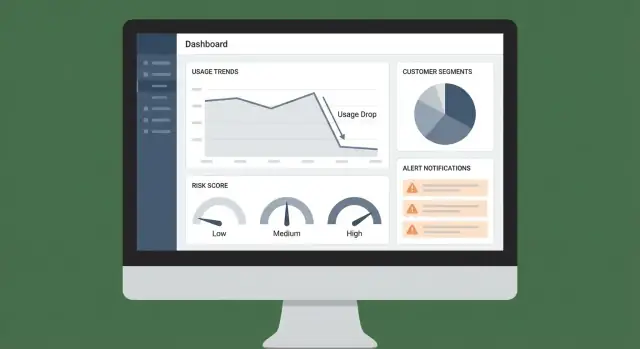
Your dashboard should answer three questions at a glance:
- Trends: a simple chart for overall usage (and optionally by key feature) with week-over-week change
- Top at-risk accounts: a ranked table with current health score, biggest negative deltas, and the strongest churn risk signals
- Recent alerts: a compact feed showing what fired, when, and the affected customer unit
Make every row clickable to an account view. Prefer familiar table patterns: sortable columns, pinned risk columns, and a clear last-seen timestamp.
Account page: the full story
Design the account view around a timeline so a CSM can understand context in seconds:
- Usage timeline with annotations (deploys, plan changes, billing events)
- Key events (activation milestones, feature adoption, support escalations)
- Signal log showing each churn risk signal: value, threshold, and evaluation time
- Notes and tasks so work stays attached to the account, not scattered across tools
Include an internal deep link pattern like /accounts/{id} so alerts can route people to the exact view.
Filters, exporting, and sharing
Filtering is where dashboards become actionable. Provide global filters for plan, segment, industry, CSM owner, region, and lifecycle stage, and persist selections in the URL for shareable views.
For export, allow CSV download from tables (respecting filters), and add “Copy link” sharing for internal handoffs—especially from the at-risk list and alert feed.
Create Alerts, Notifications, and Routing
Alerts are only useful if they reach the right person at the right time—and don’t train everyone to ignore them. Treat notifications as part of your product, not an afterthought.
Define alert triggers (what warrants attention)
Start with a small set of triggers that map to clear actions:
- Score thresholds: e.g., customer health score drops below 60, or churn risk rises above 80
- Sudden usage drops: e.g., a 40% decline week-over-week in a key event (logins, API calls, seats active)
- Multi-signal patterns: e.g., usage drops and support tickets spike, or key feature adoption stalls for 14 days
Use simple rules first, then layer in smarter logic (like anomaly detection) once you trust the basics.
Choose channels that match how your team works
Pick one primary channel and one backup channel:
- Email for summaries, daily digests, and stakeholders who don’t live in chat
- Slack for time-sensitive alerts routed to #cs-alerts or a dedicated on-call rotation
- In-app notifications for internal tools where CSMs live (best for “work queue” style follow-up)
If you’re not sure, start with Slack + in-app tasks. Email can become noisy quickly.
Add routing and deduplication to prevent spam
Route alerts based on account ownership and segment:
- If the account has an owner, notify the CSM
- If it’s a high-value account, also notify CS leadership
- If the signal is technical (API errors, ingestion failures), notify engineering/on-call
Deduplicate by grouping repeated alerts into a single thread or ticket (for example, “usage drop persists for 3 days”). Add cool-down windows so you don’t send the same alert every hour.
Include context so the alert is actionable
Every alert should answer: what changed, why it matters, what to do next. Include:
- The metric(s) that moved and the baseline comparison
- The suspected driver (feature, workspace, seat group, region)
- A recommended next step (e.g., “send check-in email” or “review onboarding completion”)
- A direct link to the account view:
/accounts/{account_id}
When alerts lead straight to a clear next action, your team will trust them—and use them.
Automate Follow-Up Workflows and Playbooks
Detection is only useful if it reliably triggers the next best action. Automating follow-up workflows turns “we saw a drop” into a consistent, trackable response that improves retention over time.
Turn signals into playbooks
Start by mapping each signal to a simple playbook. Keep playbooks opinionated and lightweight so teams actually use them.
Examples:
- Usage drop in a key feature: outreach email + offer a 15-minute working session
- New admin but no rollout: enablement nudge + share a checklist
- Spike in errors or latency: technical check-in + request logs + open an internal incident
Store playbooks as templates: steps, recommended messaging, required fields (e.g., “root cause”), and exit criteria (e.g., “usage back to baseline for 7 days”).
Create tasks that can’t be ignored
When a signal fires, create a task automatically with:
- Owner (CSM by account, or round-robin within a queue)
- Due date (based on severity; e.g., high risk within 4 business hours)
- Status tracking (Open → In progress → Blocked → Done)
Add a short context pack to every task: which metric changed, when it started, the last known healthy period, and recent product events. This reduces back-and-forth and speeds up first contact.
Integrate where teams already work
Don’t force everyone into a new tab for execution. Push tasks and notes into existing systems, and pull outcomes back into your app.
Common destinations include CRM and support tooling (see /integrations/crm). Keep the workflow bi-directional: if a task is completed in the CRM, reflect it in the health dashboard.
Measure follow-through (and make it visible)
Automation should improve response quality, not just volume. Track:
- Time-to-contact from alert to first outreach
- Resolution notes (what was done and why)
- Outcome tags (Recovered, Ongoing risk, Product issue, Customer downsized)
Review these metrics monthly to refine playbooks, tighten routing rules, and identify which actions actually correlate with usage recovery.
Prototyping faster with Koder.ai (optional)
If you want to move from spec to a working internal tool quickly, a vibe-coding platform like Koder.ai can help you prototype the dashboard, account views, and alert workflow via chat—then iterate on the real product behavior with less overhead. Because Koder.ai can generate full-stack apps (React on the web, Go services with PostgreSQL) and supports snapshots/rollback plus source-code export, it’s a practical way to validate your data model, routing rules, and UI flow before you invest in a longer build cycle.
Security, Privacy, and Compliance Basics
Security and privacy decisions are easiest to get right early—especially when your app is pulling together product events, account context, and alerts about churn risk. The goal is simple: reduce risk while still giving teams enough data to act.
Data minimization: collect only what you need
Start by defining what “monitoring” requires. If your usage-drop detection works with counts, trends, and timestamps, you probably don’t need raw message content, full IP addresses, or free-form notes.
A practical approach is to store:
- Account and workspace identifiers (internal IDs)
- Event type + timestamp
- Aggregated metrics (daily active users, feature usage counts, API calls)
- Minimal user references only if needed for routing (e.g., an internal user ID)
Keeping the dataset narrow reduces compliance burden, limits blast radius, and makes retention policies easier.
Access control and auditability
Usage-drop dashboards often become a cross-functional tool (CS, support, product, leadership). Not everyone should see the same detail.
Implement role-based access control (RBAC) with clear rules:
- Executives: summary views and trends
- CSMs: accounts they own, with relevant drill-down
- Support: operational signals, not sensitive customer metadata
- Admins: integrations and configuration only
Add audit logs for sensitive actions (exporting data, changing alert thresholds, viewing account-level details). Audit logs are also useful for debugging “who changed what” when alerts get noisy.
PII handling: hashing, encryption, and retention
Treat PII (names, emails, phone numbers) as optional. If you need it for notifications, prefer pulling it on demand from your CRM rather than copying it into your monitoring database.
If you do store PII:
- Encrypt in transit (TLS) and encrypt at rest (managed database encryption)
- Consider hashing identifiers you only need for joining (e.g., hashed email) so you don’t store readable values
- Define retention policies (e.g., raw events for 30–90 days, aggregates for 12–24 months)
- Ensure backups follow the same rules (retention, access controls)
Consent and compliance (GDPR/CCPA) without overpromising
Document what you collect, why you collect it (usage monitoring and customer support), and how long you keep it. Keep language accurate and specific—avoid claims like “fully compliant” unless you’ve completed a formal review.
At a minimum, be ready to support:
- Data access/deletion requests (delete or anonymize user-level data)
- Purpose limitation (don’t reuse monitoring data for unrelated profiling)
- Vendor and subprocessor tracking (analytics tools, email/SMS providers)
If you publish customer-facing docs, link internally to your policies (e.g., /privacy, /security) and keep them aligned with how the system actually works.
Testing, Rollout, and Ongoing Improvement
Shipping a churn-risk app isn’t just “does it run?” It’s whether teams trust the signals enough to act—and whether the system stays reliable as your product and data evolve.
Validate with historical data (backtesting)
Before you alert anyone, replay the model or rules over past weeks/months where you already know outcomes (renewed, downgraded, churned). This helps you tune thresholds and avoid noisy alerts.
A simple way to evaluate is a confusion matrix:
- True positives: flagged accounts that later churned/downgraded
- False positives: flagged accounts that were actually fine
- False negatives: missed accounts that churned
- True negatives: correctly ignored accounts
From there, focus on what matters operationally: reducing false positives so CSMs don’t ignore alerts, while keeping false negatives low enough that you catch real risk early.
Monitor the monitoring (data pipeline checks)
Many “usage drops” are really data issues. Add lightweight monitoring to every pipeline step:
- Freshness: when did this table last update?
- Missing data: sudden drop to zero events, missing tenants, or partial ingestion
- Job failures: retries, schema changes, API rate limits
Surface these issues in an internal status view so users can distinguish “customer dropped usage” from “data didn’t arrive.”
Run a phased rollout
Start with internal users (data/ops + a few CSMs) and compare alerts to what they already know. Then expand to a broader group once accuracy and workflow are stable.
During rollout, measure adoption signals: alerts opened, time-to-triage, and whether users click through to the account view.
Build feedback loops that improve results
Give users a one-click way to mark an alert as false positive, known issue, or action taken. Store that feedback and review it weekly to refine rules, update scoring weights, or add exclusions (e.g., seasonal customers, planned downtime).
Over time, this turns the app from a static dashboard into a system that learns from your team’s reality.
FAQ
What should I use as the main “usage” metric for drop detection?
Start with one primary value metric that’s hard to game and strongly tied to renewal intent (e.g., key actions completed, API calls, active seats). Keep it explainable in one sentence, then add secondary metrics later for diagnosis (feature-level usage, sessions, time-in-product).
What customer unit should the app score and alert on?
Alerting works best on a single, consistent customer unit—usually account/workspace in B2B. Use subscription if one company has multiple plans, or a sub-cohort (department/team) if adoption varies widely inside a large account. Your choice determines aggregation, ownership routing, and how dashboards are interpreted.
How do I define what counts as a “meaningful” usage drop?
A practical starting point is a clear, rules-based threshold such as week-over-week change (e.g., -40% vs prior 4-week average). Then add guardrails:
- Minimum baseline activity (avoid tiny denominators)
- Confirmation windows (persist for 2–3 days / 1–2 weeks)
- Grace periods for onboarding, plan changes, holidays, known incidents
Which data sources matter most for churn-risk signals?
Begin with product events + billing/subscriptions because they define value delivery and renewal risk. Add CRM for ownership/segment context and support/incident data to explain dips (ticket spikes, outages). Keep the initial set small enough to maintain data quality reliably.
How do I avoid broken joins and mismatched accounts across systems?
Use a single primary grouping key like account_id/tenant_id everywhere, and maintain an identity mapping layer/table that links:
- account/workspace IDs
- user IDs (with history if users move)
- subscription/plan IDs tied to billing periods
If identifiers aren’t consistent, joins break and alerts lose trust quickly.
Why should I aggregate events into daily metrics instead of querying raw events?
Pre-compute daily snapshots so dashboards and scoring don’t query raw events constantly. Common tables:
account_daily_metrics(active users, sessions, key actions)account_feature_daily(feature_key, usage_count)
This improves performance, reduces cost, and makes “what changed?” analysis much faster.
How do I make alerts and health scores explainable (not a black box)?
Create a dedicated risk_signals store with:
- signal type and severity
- evaluation window and timestamp
- evidence (baseline, delta, thresholds, contributing drivers)
This makes every flag auditable and helps teams act because they can see why the account was flagged.
Should I start with ML anomaly detection or simple rules for health scoring?
Start with rules-based scoring because it’s debuggable and easier to align across CS/Sales/Product. Combine multiple weighted signals (usage drop, failed payments, seat reduction, ticket spikes), and separate:
- leading indicators (recent change)
- lagging indicators (slow structural risk)
Translate numeric scores into bands (Healthy/Watch/At risk) with default actions and SLAs.
How do I prevent alert fatigue and notification spam?
Implement routing + deduplication from day one:
- Route by account owner and segment (CSM, leadership for high-value)
- Send technical signals to engineering/on-call
- Deduplicate with cooldowns and “persisting drop” grouping
Include context (metric, baseline, delta) and a direct link like /accounts/{account_id} so the alert is immediately actionable.
What security and privacy basics should I implement for a churn-risk monitoring app?
Use data minimization and role-based access control:
- Store aggregates and minimal identifiers when possible
- Use RBAC so teams only see what they need
- Add audit logs for exports/config changes
- Prefer pulling PII on-demand from CRM instead of copying it
- Define retention (e.g., raw events 30–90 days, aggregates 12–24 months)
Also be prepared for deletion/anonymization requests and keep internal policies aligned (e.g., /privacy, /security).