

How to Build a Web App for Procurement Approval Workflows
A step-by-step guide to plan, design, and build a procurement web app with purchase requests, approval routing, audit trails, integrations, and security.
Set Goals, Scope, and Stakeholders
Before you write specs or pick tools, get very clear on why you’re building a procurement web app. If you skip this step, you can end up with a purchase request system that technically works but doesn’t reduce the real friction—slow approvals, unclear ownership, or “shadow procurement” happening in email and chat.
Clarify the problems you’re solving
Start by naming the pain in plain language and tying it to measurable outcomes:
- Cycle time: requests sitting in limbo, chasing approvers, last‑minute escalations.
- Visibility: no single place to see what’s pending, who owns it, and what’s blocked.
- Compliance and policy adherence: missing quotes, wrong spend category, approvals happening out of order.
- Budget control: approvals happening without confirming budget availability, or finance finding out too late.
A helpful prompt: What would we stop doing if the app worked perfectly? For example: “stop approving via email threads” or “stop re‑entering the same data into an ERP.”
List core stakeholders (and what they need)
A purchase approval workflow touches more people than you think. Identify stakeholders early and capture their non‑negotiables:
- Requesters: quick submission, clear status, minimal back‑and‑forth.
- Approvers (managers, budget owners): easy review, enough context (budget, vendor, history), and mobile‑friendly actions.
- Finance: budget approvals, correct coding, audit trail, reporting.
- Procurement: policy checks, vendor onboarding, competitive bids, purchase order workflow alignment.
- IT/Security: SSO, role‑based access control, data retention, integrations.
Bring at least one person from each group into a short working session to agree on how approval routing should work.
Define success criteria you can actually track
Write down what “better” means using metrics you can measure after launch:
- Median approval time (end‑to‑end and per step)
- % of requests following policy (required fields, required approvals)
- Adoption rate (requests created in the procurement web app vs. outside it)
- Rework rate (requests sent back for missing info)
These become your north star when you later debate features.
Decide scope (so you don’t boil the ocean)
Scope choices drive your data model, business rules, and integrations. Confirm:
- Which departments and regions are in phase 1
- Supported currencies, taxes, and exchange‑rate expectations
- Whether you need multiple legal entities and cost centers
- Threshold policies (e.g., budget approvals over X, procurement review over Y)
Keep phase 1 tight, but document what you’re deliberately not doing yet. That makes future expansion easier without blocking the first release.
Map Your Current Procurement and Approval Workflow
Before you design screens or databases, get a clear picture of what actually happens from “I need to buy this” to “it’s approved and ordered.” This prevents you from automating a process that only works on paper—or only in someone’s head.
Start with how requests are created today
List every entry point people use: emails to procurement, spreadsheet templates, chat messages, paper forms, or requests created directly in an ERP.
For each entry point, note what information is typically provided (item, vendor, price, cost center, business justification, attachments) and what’s usually missing. Missing fields are a big reason requests bounce back and stall.
Draw the approval path (and the forks)
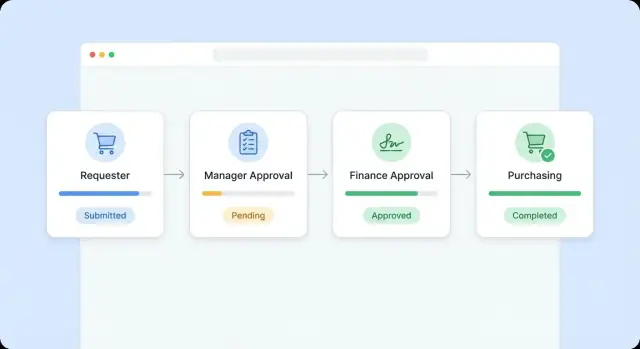
Map the “happy path” first: requester → manager → budget owner → procurement → finance (if applicable). Then document the variations:
- Different steps by category (IT, marketing, facilities)
- Different thresholds by amount (e.g., under $1k vs. over $10k)
- Different routes by cost center, region, or entity
A simple diagram is enough. What matters is capturing where decisions branch.
Capture exceptions that break the flow
Write down the cases people handle manually:
- Urgent purchases that skip steps (or require after‑the‑fact approval)
- Sole source purchases and how justification is documented
- Split purchases meant to stay under approval limits
Don’t judge the exceptions yet—just record them so your workflow rules can handle them intentionally.
Identify pain points and ownership gaps
Collect specific examples of delays: unclear approver, missing budget confirmation, duplicated data entry, and no reliable audit trail. Also note who owns each handoff (requester, manager, procurement, finance). If “everyone” owns a step, nobody does—and your app should make that visible.
Turn the Process Into Clear Requirements
A workflow diagram is useful, but your team still needs something buildable: a set of clear requirements that describe what the app must do, what data it must collect, and what “done” looks like.
Write down the “happy path”
Start with the most common scenario and keep it simple:
Request created → manager approves → procurement reviews → PO issued → goods received → request closed.
For each step, capture who does it, what they need to see, and what decision they make. This becomes your baseline user journey and helps prevent v1 from becoming a catch‑all for every exception.
Specify the data you must capture
Procurement approvals often fail because requests arrive without enough information to make a decision. Define the required fields up front (and which are optional), for example:
- Vendor (known vendor or “new vendor”)
- Items/services (description, category)
- Quantity and unit price (or estimated total)
- Currency, needed‑by date, ship‑to location
- Business justification
- Cost center / project code / budget owner
- Attachments (quote, statement of work, contract draft)
Also define validation rules: required attachments over a threshold, numeric fields, and whether prices can be edited after submission.
Decide what’s out of scope for v1
Make explicit exclusions so the team can deliver quickly. Common v1 exclusions include full sourcing events (RFPs), complex supplier scoring, contract lifecycle management, and three‑way match automation.
Turn it into a small backlog
Create a simple backlog with clear acceptance criteria:
- Must‑have: create request, attach documents, approve/deny, basic status history
- Should‑have: reminders, delegation, vendor onboarding request
- Nice‑to‑have: analytics dashboards, SLA timers, advanced forms
This keeps expectations aligned and gives you a practical build plan.
Design the Data Model (Requests, Vendors, Budgets)
A procurement workflow succeeds or fails on data clarity. If your objects and relationships are clean, approvals, reporting, and integrations become much simpler.
Start with the core objects
At minimum, model these entities:
- Purchase Request (PR): requester, department, needed‑by date, justification, currency, total amounts, status.
- Line Item: description, quantity, unit price, category, planned vendor (optional), tax info, and delivery details.
- Vendor: legal name, address, payment terms, tax IDs (as applicable), contacts, and status (active/blocked).
- Budget: available amount, period, and the “bucket” it applies to (cost center, project, GL code).
- Purchase Order (PO): links to approved PR lines, vendor, final negotiated totals, and ERP reference IDs.
Keep PR totals derived from line items (and taxes/shipping), rather than manually edited, to prevent mismatches.
Multi‑line requests and partial approvals
Real requests often mix items that require different approvers or budgets. Design for:
- Per‑line approvals (approve/deny/edit at the line level)
- Split decisions (some lines approved, others sent back)
- Revision history (a changed price should trigger re‑approval rules later)
A practical approach is a PR header status plus independent line statuses, then a rollup status for what the requester sees.
Budgets: cost centers, projects, GL codes, tax fields
If you need accounting fidelity, store cost center, project, and GL code at the line level (not just on the PR), because spend is usually booked per line.
Add tax fields only when you can define rules clearly (e.g., tax rate, tax type, tax‑included flag).
Attachments, storage, and retention
Quotes and contracts are part of the audit story. Store attachments as objects linked to PRs and/or lines with metadata (type, uploaded by, timestamps).
Define retention rules early (e.g., keep 7 years; delete on vendor request only when legally allowed) and whether files live in your database, object storage, or a managed document system.
Define Roles, Permissions, and Ownership
Clear roles and permissions prevent approval ping‑pong and make audit trails meaningful. Start by naming the people involved, then translating that into what they can do in the app.
Core roles to support
Most procurement teams can cover 90% of cases with five roles:
- Requester: creates and edits purchase requests, attaches quotes, and responds to questions.
- Manager approver: approves/returns requests for their team and confirms business need.
- Finance approver: checks budget, coding, and policy compliance (and can request changes).
- Buyer (procurement): manages vendor selection, converts approved requests into POs, and communicates with vendors.
- Admin: maintains settings, thresholds, categories, and user access.
Permissions: decide “who can do what”
Define permissions as actions, not titles, so you can mix‑and‑match later:
- Create: start a request, add items, upload files.
- Edit: change fields (often limited after submission).
- Approve/Reject/Return: record a decision with comments.
- Cancel: who can cancel, and until which stage.
- Export: CSV/PDF exports, API access, and report visibility.
Also decide field‑level rules (e.g., requesters can edit description and attachments, but not GL codes; finance can edit coding but not quantity/price).
Ownership and accountability
Every request should have:
- an owner (usually the requester),
- a current approver (or approval group), and
- an assigned buyer once approved.
This avoids orphaned requests and makes it obvious who must act next.
Delegation, “acting as,” and shared inboxes
People take vacations. Build delegation with start/end dates, and log actions as “Approved by Alex (delegated from Priya)” to preserve accountability.
For approvals, prefer named approvals (better auditability). Use shared inboxes only for queue‑based steps (e.g., “Procurement Team”), and still require an individual to claim and approve so one person is recorded as the decision maker.
Create a Simple, Fast User Experience
A procurement web app succeeds or fails on how quickly people can submit a request and how easily approvers can say “yes” or “no” with confidence. Aim for fewer screens, fewer fields, and fewer clicks—while still collecting the details Finance and Procurement need.
Make request creation hard to do wrong
Use guided forms that adapt to what the requester selects (category, vendor type, contract vs. one‑time purchase). This keeps the form short and reduces back‑and‑forth.
Add templates for common purchases (software subscription, laptop, contractor services) that pre‑fill fields like GL/cost center hints, required attachments, and the expected approver chain. Templates also standardize descriptions, which improves reporting later.
Use inline validation and completion checks (e.g., missing quote, budget code, or delivery date) before submission. Make requirements visible early, not only after an error message.
Give approvers a decision‑first view
Approvers should land on a clean queue with the essentials: amount, vendor, cost center, requester, and due date. Then provide context on demand:
- A one‑screen summary with attachments, justification, and budget impact
- Clear history (who approved, who commented, what changed)
- One‑tap actions: Approve, Reject, Request changes
Keep comments structured: allow quick reasons for rejection (e.g., “missing quote”) plus optional free text.
Add search and filters that match how people work
Users should be able to find requests by status, cost center, vendor, requester, date range, and amount. Save common filters like “Waiting on me” or “Pending > $5,000.”
Plan for mobile‑friendly approvals
If approvals happen in hallways or between meetings, design for small screens: large tap targets, fast‑loading summaries, and attachment previews. Avoid workflows that require spreadsheet‑style editing on mobile—route those tasks back to desktop.
Build Approval Routing and Business Rules
Approval routing is the traffic control system of your procurement web app. Done well, it keeps decisions consistent and fast; done poorly, it creates bottlenecks and workarounds.
Start with the rule types your organization actually uses
Most purchase approval workflow rules can be expressed with a handful of dimensions. Typical inputs include:
- Spend thresholds (e.g., under $1,000 vs. over $25,000)
- Category (IT, marketing, facilities)
- Cost center / department
- Project or client code
- Region / legal entity
- Funding source or budget type
Keep the first version simple: use the smallest set of rules that covers most requests, then add edge cases once you have real data.
Support sequential and parallel approvals (and make it visible)
Some approvals must happen in order (manager → budget owner → procurement), while others can happen in parallel (security + legal). Your purchase request system should support both patterns, and show requesters who is currently blocking the request.
Also distinguish between:
- Required approvers (must approve to proceed)
- Optional approvers (FYI, advisory, or only required under certain conditions)
Design for exceptions: escalations, rejections, timeouts
Real workflows need safety rails:
- Escalations when an approver is out of office or misses an SLA
- Rejections with structured reasons (budget, vendor risk, incomplete specs)
- Rework loops that send the request back for edits without losing context
- Timeout rules (e.g., auto‑escalate after 48 hours)
Define what resets approvals (and when to preserve them)
Nothing frustrates teams like surprise re‑approvals—or worse, approvals that should have been re‑run.
Common approval reset triggers include changes to price, quantity, vendor, category, cost center, or delivery location. Decide which changes require a full reset, which require only certain approvers to re‑confirm, and which can be logged without restarting the whole approval routing chain.
Add Notifications, Status Tracking, and Audit Trails
A procurement app feels fast when people always know what happens next. Notifications and status tracking reduce follow‑ups, while audit trails protect you during disputes, finance reviews, and compliance checks.
Define clear status states (and what they mean)
Use a small, understandable set of states and keep them consistent across purchase requests, approvals, and orders. A typical set:
- Draft: requester is still editing; not visible to approvers.
- Submitted: ready for review; routing has started.
- In Review: waiting on one or more approvers.
- Approved: approval complete; ready to order / create PO.
- Ordered: PO issued or order placed.
Be explicit about transitions. For example, a request should not move from Draft to Ordered without passing through Submitted and Approved.
Choose notification channels people actually read
Start with email + in‑app notifications and add chat tools only if they’re already part of daily work.
- Email for formal “action required” messages and summaries.
- In‑app for real‑time updates, badges, and a clear “My approvals” queue.
- Slack/Teams (optional) for lightweight nudges and quick links back to the request.
Avoid notification spam by bundling reminders (e.g., daily digest) and escalating only when approvals are overdue.
Build an audit trail you can trust
Capture a tamper‑evident history of key actions:
- Who submitted, approved, rejected, edited, or commented
- Timestamp and (optionally) source (web/mobile)
- What changed (vendor, amount, GL code, attachments)
This log should be readable by auditors but also helpful to employees. A “History” tab on each request often prevents long email threads.
Require decision reasons when needed
Make comments mandatory for certain actions, like Reject or Request changes, and for exceptions (e.g., over‑budget approvals). Store the reason alongside the action in the audit trail so it’s not lost in private messages.
Plan Integrations (ERP, Accounting, SSO, Vendor Data)
Integrations are what make a procurement web app feel real to the business. If people still have to retype vendor details, budgets, and PO numbers, adoption drops fast.
Start by deciding which tools are the systems of record, and treat your app as a workflow layer that reads and writes to them.
Identify your systems of record
Be explicit about where the “truth” lives:
- ERP/accounting: chart of accounts, cost centers, budgets, purchase orders, invoice matching.
- Vendor master: vendor IDs, payment terms, tax details, banking info (often locked down).
- HR directory: employee identity, department, manager, location (used for approval routing).
Document what your purchase request system needs from each source (read‑only vs. write‑back), and who owns data quality.
Single Sign‑On and user provisioning
Plan SSO early so permissions and audit trails map to real identities.
- Prefer OIDC (common with modern IdPs) or SAML (widely supported in enterprises).
- If available, use SCIM for user provisioning so joiners/movers/leavers are automated (and access is removed promptly).
Choose an integration method
Match the method to your partner system’s capabilities:
- APIs for real‑time lookups (vendors, GL codes) and creating POs.
- Webhooks for event‑driven updates (PO approved, vendor updated).
- CSV import/export as a practical fallback when APIs are limited or expensive.
Sync timing, failures, and reconciliation
Decide what must be real‑time (SSO login, vendor validation) vs. scheduled (nightly budget refresh).
Design for failures: retries with backoff, clear admin alerts, and a reconciliation report so finance can confirm totals across systems. A simple “last synced at” timestamp on key records prevents confusion and support tickets.
Cover Security, Compliance, and Data Governance
Security is not a “later” feature in a procurement web app. You’re handling supplier details, contract terms, budgets, and approvals that can impact cash flow and risk. A few foundational decisions early will prevent painful rewrites when finance or auditors get involved.
Protect sensitive procurement data
Start by classifying what’s sensitive and controlling it explicitly. Set access controls for fields like vendor banking details, negotiated rates, contract attachments, and internal budget lines.
In many teams, requesters should see only what they need to submit and track a request, while procurement and finance can view pricing and vendor master data.
Use role‑based access control with deny‑by‑default for high‑risk fields, and consider masking (e.g., show last 4 digits of an account) instead of full exposure.
Encrypt and manage secrets safely
Encrypt data in transit (TLS everywhere) and at rest (database and file storage). If you store attachments (contracts, quotes), ensure the object storage is encrypted and access is time‑limited.
Treat secrets as production data: don’t hardcode API keys; store them in a secrets manager, rotate them, and limit who can read them. If you integrate with ERP or accounting systems, lock down tokens to the smallest scope needed.
Audit trails that stand up to questions
Approvals are only as trustworthy as the evidence behind them. Log admin actions and permission changes, not just business events like “approved” or “rejected.” Capture who changed an approval rule, who granted a role, and when a vendor banking field was edited.
Make audit logs append‑only and searchable by request, vendor, and user, with clear timestamps.
Compliance, retention, and governance
Plan compliance needs early (SOC 2/ISO alignment, data retention rules, and least privilege).
Define how long you keep requests, approvals, and attachments, and how you handle deletions (often “soft delete” with retention policies).
Document data ownership: who can approve access, who responds to incidents, and who reviews permissions periodically.
Choose Build vs Buy and a Practical Tech Stack
Choosing whether to build a procurement web app or buy one isn’t about “best”—it’s about fit. Procurement touches approvals, budgets, audit trails, and integrations, so the right choice depends on how unique your purchase approval workflow is and how quickly you need results.
Build vs. buy: a practical comparison
Buy (or configure an existing purchase request system) when:
- You need a working purchase approval workflow in weeks, not months.
- Your process is fairly standard (request → budget approval → manager approval → PO).
- Integrations you need (ERP integration, SSO) are available off the shelf.
- You want predictable maintenance and security updates handled by a vendor.
Build when:
- Approval routing is complex (exceptions, multi‑entity budgets, conditional rules) and tools can’t model it cleanly.
- You need a tailored user experience for requesters and approvers to increase adoption.
- You have strict internal data governance rules (where data lives, retention, custom audit trail fields).
- You expect ongoing change and want full control over the roadmap.
A useful rule: if 80–90% of your needs match a product and integrations are proven, buy. If integrations are hard or your rules are core to how you operate, building may be cheaper long‑term.
A tech stack that fits most teams
Keep the stack boring and maintainable:
- Frontend: React (or Vue) with a component library (Material UI, Chakra) for fast, consistent forms.
- Backend: Node.js (NestJS/Express) or Python (Django/FastAPI). Pick what your team already ships confidently.
- Database: PostgreSQL (great for budgets, approvals, and reporting).
- Auth: SSO via SAML/OIDC (e.g., Okta/Azure AD) with role‑based access control.
If you want to accelerate the “build” path without committing to months of custom engineering upfront, a vibe‑coding platform like Koder.ai can help you prototype and iterate on a procurement automation app through a chat interface. Teams often use it to quickly validate approval routing, roles, and core screens, then export the source code when they’re ready to run it in their own pipeline. (Koder.ai’s common baseline—React on the frontend, Go + PostgreSQL on the backend—also maps well to the reliability and auditability requirements procurement systems tend to have.)
Reliability: don’t skip the “unseen” engineering
Procurement automation fails when actions double‑run or status becomes unclear. Design for:
- Background jobs for emails, ERP sync, and PDF generation.
- Idempotency so “Approve” clicked twice doesn’t create two downstream actions.
- Concurrency controls so two approvers can’t overwrite each other’s decision.
Environments, CI/CD, and monitoring
Plan from day one for dev/staging/prod, automated tests in CI, and simple deploys (containers are common).
Add monitoring for:
- API errors and slow requests
- queue/job failures
- key business signals (stuck approvals, failed ERP pushes)
This groundwork keeps your purchase order workflow dependable as usage grows.
Test, Roll Out, and Improve Over Time
Shipping the first version of a procurement web app is only half the job. The other half is making sure real teams can run their purchase approval workflow quickly, correctly, and with confidence—then tightening the process based on what actually happens.
Test with real scenarios (not just happy paths)
A purchase request system often “works” in a demo and breaks in daily life. Before you roll out, test workflows using scenarios pulled from recent requests and purchase order workflow history.
Include edge cases and exceptions such as:
- A requester changing the amount after the first approval
- Budget approvals when a cost center is missing or inactive
- An approver who is out of office, and delegation rules
- Split purchases across projects or cost centers
- Role‑based access control checks (who can see vendor details, attachments, or pricing)
- Rejected requests that get revised and resubmitted (audit trail continuity)
Don’t test only routing—test permissions, notifications, and the full audit trail end‑to‑end.
Pilot with one team, then expand
Start with a small group that represents typical usage (for example, one department and one finance approver chain). Run the pilot for a few weeks, and keep the rollout lightweight:
- Short training sessions focused on the exact steps in your app
- Office hours where users can bring real requests
- A simple feedback channel (“Something confusing? Drop a note here.”)
This prevents organization‑wide confusion while you refine approval routing and procurement automation rules.
Create an admin playbook
Treat administration as a product feature. Write a short internal playbook covering:
- How to update business rules and approval routing
- How to add or change approvers, delegates, and owners
- How to manage cost centers, budgets, and policy thresholds
- What to do when integrations fail (ERP integration, vendor data sync, etc.)
This keeps day‑to‑day operations from turning into ad hoc engineering work.
Track metrics and iterate
Define a few metrics and review them regularly:
- Cycle time (request created → final approval)
- Rework rate (sent back, edited, resubmitted)
- Spend visibility (how much is in‑flight vs. approved)
Use what you learn to simplify forms, adjust rules, and improve status tracking.
Next step
If you’re evaluating options for rolling out a procurement web app quickly, see /pricing or reach out via /contact.
If you’d like to validate your workflow and screens before investing in a full custom build, you can also prototype a purchase request system in Koder.ai, iterate in “planning mode,” and export the source code once your stakeholders agree on the process.
FAQ
What should I define before building a procurement approval web app?
Start by writing down the friction you want to eliminate (e.g., approvals stuck in email, missing quotes, unclear owners) and tie each to a measurable metric:
- Median approval time (overall and per step)
- Rework rate (sent back for missing info)
- Policy compliance rate (required fields/approvals)
- Adoption rate (requests created in the app vs outside)
Those metrics become your “north star” when feature debates come up.
How do I choose a realistic scope for v1?
Keep phase 1 narrow and explicit. Decide:
- Which departments/regions are included
- Supported currencies and tax expectations
- Whether you need multiple legal entities and cost centers
- Approval thresholds (e.g., manager over X, procurement review over Y)
Also document what’s out of scope for v1 (like RFPs or contract lifecycle management) so you can ship without blocking future expansion.
How do I map my current procurement workflow effectively?
Map what actually happens today, not what the policy says. Do three things:
- List every request entry point (email, spreadsheets, chat, ERP).
- Draw the “happy path” approval chain, then capture forks by amount/category/entity.
- Record exceptions (urgent buys, sole source, split purchases) and who currently owns each handoff.
This gives you the inputs needed to build routing rules that match real behavior.
How do I convert a workflow diagram into buildable requirements?
Turn the workflow into a small set of buildable requirements:
- Define the happy-path journey step-by-step (who acts, what they see, what decision they make).
- Specify required vs optional fields (and validation rules).
- Create a backlog with acceptance criteria (must-have/should-have/nice-to-have).
This prevents v1 from becoming a catch-all for every edge case.
What core entities should my data model include?
At minimum, model:
- Purchase Request (PR) header (requester, status, currency, totals)
- Line items (qty, unit price, category, delivery details)
- Vendor (identity, terms, status)
- Budget “bucket” (cost center/project/GL, period, available amount)
- Purchase Order (links back to approved PR lines)
Keep totals derived from line items (plus tax/shipping rules) to avoid mismatches and make reporting/integrations easier.
How should I handle multi-line requests and partial approvals?
Design for mixed-item reality:
- Allow line-level statuses (approved/denied/returned) plus a header rollup status.
- Record revision history for price/vendor/category/coding changes.
- Decide which edits trigger re-approval (often price, quantity, vendor, cost center, delivery location).
This avoids forcing users into workarounds when only part of a request needs changes.
How do I design roles and permissions without creating chaos?
Start with a small set of roles and express permissions as actions:
- Roles: requester, manager approver, finance approver, buyer/procurement, admin.
- Actions: create, edit, approve/reject/return, cancel, export.
Add field-level rules (e.g., requester can edit description/attachments, finance can edit GL/cost center) and ensure every request always has an owner and a current approver to prevent “orphaned” items.
What’s the best way to support delegation and shared inbox approvals?
Build delegation with accountability:
- Support delegate start/end dates.
- Log approvals as “Approved by Alex (delegated from Priya)” in the audit trail.
- Prefer named approvers for auditability; use shared queues only for team steps (e.g., “Procurement Team”), and require an individual to claim the item before acting.
This prevents approvals from becoming untraceable.
How do I make the UI fast for requesters and approvers?
Aim for decision-first UX:
- Guided forms that adapt by category/vendor type and surface requirements early.
- Templates for common purchases (pre-fill hints, required attachments, expected approver chain).
- Approver queue that shows amount, vendor, cost center, requester, due date, plus one-tap actions.
Add strong search/filters (status, cost center, vendor, requester, amount) and make approvals mobile-friendly (fast summaries, big tap targets, attachment preview).
What audit trails and integrations are essential for a procurement workflow app?
Treat auditability as a core feature:
- Use clear statuses (Draft → Submitted → In Review → Approved → Ordered) with strict transitions.
- Log who did what, when, and what changed (amount, vendor, coding, attachments).
- Make comments mandatory for Reject/Request changes and key exceptions.
For integrations, define systems of record (ERP/accounting, vendor master, HR directory), then choose APIs/webhooks/CSV based on capability. Add retries, admin alerts, reconciliation reports, and “last synced at” timestamps to reduce confusion.