

Create a Real-Time Web App to Monitor and Prevent SLA Breaches
Learn a practical blueprint for building a web app that tracks SLA timers, detects breaches instantly, alerts teams, and visualizes compliance in real time.
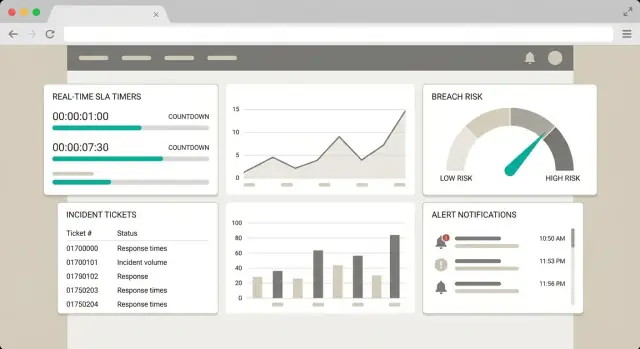
Define the SLA Monitoring Goal
Before you design screens or write detection logic, get crisp on what your app is trying to prevent. “SLA monitoring” can mean anything from a daily report to second-by-second breach prediction—those are very different products with very different architectural needs.
Decide what “real time” means (and why)
Start by agreeing on the reaction window your team can realistically execute.
If your support org operates in 5–10 minute cycles (triage queues, paging rotations), then “real time” might mean dashboard updates every minute with alerts within 2 minutes. If you’re handling high-severity incidents where minutes matter, you may need a 10–30 second detection-and-alert loop.
Write this down as a measurable goal, such as: “Detect potential breaches within 60 seconds and notify the on-call within 2 minutes.” This becomes a guardrail for later tradeoffs in architecture and cost.
Clarify which SLAs you must monitor
List the specific promises you’re tracking, and define each in plain language:
- First response time (e.g., “respond within 1 hour”)
- Resolution time (e.g., “resolve within 24 hours,” often with pause rules)
- Uptime/availability (e.g., “99.9% monthly”)
Also note how these relate to SLO and SLA definitions in your org. If your internal SLO differs from the customer-facing SLA, your app may need to track both: one for operational improvement, one for contractual risk.
Identify stakeholders and decision owners
Name the groups who will use or rely on the system: support, engineering, customer success, team leads/managers, and incident response/on-call.
For each group, capture what they need to decide in the moment: “Is this ticket at risk?”, “Who owns it?”, “Do we need escalation?” This will shape your dashboard, alert routing, and permissions.
Define the actions the app should trigger
Your goal isn’t only visibility—it’s timely action. Decide what should happen when risk rises or a breach occurs:
- Send real-time alerts to Slack/email/pager
- Escalate based on severity, customer tier, or business hours
- Auto-create a task (Jira/Linear) and assign an owner
A good outcome statement: “Reduce SLA breaches by enabling breach detection and incident response within our agreed reaction window.”
Map Your SLA Rules and Edge Cases
Before you build detection logic, write down exactly what “good” and “bad” look like for your service. Most SLA monitoring problems aren’t technical—they’re definition problems.
SLA vs SLO vs KPI (plain language)
An SLA (Service Level Agreement) is a promise to customers, usually with consequences (credits, penalties, contract terms). An SLO (Service Level Objective) is an internal target you aim for to stay safely above the SLA. A KPI (Key Performance Indicator) is any metric you track (helpful, but not always tied to a promise).
Example: SLA = “respond within 1 hour.” SLO = “respond within 30 minutes.” KPI = “average first response time.”
Define breach types clearly
List each breach type you need to detect and the event that starts the timer.
Common breach categories:
- Missed response time: e.g., ticket created at 10:00; first agent reply must occur by 11:00.
- Missed resolution time: e.g., ticket opened; must be marked resolved within 24 hours (excluding approved pauses).
- Downtime threshold: e.g., service availability drops below 99.9% monthly, or a single outage exceeds 15 minutes.
Be explicit about what counts as “response” (public reply vs internal note) and “resolution” (resolved vs closed), and whether reopening resets the timer.
Business hours, 24/7, and time zone rules
Many SLAs only count time during business hours. Define the calendar: working days, holidays, start/end times, and the time zone used for calculation (customer’s, contract’s, or team’s). Also decide what happens when work crosses boundaries (e.g., a ticket arrives at 16:55 with a 30-minute response SLA).
Pause conditions and exclusions
Document when the SLA clock stops, such as:
- Waiting on customer (requested info not provided)
- Scheduled maintenance windows
- Third-party dependency holds (if contract allows)
Write these as rules your app can apply consistently, and keep examples of tricky cases for later testing.
Choose Data Sources and Events to Track
Your SLA monitor is only as good as the data feeding it. Start by identifying the “systems of record” for each SLA clock. For many teams, the ticketing tool is the source of truth for lifecycle timestamps, while monitoring and logging tools explain why something happened.
Pick the systems that hold the truth
Most real-time SLA setups pull from a small set of core systems:
- Ticketing/helpdesk (e.g., Zendesk, ServiceNow, Jira Service Management): priority, status, assignee, customer, timestamps
- Monitoring/incident tools (e.g., Datadog, PagerDuty): incident opened/acknowledged/resolved, on-call actions
- CRM/account data (e.g., Salesforce, HubSpot): customer tier, contract SLA, support plan
- Logs and audit trails (app logs, workflow logs): detailed context for investigations and disputes
If two systems disagree, decide upfront which one wins for each field (for example: “ticket status from ServiceNow, customer tier from CRM”).
List the events you need (and the ones people forget)
At minimum, track events that start, stop, or change the SLA timer:
- Ticket created (SLA starts)
- Status changed (including “waiting on customer,” “on hold,” or “paused” states)
- Assigned / reassigned (often impacts escalation rules)
- Priority or severity changed (can switch the SLA target mid-stream)
- First response sent and resolved/closed (SLA stops)
Also consider operational events: business hours calendar changes, customer timezone updates, and holiday schedule changes.
Decide how to fetch data
Prefer webhooks for near-real-time updates. Use polling when webhooks aren’t available or reliable. Keep API exports/backfills for reconciliation (for example, nightly jobs that fill gaps). Many teams end up with a hybrid: webhook for speed, periodic polling for safety.
Plan for data quality issues
Real systems are messy. Expect:
- Missing timestamps (store “unknown” and flag for review)
- Duplicated events (use idempotency keys and dedup rules)
- Out-of-order delivery and clock skew (sort by source timestamp + ingestion time, and detect negative durations)
Treat these as product requirements, not “edge cases”—your breach detection depends on getting them right.
Design a Simple High-Level Architecture
A good SLA monitoring app is easier to build (and maintain) when the architecture is clear and intentionally simple. At a high level, you’re building a pipeline that turns raw operational signals into “SLA state,” then uses that state to alert people and power a dashboard.
The core components
Think in five blocks:
- Ingest: collect events and metrics from ticketing systems, uptime monitors, logs, or internal apps.
- Process: normalize data, correlate it to customers/services, and compute SLA timers and thresholds.
- Store: keep both the current SLA state (fast reads) and historical/audit records (traceability).
- Alert: trigger notifications and escalations when a breach is predicted or occurs.
- Display: a web app dashboard for “what’s at risk now,” plus drill-downs for investigation.
This separation keeps responsibilities clean: ingestion shouldn’t contain SLA logic, and dashboards shouldn’t run heavy calculations.
Streaming vs. frequent recalculation
Decide early how “real-time” you truly need to be.
- Event streaming (recommended for fast reaction): as events arrive (incident opened, status changed, service down), update SLA state immediately. This supports low-latency breach prediction and quick alerts.
- Frequent recalculation (simpler to start): run a scheduled job every N minutes that recomputes SLA risk from recent data. This can work for SLAs with hour-level windows, but it may miss short spikes or create noisy alerts around the refresh cycle.
A pragmatic approach is to start with frequent recalculation for one or two SLA rules, then move high-impact rules to streaming.
Start with a simple deployment model
Avoid multi-region and multi-environment complexity at first. A single region, one production environment, and a minimal staging setup are usually enough until you validate data quality and alert usefulness. Make “scale later” a design constraint, not a build requirement.
If you want to accelerate the first working version of the dashboard and workflows, a vibe-coding platform like Koder.ai can help you scaffold a React-based UI and a Go + PostgreSQL backend quickly from a chat-driven spec, then iterate on screens and filters as you validate what responders actually need.
Non-functional requirements to set now
Write these down before you implement:
- Availability target for the monitoring system itself (e.g., 99.9%).
- End-to-end latency from event to dashboard/alert (e.g., <60 seconds).
- Retention for history and audits (e.g., 13 months).
- Auditability: every SLA state change should be explainable (“which event caused this?”).
Build Event Ingestion and Normalization
Event ingestion is where your SLA monitoring system either becomes dependable—or noisy and confusing. The goal is simple: accept events from many tools, convert them into a single “truthy” format, and store enough context to explain every SLA decision later.
Define a clear event schema
Start by standardizing what an “SLA-relevant event” looks like, even if upstream systems vary. A practical baseline schema includes:
ticket_id(or case/work item ID)timestamp(when the change happened, not when you received it)status(opened, assigned, waiting_on_customer, resolved, etc.)priority(P1–P4 or equivalent)customer(account/tenant identifier)sla_plan(which SLA rules apply)
Version the schema (e.g., schema_version) so you can evolve fields without breaking older producers.
Normalize before you compute
Different systems name the same thing differently: “Solved” vs “Resolved,” “Urgent” vs “P1,” timezone differences, or missing priorities. Build a small normalization layer that:
- maps statuses to a consistent set
- converts timestamps to UTC
- fills defaults (or flags records) when required fields are missing
- attaches derived fields (like
is_customer_waitoris_pause) that make breach logic simpler later
Idempotency: don’t double-count events
Real integrations retry. Your ingestion must be idempotent so repeated events don’t create duplicates. Common approaches:
- require a producer
event_idand reject duplicates - generate a deterministic key (e.g.,
ticket_id + timestamp + status) and upsert
Keep an audit trail you can explain
When someone asks “Why did we alert?” you need a paper trail. Store every accepted raw event and every normalized event, plus who/what changed it. This audit history is essential for customer conversations and internal reviews.
Dead-letter handling for failures
Some events will fail parsing or validation. Don’t drop them silently. Route them to a dead-letter queue/table with the error reason, original payload, and retry count, so you can fix mappings and replay safely.
Pick Storage for State, History, and Audits
Your SLA app needs two different “memories”: what’s true right now (to trigger alerts) and what happened over time (to explain and prove why it alerted).
Store current state for fast decisions
Current state is the latest known status of each work item (ticket/incident/order) plus its active SLA timers (start time, paused time, due time, remaining minutes, current owner).
Choose a store optimized for quick reads/writes by ID and simple filtering. Common options are a relational database (Postgres/MySQL) or a key-value store (Redis/DynamoDB). For many teams, Postgres is enough and keeps reporting simple.
Keep the state model small and query-friendly. You’ll read it constantly for views like “breaching soon.”
Store history as an append-only event log
History should capture every change as an immutable record: created, assigned, priority changed, status updated, customer replied, on-hold started/ended, etc.
An append-only event table (or event store) makes audits and replay possible. If you later discover a bug in breach logic, you can reprocess events to rebuild state and compare results.
Practical pattern: state table + events table in the same database at first; graduate to separate analytics storage later if volume grows.
Retention and archiving decisions
Define retention by purpose:
- Operational views: keep recent state and a short history window fast (e.g., 30–90 days).
- Audit/compliance: retain events longer (e.g., 1–7 years), then archive to cheaper storage.
Use partitions (by month/quarter) to make archival and deletes predictable.
Indexes and queries for your key screens
Plan for the questions your dashboard will ask most:
- “Breaching soon”: index on
due_atandstatus(and possiblyqueue/team). - “Breached today”: index on
breached_at(or computed breach flag) and date. - Per-customer or per-service views: composite indexes like
(customer_id, due_at).
This is where performance is won: structure storage around your top 3–5 views, not every possible report.
Implement Real-Time Breach Detection Logic
Real-time breach detection is mostly about one thing: turning messy, human workflows (assigned, waiting on customer, reopened, transferred) into clear SLA timers you can trust.
Build SLA timers: start, stop, pause, resume
Start by defining which events control the SLA clock for each ticket or request type. Common patterns:
- Start: when a ticket is created, or when it first enters a “support active” status.
- Pause: when it moves to “Waiting for customer” or “On hold.”
- Resume: when the customer replies or the ticket returns to an active queue.
- Stop: when it’s resolved/closed (or when a first-response SLA is satisfied).
From these events, calculate a due time. For strict SLAs, it may be “created_at + 2 hours.” For business-hours SLAs, it’s “2 business hours,” which requires a calendar.
Reusable business calendar module
Create a small calendar module that answers two questions consistently:
- “How much business time elapsed between A and B?”
- “What timestamp is N business minutes after A?”
Keep holidays, working hours, and time zones in one place so every SLA rule uses the same logic.
Time remaining and breach risk
Once you have a due time, computing time remaining is straightforward: due_time - now (in business minutes if applicable). Then define breach risk thresholds such as “due within 15 minutes” or “less than 10% of SLA remaining.” This powers urgency badges and alert routing.
Continuous recalculation vs scheduled ticks
You can:
- Recalculate continuously (on every relevant event + every read): simplest conceptually, but can be expensive at scale.
- Use scheduled ticks (e.g., every minute): update time remaining and trigger “risk” transitions in batches.
A practical hybrid is event-driven updates for accuracy, plus a minute-level tick to catch time-based threshold crossings even when no new events arrive.
Set Up Alerting, Escalations, and Notifications
Alerts are where your SLA monitoring becomes operational. The goal isn’t “more notifications”—it’s getting the right person to take the right action before a deadline is missed.
Define alert types (and what they mean)
Use a small set of alert types with clear intent:
- Risk warning: the SLA is still safe, but trending toward a miss (e.g., “likely to breach in 30 minutes”).
- Breach confirmed: the SLA is officially violated, with timestamp and impacted scope.
- Escalation step: a timed follow-up when the issue hasn’t been acknowledged or resolved.
Map each type to a different urgency and delivery channel (chat for warnings, paging for confirmed breaches, etc.).
Route alerts by team, service, priority, and customer tier
Routing should be data-driven, not hard-coded. Use a simple rules table like: service → owning team, then apply modifiers:
- Priority/severity (P0–P3)
- Customer tier (enterprise vs. standard)
- Business hours vs. after-hours on-call
This avoids “broadcast to everyone” and makes ownership visible.
Add deduplication to prevent alert spam
SLA status can flip quickly during incident response. Deduplicate by a stable key such as (ticket_id, sla_rule_id, alert_type) and apply:
- a short cooldown window (e.g., 5–15 minutes)
- state-based sending (only notify on transitions)
Also consider bundling multiple warnings into a single periodic summary.
Include clear context in every alert
Each notification should answer “what, when, who, now what”:
- Owner/team and on-call target
- Due time and time remaining
- Next action (acknowledge, assign, respond)
- Direct link to the work item (e.g., /tickets/123) and the SLA view (e.g., /sla/tickets/123)
If someone can’t act within 30 seconds of reading it, the alert needs better context.
Design the Dashboard and User Workflows
A good SLA dashboard is less about charts and more about helping someone decide what to do next in under a minute. Design the UI around three questions: What’s at risk? Why? What action should I take?
Core views that match how teams work
Start with four simple views, each with a clear purpose:
- Overview: a snapshot of workload and risk (total open, due soon, breached, top customers affected).
- Breaching soon: the operational inbox for today—items with the highest urgency.
- Breached: what needs incident response, escalation, or customer updates.
- Compliance trends: weekly/monthly reporting so managers can spot recurring issues (by team, customer, SLA plan).
Keep the default view focused on breaching soon, since that’s where prevention happens.
Filters that stay simple (but useful)
Give users a small set of filters that map to real ownership and triage decisions:
- Team/queue (who owns it)
- Priority (impact)
- Customer (account focus)
- SLA plan (contract terms)
- Time range (last 24h, 7d, 30d for trends)
Make filters sticky per user so they don’t reconfigure every visit.
Explain why a ticket is at risk
Every row in “breaching soon” should include a short, plain-English explanation, for example:
- SLA clock: 2h 10m remaining (target 4h)
- Paused time: 1h 30m excluded (waiting on customer)
- Rule applied: “P1 Business Hours (Mon–Fri)”
- Next deadline: 15:40 local time
Add a “Details” drawer that shows the timeline of SLA state changes (started, paused, resumed, breached), so the user can trust the calculation without doing math.
Workflow and action buttons
Design the default workflow as: review → open → act → confirm.
Each item should have action buttons that jump to the source of truth:
- Open ticket: /tickets/{id}
- View customer: /customers/{id}
- Escalation policy: /oncall/{team}
If you support quick actions (assign, change priority, add note), show them only where you can apply them consistently and audit the change.
Add Security, Permissions, and Data Governance
A real-time SLA monitoring app quickly becomes a system of record for performance, incidents, and customer impact. Treat it like production-grade software from day one: limit who can do what, protect customer data, and document how data is stored and removed.
Define roles and permissions
Start with a small, clear permission model and expand only when needed. A common setup is:
- Viewer: read-only access to dashboards and reports.
- Operator: can acknowledge alerts, add notes, create incidents, and trigger escalations.
- Admin: manages SLA definitions, integrations, routing rules, users, and data policies.
Keep permissions aligned with workflows. For example, an operator may update incident status, but only an admin can change SLA timers or escalation rules.
Protect sensitive fields and audit access
SLA monitoring often includes customer identifiers, contract tiers, and ticket content. Minimize exposure:
- Mask or redact customer details by default (show full values only to authorized roles).
- Separate “display name” from “unique ID” so dashboards can stay useful without revealing private data.
- Log access to sensitive views and exports (who accessed what, when, and from where).
Secure integrations end to end
Integrations (ticketing, chat, metrics, incident tools) are a frequent weak point:
- Use least-privilege scopes: only the permissions required to read events or send notifications.
- Store tokens in a secrets manager (not in code or dashboard settings).
- Rotate tokens regularly and immediately after staff changes or suspected exposure.
- Prefer webhooks with signature verification or short-lived credentials where possible.
Set data handling policies early
Define policies before you accumulate months of history:
- Retention: how long to keep raw events, computed SLA states, and audit logs.
- Deletion: how to delete customer data on request (and what can’t be deleted for compliance).
- Exports: who can export operational reporting, in what formats, and with what redactions.
Write these rules down and reflect them in the UI so the team knows what the system keeps—and for how long.
Test, Validate, and Monitor the System
Testing an SLA monitoring app is less about “does the UI load” and more about “are timers, pauses, and thresholds calculated exactly the way your contract expects—every time.” A small mistake (time zones, business hours, missing events) can create noisy alerts or, worse, missed breaches.
Validate rules with realistic scenarios
Turn your SLA rules into concrete scenarios you can simulate end-to-end. Include normal flows and uncomfortable edge cases:
- Tickets created right before business hours end
- Priority changes mid-incident (does the clock reset?)
- Customer reply pauses the timer (and resumes correctly)
- Duplicate events, out-of-order events, and missing “resolved” events
Prove your breach detection logic is stable under real operational messiness, not just clean demo data.
Use replayable event fixtures
Create replayable event fixtures: a small library of “incident timelines” you can rerun through ingestion and calculation whenever you change logic. This helps verify calculations over time and prevents regressions.
Keep fixtures versioned (in Git) and include expected outputs: computed remaining time, breach moment, pause windows, and alert triggers.
Monitor the monitoring app
Treat the SLA monitor like any production system and add its own health signals:
- Ingestion lag (how far behind real-time you are)
- Failed event processing / dead-letter counts
- Timer calculation errors (by SLA type)
- Alert delivery success rate and time-to-deliver
If your dashboard shows “green” while events are stuck, you’ll lose trust quickly.
Runbooks for stuck pipelines and recalculation
Write a short, clear runbook for common failure modes: stuck consumers, schema changes, upstream outages, and backfills. Include steps to safely replay events and recalculate timers (what period, what tenants, and how to avoid double-alerting). Link it from your internal docs hub or a simple page like /runbooks/sla-monitoring.
Deploy Incrementally and Plan Iterations
Shipping an SLA monitoring app is easiest when you treat it like a product, not a one-time project. Start with a minimum viable release that proves the end-to-end loop: ingest → evaluate → alert → confirm it helped someone act.
Start with a minimum viable release
Pick one data source, one SLA type, and basic alerts. For example, monitor “first response time” using a single ticketing system feed, and send an alert when the clock is about to expire (not only after it breaches). This keeps scope tight while validating the tricky parts: timestamps, time windows, and ownership.
Once the MVP is stable, expand in small steps: add a second SLA type (e.g., resolution), then add a second data source, then add richer workflows.
Plan environments and safe rollouts
Set up dev, staging, and production early. Staging should mirror production configurations (integrations, schedules, escalation paths) without notifying real responders.
Use feature flags to roll out:
- New breach rules to a pilot team first
- New integrations in “observe-only” mode (log detections, no alerts)
- UI changes behind a toggle so you can revert quickly
If you’re building fast with a platform like Koder.ai, snapshots and rollback are useful here: you can ship UI and rule changes to a pilot, then revert quickly if alerts get noisy.
Document onboarding so teams actually adopt it
Write short, practical setup docs: “Connect data source,” “Create an SLA,” “Test an alert,” “What to do when you get notified.” Keep them near the product, like an internal page at /docs/sla-monitoring.
Build the iteration backlog
After initial adoption, prioritize improvements that increase trust and reduce noise:
- Simple anomaly detection for unusual volume or sudden SLA risk spikes
- Customer-facing status pages for key services (optional)
- Scheduled operational reports (weekly SLA summary, top breach causes, trend lines)
Iterate based on real incidents: every alert should teach you what to automate, clarify, or remove.
FAQ
What is an “SLA monitoring goal,” and how do I define it?
An SLA monitoring goal is a measurable statement that defines:
- What you’re trying to prevent (e.g., first-response breaches, resolution breaches, availability drops)
- How fast you need to detect risk (e.g., within 60 seconds)
- How fast you need to notify someone who can act (e.g., within 2 minutes)
Write it as an objective you can test: “Detect potential breaches within X seconds and notify on-call within Y minutes.”
How do I decide what “real time” should mean for SLA monitoring?
Define “real time” based on your team’s ability to respond, not on what’s technically possible.
- If you work in 5–10 minute triage cycles, aim for minute-level updates and alerts in ~2 minutes.
- If minutes matter (high severity), you may need a 10–30 second detect-and-alert loop.
The key is to commit to an end-to-end latency target (event → calculation → alert/dashboard), then design around it.
Which SLA types should my app monitor first?
Track the customer-facing promises you can actually breach (and potentially owe credits for), commonly:
- First response time (what counts as a response must be explicit)
- Resolution time (including pause rules)
- Uptime/availability (monthly percent and/or single-outage thresholds)
Many teams also track an internal SLO that’s stricter than the SLA. If you have both, store and display both so operators can act early while still reporting contractual compliance accurately.
What are the most important SLA edge cases to document before building?
SLA failures are often definition failures. Clarify:
- Start event (ticket created? enters an “active” status?)
- Stop event (first public reply? resolved vs closed?)
- Pause conditions (waiting on customer, on hold, maintenance)
- Reset behavior (does reopening reset the timer or resume?)
Then encode these as deterministic rules and keep a library of example timelines to test them.
How should I handle business hours and time zones in SLA calculations?
Define a single, consistent calendar rule set:
- Working days, start/end times, holidays
- The time zone used for calculation (customer, contract, or team)
- Boundary behavior (e.g., a ticket arriving 5 minutes before close)
Implement a reusable calendar module that can answer:
- “How much business time elapsed between A and B?”
- “What time is N business minutes after A?”
What data sources should I integrate, and which one is the source of truth?
Pick a “system of record” per field and document what wins when systems disagree.
Typical sources:
- Ticketing/helpdesk: status, assignee, timestamps
- Monitoring/incident tools: incident lifecycle, on-call actions
- CRM: customer tier, SLA plan
- Logs/audit trails: detailed context
For near-real-time behavior, prefer webhooks; add polling/backfills for reconciliation and missed events.
Which events do I need to track to compute SLA timers correctly?
At minimum, capture events that start, stop, or modify the SLA clock:
- Created
- Status changes (including waiting/paused states)
- Assigned/reassigned
- Priority/severity changes (may change the target mid-stream)
- First response sent
- Resolved/closed
Also plan for "people forget" events like business calendar updates, timezone changes, and holiday schedule changes—these can change due times without any ticket activity.
What’s a practical architecture for a real-time SLA monitoring web app?
Use a simple five-block pipeline:
- Ingest events
- Process normalization + SLA computation
- Store current state + immutable history
- Alert on risk/breach transitions
- Display dashboards for triage and investigation
Keep SLA logic out of ingestion and heavy computation out of dashboards. Start with a simple deployment (single region, minimal environments) until you trust data quality and alert usefulness.
Should I compute SLA state with streaming events or scheduled recalculation?
Use both, depending on urgency:
- Event-driven streaming updates SLA state immediately when events arrive. Best for low-latency alerts.
- Scheduled recalculation (“ticks”) recomputes timers periodically. Simpler, but can miss short windows.
A strong hybrid is: event-driven updates for correctness plus a minute-level tick to catch threshold crossings even when no new events arrive (e.g., “due in 15 minutes”).
How do I prevent alert spam while still catching SLA risk early?
Treat alerting as a workflow, not a firehose:
- Define a few alert types: risk warning, breach confirmed, escalation step.
- Route by team/service, then modify by priority and customer tier.
- Deduplicate on
(work_item_id, sla_rule_id, alert_type)and send only on state transitions with a cooldown.
Every alert should include: owner/on-call target, due time and remaining time, the next action, and links like /tickets/{id} and /sla/tickets/{id}.