

How to Build a Web App for Remote Teams: Tasks, Goals, KPIs
Learn how to plan, design, and build a web app for remote teams to track tasks, goals, and performance—features, data model, UX, and rollout tips.
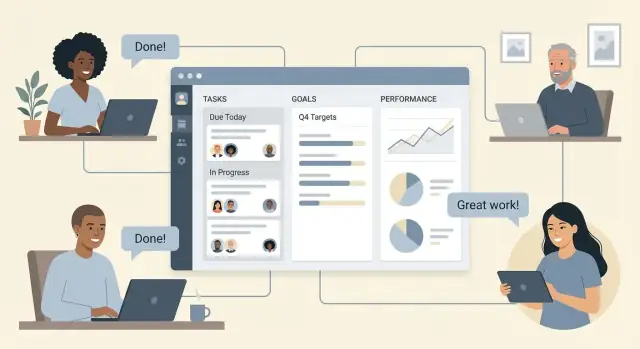
What You’re Building and Who It Helps
A remote team web app for tasks, goals, and performance tracking is really a visibility tool: it helps people understand what’s happening, what matters next, and whether work is moving toward outcomes—without hovering over every hour.
The core problem: clarity without micromanagement
Distributed teams lose “ambient awareness.” In an office, you overhear blockers, priorities, and progress. Remotely, that context fragments across chat, docs, and meetings. The app you’re building should answer a few everyday questions quickly:
- What are we working on right now?
- How does this connect to team goals (OKRs)?
- Are we getting results, or just staying busy?
Who it’s for (and what each needs)
Design for multiple roles from the start, even if your MVP serves only one well.
- Managers need status at a glance, risk signals, and clean goal alignment.
- Team leads need planning views, dependencies, and lightweight accountability.
- Individual contributors need a simple place to track tasks, share updates, and see how their work ladders up to goals.
- HR/ops (if included) need higher-level trends and consistency—not invasive monitoring.
Three pillars: tasks, goals, performance signals
- Task tracking: the day-to-day commitments (what, who, when).
- Goal tracking (OKRs): why the work matters and what “success” looks like.
- Performance signals: indicators that outcomes are improving (cycle time, delivery rate, customer impact), not just activity (messages sent, hours online).
Define success metrics for the product
Before you build screens, set product-level success metrics like:
- Adoption: % of the team active weekly.
- Update frequency: how often tasks/goals are refreshed.
- Time-to-status: how quickly someone can produce a trustworthy status update.
The goal is a KPI dashboard that creates shared understanding—so decisions get easier, not noisier.
Requirements: Roles, Workflows, and User Stories
Good requirements are less about big documents and more about shared clarity: who uses the app, what they do every week, and what “done” looks like.
Map roles and permissions
Start with four roles and keep them consistent across tasks, goals, and reporting:
- Admin: manages workspace settings, billing, integrations, and permission rules
- Manager: creates team goals, assigns work, runs reviews, sees team-level reporting
- Member: manages their tasks, updates goal progress, posts weekly updates
- Viewer: read-only access for stakeholders (useful for leadership or clients)
Write down what each role can create, edit, delete, and view. This prevents painful rework later when you add sharing and dashboards.
Capture the core workflows
Document the “happy path” steps in plain language:
- Task workflow: create task → assign → update status → comment → close
- Goal workflow (OKRs): set OKR → align to team → update progress → review cycle
- Reporting workflow: weekly update → team review → export/share
Keep workflows short; edge cases (like reassignment or overdue rules) can be noted as “later” unless they block adoption.
Draft 8–12 user stories (scope reality check)
Aim for a small set that covers the essentials:
- As an admin, I can invite users and assign roles.
- As a manager, I can create a team and set visibility.
- As a member, I can create and edit my tasks.
- As a manager, I can assign tasks and set due dates.
- As a member, I can change task status and add comments.
- As a member, I can create an OKR and link it to a team.
- As a manager, I can align individual goals to team goals.
- As a member, I can update goal progress with a short note.
- As a manager, I can run a review cycle and capture outcomes.
- As a viewer, I can see a read-only KPI dashboard and weekly summaries.
If a feature can’t be expressed as a user story, it’s usually not ready to build.
MVP Scope and Feature Prioritization
A remote team web app succeeds when it removes daily friction quickly. Your MVP should aim to deliver a clear “before vs after” improvement in 2–6 weeks—not prove every idea at once.
Define a simple MVP promise
Pick one core promise and make it undeniable. Examples:
- “Everyone knows what to do next, and who owns it.”
- “Goals and weekly work finally connect in one place.”
If a feature doesn’t strengthen that promise, it’s not MVP.
Prioritize: must-have vs nice-to-have vs later
A practical way to decide:
- Must-have: needed for the promise to work on day one (create tasks, assign owners, basic goal/OKR view, lightweight KPI updates, notifications).
- Nice-to-have: improves comfort but isn’t required (templates, custom fields, rich comments, advanced filters).
- Later: adds complexity or requires mature data (automation rules, advanced analytics, multi-org support).
Decide what not to build first
Avoid building “gravity wells” early—features that expand scope and debates:
- Time tracking and timesheets
- Deep HR performance reviews and compensation workflows
- Complex BI dashboards and bespoke reporting
You can still design for them (clean data model, audit history), without delivering them now.
MVP acceptance checklist (what “done” means)
Before you start, write a short checklist you can demo:
- A manager can create a goal/OKR and link 3–10 tasks to it.
- A teammate can update status in under 30 seconds.
- A weekly view shows progress and blockers for the whole team.
- Permissions prevent accidental edits across teams.
- A basic KPI dashboard updates and shows change over time.
Plan for iterative releases
Ship, watch where users hesitate, then release small upgrades every 1–2 weeks. Treat feedback as data: what people try to do, where they abandon, and what they repeat. This rhythm keeps your MVP lean while steadily expanding real value.
Core Features for Tasks, Goals, and Performance
Your app succeeds when it turns day-to-day work into clear progress—without forcing people to “work for the tool.” A good core set of features should support planning, execution, and learning in one place.
Task tracking that matches real work
Tasks are the unit of execution. Keep them flexible but consistent:
- Statuses that reflect your workflow (e.g., To do → In progress → Blocked → Done). Make “Blocked” explicit so remote teams can unblock each other faster.
- Due dates (and optional start dates) to support reminders and realistic planning.
- Priorities that are easy to scan (e.g., P0–P3) and don’t require debates every time.
- Tags for lightweight grouping (client, initiative, sprint) without creating a maze of folders.
- Dependencies to show “can’t start until…” and “this unblocks…,” which is especially valuable across time zones.
Goal tracking (OKRs) that stays connected to tasks
Goals help teams choose the right work, not just more work. Model goals with:
- Objectives (the “why”) and Key Results (measurable outcomes)
- Owners (a single accountable person, with contributors optional)
- Time periods (quarter, month, custom)
- Confidence levels (e.g., On track / At risk / Off track) so updates include judgment, not only numbers
Link tasks and projects to key results so progress isn’t a separate reporting exercise.
Performance signals that don’t punish good behavior
Remote teams need signals that promote outcomes and reliability:
- Outcome metrics (customer impact, revenue, quality) tied to key results
- Goal progress that combines metric movement with confidence updates
- Delivery reliability indicators (on-time rate, aging work, recurring blockers) to highlight process issues, not “who worked hardest”
Collaboration and notifications that reduce noise
Use comments, mentions, attachments, and an activity feed to keep context with the work.
For notifications, prefer in-app and email digests plus targeted reminders (due soon, blocked too long). Let users tune frequency so updates inform rather than interrupt.
UX and Information Design for Remote Teams
Remote teams need answers fast: “What should I do next?”, “Is the team on track?”, and “Which goals are at risk?”. Good UX reduces the time between opening the app and taking the next action.
Navigation built for quick status
Aim for a simple top-level structure that matches how people think during async work:
- My Work: assigned tasks, due soon, blocked items, today’s priorities
- Team: who’s overloaded, recent updates, handoffs, mentions
- Goals: OKRs, progress, linked initiatives, upcoming milestones
- Reports: KPI dashboard, trends, and drill-downs (with clear definitions)
Keep each area scannable. A “last updated” timestamp and a lightweight activity feed help remote users trust what they’re seeing.
Wireframes for the screens people live in
Start with three to four key screens and design them end-to-end:
- Dashboard: a concise summary (top priorities + goal health + pending check-ins)
- Task board/list: fast filtering (owner, due date, status), and a clear “blocked” state
- Goal page: target, owner, confidence, progress over time, and linked work
- Check-ins: quick form for weekly updates (wins, blockers, next steps)
Make updates effortless
Remote teams avoid tools that feel “heavy.” Use one-click status changes, inline edits, and fast check-in forms with sensible defaults. Autosave drafts and allow quick comments without navigating away.
Add context without clutter
Link tasks to goals so progress is explainable: a task can support one or more goals, and each goal should show “work driving progress.” Use small, consistent cues (badges, breadcrumbs, hover previews) rather than large blocks of text.
Accessibility basics that improve everyone’s experience
Use sufficient contrast, support keyboard navigation, and ensure charts are readable with labels and patterns (not color alone). Keep typography generous and avoid dense tables unless users can filter and sort.
Data Model: Entities, Relationships, and History
A clean data model keeps task tracking, goal tracking, and performance tracking consistent—especially when people work across time zones and you need to understand “what changed, when, and why.”
Core entities to start with
At MVP level, you can cover most remote team workflows with:
- User: person, role, timezone
- Team: group of users, default settings
- Project: container for tasks (often per client, product area, or initiative)
- Task: unit of work with owner, status, due date
- Goal (OKR-style objective): outcome you want to achieve
- Check-in: lightweight weekly update that ties tasks to goals
Relationships that keep everything connected
Model relationships explicitly so your UI can answer common questions (“Which tasks move this goal forward?”):
- A task belongs to a project (project_id on task)
- A goal aligns to a team (team_id on goal)
- A task can link to a goal (task.goal_id, or a join table if one task supports multiple goals)
- A check-in belongs to a user and can reference a goal and/or project
History and audit: trust the numbers
For remote teams, edits happen asynchronously. Store an audit log of important changes: task status, reassignment, due date changes, and goal progress edits. This makes KPI dashboards easier to explain and prevents “mystery progress.”
Progress storage: manual vs computed
- Manual % (simple): store
goal.progress_pctupdated via check-ins. - Computed (more reliable): store key results and calculate progress from them. Even if you start manual, design so you can migrate later.
A basic schema (with example records)
User: {id: u1, name: "Sam", team_id: t1}
Team: {id: t1, name: "Customer Success"}
Project: {id: p1, team_id: t1, name: "Onboarding Revamp"}
Goal: {id: g1, team_id: t1, title: "Reduce time-to-value", progress_pct: 35}
Task: {id: tk1, project_id: p1, goal_id: g1, assignee_id: u1, status: "in_progress"}
CheckIn: {id: c1, user_id: u1, goal_id: g1, note: "Completed draft playbook", date: "2025-01-08"}
AuditEvent: {id: a1, entity: "Task", entity_id: tk1, field: "status", from: "todo", to: "in_progress", actor_id: u1}
Architecture Choices for a Maintainable Web App
A maintainable architecture is less about “perfect” technology and more about making daily development predictable: easy to change, easy to deploy, and easy to understand by new teammates.
Pick a stack that fits your team
Choose a framework your team can confidently ship with for the next 12–24 months. For many teams, that’s a mainstream combo such as:
- A web framework with strong conventions (e.g., Rails, Django, Laravel, Next.js + a backend)
- A relational database for core records (often Postgres)
- Managed hosting that supports simple deployments and rollbacks
The best stack is usually the one you already know well enough to avoid “architecture as a hobby.”
Separate concerns without over-splitting
Start with clear boundaries:
- Web client: screens and interaction (tasks, goals, KPI views)
- API: business rules, validation, permissions
- Background jobs: scheduled reminders, imports, report refreshes
- Analytics/reporting: read-optimized queries and cached aggregates
This separation can still live in one codebase early on. You get clarity without the overhead of multiple services.
Multi-tenant from day one (if you need it)
If the app will support multiple organizations, bake in tenancy early: every key record should belong to an Organization/Workspace, and permissions should be evaluated within that scope. It’s much harder to retrofit later.
Environments and configuration
Use dev / staging / prod with the same deployment path. Store configuration in environment variables (or a secrets manager), not in code. Staging should resemble production enough to catch “it worked on my machine” issues.
Keep it simple until scale proves otherwise
Optimize for a small number of well-defined components, good logs, and sensible caching. Add complexity (queues, replicas, separate reporting stores) only when real usage data shows it’s necessary.
API Design: Endpoints, Validation, and Consistency
A clear API keeps your web app predictable for the UI and easier to extend later. Aim for a small set of consistent patterns rather than one-off endpoints.
Core endpoints (tasks, goals, teams, users, reports)
Design around resources with standard CRUD operations:
- Users:
GET /api/users,GET /api/users/{id},POST /api/users,PATCH /api/users/{id} - Teams:
GET /api/teams,POST /api/teams,GET /api/teams/{id},PATCH /api/teams/{id} - Tasks:
GET /api/tasks,POST /api/tasks,GET /api/tasks/{id},PATCH /api/tasks/{id},DELETE /api/tasks/{id} - Goals / OKRs:
GET /api/goals,POST /api/goals,GET /api/goals/{id},PATCH /api/goals/{id} - Reports (KPIs, progress summaries):
GET /api/reports/team-progress,GET /api/reports/kpi-summary
Keep relationships simple in the API surface (e.g., task.teamId, task.assigneeId, goal.ownerId) and let the UI request what it needs.
Consistent querying: pagination, filtering, sorting, search
Pick one convention and use it everywhere:
- Pagination:
?limit=25&cursor=abc123(or?page=2&pageSize=25) - Filtering:
?teamId=...&status=open&assigneeId=... - Sorting:
?sort=-dueDate,priority - Search:
?q=quarterly review
Return metadata consistently: { data: [...], nextCursor: "...", total: 123 } (if you can compute totals cheaply).
Validation and UI-friendly errors
Validate inputs at the boundary (required fields, date ranges, enum values). Return clear errors the UI can map to form fields:
400with{ code, message, fields: { title: "Required" } }401/403for auth/permissions,404for missing records,409for conflicts (e.g., duplicate key)
Updates: polling vs WebSockets
If teams need “fresh” boards or KPI tiles, start with polling (simple, reliable). Add WebSockets only when you truly need live collaboration (e.g., presence, instant board updates).
Documentation with examples
Document endpoints with sample requests/responses (OpenAPI is ideal). A small “cookbook” page—create task, move status, update goal progress—speeds up development and reduces misunderstandings across the team.
Security, Permissions, and Privacy Basics
Security isn’t a “later” feature for remote-team apps—permissions and privacy decisions shape your database, UI, and reporting from day one. The goal is simple: the right people see the right information, and you can explain who changed what.
Authentication: pick the lowest-friction option your users will trust
Start with email/password if you’re targeting small teams and want fast onboarding. If your customers already live in Google Workspace or Microsoft 365, add SSO to reduce support tickets and account sprawl. Magic links can be great for contractors and occasional users, but only if you can handle link expiration and device sharing.
A practical approach is to launch with one method (often email/password) and add SSO once you see repeated requests from larger organizations.
Authorization: roles + scope (team, project, goals)
Role-based access control (RBAC) is only half the story—scope matters just as much. Define roles like Admin, Manager, Member, and Viewer, then apply them within a specific team and/or project. For example, someone may be a Manager in Project A but a Member in Project B.
Be explicit about who can:
- view and edit tasks
- create and approve goals/OKRs
- see KPI dashboards and individual performance views
- manage members, billing, and integrations
Privacy: share performance data carefully
Default to “need to know.” Show team-level trends broadly, and restrict individual-level performance views to managers and the individual employee. Avoid exposing raw activity data (e.g., timestamps, detailed logs) unless it directly supports a workflow.
Audit logs, retention, and exports
Add an audit trail for key actions (role changes, goal edits, KPI updates, deletions). It helps with accountability and support.
Finally, plan for basic data access: exports for admins, a clear retention policy, and a way to handle deletion requests without breaking historical reports (e.g., anonymize user identifiers while keeping aggregated metrics).
Performance Tracking Without Misleading Metrics
Performance tracking should answer one question: “Are we getting better results over time?” If your app only counts activity, people will optimize for busywork.
Start by defining what you’ll measure
Pick a small set of signals that reflect real use and real progress:
- Adoption: weekly active users, % of team completing at least one update
- Task throughput: tasks completed per week, cycle time (start → done)
- Goal progress: % of key results on track, progress vs target
- Check-in rates: on-time updates for goals/OKRs, missed check-ins
Tie each metric to a decision. For example, if check-in rates drop, you might simplify updates or adjust reminders—rather than pushing people to “post more.”
Dashboards by role (so everyone sees what matters)
Design separate views instead of one mega-dashboard:
- Team member: personal tasks due soon, goal confidence, blockers
- Manager: team throughput trends, goals at risk, workload distribution
- Exec summary: a few outcomes: goal status, major risks, notable wins
This keeps the interface focused and reduces comparisons that create anxiety.
Separate activity from outcomes
Treat “messages sent” and “comments added” as engagement, not performance. Place them in a secondary section (“Collaboration signals”), and keep outcome metrics (deliverables, KR movement, customer impact) front and center.
Simple charts that stay honest
Use straightforward visuals: trend lines (week over week), completion rates, and a goal confidence indicator (e.g., On track / At risk / Off track with a short note). Avoid single-number “productivity scores.”
Export only when it’s truly needed
Add CSV/PDF export when your audience must report externally (investors, compliance, clients). Otherwise, prefer shareable links to a filtered view (e.g., /reports?team=design&range=30d).
Integrations and Data Import for Faster Adoption
Adoption often stalls when a new tool adds work. Integrations and a simple import path help teams get value on day one—without asking everyone to change habits overnight.
Integrations that remove busywork
Start with the connections that close the loop between “work happens” and “work is visible.” For most remote teams, that means:
- Slack/Microsoft Teams notifications for assignments, due-date changes, and mentions. Keep messages actionable (e.g., “Mark complete” or “Open task”) and avoid noisy broadcasts.
- Calendar sync so tasks with due dates or goal milestones can appear on personal/team calendars. Treat calendar entries as reminders, not as the source of truth.
- Email for digest summaries (daily/weekly) and critical alerts (overdue, blocked), especially for teammates who don’t live in chat.
A good default is to let users choose what they receive: instant notifications for direct assignments, and digests for everything else.
Import paths that meet teams where they are
Many teams begin with spreadsheets. Provide a CSV import that supports a “minimum viable migration”:
- Tasks: title, assignee, status, due date, tags, notes
- Goals/OKRs: objective, key results, owner, time period
After upload, show a preview and mapping step (“This column becomes Due date”) and a clear error report (“12 rows skipped: missing title”). If you can, offer a template file users can download from /help/import.
Webhooks for add-ons (when you’re ready)
If you expect partner tools or internal add-ons, expose simple webhooks for events like task completed or goal updated. Document the payloads and include retries and signatures so integrations don’t silently fail.
Permissions, transparency, and fallbacks
Keep integration permissions narrow: request only what you need (e.g., post messages to one channel, read basic profile info). Explain why each permission is required and let admins revoke access anytime.
Finally, always provide a fallback: when an integration is unavailable, users should still be able to export CSV, send an email digest, or copy a shareable link—so work never depends on a single connector.
Testing, Launch Plan, and Continuous Improvement
Shipping a tasks + goals + KPI app is less about a perfect “big bang” release and more about proving that your core workflows work reliably for real teams.
A practical testing plan
Focus tests on the places where mistakes hurt trust: permissions, status changes, and calculations.
- Unit tests for business rules: goal progress math, KPI aggregation, due-date logic, reminder schedules, and role-based access (who can edit, approve, or view).
- Integration tests for key flows: sign-up → create workspace → invite teammates → create tasks → link tasks to goals/OKRs → update progress → view KPI dashboard.
Keep test data stable so failures are easy to diagnose. If you have an API, validate contract behavior (required fields, error messages, and consistent response shapes) as part of integration tests.
Seed demo data that feels real
Before launch, include seed demo data so new users instantly see what “good” looks like:
- A small project with tasks in different states
- One goal/OKR with linked tasks and check-ins
- A KPI dashboard with believable numbers and time trends
This helps you create realistic screenshots for onboarding and makes first-run experiences less empty.
Roll out in phases
Start with a beta rollout to one team, ideally a team that’s motivated and willing to report issues. Provide short training, plus ready-to-use templates (weekly planning, OKR check-ins, and KPI definitions).
After 1–2 weeks, expand to more teams with the best-performing templates and clearer defaults.
Build feedback loops into the product
Collect feedback while people are working:
- In-app prompts after key actions (e.g., after a check-in)
- Short surveys (2–3 questions)
- Usage analytics to spot friction (drop-offs, repeated edits, unused features)
Plan ongoing improvements
Use a simple cadence: weekly bug fixes, biweekly UX/reporting improvements, and monthly reminder refinements. Prioritize changes that make updates faster, reporting clearer, and reminders more helpful—not noisier.
FAQ
What is the main purpose of a remote team tasks + goals + KPI app?
Start by optimizing for clarity without micromanagement. Your app should quickly answer:
- What are we working on right now?
- How does it connect to goals/OKRs?
- Are we making outcome progress (not just activity)?
If those are easy to see and update, the product stays lightweight and trusted.
Which roles should I design for in the MVP?
A practical starting set is:
- Admin: workspace settings, billing, integrations, permission rules
- Manager: creates goals, assigns work, runs reviews, views team reporting
- Member: manages tasks, posts updates, updates goal progress
- Viewer: read-only access for stakeholders
Define what each role can create/edit/delete/view across tasks, goals, and reports to avoid rework later.
What core workflows should the product support every week?
Keep workflows short and repeatable:
- Tasks: create → assign → update status → comment → close
- OKRs: set objective/KRs → align to team → update progress/confidence → review cycle
- Reporting: weekly check-in → team review → share/export
If a step adds friction without improving decisions, push it out of MVP.
How many user stories do I need before building?
Write user stories that cover onboarding, execution, and reporting. Examples:
- Invite users and assign roles
- Create tasks, set owners/due dates, update status/comments
- Create goals/OKRs, align them, and update progress with a note
- Produce a read-only dashboard and weekly summaries
If you can’t describe a feature as a user story, it’s usually not ready to build.
How do I decide what belongs in the MVP vs later?
Pick one MVP promise and prioritize around it (2–6 weeks of scope). Common promises:
- “Everyone knows what to do next, and who owns it.”
- “Weekly work connects to goals in one place.”
Then classify features into must-have / nice-to-have / later so the MVP has a clear demoable “done.”
What should I avoid building early to keep scope under control?
Common early scope traps (“gravity wells”) include:
- Time tracking and timesheets
- Deep HR performance review/compensation workflows
- Complex BI dashboards and bespoke reporting
You can still design for them (clean data model, audit history) without shipping them first.
What task tracking features matter most for remote teams?
Use simple, consistent task primitives:
- Statuses like To do / In progress / Blocked / Done (make “Blocked” explicit)
- Due dates (optional start dates), priority (e.g., P0–P3), tags
- Dependencies for cross-time-zone handoffs
Aim for fast updates (one-click status changes, inline edits) so people don’t feel they’re “working for the tool.”
How should I structure OKRs so they stay connected to work?
Model goals with enough structure to keep them measurable and reviewable:
- Objective + key results (KRs)
- Single owner (contributors optional)
- Time period (quarter/month/custom)
- Confidence (On track / At risk / Off track)
Link tasks/projects to KRs so progress doesn’t become a separate reporting exercise.
Which KPIs are useful without encouraging busywork?
Prefer signals that highlight outcomes and reliability, not “who was busiest.” Good starting metrics include:
- Goal/KR progress + confidence over time
- Throughput and cycle time (start → done)
- On-time delivery rate and aging work
- Recurring blockers
Avoid collapsing everything into a single “productivity score,” which is easy to game and hard to trust.
What data model and history should I implement from day one?
A solid MVP data model usually includes:
- User, Team, Project, Task, Goal (OKR), Check-in
- Explicit relationships (task→project, goal→team, task↔goal)
- An audit log for key changes (status, assignment, due dates, goal progress)
Audit history is what makes dashboards explainable in async teams (“what changed, when, and why”).