

Create a Web App to Replace Email with Structured Workflows
Learn how to design and build a web app that replaces email threads with structured workflows—clear ownership, approvals, status tracking, and audit trails.
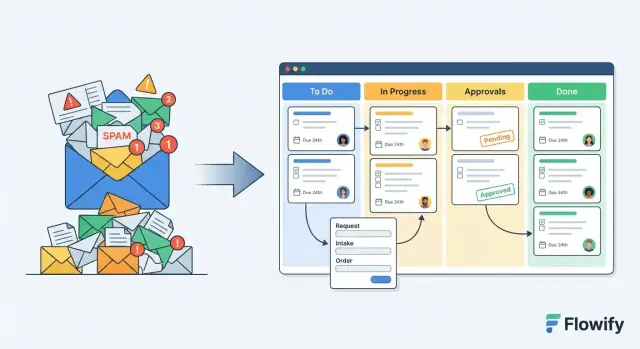
Why Email Breaks Operations (and What to Replace It With)
Email is great for conversations, but it’s a poor system for running operations. The moment a process relies on “reply all,” you’re asking a chat tool to behave like a database, a task manager, and an audit log—without any of those guarantees.
The operational problems email creates
Most teams feel the pain in the same places:
- Lost context: decisions get buried in long threads, forwarded versions, or personal inboxes.
- Unclear ownership: nobody knows who has the “ball” right now, so work stalls.
- Slow approvals: approvers miss messages, ask for info that was already shared, or respond without the needed details.
- Version confusion: attachments multiply, and “final_final_v3” becomes a real risk.
- No visibility: managers can’t see status across requests without chasing updates.
- Weak compliance: it’s hard to prove what happened, when, and who approved it—especially months later.
What “structured workflow” means (in plain terms)
A structured workflow replaces email threads with records and steps:
- A request is a single record (e.g., “New vendor onboarding”) with required fields.
- That record generates tasks (who needs to do what) and approvals (who must say yes/no).
- Each record has status tracking (Submitted → In Review → Approved/Rejected → Done) and a clear current owner.
- All comments, files, and decisions live in one place—the single source of truth.
Set clear goals before you build
Define success in operational terms: faster turnaround times, fewer errors and rework, better visibility, and stronger auditability.
Start small: pick 1–2 high-volume processes
Avoid boiling the ocean. Start with processes that generate lots of email and repeat often—purchase approvals, access requests, content reviews, customer escalations. Getting one workflow right builds confidence and creates patterns you can reuse as you expand.
Choose the Right Process for Your First Workflow App
Your first workflow app shouldn’t try to “fix email” everywhere. Pick one operational process where structure clearly beats threads, and where a small app removes daily friction without forcing an immediate company-wide change.
Start with strong candidates
Look for work that already has a repeatable pattern, multiple handoffs, and a need for visibility. Common first wins include:
- Employee onboarding (tasks, owners, due dates, standard checklists)
- Purchase requests (approvals, budgets, vendor details)
- Content approvals (versions, feedback, final sign-off)
- Support escalations (priority, SLA, routing, accountability)
If a process has a “Where is this at?” question more than once a day, it’s a good signal.
Score processes before you commit
Create a simple scorecard so the loudest stakeholder doesn’t automatically win. Rate each process (for example 1–5) on:
- Volume: how often it happens
- Risk: what goes wrong when it’s missed (money, compliance, customer impact)
- Complexity: number of steps, exceptions, and teams involved
- Stakeholder pain: how much time is wasted chasing updates or reconciling conflicting info
A great first pick is usually high volume + high pain, with moderate complexity.
Define “done” for the first release
Set MVP boundaries so the app launches quickly and earns trust. Decide what you will not do yet (advanced reporting, every edge case, automations across five tools). Your MVP should cover the core happy path plus a couple of common exceptions.
Write a problem statement and success criteria
For the chosen process, write one paragraph:
- Problem statement: what email makes hard (lost requests, unclear ownership, no status tracking)
- Success criteria: measurable outcomes (e.g., approval time down 30%, zero missing fields, every request has an owner and a status)
This keeps the build focused—and gives you a clear way to prove the workflow app is working.
Map the Current Email Process Before You Automate It
Automation fails most often when it “modernizes” a process nobody has actually written down. Before you open a workflow builder or spec a web app, take one week to map how work truly moves through email—not how it’s supposed to.
Interview the people in the chain
Start with short interviews across roles: requesters (people who ask for the work), approvers (people who say yes/no), operators (people who do the work), and admins (people who deal with access, records, and policy).
Ask for real examples: “Show me the last three email threads you handled.” You’re looking for patterns: what information is always requested, what gets debated, and what gets lost.
Map the flow step-by-step
Write the process as a timeline with clear actors. For each step, capture:
- Who sends what (requester → shared inbox, manager → finance, etc.)
- When it happens (immediately, after weekly review, only after a ticket is created)
- Why it happens (policy requirement, risk check, budget control, courtesy copy)
This is where hidden work shows up: “We always forward it to Sam because he knows the vendor contact,” or “Approval is implied if nobody objects in 24 hours.” Those informal rules will break in an app unless you make them explicit.
Capture the data and the exceptions
List required fields from the emails and attachments: names, dates, amounts, locations, IDs, screenshots, contract terms. Then document the exceptions that trigger back-and-forth: missing details, unclear ownership, rush requests, changes after approval, duplicates, and “reply-all confusion.”
Document handoffs, approval rules, and failure points
Finish by marking:
- Handoffs (where ownership changes)
- Approval logic (who approves what, based on which thresholds)
- Failure points (stalls, lost context, conflicting answers, no audit trail)
This map becomes your build checklist—and a shared reference that prevents your new workflow app from recreating the same chaos in a different UI.
Design the Data Model: From Email Threads to Records
Email threads mix decisions, files, and status updates into one long scroll. A workflow app works because it turns that mess into records you can query, route, and audit.
Start with the core entities
Most email-based operations can be expressed with a small set of building blocks:
- Request: the “thing” being asked for (purchase request, content change, customer exception).
- Task: work items needed to complete the request (collect info, review, fulfill).
- Approval: decision points tied to a role or person (approve/reject, with reason).
- Comment: discussion that stays attached to the record (not scattered across inboxes).
- Attachment: files connected to the request or a specific task.
- User and Team: who acts, who owns, and who can see what.
Required vs. optional: keep forms short
Your first version should capture only what is needed to route and complete the work. Make the rest optional.
A simple rule: if a field isn’t used for routing, validation, or reporting, don’t require it. Short forms increase completion rates and reduce back-and-forth.
Traceability: identifiers, timestamps, ownership
Add boring-but-essential fields from day one:
- Stable ID (human-friendly like REQ-1042 helps support conversations)
- CreatedAt / UpdatedAt and “last activity” timestamps
- CreatedBy, CurrentOwner (person/team), and optionally Requester
These fields power status tracking, SLA reporting, and audit trails later.
Model relationships clearly
A typical pattern is one Request → many Tasks and Approvals. Approvals often belong to a step (e.g., “Finance approval”) and should record:
- approver (user or role), decision, timestamp, and rationale
Finally, design for permissions: visibility and edit rights usually depend on role + request ownership, not just who received an email originally.
Define Workflow States, Rules, and Exceptions
A workflow app succeeds or fails on one thing: whether everyone can look at a request and instantly know what happens next. That clarity comes from a small set of states, explicit transition rules, and a few planned exception paths.
Start with a minimal state machine
Resist the urge to model every nuance on day one. A simple baseline covers most operational requests:
- Draft → Submitted → In Review → Approved/Rejected → Completed
“Draft” is private work. “Submitted” means the request is now owned by the process. “In Review” signals active handling. “Approved/Rejected” captures the decision. “Completed” confirms the work is finished (or delivered).
Define transitions (who can move what, and when)
Each arrow between states should have an owner and a rule. For example:
- Only the requester can move Draft → Submitted.
- Only designated reviewers can move Submitted/In Review → Approved/Rejected.
- Only the fulfiller (or system automation) can move Approved → Completed.
Keep transition rules readable in the UI: show allowed actions as buttons, and hide or disable everything else. This prevents “status drift” and stops backchannel approvals.
Add due dates without turning it into project management
Use SLA targets where they matter—typically from Submitted (or In Review) to a decision. Store:
- a Due date (or SLA deadline),
- an Overdue flag, and
- a simple escalation rule (e.g., notify a manager after 48 hours overdue).
Plan exception paths early
Email-based processes survive on exceptions, so your app needs a few safe exits:
- Rework: Send In Review → Draft with required comments.
- Cancellation: Allow Draft/Submitted → Cancelled (with reason).
- Escalation: Route In Review → Escalated when blocked, with a new assignee.
If an exception happens more than occasionally, promote it into a first-class state—don’t leave it to “just message me.”
Build a Simple UX: Forms, Queues, and a Single Source of Truth
A workflow app works when people can move work forward in seconds. The goal isn’t a fancy interface—it’s a small set of screens that replace the “search, scroll, reply-all” habit with clear actions and a reliable place to check status.
The four screens that do most of the work
Start with a predictable UI pattern and reuse it across workflows:
- Create request (form): a guided entry point that captures the fields you used to ask for via email.
- Request detail: the record page that holds everything about a single request.
- Inbox/queue: where assignees see what they own and what needs attention.
- Dashboard: a lightweight overview for managers (volume, aging items, bottlenecks).
If you build these well, most teams won’t need more screens for the first version.
Make ownership and next action impossible to miss
Every request detail page should answer two questions immediately:
- Who owns this now? (a single person or role, plus a clear fallback if unassigned)
- What happens next? (the current status, the required action, and what triggers the next state)
Practical UI cues help: a prominent status badge, an “Assigned to” field at the top, and a primary action button like Approve, Request changes, Complete, or Send to Finance. Keep secondary actions (edit fields, add watchers, link records) out of the main flow so people don’t hesitate.
Use templates to turn repeat work into one click
Email-based operations repeat the same requests with slightly different details. Templates remove retyping—and the “did I forget something?” problem.
Templates can include:
- Pre-filled fields (category, priority, department, vendor)
- Standard checklists (what must be verified before approval)
- Default routing (start in the right queue, assign to the right role)
Over time, templates also reveal what your organization actually does—useful for cleaning up policies and reducing one-off exceptions.
Keep conversation and files inside the record
The moment discussions split between the app and email, you lose the single source of truth. Treat the request detail page as the canonical timeline:
- Comments for context and decisions
- Mentions to pull in specific people without forwarding threads
- Attachments stored with the request (quotes, screenshots, PDFs)
This way, someone new can open the request and understand the full story—what was asked, what was decided, and what needs to happen next—without digging through inboxes.
Notifications Without Recreating Email Chaos
Email fails operations because it treats every update like a broadcast. Your workflow app should do the opposite: notify only the right people, only when something meaningful happens, and always point them to the next action.
Replace CC chaos with event-based alerts
Start by defining a small set of notification events that map to real workflow moments:
- Submitted: tell the queue owner (or team) a new item arrived.
- Assigned: tell the assignee they now own the next step.
- Needs changes: tell the requester exactly what to fix.
- Approved: tell stakeholders the decision is final (and what happens next).
- Overdue: escalate to the assignee first, then their manager if it stays overdue.
Rule of thumb: if someone can’t take an action (or doesn’t need awareness for compliance), they shouldn’t be notified.
Use in-app first, email as an option
Make in-app notifications the default (a bell icon, an “Assigned to me” list, a queue view). Email can still help, but only as a delivery channel—not as the system of record.
Offer user controls where it’s reasonable:
- Immediate for assignments and “needs changes”
- Daily/weekly digest for FYI updates and approvals completed
This reduces interruptions without hiding urgent work.
Every notification must deep-link to the work
Each notification should include:
- The record name/ID and current status
- Why the user is receiving it (“You’re the approver”)
- A single primary action button (Approve, Request changes, Reassign)
- A link back to the exact item (for example:
/requests/123)
If a notification can’t answer “What happened, why me, what next?” in one glance, it will turn into another email thread.
Permissions, Security, and Audit Trails
Email feels “simple” because everyone can forward, copy, and search. A workflow app needs that same accessibility without turning into a free-for-all. Treat permissions as part of the product design, not an afterthought.
Define clear role types
Start with a small set of roles and make them consistent across workflows:
- Requester: creates a request, uploads files, answers follow-up questions.
- Approver: reviews, approves/rejects, can request changes.
- Operator: fulfills the work (e.g., executes the task once approved), updates outcomes.
- Admin: manages workflow configuration, roles, templates, and system settings.
Keep roles tied to actions people understand (“approve”, “fulfill”) rather than job titles that vary by team.
Apply least-privilege access
Decide—explicitly—who can view, edit, approve, export, and administer data. Useful patterns:
- Requesters can view/edit their own open requests, but not others.
- Approvers can view everything in their approval queue, but can’t edit requester-submitted fields (only comment or request changes).
- Operators can edit fulfillment fields, but not approval decisions.
- Exports are often the biggest risk: restrict bulk export to admins (or specific compliance roles) and log it.
Also define file access separately. Attachments often contain sensitive data; make sure permissions apply to files, not just records.
Plan audit logs that answer real questions
Audit trails should capture who did what and when, including:
- status changes (with from/to)
- approvals and rejections (plus rationale)
- edits to key fields (old/new values)
- file access and downloads
Make logs searchable and tamper-evident, even if only admins can see them.
Data retention and legal requirements
Set retention rules early: how long to keep requests, comments, and files; what “delete” means; and whether you must support legal hold. Avoid promises like “we delete everything immediately” unless you can enforce it across backups and integrations.
Integrations: Connect the Workflow to the Rest of Your Tools
A workflow app replaces email threads, but it shouldn’t force people to retype the same details in five places. Integrations are what turn a “nice internal tool” into the system your team actually trusts.
Start with the integrations that kill copy/paste
Begin with the tools that drive identity, scheduling, and “where the work lives”:
- Directory / SSO (Okta, Google Workspace, Microsoft Entra ID): automatically know who the requester is, their department, and what they’re allowed to see. It also reduces “who approved this?” confusion.
- Calendar: create or update events when a workflow reaches a scheduling step (e.g., onboarding start date confirmed).
- Ticketing (Jira, ServiceNow, Zendesk): open a ticket when work must move to another team, and pull the ticket status back into the workflow record.
- Docs and storage (Google Drive, SharePoint): attach the right template, store generated PDFs, and keep links to the single source of truth.
Use webhooks and APIs for key events
Plan a small set of inbound endpoints (other systems can notify your app) and outbound webhooks (your app can notify other systems). Keep it focused on events that matter: create record, status change, assignment change, approval granted/denied.
Design for event-driven updates
Treat status changes as triggers. When a record moves to “Approved,” automatically:
- create downstream tasks,
- notify the right channel,
- update the ticket, and
- write an audit entry.
This keeps humans out of the relay race that email creates.
Always provide a fallback
Integrations fail: permissions expire, APIs rate-limit, vendors have outages. Support manual entry (and later reconciliation) so the workflow can continue, with a clear flag like “Added manually” to preserve trust.
Implementation Approach and Architecture Choices
Your first workflow app succeeds or fails on two things: how quickly you can ship something usable, and how safely it runs once people depend on it.
Build vs. low-code vs. hybrid
- Build (custom code): Best when your process is unique, needs complex rules, or must integrate deeply with internal systems. Expect more upfront time, but more control long term.
- Low-code: Best when you need speed, your workflow is fairly standard, and your team can live within platform limits. Great for pilots and proving value.
- Hybrid: Often the sweet spot. Use a builder for UI and basic workflows, and custom services for tricky logic, integrations, or compliance needs.
A practical decision rule: if you can’t clearly describe platform limits you might hit, start low-code; if you already know those limits are dealbreakers, build or go hybrid.
Where platforms like Koder.ai fit
If your goal is to replace email-driven operations with a workflow app quickly, a vibe-coding platform like Koder.ai can be a pragmatic path: you describe the process in chat, iterate on forms/queues/states, and ship a working web app without starting from a blank repo. Because the system is built on a modern stack (React frontend, Go backend, PostgreSQL), it also maps cleanly to the architecture described above—and you can export source code when you need deeper customization.
Operationally, features like planning mode, snapshots and rollback, and built-in deployment/hosting reduce the risk of changing workflows while teams are actively using them. For organizations with stricter requirements, global AWS hosting options and support for running apps in different regions can help align with data residency and cross-border data transfer constraints.
A practical architecture (simple, not fragile)
A reliable workflow app usually has four parts:
- Database: stores the records (requests, approvals, attachments metadata, comments, timestamps).
- Backend API: validates input, enforces permissions, applies workflow rules, and exposes endpoints to the frontend.
- Frontend: forms for submitting work, queues/inboxes for reviewers, and detail pages that show the full history.
- Background jobs: send notifications, run scheduled checks, sync data to other tools, and process retries.
Reliability basics you should plan from day one
Treat failures as normal:
- Retries for temporary issues (email/SMS providers, external APIs).
- Idempotency so a repeated request doesn’t create duplicate approvals or tasks.
- Error handling + dead-letter queues so nothing silently disappears.
- Backups and restore tests, not just backups.
Performance expectations and early monitoring
Set expectations early: most pages should load in ~1–2 seconds, and key actions (submit/approve) should feel instant. Estimate peak usage (e.g., “50 people at 9am”) and instrument basic monitoring: latency, error rates, and job queue backlog. Monitoring isn’t “nice to have”—it’s how you keep trust once email is no longer the fallback.
Rollout Plan: Pilot, Adoption, and Change Management
A workflow app doesn’t “launch” the way a feature does—it replaces a habit. A good rollout plan focuses less on shipping everything and more on helping people stop sending operational requests by email.
1) Start with a tight pilot
Pick one team and one workflow type (for example: purchase approvals, customer exceptions, or internal requests). Keep the scope small enough that you can support every user in the first week.
Define success metrics before you begin. Useful ones include:
- Time from request to completion
- Number of back-and-forth messages per request (should drop)
- Percentage of requests submitted through the app vs. email
- Rework rate (missing info, wrong routing)
Run the pilot for 2–4 weeks. Your goal is not perfection—it’s validating that the workflow can handle real volume without slipping back into inboxes.
2) Migrate only what you need
Avoid a “big bang” migration of every old email thread. Move active requests first so the team gets immediate value.
If historical data matters (compliance, reporting, customer context), migrate it selectively:
- Recent items (e.g., last 30–90 days)
- High-value or high-risk categories
- Records needed for audit
Everything else can remain searchable in the email archive until you have time (or a clear need) to import it.
3) Train in minutes, not hours
Create lightweight training that people will actually use:
- A 10-minute walkthrough (live or recorded)
- A one-page cheatsheet: “how to submit,” “how to check status,” “how to escalate”
Make the training task-based: show exactly what replaces the email they used to send.
4) Create the “send to workflow” habit
Adoption improves when the new path is a single click:
- Replace “Email us your request” with one link to the form/queue
- Add the link to templates, bookmarks, and internal docs
- When someone emails a request, respond once with the workflow link and move on
Over time, the app becomes the default intake, and email becomes a notification channel—not the system of record.
Measure Results and Iterate Toward a Workflow-First Operation
Launching the workflow app is the beginning, not the finish line. To keep momentum and prove value, measure what changed, listen to the people doing the work, and make improvements in small, low-risk releases.
Track the metrics that reflect operational health
Pick a handful of metrics you can measure consistently from the app’s records (not from anecdotes). Common, high-signal options include:
- Cycle time: from submission to completion
- Backlog size: open items by queue/team
- Rework rate: items sent back for missing info or corrections
- Approval time: time spent waiting on decision-makers
- SLA breaches: items that missed a due date or service target
If you can, set a baseline from the last few weeks of email-driven work, then compare after rollout. A simple weekly snapshot is enough to start.
Collect qualitative feedback without turning it into another inbox
Numbers explain what changed; feedback explains why. Use lightweight prompts inside the app (or a short form) to capture:
- Where the new flow feels slower than email
- What’s confusing (field names, statuses, ownership)
- What’s missing (exceptions, edge cases, handoffs)
Keep feedback tied to a record when possible (“this request type needs X”), so it stays actionable.
Iterate safely: treat workflows like product releases
Workflow tweaks can break work if they’re unmanaged. Protect operations by:
- Versioning workflows (so in-flight items stay consistent)
- Testing changes with a small pilot group before broad release
- Documenting updates in a short changelog (what changed and who it affects)
Expand using a repeatable pattern
Once the first workflow is stable, choose the next candidates based on volume, risk, and pain. Reuse the same pattern—clear intake, statuses, ownership, and reporting—so each new workflow feels familiar and adoption stays high.
If you’re building publicly, consider turning your workflow rollout into a repeatable “build in the open” series. Platforms like Koder.ai even offer ways to earn credits for creating content about what you built, and referrals can offset costs as additional teams adopt the workflow-first approach.
FAQ
Why is email a bad tool for running operational processes?
Email threads don’t provide guarantees you need for operations: clear ownership, structured fields, consistent statuses, and a reliable audit trail. A workflow app turns each request into a record with required data, explicit steps, and a visible current owner, so work doesn’t stall in inboxes.
What does “structured workflow” mean in plain terms?
A structured workflow replaces threads with records + steps:
- One request record with required fields
- Generated tasks and approvals with named owners
- Status tracking (e.g., Submitted → In Review → Approved/Rejected → Completed)
- A single timeline for comments, decisions, and files
The result is less back-and-forth and more predictable execution.
What’s the best first process to move from email into a workflow app?
Pick 1–2 processes that are high-volume and create daily friction. Strong first candidates are purchase approvals, onboarding, access requests, content approvals, or escalations.
A simple test: if people ask “Where is this at?” more than once a day, it’s a good workflow target.
How do I decide which process to automate first?
Use a quick scorecard (1–5) across:
- Volume (how often it happens)
- Risk (impact of mistakes or delays)
- Complexity (handoffs, exceptions, teams involved)
- Stakeholder pain (time wasted chasing info/status)
A strong first choice is usually high volume + high pain with moderate complexity.
What should the MVP include—and what should it leave out?
Set MVP boundaries around the happy path plus a couple common exceptions. Defer items like advanced reporting, rare edge cases, and multi-tool automations.
Define “done” with measurable outcomes, such as:
- Approval time down 30%
- No missing required fields
- Every request has a status and a current owner
How do I map the current email process before building anything?
Interview the people in the chain and ask for real examples: “Show me your last three threads.” Then map the process step-by-step:
- Who does what
- When it happens
- Why it happens (policy, risk, budget control)
Capture exceptions (rush requests, missing info, implied approvals) so you don’t rebuild the same chaos in a new UI.
What data model do I need to replace email threads with records?
Start with a few core entities:
- Request (the thing being asked for)
- Task (work items to fulfill it)
- Approval (decision points with rationale and timestamps)
- Comment and Attachment (context and files in one place)
- User/Team (ownership and permissions)
Add essentials early: stable IDs, timestamps, created-by, and current owner for traceability and reporting.
How should I design workflow states, transitions, and exceptions?
Use a small, explicit state machine and enforce transitions:
- Draft → Submitted → In Review → Approved/Rejected → Completed
Define:
- Who can move each transition
- What information is required to progress
- A few exception paths (rework, cancellation, escalation)
Keep allowed actions visible as buttons and hide/disable everything else to prevent “status drift.”
How do I set up notifications without recreating email chaos?
Default to in-app notifications and keep email optional as a delivery channel—not the system of record. Trigger alerts only on meaningful events (Submitted, Assigned, Needs changes, Approved, Overdue).
Every notification should include:
- Record ID/name and status
- Why the user is getting it
- One primary action (Approve, Request changes, Reassign)
- A deep link (e.g.,
/requests/123)
What permissions and audit trail features should a workflow app have?
Implement role-based access (Requester, Approver, Operator, Admin) and apply least privilege (view/edit/approve/export). Treat attachments as sensitive and permission them explicitly.
For auditability, log:
- Status changes (from/to)
- Approvals/rejections with rationale
- Edits to key fields (old/new)
- File access/downloads
Also define retention rules early (how long data is kept, what “delete” means, legal hold needs).