

How to Create a Web App for Subscription Plans and Billing
Step-by-step guide to building a subscription web app: plans, checkout, recurring billing, invoicing, taxes, retries, analytics, and security best practices.
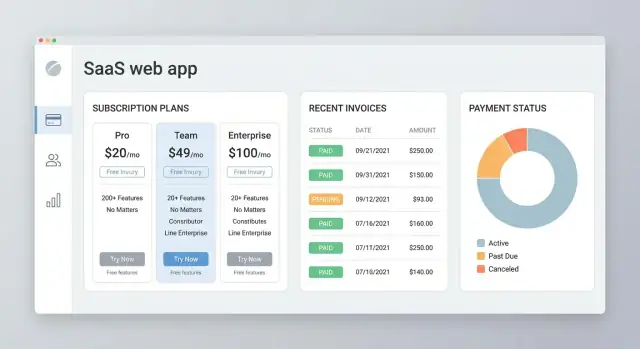
Clarify Requirements for a Subscription Business
Before you pick a payments provider or design your database, get clear on what you’re actually selling and how customers will change over time. Most billing problems are requirement problems in disguise.
A helpful way to reduce risk early is to treat billing as a product surface, not just a backend feature: it touches checkout, permissions, emails, analytics, and support workflows.
Define your subscription model
Start by choosing the commercial shape of your product:
- B2B vs B2C: B2B usually needs invoices, PO fields, team management, and admin controls. B2C tends to prioritize a fast checkout and simple cancellations.
- Seats vs usage: Seats are predictable (e.g., $15/user/month). Usage-based billing needs metering rules (what counts, when you measure, rounding) and customer visibility into usage.
- Account structure: Is there one “owner” with multiple members? Can one person belong to multiple workspaces? These decisions affect permissions, billing contacts, and who can cancel.
Write down examples: “A company with 12 members downgrades to 8 mid-month” or “A consumer pauses for a month, then returns.” If you can’t describe it clearly, you can’t build it reliably.
List the workflows you must support
At minimum, document the exact steps and outcomes for:
- Sign-up → trial → first payment (or immediate charge)
- Upgrade/downgrade (proration? effective immediately or next renewal?)
- Cancellation (end immediately, end at period end, or pause)
- Renewal (auto-renew, manual renewal, grace period)
Also decide what should happen to access when payment fails: instant lock, limited mode, or a grace window.
Decide self-service vs admin-managed changes
Self-service reduces support load but requires a customer portal, clear confirmation screens, and guardrails (e.g., preventing downgrades that break limits). Admin-managed changes are simpler early on, but you’ll need internal tooling and audit logs.
Set success metrics
Choose a few measurable targets to steer product decisions:
- Activation rate (trial-to-active or signup-to-first-value)
- Churn (logo and revenue churn)
- MRR/ARR and expansion (upgrades, added seats)
- Support tickets related to billing (refunds, failed payments, confusion)
These metrics help you prioritize what to automate first—and what can wait.
Design Plans, Pricing, Trials, and Add-ons
Before you write any billing code, decide what you’re actually selling. A clean plan structure reduces support tickets, failed upgrades, and “why was I charged?” emails.
Choose a pricing model that matches value
Common models work well, but they behave differently in billing:
- Flat-rate: one price for everyone. Easiest to explain and implement.
- Tiered: multiple packages (e.g., Starter/Pro/Business) with different feature limits. Great for “grow with you” positioning.
- Per-seat: price scales with team size. Be explicit about what counts as a seat (invited user vs. active user).
- Usage-based: pay for what you consume (API calls, storage, messages). Decide whether you bill in arrears, with a prepaid allowance, or with hard caps.
If you mix models (e.g., base plan + per-seat + usage overages), document the logic now—this becomes your billing rules.
Define billing intervals and trial rules
Offer monthly and annual if it fits your business. Annual plans usually need:
- Clear savings messaging (“2 months free”)
- Proration rules for upgrades/downgrades mid-cycle
For trials, decide:
- Length (7/14/30 days)
- Whether a payment method is required upfront
- What happens at the end (auto-convert, pause, or require confirmation)
- Whether downgrades during trial are allowed
Add-ons, coupons, and grandfathered plans
Add-ons should be priced and billed like mini-products: one-time vs recurring, quantity-based or fixed, and whether they’re compatible with every plan.
Coupons need simple guardrails: duration (one-time vs repeating), eligibility, and whether they apply to add-ons.
For grandfathered plans, decide if users can keep old pricing forever, until they change plans, or until a sunset date.
Write plan names and limits for the UI
Use plan names that signal outcomes (“Starter”, “Team”) rather than internal labels.
For each plan, define feature limits in plain language (e.g., “Up to 3 projects”, “10,000 emails/month”) and ensure the UI shows:
- What’s included
- What happens when limits are reached (block, overage charges, or prompts to upgrade)
- Upgrade/downgrade paths without surprises
Model Your Data for Plans and Billing
A subscription app feels simple on the surface (“charge monthly”), but billing gets messy unless your data model is clear. Start by naming your core objects and making their relationships explicit, so reporting, support, and edge cases don’t turn into one-off hacks.
Core entities (and what they should store)
At minimum, plan for these:
- Customer: identity, email, billing address, tax IDs (if applicable), and links to payment methods.
- Plan: the product tier (e.g., Starter, Pro). Keep it mostly marketing/feature info.
- Price: the billable amount and cadence (e.g., $29/month, $290/year). This is often separate from Plan because one Plan can have multiple Prices.
- Subscription: which Customer is on which Price, plus start date, current period start/end, and renewal behavior.
- Invoice: what you intended to charge for a period (line items, totals, tax, discounts), plus references to Subscription.
- Payment: the money movement attempt/result tied to an Invoice.
- Refund: reversals tied back to a Payment (and often the Invoice).
A useful rule: Plans describe value; Prices describe money.
Represent status changes without confusion
Subscriptions and invoices both need statuses. Keep them explicit and time-based.
For Subscription, common statuses are: trialing, active, past_due, canceled, paused. For Invoice: draft, open, paid, void, uncollectible.
Store the current status and the timestamps/reasons that explain it (e.g., canceled_at, cancel_reason, past_due_since). This makes support tickets much easier.
Audit logs for billing actions
Billing needs an append-only audit log. Record who did what and when:
- plan change, proration decision, refund issued, invoice manually voided
- actor (customer, admin, system webhook), IP/device when relevant
- before/after values (even if summarized)
Admin vs customer permissions
Draw a clear line:
- Customer: view invoices/receipts, update payment method, cancel/resume, download docs.
- Admin/support: issue refunds, comp periods, override status (rare), edit customer tax info, view audit history.
This separation keeps self-service safe while giving operations the tools they need.
Pick a Payments Approach and Integrate a Provider
Choosing your payments setup is one of the highest-leverage decisions you’ll make. It affects development time, support load, compliance risk, and how quickly you can iterate on pricing.
All-in-one billing provider vs. custom billing engine
For most teams, an all-in-one provider (for example, Stripe Billing) is the fastest path to recurring payments, invoices, tax settings, customer portals, and dunning tools. You trade some flexibility for speed and proven edge-case handling.
A custom billing engine can make sense if you have unusual contract logic, multiple payment processors, or strict requirements around invoicing and revenue recognition. The cost is ongoing: you’ll be building and maintaining proration, upgrades/downgrades, refunds, retry schedules, and a lot of bookkeeping.
Hosted checkout vs. embedded forms (PCI scope)
Hosted checkout pages reduce your PCI compliance scope because sensitive card details never touch your servers. They’re also easier to localize and keep up to date (3DS, wallet payments, etc.).
Embedded forms can offer tighter UI control, but they typically increase your security responsibilities and testing burden. If you’re early-stage, hosted checkout is usually the pragmatic default.
Webhooks/events: keep your app in sync
Assume payments happen outside your app. Use provider webhooks (events) as the source of truth for subscription state changes—payment succeeded/failed, subscription updated, charge refunded—and update your database accordingly. Make webhook handlers idempotent and retry-safe.
Document failure modes before you ship
Write down what happens for card declines, expired cards, insufficient funds, bank errors, and chargebacks. Define what the user sees, what emails go out, when access is paused, and what support can do. This reduces surprises when the first failed renewal hits.
Build Signup, Checkout, and Subscription Creation
This is the point where your pricing strategy turns into a working product: users pick a plan, pay (or start a trial), and immediately get the right level of access.
If you’re trying to ship an end-to-end subscription web app quickly, a vibe-coding workflow can help you move faster without skipping the details above. For example, in Koder.ai you can describe your plan tiers, seat limits, and billing flows in chat, then iterate on the generated React UI and Go/PostgreSQL backend while keeping your requirements and data model aligned.
Create a clear pricing page and selection flow
Your pricing page should make it easy to choose without second-guessing. Show each tier’s key limits (seats, usage, features), what’s included, and the billing interval toggle (monthly/annual).
Keep the flow predictable:
- Pick plan → create account (or sign in) → checkout → confirmation
If you support add-ons (extra seats, priority support), let users select them before checkout so the final price is consistent.
Implement checkout with the “real-world” details
Checkout isn’t just taking a card number. It’s where edge cases show up, so decide what you’ll require up front:
- Trials: start a subscription in trial mode and define what happens at trial end (auto-bill, require payment method, or “pay to continue”).
- Coupons/promos: apply discount codes and display the adjusted subtotal clearly.
- Taxes/VAT: collect location (country/state/postal code) and show estimated tax before the final pay step.
- Required fields: billing name, email, company name, VAT ID (if applicable), and invoice address.
Confirm subscription creation and grant access
After payment, verify the provider’s result (and any webhook confirmation) before unlocking features. Store the subscription status and entitlements, then provision access (e.g., enable premium features, set seat limits, start usage counters).
Send transactional emails that reduce support tickets
Send the essentials automatically:
- Welcome email with “next steps” and a link to /account/billing
- Receipt/invoice email after successful payment
- Trial ending reminders (e.g., 7 days and 1 day before)
Make these emails match what users see in-app: plan name, renewal date, and how to cancel or update payment details.
Create a Customer Billing Portal and Self-Service
A customer billing portal is where support tickets go to die—in a good way. If users can fix billing issues themselves, you’ll reduce churn, chargebacks, and “please update my invoice” emails.
What customers should be able to manage
Start with the essentials and make them hard to miss:
- Payment method updates: let customers update card details (or switch to another method) and immediately re-attempt any past-due invoice when appropriate.
- Billing details: support updating billing address and company info so future invoices are correct.
If you’re integrating a provider like Stripe, you can either redirect to their hosted portal or build your own UI and call their APIs. Hosted portals are faster and safer; custom portals give more control over branding and edge cases.
Upgrades, downgrades, and proration
Plan changes are where confusion happens. Your portal should clearly show:
- current plan, renewal date, and next charge
- the new price and when it takes effect
- proration behavior (credit for unused time vs immediate charge)
Define proration rules upfront (e.g., “upgrades effective immediately with prorated charge; downgrades apply at next renewal”). Then make the UI mirror that policy, including an explicit confirmation step.
Cancellation options that feel fair
Offer both:
- Cancel at period end (keeps access until renewal)
- Immediate cancel (ends access now, optionally with refund logic)
Always show what happens to access and billing, and send a confirmation email.
Invoices and receipts on-demand
Add a “Billing history” area with download links for invoices and receipts, plus payment status (paid, open, failed). This is also a good place to link to /support for edge cases like VAT ID corrections or invoice re-issues.
Implement Invoicing, Receipts, and Refund Handling
Invoicing is more than “send a PDF.” It’s a record of what you charged, when you charged it, and what happened afterward. If you model the invoice lifecycle clearly, support and finance tasks become much easier.
Define a clear invoice lifecycle
Treat invoices as stateful objects with rules for how they transition. A simple lifecycle might include:
- Draft: created but not finalized (you can still edit line items).
- Open: finalized and awaiting payment.
- Paid: payment succeeded (receipt can be issued).
- Void: finalized invoice canceled before payment.
- Refunded: payment reversed (fully or partially).
Keep transitions explicit (e.g., you can’t edit an Open invoice; you must void and reissue), and record timestamps for auditability.
Invoice numbers, PDFs, and safe storage
Generate invoice numbers that are unique and human-friendly (often sequential with a prefix, like INV-2026-000123). If your payment provider generates numbers, store that value too.
For PDFs, avoid storing raw files in your app database. Instead, store:
- the provider’s invoice URL (hosted invoice page), and/or
- a PDF link in secure object storage with controlled access.
Refunds, partial refunds, and credit notes
Refund handling should reflect your accounting needs. For simple SaaS, a refund record tied to a payment may be enough. If you need formal adjustments, support credit notes and link them to the original invoice.
Partial refunds require line-item clarity: store the refunded amount, currency, reason, and which invoice/payment it relates to.
Expose invoice history in UI and email
Customers expect self-service. In your billing area (e.g., /billing), show invoice history with status, amount, and download links. Also email finalized invoices and receipts automatically, and resend them on demand from the same screen.
Handle Taxes, VAT/GST, and Compliance Basics
Taxes are one of the easiest ways for subscription billing to go wrong—because what you charge depends on where your customer is, what you sell (software vs. “digital services”), and whether the buyer is a consumer or a business.
Decide which taxes apply
Start by listing where you will sell and what tax regimes are relevant:
- Sales tax (often US): rules vary by state and sometimes by city/county.
- VAT (common in the UK/EU and many other regions): typically charged based on the customer’s country.
- GST (e.g., Australia, New Zealand, parts of Asia): similar concept, different thresholds and rules.
- Digital services rules: some countries treat SaaS/digital products differently from physical goods.
If you’re unsure, treat this as a business decision, not a coding task—get advice early so you don’t need to redo invoices later.
Collect the customer tax info you’ll need
Your checkout and billing settings should capture the minimum data required to calculate tax correctly:
- Customer country (and sometimes state/province)
- Billing address (often required for tax evidence)
- Business vs. consumer indicator
- VAT ID / tax ID where applicable (and whether it’s valid)
For B2B VAT, you may need to apply a reverse-charge or exemption rule when a valid VAT ID is provided—your billing flow should make this predictable and visible to the customer.
Use tax tooling when it’s worth it
Many payment providers offer built-in tax calculation (e.g., Stripe Tax). This can reduce errors and keep rules up to date. If you sell in many jurisdictions, have high volume, or need advanced exemptions, consider a dedicated tax service instead of hard-coding rules.
Store tax breakdowns for support and reporting
For every invoice/charge, save a clear tax record:
- Tax rate(s) applied, taxable amount, tax amount, and total
- Customer location evidence used for the decision
- VAT/GST ID and validation result (if provided)
This makes it far easier to answer “why was I charged tax?”, handle refunds correctly, and produce clean finance reports later.
Manage Failed Payments, Retries, and Dunning
Failed payments are normal in subscription businesses: cards expire, limits change, banks block charges, or customers simply forget to update details. Your job is to recover revenue without surprising users or creating support tickets.
Implement a simple dunning flow (retries + reminders)
Start with a clear schedule and keep it consistent. A common approach is 3–5 automatic retries over 7–14 days, paired with email reminders that explain what happened and what to do next.
Keep reminders focused:
- What failed (“Your April renewal payment didn’t go through”)
- Why it might happen (expired card, bank declined, insufficient funds)
- One action button (“Update payment method”)
If you use a provider like Stripe, lean on built-in retry rules and webhooks so your app reacts to real payment events rather than guessing.
Grace periods and access suspension rules
Define (and document) what “past-due” means. Many apps allow a short grace period where access continues, especially for annual plans or business accounts.
A practical policy:
- Day 0–3: payment failed → service continues, reminders sent
- Day 4–14: limited features (optional) + stronger reminders
- After Day 14: suspend access until payment succeeds
Whatever you choose, make it predictable and visible in the UI.
Payment method updates and automatic recovery
Your checkout and billing portal should make updating a card fast. After an update, immediately attempt to pay the latest open invoice (or trigger the provider’s “retry now” action) so customers see an instant resolution.
Make decline messages actionable
Avoid “Payment failed” with no context. Show a friendly message, the date/time, and next steps: try another card, contact the bank, or update billing details. If you have a /billing page, link users there directly and keep the button wording consistent across emails and the app.
Add Admin Tools for Support and Operations
Your subscription billing flow won’t stay “set and forget.” Once real customers are paying, your team will need safe, repeatable ways to help them without editing production data by hand.
Core admin tools to ship early
Start with a small admin area that covers the most common support requests:
- Plan management: create/disable plans, set prices, configure trial lengths, and manage add-ons. Keep a “deprecated” state instead of deleting plans so existing subscribers aren’t broken.
- Customer lookup: search by email, customer ID, invoice number, or last 4 digits of a card (via your provider’s reference, not stored raw). Show key facts at a glance: current plan, next renewal date, status, and recent payment attempts.
- Refunds and cancellations: provide clear buttons for “refund last invoice,” “cancel at period end,” and “cancel immediately,” with confirmation prompts and a short required reason.
Support workflows that save hours
Add lightweight tools that let support resolve issues in one interaction:
- Grant credits (e.g., $20 account credit) and track when it will apply.
- Extend trials by X days with guardrails (max extension, one-time vs repeat).
- Internal notes on accounts (visible to staff only), including links to tickets.
Role-based access control (RBAC)
Not every staff member should be able to change billing. Define roles such as Support (read + notes), Billing Specialist (refunds/credits), and Admin (plan changes). Enforce permissions on the server, not only in the UI.
Audit logs for sensitive actions
Log every sensitive admin action: who did it, when, what changed, and the related customer/subscription IDs. Make logs searchable and exportable for audits and incident review, and link entries to the affected customer profile.
Analytics and Reporting for Subscription Metrics
Analytics is where your billing system turns into a decision-making tool. You’re not just collecting payments—you’re learning which plans work, where customers struggle, and what revenue you can rely on.
The core metrics to track (and why)
Start with a small set of subscription metrics you can trust end-to-end:
- MRR/ARR: Your recurring revenue baseline. Break it down by new, expansion, contraction, and churn to see what’s really driving growth.
- Churn: Track both customer churn and revenue churn (they tell different stories).
- LTV: Useful for marketing spend decisions, but only if your churn data is clean.
- Trial conversion: Measure conversion by plan, channel, and time-to-convert.
- Expansion revenue: Upgrades, add-ons, seat increases—often the easiest revenue to grow.
Cohorts and retention charts
Point-in-time totals can hide problems. Add subscription cohort views so you can compare retention for customers who started in the same week/month.
A simple retention chart answers questions like: “Do annual plans retain better?” or “Did last month’s pricing change reduce week-4 retention?”
Event tracking that supports billing decisions
Instrument key actions as events and attach context (plan, price, coupon, channel, account age):
- upgrade / downgrade
- cancel (include cancellation reason)
- payment failed
- payment recovered
Keep a consistent event schema so reporting doesn’t turn into a manual cleanup project.
Alerts for issues you can act on
Set up automated alerts for:
- sudden spikes in payment failures
- unusual increases in refunds
- churn rate moving outside a normal range
Deliver alerts to the tools your team actually watches (email, Slack), and link to an internal dashboard route like /admin/analytics so support can investigate quickly.
Security, Reliability, and Testing Checklist
Subscriptions fail in small, expensive ways: a webhook delivered twice, a retry that charges again, or a leaked API key that lets someone create refunds. Use the checklist below to keep billing safe and predictable.
Protect secrets and webhooks
Store payment provider keys in a secrets manager (or encrypted environment variables), rotate them regularly, and never commit them to git.
For webhooks, treat every request as untrusted input:
- Verify the provider’s webhook signature on every call, and reject requests with stale timestamps.
- Put webhook endpoints behind HTTPS only, with clear allowlists and rate limits.
- Log webhook event IDs and outcomes so support can trace “what happened” quickly.
Minimize PCI scope (don’t store card data)
If you’re using Stripe (or a similar provider), use their hosted Checkout, Elements, or payment tokens so raw card numbers never touch your servers. Don’t store PAN, CVV, or magnetic stripe data—ever.
Even if you save a “payment method,” store only the provider’s reference ID (e.g., pm_...) plus last4/brand/expiry for display.
Make billing operations idempotent
Network timeouts happen. If your server retries “create subscription” or “create invoice,” you can accidentally double-charge.
- Use idempotency keys on API calls that can create money movement.
- In your database, enforce uniqueness on external IDs (customer ID, subscription ID, invoice ID) to prevent duplicates.
Test like money is on the line
Use a sandbox environment and automate tests that cover:
- Signup → trial → conversion → cancellation → reactivation.
- Webhook delivery out of order, delayed, and duplicated.
- Failed payments, retries, and card updates in the billing portal.
- Plan changes mid-cycle (proration on/off), coupons, and add-ons.
Before shipping schema changes, run a migration rehearsal on production-like data and replay a sample of historical webhook events to confirm nothing breaks.
If your team is iterating rapidly, consider adding a lightweight “planning mode” step before implementation—whether that’s an internal RFC or a tool-assisted workflow. In Koder.ai, for instance, you can outline billing states, webhook behaviors, and role permissions first, then generate and refine the app with snapshots and rollback available as you test edge cases.
FAQ
What should I define before building subscription billing?
Start with the customer journey: sign-up, trial or first charge, renewal, plan changes, cancellation, and failed payments. Write a few real scenarios, such as a team removing seats halfway through a month, before choosing tools or tables.
Should plans and prices be separate in my data model?
Keep plans and prices separate. A plan explains the features and limits customers receive, while a price stores the amount, currency, and billing interval. This lets one plan offer monthly and annual options without duplicating its feature rules.
Should I use hosted checkout or build my own payment form?
For most new apps, hosted checkout is the simplest choice. The payment provider handles card entry and many security details, while your app receives the completed payment result and grants access.
Why do I need webhooks for subscription billing?
Treat provider webhooks as the source of truth for payment and subscription changes. Verify each event, save its external ID, and make processing safe to repeat so a duplicate delivery does not create duplicate access or charges.
How should upgrades and downgrades work?
Choose one clear rule and show it before confirmation. A common approach charges upgrades immediately with a credit for unused time, while downgrades take effect at the next renewal. Customers should see the new price and date before they accept.
What should customers be able to do in a billing portal?
Let customers update payment details, view invoices, change plans, and cancel without contacting support. A hosted billing portal can cover these needs quickly; build a custom portal only when your rules or interface require it.
What should happen when a recurring payment fails?
Use a short, consistent retry schedule with clear reminders. Many businesses retry several times over one to two weeks, keep access during a defined grace period, then suspend access until the customer pays or updates their payment method.
How do I handle VAT, GST, and sales tax?
Collect the billing address, customer type, and tax ID where relevant, then save the tax rate and amount on every invoice. Tax rules vary by location and product, so use provider tax tools or get specialist advice before hard-coding rules.
What admin tools does a subscription app need?
Give staff only the permissions they need. Support staff can view accounts and add notes, billing staff can issue refunds or credits, and only a small group can change plans or pricing. Record every sensitive action in an audit log.
What should I test before launching subscription billing?
Test the full money flow in a sandbox: trial, first payment, renewal, cancellation, refund, failed payment, card update, and plan change. Also test delayed, duplicated, and out-of-order webhooks, because those events occur in real payment systems.