

How to Create a Web App to Track Customer Training Completion
Learn how to plan, design, and build a web app that tracks customer course enrollment, progress, and completion—plus reminders, reports, and certificates.
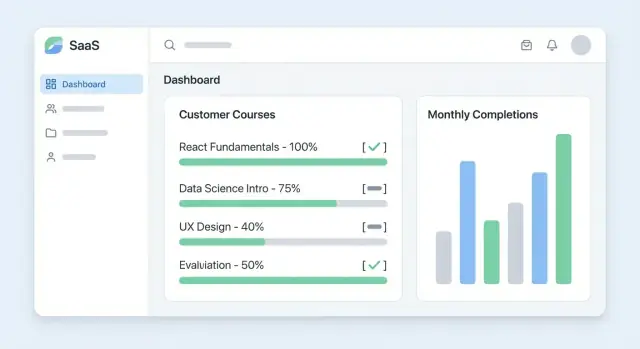
What “Training Completion Tracking” Should Solve
Training completion tracking is not just a checklist—it answers a concrete operational question: who completed which training, when, and with what result. If your team can’t trust that answer, customer onboarding training slows down, renewals get riskier, and compliance conversations become stressful.
The core problem to solve
At minimum, your learning progress web app should make it easy to:
- See each learner’s completion status per course (not started, in progress, completed)
- Capture timestamps (started, last activity, completed)
- Store outcomes like score, pass/fail, and attempt count when assessments are involved
- Keep an audit trail of changes (manual overrides, reassignments, certificate re-issues)
This becomes your “source of truth” for customer training tracking—especially when multiple teams (CS, Support, Sales, Compliance) need the same answer.
Who is it for?
“Customer training” can mean different audiences:
- Customers being onboarded to your product
- Partners who need enablement before reselling
- External learners taking optional education
Clarifying the audience early affects everything: required vs optional courses, reminder cadence, and what “completion” actually means.
Typical outputs stakeholders expect
A practical education completion dashboard usually needs:
- Per-account and per-learner views of progress
- Training compliance reporting (filters by date range, course, region)
- Exports (CSV) for audits or QBRs
- Certificates and completion records that can be shared or verified
Success metrics to track
Define success beyond “it works”:
- Completion rate by cohort/course
- Time-to-complete (median and outliers)
- Adoption (active learners, return visits)
- Impact signals (fewer support tickets, faster onboarding milestones)
These metrics guide what you build first—and what you can safely leave for later.
Users, Roles, and Customer Accounts
A training-completion app becomes much easier to manage when you separate who someone is (their role) from who they belong to (their customer account). This keeps reporting accurate, prevents accidental data exposure, and makes permissions predictable.
Core roles (and what they can do)
Learner
Learners should have the simplest experience: view assigned courses, start/resume training, and see their own progress and completion status. They should not see other people’s data, even within the same customer.
Customer Admin
A customer admin manages training for their organization: invite learners, assign courses, view completion for their teams, and export reports for audits. They can edit user attributes (name, team, status) but should not change global course content unless you explicitly support customer-specific courses.
Internal Admin (your team)
Internal admins need visibility across customers: manage accounts, troubleshoot access, correct enrollments, and run global reports. This role should also control sensitive actions like deleting users, merging accounts, or changing billing-related fields.
Instructor / Content Manager (optional)
If you run live sessions or have staff updating course materials, this role can create/edit courses, manage sessions, and review learner activity. They typically shouldn’t see customer billing data or cross-customer analytics unless required.
How to group customers: orgs, teams, and cohorts
Most B2B apps work best with a simple hierarchy:
- Organization (customer account): the tenant boundary (e.g., “Acme Inc.”)
- Teams/Departments: optional subdivisions (Support, Sales, etc.)
- Cohorts: time-based or program-based groupings (Q1 onboarding, Partner certification 2026)
Teams help with day-to-day management; cohorts help with reporting and deadlines.
Multi-tenant access rules (non-negotiable)
Treat every customer organization as its own secure container. At minimum:
- Every user belongs to exactly one organization (or you explicitly support multi-org users later).
- Every enrollment, progress record, and certificate is tied to an organization.
- Customer admins can only view/edit data within their organization.
- Internal admins can access multiple organizations, with audit logs for sensitive actions.
Designing roles and tenant boundaries early prevents painful rewrites when you add reporting, reminders, and integrations later.
Core Data Model: Courses, Progress, and Completion
A clear data model prevents most “why does this user look incomplete?” problems later. Aim to store what was assigned, what happened, and why you consider it complete—without guessing.
Training items: what you’re tracking
Start by modeling training content in a way that matches how you deliver it:
- Course (the unit customers recognize)
- Module (optional grouping)
- Lesson (video, article, webinar recording)
- Quiz (graded or pass/fail)
- Resource (PDF, link, checklist)
Even if your MVP only has “courses,” designing for modules/lessons avoids painful migrations when you add structure.
Completion rules: how “done” is decided
Completion should be explicit, not implied. Common rules include:
- Watched % (e.g., 90% of a video lesson)
- Passed quiz (e.g., score ≥ 80%)
- Manual approval (admin marks completion after a live session)
At the course level, define whether completion requires all required lessons, all required modules, or any N of M items. Store the version of the rule used, so reporting stays consistent if you change requirements later.
Progress and timestamps: what happened and when
Track a progress record per learner and item. Useful fields:
started_at,last_activity_at,completed_atexpires_at(for annual renewals or compliance cycles)
This supports reminders (“inactive for 7 days”), renewal reporting, and audit trails.
Evidence: what you can prove
Decide what evidence to store for each completion:
- Quiz score and pass/fail
- Attempt count (and optionally last attempt details)
- Certificate ID (plus issued timestamp)
Keep evidence lightweight: store identifiers and summaries in your app, and link to raw artifacts (quiz answers, video logs) only if you truly need them for compliance.
Authentication and Enrollment Flows
Getting authentication and enrollment right makes the app feel effortless for learners and controllable for admins. The goal is to reduce friction without losing track of who completed what—and for which customer account.
Choose login methods (start simple, leave room for SSO)
For an MVP, pick one primary sign-in option and one fallback:
- Email + password: familiar and universal, but adds reset/support work.
- Magic link (email one-time link/code): low friction and fewer password issues; ensure links expire quickly.
You can add SSO later (SAML/OIDC) when larger customers request it. Design now for it by keeping identities flexible: a user can have multiple auth methods connected to the same profile.
Enrollment flows that match how customers work
Most training apps need three enrollment paths:
- Invite link: admin generates an invite for a specific course (and optionally a customer account). Learner signs in (or creates an account) and is enrolled immediately.
- Admin assignment: admin selects learners and assigns courses. Useful for compliance or structured onboarding.
- Self-enroll: a public or customer-restricted catalog where learners can enroll themselves. If you support this, decide whether approval is needed.
A practical rule: enrollment should always record who enrolled the learner, when, and under which customer account.
Edge cases you should decide upfront
Re-enrollment and retakes: allow admins to reset progress or create a new attempt. Keep history so reporting can show “latest attempt” vs “all attempts.”
Course version updates: when content changes, decide whether completions stay valid. Common options are:
- Completion is tied to a course version (recommended for auditability).
- Learners are auto-enrolled into the new version, or only new learners see it.
Password reset and account recovery basics
If you use passwords, support “forgot password” via email with short-lived tokens, rate limits, and clear messaging. If you use magic links, you still need recovery for cases like changed emails—usually handled by admin support or a verified email change flow.
The best test: can a learner join a course from an invite in under a minute, and can an admin fix mistakes (wrong email, wrong course, retake) without engineering help?
Learner Experience: Simple Progress That’s Easy to Finish
A training tracker only works if learners can quickly understand what they need to do next—without hunting through menus or guessing what “complete” means. Design the learner experience to reduce decisions and keep momentum.
Learner home: assignments, due dates, and progress
Start with a single home screen that answers three questions: What’s assigned to me? When is it due? How far along am I?
Show assigned trainings as cards or rows with:
- Course title and short description (one line)
- Due date (or “No due date”)
- Progress indicator (e.g., 3/8 lessons, 45 minutes left)
- A single primary action: Continue
If you have compliance needs, add a clear status label like “Overdue” or “Due in 3 days,” but avoid alarmist UI.
A simple, mobile-friendly course player
Most customers will do training between meetings, on phones, or in short bursts. Make the player resume-first: open on the last unfinished step and keep navigation obvious.
Practical essentials:
- Large tap targets and readable line length
- “Next” and “Back” fixed at the bottom on mobile
- Remember where the learner stopped (even across devices)
Completion criteria: make the finish line visible
Show completion requirements near the top of the course (and on every step if needed): e.g., “Complete all lessons,” “Pass quiz (80%+),” “Watch video to 90%.” Then display what’s left: “2 lessons remaining” or “Quiz not attempted.”
When learners finish, confirm it immediately with a completion screen and a link to certificates or history (e.g., /certificates).
Accessibility basics you can ship early
Bake in a few basics from day one: keyboard navigation for the player, visible focus states, good color contrast, captions/transcripts for video, and clear error messages. These improvements reduce support tickets and drop-off.
Admin Dashboard: Monitor Completion at a Glance
Your admin dashboard should answer one question immediately: “Are our customers actually finishing the training?” The best dashboards do this without making admins click through five screens or exporting data just to understand what’s going on.
A dashboard per customer account
Start with an account selector (or account switcher) so the admin always knows which customer they’re viewing. Inside each customer account, show a clear table of enrolled learners with the essentials:
- Learner name and email
- Team/group (if you support teams)
- Enrolled courses
- Current status: Not started / In progress / Completed
- Completion date (when applicable)
- Last activity (so stalled learners are obvious)
A small “health summary” above the table helps admins scan quickly: total enrolled, completion rate, and how many are stalled (e.g., no activity in 14 days).
Filters that match how admins think
Admins typically ask questions like “Who hasn’t started Course A?” or “How is the Support team doing?” Make filters prominent and fast:
- Course filter (single course or “all courses”)
- Team filter
- Status filter (Not started / In progress / Completed)
Keep the results instantly sortable by last activity, status, and completion date. This turns the dashboard into a daily working tool, not just a report.
Bulk actions for real workflows
Completion tracking becomes valuable when admins can take action right away. Add bulk actions directly on the results list:
- Enroll users (add selected learners to a course)
- Send reminders (to selected learners, or all “Not started”)
- Export CSV (current filtered view)
Bulk actions should respect filters. If an admin filters to “In progress → Course B → Team: Onboarding,” the export should include exactly that cohort.
Drill-down: user timeline of activity and attempts
From any row in the table, admins should be able to click into a learner detail view. The key is a readable timeline that explains why someone is stuck:
- Enrollment events (course assigned, self-enrolled)
- Module or lesson starts/completions
- Assessment attempts and outcomes (pass/fail, score if applicable)
- Certificate issued (with a link to download)
- Reminder emails sent (so admins don’t spam by accident)
This drill-down reduces back-and-forth with customers (“I swear I finished it”) because admins can see what happened and when.
Reporting, Exports, and Certificates
Reports are where training completion tracking turns into something you can act on—and something you can prove during an audit or renewal.
Reports that answer real questions
Start with a small set of reports that map to common decisions:
- Completion rate by course: show % completed, in progress, not started—filterable by customer account and time period.
- Overdue learners: list learners past a due date (or “days since enrollment” threshold), including their last activity.
- Trend over time: a simple chart of completions per week/month, plus a breakdown by customer account to spot adoption issues early.
Keep each report drillable: from a chart to the underlying list of learners, so admins can follow up quickly.
Exports that fit existing workflows
Many teams live in spreadsheets, so CSV export is the default. Include stable columns like customer account, learner email, course name, enrollment date, completion date, status, and score (if applicable).
For compliance or customer reviews, a PDF summary can be optional: one page per customer account or per course with totals and a dated snapshot. Don’t block your MVP on perfect PDF formatting—ship CSV first.
Certificates that people can verify
Certificate generation is usually straightforward:
- Use a template (logo, course title, learner name, issue date, certificate ID).
- Generate on completion, store the PDF, and provide a verification link like
/verify/<certificate_id>.
The verification page should confirm the learner, course, and issue date without exposing extra personal details.
Retention: decide it early
Completion history grows fast. Define how long to keep:
- Operational data (e.g., full activity logs): 90–180 days.
- Proof of completion and certificates: 1–7 years depending on your industry.
Make retention configurable per customer account so you can support different compliance needs without rebuilding later.
Notifications and Automated Reminders
Notifications are the difference between “we assigned training” and “people actually finish it.” The goal isn’t to nag—it’s to create a gentle, predictable system that prevents customers from falling behind.
Reminder triggers that match real behavior
Start with a small set of triggers that cover most cases:
- Assigned: send a welcome nudge when a learner is enrolled, with a direct link to resume.
- Due soon: warn a few days before the deadline (and optionally again the day before).
- Overdue: notify after the due date, with a clear call to action and updated expectations.
- Stalled progress: if there’s no activity for X days (for example 7–14), remind them where they left off.
Keep triggers configurable per course or customer account, because compliance training and product onboarding have very different tolerance for urgency.
Channels: email first, in-app second
Email is the primary channel for most customer training tracking because it reaches learners who aren’t logged in. In-app notifications are useful for people already active in the learning progress web app—think of them as reinforcement, not the main delivery mechanism.
If you add both, ensure they share the same underlying schedule so the learner doesn’t get double-pinged.
Admin controls for tone and frequency
Give admins simple controls:
- Editable message templates (subject + body)
- Send windows (e.g., weekdays only, local time)
- Frequency caps (e.g., max 2 reminders per week per learner)
This keeps reminders aligned with customer onboarding training style and avoids spam complaints.
Log everything (for trust and audits)
Store a notification history record for each send attempt: trigger type, channel, template version, recipient, timestamp, and result (sent, bounced, suppressed). This prevents duplicates, supports training compliance reporting, and helps explain “why did I get this email?” when customers ask.
Integrations: CRM, LMS, and Event Sync
Integrations turn a training tracker from “another tool to update” into a system your team can trust. The goal is simple: keep customer accounts, learners, and completion status consistent across the tools you already use.
What to integrate first (and why)
Start with the systems that already define customer identity and workflows:
- CRM (Salesforce/HubSpot): source of truth for accounts, contacts, and renewals. Useful for tying completion to customer health and onboarding milestones.
- Support portal (Zendesk/Freshdesk/Intercom): show training status to support agents and trigger playbooks when users are stuck.
- Product analytics (Segment/Amplitude/Mixpanel): correlate learning progress with product activation and feature adoption.
- External LMS (Docebo/LearnUpon/Moodle): if training content lives elsewhere, your app may primarily aggregate and report completion.
Decide the data flow: import vs. push vs. sync
Pick one “system of record” per entity to avoid conflicts:
- Sync orgs/accounts from the CRM (nightly or near-real-time) so customer hierarchies match sales reporting.
- Import users from the CRM, LMS, or SSO directory; optionally allow admins to invite users in-app.
- Push completion events back to the CRM (e.g., update a Contact property, create an activity, or tag an onboarding task).
- Two-way sync only when necessary; it increases edge cases (duplicates, deletes, mismatched emails).
A simple integration API for an MVP
Keep the surface area small and stable:
POST /api/users(create/update by external_id or email)POST /api/enrollments(enroll user in course)POST /api/completions(set completion status + completed_at)GET /api/courses(for external systems to map course IDs)
Webhooks for real-time “course completed” events
Document one core webhook your customers can rely on:
- Event:
course.completed - Payload:
account_id,user_id,course_id,completed_at,score(optional) - Delivery: signed requests, retries, idempotency key
If you later add more events (enrolled, overdue, certificate issued), keep the same conventions so integrations stay predictable.
Privacy, Security, and Compliance Basics
Training completion data looks harmless—until you connect it to real people, customer accounts, certificates, and audit history. A practical MVP should treat privacy and security as product features, not afterthoughts.
Start with the data you actually need
List every piece of personal data you plan to store (name, email, job title, training history, certificate IDs). If you don’t need it to prove completion or manage enrollment, don’t collect it.
Decide early whether you must support audits (for regulated customers). Audits usually require immutable timestamps (enrolled, started, completed), who made changes, and what was changed.
Consent, transparency, and customer expectations
If learners are in the EU/UK or similar jurisdictions, you’ll likely need a clear lawful basis for processing and, in some cases, consent. Even when consent isn’t required, be transparent: provide a simple privacy notice and explain what admins can see. Consider a dedicated page like /privacy.
Role-based access control (RBAC) by default
Use least-privilege permissions:
- Learners: only their own progress and certificates
- Customer admins: only learners within their customer account
- Internal staff: limited support access, ideally time-bound
Treat “export all” and “delete user” as high-risk actions—gate them behind elevated roles.
Security essentials you can’t skip
Encrypt data in transit (HTTPS) and protect sessions (secure cookies, short-lived tokens, logout on password change). Add rate limits to login and invitation flows to reduce abuse.
Store passwords with strong hashing (e.g., bcrypt/argon2), and never log secrets.
Backups, deletion requests, and activity logs
Plan for:
- Automated backups with tested restores
- Data deletion requests (delete or anonymize, with clear rules)
- Activity logs for key events (enrollment, completion edits, admin exports)
These basics prevent most “we can’t prove it” and “who changed this?” problems later.
Tech Choices and Architecture for a Practical MVP
Your MVP should optimize for speed of delivery and clarity of ownership: who manages courses, who sees progress, and how completion is recorded. The “best” tech is the one your team can support for the next 12–24 months.
Choose a build approach
Custom app is ideal when you need account-based access, tailored reporting, or a branded learner portal. It gives you control over roles, certificates, and integrations—but you own maintenance.
Low-code (e.g., internal tools + database) can work if requirements are simple and you’re mostly tracking checklists and attendance. Watch out for limits around permissions, exports, and audit history.
Existing LMS + portal is often fastest when you need quizzes, SCORM, or rich course authoring. Your “app” becomes a thin customer portal and reporting layer, pulling completion data from the LMS.
A simple, practical stack
- Frontend: React / Next.js (or similar) for a clean learner and admin UI.
- Backend: Node.js, Python, or Rails—pick what your team already uses.
- Database: Postgres for relational data (accounts → users → enrollments → completions).
- Email/SMS: SendGrid/Mailgun (email) and optional Twilio (SMS) for reminders.
Keep the architecture boring: one web app + one API + one database is enough for an MVP.
If you want to move faster: prototype with Koder.ai
If the main constraint is delivery speed (not long-term differentiation), a vibe-coding platform like Koder.ai can help you ship a credible first version faster. You can describe your desired flows in chat—multi-tenant customer accounts, enrollment, course progress, admin tables, CSV export—and generate a working baseline using a modern stack (React on the frontend, Go + PostgreSQL on the backend).
Two practical advantages for an MVP like this:
- Planning mode + snapshots/rollback make it easier to iterate on completion rules and admin workflows without breaking production.
- Source code export means you’re not locked in—you can take the generated codebase and keep building with your team.
Hosting and environments
Plan three environments early: dev (fast iteration), staging (safe testing with realistic data), production (locked-down access, backups, monitoring). Use managed hosting (e.g., AWS/GCP/Render/Fly) to reduce ops work.
Effort: MVP vs. nice-to-haves
MVP (weeks): auth + customer accounts, course enrollment, progress/completion tracking, basic admin dashboard, CSV export.
Nice-to-haves (later): certificates with templates, advanced analytics, fine-grained permissions, LMS/CRM sync, automated reminder journeys, audit logs.
Implementation Roadmap: From MVP to Iteration
A training completion app succeeds when it’s boringly dependable: learners can finish, admins can verify, and everyone trusts the numbers. The fastest path is to ship a narrow MVP, prove it with real customers, then expand.
Step 1: Define the MVP scope (2–4 weeks)
Pick the minimum set of screens and capabilities that deliver “proof of completion” end to end:
- Learner screens: login, course list, course detail, progress view, completion confirmation.
- Admin screens: customer account picker, course roster, completion status, simple filters.
- APIs/endpoints: enroll user, fetch progress, record completion, list completions per customer.
- Reports: one export (CSV) and a basic completion summary.
Decide completion rules now (e.g., “all modules viewed” vs “quiz passed”) and write them down as acceptance criteria.
Step 2: Build checklist (what must exist to ship)
Keep a single checklist the whole team shares:
- Data model: customers/accounts, users/roles, courses/modules, enrollments, progress events, completions.
- Auth & permissions: learner vs admin, customer-level access boundaries.
- Learner flow: enroll → start → resume → finish → see completion.
- Admin view: search/filter, drill-down per customer, export button.
If you’re using Koder.ai to accelerate delivery, this checklist also translates cleanly into a “spec in chat” that you can iterate on (and validate quickly with stakeholders).
Step 3: Test scenarios (before you call it “done”)
Run realistic tests that mirror how customers will use it:
- Enrollment created manually and via bulk import.
- Edge cases in completion rules (retake quiz, reopened course, partial completion).
- Exports match the on-screen totals.
- Permissions: an admin from Customer A cannot access Customer B.
Step 4: Launch as a pilot, then iterate
Pilot with one customer account for 2–3 weeks. Track time-to-first-completion, drop-off points, and admin questions. Use feedback to prioritize the next iteration: certificates, reminders, integrations, and richer analytics.
If you want help scoping an MVP and shipping it quickly, reach out via /contact.
FAQ
What problem should training completion tracking solve first?
Start with the operational question: who completed which training, when, and with what result. Your MVP should reliably capture:
- Status: not started / in progress / completed
- Timestamps:
started_at,last_activity_at,completed_at - Outcomes: score, pass/fail, attempt count (if assessments exist)
- An audit trail for overrides and reassignment
If those fields are trustworthy, dashboards, exports, and compliance conversations become straightforward.
How do I define “completion” so it’s consistent and auditable?
Define completion rules explicitly and store them (and their version) rather than inferring completion from clicks.
Common rule types:
- Watched percentage for video lessons (e.g., 90%)
- Quiz threshold (e.g., score ≥ 80%)
- Manual approval for live sessions
At the course level, decide whether completion requires all required items or N of M, and store the rule version so old completions remain auditable after content changes.
What roles do I need, and how should I separate roles from customer accounts?
In most B2B training trackers, keep tenant boundaries simple:
- One organization/account is the security boundary
- Users belong to exactly one organization (until you intentionally support multi-org)
- Every enrollment, progress record, and certificate is tied to an organization
Then layer roles on top:
- Learners: only their own data
- Customer admins: only their organization’s learners
- Internal admins: cross-org access with audit logs
This prevents data leakage and makes reporting reliable.
Which enrollment flows should an MVP support?
Minimum set that covers most workflows:
- Invite link: enroll immediately after sign-in; record who created the invite.
- Admin assignment: customer admin assigns courses to selected users.
- Self-enroll: optional catalog; decide whether approval is required.
Always record enrolled_by, enrolled_at, and organization_id on the enrollment to avoid “how did they get in?” ambiguity later.
Should I use passwords or magic links for learner authentication?
Magic links reduce password friction and support load, but you still need:
- Short expiry (minutes, not days)
- One-time use and rate limits
- A plan for email changes (admin-verified change or support flow)
Passwords are fine if your customers expect them, but budget time for resets, lockouts, and security hardening. A common path is magic link now, add SSO (SAML/OIDC) when larger customers require it.
What UX elements most improve course completion rates?
Make “what’s next” obvious and “finish” predictable:
- A single home screen showing assignments, due dates, and a Continue button
- Resume-first player (opens where they left off across devices)
- Visible completion criteria (e.g., “Pass quiz 80%+”)
- Immediate completion confirmation plus certificate/history access (e.g.,
/certificates)
If learners can’t tell what remains, they stall—even if your tracking is perfect.
What should the admin dashboard show on day one?
Include a table that answers who is stuck and why:
- Learner identity (name/email), team
- Course, status, completion date, last activity
- Fast filters (course/team/status) and sorting (last activity, status)
Then add actions where the admin is looking:
- Bulk enroll
- Bulk reminders
- CSV export of the current filtered view
This turns the dashboard into a daily tool instead of a once-a-quarter report.
How should I handle retakes, resets, and multiple quiz attempts?
Track attempts as first-class data rather than overwriting fields.
Practical approach:
- Keep a progress history (events or attempt records)
- Expose “latest attempt” and “all attempts” in reporting
- Allow admins to reset progress or start a new attempt (but don’t delete history)
This supports honest reporting (“they passed on attempt 3”) and reduces disputes.
What happens to completions when a course is updated?
Treat content changes as a versioning problem.
Options:
- Tie completion to a course version (best for audits)
- Decide whether existing completions remain valid or expire
- If you publish a new version, choose between auto-enrolling everyone vs. only new learners
Store course_version_id on enrollments/completions so reports don’t change retroactively when you update requirements.
Which integrations should I build first, and what should the API look like?
Prioritize integrations that anchor identity and workflows:
- CRM (Salesforce/HubSpot) for accounts/contacts and renewal context
- Support tools (Zendesk/Intercom) so agents can see training status
Keep the API minimal:
POST /api/usersPOST /api/enrollmentsPOST /api/completionsGET /api/courses
Add one webhook customers can rely on (e.g., course.completed) with signing, retries, and idempotency to keep downstream systems consistent.