

How to Build a Web App to Track OKRs Across Teams and Departments
Plan, design, and ship an OKR tracking web app: data model, roles, check-ins, dashboards, integrations, and security for cross-team alignment.
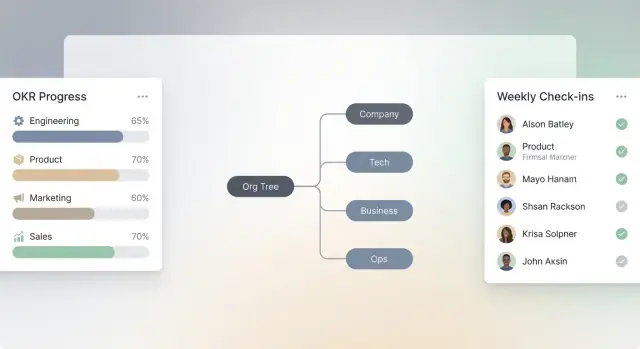
Define the scope, audience, and success metrics
Before you design an OKR tracking app, decide exactly who it serves and what “success” looks like. Otherwise, you’ll build a web app for OKRs that tries to satisfy everyone—and ends up being confusing for most.
Clarify the primary audience (and their priorities)
An OKR system is used by different people in different ways:
- Executives want a clean OKR dashboard with rollups, progress confidence, and “what needs attention.”
- Department leads need visibility across teams, alignment to company objectives, and easy reporting.
- Team leads focus on drafting objectives and key results, aligning dependencies, and running a consistent OKR check-in workflow.
- Contributors need simple updates, clear ownership, and context (why this KR matters).
Pick a primary audience for v1 (often team and department leads) and ensure other roles can still complete basic tasks.
Define the core jobs to be done
For objective and key results software, the must-have jobs are:
- Set OKRs (create objectives, define key results, assign owners, dates, and baselines)
- Align OKRs (link team KRs to higher-level objectives; show relationships clearly)
- Check in (quick updates, comments, confidence, and blockers)
- Report (status views for teams and departments)
- Learn (end-of-cycle reflections and what to change next cycle)
Decide what “across teams and departments” means on day one
Be explicit about minimum support for scale: multiple departments, cross-functional teams, shared objectives, and rollups by team/department. If you can’t support cross-team alignment links from the start, say so—and limit scope to within-team tracking.
Set product success metrics
Choose metrics you can measure:
- Adoption: % of targeted teams actively using the OKR tracking app
- Check-in rate: % of KRs updated weekly (or per cadence)
- Reporting time saved: time to produce a weekly/monthly OKR dashboard
- Quality signals: % of KRs with clear measures, owners, and due dates
Write these into your requirements so every feature decision ties back to outcomes.
Standardize OKR concepts and rules
Before you design screens or databases, standardize what “an OKR” means in your organization. If teams interpret terms differently, your OKR tracking app will turn into a reporting tool that nobody trusts.
Define the core entities
Start by writing clear definitions that will appear in your product copy, help text, and onboarding.
Objective: a qualitative, outcome-oriented goal (what we want to achieve).
Key Result: a measurable result that proves progress toward the objective (how we know we achieved it).
Initiative (optional): the work or projects intended to influence key results (what we do). Decide early whether initiatives are in scope for your web app for OKRs.
If you include initiatives, be explicit that they don’t “roll up” achievement the way key results do. Many teams confuse activity with outcomes; your definitions should prevent that.
Choose scoring and rollup rules
Your OKR dashboard will only be as credible as its scoring rules. Pick one primary scoring method and apply it everywhere:
- 0–1 (e.g., 0.0 to 1.0)
- 0–100 (percent)
- Red/Amber/Green status (often alongside a numeric score)
Then define rollups (how scores combine):
- How is an Objective score calculated from its key results (average, weighted average, lowest KR, manual override)?
- Are weights allowed per key result, and if so, must they sum to 100%?
- How do you handle non-numeric KRs (e.g., milestone-based)—do they map to numeric progress?
Write these rules down as product requirements for your objective and key results software so they’re enforced consistently in analytics and reporting.
Decide cadence and cycle boundaries
Define your time cadence: quarterly, monthly, or custom cycles. Your OKR check-in workflow depends on this.
Document:
- When cycles start/end (calendar quarters vs fiscal)
- Whether OKRs can overlap cycles
- What “active,” “completed,” and “carried over” mean
These decisions affect filters, permissions, and historical comparisons in the OKR analytics views.
Document naming conventions
Naming sounds minor, but it’s the difference between “team alignment” and a wall of vague titles.
Establish conventions like:
- Objectives start with a verb and outcome (“Improve onboarding conversion…”)
- Key results include a metric and target (“Increase activation rate from X to Y”)
- Optional prefixes for team or scope (“[Sales] …”, “[Platform] …”) if needed
Make these conventions visible in the UI (placeholders, examples, validation hints) so OKRs stay readable across teams and departments.
Plan information architecture and navigation
Information architecture (IA) is where an OKR tracking app either feels obvious—or immediately confusing. Your goal is to make it easy for someone to answer three questions in seconds: “What are my OKRs?”, “How is my team doing?”, and “Are we on track as a company?”
Map the primary screens
Start with a small set of core screens and make them reachable in one click from the main navigation:
- OKR list: a browsable catalog of Objectives and Key Results for the current cycle (and past cycles).
- OKR detail: the single source of truth—description, owners, alignment, progress, history, and comments.
- Check-ins: a focused place to post updates without hunting for the right page.
- Dashboards: progress rollups and trends for individuals, teams, and the company.
- Admin: cycles, org structure, permissions, templates, and integrations.
Keep secondary actions (export, duplicate, archive) inside menus on the relevant screen, not in global navigation.
Design navigation around “My / Team / Company”
Most users think in these three lenses. Make them explicit in the UI—either as top-level tabs or as a persistent switcher:
- My OKRs: defaults to items the user owns or contributes to.
- Team OKRs: shows the user’s team(s) with clear ownership and alignment.
- Company OKRs: highlights top-level Objectives and overall progress.
Make the default landing view “My OKRs” to reduce cognitive load.
Global search, filters, and fast workflows
Add a global search that works across Objectives, Key Results, and people. Pair it with simple filters that match how OKRs are managed: cycle, owner, status, department, and tags.
For non-technical users, keep flows short: clear labels (“Create Objective”, “Add Key Result”), strong defaults (current cycle), and minimal required fields. A user should be able to create an OKR and post a check-in in under a minute.
Design the data model for OKRs at scale
A scalable OKR tracking app starts with a clear, consistent data model. If the structure is messy, alignment breaks, reporting becomes slow, and permissions get complicated.
Core entities (the “must-haves”)
Most teams can cover 80% of needs with a small set of core records:
- User: profile, title, timezone, active status.
- Team and Department: two separate concepts so you can support cross-functional teams without forcing them into the org chart.
- OKR Cycle: e.g., “Q1 2026,” with dates, status (draft/active/closed), and visibility rules.
- Objective: the qualitative goal; includes owner, cycle, status, and visibility.
- Key Result: the measurable outcome; includes metric type, starting value, target, and current value.
Supporting entities (what makes it usable)
To make the app trustworthy and collaborative, store the history around OKRs:
- Check-in: timestamped progress update (value, confidence, note).
- Comment: discussion thread per objective or key result.
- Update history / audit log: who changed what, and when (especially for targets and ownership).
- Attachment / link: references to documents, dashboards, tickets, or specs.
Relationships: alignment and ownership
OKRs get complicated when many teams align work. Model these relationships explicitly:
- Ownership: one primary owner (user or team) plus optional co-owners.
- Contributors: many-to-many links between key results and users/teams.
- Alignment / parent-child links: allow an objective (or key result) to align to a parent objective. Consider supporting multiple parents only if you truly need it—otherwise reporting can get confusing.
How to store progress (so reporting stays fast)
For each key result, store:
- Start value, current value, target value (and a unit: %, $, #, yes/no)
- Confidence (e.g., red/yellow/green) and optional trend (up/flat/down)
Keep the latest “current value” on the key result for quick dashboards, and store each check-in as the source of truth for timelines and rollups.
Set up roles, permissions, and org structure
A good OKR tracking app isn’t just a list of objectives—it’s a reflection of how your company actually works. If your org chart in the product is too rigid (or too loose), alignment breaks down and people lose trust in what they’re seeing.
Model the org the way teams operate
Start by supporting the basics: departments and teams. Then plan for real-world complexity:
- Matrix teams (e.g., a product designer belongs to “Design” but works in “Product Squad A”).
- Shared ownership where an Objective is owned by one team, but Key Results are co-owned across multiple teams.
- Temporary groups like task forces or quarterly initiatives.
This structure drives everything else: who can see which OKRs, how rollups work, and how people find the right place to check in.
Define roles and what each role can do
Keep role-based access control simple enough for admins to manage, but specific enough to prevent chaos.
A practical baseline:
- Viewer: can view OKRs they have access to, comment (optional).
- Contributor: can create draft OKRs (within allowed areas), post check-ins, and suggest changes.
- Editor: can edit and align OKRs, manage owners, and update statuses.
- Admin: can manage org structure, cycles, permissions, and global settings.
Avoid “everyone can edit everything.” It creates accidental changes and endless “who touched this?” conversations.
Decide who controls cycles and governance actions
Be explicit about a few high-impact actions:
- Who can create cycles (quarters, half-years) and set dates?
- Who can publish OKRs so they’re visible beyond drafts?
- Who can lock edits once a cycle starts (or after a review deadline)?
- Who can archive old cycles and restore them?
A common pattern is: admins create cycles, department editors publish within their area, and locking/archiving is limited to admins (or a small ops group).
Plan visibility settings that match culture
Visibility needs to be flexible, not one-size-fits-all:
- Company-wide: default for most departmental OKRs.
- Department-only: for sensitive plans or early-stage work.
- Private drafts: for individuals or teams while shaping wording.
Make visibility obvious in the UI (badge + sharing summary), and ensure it’s enforced in search, dashboards, and exports—not just on the OKR page.
Define the OKR lifecycle and workflow states
A clear lifecycle keeps your OKR tracking app consistent across teams. Without it, people will create goals in different formats, update them at random times, and argue about what “done” means. Define a small set of workflow states and make every screen (creation, editing, check-ins, reports) respect them.
Core workflow states
A practical default lifecycle looks like:
Draft → Review → Published → In progress → Closed
Each state should answer three questions:
- Who can edit? (e.g., the owner only, or also collaborators)
- What can change? (objective text, key result targets, owners, due dates)
- Where does it show up? (private to the owner vs visible in team dashboards)
For example, keep Draft private by default, then make Published visible in rollups and the OKR dashboard so leadership views aren’t polluted by unfinished work.
Review steps that prevent misalignment
Most teams need lightweight gates before OKRs become “real.” Add configurable review steps such as:
- Manager approval for individual OKRs
- Leadership review for department-level OKRs
- Alignment checks that confirm each OKR links to a parent (or is explicitly marked as “top-level”)
In the app, reviews should be explicit actions (Approve / Request changes) with a comment box, not informal Slack messages. Also decide what happens after feedback: typically Review → Draft (with notes) until resubmitted.
Cycle changes: carry over, archive, clone
At the end of a quarter, users will want to reuse work without losing history. Support three distinct actions:
- Close & archive: lock the OKR and keep it available for reporting
- Clone to next cycle: copy the structure, reset progress, keep links if desired
- Carry over: move the same OKR into the next cycle (use sparingly; it can hide poor planning)
Make these actions visible in the cycle close flow, and ensure rollups don’t double-count clones.
Audit trail for goal and target changes
Targets will change. Your app should record who changed what, when, and why—especially for key result baselines and target values. Keep an audit trail that captures field-level diffs (old value → new value), plus optional notes.
This audit history builds trust: teams can discuss progress without arguing over whether the goalposts moved.
Build UX for creating and aligning OKRs
A great OKR tracking app lives or dies on how easy it is to write a good Objective, define measurable Key Results, and connect them to what other teams are doing. The UX should feel more like guided writing than “filling out a database.”
Simple creation flow with inline guidance
Start with a clean, two-part form: Objective (a clear outcome) and Key Results (measurable signals). Keep labels plain-language and add short, inline prompts like “Describe the change you want to see” or “Use a number + deadline.”
Use real-time validation that teaches without blocking—e.g., warn if a Key Result has no metric (“Increase what, by how much?”). Provide a one-click toggle for common KR types (number, %, $), and show examples next to the field, not hidden in a help page.
Templates and examples to beat blank-page friction
Offer templates by department (Sales, Product, HR) and by theme (Growth, Reliability, Customer Satisfaction). Let users start from a template, then edit everything. In objective and key results software, templates reduce inconsistent phrasing and speed up adoption.
Make “last quarter’s OKRs” searchable so people can reuse patterns, not just copy text.
Alignment helpers that keep context visible
Alignment shouldn’t be a separate step. While creating an OKR, let users:
- Pick a parent OKR (company or department)
- See related OKRs in a side panel (same team, same initiative, similar keywords)
- Preview alignment impact (who else depends on this KR)
This keeps team alignment front-and-center and improves rollups later in the OKR dashboard.
Quick edits without losing history
Treat edits as normal. Add autosave, and capture meaningful history with lightweight “version notes” (e.g., “Adjusted target after pricing change”). Show a clear change log so teams can trust updates during the OKR check-in workflow without arguing over what changed.
Implement check-ins, updates, and team collaboration
A tracking app only works if teams actually use it. The goal of check-ins is to capture reality—quickly—so progress, risks, and decisions stay visible without turning into a weekly paperwork ritual.
A weekly check-in flow people will finish
Design a single, predictable flow that works for every Key Result:
- Update the metric (current value, delta since last check-in, or % complete—whatever your KR type uses).
- Set confidence (e.g., On track / At risk / Off track) so leaders can scan status without reading everything.
- Add notes in plain language: what changed, what you learned, and what you’ll do next.
- Capture blockers as a structured field (optional) so they can be rolled up and resolved.
Keep the form short, allow saving drafts, and pre-fill last week’s context so users aren’t starting from zero.
Collaboration that stays lightweight
Add comments directly on Objectives, Key Results, and individual check-ins. Support @mentions to pull the right people in without meetings, and include a simple “decision log” pattern: a comment can be marked as a decision, with date and owner, so teams can answer “why did we change direction?” later.
Evidence links without setup headaches
Let users attach links to evidence—docs, tickets, dashboards—without requiring integrations. A URL field plus optional label (“Jira ticket”, “Salesforce report”, “Spreadsheet”) is enough. If possible, auto-fetch titles for nicer readability, but don’t block saving if metadata fails.
Make it mobile-first and low-friction
Busy teams check in between calls. Optimize for phones: large tap targets, minimal typing, and one-screen submission. A quick-action entry point (e.g., “Check in now”) and reminders that deep-link to the exact KR reduce drop-off and keep updates consistent.
Create dashboards, reporting, and rollups
Dashboards are where your OKR tracking app becomes useful day-to-day. The goal is to help people answer two questions fast: “Are we on track?” and “What should I look at next?” To do that, build dashboards by level—company, department, team, and individual—while keeping the same mental model across all of them.
Dashboards by level (company → individual)
Each level should show a consistent set of widgets: overall status distribution, top at-risk objectives, upcoming review dates, and check-in health. The difference is the scope filter and the default “owner” context.
A company dashboard might start with org-wide rollups; a team dashboard should highlight only the objectives the team owns plus any parent objectives they contribute to.
Rollups and drill-downs that feel natural
Rollups should be transparent, not “magic.” Let users drill down from an Objective to its Key Results, and then into the latest updates, comments, and evidence. A good pattern is:
- Objective card → key results list (progress + confidence)
- Key result row → update timeline (most recent first)
- Update timeline → attached links, blockers, decisions
Include a breadcrumb trail so users always know where they are, especially when they arrive from a shared link.
Views that surface risk early
Add dedicated views (not just filters) for:
- Status and confidence (e.g., On track / Off track + High/Medium/Low)
- Overdue check-ins (who hasn’t updated and since when)
- At-risk goals (low confidence, stalled progress, or repeated blockers)
These views should support “assign follow-up” actions so managers can move from insight to next step.
Exportable reports for reviews (PDF/CSV)
Quarterly reviews shouldn’t require copying screenshots into slides. Provide one-click exports:
- PDF: a clean, printable summary by level, including highlights, risks, and recent updates
- CSV: objectives, key results, owners, status, confidence, last check-in date
If you support scheduled exports, send them via email or store them under /reports for easy access during review meetings.
Plan integrations, imports, and APIs
Integrations can make or break adoption. If your OKR tracking app forces teams to double-enter status updates, it will be ignored. Plan integrations early, but ship them in a sensible order so you don’t stall the core product.
Decide what to integrate first
Start with the tools most likely to reduce manual work and increase visibility:
- Slack / Microsoft Teams: for check-in prompts, quick updates, and sharing progress links.
- Jira (or similar): to connect Key Results to delivery work, without pretending “tickets = outcomes.”
- Asana: for teams that live in task boards and want lightweight rollups.
- Google Sheets: for quick exports/imports and “last-mile” workflows.
- SSO (Google Workspace, Microsoft Entra ID/AD): to remove login friction and simplify user provisioning.
A practical rule: integrate the system that’s already the “source of truth” for your users’ daily workflow before adding nice-to-have analytics connectors.
Plan the initial data import
Most rollouts start with existing OKRs in spreadsheets or slides. Support a CSV import with:
- Column mapping (Objective title, KR, owner, team, start/end dates, baseline/target, status)
- Validation (missing owners, invalid dates, duplicate IDs)
- Deduplication strategies (match by external ID, normalized titles, or a user-confirmed merge step)
Make imports idempotent when possible, so re-uploading a corrected file doesn’t create duplicates.
Define API needs (and boundaries)
Be explicit about whether your APIs are read-only (reporting, embedding OKRs elsewhere) or write-enabled (create/update OKRs, post check-ins).
If you expect near-real-time sync, add webhooks for key events like “KR updated,” “check-in submitted,” or “objective archived,” so external tools can react without polling.
Build a simple integrations admin page
Include an admin page where authorized users can connect, test, and manage integrations: token status, scopes, webhook health, last sync time, and error logs. Keep the UX simple—one screen that answers: “Is it connected, and is it working?”
Rapid prototyping note: shipping faster without locking into bad decisions
If you want to prototype your OKR tracking app quickly (especially the OKR dashboard, check-in workflow, and permissions model), a vibe-coding platform like Koder.ai can help you get to a working internal version faster—while still producing real, exportable source code. That can be useful for validating IA, roles, and reporting with stakeholders before you invest heavily in bespoke engineering.
Add notifications, reminders, and automations
Notifications are the difference between an OKR tracking app that looks good in demos and one teams actually use. The goal isn’t “more pings”—it’s timely nudges that keep check-ins and reviews from slipping, without training people to ignore the system.
Reminder rules that match real OKR work
Start with a few clear, high-signal reminders:
- Missing check-ins: if a key result hasn’t been updated by the chosen cadence (weekly/biweekly), send a reminder to the owner.
- Approaching cycle close: nudge owners to finalize updates and confidence before the end date.
- Review deadlines: remind managers/reviewers when a review is assigned and still pending.
Keep rules configurable at the workspace or org level, but ship with sensible defaults (for example: a single reminder 24 hours after a missed check-in, and another 48 hours later if still untouched).
User preferences: where and when to notify
Different teams live in different tools, so offer per-user notification channels:
- In-app notifications for lightweight, non-urgent events.
- Email for summaries and time-based reminders.
- Slack/Teams for “today” actions like overdue check-ins.
Also add quiet hours and time zones. A reminder at 9am local time feels helpful; the same reminder at 2am gets muted forever.
Lightweight automation that saves effort
Automations should remove repetitive work while staying transparent:
- Recurring check-in prompts based on each OKR’s cadence.
- Digest summaries (weekly) for owners and managers: what changed, what’s overdue, where confidence dropped.
- Auto-create review tasks when an OKR enters “Ready for review.”
Make automations opt-in where they may surprise users, and always show “why you got this” inside the notification. That trust is what keeps adoption high.
Address security, privacy, and deployment
Security and privacy decisions are hard to “bolt on” later—especially when your OKR tracking app starts holding sensitive performance context, strategy notes, and leadership comments. Treat these as product requirements, not just engineering tasks.
Security fundamentals to bake in
Use encryption in transit (HTTPS/TLS everywhere) and encryption at rest for databases and file storage. Protect sessions with short-lived tokens, secure cookies, and clear logout behavior (including “log out of all devices”). Add rate limits to login and API endpoints to reduce brute force attempts, and keep an audit log of key events: sign-ins, permission changes, OKR edits, exports, and integrations.
A simple but powerful rule: any action that changes OKRs or access should be attributable to a user, time, and source.
Multi-tenant separation (if you support multiple orgs)
If your product supports multiple companies, plan tenant isolation early. At minimum:
- Every query is tenant-scoped by default (not optional)
- Unique tenant identifiers on all core tables
- Separate encryption keys and storage buckets where feasible
For higher assurance, consider separate databases per tenant—more work, but simpler containment.
Privacy, retention, and deletion
Define what happens when cycles end. Keep a retention policy for cycles, check-ins, and comments (e.g., retain 2–3 years), and support deletion for user accounts and personal data where required. Make exports and admin deletion actions auditable. If you anonymize past comments when a user is deleted, document the behavior clearly.
Deployment and operations
Set up environments (dev/staging/prod) with controlled access and configuration management. Automate backups and regularly test restores. Add monitoring for uptime, error rates, and slow queries, plus alerts that reach a human. Finally, write a lightweight incident response runbook: how to revoke tokens, rotate keys, communicate impact, and ship fixes safely.
FAQ
What should I define before building an OKR tracking web app?
Start by choosing a primary audience for v1 (often team and department leads) and define the core jobs to be done:
- Set OKRs
- Align OKRs across teams/departments
- Run a lightweight weekly check-in
- Report status for reviews
- Capture end-of-cycle learnings
Then write measurable success metrics (adoption, check-in rate, reporting time saved, KR quality) so feature decisions stay outcome-driven.
Who is the best primary audience for an OKR app v1?
A safe default is team and department leads because they:
- Draft and align OKRs across groups
- Need rollups and reporting for reviews
- Can drive consistent check-in habits
Still ensure executives can scan dashboards and contributors can update KRs quickly, but optimize early UX for the people who run the workflow.
What does “tracking OKRs across teams and departments” need to include on day one?
Minimum viable “across teams and departments” usually means:
- Multiple departments and cross-functional teams
- Shared objectives and clear parent-child alignment links
- Rollups by team and department
- Visibility controls that work in search, dashboards, and exports
If you can’t support cross-team alignment links yet, explicitly scope v1 to within-team tracking to avoid misleading reporting.
What core OKR concepts should the app standardize?
Standardize the terms in product copy and onboarding:
- Objective: qualitative, outcome-oriented goal
- Key Result: measurable proof of progress
- Initiative (optional): projects/work that influence KRs (not the same as outcomes)
If you include initiatives, clearly prevent them from “rolling up” achievement like KRs, or teams will mistake activity for progress.
How should OKR scoring and rollups work in the product?
Pick one primary scoring method and enforce it everywhere:
- Numeric: 0–1 or 0–100
- Status: Red/Amber/Green (often alongside numeric)
Define rollups in writing (average vs weighted, whether weights must sum to 100%, how milestone KRs map to numeric progress, and whether manual overrides are allowed). Consistency is what makes dashboards credible.
What OKR lifecycle states should an app support?
Start with a small set of workflow states and make them consistent across screens:
- Draft → Review → Published → In progress → Closed
For each state, define:
- Who can edit
- What fields can change (targets, owners, dates)
- Where the OKR appears (private vs dashboards)
This prevents “half-baked” OKRs from polluting leadership views and makes governance predictable.
What data model entities do I need for OKRs at scale?
A practical minimum set is:
- User (profile, timezone)
- Team and Department (separate concepts)
- OKR Cycle (dates, status)
- Objective (owner, cycle, visibility)
- Key Result (metric type, start/current/target, unit)
- Check-in (timestamped updates)
- Comment + audit log
- Alignment links (parent-child)
Keep the latest KR current value on the KR record for fast dashboards, and store check-ins as the timeline source of truth.
How should roles and permissions work in an OKR tracking app?
Use simple role-based access control and avoid “everyone can edit everything.” A baseline:
- Viewer: view (and optionally comment)
- Contributor: draft OKRs and submit check-ins
- Editor: edit/publish/alignment within allowed scope
- Admin: cycles, org structure, permissions, integrations
Also decide governance actions: who creates cycles, publishes OKRs, locks edits, and archives cycles—then enforce those rules consistently in UI and API.
What makes an OKR check-in workflow actually get used?
Design for a predictable weekly flow that can be completed quickly:
- Update the metric (current value / delta / %)
- Set confidence (on track / at risk / off track)
- Add a short note (what changed, what you learned, next step)
- Optional structured blockers field
Reduce friction with pre-filled last context, draft saving, and mobile-friendly screens. Adoption usually correlates with how fast a user can complete a check-in.
What dashboards and reports should an OKR web app include?
Dashboards should answer: “Are we on track?” and “What should I look at next?” Build by level:
- Company → department → team → individual
Make rollups transparent with drill-down:
- Objective card → KR list → update timeline (with comments/evidence)
Include dedicated risk views (at-risk, overdue check-ins) and provide exports for reviews:
- PDF summary
- CSV of OKRs/owners/status/confidence/last check-in
If you offer scheduled exports, store them under /reports for easy retrieval.