

Create a Web App to Track Vendor Contract Expirations
Learn how to plan, build, and launch a web app that tracks vendor contract expirations, stores documents, and sends timely renewal reminders.
What a Contract Expiration Tracker Should Solve
A contract expiration tracker exists to prevent “we didn’t see that coming” moments: surprise renewals, missed notice windows, and last‑minute scrambles because the agreement PDF lives in someone’s inbox.
The problems it should eliminate
Most teams run into the same failure modes:
- Missed renewals and notice periods: Many contracts require cancellation 30–90 days before renewal. If that date passes, you’re locked in.
- Auto‑renew clauses: Agreements quietly roll over for another term, sometimes with price increases.
- Scattered files and unclear terms: The signed version is hard to find, amendments are stored elsewhere, and nobody is sure which dates are binding.
Who actually uses it (and why)
A useful tracker supports different roles without forcing them to become contract experts:
- Procurement needs renewal visibility to negotiate early and manage vendor spend.
- Legal needs access to the latest executed agreement, key clauses, and amendments.
- Finance needs predictable forecasting and confirmation of payment terms.
- Department owners (IT, Marketing, HR, etc.) need reminders and context to decide: renew, renegotiate, or cancel.
The outcomes to aim for
When the tracker works, it creates:
- Fewer surprises (no silent renewals).
- Better negotiation timing (start discussions before notice deadlines).
- Clear ownership (every contract has a responsible person and backup).
Success metrics to track from day one
Pick measurable signals that show adoption and reliability:
- % of contracts with an assigned owner (and department).
- Reminder delivery rate (sent vs. bounced/failed) across email and Slack.
- On-time renewal decisions (decisions logged before notice date).
- % of contracts with key dates populated (end date, notice date, renewal term).
If your MVP can consistently solve these, you’ll prevent the most costly contract mistakes before adding advanced features.
MVP Scope and Feature Checklist
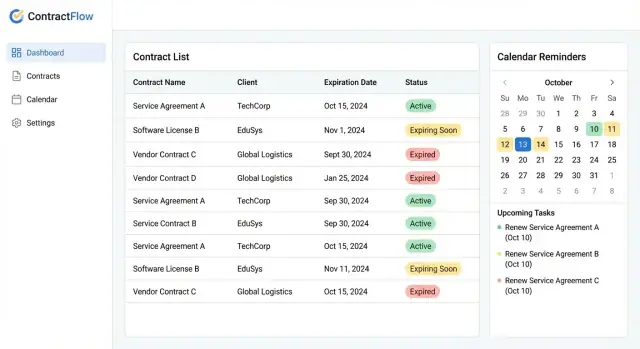
An MVP contract expiration tracker should answer one question instantly: “What’s expiring soon, who owns it, and what happens next?” Keep v1 small enough to ship quickly, then expand based on real usage.
If you want to move fast without building a full custom stack on day one, a vibe-coding platform like Koder.ai can help you prototype the core screens and reminder flow from a chat-based spec—while still producing real, exportable source code when you’re ready to operationalize.
Core MVP features (must-have)
- Contract list with vendor name, contract name/ID, start date, expiration date, and status (Active/Expired).
- Owner field (a person responsible), plus backup owner if you need coverage.
- Reminder scheduling tied to the expiration date (e.g., 90/60/30/7 days), with a clear “next reminder” indicator.
- Basic search and filters: vendor, owner, “expiring in X days,” and status.
- Simple contract detail page: key dates, renewal type (auto/manual), notes, and attached document link.
Nice-to-have features (add after v1 is working)
- Clause tagging and structured metadata (e.g., “termination,” “price increase,” “data processing”).
- E-signature and source links (DocuSign/Dropbox/Drive URL) so teams can jump to the original workflow.
- Vendor scorecards (renewal risk, performance notes) to support renewal decisions.
Explicitly out of scope for v1
To prevent the project from turning into a full contract lifecycle management system, keep these out of v1:
- Multi-step approvals and legal review workflows
- Negotiation redlining tools
- Complex obligations management (deliverables, SLAs) beyond simple notes
Simple user stories by role
Contract Owner: “I can see my contracts expiring soon and get reminders early enough to negotiate.”
Procurement/Admin: “I can add/edit contracts and assign owners so nothing sits unassigned.”
Finance/Leadership (read-only): “I can view upcoming renewals to forecast spend and avoid surprise auto-renewals.”
If you can deliver these stories with clean screens and dependable reminders, you have a solid MVP.
Data Model: Vendors, Contracts, Terms, and Dates
A contract tracker succeeds or fails on the data you capture. If the model is too thin, reminders become unreliable. If it’s too complex, people stop entering information. Aim for a “core record + a few structured fields” that covers 90% of cases.
The core entities
Vendor is the company you pay. Store the basics you’ll search and report on: legal name, display name, vendor type (software, facilities, agency), and an internal vendor ID if you have one.
Contract is the agreement you’re tracking. One vendor can have multiple contracts (e.g., separate agreements for licensing and support), so keep Contract as a separate record linked to Vendor.
Ownership and contacts
Every contract needs a clear contract owner (the person responsible for renewal decisions), plus a backup owner for vacations and turnover. Treat these as required fields.
Also capture key contacts:
- Vendor rep name/email
- Internal stakeholders (optional)
Terms and the dates that matter
Most apps store “start” and “end” dates and then wonder why renewals are missed. Track multiple dates explicitly:
- Start date (when the term begins)
- End date (when service stops unless renewed)
- Notice deadline (last day to give non-renewal notice)
- Renewal/next term date (when the next period begins)
Auto-renew and month-to-month rules
Add a few structured fields to cover common renewal patterns:
- Renewal type: fixed-term, auto-renew, month-to-month
- Renewal period: e.g., 12 months, 1 month
- Auto-renew enabled: yes/no
For month-to-month, the “end date” may be unknown. In that case, drive reminders off notice deadline rules (e.g., “notify 30 days before the next billing cycle”).
Status Rules and Lifecycle for Each Contract
Statuses are more than labels—they’re the logic that drives your dashboard counts, reminder schedules, and reporting. Define them early, keep them simple, and make them consistent across every vendor agreement.
Core statuses (keep them mutually exclusive)
A practical set for an MVP contract tracker:
- Active: Contract is in force and not within the “expiring soon” window.
- Expiring Soon: Contract is still active, but renewal action is approaching.
- Renewed: A new term has been executed (often linked to a new contract record or a new version/term).
- Terminated: Contract ended early or ended by notice before the natural end date.
- Archived: Historical record that should no longer generate reminders (typically after renewal is complete or long after termination).
Define “Expiring Soon” with clear thresholds
Choose fixed windows so everyone understands what “soon” means. Common options are 30/60/90 days before the effective end date. Make the threshold configurable per organization (or per contract type) so the tool fits different procurement rhythms.
Also decide what happens if the end date changes: the status should be recalculated automatically to avoid stale “Expiring Soon” flags.
Reason codes for clean reporting
When a contract moves to Terminated or Archived, require a reason code such as:
- Canceled
- Replaced (superseded by another agreement)
- Vendor merge (counterparty changed)
- Non-renewal
These reasons make quarterly reporting and vendor risk reviews much easier.
Track every status change (audit-friendly)
Treat status as an auditable field. Log who changed it, when, and what changed (old status → new status, plus reason code and optional note). This supports accountability and helps explain why reminders stopped or why a renewal was missed.
Reminder Engine and Notification Design
A contract tracker is only useful if people act on the reminders. The goal isn’t “more notifications”—it’s timely, actionable nudges that match how your team works.
Choose channels (start simple)
Begin with email as the default channel: it’s universal, easy to audit, and doesn’t require extra admin work. Once the workflow is stable, add optional Slack/Teams delivery for teams that live in chat.
Keep channel preferences per user (or per department) so Finance can stay on email while Procurement uses chat.
Reminder schedule that prevents surprises
Use a predictable cadence tied to the end date:
- 90 / 60 / 30 / 7 days before expiration
Also add a separate class of alert for the notice deadline (for example, “must give 45 days’ notice to cancel”). Treat that as higher priority than the expiration date, because missing it can lock you into another term.
Make reminders actionable: acknowledge and snooze
Every notification should include two one-click actions:
- Acknowledge: “I’ve seen this and I’m handling it.” This stops repeated pings for that step.
- Snooze: postpone by a small, controlled amount (e.g., 3 days, 1 week) to reduce noise without losing accountability.
Record actions in an audit trail (who acknowledged, when, and any comment) so follow-ups are clear.
Escalation when nothing happens
If the contract owner doesn’t acknowledge after a defined window (e.g., 3 business days), send an escalation to a manager or backup owner. Escalations should be limited and explicit: “No response yet; confirm ownership or reassign.”
Noise control and reliability
Deduplicate reminders (no repeats for the same contract/date), respect quiet hours, and retry failures. Even a great design fails if messages arrive late or twice.
UX Flow: Dashboard, Search, and Contract Detail Pages
A contract tracker succeeds or fails on speed: can someone find the right agreement, confirm the renewal date, and update it in under a minute? Design the UX around the most frequent actions—checking what’s next, searching, and making small edits.
Core pages to include
Dashboard should answer one question: “What needs attention soon?” Lead with Upcoming Renewals (next 30/60/90 days) and a small set of KPIs (e.g., expiring this month, auto-renewing soon, missing documents). Provide two primary views:
- Table view for scanning and bulk actions (sort by expiration, owner, vendor)
- Calendar view (“renewal calendar”) for planning and recurring check-ins
Contract Detail is the “single source of truth.” Put the essentials at the top: vendor, status, expiration date, renewal terms, owner, and notification settings. Keep supporting items below: notes, tags, linked documents, and related contacts.
Vendor Detail aggregates everything tied to one vendor: active contracts, historical contracts, key contacts, and renewal patterns. This is where users answer “What else do we buy from them?”
Settings should stay lean: notification defaults, roles, Slack/email connections, and standard tags/statuses.
Search, filters, and saved views
Make search omnipresent. Support filtering by vendor, owner, status, date range, and tag. Add “quick filters” on the dashboard (e.g., “Auto-renew in 14 days,” “Missing owner,” “Draft”). If your users repeat the same filters, allow saved views like “My renewals” or “Finance approvals.”
Design for fast updates
Most edits are small. Use inline editing for expiration date, owner, and status directly in the table and at the top of the contract detail page. Confirm changes with subtle feedback and keep an “Undo” option for accidental edits.
Keep navigation consistent: dashboard → search results → contract detail, with a clear back path and persistent filters so users don’t lose context.
Document Storage and Version Control
A contract tracker isn’t complete without the paperwork. Storing documents next to the key dates prevents “we can’t find the signed copy” moments when renewal time hits.
What to upload (and why)
Start with the minimum set of files people actually look for:
- Signed agreement PDF (the source of truth)
- Amendments and addenda (they often change pricing, term length, or notice periods)
- Renewal or termination emails/letters (proof of notice and timing)
Keep uploads optional in the MVP, but make the “missing document” state obvious on the contract detail page.
Storage approach: object storage + database links
For most teams, the simplest and most reliable setup is:
- Store files in object storage (e.g., S3-compatible storage)
- Save only metadata in your database: file URL/key, original filename, size, content type, checksum, uploaded_by, uploaded_at, and which contract/version it belongs to
This keeps your database small and fast, while object storage handles large PDFs efficiently.
Versioning: latest vs. previous documents
Treat documents as immutable records. Instead of “replacing” a PDF, upload a new version and mark it as the latest.
A practical model is:
document_group(e.g., “Master Agreement”)document_version(v1, v2, v3…)
On the contract page, show the latest version by default, with a short history list for previous versions (who uploaded, when, and a note like “Updated renewal clause”).
Permissions for download, replace, and delete
Document access should follow role-based access:
- Viewers: download only
- Editors: upload new versions (and optionally add notes)
- Admins: manage permissions; delete only if you truly need it
If you allow deletion, consider “soft delete” (hide from UI but keep in storage) and always record actions in your audit log. For more on controls, link this to your /security-and-audit section.
Security, Permissions, and Audit Logs
Contract data isn’t just dates—it includes pricing, negotiated terms, and signed agreements. Treat security as a core feature of your contract management web app, even in an MVP.
Roles and permission levels
Start with a small set of roles that map to real responsibilities:
- Admin: manages users, roles, global settings, and integrations.
- Editor: can create and update vendors/contracts, upload files, and manage reminders.
- Viewer: read-only access (useful for stakeholders who only need a renewal calendar).
- Legal-only: can view legal fields and documents, but not finance fields.
- Finance-only: can view pricing, billing terms, and renewal costs, but not internal legal notes.
Keep roles simple, then add exceptions via record-level rules.
Record-level access (who can see what)
Define rules per vendor and inherit them to all related contracts. Common patterns:
- Vendor is visible to All employees, Specific teams, or Named users.
- A contract can optionally override vendor visibility (for especially sensitive agreements).
- Restrict document downloads to users who can view the contract and have “Download files” permission.
This prevents accidental exposure while still supporting cross-team vendor contract tracking.
Authentication: SSO or email + MFA
If your organization has an identity provider, enable SSO (SAML/OIDC) so access is tied to employment status. If not, use email/password with MFA (TOTP or passkeys) and enforce strong session controls (timeouts, device revocation).
Audit logs you’ll actually use
Log actions that matter during reviews and disputes:
- File downloads, uploads, and deletions
- Contract edits (old value → new value), especially renewal dates and auto-renew terms
- Permission and role changes
Make audit entries searchable by vendor/contract and exportable for compliance. This “audit trail for contracts” turns trust into evidence.
Importing Existing Contracts and Integrations
A contract tracker is only useful once it contains your real-world agreements. Plan for two paths: a fast “get it in” import so people start using the app quickly, and deeper integrations that reduce manual work over time.
Quick start: CSV import
A manual CSV import is the simplest way to load existing contracts from spreadsheets or shared drives. Keep the first version forgiving and focused on the fields that drive reminders:
- Vendor name (and optional vendor ID)
- Contract name/type
- Start date, end/expiration date, auto-renew flag
- Renewal notice window (e.g., 30/60/90 days)
- Owner (person or team)
Include a downloadable template and a “mapping” step so users can match their column names to your fields. Also provide a preview screen that highlights errors before anything is saved.
Data cleanup you should expect
Imports expose messy data. Build a small cleanup workflow so the first upload doesn’t turn into a support ticket:
- Duplicate vendors: “Acme Inc.” vs “ACME” vs “Acme, LLC.” Offer suggestions to merge and a way to pick an existing vendor record during import.
- Inconsistent date formats: 01/02/2026 can mean different things. Detect formats, require the user to confirm, and show the parsed result.
- Missing owners or dates: Allow import to continue, but flag incomplete rows and send them to a “Needs review” queue.
Optional integrations (reduce re-entry)
Once the basics work, integrations can keep vendor and renewal info current:
- Google Workspace / Microsoft 365 contacts: pull in vendor contacts to populate “Account manager,” billing email, and phone.
- Calendar sync: optionally create calendar events for expiration and notice dates so teams see renewals in their existing workflow.
Syncing with a vendor system (ERP/procurement)
If your company already has an ERP or procurement tool, treat it as a potential source of truth for vendor records. A lightweight sync can import vendors and IDs nightly, while contract-specific dates remain managed in your app. Document what wins in conflicts, and show a clear “Last synced” timestamp so users trust the data.
If you later add automation, link to it from your admin area (for example, /settings/integrations) rather than hiding it behind engineering-only processes.
Backend Logic for Scheduling and Reliability
A contract tracker feels “simple” until reminders don’t fire, fire twice, or fire at the wrong local time. Your backend needs a reliable scheduling layer that’s predictable, debuggable, and safe to retry.
Background jobs for reminders and escalations
Use a job queue (e.g., Sidekiq/Celery/BullMQ) rather than running reminder logic inside web requests. Two job patterns work well:
- Daily scheduler job: runs every hour (or once per day) and enqueues reminder jobs due soon.
- Per-contract reminder jobs: one job per contract per reminder window (e.g., 90/60/30/7/1 days) plus escalation jobs if no action is recorded.
Escalations should be explicit: “notify owner,” then “notify manager,” then “notify finance,” with delays between each step so you don’t spam everyone.
Time zones and business days
Store all timestamps in UTC, but compute “due dates” in the contract owner’s time zone (or the organization’s default). For example, “30 days before expiration at 9:00 AM local time.”
If you support business-day deadlines, avoid hand-rolled logic. Either:
- Use a business calendar library, or
- Maintain a small “company calendar” table (weekends + holidays) and shift reminders to the previous business day.
Make the rule visible in logs and in the contract detail page so users understand why a reminder arrived on a Friday instead of a weekend.
Idempotency: prevent duplicate notifications
Retries are normal (network hiccups, email provider timeouts). Design notification sending to be idempotent:
- Create a notification_outbox record with a unique key like
contract_id + reminder_type + scheduled_for_date + channel. - Put a unique constraint on that key.
- Only send if the insert succeeds; if it already exists, exit safely.
This guarantees “at most once” delivery from your app even if jobs run twice.
Message templates with variables
Centralize templates so business users can tweak wording without code changes. Support variables such as:
{{vendor_name}}{{contract_title}}{{expiration_date}}{{days_remaining}}{{contract_url}}(relative link like/contracts/123)
Render templates server-side, store the final rendered text in the outbox for audit/debugging, and send via email and Slack with the same underlying payload.
Testing, Pilot Rollout, and Go-Live Checklist
Testing is where contract trackers usually fail quietly: a date rule is off by one day, an auto-renew clause is misread, or notifications get sent but never delivered. Treat the reminder engine like billing logic—high impact, low tolerance for surprises.
What to test (and how)
Start with automated tests around your “contract truth,” not UI polish.
- Date rules: end dates, “effective through” wording, time zones, and inclusive/exclusive logic (e.g., is a contract valid until 2026-03-31 at 23:59?).
- Notice deadlines: test computed dates for 30/60/90-day notice windows, including weekend/holiday handling if you support it.
- Auto-renew logic: verify renewal terms (e.g., “renews for one year unless canceled 45 days prior”), and ensure the next cycle is calculated correctly.
Add a small set of fixtures (realistic sample contracts) and write tests that assert the exact reminder schedule produced for each one.
Notification reliability checks
Test email deliverability in a staging environment with real inboxes (Gmail, Outlook) and verify:
- SPF/DKIM/DMARC alignment (or your provider’s equivalent)
- Bounce handling and suppression behavior
- Unsubscribe/opt-out behavior for non-critical alerts
If you support Slack notifications, validate rate limits, channel permissions, and what happens when a channel is archived.
Pilot rollout: small, real, measurable
Run a pilot with a small group (procurement + finance is ideal) using real contracts. Define success metrics: “No missed renewals,” “<5% incorrect reminders,” and “All contracts searchable in under 10 seconds.” Capture feedback weekly and fix rule gaps before scaling.
If you’re building your first version with Koder.ai, a pilot is also the right time to use snapshots/rollback to iterate safely on the reminder logic and permission rules without disrupting the whole team.
Go-live readiness checklist
Before launch, confirm:
- Admin roles and access are correct for every team
- A backup/restore test has been performed
- Reminder jobs run on schedule and are monitored
- A support path exists (who triages failed imports or bad dates)
- A short internal guide is published (e.g., /blog/contract-tracker-playbook)
Analytics, Reporting, and Ongoing Maintenance
A contract tracker earns its keep when it helps people act early—not just store agreements. That means clear reporting, lightweight engagement metrics, and a simple plan for keeping data trustworthy over time.
Practical reports people actually use
Start with a few “always-on” views that answer common questions:
- Upcoming renewals by month: a renewal calendar that shows how many contracts are due in the next 30/60/90 days, grouped by month.
- By owner: who is responsible for what, so managers can rebalance workload before deadlines.
- By vendor: see all contracts tied to one vendor (including different departments) to spot consolidation opportunities.
If you offer exports, keep them simple: CSV for spreadsheets, plus a shareable filtered link within the app (e.g., /reports/renewals?range=90&group=owner).
Engagement signals: acknowledgements and missed notices
To avoid “we never saw the reminder,” track a small set of events:
- Acknowledgements: when a recipient clicks “Acknowledge” (or marks “In progress”).
- Overdue renewals: contracts that crossed a renewal decision date without a recorded outcome.
- Missed notices: reminders that failed to deliver (email bounce, Slack error) or were never acknowledged.
These don’t need to feel punitive. Their main purpose is operational clarity: you can see where follow-ups are needed and whether notification settings are working.
Ongoing improvements to plan for
Once the MVP is stable, the next upgrades that add real value are:
- Tags (e.g., “auto-renew,” “security review required”) for faster filtering and reporting.
- Templates for standard terms and reminder schedules.
- Workflow approvals for renew/terminate decisions (lightweight: requester → approver → recorded decision).
Support processes that keep data clean
Write down a few simple runbooks and link them from an internal page like /help/admin:
- Data corrections: who can edit key dates, how to document why they changed.
- Access requests: how to grant roles and how often permissions are reviewed.
- Backups and restores: backup frequency, where backups live, and how to test restores periodically.
With these basics, the app stays useful long after launch—and the reporting becomes a trusted source for renewal planning.
FAQ
What is a contract expiration tracker supposed to prevent?
It should prevent three common failures:
- Missing notice deadlines (often 30–90 days before renewal)
- Getting trapped by auto-renew clauses (sometimes with price increases)
- Losing time to scattered files and unclear “latest executed” terms
If it reliably answers “what’s expiring soon, who owns it, and what happens next,” it’s doing the job.
What are the must-have MVP features for a contract expiration tracker?
Start with a small, shippable scope:
- Contract list (vendor, contract ID/name, start/end dates, status)
- Required owner (plus optional backup owner)
- Reminder scheduling (e.g., 90/60/30/7 days) with “next reminder” shown
- Search + filters (vendor, owner, expiring in X days, status)
- Detail page with key dates, renewal type, notes, and a document link
Add clause tagging, scorecards, and integrations only after reminders are dependable.
Which key dates should be stored to avoid missed renewals?
Track dates separately so reminders stay accurate:
- Start date
- End/expiration date
- Notice deadline (the last day to cancel/non-renew)
- Next term / renewal effective date
Many missed renewals happen because teams store only start/end dates and ignore the notice window.
How should the app model auto-renew and month-to-month contracts?
Use a few structured fields:
- Renewal type: fixed-term, auto-renew, or month-to-month
- Renewal period (e.g., 12 months)
- Auto-renew enabled: yes/no
For month-to-month where an “end date” is unclear, drive alerts from the notice rule (e.g., “30 days before next billing cycle”) rather than an end date.
What contract statuses work best for an MVP—and why?
Keep statuses mutually exclusive and tied to logic:
- Active
- Expiring Soon (based on a clear threshold like 30/60/90 days)
- Renewed
- Terminated
- Archived (no more reminders)
Recalculate status automatically when dates change, and log who changed what (old → new) for auditability.
What reminder schedule should you start with, and what actions should reminders include?
A practical default is:
- 90 / 60 / 30 / 7 days before expiration
- Separate, higher-priority alerts for the notice deadline
Include two one-click actions in each reminder:
- Acknowledge (stop repeats for that step)
- Snooze (short, controlled delay like 3 days or 1 week)
Escalate to the backup owner/manager if there’s no acknowledgement after a defined window.
Should notifications be email, Slack/Teams, or both?
Email is the best default because it’s universal and easy to audit. Add Slack/Teams only after the workflow is stable.
To reduce noise:
- Deduplicate reminders per contract/date
- Respect quiet hours
- Retry failures safely
Also track delivery outcomes (sent/bounced/failed) so you can trust the system.
How should documents and versions be stored in the tracker?
Use a simple, scalable approach:
- Store files in object storage (S3-compatible)
- Store metadata in your DB (file key/URL, checksum, uploaded_by, uploaded_at, linked contract/version)
Treat documents as immutable: upload a new version instead of replacing the old one, and show “latest” plus a short version history on the contract page.
What’s the minimum security and audit logging an MVP should include?
Start with a small set of roles (Admin, Editor, Viewer) and add restricted roles if needed (e.g., Legal-only, Finance-only).
For access control:
- Apply visibility rules at the vendor level and inherit to contracts
- Restrict file downloads to users who can view the contract and have download permission
Log key audit events: contract edits (especially dates/renewal terms), permission changes, and file uploads/downloads/deletions.
How do you import existing contracts without turning it into a data-cleanup nightmare?
A forgiving CSV import gets teams using the app quickly. Provide:
- A downloadable template
- Column mapping
- A preview step that flags errors before saving
Expect cleanup needs:
- Vendor duplicates (“Acme Inc” vs “ACME”)
- Mixed date formats
- Missing owners/dates
Let the import complete, but route incomplete rows to a “Needs review” queue so reminders don’t silently fail.