

How to Create a Web App for Advocacy and Referral Tracking
Learn how to build a web app to track advocates, referrals, and rewards—from MVP features and data model to integrations, analytics, and privacy basics.
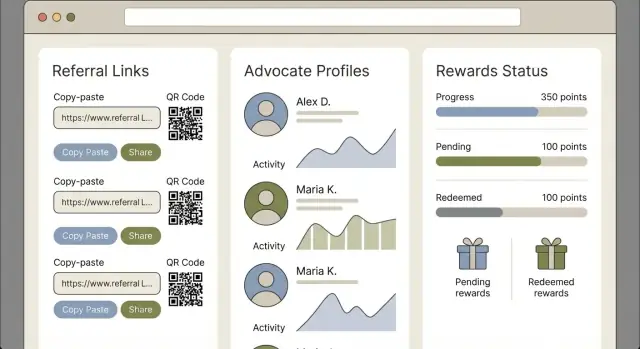
Clarify Goals and What You Will Track
Before you build anything, decide what “advocacy” means in your business. Some teams treat advocacy as referrals only. Others also track product reviews, social mentions, testimonial quotes, case studies, community participation, or event speaking. Your web app needs a clear definition so everyone records the same actions in the same way.
Choose 1–2 primary goals
Referral programs can serve different purposes, and mixing too many goals makes reporting muddy. Pick one or two primary outcomes, such as:
- More qualified leads for sales
- Lower customer acquisition cost (CAC)
- Higher retention or expansion by rewarding loyal customers
A useful test: if you had to pick one chart to show the CEO monthly, what would it be?
Set success metrics you’ll compute inside the app
Once goals are set, define the numbers your referral tracking system must calculate from day one. Common metrics include:
- Referral-to-signup rate (how many referred visitors become signups)
- Referral-to-paid conversion rate (or lead-to-opportunity rate for sales-led funnels)
- Reward cost per acquisition (total rewards + fees / new customers acquired)
Be explicit about definitions (e.g., “conversion” within 30 days; “paid” excludes refunds).
Align stakeholders early
Customer advocacy tracking touches multiple teams. Identify who approves rules and who needs access:
- Marketing: program positioning, channels, and reporting
- Sales: lead quality and routing expectations
- Support/Success: advocate experience and edge cases
- Finance: reward budgets, payout timing, tax considerations
Document these decisions in one short spec. It will prevent rework once you start building screens and attribution logic.
Map Users, Workflows, and Core Screens
Before you pick tools or database tables, map the humans who will touch the system and the “happy path” they expect. A referral program web app succeeds when it feels obvious to advocates and controllable for the business.
Target users (and what they need)
Advocates (customers, partners, employees): a simple way to share a link or invite, see referral status, and understand when rewards are earned.
Internal admins (marketing, customer success, ops): visibility into who’s advocating, which referrals are valid, and what actions to take (approve, reject, resend messages).
Finance / rewards approvers: clear evidence for payouts, audit trails, and exportable summaries to reconcile reward automation with real costs.
Core user journeys to design first
-
Invite → signup → attribution → reward
An advocate shares a link or invite. A friend signs up. Your referral tracking system attributes the conversion to the advocate. The reward is triggered (or queued for approval). -
Advocate onboarding → sharing options → status tracking
An advocate joins the program (consent, basic profile). They choose how to share (link, email, code). They track progress without contacting support. -
Admin review → exception handling → payout confirmation
An admin reviews flagged referrals (duplicates, refunds, self-referrals). Finance approves payouts. The advocate gets a confirmation message.
Where the app should live
A standalone portal is faster to launch and easy to share externally. An embedded experience inside your product reduces friction and improves customer advocacy tracking because users are already authenticated. Many teams start standalone and later embed key screens.
Must-have screens for v1
For a web app MVP, keep screens minimal:
- Admin dashboard: performance snapshot, queues (pending, flagged), quick filters
- Advocate profile (admin-facing): contact info, consent status, totals earned, sharing assets
- Referral details: attribution source, timestamps, status history, notes, and reward eligibility
These screens form the backbone of advocate management and make later referral analytics far easier to add.
Choose MVP Scope vs Phase 2 Features
An advocacy and referral app can grow into a big product quickly. The fastest way to ship something useful is to define an MVP that proves the core loop: an advocate shares, a friend converts, and you can confidently credit and reward the right person.
What “done” means for the MVP
Your MVP should let you run one real program end-to-end with minimal manual work. A practical baseline includes:
- Unique referral links or codes that are easy to share and hard to guess
- Attribution that assigns a conversion to the correct advocate (with clear rules)
- Basic rewards (fixed amount or a single reward type) and simple status tracking
- Admin review tools to approve/deny edge cases, override attribution, and export results
If your MVP can handle a small pilot without spreadsheets, it’s “done.”
Features to postpone (Phase 2)
These are valuable, but they often slow delivery and add complexity before you know what matters:
- Tiered rewards (milestones, multi-step unlocks, VIP tiers)
- Multi-campaign support (multiple programs, brands, countries, currencies)
- A/B tests for messages, landing pages, or incentive structures
- Full self-serve advocate portal with payout history, support flows, and richer profile management
Set constraints before you commit
Write down constraints that will shape scope decisions: timeline, team skills, budget, and compliance needs (tax, privacy, payout rules). When trade-offs appear, prioritize accuracy of tracking and a clean admin workflow over bells and whistles—those are hardest to patch later.
Design the Data Model for Advocates and Referrals
A referral app succeeds or fails on its data model. If you get the entities and statuses right early, everything else—reporting, payouts, fraud checks—becomes simpler.
Start with the core entities
At minimum, model these objects explicitly:
- Advocate: the person enrolled in your program (has a profile and share assets)
- Referrer: the source identity that generated a referral (often the same as Advocate, but not always—e.g., partners)
- Referral: the relationship between a referrer and a referred user (the “case file”)
- Reward: what gets earned (coupon, cash, points) and its lifecycle
- Campaign: rules and eligibility for a program variant (dates, regions, incentives)
- Event: every tracked action (click, signup, purchase, refund)
- Payout: how rewards are paid or issued (batch, method, external IDs)
Key fields that prevent headaches later
Give every record a unique identifier (UUID or similar) plus timestamps (created_at, updated_at). Add statuses that match how work actually flows—such as pending → approved → paid for rewards—and store the source channel (email, link share, QR, in-app, partner).
A practical pattern is to keep “current status” fields on the Referral/Reward, while storing the full history as Events.
Track referrals as a timeline, not a single moment
Referrals rarely happen in one step. Capture a chronological chain like:
click → signup → purchase → refund
This makes attribution explainable (“approved because purchase happened within 14 days”) and supports edge cases like chargebacks, cancellations, and partial refunds.
Plan for idempotency from day one
Product and payment events get resent. To avoid duplicates, make your Event writes idempotent by storing an external_event_id (from your product, payment processor, or CRM) and enforcing a uniqueness rule like (source_system, external_event_id). If the same event arrives twice, your system should safely return “already processed” and keep totals correct.
Set Up Attribution Rules That Match Real Behavior
Attribution is the “source of truth” for who gets credit for a referral—and it’s where most referral program web apps either feel fair or create constant support tickets. Start by deciding which behaviors you’ll recognize, then write rules that behave predictably when reality gets messy.
Pick a small set of attribution methods (MVP-friendly)
Most teams succeed with 2–3 methods at first:
- Referral links (best default): unique URL per advocate
- Coupon codes: helpful for offline sharing or influencers
- Invite emails: tracked via the recipient address and send event
- Post-signup claim flow: “Were you referred? Enter code/email” as a backup when tracking fails
Handle edge cases you will definitely see
Users click multiple links, switch devices, clear cookies, and convert days later. Your referral tracking system should define what happens when:
- Multiple clicks occur (same user clicks different advocates’ links)
- Multiple devices are involved (mobile click → desktop purchase)
- Delayed conversions happen (conversion window like 7/30/90 days)
A practical MVP rule: set a conversion window, store the most recent valid referral within that window, and allow manual overrides in the admin tool.
Choose a crediting model (keep it simple)
For a web app MVP, pick last-touch or first-touch and document it. Split credit is attractive, but it increases complexity in reward automation and reporting.
Store evidence for every decision
When you credit a referral, persist an audit trail (e.g., click ID, timestamp, landing page, coupon used, invite email ID, user agent, and any claim-form input). This makes advocate management easier, supports fraud reviews, and helps resolve disputes quickly.
Build the Admin Dashboard and Management Tools
Your program will only work if someone can run it day to day. The admin area is where you turn raw referral events into decisions: who gets rewarded, what needs follow‑up, and whether the numbers look healthy.
The dashboard: a clear “control center”
Start with a simple dashboard that answers the questions an operator asks every morning:
- Totals and trends: new advocates, new referrals, conversion rate, rewards issued (and pending)
- Pending approvals: items waiting for review, with due dates or aging (e.g., “pending 7+ days”)
- Top advocates: ranked by qualified referrals or revenue attributed
- Flagged activity: sudden spikes, repeated self-referrals, multiple signups from the same device/IP, or suspicious patterns
Keep charts lightweight—clarity beats complexity.
Referral detail view: auditability in one place
Every referral should have a drill‑down page showing:
- Who referred whom (and key identifiers)
- Current status (clicked → signed up → qualified → rewarded)
- Timeline of events
- Reward eligibility and the rule that triggered it
This makes support tickets easy: you can explain outcomes without digging through logs.
Advocate profiles: manage relationships, not just links
Each advocate profile should include contact info, their referral link/code, full history, plus notes and tags (e.g., “VIP,” “needs outreach,” “partner”). This is also the right place for manual adjustments and communication tracking.
Exports and access control
Add basic CSV exports for advocates, referrals, and rewards so teams can report or reconcile in spreadsheets.
Implement role-based access: admin (edit, approve, pay out) vs read-only (view, export). It reduces mistakes and keeps sensitive data limited to the right people.
Implement Rewards and Approval Workflows
Rewards are where your referral program becomes “real” for advocates—and where operational mistakes get expensive. Treat rewards as a first-class feature, not a few fields bolted onto conversions.
Pick reward types that match your business
Common options include discounts, gift cards, account credits, and (where applicable) cash. Each type has different fulfillment steps and risk:
- Discounts are easy to issue and hard to misuse if they’re single-use
- Account credits keep value in your product and reduce payout friction
- Gift cards are popular but need a provider or manual purchasing process
- Cash requires extra compliance, payment rails, and stronger fraud checks
Model the reward lifecycle clearly
Define a consistent state machine so everyone (including your code) agrees on what’s happening:
eligible → pending verification → approved → fulfilled → paid
Not every reward needs every step, but you should support them. For example, a discount might go from approved → fulfilled immediately, while cash may require paid after payout confirmation.
Balance automation with manual control
Set automatic thresholds to keep the program fast (e.g., auto-approve rewards under a certain value, or after X days without a refund). Add manual review for high-value rewards, unusual activity, or enterprise accounts.
A practical approach is “auto-approve by default, escalate by rules.” That keeps advocates happy while protecting your budget.
Add audit logs from day one
Every approval, edit, reversal, or fulfillment action should write an audit event: who changed it, what changed, and when. Audit logs make disputes easier to resolve and help you debug issues like duplicated payouts or misconfigured rules.
If you want, link the audit trail from the reward detail screen so support can answer questions without engineering help.
Connect Integrations: Product Events, CRM, and Messaging
Integrations turn your referral program web app from “another tool” into part of your daily workflow. The goal is simple: capture real product activity, keep customer records consistent, and automatically communicate what’s happening—without manual copy/paste.
Product events: signups, upgrades, purchases
Start by integrating with the events that actually define success for your program (for example: account created, subscription started, order paid). Most teams do this via webhooks or an event-tracking pipeline.
Keep the event contract small: an external user/customer ID, event name, timestamp, and any relevant value (plan, revenue, currency). That’s enough to trigger referral attribution and reward eligibility later.
{
  "event": "purchase_completed",
  "user_id": "usr_123",
  "occurred_at": "2025-12-26T10:12:00Z",
  "value": 99,
  "currency": "USD"
}
CRM sync: customers and deals without the mess
If you use a CRM, sync the minimum fields needed to identify people and outcomes (contact ID, email, company, deal stage, revenue). Avoid trying to mirror every custom property on day one.
Document your field mapping in one place and treat it like a contract: which system is the “source of truth” for email, which owns company name, how duplicates are handled, and what happens when a contact is merged.
Messaging: email/SMS that keeps advocates engaged
Automate the messages that reduce support tickets and increase trust:
- Referral invite (share link + instructions)
- Status updates (clicked, signed up, purchase confirmed)
- Reward confirmation (what they earned, when it arrives, and any next steps)
Use templates with a few variables (first name, referral link, reward amount) so the tone stays consistent across channels.
If you’re evaluating pre-built connectors or managed plans, add clear paths to product pages like /integrations and /pricing so teams can confirm what’s supported.
Add Analytics That Explain Performance and ROI
Analytics should answer one question: “Is the program creating incremental revenue efficiently?” Start by tracking the full funnel, not just shares or clicks.
Track the funnel end-to-end
Instrument metrics that map to real outcomes:
- Clicks → signups → qualified leads → purchases → retained customers
This lets you see where referrals stall (for example, high clicks but low qualified leads usually means targeting or offer mismatch). Make sure each step has a clear definition (e.g., what counts as “qualified,” what time window qualifies a purchase).
Segment results so you can act on them
Build segmentation into every core chart so stakeholders can spot patterns quickly:
- Campaign (e.g., “Spring promo”)
- Channel (email, in-product, social, partner)
- Advocate cohort (joined date or first referral date)
- Geography (only if you actually collect it)
Segments turn “the program is down” into “social referrals convert well but have low retention,” which is actionable.
Dashboards that answer business questions
Avoid vanity numbers like “total shares” unless they connect to revenue. Good dashboard questions include:
- Which advocates drive qualified conversions?
- What’s the conversion rate and time-to-convert by channel?
- How much did we pay in rewards vs revenue generated?
- What’s the ROI and payback period by campaign?
Include a simple ROI view: attributed revenue, reward cost, operational cost (optional), and net value.
Reporting cadence for stakeholders
Automate updates so the program stays visible without manual work:
- Weekly summary: volume, conversion, top advocates, anomalies
- Monthly ROI review: performance by segment, costs, retention, recommendations
If you already have a reporting hub, link out to it from the admin area (e.g., /reports) so teams can self-serve.
Reduce Fraud and Keep the Program Fair
Referral programs work best when honest advocates feel protected from “gaming.” Fraud controls shouldn’t feel punitive—they should quietly remove obvious abuse while letting legitimate referrals flow.
Common fraud patterns to plan for
A few issues show up in almost every referral program web app:
- Self-referrals (the advocate refers themselves using another email or device)
- Duplicate accounts (multiple signups to harvest bonuses)
- Coupon abuse (sharing a one-time code publicly or stacking discounts)
- Bot clicks and fake traffic (inflated clicks with no real intent to buy)
Lightweight protections that won’t annoy users
Start simple, then tighten rules only where you see real abuse.
Use rate limits on events like “create referral,” “redeem code,” and “request payout.” Add basic anomaly detection (sudden spikes from one IP range, unusually high click-to-signup ratios). If you use device/browser fingerprinting, be transparent and obtain consent where required—otherwise you risk privacy issues and user distrust.
Also give your team manual flags in the admin area (e.g., “possible duplicate,” “coupon leaked,” “needs review”) so support can act without engineering help.
Verify rewards before approving them
A clean approach is “trust, but verify”:
- Apply a cooldown period before rewards become payable
- Require minimum purchase thresholds (and exclude trial or refunded orders)
- Run refund/chargeback checks before final approval
Add a review queue instead of hard blocking
When something looks suspicious, route it to a review queue rather than auto-rejecting. This avoids punishing good advocates because of shared households, corporate networks, or legitimate edge cases.
Handle Privacy, Consent, and Data Retention
Referral tracking is inherently personal: you’re connecting an advocate to someone they invited. Treat privacy as a product feature, not a legal afterthought.
Collect only what you need
Start by listing the minimum fields required to run the program (and nothing more). Many teams can operate with: advocate ID/email, referral link or code, referred user identifier, timestamps, and reward status.
Define retention periods up front, and document them. A simple approach is:
- Referral event data: keep long enough to resolve disputes and measure performance (e.g., 12–24 months)
- Payout and accounting records: keep as required for tax/finance rules in your regions (often longer)
- Inactive advocates: archive after a set period, then delete
Make consent and terms visible in the UI
Add clear consent checkboxes at the right moments:
- Advocate sign-up (agree to program terms, data processing)
- Referral share flow (what information will be used to attribute referrals)
- Referred user sign-up/checkout (notice that a referral may be credited)
Keep terms readable and linked nearby (for example, /terms and /privacy), and avoid hiding key conditions like eligibility, reward caps, or approval delays.
Control who can see what
Decide which roles can access advocate and referred-user details. Most teams benefit from role-based access such as:
- Support: view referral status, limited personal info
- Finance: view payout history
- Admin: full access + exports
Log access to exports and sensitive screens.
Plan for deletion requests
Build a straightforward process for privacy rights requests (GDPR/UK GDPR, CCPA/CPRA, and local rules): verify identity, delete personal identifiers, and retain only what you must for accounting or fraud prevention—clearly marked and time-limited.
Pick a Simple Tech Stack and Build Safely
A referral program web app doesn’t need an exotic stack. The goal is predictable development, easy hosting, and fewer moving parts that can break attribution.
A simple, practical stack
- Modern web framework: Next.js (React) or Remix for the UI and server routes
- Database: Postgres (hosted on Supabase, Neon, or RDS) for a reliable referral tracking system
- Hosted authentication: Auth0, Clerk, or Supabase Auth to avoid rolling your own login
- Background jobs: a managed queue (e.g., Cloud Tasks) or a simple worker to process reward automation and webhook retries
If you want to ship faster with a smaller team, a vibe-coding platform like Koder.ai can help you prototype (and iterate) the admin dashboard, core workflows, and integrations from a chat-driven spec—while still producing real, exportable source code (React on the frontend, Go + PostgreSQL on the backend) and supporting deployment/hosting, custom domains, and rollback via snapshots.
Frontend vs backend (plain-English version)
The frontend is what admins and advocates see: forms, dashboards, referral links, and status pages.
The backend is the rulebook and record-keeper: it stores advocates and referrals, applies attribution rules, validates events, and decides when a reward is earned. If you’re doing customer advocacy tracking well, most “truth” should live on the backend.
Security basics you should not skip
Use authentication (who are you?), authorization (what are you allowed to do?), and encryption in transit (HTTPS everywhere).
Store secrets (API keys, webhook signing secrets) in a proper secrets manager or your host’s encrypted env vars—never in code or client-side files.
A lightweight testing plan
Write unit tests for attribution logic (e.g., last-touch vs first-touch, self-referrals blocked). Add end-to-end tests for the core referral flow: create advocate → share link → signup/purchase → reward eligibility → admin approval/denial.
This keeps changes safe as you expand your web app MVP.
Launch, Learn, and Improve the App Over Time
A referral program web app rarely works perfectly on day one. The best approach is to launch in controlled steps, collect real usage signals, and ship small improvements that make customer advocacy tracking easier for both advocates and admins.
Roll out in stages
Start with an internal test to validate the basics: referral links, attribution, reward automation, and admin actions. Then move to a small cohort (for example, 20–50 trusted customers) before a full launch.
In each stage, define a “go/no-go” checklist: are referrals being recorded correctly, are rewards queued as expected, and can support resolve edge cases quickly? This keeps your referral tracking system stable while usage grows.
Build a feedback loop you actually use
Don’t rely on gut feeling. Create structured ways to learn:
- Support tags for referral issues (missing credit, duplicate accounts, payout questions)
- Short advocate surveys (why they shared, what blocked them, perceived reward value)
- Admin notes attached to advocates/referrals (useful patterns, suspicious behavior, special handling)
Then review these weekly alongside referral analytics so feedback turns into action.
Iterate with a clear roadmap
Once the MVP is steady, prioritize features that reduce manual work and increase participation. Common next steps include tiered rewards, multi-language support, a more complete self-serve advocate portal, and API access for CRM integration or partner tooling.
Keep Phase 2 features behind feature flags so you can test safely with a subset of advocates.
If you build publicly, consider incentivizing adoption and feedback: for example, Koder.ai offers an “earn credits” program for creating content and a referral link program—mechanics that mirror the same advocate-management principles you’re implementing in your own app.
Measure impact and decide what to expand
Track outcomes that reflect ROI, not just activity: conversion rate by source, time-to-first-referral, cost per acquired customer, and reward cost as a percentage of revenue.
If performance is strong, consider expanding beyond customers into partners or affiliates—but only after you’ve confirmed your attribution, fraud prevention referrals, and privacy and consent handling scale cleanly.
FAQ
What should I define before building an advocacy and referral tracking web app?
Start by defining what “advocacy” includes for your business (referrals only vs reviews, testimonials, community participation, event speaking, etc.). Then choose 1–2 primary goals (e.g., qualified leads, lower CAC, higher retention) and lock metric definitions early (conversion window, refund handling, what counts as “paid”).
Which success metrics are most important to track inside the app?
Pick metrics your app can compute from day one:
- Referral-to-signup rate
- Referral-to-paid (or lead-to-opportunity) conversion rate
- Reward cost per acquisition:
(total rewards + fees) / new customers acquired
Be explicit about rules like “conversion within 30 days” and “paid excludes refunds/chargebacks.”
Who are the main users of a referral tracking system, and what do they need?
Design around three roles:
- Advocates: share links/codes, see status, understand reward eligibility
- Admins (marketing/CS/ops): review referrals, handle exceptions, manage advocates
- Finance/approvers: audit trails, payout evidence, exports for reconciliation
This prevents building a portal that looks good but can’t be operated day to day.
What’s a realistic MVP scope for a referral program web app?
In v1, ship only what supports the core loop:
- Unique referral links or codes
- Attribution with documented rules
- A basic reward type and clear statuses
- Admin tools to approve/deny, override, and export
If you can run a pilot without spreadsheets, your MVP is “done.”
Should the app be a standalone portal or embedded in my product?
Start with:
- Standalone portal: quicker launch, easy to share externally
- Embedded experience: lower friction if users are already logged into your product
A common path is launching standalone first, then embedding the key advocate/admin screens once workflows are proven.
What data model entities do I need for advocates, referrals, and rewards?
Model the program explicitly with core entities:
- Advocate, Referrer, Referral, Reward, Campaign, Event, Payout
Use status fields for “current state” (e.g., pending → approved → paid) and store the full history as Events. Add UUIDs and timestamps everywhere to make reporting and audits reliable.
Why should referrals be tracked as an event timeline instead of a single conversion?
Because referrals are a timeline, not a single action. Capture events like:
click → signup → purchase → refund
This makes decisions explainable (“purchase occurred within 14 days”) and supports edge cases like cancellations, chargebacks, and delayed conversions.
How do I prevent duplicate events and double-paying rewards?
Make event ingestion idempotent so repeated webhooks don’t double-count.
- Store
external_event_idplussource_system - Enforce uniqueness on
(source_system, external_event_id) - If the same event arrives again, return “already processed” safely
This protects attribution totals and prevents duplicate rewards.
What attribution rules should I implement first, and how do I handle edge cases?
Keep MVP attribution methods limited (2–3):
- Referral links (best default)
- Coupon codes (offline/influencers)
- Invite emails (tracked by recipient)
- Optional claim flow after signup (backup)
Document edge-case rules: multiple clicks, multiple devices, conversion windows, and whether you credit first-touch or last-touch. Store evidence (click ID, coupon used, timestamps) for auditability.
How can I reduce fraud while keeping the program fair and user-friendly?
Add lightweight controls that don’t punish honest users:
- Rate limits on referral creation, code redemption, payout requests
- Flag suspicious patterns (self-referrals, repeated device/IP, abnormal spikes)
- Cooldown period before rewards become payable
- Refund/chargeback checks before final approval
Route suspicious cases to a review queue instead of auto-rejecting, and keep clear audit logs of all admin actions.