

How to Create a Web App to Track Hypotheses and Learnings
Step-by-step guide to designing, building, and launching a web app to manage hypotheses, run experiments, and capture learnings in one place.
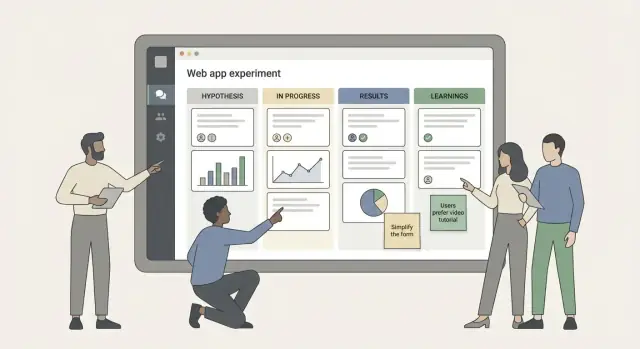
Define Goals and Scope for Experiment Tracking
Before you choose a database or design screens, get clear on what problem your experiment tracking web app is solving. Most teams don’t fail at experimentation because they lack ideas—they fail because the context disappears.
Define the real problem (not the symptom)
Common signals you need a dedicated learning repository:
- Experiments are documented in scattered notes, decks, or chat threads.
- People repeat tests because they can’t find prior learnings (or don’t trust what they find).
- Decisions get made without a clear trail of hypotheses, outcomes, and “what we learned.”
Write a one-paragraph problem statement in plain language, such as: “We run many tests, but we can’t reliably answer what we tried before, why we tried it, what happened, and whether it changed our decision.” This anchors everything else.
Set success criteria you can actually measure
Avoid vanity metrics like “number of experiments logged” as your primary goal. Instead, define success around behaviors and decision quality:
- Adoption: which teams will use it weekly, and what “active usage” means (e.g., every experiment has an entry before launch and a conclusion after).
- Searchability: time-to-answer for common questions like “Have we tested pricing page headline X?” or “What did we learn about onboarding friction?”
- Decision quality: fewer repeated tests, clearer go/no-go decisions, and better handoffs when people change roles.
These criteria will guide what features are necessary versus optional.
Identify target teams and core use cases
Experimentation is cross-functional. Define who the app is for in v1—typically a mix of product, growth, UX research, and data/analytics. Then map their core workflows:
- Product: propose a hypothesis, align stakeholders, record outcome and decision.
- Growth: run frequent A/B test workflow, compare variations, move quickly without losing history.
- UX research: log qualitative studies as “experiments” with learnings and confidence.
- Data: validate analysis, track metric definitions, add notes about caveats.
You don’t need to support every workflow perfectly—just ensure the shared record makes sense to all.
Clarify what the app will (and won’t) do in v1
Scope creep kills MVPs. Decide your boundaries early.
V1 will likely do: capture hypotheses, link experiments to owners and dates, store learnings, and make everything easy to search.
V1 likely won’t do: replace analytics tools, run experiments, calculate statistical significance, or become a full product discovery tool.
A simple rule: if a feature doesn’t directly improve documentation quality, findability, or decision-making, park it for later.
Identify Users, Roles, and Core Workflows
Before you design screens or pick a database, get clear on who will use the app and what outcomes they need. A great experiment tracking web app feels “obvious” because it mirrors real team behavior.
Primary roles (keep it simple)
Most teams can start with four roles:
- Contributor: adds hypotheses, runs experiments, records results.
- Reviewer: helps shape experiment plans, checks quality, approves decisions.
- Admin: manages workspace settings, permissions, templates, and cleanup.
- Viewer: reads past learnings, searches, and exports—no editing.
Jobs to be done by role
A fast way to validate your workflow is to list what each role must accomplish:
| Role | Key jobs to be done |
|---|---|
| Contributor | Log an idea quickly, turn it into a testable hypothesis, document an experiment plan, update status, capture learnings with evidence. |
| Reviewer | Ensure hypotheses are specific, confirm success metrics and guardrails, approve “ready to run,” decide whether learning is strong enough to act on. |
| Admin | Set up fields/taxonomy, manage access, handle audit needs, maintain templates and integrations. |
| Viewer | Find relevant prior experiments, understand what was tried, and reuse learnings without re-running work. |
The happy path (idea → learning)
A practical “happy path” flow:
- Idea captured (quick note, tag to a product area).
- Hypothesis created (who/what/expected impact + why).
- Experiment planned (method, audience, duration, metrics, risks).
- Run + updates (status changes and links to artifacts).
- Learning recorded (decision + evidence + next steps).
Approval points and likely bottlenecks
Define where a reviewer must step in:
- Before running: approve hypothesis quality and measurement plan.
- After results: approve the conclusion and decision (ship, iterate, stop).
Common bottlenecks to design around: waiting for review, unclear ownership, missing data links, and “results” posted without a decision. Add lightweight cues like required fields, owner assignment, and a “needs review” queue to keep work moving.
Design the Data Model: Hypotheses, Experiments, Learnings
A good data model makes the app feel “obvious” to use: people can capture an idea once, run multiple tests against it, and later find what they learned without digging through docs.
What a “Hypothesis” should contain
Start by defining the minimum fields that turn a loose idea into something testable:
- Hypothesis statement: a clear “If we do X, then Y will happen for Z audience.”
- Rationale: why you believe this is true (insights, customer feedback, prior experiments).
- Expected impact: what should move, and in which direction (e.g., activation rate up, churn down).
Keep these fields short and structured; long narrative belongs in attachments or notes.
Core entities you’ll want
Most teams end up needing a small set of objects:
- Experiment: the concrete test you run (dates, owner, status, method).
- Metric: what you measure (definition, source, guardrails).
- Variant: what changed (control vs. one or more treatments).
- Decision: what you decided (ship, iterate, stop) and who approved.
- Learning: the takeaway phrased so it can be reused.
- Attachment: screenshots, SQL snippets, designs, research notes.
Relationships that match reality
Model the connections so you don’t duplicate work:
- One hypothesis → many experiments (you may test the same belief across segments or channels).
- One experiment → many learnings (expected and unexpected outcomes).
- Experiments link to many metrics and many variants.
Tags and taxonomy (findability wins)
Add lightweight tagging early, even in an MVP:
- Product area (Onboarding, Pricing, Search)
- Channel (Email, Paid, In-app)
- Audience (New users, SMB, Enterprise)
- Risk and effort (simple scales)
This taxonomy is what makes search and reporting useful later, without forcing a complex workflow now.
Build a Clear Status and Decision Framework
A status framework is the backbone of an experiment tracking web app. It keeps work moving forward, makes reviews faster, and prevents “half-finished” experiments from polluting your learning repository.
Use a small, unambiguous set of states
Start with a simple flow that matches how teams actually work:
- Draft: idea captured, not yet shaped
- Planned: ready to run, scheduled, owners assigned
- Running: experiment live and collecting data
- Analyzing: results being evaluated
- Decided: a decision has been made and documented
- Archived: closed and filed for future search
Keep state changes explicit (a button or dropdown), and show the current state everywhere (list view, detail page, exports).
Add guardrails: required fields per state
Statuses are more useful when they enforce completeness. Examples:
- Draft requires: hypothesis statement, problem/opportunity, requester
- Planned requires: primary metric, success threshold, audience/segment, start/end dates, owner, risks
- Running requires: experiment ID/link, rollout plan, monitoring notes
- Analyzing requires: data source, result summary, effect direction, confidence notes
- Decided requires: decision type, rationale, next steps
This prevents “Running” experiments without a clear metric, and “Decided” entries without a rationale.
Record decisions (including uncomfortable ones)
Add a structured decision record with a short free-text explanation:
- Ship (adopt the change)
- Iterate (adjust and test again)
- Stop (not worth pursuing)
- Rerun (fix execution issues and repeat)
- Inconclusive (insufficient evidence)
For inconclusive outcomes, don’t let teams bury them. Require a reason (e.g., underpowered sample, conflicting signals, instrumentation gap) and a recommended follow-up (rerun, gather qualitative input, or park with a revisit date). This keeps your experiment database honest—and your future decisions better.
Plan the UX: Capture, Search, and Review
A tracking app succeeds or fails on speed: how quickly someone can capture an idea, and how easily the team can find it again months later. Design for “write now, organize later” without letting the database become a dumping ground.
Key screens to design first
Start with a small set of screens that cover the full loop:
- List view: the default landing page with saved filters (e.g., “My active experiments,” “Needs decision,” “Shipped learnings”).
- Detail view: a readable, shareable page for one hypothesis/experiment, optimized for scanning (summary at top, evidence and outcomes below).
- Editor: inline editing on the detail page or a focused edit mode; avoid long, intimidating forms.
- Dashboard: a lightweight overview of what’s running, what’s blocked, and what has concluded—more operational than analytical.
Make entry fast (so people actually use it)
Use templates and default fields to reduce typing: hypothesis statement, expected impact, metric, audience, rollout plan, decision date.
Add small accelerators that compound over time: keyboard shortcuts (create new, add tag, change status), quick-add for owners, and sensible defaults (status = Draft, owner = creator, dates auto-filled).
Search and filters are product features
Treat retrieval as a first-class workflow. Provide global search plus structured filters for tags, owner, date range, status, and primary metric. Let users combine filters and save them. On the detail view, make tags and metrics clickable to jump to related items.
Onboarding and empty states
Plan a simple first-run experience: one sample experiment, a “Create your first hypothesis” prompt, and an empty list that explains what belongs here. Good empty states prevent confusion and nudge teams toward consistent documentation.
Create Templates for Hypotheses and Experiment Plans
Templates turn “good intentions” into consistent documentation. When every experiment starts from the same structure, reviews get faster, comparisons get easier, and you spend less time deciphering old notes.
A hypothesis template that forces clarity
Start with a short hypothesis template that fits on one screen and guides people toward a testable statement. A reliable default is:
If we [change] , then [expected outcome] , because [reason / user insight] .
Add a couple of fields that prevent vague claims:
- Target user / segment: who this is for (new users, power users, a specific plan)
- Evidence: the customer quote, research note, or data point that motivated it (link to /docs or /research)
- Expected direction: up/down/no change, so “success” isn’t rewritten later
An experiment plan template that’s easy to approve
Your plan template should capture just enough detail to run the test responsibly:
- Audience: who is eligible and any exclusions
- Duration: start/end dates or decision date
- Sample size notes: rough guidance, assumptions, or “run until X conversions” (not everyone will do stats)
- Primary metric: the one number that decides the outcome
- Secondary metrics: helpful context, not decision-makers
- Guardrails: metrics that must not degrade (e.g., refunds, support tickets)
Keep links as first-class fields so the template connects to the work:
- Designs: /docs/designs/...
- Tickets/PRDs: /docs/...
- Dashboards: /analytics/...
Make templates flexible without becoming free-form
Provide a few experiment-type presets (A/B test, onboarding change, pricing test), each pre-filling typical metrics and guardrails. Still, keep a “Custom” option so teams aren’t forced into the wrong mold.
The goal is simple: every experiment should read like a short, repeatable story—why, what, how, and how you’ll decide.
Capture Learnings in a Reusable, Structured Way
A tracking app becomes truly valuable when it preserves decisions and reasoning, not just results. The goal is to make learnings easy to scan, compare, and reuse—so the next experiment starts smarter.
Use a consistent “Learning” record
When an experiment finishes (or is stopped early), create a learning entry with fields that force clarity:
- What happened: a plain-English summary of the outcome (including surprises and edge cases).
- Why we think it happened: the best explanation based on evidence, not guesswork. If there are competing explanations, list them.
- Next step: what to do now—ship, iterate, run a follow-up test, or drop the idea.
This structure turns one-off writeups into an experiment database your team can search and trust.
Capture qualitative context alongside metrics
Numbers rarely tell the full story. Add dedicated fields for:
- Qualitative notes: usability observations, support ticket themes, sales call takeaways.
- Quotes: short snippets from users or stakeholders, tied to a source and date.
This helps teams understand why metrics moved (or didn’t), and prevents repeating the same misinterpretations.
Support attachments as first-class evidence
Allow attachments on the learning entry itself—where people will look later:
- Screenshots (before/after UI, heatmaps)
- Docs (research summaries, decision memos)
- SQL snippets (exact query used)
- Charts (exported graphs, experiment readouts)
Store lightweight metadata (owner, date, related metric) so attachments remain usable, not just dumped files.
Add “What we’d do differently”
A dedicated field for process reflection builds compounding improvement: recruitment gaps, instrumentation mistakes, confusing variants, or mismatched success criteria. Over time, this becomes a practical checklist for running cleaner tests.
Add Reporting Without Misleading Metrics
Reporting is useful only if it helps the team make better decisions. For an experiment tracking web app, that means keeping analytics lightweight, clearly defined, and tied to the way your team actually works (not vanity “success rates”).
Start with lightweight analytics
A simple dashboard can answer practical questions without turning your app into an experiment metrics dashboard full of noisy charts:
- Count by status (Draft → Planned → Running → Analyzing → Decided). This shows throughput and bottlenecks.
- Win rate (with caveats). Treat this as a directional signal, not a performance score.
- Time-to-decision (created → decided). This highlights process friction more than “good vs bad ideas.”
Make every metric clickable so people can drill down into the underlying experiment documentation instead of arguing about aggregates.
Slice outcomes in ways that match decisions
Most teams want to see outcomes by:
- Area (onboarding, pricing, activation, retention)
- Primary metric (conversion, revenue, time-to-value)
- Owner (who ran it)
These views are especially helpful for hypothesis management because they reveal repeated patterns (e.g., onboarding hypotheses that often fail, or one area where assumptions are consistently wrong).
Add a learning feed (and a weekly summary)
A “learning feed” should highlight what changed in your learning repository: new decisions, updated assumptions, and newly tagged learnings. Pair it with a weekly summary view that answers:
- What did we decide this week?
- What should we stop doing, start doing, or repeat?
- Which hypotheses were invalidated (and why)?
This keeps product experimentation visible without forcing everyone to read every A/B test workflow detail.
Don’t imply certainty you don’t have
Avoid charts or labels that imply statistical truth by default. Instead:
- Show significance as a label (e.g., “Not tested,” “Directional,” “Significant at 95%”) and store the assumptions (test type, sample definition, stopping rule).
- Display confidence notes (“small sample,” “seasonality risk,” “guardrail metric moved”).
- Separate decision (“Ship / Don’t ship / Iterate”) from result (effect size, metric movement).
Good reporting should reduce debate, not create new arguments from misleading metrics.
Integrations and Automation That Save Time
A tracking app only sticks if it fits into the tools your team already uses. The goal of integrations isn’t “more data”—it’s less manual copy/paste and fewer missed updates.
Authentication and team context
Start with sign-in that matches how people access other internal tools.
If your company has SSO (Google Workspace, Microsoft, Okta), use it so onboarding is one click and offboarding is automatic. Pair this with a simple team directory sync so experiments can be attributed to real owners, teams, and reviewers (e.g., “Growth / Checkout squad”), without everyone maintaining profiles in two places.
Analytics connections (without creating a security headache)
Most teams don’t need raw analytics events inside the experiment tracking web app. Instead, store references:
- Links to dashboards in GA4, Amplitude, Mixpanel, Looker, etc.
- The metric IDs or report identifiers used for evaluation
- A snapshot of the decision and interpretation (what changed, for whom, and why)
If you do use APIs, avoid storing raw secrets in the database. Use an OAuth flow where possible, or store tokens in a dedicated secrets manager and keep only an internal reference in your app.
Notifications that close the loop
Notifications are what turn documentation into a living workflow. Keep them focused on actions:
- A comment is added (request clarification, share a finding)
- Status changes (Planned → Running → Analyzing → Decided)
- A decision is published (so stakeholders stop asking “what happened?”)
Send these to email or Slack/Teams, and include a deep link back to the exact experiment page (e.g., /experiments/123).
Import/export for migration and backups
Support CSV import/export early. It’s the fastest path to:
- Migrate from spreadsheets or another tool
- Bulk-fix fields (owners, tags, statuses)
- Create lightweight backups and offline sharing
A good default is exporting experiments, hypotheses, and decisions separately, with stable IDs so re-import doesn’t duplicate records.
Permissions, Auditability, and Data Safety
Experiment tracking only works if people trust the system. That trust is built with clear permissions, a reliable audit trail, and basic data hygiene—especially when experiments touch customer data, pricing, or partner information.
Permissions: workspace, project, and record-level
Start with three layers that map to how teams actually work:
- Workspace access: who can enter the product at all (e.g., employees vs. guests).
- Project access: who can view and contribute to a specific product area (Growth, Onboarding, Payments).
- Record-level rules: who can view/edit a particular hypothesis or experiment (useful for legal reviews, sensitive partnerships, or pre-launch features).
Keep roles simple for an MVP: Viewer, Editor, Admin. Add “Owner” later if needed.
Audit trail: edits, decisions, deletions
If a metric definition changes mid-test, you want to know. Store an immutable history of:
- field changes (what changed, from/to, who, when)
- status transitions and decisions (e.g., “Shipped”, “Stopped”, “Inconclusive”)
- deletions (prefer soft-delete with restore)
Make the audit log visible from each record so reviewers don’t need to hunt.
Retention, backups, and recovery
Define a retention baseline: how long experiments and attachments are kept, and what happens when someone leaves the company.
Backups don’t need to be fancy: daily snapshots, tested restore steps, and a clear “who to call” runbook. If you expose exports, ensure they respect project permissions.
Protect sensitive info
Treat PII as a last resort. Add a redaction field (or toggle) for notes, and encourage linking to approved sources rather than pasting raw data.
For attachments, allow admins to restrict uploads per project (or disable entirely) and block common risky file types. This keeps your learning repository useful without turning it into a compliance headache.
Choose a Practical Tech Stack for an MVP
Your MVP’s tech stack should optimize for speed of iteration, not future perfection. The goal is to ship something the team will actually use, then evolve it once workflows and data needs are proven.
Architecture: start as a monolith
For an MVP, a simple monolith (one codebase, one deployable app) is usually the fastest path. It keeps authentication, experiment records, comments, and notifications in one place—easier to debug and cheaper to run.
You can still design for growth: modularize by feature (e.g., “experiments,” “learnings,” “search”), keep a clean internal API layer, and avoid tightly coupling UI to database queries. If adoption takes off, you can split out services later (search, analytics, integrations) without rewriting everything.
Storage: relational first, files separate
A relational database (PostgreSQL is a common choice) fits experiment tracking well because your data is structured: owners, status, dates, hypothesis, variants, metrics, and decisions. Relational schemas make filtering and reporting predictable.
For attachments (screenshots, decks, raw exports), use object storage (e.g., S3-compatible) and store only metadata and URLs in the database. This keeps backups manageable and prevents your DB from becoming a file cabinet.
API style: REST or GraphQL—keep it boring
Both REST and GraphQL work. For an MVP, REST is often simpler to reason about and easier for integrations:
- Create/read/update endpoints for hypotheses, experiments, learnings, and comments
If your frontend has lots of “one page needs many related objects” use cases, GraphQL can reduce overfetching. Either way, keep endpoints and permissions straightforward so you don’t ship a flexible API that’s hard to secure.
Fast discovery: add full-text search early
Search is the difference between a “learning repository” and a forgotten database. Add full-text search from day one:
- Start with native Postgres full-text search for titles, hypotheses, tags, and outcomes
If you later need richer relevance ranking, typo tolerance, or cross-field boosting, you can introduce a dedicated search service. But the MVP should already let people find “that checkout experiment from last quarter” in seconds.
Prototyping faster with Koder.ai (optional)
If your main bottleneck is getting a working MVP into people’s hands, you can prototype this kind of internal tool with Koder.ai. It’s a vibe-coding platform that lets you build web apps through a chat interface (commonly React on the frontend, Go + PostgreSQL on the backend), with practical features like source code export, deployment/hosting, custom domains, and snapshots/rollback. That’s often enough to validate your workflows (templates, statuses, search, permissions) before investing in a longer-term build pipeline.
MVP Roadmap, Testing, and Team Adoption
An experiment tracking web app succeeds or fails on adoption, not features. Plan your MVP like a product: ship small, test in real workflows, then expand.
MVP (v1): the must-haves
Start with the minimum that lets a team document and retrieve work without friction:
- CRUD for hypotheses and experiments (create, edit, archive)
- Templates for hypothesis, experiment plan, and results so entries are consistent
- Search + filters (by status, owner, product area, date)
- Clear statuses (e.g., Draft → Planned → Running → Analyzing → Decided)
- Comments and @mentions to keep discussion attached to the record
If a feature doesn’t reduce time-to-log or time-to-find, defer it.
Pilot first, then iterate
Ship v1 to a small pilot team (5–15 people) for 2–4 weeks. Ask them to use it for every new experiment and to backfill only a handful of recent ones.
Test with realistic scenarios:
- “Can I find the last three pricing experiments in under 30 seconds?”
- “Can a new teammate understand what happened without asking the owner?”
Collect feedback weekly and prioritize fixes that remove confusion: field names, default values, empty states, and search quality.
If you’re using a platform approach (for example, building the MVP on Koder.ai and exporting the code once workflows stabilize), treat the pilot as your “planning mode”: lock the data model and happy-path UX first, then iterate on integrations and permission edges.
v2: expand carefully
Once logging is steady, add higher-leverage upgrades:
- Lightweight dashboards (volume by status, cycle time, decision outcomes)
- Integrations (Slack notifications, Jira/Linear links, calendar reminders)
- Advanced permissions (private experiments, restricted fields)
Adoption plan: make it a habit
Define operating norms:
- Ownership: one “Experiment Librarian” per team to keep templates and tags tidy
- Cadence: a weekly review where new experiments are logged and completed ones are summarized
- Definition of done: an experiment isn’t “closed” until learnings are written and linked to the decision
Document these norms in a short internal page (e.g., /playbook/experiments) and include it in onboarding.
FAQ
How do I know we actually need an experiment tracking web app?
Start when you can’t reliably answer:
- What did we try before?
- Why did we try it?
- What happened?
- What did we decide?
If experiments live across decks, docs, and chat—and people repeat work or distrust past notes—you’re past the “spreadsheet is fine” phase.
What success criteria should we set for v1?
Use behavioral and decision-quality measures rather than vanity counts:
- Adoption: experiments get logged before launch and concluded after results.
- Searchability: “time-to-answer” common questions stays low (seconds/minutes, not hours).
- Decision quality: fewer reruns due to lost context; clearer ship/iterate/stop calls; smoother handoffs when owners change.
Which teams and roles should the app support first?
Keep v1 focused on a shared learning record for cross-functional teams:
- Product: hypothesis → plan → outcome → decision
- Growth: frequent A/B tests, fast status updates, clean history
- UX research: qualitative studies captured as “experiments” with evidence
- Data/analytics: metric definitions, caveats, links to analysis
Design the record so it reads clearly for all of them, even if workflows differ.
What should the app do in v1 vs. not do?
A practical v1 boundary is:
- Capture hypotheses, owners, dates, and statuses
- Store learnings and decisions with evidence
- Make entries easy to search and filter
Avoid trying to replace analytics tools or run experiments inside the app. If a feature doesn’t improve documentation quality, findability, or decision-making, defer it.
What’s the simplest roles and permissions model that works?
A simple role model is:
- Contributor: create/update hypotheses, experiments, results
- Reviewer: approve “ready to run” and final conclusions
- Admin: permissions, templates, taxonomy, cleanup
- Viewer: search and read; export if needed
You can map these into MVP permissions as Viewer / Editor / Admin and add more nuance later.
What core entities should the data model include?
Model what you want people to retrieve later:
- Hypothesis: statement, rationale, expected impact
- Experiment: owner, dates, method, status
- Metric: definition + source (and guardrails)
- Variant: control/treatments
- Decision: ship/iterate/stop/rerun/inconclusive + approver
- Learning: reusable takeaway + evidence
- Attachments: links and metadata
Key relationships:
- One hypothesis → many experiments
- One experiment → many metrics/variants and potentially many learnings
What statuses should an experiment go through?
Use a small, explicit set such as:
- Draft → Planned → Running → Analyzing → Decided → Archived
Make state changes deliberate (button/dropdown) and visible everywhere (lists, detail pages, exports). This prevents “half-finished” items from polluting your repository.
How do we prevent incomplete or low-quality experiment entries?
Require fields that prevent bad handoffs:
- Planned: primary metric, success threshold, audience, dates, owner, risks
- Running: experiment ID/link, rollout plan, monitoring notes
- Analyzing: data source, summary, effect direction, confidence notes
- Decided: decision type, rationale, next steps
This reduces “we ran it but didn’t define success” and “we have results but no decision.”
How should we capture learnings so they’re actually reusable later?
Structure learnings so they’re reusable:
- What happened: plain-English outcome (include surprises)
- Why we think it happened: evidence-based explanation; note alternatives
- Next step: ship/iterate/follow-up/stop
Add fields for qualitative context (notes, quotes) and attach evidence where people will look later (designs, dashboards, SQL, exports). Include a “what we’d do differently” field to improve process over time.
What tech stack is best for an MVP experiment tracking app?
A pragmatic MVP stack is:
- Monolith to iterate fast
- PostgreSQL for structured relational data (owners, statuses, tags, metrics)
- Object storage for attachments; store only metadata/URLs in the DB
- REST (or simple GraphQL) with straightforward permissions
- Full-text search early (Postgres FTS is a strong v1 choice)
This combination optimizes for speed-to-ship while keeping future scaling options open.