

Create a Website for Customer Stories & Testimonials That Convert
Learn how to plan, collect, write, and publish customer stories and testimonials on a dedicated website that builds trust and drives sign-ups.
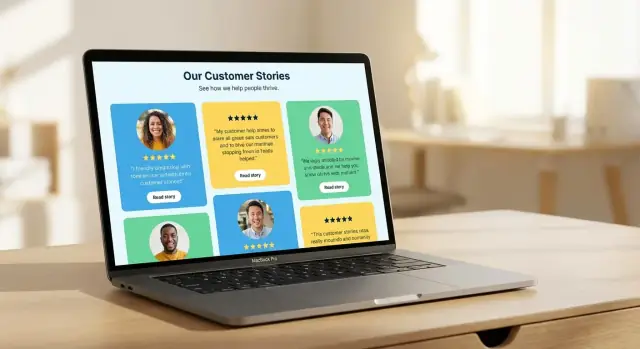
Define Goals, Audience, and Success Metrics
Before you design a customer stories website, get clear on what it’s supposed to accomplish. Testimonials can do several jobs at once, but your site will convert better when you choose a primary goal and build around it.
Clarify the goal (and the job each story should do)
Common goals include:
- Trust-building: reduce perceived risk with credible proof and recognizable outcomes.
- Lead generation: move visitors to a demo request, trial, or contact form.
- Customer education: show how real customers use your product in specific situations.
Pick one as the “main” outcome, then treat the others as supporting benefits. This decision will shape everything: page structure, CTAs, the amount of detail you include, and even how you tag stories.
Define the audience and the questions they bring
A customer stories page will be read by different people at different stages of the buying process. Identify your primary audience:
- Prospects/users: “Will this work for me?” “How hard is setup?”
- Evaluators/managers: “What’s the ROI?” “Will my team adopt this?”
- Executives: “Is this low-risk?” “Does this align with strategic goals?”
Write down the top 5 questions they need answered and make sure your stories explicitly address them. If those questions stay unanswered, visitors will treat your stories as “nice marketing,” not decision support.
Decide what success means (and how you’ll measure it)
Choose 1–3 success metrics that match your goal, such as:
- Demo requests from story pages
- Trial sign-ups after reading a case study
- Contact form submits, pricing page visits, or sales-qualified leads
Set a baseline (current performance) so you can see improvement after launch. Without a baseline, you can’t tell whether your new testimonial page design actually helped.
Choose story types and core pages
Match formats to intent: short quotes for quick reassurance, full case studies for proof and detail, video testimonials for emotion and authenticity, and a logo wall for instant credibility.
Before building, list the core pages you want—for example: a main /customers hub, individual story pages, an industry or use-case filter page, and a submission page for new testimonials.
Choose the Right Site Structure and Pages
Your site structure should make it effortless for a buyer to find “someone like me,” understand what changed, and then take the next step. Start by choosing between two proven options based on how many stories you have today.
Pick a structure that fits your volume
Option 1: A hub page + many story pages (best for growing libraries). The hub helps visitors filter quickly, while each story page can rank for specific searches and carry a focused narrative.
Option 2: A single long page (best if you have ~5–15 strong testimonials). It’s easy to maintain and works well when your product is simple or your audience is narrow.
If you expect your library to grow, choose Option 1 early. It prevents a painful migration later and makes internal linking, SEO, and filtering much easier.
Plan the must-have pages
Keep it simple and buyer-friendly:
- Stories (case studies / customer stories hub)
- Testimonials (short quotes, ratings, snippets)
- Industries / Use cases (browse by “what I do” or “what I need”)
- About (trust builders: team, mission, proof points)
- Contact (and/or Pricing, if relevant)
If you want a clean start, link your Stories hub from the main nav and feature 3–6 stories on the homepage.
Use navigation labels buyers understand
Avoid internal jargon like “Success” or “Customer Wins” if your audience doesn’t use those terms. Prefer labels like Customer Stories, Case Studies, Testimonials, By Industry, and Results.
Standardize a clear CTA pattern
Use one primary CTA across story-related pages (for example, Book a demo or Start trial) and repeat it consistently: top of page, after key results, and at the end.
Consistency matters because story pages are often read non-linearly. If visitors skim straight to “Results,” they should still see a clear next step.
Sketch the journey (before you build)
A simple path that works:
Homepage → Customer Stories hub → Story page (problem → solution → results) → CTA → /contact or /pricing
If a visitor can’t reach a relevant story in two clicks, your structure is probably too complicated.
Design Principles for High-Trust Testimonial Pages
A testimonial page succeeds when it feels effortless to scan and easy to believe. Your design should reduce “work” for the reader: show who said it, what changed, and what to do next—without distractions.
Prioritize readability first
Make the quotes the hero. Use generous spacing, short line lengths, and clear hierarchy (headline → quote → context). Large quote text can work well, but pair it with strong headings that summarize the outcome (e.g., “Cut onboarding time by 30%”). Treat this page like a reading experience, not a collage.
Use consistent story cards with the right details
Standardize every testimonial so visitors can quickly compare.
Each card should include:
- Customer name, role, and company (with logo when available)
- A specific outcome (metric, time saved, revenue impact, fewer errors)
- 1–3 tags to signal relevance (industry, company size, problem, product area)
Consistency builds trust because it signals you didn’t rewrite every story differently. It also makes it easier to scale later.
Filters: helpful, not noisy
Filters can increase conversions by helping people find “someone like me.” Keep them limited and meaningful: industry, company size, problem, or product area. Avoid too many options, and don’t hide the best stories behind multiple clicks.
A good rule: if a filter won’t change a buying decision, remove it.
Avoid clutter; keep one clear next step
Don’t overload the page with unrelated CTAs. Keep each page focused on proof, then offer a single next step such as “See the case study,” “Book a demo,” or “Talk to sales.” If you add supporting elements (ratings, review counts, security badges), keep them visually quiet so they support the stories rather than compete with them.
Mobile-first by default
Most visitors will skim on a phone. Ensure quote blocks don’t become walls of text, logos don’t shrink into illegibility, and video embeds load cleanly. Use readable font sizes, tappable filters, and keep key context (name, role, outcome) visible without extra taps.
How to Collect Testimonials and Customer Stories
Collecting great testimonials is mostly about preparation and respect for your customer’s time. If you make participation easy and the outcome clear, you’ll get specific stories instead of vague compliments.
Build a smart candidate list
Start with your happiest customers—but don’t stop there. Aim for variety so your future customer stories website reflects the range of people you serve:
- Customers with clear results (time saved, revenue, fewer errors)
- A mix of industries, company sizes, and use cases
- Recognizable logos or credible job titles (when allowed)
- Customers who recently hit a milestone (launch, renewal, expansion)
Keep a simple tracker with name, product/use case, results, and status (asked / agreed / drafted / approved).
Ask for permission and set expectations upfront
Your outreach message should answer: what will be public, where it will appear, and how much time it takes. Be explicit about permissions (name, title, company, headshot, logo) and whether you’ll attribute quotes.
If you use incentives, keep them appropriate and transparent (e.g., a donation to a charity or a gift card where permitted).
Offer low-friction ways to contribute
Give customers options:
- A 3–5 question short form
- A 15-minute “quick call”
- Email Q&A they can answer asynchronously
The best method is the one they’ll actually complete.
Use prompts that lead to outcomes
Avoid “Do you like it?” Instead ask for specifics:
- What problem were you trying to solve?
- What changed after switching?
- What measurable result did you see?
- What would you tell someone evaluating alternatives?
Keep approvals lightweight
Send a final draft for confirmation, with a clear “reply with edits or approval” CTA. Limit review to facts, attribution, and sensitive details—then publish quickly while momentum is high.
Write Customer Stories That Feel Real (Not Salesy)
A customer story should read like a helpful mini-lesson, not a brochure. The easiest way to keep it grounded is to build it around what actually changed for the customer—and how.
Use a simple story arc (and stick to it)
A clean structure keeps you from over-explaining and helps readers find themselves in the story:
- Problem: What wasn’t working? What did it cost them (time, risk, missed revenue, stress)?
- Approach: What did they try, decide, or change? Include key steps without turning it into a product manual.
- Results: What improved, and how do they know?
- Advice: What would they tell someone in the same situation?
This arc also makes your story skimmable, which matters on busy testimonial pages.
Capture specifics—only if they’re verified
Vague wins (“saved a lot of time”) don’t build trust. Look for measurable specifics the customer can confirm:
- Time saved per week
- Steps reduced in a process
- Errors avoided or rework reduced
- Cycle time shortened (e.g., onboarding, reporting, approvals)
If the customer can’t verify a number, don’t invent one. Instead, use concrete descriptions: “Our weekly report went from a half-day project to something we finish before lunch.”
Add context so the reader can self-qualify
A strong story answers: “Would this work for a team like mine?” Include a few anchors near the top:
- Customer type (industry or use case)
- Team size and roles involved
- Starting point (tools/process they had before)
- Constraints (tight timeline, compliance requirements, limited budget)
Context prevents the story from sounding too perfect—and helps the right prospects lean in.
Keep the customer’s voice (edit lightly)
Preserve the customer’s phrasing and perspective. Edit for clarity, remove filler, and fix grammar, but don’t swap in marketing language they never used. A good test: if you read it aloud, does it sound like a person talking to a peer?
Write a pull-quote for scanning and sharing
Pull-quotes help readers get the “so what” in seconds. Make it short, specific, and outcome-focused.
Example: “We cut onboarding from two weeks to three days—and new hires stopped asking the same setup questions.”
Pick Formats: Quotes, Case Studies, Video, and More
The “best” testimonial format depends on where it will live on your site and how much effort you can reliably invest. A single strong quote can lift a conversion page, while a full case study can shorten the sales cycle for higher-consideration buyers.
The goal is to choose a mix you can maintain long-term—fresh, credible, and easy to browse.
Quote testimonials (fast, flexible social proof)
Quote testimonials are ideal when you need quick proof near a decision point—pricing pages, product pages, signup flows, and in-page CTAs. They work best when they’re specific.
A useful quote includes:
- The result (metric if possible)
- The context (what they used, for how long)
- The customer identity (name, role, company, and optional headshot)
If you only publish one format to start, start here: quotes are quick to collect, quick to publish, and easy to reuse across /pricing, /features, and key landing pages.
Case studies (depth for complex decisions)
Case studies are the right choice when buyers need to justify a purchase internally, compare options, or understand implementation details. They’re especially effective for complex deals, higher price points, and longer sales cycles.
Keep them skimmable: a clear “problem → approach → results” flow, a short summary at the top, and a section that addresses common objections (timeline, migration effort, team involvement). Think of a case study as a decision aid, not a press release.
Video testimonials (high trust, higher effort)
Video builds credibility quickly because people can see and hear the customer. The trade-off is production and coordination.
To make video practical:
- Keep it short (30–90 seconds is often enough)
- Add clear captions (many viewers watch muted)
- Pair the video with a written summary and key metrics for scanning
Even a lightly produced recording can work if the story is authentic and the audio is clear.
Before/after snapshots (simple proof of change)
Before/after snapshots show transformation without asking readers to commit to a long story. They can be a small visual, a checklist, or a “then vs. now” table.
This format works well on product and feature pages: it answers “What will change for me?” in seconds.
Choose formats you can sustain
A neglected stories section hurts trust. Pick formats based on your team size and workflow: quotes are easiest to keep fresh, case studies require more coordination, and video needs ongoing operational support.
A smart mix is often: frequent quotes, occasional case studies, and selective video for your most persuasive customers or flagship use cases.
Create Reusable Templates and Content Fields
Consistency is what makes a customer stories website feel credible—and what makes it easy to publish the next story without starting from scratch.
Define your core fields (every story gets these)
Start with standard fields that can appear in a header area across all customer stories:
- Customer name
- Title / role
- Company name
- Headshot and/or company logo
- Date published (or last updated)
These fields make stories scannable and help readers quickly answer: “Is this someone like me?” They also support better internal filtering and future SEO improvements.
Add story fields that drive real credibility
A good story reads like a clear before-and-after—not a product brochure. Build your content model around a repeatable narrative:
- Challenge: what was broken, slow, expensive, or risky?
- Solution: what did they choose and why?
- Implementation: how it went, who was involved, timeline, obstacles
- Results: measurable outcomes (and how they measured them)
- Favorite feature: a human detail that makes it feel real
If your CMS supports it, treat Results as structured fields (e.g., metric label + value + timeframe) so you can reuse them in cards, sidebars, and “highlights” sections.
Tag stories so visitors can find “someone like me”
Tagging turns a collection of pages into a browsable library. Use a small, controlled set of tags you’ll actually maintain:
- Industry (e.g., SaaS, healthcare, ecommerce)
- Use case (e.g., onboarding, reporting, support)
- Integrations (e.g., Salesforce, Slack)
- Product modules (so readers connect outcomes to what they’d buy)
- Company size (or segment: SMB, mid-market, enterprise)
Avoid free-text tags that create duplicates (“E-commerce” vs “ecommerce”). Pick a single naming style and stick to it.
Build reusable components to speed up publishing
Turn repeated sections into components you can drop into any story:
- Highlights box: 3–5 key outcomes and a one-sentence summary
- Key metrics: formatted numbers with context (timeframe, baseline)
- Timeline: phases like “Week 1: setup” → “Week 4: rollout”
- Tools used / integrations: quick list to reduce “how did they do it?” friction
When these components are standardized, you can also reuse them on /customers, product pages, and pricing pages without rewriting everything.
Make the template your publishing checklist
A template isn’t just layout—it’s an editorial system. If a draft is missing a Challenge, an Implementation detail, or a dated result, it’s not ready to ship. That rule alone keeps your library consistent, faster to publish, and easier to trust.
Integrate Stories Across Your Website for Conversions
A testimonial hub is useful, but customer stories convert best when they appear exactly where people hesitate. The goal is to reduce “Will this work for me?” friction at key moments—without turning every page into a wall of quotes.
Start with a clear “Proof” section on the homepage
Make social proof impossible to miss. Add a dedicated homepage block (often right after your value proposition or product overview) with a few high-signal snippets and a direct link to your full story library.
Example structure:
- 2–3 short outcomes (“Cut onboarding time by 40%”) + customer name/logo
- A single button: View all customer stories →
/customers
Place stories at decision points (features, pricing, and comparison pages)
People scan features and pricing looking for risk. Add relevant stories next to the claims that need support:
- On feature pages, pair the feature description with a short quote that mentions that feature.
- On
/pricing, include a small “Trusted by” strip plus one or two pricing-adjacent stories (e.g., “Upgraded from Starter after 2 weeks”). - On competitor/comparison pages, link to a story that addresses switching.
Connect stories to each other with smart internal linking
Don’t make readers restart their search. On each story page, add links to related stories:
- Same industry (e.g., Healthcare)
- Same use case (e.g., “Reporting automation”)
- Same company size (e.g., “50–200 employees”)
A simple “More stories like this” section keeps people browsing and increases the chances they’ll find a match.
Use contextual CTAs that feel natural
Every story page should offer a next step, but it shouldn’t overpower the narrative. Match CTAs to intent:
- If the story is early-stage inspiration: Start a free trial →
/pricing - If it’s a complex implementation: Book a demo →
/demo - If it’s enterprise: Contact sales →
/contact
Place one CTA near the top (subtle) and one at the end (clear), and keep the story itself front and center.
SEO for Testimonials and Customer Story Pages
Customer stories can rank well because they answer high-intent questions like “Does this work for companies like mine?” The key is to publish pages that match what people actually search for—and make them easy for search engines to understand.
Build pages around search intent
Create dedicated story pages that combine industry + problem/solution + outcome. For example: “HVAC scheduling software: how Acme Services cut no-shows by 22%.” This is more discoverable than a generic “Customer Success Story.”
If you have multiple stories, consider light organization pages (e.g., “Stories by industry” or “Stories by use case”) that link out to each story.
Titles, meta descriptions, and URLs that say what the page is
Write a clear, specific title and meta description for each story page. Mention the customer type, the solution, and a measurable result when possible.
Use descriptive URLs and headings:
- URL:
/customers/acme-hvac-scheduling-no-shows - H1: the story title
- H2s: predictable sections like “Challenge,” “Solution,” “Results,” and “Why they chose us”
Make multimedia searchable
If you embed video testimonials, add captions or a transcript on the page (not only in the player). For images (logos, screenshots, before/after charts), add accurate alt text that describes what’s shown.
Write for humans first (and still win SEO)
Avoid keyword stuffing like repeating “testimonial page design” unnaturally. Instead, focus on clarity: who the customer is, what changed, and the proof behind it.
If you want more structure, pair this section with reusable story templates from /blog/create-reusable-templates-and-content-fields.
Legal, Privacy, and Approval Workflow Basics
Great testimonials build trust—until a customer feels exposed, misquoted, or surprised by what you published. A clear legal and privacy workflow protects both sides and makes your customer stories website easier to scale.
Get explicit permission (and document it)
Before you publish names, logos, headshots, job titles, or direct quotes, get written approval. This can be as simple as an email confirmation or a lightweight release form that states exactly what you’ll use and where it will appear (e.g., a testimonial page, homepage, ads, sales decks).
When in doubt, treat “publicly available on LinkedIn” as not the same as permission to republish.
Handle sensitive details with care
Customer stories are most compelling when specific—but specificity can accidentally reveal confidential information. Be cautious with:
- Pricing, discounts, contract terms, or renewals
- Security posture, tools, and internal processes
- Performance numbers that could be considered material or regulated
A practical rule: if a detail would be uncomfortable in a competitor’s hands, confirm it’s safe to share (or remove it).
Offer privacy-friendly publishing options
Not every great result can be shared under a full name and logo. Build flexible options into your case study website process:
- Anonymized story (industry + company size only)
- First name only
- Company hidden (e.g., “Operations Lead at a mid-market logistics firm”)
This keeps your social proof website growing even when customers have strict policies.
Create an approval workflow that’s easy to follow
Make approvals predictable to reduce delays and revisions:
- Send a draft with highlighted “facts and figures” to verify.
- Ask the customer to confirm attribution (name/title/company/logo) separately from the copy.
- Capture final approval in writing, and store it alongside the asset.
If multiple stakeholders are involved (legal, PR, leadership), set a clear deadline and one “single approver” to avoid endless loops.
Plan for updates, removals, and disclosures
Create a simple process to update or remove a testimonial on request—especially if the customer changes roles, rebrands, or ends the relationship.
If incentives were provided (gift cards, discounts, event perks), add a short disclosure where appropriate. This keeps your publish case studies program transparent and avoids awkward surprises later.
Measure What Works and Iterate
A customer stories library isn’t “set and forget.” Treat it like a product: define what success looks like, measure it consistently, then make small changes that compound.
Start with a simple measurement plan
Pick a short list of metrics you’ll review every month:
- Story page views (which stories attract interest)
- Time on page + scroll depth (whether people actually read/watch)
- CTA clicks (the strongest signal that a story is driving intent)
If you can, segment by traffic source (organic, paid, email) and device. Video-heavy pages often behave differently on mobile.
Set goals for actions that matter
Tie your stories to real outcomes—then measure lift. Common “key actions” include:
- Start trial
- Book a demo
- Contact form submission
- Pricing page visit
In analytics, set up these actions as goals/conversions and compare performance for visitors who viewed at least one story vs. those who didn’t. If story viewers convert at a higher rate, you’ve proven the library is doing its job.
A/B test small elements (not entire pages)
Big redesigns make results hard to interpret. Instead, test one change at a time:
- CTA text (“Get a demo” vs. “See if this will work for you”)
- Story card layout (logo-first vs. outcome-first)
- Filter placement (top of page vs. sidebar)
Run tests long enough to avoid weekday/weekend noise, and keep the “winner” only if it improves the primary conversion—not just clicks.
Use qualitative feedback to guide your next edits
Ask sales and support which stories actually help close deals. Add quick internal notes (e.g., “best for healthcare CTOs,” “handles security objections”) so teams can find the right proof fast.
Refresh or retire to stay credible
Outdated tools, old screenshots, or results from years ago can reduce trust. Update metrics, add a current quote, or archive stories that no longer reflect your product or customer base.
Maintain and Scale Your Customer Story Library
A testimonial library works best when it’s treated like a product—not a one-time campaign. The goal is to keep stories fresh, easy to find, and easy to publish, even as volume grows.
Set a predictable publishing rhythm
Create a simple editorial calendar with a realistic cadence (for example: 1 customer story per month, 2 short testimonials per week). Assign clear ownership: who sources candidates, who interviews, who writes, who approves, and who publishes.
If you’re short on time, ship “small” consistently: a strong quote + photo + outcome can be more valuable than a long case study that never gets finished.
Build a steady request pipeline
Don’t rely on memory or ad-hoc Slack messages. Keep a lightweight pipeline that anyone in Support or Customer Success can contribute to:
- A shared form (or CRM field) to nominate customers
- Required notes: use case, results, contact, product plan, region/industry
- A next-step status (Nominated → Requested → Scheduled → Drafted → Approved → Published)
This turns everyday wins—resolved tickets, renewals, positive NPS comments—into publishable assets.
Maintain consistency as you add volume
As your library grows, inconsistency becomes the enemy of trust. Create a small style guide that covers:
- Naming rules (e.g., “Company + outcome”)
- Photo guidelines (size, background, whether logos are allowed)
- Standard fields (role, company size, industry, tools used, measurable results)
Consistent structure also makes it easier to reuse content across pages without rewriting.
Repurpose stories everywhere (without extra work)
Every published story should generate snippets you can drop into other channels: email nurtures, sales decks, one-pagers, social posts, and onboarding. Store these snippets alongside the main story so Sales and Marketing can grab them quickly.
Plan for growth in navigation and publishing
As the library expands, add categories (industry, use case, product), search, and filters so visitors can find “someone like me.” Also invest in faster publishing—templates, reusable content blocks, and a checklist—so new stories don’t get stuck in production.
Build Faster: Turning Your Story Library Into a Shippable Site
A lot of teams get stuck between “we know what pages we need” and “we don’t have time to build it.” If you’re trying to launch (or rebuild) a case study website quickly, a structured template plus a repeatable publishing workflow is the real unlock.
One practical approach is to use a build system that can generate the core pages (hub, filters, individual story templates, and CTA placements) from a consistent content model. For example, Koder.ai can help teams vibe-code a customer stories website from a simple chat brief—then iterate on components like story cards, tag filters, and reusable templates without rebuilding everything by hand. This is especially useful if you want a React-based front end, a Go/PostgreSQL backend for structured “Results” fields, and the option to export source code or host with custom domains.
The key is the same either way: keep the structure consistent, ship the first version quickly, and then improve based on real reading and conversion data—not opinions.
FAQ
What’s the first thing to decide before building a customer stories website?
Start by choosing one primary outcome and designing everything around it:
- Trust-building: make credibility and proof easiest to scan.
- Lead generation: emphasize CTAs and paths to /demo, /contact, or /pricing.
- Customer education: focus on use-case context and implementation details.
You can support the other goals, but one “main job” keeps the site from becoming unfocused.
How do I define the audience for my testimonials and case studies?
Pick the group you most want to persuade, then list the top questions they need answered:
- Prospects/users: setup effort, day-to-day fit
- Evaluators/managers: ROI, adoption risk
- Executives: strategic alignment, downside risk
Use those questions as an editorial checklist: each story should answer at least 2–3 of them clearly.
What success metrics should I track for customer story pages?
Choose 1–3 metrics that match your main goal, then set a baseline before launch. Common choices:
- Demo requests or trial sign-ups that happen after viewing story pages
- CTA clicks from story pages
- Visits from stories to /pricing or /contact
Review monthly and compare conversion rates for visitors who viewed at least one story vs. those who didn’t.
Should I build a customer stories hub with separate pages or one long testimonials page?
Use your current volume to decide:
- Hub + individual story pages: best if you’re building a growing library and want SEO value per story.
- Single long page: best if you have ~5–15 strong testimonials and want something easy to maintain.
A simple test: if visitors can’t reach a relevant story in two clicks, your structure is likely too complex.
What are the must-have pages for a customer stories website?
Start with pages that help buyers browse, trust, and act:
- /customers (hub)
- Individual story pages (case studies)
- /testimonials (short quotes/snippets)
- Browse pages like /industries or /use-cases
- A clear next step like /contact (and optionally /pricing)
Then feature 3–6 of your strongest stories on the homepage and link to the hub from the main nav.
What should I call these pages in the navigation (Customer Stories vs. Success Stories, etc.)?
Use labels your buyers already recognize and search for:
- Customer Stories
- Case Studies
- Testimonials
- By Industry / Use Cases
Avoid internal terms like “Customer Wins” or “Success” if they aren’t common in your market—clarity beats creativity in navigation.
How should I place CTAs on testimonial and case study pages without feeling pushy?
Standardize one primary CTA across story-related pages (for example, Book a demo or Start trial) and repeat it in predictable spots:
- Near the top (subtle)
- After key results (contextual)
- At the end (clear)
Keep secondary CTAs minimal so the proof stays the focus and the next step feels obvious.
What should each testimonial card include to build trust quickly?
Make testimonials easy to compare and easy to believe. A strong “card” includes:
- Customer name, role, company (and logo if allowed)
- A specific outcome (metric, time saved, errors reduced)
- 1–3 tags (industry, size, use case, product area)
Consistency matters: when every entry shows the same types of details, it feels less cherry-picked.
How do I collect high-quality testimonials that are specific (not generic praise)?
Offer low-friction options and use outcome-focused prompts.
Ways to contribute:
- 3–5 question form
- 15-minute quick call
- Async email Q&A
Prompts that work:
- “What changed after switching?”
- “What measurable result did you see?”
- “What would you tell someone comparing alternatives?”
End with a lightweight approval step: “Reply with edits or approval,” and publish while momentum is high.
What legal and privacy steps do I need before publishing customer stories?
Get explicit written permission and keep a simple, repeatable workflow.
Minimum best practices:
- Confirm what’s public: name/title, logo, headshot, direct quotes
- Flag sensitive details (pricing, security posture, internal processes)
- Offer privacy-friendly options (anonymized, first name only, company hidden)
Store approvals alongside the final asset so you can scale publishing and handle update/removal requests cleanly.