

Create a Website for Your Digital Newsletter Archive (Guide)
Step-by-step guide to building a searchable, well-organized newsletter archive website: structure, import, design, SEO, and upkeep.
Define Goals and Scope
A newsletter archive website is a dedicated place where your past newsletter issues live on the web—organized, readable, and easy to share. It serves multiple audiences at once: loyal subscribers who want to revisit a topic, new readers discovering you for the first time, and even journalists or partners looking for a specific quote or resource.
Clarify what you’re trying to achieve
Before you pick a platform or design a layout, decide why the archive exists. Common goals include:
- Discovery: help people find old issues via search, tags, and related topics.
- Sharing: make it simple to link to a specific issue (or section) on social, in Slack, or in other newsletters.
- Lead capture: turn readers into subscribers with clear “subscribe” calls to action.
- Long-term access: preserve your work beyond the inbox so it’s still useful months or years later.
Your goals determine scope. For example, if lead capture is primary, you’ll prioritize prominent subscribe modules. If long-term access matters most, you’ll focus on clean URLs, stable navigation, and readable formatting.
Identify the “must-have” pages
Most archive sites need a small set of core pages:
- Home: what the newsletter is about and why it’s worth reading.
- Archive: a browsable list of all issues.
- Issue page: the full content of each newsletter with a permanent link.
- About: who writes it, what readers can expect.
- Subscribe: a focused signup page (and a signup form embedded across the site).
Define what success looks like
Pick a few measurable outcomes so you can evaluate changes later: archive search usage, issue page views, average time on page, shares/click-throughs, and—most importantly—new signups from archive pages. If you track these from day one, you’ll know whether the archive is truly helping your newsletter grow.
Choose What You Will Publish
Before you build anything, decide what the archive is. A clear publishing approach keeps the site consistent, avoids awkward gaps, and reduces future cleanup.
Public, members-only, or mixed?
Start by choosing who can read what:
- Public: best for discoverability and SEO, but you’ll need to be confident the content can live on the open web.
- Members-only: good for paid newsletters or sensitive material; be ready to handle logins and access control.
- Mixed: a common sweet spot—public “index” pages and selected issues, with premium issues behind a paywall.
If you go mixed, define the rule (for example: “everything older than 60 days is public” or “only evergreen editions are public”) so your archive doesn’t feel random.
Full issues, excerpts, or summaries
Next, decide the “unit” you’ll publish:
- Full issues: simplest for readers and for search, and preserves the original experience.
- Excerpts: useful when your email contains personal notes, partner mentions, or time-sensitive promos you don’t want to keep publishing indefinitely.
- Summaries with links: great if the email is mostly a round-up; you can keep the value while reducing clutter.
Whichever you choose, keep a consistent structure per issue (title, date, intro, sections, and a clear “Read next” path).
Special content: images, embeds, downloads, transcripts
Newsletters often include things that don’t age well on the web. Decide how you’ll handle:
- Images (host them reliably; avoid broken “tracking pixel” leftovers)
- Embeds (videos, tweets, forms—consider a fallback link or screenshot when embeds fail)
- Downloads (PDFs, spreadsheets—use stable filenames and a short description)
- Audio/video transcripts (publish them when possible for accessibility and search)
A content policy for edits and removals
Write a simple policy you can point to later: what you might update (typos, broken links), what you might remove (legal/privacy concerns), and how you’ll mark changes (for example, a short “Updated on…” note).
You don’t need to promise timelines or outcomes—just set expectations so the archive feels cared for, not frozen or unpredictable.
Plan Your Content Model
Before you import anything or pick a platform, decide what “a thing” is on your archive site. For most newsletter archives, the cleanest primary unit is an Issue—one published email on one date. That single choice makes everything else (URLs, search, tags, templates, SEO) much easier to standardize.
Make “Issue” your core content type
Think of an Issue as a record with consistent fields. At minimum, aim for these:
- Title: Human-friendly and shareable (not just “Newsletter #42”).
- Date: The publish date you’ll sort by.
- Issue number: Helpful for long-running newsletters.
- Intro: A short summary that appears on listing pages.
- Sections: The body content, ideally broken into headings/blocks.
- Tags: Topics like “Hiring,” “Product,” “Marketing.”
- Author: Even if it’s usually the same person.
A practical way to sanity-check your model is to imagine the archive homepage and an issue page. If you can’t answer “What shows up on the card?” and “What shows up at the top of the issue?” you likely need clearer fields.
Add optional fields (only if you’ll use them)
Optional fields can improve browsing and sharing, but only add them if they’ll appear somewhere on the site:
- Reading time (estimated)
- Topic (a single primary category, different from tags)
- Featured image (for social previews)
- Canonical URL (if the issue already lives elsewhere and you’re avoiding duplicates)
Plan for growth: series, seasons, and multiple newsletters
If you might publish more than one newsletter (or run special series), include a field like Newsletter name or Series from day one. That keeps your archive flexible without a redesign later.
If you want, sketch this as a simple checklist in a doc now—then reuse it as your template when you import older issues.
Design the Information Architecture
Information architecture is simply “how people find things.” For a newsletter archive website, your goal is to help a first-time visitor land on something valuable in seconds—and help returning readers jump straight to a specific issue.
A simple path: Archive → Issue → Section
Start with a straightforward structure that matches how people think about newsletters:
- Archive: the full list, usually ordered by date (newest first).
- Issue page: one page per newsletter edition.
- Sections within an issue: the “chapters” of that edition (e.g., Intro, Links, Tips, Sponsor). These can be on one page with clear anchors, or split into subpages if issues are long.
This predictable path makes navigation feel familiar, even to non-technical visitors.
Categories vs. tags (and why consistency matters)
Use categories for broad themes (think “pillars”), and tags for specifics.
- Categories: 5–10 max (e.g., Marketing, Product, Career).
- Tags: flexible details (e.g., “onboarding,” “pricing page,” “LinkedIn”).
Create a short rule set and stick to it: one primary category per issue, and a limited tag list that you reuse (avoid near-duplicates like “AI” vs “A.I.”).
Add a “Start here” and best-of collections
New readers shouldn’t have to dig through 200 issues. Create a /start-here page that explains what the newsletter is, who it’s for, and links to a “best of” set (top 10 issues) plus curated collections (e.g., “Best for beginners,” “Most shared”).
Define URL patterns early
Choose URLs that are readable and stable. A common pattern is:
- /archive/2025/issue-42
Keep the format consistent so links stay clean, sharing looks trustworthy, and future automation (like importing new issues) stays simple.
Select a Platform and Hosting
Your platform choice affects three things more than anything else: how quickly you can publish new issues, how easy it is for readers to find old ones, and how painful it will be to move later.
CMS vs. static site: pick your workflow
A CMS (like WordPress, Ghost, or a headless CMS) is usually best if you want a friendly editor, scheduled posts, drafts, and multiple contributors. The tradeoff is more updates and a bit more ongoing maintenance.
A static site (generated from files using tools like Eleventy, Hugo, or Jekyll) is great if your archive is mostly “publish and forget.” It’s typically faster, cheaper to host, and simpler to secure—but editing can feel less intuitive unless you add a Git-based editor or a lightweight CMS layer.
Newsletter-specific tools vs. general site builders
Newsletter platforms with web archives can get you live quickly and may include built-in email signup, tagging, and issue pages. The downside is design limits and sometimes weak portability if you later want to export everything.
General site builders (Squarespace, Webflow, etc.) offer polished templates and easy editing, but advanced features like a truly searchable newsletter archive or complex tagging can require add-ons or custom work.
If you want a faster way to build a custom archive without assembling a traditional stack, vibe-coding platforms like Koder.ai can be a practical middle path: you describe the archive structure (issues, tags, search, subscribe CTA) in chat, generate a React-based web app with a Go + PostgreSQL backend under the hood, and still retain the option to export source code later.
Hosting basics to get right
Whatever you choose, make sure you have:
- A custom domain (so your archive isn’t tied to a vendor URL)
- SSL enabled (HTTPS)
- Automated backups (and a tested restore)
- A staging environment to test imports, templates, and redirects before going live
What to look for before you commit
Prioritize: fast and accurate search, flexible templates for issues and tag pages, and export portability (clean HTML/Markdown export + accessible images). If leaving is hard, you’re renting your archive—try to own it.
Import and Clean Up Past Issues
If you’ve been publishing for a while, your “archive” probably exists in a few different formats. The goal is to turn that pile of past issues into consistent, searchable pages without losing what made each edition useful.
Gather your source files
Start by collecting everything you can, then decide what will be your “source of truth.” Common sources include:
- Email provider exports (often CSV + HTML for each campaign)
- Raw HTML emails you’ve saved
- Markdown files (if you wrote issues in a text editor)
- PDFs (common for older internal newsletters)
Tip: keep the originals untouched in a separate folder. You’ll likely want to re-import later.
Clean up formatting (the unglamorous part)
Newsletter HTML is often messy because email clients have special requirements. Before importing, standardize the parts that matter on the web:
- Convert styling-heavy HTML into clean headings and paragraphs
- Fix lists so they render as real bullet lists (not manual dashes)
- Check links: remove broken tracking redirects where possible
- Normalize images (consistent width, add missing alt text)
- Strip or shorten tracking parameters (UTMs) if they make URLs unreadable
A quick win: ensure every issue has a clear title, date, and a short intro/summary.
Map old content to your content model
Decide how each historical issue will populate your fields. For example:
- Date → send date (or publication date)
- Title → subject line (optionally cleaned up)
- Sections → main headings inside the email
- Tags → topics, people, products, or series names
If older issues don’t have tags, add a small set of broad tags first. You can refine later.
Create a repeatable import workflow
Even if you only import once, plan for re-imports (fixes, new issues, migrations). Typical workflows:
- CSV/JSON import into your CMS
- A small script that converts HTML/Markdown into your template format
- A manual process for a small archive (but document each step)
Whatever you choose, test with 5–10 issues first. Confirm that URLs, dates, and titles look right—because changing URLs later can create SEO and sharing headaches.
Build the Core Pages and Templates
Your archive will feel “finished” when the core pages behave consistently. Focus on two templates first: an archive index (to browse) and an issue page (to read). Everything else can build on these patterns.
Archive index page (your main browsing hub)
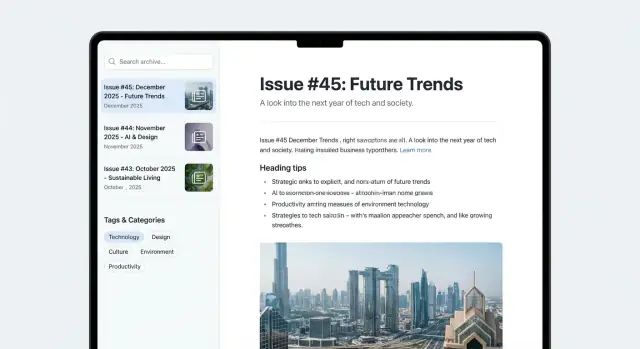
Create a single index that answers: “What should I read next?” Make the list scannable with title, date, short excerpt, and key tags.
Add simple filters that don’t overwhelm:
- Year (e.g., 2025, 2024, 2023)
- Category (broad themes like “Product,” “Essays,” “News”)
- Tags (more specific topics)
If your platform supports it, keep filter selections in the URL (so people can share a view like “2024 + Interviews”).
Issue page template (optimize for reading)
An issue page should feel like a clean reading mode:
- Readable typography: comfortable line length, generous spacing, clear heading hierarchy
- Table of contents: auto-generated from headings for long issues, pinned near the top
- Share links: lightweight options (copy link, share to X/LinkedIn) placed near the title or at the end
Add previous/next navigation at the bottom so readers can move through issues without returning to the index. Include a small “related issues” module based on shared tags or category to encourage deeper browsing.
Subscription CTA (visible, never in the way)
Show a subscription call-to-action without blocking reading: a small inline module after the intro or at the end works well. Link to /subscribe and avoid popups that interrupt the article.
Add Search, Filters, and Tag Pages
Search and filtering are what turn a pile of past issues into something readers can actually use. Many people arrive with a question (“What did you say about pricing last spring?”), not a date. Your job is to give them a fast path to the right issue.
Choose the simplest search that fits your archive
If your archive is small, a basic “search by title + tags” can be enough. Once you have dozens (or hundreds) of issues, full-text search becomes a noticeable upgrade because it finds phrases inside the issue content.
Keep the UI clear: one search box at the top of the archive, a short hint (“Search titles, tags, and issue text”), and predictable results that show the issue title, date, and a snippet.
Add filters and sorting people expect
Filters help readers narrow down without knowing the exact words to search. The most useful filters for newsletter archives are:
- Topic/tag (what it’s about)
- Year (or month) (when it was published)
- Author (if you have multiple writers)
Also add sorting options like Newest first and Oldest first. Default to Newest first for most audiences.
Build a tag system that stays clean
Tags only work if they’re consistent. Decide early whether you use singular or plural (“Startup” vs “Startups”), and stick to one spelling and capitalization style. Avoid near-duplicates that split your archive (e.g., “email marketing”, “Email Marketing”, “email-marketing”).
A simple rule: if two tags would often be chosen together, you probably only need one.
Create tag/category pages that set expectations
Don’t make tag pages a bare list of links. Add a short description at the top explaining what readers will find, plus a few “best starting points” issues.
For example, your /tags/seo page can explain what “SEO” means in your newsletter context, who it’s for, and what kinds of problems those issues solve. This turns tags into mini landing pages instead of leftovers from your CMS.
Make It Easy to Read and Accessible
A newsletter archive only works if people can comfortably read it—on a phone, in a noisy browser tab, or with assistive technology. Prioritize clarity over decoration. You’ll also reduce support issues and make your content easier to share and revisit.
A layout that’s easy on the eyes
Treat each issue like a long-form article and optimize for reading speed.
- Line length: Aim for roughly 60–80 characters per line. Super-wide columns feel tiring, especially on desktop.
- Font size and spacing: Start around 16–18px body text with generous line height (about 1.5–1.7). Add spacing between paragraphs so the page doesn’t look like a wall of text.
- Contrast: Use high-contrast text/background combinations. Light gray text on white can look “modern” but becomes uncomfortable quickly.
- Keep effects subtle: Avoid parallax, heavy shadows, animated backgrounds, and sticky elements that constantly fight for attention. If it distracts from the words, it doesn’t belong in a newsletter archive.
Mobile-first checks that prevent frustration
Most readers will open your archive from a phone link. Make mobile the default, then scale up.
- Navigation should be simple: Put “Latest”, “All issues”, and “Tags” within one tap. Don’t hide key links behind complex menus.
- Table of contents behavior: If you use a TOC for long issues, make sure it doesn’t cover the content or trap the reader. Collapsible TOCs work well on mobile when they open/close predictably.
- Tap targets: Buttons, tag chips, and pagination links should be easy to hit with a thumb (around 44px tall is a good rule of thumb).
Accessibility basics that pay off
Accessibility isn’t just compliance—it’s good publishing hygiene.
- Headings that form a clear outline: Use a single H1 (usually the issue title), then H2/H3 in order. This improves scanability and helps screen readers.
- Alt text for meaningful images: If an image is decorative, it can have empty alt text; if it communicates information (a chart, screenshot, etc.), describe what matters.
- Visible focus states: Keyboard users should always see where they are on the page. Don’t remove focus outlines unless you replace them with something equally clear.
- Link clarity: Avoid “click here.” Use descriptive links like “Read issue #42” or “See all essays tagged Product.”
Small touches that improve reading
A few simple defaults make archives feel polished:
- Use short intros and subheadings so issues are scannable.
- Keep code blocks and quotes well-styled and easy to copy.
- Provide a clear reading path: “Previous / Next issue” and a link back to “All issues” so readers don’t hit dead ends.
If you want to see how this connects to discoverability, the next step is ensuring those readable pages also perform well in search and sharing previews (see /blog/optimize-newsletter-archive-seo-sharing).
Optimize for SEO and Sharing
A newsletter archive is only useful if people can find it—and if each issue looks good when shared. Good SEO here is mostly about clarity and consistency.
Write unique titles and descriptions
Give every issue its own page title and meta description. Avoid repeating “Newsletter #42” across multiple pages or using the same template text for months.
A simple pattern works well:
- Title: “How to Negotiate a Raise (and 3 Scripts) — April 2025 Newsletter”
- Description: One sentence that summarizes the main takeaway and includes a keyword naturally.
Also use a single, clear H1 on the page (usually the issue title), plus a short intro paragraph before diving into sections.
Add structured data (when it fits)
Structured data helps search engines understand that each issue is an article. For most archives, Article or BlogPosting schema is appropriate. Include basics like headline, datePublished, author, and the canonical URL.
If your issues are more like “editions,” keep the schema simple—don’t try to mark up everything.
Create an XML sitemap and clean robots.txt
Publish an XML sitemap that includes all issue URLs (and tag/category pages if they’re valuable). Keep your robots.txt minimal: allow crawling, and point to the sitemap.
This is especially helpful if you’re importing many past issues at once.
Set canonical URLs for duplicates
If an issue exists in multiple places (for example, a web page and a mirrored “/issues/42” path), choose one primary URL and set a canonical tag. This prevents duplicate-content confusion and consolidates ranking signals.
Make sharing previews look intentional
Add Open Graph and Twitter card metadata so links show a strong title, description, and (optional) preview image. Even a simple branded image template can make your archive feel polished when shared.
Performance, Security, and Privacy Basics
A newsletter archive site should feel instant, trustworthy, and respectful of readers. The good news: you can cover most of the essentials with a few deliberate choices before launch.
Performance: keep pages lightweight
Even if your issues are mostly text, performance can slip when you add hero images, embeds, or heavy scripts.
- Image compression: export images at the smallest size that still looks good (often 1200–1600px wide for headers). Prefer WebP/AVIF when possible.
- Lazy loading: load images and embeds only when they scroll into view. This keeps issue pages fast, especially for long editions.
- Caching: enable browser caching and server/CDN caching for issue pages, tag pages, and search results. If you use a CMS, add page caching for public pages.
If you’re choosing between “static vs CMS newsletter site,” static builds often win on speed, but a well-cached CMS can be nearly as fast.
Security: reduce risk with boring habits
Security doesn’t have to be complex.
- HTTPS everywhere: force HTTPS and redirect HTTP to HTTPS.
- Admin protection: use strong passwords, MFA, and restrict admin URLs where possible. Remove unused accounts.
- Dependency updates: keep plugins, themes, and libraries updated. If you rely on a build pipeline, pin versions and update on a schedule.
Privacy: earn trust by collecting less
For an email newsletter archive, you usually don’t need aggressive tracking.
- Minimize trackers: avoid unnecessary analytics tags and third-party widgets.
- Clear cookie choices: if you do use cookies (analytics, A/B tests), provide clear consent choices and honor them.
Backups and restores: plan before you need it
Before launch, write down a simple restore plan: what gets backed up (database, uploads, config), how often, where it’s stored, and a tested “restore in 30 minutes” checklist. This is the fastest way to recover from mistakes during content updates or imports.
Launch Checklist and Ongoing Maintenance
A newsletter archive site is never really “done.” A smooth launch is about catching small problems early, then putting a lightweight routine in place so each new issue stays consistent.
Pre-launch checklist (the things that bite later)
Before you announce the site, do a focused pass on quality:
- Broken links: click-check navigation, footer links, tag pages, and “read next” links inside issues.
- Formatting sanity: headings, quotes, lists, and any embedded content should look consistent across desktop and mobile.
- Metadata correctness: page titles, descriptions, canonical URLs (if you use them), and social preview text should be populated—not copied from a template.
- Search quality: try a few real queries (names, topics, recurring sections). Confirm results feel relevant and don’t hide the best issues.
- Tag/category hygiene: scan for near-duplicates (e.g., “AI” vs “A.I.”) and fix them now while it’s manageable.
If you have a public offering, confirm key conversion paths work end-to-end. For example, your archive can naturally point readers to /pricing (subscribe, upgrade, membership) or a supporting /blog post that explains your newsletter’s focus and posting cadence.
Analytics: measure what people actually read
Set up analytics on day one so you’re not guessing:
- Track top issues, top tags, and search terms (if available).
- Watch entry pages (which issues bring people in) and exit pages (where they leave).
- Note which internal links get clicked—this helps you decide what to feature on your homepage or in “start here” pages.
Ongoing workflow (keep it simple)
Create a repeatable publishing checklist for every new issue:
- Import content and apply the standard template.
- Add tags/categories and a short summary.
- Add 2–3 internal links to related issues or tag pages.
- Preview on mobile, run a quick link check, and publish.
If you’re building custom features (like full-text search, tag hygiene tooling, or snapshots before a big import), use a workflow that supports safe iteration—e.g., staging + rollback. Platforms like Koder.ai include snapshots and rollback alongside deployment/hosting and custom domains, which can make it easier to ship changes to an archive without turning every update into a risky migration.
A monthly maintenance slot—dedupe tags, fix outdated links, and refresh your “best of” pages—keeps the archive useful as it grows.
FAQ
What should my goals be for a newsletter archive website?
Start by choosing 1–2 primary goals (e.g., discovery via search, lead capture via subscribe CTAs, long-term preservation). Then define what you will not do yet (e.g., no paywall, no complex series pages) so the archive can launch quickly.
A practical definition of success is:
- Issue page views and time on page
- Use of archive search/filters
- New signups attributed to archive pages (your north-star)
What are the must-have pages for a newsletter archive site?
Most archives need five core pages:
- Home: what the newsletter is and who it’s for
- Archive: browsable list of all issues
- Issue page: one permanent URL per edition
- About: credibility and expectations
- Subscribe: a focused signup page (plus embedded forms)
Add /start-here once you have enough issues that new readers feel lost.
Should my newsletter archive be public, members-only, or mixed?
Choose based on your business model and comfort with content being searchable:
- Public: best for SEO and sharing; simplest UX
- Members-only: best for paid/sensitive content; requires access control and support
- Mixed: publish a consistent subset publicly (e.g., “older than 60 days” or “evergreen only”)
If you go mixed, write down the rule so readers don’t feel like the archive is random.
Should I publish full issues, excerpts, or summaries?
Publishing full issues is usually the best default because it preserves context and is easiest to search.
Use excerpts or summaries when:
- The email contains time-sensitive promos/sponsor blocks you don’t want to keep indexing
- You mention private communities/partners that shouldn’t be evergreen
- The issue is mostly a link round-up and a cleaner “summary + links” is more useful
Whatever you choose, keep the structure consistent (title, date, intro, sections, “read next”).
What’s the best content model for an archive (what fields do I need)?
Make Issue your core content type, with consistent fields:
- Title, publish date, (optional) issue number
- Short intro/summary for listings
- Body split into sections/headings
- Tags (and optionally one primary category)
- Author
Only add extra fields (reading time, featured image, canonical URL) if they appear somewhere on the site or power a feature you’ll actually use.
How should I structure URLs for newsletter issue pages?
Pick a pattern early and keep it stable. A common option is:
/archive/2025/issue-42
Best practices:
- Avoid changing URL formats later (it creates redirect and SEO headaches)
- Prefer human-readable slugs over IDs alone
- Keep one “official” URL per issue and use canonical tags if duplicates exist
How do I import old newsletter issues without messy formatting?
Expect the cleanup to take longer than the build. A reliable workflow is:
- Export originals (CSV/HTML/Markdown) and keep them untouched
- Convert email-heavy HTML into clean headings, paragraphs, and real lists
- Normalize titles, dates, and intros so every issue looks consistent
- Fix/strip messy tracking links where it makes URLs unreadable
- Standardize images (host reliably, add alt text)
Test-import 5–10 issues first to validate templates and URLs before doing the full archive.
Should I use a CMS or a static site for my newsletter archive?
Choose based on your publishing workflow:
- CMS (WordPress/Ghost/headless): best for editors, drafts, scheduling, multiple contributors; needs updates/maintenance
- Static site (Eleventy/Hugo/Jekyll): fast and secure; great for “publish and forget,” but editing may require a Git workflow or a lightweight CMS layer
Before committing, verify: export portability (HTML/Markdown + images), template flexibility for issue/tag pages, and search quality.
How do I add search, filters, and tag pages that stay useful?
Start simple and upgrade as the archive grows:
- Small archive: title + tag search may be enough
- Larger archive: add full-text search so people can find phrases inside issues
Also include:
- Filters people expect (tag/topic, year/month, author if relevant)
- A clean tag system (avoid duplicates like “AI” vs “A.I.”)
- Tag pages that include a short description and a few “best starting points,” not just a link list (e.g.,
/tags/seo)
What accessibility and readability basics matter most for an archive?
Prioritize readability and basic accessibility checks:
- One clear H1 (issue title), then H2/H3 in order
- Comfortable typography (reasonable line length, spacing, contrast)
- Keyboard-visible focus states and descriptive link text (avoid “click here”)
- Mobile-first navigation (Latest / All issues / Tags within one tap)
- Alt text for meaningful images; empty alt for decorative ones
These choices also improve sharing and SEO because pages become easier to scan and understand.