

How to Create a Website for Product Comparison and Reviews
Learn how to plan, build, and grow a product comparison or review website: features, content, SEO, monetization, trust, and launch steps.
Define Your Niche and Website Goals
A comparison or review site is easiest to grow when it’s clearly “for someone” and “for something.” Before you think about design or tools, decide what you’ll cover and what success should look like.
Define the niche and target audience
Start with a tight niche you can realistically serve better than general review sites. Be specific about:
- Who you’re helping (first-time buyers, professionals, parents, small businesses)
- What products you’ll focus on (and what you’ll exclude)
- Why now (new regulations, rising prices, confusing feature sets, frequent model releases)
A useful test: can you describe your site in one sentence without using the word “best”? For example: “We compare compact espresso machines for small kitchens, focusing on noise, cleaning effort, and long-term cost.”
Choose your platform type
Decide whether you’re building:
- Comparison-first: tables, filters, “A vs B,” buyer guides
- Review-first: hands-on reviews, scoring, pros/cons, long-form testing
- Both: comparisons that link to deeper reviews (often the strongest model, but more work)
Pick the type that matches your resources. Comparison-first can start faster; review-first can build stronger authority if you can genuinely test products.
Set measurable goals (and constraints)
Define 2–4 success metrics for the first 90 days and 12 months: organic traffic, email sign-ups, affiliate revenue, leads, or partner inquiries.
Then list constraints: budget, timeline, who will write/edit, and any legal needs (disclosures, how you handle sponsored content, and whether you’ll accept user submissions). Clear goals and constraints prevent a site that looks polished but doesn’t convert or scale.
Choose a Clear Value Proposition and User Journey
A product comparison website succeeds when readers immediately understand two things: what you help them decide, and how quickly you’ll get them to a confident choice. Your value proposition is the promise; the user journey is the path that fulfills it.
Define what “decision-ready” means
Be specific about the outcome your site delivers. “Decision-ready” might mean:
- They’ve narrowed to 2–3 products that match their budget and priorities
- They understand the trade-offs (price vs. performance, features vs. simplicity)
- They feel safe clicking through to buy, download, or request a quote
This definition shapes how much detail you show, which comparisons you prioritize, and how you summarize conclusions.
Map the core journeys (and keep them short)
Most visitors follow one of these flows: browse → filter → compare → decide → click out. Design each step so it’s obvious what to do next:
- Browse: clear categories, “best for” collections, and trending items
- Filter: a small set of high-impact filters (price, key feature, rating, availability)
- Compare: side-by-side tables that highlight differences, not every spec ever
- Decide: a short verdict, who it’s for, who should avoid it, and alternatives
- Click out: visible buttons with consistent wording (e.g., “See price”, “Read more”, “Get deal”)
Identify your differentiators
Choose 1–2 strengths you can consistently deliver, such as:
- Depth: hands-on testing, expert reviews, or real user feedback
- Freshness: frequent updates, price checks, and “last verified” timestamps
- Methodology: clear scoring rules and comparison criteria
- UX: fast tables, smart filters, and easy-to-skim verdicts
Decide regions and languages up front
Before you build momentum, confirm where you’ll support accurate pricing, availability, shipping, and local regulations. If you plan multiple locales, design your navigation and URL structure early so expansion doesn’t force a rebuild later.
Plan the Catalog Structure and Comparison Model
A comparison site lives or dies by how cleanly your product information is structured. Before you write reviews or design tables, decide what a “product” is in your system, what can be compared, and which fields must be consistent across every listing.
Pick comparison dimensions (what users actually decide on)
Start with the few dimensions people use to make a choice, then expand later. Common examples include price, core features, ratings, and clear pros/cons.
Define:
- Must-have fields (required for every product): name, brand, category, price (or price range), rating, key features
- Nice-to-have fields (often missing): warranty, materials, integrations, shipping time
- Display rules: how you’ll show “not available” vs “unknown” so tables stay honest
Build the data model: categories, tags, and attributes
Think in three layers:
- Categories: the main navigation (e.g., “Robot Vacuums”)
- Tags: flexible labels for discovery (e.g., “pet hair,” “small apartments”)
- Attributes: structured specs used in comparison tables (e.g., suction power, battery life)
Attributes should have a clear type (number, yes/no, text, picklist) and a consistent unit (minutes, watts). This prevents messy comparisons like “1.5h” vs “90 minutes.”
Plan taxonomy pages users will search for
Beyond category pages, plan templates for:
- Brand pages (all products by a manufacturer)
- “Best for” pages (intent-driven lists like “Best for beginners”)
These pages become your main entry points from search and make internal linking straightforward (for example, from a review to /best/portable-blenders).
Decide how products enter the catalog
Choose your ingestion approach early:
- Manual entry for accuracy and smaller catalogs
- Feeds (CSV/XML) for larger, regularly updated catalogs
- APIs for real-time pricing/availability (more setup, less manual work)
Whatever you choose, define a review step so new items can’t publish with missing comparison fields.
Design Core Pages: Product, Category, and Comparison
Your site’s “core pages” do most of the work: they help visitors narrow choices quickly, understand trade-offs, and take the next step with confidence. Design them so a first-time visitor can get value in under a minute.
Product page: clarity first
A great product page answers three questions fast: What is it? Is it good for me? What should I do next?
Include these must-haves near the top:
- At-a-glance summary (1–2 sentences) and a clear score/rating if you use one
- Key specs in a compact table (size, compatibility, battery life, warranty—whatever matters in your niche)
- Pros/cons that feel specific (avoid generic “great value”)
- Screenshots/photos (and captions explaining what viewers should notice)
Then add a “details” area for deeper reading: what it’s best for, what to avoid, notable alternatives, and a short FAQ.
Calls-to-action should be obvious and consistent:
- Compare (adds to comparison tray)
- Read review (jumps to the full review section)
- Check price (external click or internal offer page)
Category pages: filter, don’t overwhelm
Category pages should help people shrink the list quickly. Provide filters that match real buying decisions:
- Price range slider
- Feature checkboxes (e.g., “noise cancelling,” “waterproof”)
- Rating threshold (4.0+)
- Availability (in stock, shipping speed, region)
Keep results scannable: product name, a one-line “best for,” price range, rating count, and a quick “Compare” button.
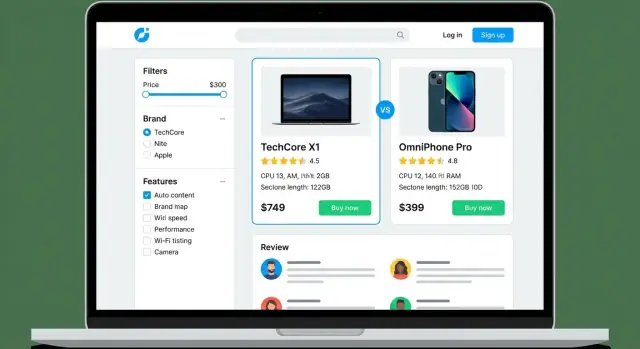
Comparison pages: make differences pop
Comparison tables work best when they’re interactive:
- Sortable columns (price, rating, weight)
- Highlight differences (visually emphasize where products diverge)
- Sticky header so column labels stay visible while scrolling
Add short “verdict” text below the table: who should pick each option, in plain language.
Search that forgives mistakes
Implement search with autocomplete, synonyms (e.g., “earbuds” vs “in-ear”), and misspelling handling. The goal is zero dead ends—always show close matches and popular alternatives.
Decide How Reviews and Ratings Will Work
Reviews are the engine of a comparison site: they influence trust, rankings, and conversions. Before you collect a single rating, define a system users can understand in a few seconds—and that you can enforce consistently.
Pick a rating model (and define what it means)
Choose one primary format and document its meaning:
- Star ratings (1–5): familiar and fast, but can be vague unless you explain what “3 stars” represents.
- Scores (0–10 / 0–100): more granular, useful for editorial testing.
- Multi-criteria scoring: best for complex products (e.g., “Ease of use,” “Value,” “Support”). Show a clear overall score and how it’s calculated.
Add microcopy near the rating (“Based on X criteria” or “User average from Y reviews”) so it’s not a mystery.
Decide whose reviews you’ll publish
Most sites use one of these approaches:
- Editorial reviews: consistent methodology, great for comparison tables.
- User reviews: add scale and real-world use cases.
- Both: powerful, but only if you label them clearly (e.g., “Editor score” vs “User rating”).
Standardize review fields
A consistent template makes reviews easier to scan and harder to spam. Common fields include: title, pros/cons, use case, and optional verified purchase (only if you have a reliable way to confirm it—otherwise don’t imply verification).
Moderation and anti-spam basics
Publish simple rules at /review-guidelines. Use a mix of automated checks (rate limits, duplicate detection) and human review for edge cases. Be strict about conflicts of interest and incentivized reviews.
Display and sorting rules
Decide how users will browse feedback: show most helpful and most recent views, allow filtering by rating, and explain when reviews are hidden, removed, or “pending verification.”
Build Trust: Transparency, Disclosures, and Policies
Trust is the difference between a site people skim once and a review platform they return to before every purchase. For comparison and review websites, trust is earned through consistency, clarity, and making your incentives visible.
Create the essential “credibility” pages
At minimum, publish these pages in your main navigation or footer:
- About: who you are, what you review, and what you don’t
- Contact: a real way to reach you (a form + email address is usually enough)
- Privacy: what data you collect (analytics, cookies, newsletter) and why
- Terms: rules for using your site and limiting liability
- Disclosure: how you make money, including affiliate links and sponsorships
If you need a simple structure, keep these links consistent across the site (footer is ideal): /about, /contact, /privacy, /terms, /disclosure.
Explain your review methodology in plain language
Readers don’t need a lab report—they need to know your process is fair.
Describe:
- How products are selected (best-sellers, editor picks, reader requests)
- What you test or evaluate (price, durability, support, features)
- How scoring works (what a “4/5” actually means)
- Whether you bought the product, were sent it, or used a free trial
A short “How we review” section on every review plus a dedicated methodology page builds credibility fast.
Disclose sponsorships and affiliate links clearly
Don’t hide the business model. Place a short note near the top of comparisons and reviews, and label sponsored posts directly in the title area.
Be specific: “We may earn a commission if you buy through links on this page. This doesn’t affect our rankings.” If a ranking is paid placement, say that plainly.
Conflicts of interest and corrections
Define what you won’t do (for example: “We don’t accept payment to change ratings”). Add a corrections policy so readers know how errors are handled and how to report them.
Show update dates and change logs
Comparison content gets outdated quickly. Add a visible “Last updated” date on major reviews and key comparison pages. For important updates, include a small change log (e.g., “Dec 2025: updated pricing; replaced discontinued model”). This signals active maintenance—and prevents readers from feeling misled by old information.
Choose Your Tech Stack and Hosting
Your tech choices affect how fast you can publish, how easy it is to maintain the site, and how well it handles growth. Aim for the simplest option that supports comparison tables, reviews, and structured content.
Pick an approach: CMS, builder, or custom
- CMS (common choice): WordPress or similar systems are flexible, affordable, and have plugins for comparison tables, reviews, and SEO. Best if you expect frequent publishing.
- Website builders: Tools like Webflow, Squarespace, or Wix can look great quickly, but can feel limiting when you need advanced filtering, lots of template types, or complex comparison logic.
- Custom build: A custom site (e.g., Next.js + a headless CMS) is ideal for large catalogs and unique comparison features, but costs more and requires ongoing developer support.
If you want the flexibility of a custom build without setting up a traditional dev pipeline from scratch, a vibe-coding platform like Koder.ai can be a practical middle ground: you can describe your review platform (catalog, comparison tables, user reviews, moderation, and admin workflows) in chat, iterate quickly, and export the source code when you’re ready to own the stack.
Choose hosting based on traffic and content volume
Start with managed hosting if you don’t want to handle server maintenance. If you expect heavy traffic spikes (seasonal buying guides, viral posts), prioritize:
- fast SSD storage and enough memory
- built-in caching and a CDN option
- easy scaling (upgrade plan in minutes, not days)
Create a simple URL structure
Keep URLs predictable for both navigation and SEO:
- Categories:
/laptops/ - Product pages:
/laptops/macbook-air-m3/ - Comparisons:
/compare/macbook-air-m3-vs-dell-xps-13/
Avoid changing URL patterns later—migrations are time-consuming.
Plan integrations early
Decide what you’ll connect from day one: analytics, a newsletter tool, affiliate networks, and (if you sell leads) a lightweight CRM. Choose tools with easy exports so you’re not locked in.
Use staging, backups, and rollbacks
Set up a staging environment to test new plugins, layouts, and tracking changes before they go live. Schedule automatic daily backups, store them off-site, and make sure you can restore with one click.
If you’re using a platform that supports snapshots and rollback (for example, Koder.ai’s snapshots), you can reduce risk when shipping changes to templates, table layouts, and tracking scripts.
Set Up Content Management and Editorial Workflow
A comparison and review site lives or dies by consistency. Before you publish your first review, decide who can create, change, and approve content—and how you’ll keep older pages accurate as products change.
Define roles and permissions
Keep roles simple so responsibilities are clear:
- Admin: manages site settings, categories, monetization links, and user permissions
- Editor: assigns topics, enforces guidelines, approves updates, and maintains templates
- Reviewer (author): writes hands-on reviews, fills in specs, and records testing notes
- Moderator: handles user reviews/comments, flags spam, and escalates disputes
Even if one person wears multiple hats, setting roles early prevents messy publishing later.
Build a reliable workflow (draft → review → publish → update)
Use a straightforward pipeline:
- Draft: author creates the review and attaches sources (manufacturer pages, test data, pricing notes).
- Editorial review: editor checks claims, tone, formatting, and affiliate link placement.
- Publish: content goes live with a visible “last updated” date.
- Update: schedule refreshes (e.g., every 90–180 days) and trigger updates when products change, prices shift, or better options appear.
Create reusable templates
Templates are how you scale without sacrificing quality. Create standard blocks for:
- Review pages: pros/cons, key specs, testing methodology, “who it’s for,” and alternatives
- Comparison pages: selection criteria, a consistent comparison table, and a short summary for each pick
This also makes internal linking easier (e.g., “See the full review” → /reviews/product-name).
Media handling standards
Set rules for images before your media library becomes chaotic: consistent dimensions, compression targets (so pages stay fast), and required alt text that describes what’s shown. Name files clearly (brand-model-angle.jpg) so your team can find them later.
Versioning and editorial checklists
Maintain a simple changelog (what changed and why) and use a pre-publish checklist: verify specs, confirm availability, test affiliate links, note conflicts of interest, and double-check comparisons use the same criteria across products. This is how you build accuracy—and keep it.
SEO for Comparison and Review Websites
SEO is how people discover your comparison pages at the exact moment they’re ready to choose. The goal is to match search intent, answer quickly, and make it easy for search engines to understand what your page is about.
Do keyword research by intent
Comparison and review sites tend to win on “decision” queries. Build your keyword list around patterns like:
- “best” (e.g., “best project management tools for startups”)
- “vs” (e.g., “Tool A vs Tool B”)
- “review” (e.g., “Tool A review”)
- “alternatives” (e.g., “Tool A alternatives”)
Map each intent to the right page type: “best” keywords to category guides, “vs” to dedicated comparison pages, and “review” to individual product pages.
On-page basics that move the needle
Keep pages scannable: clear H1/H2s, a short comparison summary near the top, and internal links to relevant deep dives.
A simple internal linking model helps both users and crawlers:
- Category guides → product pages
- Product pages → “vs” comparisons
- Blog posts → category hubs like /blog and “top picks” roundups
Use structured data (without overdoing it)
Add schema markup where it genuinely matches the content, such as Product, Review, and FAQ. This can improve how your pages appear in search, and it reduces ambiguity about ratings, pricing, and key attributes.
Avoid thin pages with minimum standards
Set a minimum content requirement for product pages so they’re not just a table and an affiliate button. Include who it’s for, key features, pros/cons, pricing notes, and how it compares to close alternatives (with links to those comparisons).
Create internal linking hubs
Build “hub” pages that consolidate authority and help users explore:
- Category hubs (top picks)
- /blog educational content
- Comparison hubs (e.g., “All X vs Y comparisons”)
This structure makes your site easier to navigate—and easier to rank.
Performance, Accessibility, and Security Essentials
A comparison and review site only works if people can scan it quickly, trust it, and use it comfortably—especially on a phone. Treat performance, accessibility, and security as product features, not cleanup tasks.
Performance targets that protect conversions
Aim for a page that feels instant: meaningful content visible in ~2 seconds on mobile, and no “jumping” layout as tables load.
Keep it simple:
- Compress and resize images (serve modern formats like WebP/AVIF when possible).
- Minimize scripts—every extra widget can slow down filters and comparison tables.
- Cache pages and assets; use a CDN if your audience is global.
- Load heavy elements (charts, embeds) only when needed.
For comparison tables, prioritize readability over clever effects. Sticky headers and lightweight sorting usually beat complex animations.
Mobile-first tables and filters
Most users will compare on a small screen. Use horizontal scrolling for wide tables, but make it obvious and comfortable. Keep key attributes (price, rating, “best for”) near the left, and let users expand rows for details instead of cramming everything into one view.
Accessibility basics that broaden your audience
Make the site usable without a mouse:
- Ensure high contrast and readable font sizes.
- Support keyboard navigation for tabs, filters, and sorting.
- Use clear labels for form inputs and filter controls.
- Don’t rely on color alone to communicate ratings or “winner” badges.
Security and privacy essentials
Always use HTTPS. Keep your CMS, plugins, and dependencies updated, and grant least-privilege access (editors shouldn’t be admins). If you collect emails or allow user reviews, protect admin accounts with strong passwords and MFA.
For privacy, decide what you truly need. If you run affiliate tracking or analytics, implement cookie consent options that match your setup, and link to your policy pages (for example, /privacy and /cookies).
Monetization Options and Conversion Tracking
Monetizing a product comparison website works best when it aligns with what visitors already want: a confident decision. The goal is to earn revenue without turning the site into a maze of aggressive buttons.
Common revenue models (and where they fit)
Most comparison and review sites use a mix of these:
- Affiliate commissions: earn when users buy after clicking to a merchant. Works well on “best X” pages and comparison tables.
- Lead generation: earn when users request a quote, booking, or consultation. Great for services (insurance, SaaS demos, home services).
- Ads: useful for high-traffic informational pages, but easy to overdo on high-intent pages.
- Sponsorships: paid placements or sponsored categories—only if you clearly label them.
- Subscriptions: premium filters, ad-free mode, or extra data (price history, expert notes) for power users.
CTAs that convert without hurting trust
Keep calls-to-action accurate and consistent with what happens next. If a button sends people to a partner site, say so (“Visit site,” “Check price,” “See plans”). Avoid lookalike “Download” or “Start free trial” buttons unless that’s truly the offer.
A helpful pattern is to pair the primary CTA with a secondary action, like “Compare details,” so users don’t feel forced into leaving.
Track the actions that matter
Pageviews won’t tell you which comparisons actually drive revenue. Track events such as:
- Outbound clicks to partners (by product, position, and page type)
- “Reveal deal” or “Show more” interactions in comparison tables
- Lead form submits and phone/email taps (on mobile)
Then tie these to outcomes (affiliate reports, CRM leads, or ad revenue) so you can spot which categories and modules perform.
High-intent modules: widgets and “best picks”
Create reusable comparison widgets—mini tables, “best for beginners,” “best value,” or “best for teams”—and place them on pages where users are close to choosing. Standardize the layout so visitors learn to trust your patterns.
Make it easy for partners to work with you
Publish a simple media kit with audience stats, placements, and collaboration options at /media-kit. It saves time, looks professional, and helps you negotiate sponsorships without cluttering editorial pages.
Launch Plan and Ongoing Growth
A comparison or review site doesn’t “finish” when it goes live. Your first goal is a clean, credible launch; your second is creating a rhythm where content, SEO, and conversion improvements compound over time.
Pre-launch checklist (the unglamorous stuff that saves you)
Before you announce anything, run a quick quality sweep:
- Check for broken links (especially affiliate links) and missing images.
- Validate structured data (schema markup) so ratings, pros/cons, and product info can be understood by search engines.
- Run page speed checks on your heaviest pages (usually comparisons and category hubs) and fix obvious bottlenecks.
- Confirm your disclosures and policies are visible and accurate (affiliate disclosure, review policy, privacy/cookies).
Seed content plan: launch with a “minimum lovable” set
Avoid publishing dozens of thin pages. A better approach is to launch with a small set that demonstrates depth and usefulness:
- A few category hubs (your main entry points from search)
- Several key standalone reviews for popular products in each category
- One flagship comparison that’s genuinely better than what already ranks (clear criteria, updated picks, and a simple table)
This structure helps users move naturally from “what should I buy?” to “is this product right for me?” without getting stuck.
Launch promotion: get your first real visitors
On launch week, focus on channels that reward helpful content, not hype:
- Email list: even a small list can generate early clicks, feedback, and return visits.
- Communities: participate where your audience already asks for recommendations (follow rules; lead with value).
- Partner outreach: let brands, creators, and niche newsletters know about your comparison—especially if you included them fairly.
Post-launch iteration: what to improve first
Your first month should be about learning. Start with the pages that matter most:
- Top landing pages from search (often category hubs and comparisons): tighten intros, improve tables, add missing alternatives.
- Reviews with high impressions but low CTR: refine titles/meta descriptions and clarify “who it’s for.”
- High-traffic pages with low outbound clicks: improve calls-to-action, link placement, and comparison clarity.
Set a refresh schedule, too. Comparisons and “best of” pages should be checked regularly (pricing, availability, new models), while evergreen guides can be updated less often.
Measure what matters (and ignore vanity)
Track a small set of metrics that map to your goals:
- Rankings for target comparison keywords
- Search CTR (are people choosing your result?)
- Time on page / scroll depth (are they engaging?)
- Clicks out to merchants or partners (are you helping decisions?)
- Sign-ups (email/newsletter) if you’re building an owned audience
If you improve one flagship comparison and one hub each week, growth becomes predictable—and your review platform starts earning trust, traffic, and revenue at the same time.
FAQ
How do I choose a niche for a product comparison or review website?
Start by defining who you help and what decision you help them make. Pick a narrow niche you can cover better than broad review sites, then write a one-sentence description of the site (avoid vague claims like “best”).
Practical starter formula: “We compare [product type] for [audience], focusing on [3 criteria].”
What goals should I set before building the site?
Use measurable targets for two time horizons:
- First 90 days: publish cadence (e.g., 10 reviews + 3 comparisons), baseline organic traffic, first outbound clicks, first email sign-ups.
- 12 months: organic sessions, revenue (affiliate/lead gen), number of ranking pages, partner inquiries.
Also write down constraints (budget, time, who edits, legal/disclosure needs) so you don’t build features you can’t maintain.
Should I build a comparison-first site, a review-first site, or both?
Pick the format that matches your resources:
- Comparison-first: faster to launch (tables, filters, “A vs B”), but you need clean structured data.
- Review-first: builds authority if you can truly test or evaluate products.
- Both: often strongest—comparisons for discovery, reviews for depth—but requires more content and upkeep.
If you’re solo, start with comparison-first plus a small set of deep reviews for the top products.
What product data do I need to collect for a good comparison model?
Define a small, consistent set of fields so every product can be compared fairly:
- Must-have: name, brand, category, price (or range), rating/score, key features.
- Nice-to-have: warranty, materials, integrations, shipping time.
- Rules: show “not available” vs “unknown” differently so users don’t confuse missing data with a negative.
Keep units consistent (e.g., minutes vs hours) to avoid misleading tables.
How should I structure categories, tags, and attributes?
Use three layers:
- Categories: your main navigation (e.g., Robot Vacuums).
- Tags: flexible labels for discovery (e.g., pet hair, small apartments).
- Attributes: structured specs for tables (e.g., battery life as a number in minutes).
This setup supports SEO pages like brand listings and “best for” collections without duplicating content.
What are the essential pages every comparison site should have?
Design around the fastest path to confidence:
- Category pages should filter without overwhelming (price, 1–3 key features, rating threshold, availability).
- Product pages should answer: What is it? Who is it for? What next? (summary, key specs, pros/cons, alternatives, clear CTA).
- Comparison pages should emphasize differences, not every spec (sortable columns, highlighted deltas, short verdicts).
Add a consistent “Compare” action so users can build a short list quickly.
How do I set up ratings and reviews without confusing readers?
Pick one primary model and explain it everywhere you show it:
- Stars (1–5): simple, but define what each level means.
- Score (0–10 / 0–100): more detail for editorial testing.
- Multi-criteria: best for complex products; show the overall score and the criteria weights.
Label sources clearly (e.g., “Editor score” vs “User rating”) and keep review templates consistent (pros/cons, use case, key tests).
What policies and disclosures do I need to build trust?
At minimum, publish and link these pages in your footer:
- /about, /contact
- /privacy, /terms
- /disclosure
Also add a plain-language methodology page (e.g., /how-we-review) and put a short methodology snippet on each review. If you use affiliate links or sponsorships, disclose near the top of reviews/comparisons and label paid placement explicitly.
What tech stack should I use for a comparison and review website?
Choose based on catalog size and feature complexity:
- CMS (e.g., WordPress): fastest for frequent publishing; plugins help with SEO and tables.
- Builder (Webflow/Squarespace/Wix): quick design, but can be limiting for advanced filters and large catalogs.
- Custom (e.g., Next.js + headless CMS): best for big catalogs and unique comparison UX; higher cost and ongoing dev needs.
Whatever you choose, set up staging, automatic daily backups, and an easy rollback process.
How do I track conversions and improve monetization after launch?
Track decision-making actions, not just pageviews:
- Outbound clicks to partners (by product and table position)
- “Compare” adds, filter usage, and table interactions (sort, expand)
- Lead form submits, phone/email taps (mobile)
Then prioritize improvements on:
- Pages with high impressions but low CTR (titles/meta + clearer “who it’s for”)
- High traffic but low outbound clicks (CTA wording/placement, clearer verdicts)
- Comparisons that need freshness (add “Last updated” + update picks and availability)