

How to Create a Website for Real Estate Listings and Showcases
Learn how to build a real estate listings website with great property pages, search filters, maps, SEO, and lead capture—step by step for beginners.
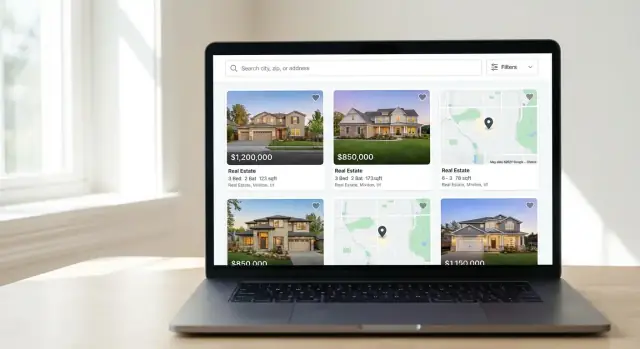
Define goals, audience, and website scope
Before you touch templates or hosting, get clear on what your real estate website is supposed to do. A property listings website built for buyers will look and behave differently than a showcase meant to attract sellers or investors.
Decide who the site is for
Start by choosing a primary audience (you can serve others later):
- Buyers who want fast search, saved favorites, and clear next steps
- Renters who care about availability, fees, and move-in timing
- Sellers who want proof you can market their home and generate demand
- Investors who need numbers: yield, comps, and neighborhood trends
Write one sentence describing your “ideal visitor,” including budget range and urgency (e.g., “first-time buyers looking for 2–3 bedroom condos under $500k within 30 minutes of downtown”).
Pick the main goal (one primary KPI)
Choose the outcome you’ll optimize for:
- Leads/inquiries (form submits, calls, WhatsApp clicks)
- Bookings (viewings, consultations)
- Brand awareness (newsletter signups, time on site)
This decision influences everything—page layout, calls-to-action, and what you track later.
Define your scope: area, property types, and volume
Be specific about:
- Coverage area (one neighborhood vs. a metro region)
- Property types (single-family, condos, new builds, luxury, rentals)
- Listing source (your own inventory, manual uploads, partner feeds)
A tight scope helps you publish more relevant pages and keeps your site easier to maintain.
Must-have vs. nice-to-have features
Create two lists. Must-haves usually include a searchable listings catalog, property detail pages, contact/lead capture, and basic SEO. Nice-to-haves might be virtual tours, mortgage calculators, chat widgets, or advanced map tools.
If you’re planning the full guide, aim for ~3,000 words total and keep each section focused on one decision, so readers can act step by step.
Pick the right site structure and key pages
Before you choose a template or write a single listing, decide what kind of real estate website you’re building. The structure you pick affects navigation, SEO, and how quickly visitors find the right property.
Choose your structure: agent/broker vs. marketplace
An agent/broker site is built to showcase you (or your team). Listings support the story, but the primary goal is inquiries and appointments. Expect prominent About/Reviews, clear service areas, and strong lead capture.
A marketplace-style property listings website puts inventory first. Visitors come to browse, filter, compare, and save homes. This structure needs strong search and category pages (e.g., “Condos,” “Under $500k,” “Open houses”), plus consistent listing data.
If you’re unsure, pick one “primary job” for the site:
- Generate leads for your services (agent-first)
- Help users discover inventory (listing-first)
Core pages you should plan from day one
Most successful real estate showcase sites share a small set of pages:
- Home: highlights key paths (Search, Featured listings, Neighborhoods, Contact)
- Listings: a browsable grid with sorting and basic filters
- Property Detail (listing pages): photos, specs, map, tour links, and an inquiry form
- About: credibility (experience, licenses, areas served, social proof)
- Contact: simple form, phone, email, office address, hours
Support pages that improve trust and conversions
These aren’t mandatory, but they often increase time on site and inquiries:
- Neighborhoods/Areas: curated pages for local intent searches
- Resources: buying/selling guides, checklists, financing basics
- FAQ: answers about showings, availability, fees, and next steps
- Blog (optional): market updates and evergreen guides (only if you can maintain it)
Use plain-language navigation and sketch a sitemap
Avoid jargon in menu labels. “Homes for Sale” beats “Residential Inventory,” and “Get in Touch” beats “Inquiry Portal.”
Finally, sketch a one-page sitemap before building. It prevents page sprawl and ensures your most important pages are reachable in one or two clicks.
Choose a platform, hosting, and domain
Your platform and hosting decisions affect everything that follows: how fast you can publish listings, how easily you can tweak pages, and how confidently you can scale later.
Start with a domain (and matching email)
Pick a domain that’s short, readable, and easy to spell. If you serve a specific area, consider a local cue (city/neighborhood) rather than a generic “besthomes” name.
Use an email address that matches your domain (e.g., [email protected]). It’s a small detail that improves trust with sellers and buyers, and keeps your brand consistent across inquiries, newsletters, and follow-ups.
Platform options: builder, CMS, or custom
Website builders (hosted all-in-one tools) are quickest to launch and easiest for non-technical updates. They’re great when you want clean templates, simple editing, and built-in basics.
CMS platforms (like WordPress) offer more flexibility and plugin ecosystems for forms, SEO, and listing layouts—at the cost of a bit more setup and maintenance.
Custom development makes sense when you need unique search experiences, special integrations, or a highly differentiated real estate showcase. Budget more time for build, QA, and ongoing updates.
If you want the speed of a builder but the control of custom, a vibe-coding platform like Koder.ai can be a practical middle ground: you can describe the site (listings catalog, listing pages, lead capture forms, admin workflows) in chat, iterate quickly, and still ship a real React + Go/PostgreSQL application with exportable source code.
A good rule: if your listings and pages are fairly standard, start with a builder or CMS and upgrade later only if you hit real limitations.
Hosting: prioritize speed, uptime, and support
If you choose a CMS, look for hosting that includes:
- Fast servers (SSD), a CDN option, and caching
- Free SSL (HTTPS)
- Daily backups and one-click restore
- Responsive support (chat/tickets)
Templates and editing: mobile-first wins
Most buyers browse on phones. Choose a mobile-friendly theme/template with large tap targets, readable fonts, and fast-loading galleries. Also test the editor: can you update listing pages, neighborhood descriptions, and CTAs without calling a developer?
Understand pricing—and avoid lock-in
Budget for: domain renewal, hosting, a template/theme, essential plugins/apps, and ongoing upkeep.
Before committing, confirm you can export your content (pages, blog posts, images, leads) and redirect URLs if you change platforms later. That flexibility protects your SEO and saves time during future upgrades.
Plan your listing content and data source
A great property listings website feels “predictable” in the best way: every listing answers the same core questions, in the same order, with the same level of detail. That consistency improves trust, makes your site easier to scan on mobile, and helps search engines understand your pages.
Create a consistent listing template
Start by defining a single listing template you’ll reuse across all properties. Keep field names and formatting consistent (e.g., “2 beds • 2 baths • 1,240 sq ft”). This makes filters more reliable and prevents messy, hard-to-compare pages.
Decide which fields are mandatory for every listing:
- Price (or clear “Contact for price”)
- Address or area (be mindful of privacy for some rentals)
- Beds/baths
- Size (sq ft / m²) and lot size if relevant
- Status (For sale, Pending, Sold, For rent)
Optional fields can include year built, HOA fees, parking, pet policy, open house times, and school zone notes.
Write scannable descriptions (with disclaimers)
Aim for short paragraphs and quick highlights. A simple structure works well:
-
One-sentence hook (who it’s ideal for)
-
3–6 bullet-style highlights (kitchen, outdoor space, commute, views)
-
Practical notes (fees, lease terms, what’s included)
Add a brief disclaimer for accuracy, especially if details can change: “Information deemed reliable but not guaranteed. Buyer to verify.”
Set photo standards that look professional
Define standards before uploading anything:
- Target count (e.g., 15–30 photos per listing)
- Orientation: prioritize landscape; keep a consistent lead photo style
- Compression: optimize for fast loading without visible blur
- Naming: use descriptive, consistent names like
123-main-st_kitchen_01.jpg
Choose your data source (and keep it clean)
Decide where listings will come from: your own inventory, partner feeds, or MLS/IDX if applicable. If you’re using “IDX alternatives” (manual entry, CSV imports, or a lightweight database), set rules for updates: who owns edits, how often prices/status are refreshed, and how you handle removals to avoid stale pages.
A clean template + dependable data source is the foundation for everything you’ll build next—search filters, map browsing, and lead capture forms.
Design high-converting property detail pages
A property detail page is where browsing turns into action. Your goal is to answer the big questions quickly (what is it, where is it, how much, and how do I see it?) while making the next step obvious.
Start with a headline that sells clarity
Use a strong, scannable heading that combines price + key specs + location.
Example:
$485,000 · 3 bed / 2 bath · 1,640 sq ft · Sunnyside, Queens
Right below it, place the essentials: address (or area if privacy is needed), availability, HOA/fees (if relevant), and a short one-sentence highlight.
Make photos do the heavy lifting
Add a gallery near the top with captions (e.g., “South-facing living room,” “Primary suite with walk-in closet”). Captions build confidence and reduce confusion when layouts are similar.
Be explicit about image behavior:
- Load the first image fast (hero), then lazy-load the rest
- Keep consistent aspect ratios so the page doesn’t jump while loading
- Provide a full-screen view for details (finishes, views, condition)
Add location context buyers actually use
Embed a map and, when available, include nearby points of interest (schools, parks, grocery, transit) plus commute notes (“18 min walk to Central Station,” “25–35 min drive to downtown at 8am”). Keep it factual and sourced.
Calls to action that match intent
Offer multiple, clear CTAs:
- Request info (short form)
- Schedule a viewing (with preferred times)
- Save (favorites)
- Share (copy link, WhatsApp/email)
Place CTAs near the price, after key details, and again after the description.
Build trust with visible credentials
Include trust details in the footer or sidebar: license number (where applicable), brokerage details, office address, and multiple contact options (phone, email, messaging). If you use a form, show what happens next: “We reply within 1 business day.”
Build property search, filters, and map browsing
A great real estate website lives or dies by how quickly visitors can narrow down choices. Your search experience should feel like a helpful assistant: quick, clear, and flexible enough to handle imperfect input.
Essential filters that match how people shop
Start with the core filters most buyers and renters expect:
- Price (with min/max ranges)
- Beds and baths
- Property type (house, condo, apartment, land, commercial)
- Status (for sale, for rent, pending, sold, off-market)
If you have the data, add a few “high intent” options that don’t overwhelm the page—think parking, pet-friendly, HOA fee range, or open house. The goal is to reduce scrolling and second-guessing.
Sorting that makes sense
Even with good filters, visitors still want control over what appears first. Include sorting options such as:
- Newest (or “most recent update”)
- Price: low to high / high to low
- Size (sq ft / lot size)
- Popular (based on views or saves)
Keep the sort label visible above results so it doesn’t feel hidden or “locked.”
Map view + list view (the best of both)
If possible, offer both a list view and a map view—and let users switch easily. Map browsing is especially useful for neighborhood-based searches (schools, commute, walkability), while list view makes comparison faster.
Make the map practical: cluster pins when zoomed out, show price on pins, and keep the selected listing highlighted between map and list.
Fast, forgiving search behavior
Search should handle real human input: partial matches, typos, abbreviations, and different naming styles (e.g., “St.” vs “Street”). Autocomplete for cities, neighborhoods, and ZIP codes can reduce errors and speed up the first search.
Also, prioritize speed: users won’t wait for slow filters to reload. Use loading states, keep results lightweight, and avoid reloading the whole page for every change.
Saved searches and alerts
If your platform supports it, add saved searches and email/text alerts. They create repeat visits and help you capture leads without forcing a form too early. Pair this with clear value: “Get notified when a 2-bed condo under $500k hits the market.”
Set up lead capture and inquiry workflows
A listings site only works if visitors can quickly reach you (or your agents) the moment interest is high. Treat lead capture as part of the browsing experience—not a separate “Contact” destination.
Place the right forms in the right spots
Include clear, page-level calls to action on every property detail page:
- Contact agent (general inquiry)
- Request a tour (in-person or virtual)
- Ask a question (about price, HOA, availability, disclosures)
Put one primary button near the top (next to key facts like price and location), and repeat it after the description and photos.
Keep forms short and set expectations
Short forms convert better and are easier on mobile. A good default is:
- Name
- Email or phone
- Message (optional but recommended)
Right under the button or form, add a one-line expectation: “We’ll reply within 1 business day,” or “An agent will contact you by text.” This reduces hesitation and cuts down on low-intent submissions.
Make mobile contact effortless
On mobile, add click-to-call and click-to-email links in a sticky footer or near the main CTA. If you use messaging apps, make them secondary options so the page doesn’t feel cluttered.
Use booking only when you can honor it
Calendar booking can increase conversions, but only if your team can reliably manage availability. If you can’t, offer “Request a tour” with preferred times instead of promising instant confirmation.
Block spam without blocking people
Start with lightweight protection: a hidden “honeypot” field, rate limiting, and basic validation. Use CAPTCHA only when spam becomes a real problem—and choose the least disruptive option.
Finally, route every submission to the right place (email + CRM), and send an immediate confirmation message so leads know you received it.
Make your site easy to find with real estate SEO
Real estate SEO is less about “hacking Google” and more about making every listing and location page clearly understandable to search engines—and genuinely useful to buyers.
Start with clean, descriptive URLs
Use SEO-friendly URLs that mirror how people talk about homes and areas. For example:
/listings/123-main-street/cities/austin-tx/neighborhoods/ballard-seattle
Avoid long query strings for core pages when possible, and keep naming consistent (same city spelling everywhere).
Write titles and meta descriptions that match search intent
Each listing and location page should have a unique page title and meta description that includes the key details people search for.
Example listing title:
123 Main St, Austin TX — 3 Bed, 2 Bath Home for Sale
Example meta description:
See photos, price, amenities, and a map for 123 Main St in Austin, TX. Schedule a showing or request details.
For location pages, lean into “homes for sale” phrasing:
Homes for Sale in Ballard, Seattle — Listings, Prices, Map
Build location pages that can rank
Create dedicated pages for cities, neighborhoods, ZIP codes, and communities. These pages work best when they combine:
- A short, original overview (schools, commute, vibe)
- A live list of matching properties
- Internal links to related areas (nearby neighborhoods, popular ZIPs)
Add structured data for listings
Where appropriate, include structured data (Schema.org) to help search engines interpret your pages. Many real estate sites use types like RealEstateListing and Residence (or more specific subtypes when they fit).
Optimize images for speed and search
Listings are image-heavy, so image optimization has outsized impact:
- Compress and resize before upload
- Use descriptive alt text (e.g., “Kitchen with island at 123 Main St, Austin TX”)
- Keep file names meaningful (e.g.,
123-main-street-austin-kitchen.jpg)
If you want a quick next step, create 10–20 high-quality location pages first, then expand based on what people search for and what converts.
Improve performance, mobile UX, and trust
A real estate website is only as effective as it feels to use. Slow pages, clumsy mobile layouts, or missing trust signals can make visitors bounce before they ever view a listing.
Speed: remove the common bottlenecks
Start with a speed test (Google PageSpeed Insights or GTmetrix) and fix the biggest issues first.
Large photos are usually the #1 culprit. Resize images to the maximum size you actually display, compress them, and serve modern formats (WebP/AVIF) when possible. For galleries and virtual tours, use lazy loading so off-screen media loads only when needed.
Also review plugins and add-ons. Heavy sliders, multiple tracking scripts, or “do-everything” page builders can slow a property listings website dramatically. If a plugin isn’t essential to search, lead capture forms, or analytics, remove it.
Mobile UX: make browsing effortless
Most buyers browse on phones, so test your pages on a small screen—not just by resizing a desktop browser.
Ensure responsive layouts for listing pages, search results, and maps. Keep tap targets large, make the primary CTA (Call, Message, Book a tour) easy to reach with a thumb, and avoid popups that cover half the screen.
Accessibility basics that also improve conversions
Use readable font sizes, strong contrast, and clear headings. Make sure users can navigate menus, filters, and photo galleries with a keyboard. Add descriptive labels to form fields and buttons (especially “Schedule a showing” and “Request info”).
Trust: security, freshness, and transparency
Use HTTPS everywhere and renew certificates automatically. Keep your CMS, themes, and plugins updated to reduce security risk and avoid broken features.
Finally, add a privacy policy and cookie notice where required in your region, and be clear about what happens when someone submits an inquiry (response time, who contacts them, and how their data is used).
Track results with analytics and lead management
A real estate website isn’t finished when it goes live—you need to know which listings attract attention and which pages generate inquiries. The goal is simple: connect visitor behavior to real leads, so you can invest time (and ad spend) where it pays off.
Set up the right analytics (and look at the right reports)
Start with an analytics tool (commonly GA4) and connect it to your site so you can track:
- Total visits and traffic sources (organic search, social, paid ads, referrals)
- Top listing and neighborhood pages (your “inventory winners”)
- On-site search usage (what people type into your property search)
- Form submissions and click-to-call actions (your true conversions)
If you’re also working on /blog or location pages, connect Google Search Console to see which queries bring in traffic—and where you’re close to ranking higher.
Define conversion events that match how buyers behave
Real estate shoppers convert in more ways than “submit a contact form.” Set up conversion events for:
- Phone calls (tap-to-call on mobile, call buttons on listing pages)
- Email clicks (mailto links)
- Form submits (general inquiry, schedule a showing, request details)
- Bookings (if you use a scheduling tool)
Give each event a clear name (e.g., lead_form_submit, schedule_showing_click) so reports stay readable.
Don’t lose leads: create a simple follow-up system
Analytics tells you what’s happening; lead management ensures you respond fast.
Keep it lightweight if you want:
- Route all form leads to a shared inbox plus a backup address
- Use an auto-reply that sets expectations (“We reply within 1 business hour”)
- Log every lead in a simple CRM (or even a spreadsheet) with status: New → Contacted → Showing → Won/Lost
Speed matters—many prospects contact multiple agents.
Use UTM links to measure ads and social posts
When you share listings on social media or run ads, use UTM-tagged links so analytics can attribute leads correctly (e.g., utm_source=instagram&utm_campaign=condo_showcase). Without UTMs, “direct traffic” becomes a guessing game.
Review monthly and iterate
Once a month, check which pages drive inquiries, which filters people use, and where visitors drop off. Then make small updates: improve CTAs, reorder filters, add missing details, or feature high-performing listing types on your homepage.
Launch checklist and ongoing maintenance
A real estate listings site shouldn’t “go live” until the basics are proven end-to-end: a visitor can find a property, trust the information, and contact you without friction. Treat launch as a controlled release, then build a simple cadence to keep listings accurate.
Pre-launch checklist (quick but thorough)
Before you share the link publicly, test like a buyer and like an agent.
- Links and navigation: key pages load, menus work on mobile, footer links aren’t broken.
- Search and filters: try common scenarios (2 beds, price range, pet-friendly, “open house”). Confirm zero-result states are helpful.
- Forms and inquiries: submit every form (contact, “request a showing,” “ask a question”). Confirm messages reach the right inbox, autoresponders fire, and phone/email are formatted correctly.
- Images and media: galleries load fast, images aren’t stretched, and file sizes are reasonable.
- SEO basics: unique page titles, meta descriptions on main pages, and an XML sitemap available (often at /sitemap.xml).
Launch with a smaller, stronger inventory
Start with a curated set of high-quality listings—clear photos, complete specs, accurate addresses (or intentionally hidden locations where needed), and consistent formatting. It’s better to showcase 20 excellent entries than 200 incomplete ones.
Ongoing updates: keep trust high
Create a routine for listing hygiene:
- Update sold/leased status quickly and archive older listings appropriately.
- Apply price changes the same day you receive them.
- Refresh photos when staging changes, seasons shift, or renovations are completed.
- Re-check key fields (beds/baths, HOA fees, square footage notes) for consistency.
If you’re building custom, prioritize safe iteration: keep regular backups and a rollback plan before you ship major changes to search, forms, or templates. Platforms like Koder.ai support snapshots and rollback, which can make ongoing improvements less risky—especially when you’re updating listings features while the site is actively generating leads.
Promotion plan (and where to send people)
Promote new listings through social posts, email, and local partnerships. Link directly to high-intent pages—your main listings page and popular filters—rather than sending everyone to the homepage. Keep URLs clean and shareable (e.g., /listings and /neighborhoods).
Next features to plan
Once the site is stable, prioritize upgrades buyers actually use: virtual tours, simple market reports, and neighborhood guides that explain schools, commute options, and local amenities.
FAQ
What’s the first step before building a real estate listings website?
Start by writing one sentence describing your ideal visitor (budget, area, urgency), then pick one primary KPI such as leads, bookings, or newsletter signups. That KPI should drive your page layout, CTAs, and what you track in analytics.
Should I build an agent website or a marketplace-style listings website?
Choose agent/broker if the site’s main job is to generate inquiries for you or your team (About, reviews, service areas, contact are primary). Choose marketplace-style if inventory discovery is the main job (powerful search, filters, and category/location pages are primary).
What core pages should a real estate website include from day one?
At minimum, plan:
- Home (clear paths to Search, Featured, Neighborhoods, Contact)
- Listings (grid + sorting/filters)
- Property detail pages (photos, specs, map, inquiry form)
- About (credentials, licenses, proof)
- Contact (simple form + phone/email/address)
These pages cover discovery, trust, and conversion.
How should I name menu items and structure navigation for clarity?
Use plain-language labels that match search intent:
- “Homes for Sale” vs. “Residential Inventory”
- “Neighborhoods” vs. “Areas Served” (unless you’re agent-first)
- “Get in Touch” or “Schedule a Viewing” vs. “Inquiry Portal”
Then sketch a one-page sitemap so your key pages are reachable in 1–2 clicks.
How do I choose a domain name and email for a real estate site?
Start with a short, readable domain and use a matching email (e.g., [email protected]) for trust. If you focus on a specific city or neighborhood, a local cue in the domain can help branding and relevance—without becoming too limiting if you expand later.
Which platform is best: website builder, CMS, or custom development?
A practical rule:
- Use a website builder for fastest launch and easy edits.
- Use a CMS (e.g., WordPress) for flexibility and plugins (forms, SEO, layouts).
- Go custom only if you need unique search, complex integrations, or a differentiated UX.
If your needs are standard, start simple and upgrade only when you hit real limits.
What listing data should every property page include?
Define a single reusable listing template with consistent mandatory fields:
- Price (or “Contact for price”)
- Address/area (with privacy rules when needed)
- Beds/baths
- Size (sq ft or m²)
- Status (for sale/rent/pending/sold)
Consistency makes filtering reliable, pages easier to scan on mobile, and content easier to maintain.
What makes a high-converting property detail page?
Keep the page scannable and action-focused:
- Headline with price + specs + location
- Fast-loading gallery near the top (lazy-load the rest)
- Map + factual nearby context (transit, schools, commute notes)
- Multiple CTAs (request info, schedule a viewing, save, share)
- Visible credentials (license/brokerage details) and response-time expectation
Which search filters and map features matter most for users?
Start with the essentials people expect:
- Price (min/max)
- Beds/baths
- Property type
- Status
- Sensible sorting (newest, price, size)
If possible, offer list + map views, cluster pins when zoomed out, and make search forgiving (typos, abbreviations, autocomplete). Add saved searches/alerts if your platform supports them.
What analytics and lead tracking should I set up after launch?
Track what drives real leads, not just visits:
- Form submissions (request info, schedule a viewing)
- Click-to-call and email clicks
- Bookings (if used)
- On-site search terms and top listing/location pages
Connect analytics (e.g., GA4) and Search Console, use UTM links for ads/social, and set up a simple follow-up workflow so inquiries never get missed.