

How to Create a Website for SaaS Changelog Release Notes
Learn how to create a SaaS changelog and release notes website: structure, writing tips, categories, search, subscriptions, SEO, and maintenance steps.
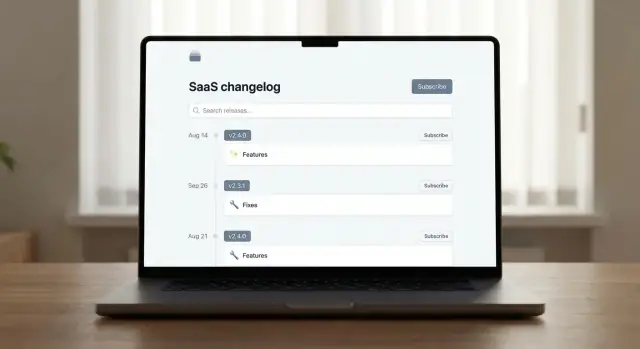
What a SaaS changelog site is (and why it matters)
A SaaS changelog site is a public page (or mini-site) where you publish product updates in a consistent, easy-to-browse archive. Think of it as your “what changed, when, and why” home base—especially valuable for customers who rely on your app for daily work.
Users look for a changelog when something feels different (“Where did that button go?”), when they’re deciding whether to enable a feature, or when they’re evaluating how actively the product is maintained. A clear update history reduces confusion and helps people trust what they’re using.
Changelog vs. release notes
These terms get mixed up, but they serve slightly different jobs:
- Changelog entries are usually short and scannable: Added, Improved, Fixed, Deprecated. They answer “What shipped?”
- Release notes add context and guidance: what the change means, who it affects, how to use it, and any actions required. They answer “How does this impact me?”
Many SaaS teams publish both on the same site: a quick summary at the top, with expandable details for people who need them.
Why it’s worth doing
A well-run changelog site supports multiple goals at once:
- Reduce support tickets by pre-answering “Is this a bug or a change?”
- Build trust through transparent communication and predictable updates
- Drive adoption by showing new features with clear benefits and next steps
- Align teams by giving Sales, Support, and Success a single source of truth
Define the scope early
Decide what’s customer-facing versus internal. Public notes should focus on user impact, avoid sensitive details, and use plain language. Internal notes can be more technical (e.g., infrastructure changes) and belong in your internal docs—not your public changelog.
Decide your audience, tone, and goals
Before you pick a template or start publishing, decide who the changelog is for. A single “release notes page” often tries to serve everyone—and ends up helping no one.
Identify your primary audiences
Most SaaS changelogs have at least three audiences, each needing different information:
- Customers (end users): want quick clarity—what’s new, how it affects their daily workflow, and what to do next.
- Admins / owners: care about permissions, settings changes, security notes, billing-related impacts, and rollout timing.
- Prospects: look for proof of momentum and fit. They want highlights, not every tiny fix.
You may also have an internal audience (Support, CS, Sales). Even if the changelog is public, writing with internal reuse in mind saves time: support can link to a specific entry instead of rewriting explanations.
Choose a tone and level of detail
Match the writing style to product complexity and user expectations:
- For simple products, keep entries short and benefit-led (“You can now export invoices to CSV”).
- For complex products, add a short “Why it matters” and a brief “How to use it” section.
Keep the voice consistent: if your UI is friendly, your changelog can be friendly too—without being casual or vague.
Decide visibility: public or behind login
A public product updates page helps with transparency, trust, and sharing links. A login-only changelog may be better if you ship sensitive enterprise features, customer-specific work, or security details that shouldn’t be indexed.
If you’re unsure, publish publicly but reserve certain entries for authenticated users.
Set clear success criteria
Define what “good” looks like. Common goals include fewer “what changed?” tickets, faster rollout adoption, and higher feature usage. Pick one or two metrics (support ticket volume, feature activation rate, changelog page visits) and review them monthly so the changelog stays useful—not just busy.
Plan the structure and navigation
A changelog only works if people can consistently find it—and quickly get to the update that affects them. Before you write a single release note, sketch the pages and the paths users will take from your main site, app, and help center.
A simple, practical site map
For most SaaS products, you don’t need a complex information architecture. Start with a small set of predictable URLs:
- /changelog — the main “latest updates” feed (default entry point)
- /releases — an archive view (often the same as /changelog, but can be a filtered or paginated list)
- /subscribe — one page explaining subscription options and what users will receive
- /rss (optional) — RSS feed for power users and internal teams
If you prefer even fewer pages, you can merge /subscribe into /changelog as a sticky call-to-action.
Choose a URL strategy users will remember
Put your changelog where users already expect it:
- Best default: a subfolder on your main domain (e.g., /changelog) so it benefits from your site navigation and trust.
- If you must host it elsewhere, keep the link prominent and consistent across your product and docs.
Whichever you choose, keep the URL short, permanent, and easy to type.
Make it easy to reach from key pages
Add a clear link to the changelog from:
- your website footer
- your in-app help menu
- your help center homepage (e.g., /help)
- the product updates page (if separate)
Plan browsing: feed first, filters second
Default to a latest-first list so users instantly see what’s new. Then support browsing with simple filters (for example: by product area or “Bug fixes” vs “New”). This balances speed for casual readers and control for users looking for one specific change.
Choose a release note format and required fields
A good release note format is predictable: readers should be able to scan the first few lines and immediately understand what changed, when, and whether it affects them. Before you write anything, decide on a small set of required fields and stick to them for every post.
Recommended required fields (the “always include” set)
- Title: one clear outcome (e.g., “Saved views for Reports”)
- Date: publishing date (and optionally the release date if different)
- Version (when applicable): app build or release identifier
- Category: one primary label such as Feature, Improvement, Fix, or Security
- Summary: 1–2 sentences in plain language
- Details: short bullet points or a brief paragraph describing what changed
If you keep these fields consistent, your release notes page becomes a reliable index, not a stream of unstructured announcements.
Versioning vs. date-based releases
Use versions when you ship build-based software or when support needs a precise reference point (mobile apps, desktop apps, API versions, self-hosted deployments). A user reporting a bug can say “I’m on 2.14.3,” and your team can reproduce it.
Use date-based releases when you ship continuously and changes roll out behind feature flags. Many SaaS teams still add an internal build number, but they present releases publicly by date because that’s easier for customers to follow.
A hybrid works well: show a date as the primary anchor, and include a version/build in smaller text for support.
Optional fields (use when they add clarity)
Optional fields are valuable, but only if they stay purposeful:
- Affected area (e.g., Billing, Reports, Admin)
- Rollout status (Announced, Rolling out, Available, Deprecated)
- Known issues (and workarounds)
- Screenshots (only when the UI change is hard to describe)
A simple template for scannability
Title
Date • Version • Category • Affected area (optional)

Summary (1–2 sentences)

Details
- Bullet 1
- Bullet 2

Rollout status (optional)
Known issues (optional)
This structure keeps every entry readable, makes filtering easier later, and sets you up for consistent tags and search in the next steps.
Create categories and tags that users understand
A changelog is easiest to scan when every update answers two questions quickly: what kind of change is this? and what part of the product does it affect? Categories and tags are how you do that—without forcing people to read every post.
Start with a simple, stable set of categories
Use a small taxonomy that covers most releases and stays consistent over time:
- New — brand-new features or capabilities
- Improved — enhancements to existing features
- Fixed — bug fixes and reliability improvements
- Deprecated — features or endpoints being phased out
- Security — security-related updates (even if brief)
Keep categories limited. If a change doesn’t fit, adjust the wording of the note before inventing a new category.
Add product-area tags for filtering
Tags should describe where the change happened, using words customers already recognize from your UI and docs. Common examples include Billing, API, Dashboard, and Mobile.
A good rule of thumb: each release note gets 1–3 tags. Enough to filter, not enough to overwhelm.
Prevent tag sprawl with clear rules
Tag sprawl makes filters useless. Set lightweight guardrails:
- Maintain an “approved tags” list and reuse existing tags before creating new ones.
- Set a hard cap (for example, 20–40 total tags) and retire rarely used ones.
- Prefer singular, consistent naming (e.g., “Integration” vs. “Integrations”—pick one).
- Avoid synonyms (“Auth” vs. “Authentication”) and overly broad tags (“General”).
Name features consistently
People search by the words they see in-product. Use the same feature names across UI, help docs, and notes (e.g., “Saved Views,” not “View Presets” in one place and “Saved Filters” in another). Consider a short internal naming guide so everyone ships updates with the same vocabulary.
Write release notes people can actually use
Release notes aren’t a diary of what your team built—they’re a guide to what changed for users. The goal: help people quickly understand the value, whether they’re affected, and what (if anything) they need to do next.
Start with titles that summarize the value
A good title answers “why should I care?” in one line.
Bad: “Project Falcon rollout”
Better: “Faster invoice exports (up to 3× quicker)”
Better: “New: Share dashboards with view-only links”
If you need extra context, add a short subtitle that stays user-focused: “Available for Pro and Business plans.”
Use a scannable structure: bullets first, then Details
Lead with 2–5 short bullets so users can skim. Then add a Details paragraph for the “what/why/how” context.
Example structure:
- New: Share dashboards with view-only links
- Improved: CSV exports now include custom fields
- Fixed: Scheduled reports no longer fail on large date ranges
Details: You can now generate a secure link to share a dashboard without creating a new user. Links can be revoked anytime from Settings → Sharing.
Add “Who is impacted?” and “What do I need to do?”
Include these when the change affects behavior, permissions, billing, or workflows.
Who is impacted? Admins managing sharing settings; anyone receiving shared links.
What do I need to do? Nothing by default. If you want to restrict link sharing, disable “Public links” in Settings → Sharing.
Avoid jargon and internal names
Write in user terms, not internal project labels. Replace “migrated to v2 pipeline” with “uploads are more reliable” (and explain how it changes the user experience). If you must mention a technical term, define it in one short sentence.
Example phrasing users understand
- New: “You can now export invoices as PDF from the billing page.”
- Improved: “Search suggestions appear faster and include recent results.”
- Fixed: “Notifications no longer send duplicates when you edit a reminder.”
Aim for clarity over completeness: if it’s not actionable or meaningful to users, leave it out.
Add search, filters, and browsing features
A changelog is easy to skim when you have five posts. Once you have fifty, it turns into “I know you shipped it… but where is it?” Search and browsing tools keep your release notes page useful long after launch—especially for support teams, customers evaluating your product, and anyone returning to find a specific fix.
Make search the default escape hatch
Add a prominent search box at the top of the changelog list. Prioritize searching titles, tags, and the first paragraph of each note. Consider highlighting matches and supporting common queries like feature names, integrations (“Slack”), or error codes.
If your changelog has multiple products or modules, allow searching within a selected product area to reduce noise.
Add filters that match how users think
Filters should reflect the vocabulary your users use, not internal team names.
Useful controls include:
- Tag (e.g., “SSO”, “Billing”, “API”)
- Category (New, Improved, Fixed)
- Date range (last 30/90 days, custom range)
- Product area (Dashboard, Mobile, Admin, Integrations)
Keep filters multi-select when possible, and make the “clear all” button obvious.
Help people scan long updates
For longer release notes, include anchor links at the top (e.g., New features, Improvements, Fixes). Also add “Copy link” anchors on headings so support can point users to the exact section.
Set expectations for pagination and speed
Use pagination or “Load more” after a reasonable number of posts (10–20) and show the total count. Keep pages fast: server-render the list, lazy-load heavy elements, and avoid complex client-side filtering that blocks on large archives. Fast loading isn’t just nice—it’s what makes browsing feel trustworthy.
Let users subscribe: email and RSS
A changelog is most useful when people don’t have to remember to check it. Subscriptions turn your release notes page into a lightweight communication channel—without forcing users into social media or support tickets.
Offer multiple ways to follow updates
Aim for three options:
- Email updates for people who want updates delivered automatically.
- RSS/Atom for power users, developers, and teams tracking many tools.
- An in-app link (e.g., in your help menu or account dropdown) that points to “What’s new” so customers can catch up anytime.
Place clear calls to action near the top of the page (above the list of entries): “Subscribe” and “View latest updates.” If you have a dedicated updates index, link it as well (for example, /changelog).
Let users choose frequency (and reduce inbox fatigue)
If you support it, offer Immediate, Weekly digest, and Monthly digest options. Immediate works well for critical changes and fast-moving products; digests are better for busy stakeholders.
Add simple preferences when possible
Subscriptions are more valuable when users can filter what they receive. If your changelog uses tags or categories (like Billing, API, Security, Mobile), let subscribers pick areas they care about—then tell them how to adjust later in the email footer.
Publish an RSS endpoint
If you publish a feed, keep it predictable and easy to remember, such as /rss (or /changelog/rss). Link it next to the Subscribe button, and label it clearly (“RSS feed”) so non-technical users know it’s optional.
Make your changelog discoverable (SEO and indexing)
A changelog only helps if people can find it—via search engines, your in-app links, and even “site:yourdomain.com” queries from support teams. Good SEO here isn’t about marketing tricks; it’s about clarity and consistency.
Get the basics right: titles, URLs, and meta descriptions
Treat each release note as its own page with a descriptive title that matches what users search for (and what they’ll scan in browser tabs). Use clean, readable URLs that won’t change later.
For example:
- Title: “New permissions controls for teams”
- URL:
/changelog/new-permissions-controls
Add a unique meta description per post. Keep it simple: what changed, who it affects, and the main benefit.
Use consistent headings and publish dates
Your changelog page should have a clear structure:
- One H1 on the page (the site can handle this globally)
- H2 for the release title
- H3 for sections like “Added”, “Improved”, “Fixed”, or “Known issues”
Always show a visible publish date (and keep its format consistent). Search engines and users both rely on it for freshness and context.
Avoid thin updates and link to the “how”
Even small releases should answer two questions: what changed and why it matters. If there’s setup involved, add internal links to supporting docs (relative only), like /docs/roles-and-permissions or /guides/migrate-api-keys.
Build an index that search engines can crawl
Create a changelog index page (e.g., /changelog) that lists releases with titles, dates, short summaries, and pagination. This helps indexing, makes older updates discoverable, and prevents valuable notes from disappearing into an infinite scroll.
Design for readability and accessibility
A changelog is only useful if people can quickly scan it, understand what changed, and navigate it without friction. Good design here isn’t about decoration—it’s about clarity.
Typography, contrast, and spacing
Use readable typography: a comfortable font size (16–18px for body text), clear line height, and strong contrast between text and background. Release notes often include dense details, so generous spacing helps users scan headings, dates, and bullet points without losing their place.
Keep headings consistent (e.g., version/date → summary → details). Avoid long, full-width paragraphs; short blocks read better on both desktop and mobile.
Keyboard and screen reader support
Make the changelog usable without a mouse. Ensure all interactive elements—search, filters, tag chips, “Load more,” and pagination—are reachable with the Tab key in a logical order.
Use accessible labels on links and buttons. “Read more” should become “Read more about API improvements” so it makes sense out of context. If you have icons-only buttons (like a filter icon), add an aria-label.
Images, screenshots, and date clarity
If you include screenshots, add alt text that describes what changed, not what the image looks like (e.g., “New billing settings toggle for annual plans”). Avoid text-only images: if the only way to read the update is inside a screenshot, many users won’t be able to access it.
Use unambiguous dates such as 2025-12-26. This prevents confusion for global users and helps support teams reference releases accurately.
Mobile-first interaction
Your filters and tables must work on small screens. Prefer responsive layouts where filters collapse into a panel, tags wrap cleanly, and tables turn into stacked cards when needed. If users can’t quickly find “Bug fixes” on their phone, they’ll assume the changelog isn’t maintained.
Pick a publishing workflow and keep it consistent
A changelog only builds trust when it’s predictable. That doesn’t mean it has to be frequent—it means users should know what to expect: how updates are written, who signs off, and what happens when something changes after publication.
Choose how you’ll publish
Your workflow starts with the platform:
- Static site (e.g., generated pages in your repo): great for teams who already ship via Git and want changes reviewed like code.
- CMS: good when non-technical teammates need to publish, schedule, and edit without engineering help.
- Dedicated changelog tool: fastest setup, often includes subscriptions, tagging, and search out of the box.
Pick one that matches your team’s real habits. The “best” tool is the one you’ll actually use every release.
If you’re building from scratch, a vibe-coding platform like Koder.ai can speed up the initial implementation: you can describe the pages you want (e.g., /changelog, search, tags, RSS, email subscribe) in chat and generate a working React-based frontend with a Go + PostgreSQL backend under the hood. That’s especially useful when you want a custom changelog experience without dedicating weeks of engineering time.
Define a simple content workflow
Keep stages explicit so nothing gets stuck in someone’s head. A common, lightweight flow is:
Draft → Review → Approve → Publish → Update (if needed)
Write down what each stage means (one sentence each is enough) and where work happens (doc, issue, CMS draft, pull request). Consistency matters more than formality.
Handle rollouts without confusing people
If you do phased releases, reflect it clearly:
- Rolling out: users may not see it yet; include expected timing if you can.
- Available to everyone: the rollout is complete.
This prevents “I don’t have this feature” support tickets and reduces frustration.
Have a correction policy
Edits are normal—silent rewrites are not. Decide:
- When you’ll fix typos silently
- When you’ll add an “Updated” note with what changed (e.g., scope, behavior, limitations)
Set ownership
Assign roles so the changelog doesn’t become “everyone’s job” (and then no one’s job): who writes, who approves, and who maintains categories/tags over time.
Measure performance and maintain the archive
A changelog only earns its keep if it’s used—and if it stays trustworthy over time. A light measurement plan and a simple maintenance routine will help you spot what users care about, reduce support load, and keep older notes from becoming a mess.
Track what matters (and ignore vanity metrics)
Start with a few signals you can act on:
- Page views by entry and category: which updates attract attention (and which get ignored).
- On-site search queries: what people type into your changelog search reveals missing tags, unclear naming, and confusing navigation.
- Subscription conversions: how many visitors subscribe via email or RSS from the changelog.
If you have a “What’s new” link inside the product, measure click-through rate to your release notes page and which entries users open.
Watch support signals after major releases
Your changelog can reduce repeated questions—if it answers them clearly. After each major release, keep an eye on:
- The number of tickets about the updated feature
- Repeated “Is this a bug or a change?” messages
- Time-to-resolution for common questions
If ticket volume doesn’t drop, treat it as a writing problem (missing context, unclear impact) or a discovery problem (users can’t find the relevant note).
Build a simple feedback loop
Every entry should give readers a next step:
- Link to /contact for questions
- Or add a short “Was this helpful?” link to a feedback form
Keep feedback lightweight. One open text box often beats complex surveys.
Set a maintenance routine
Once a month (or quarterly for smaller products):
- Clean up tags (merge duplicates like “API” vs “Apis”)
- Check for broken links to docs and announcements
- Update notes that became misleading (mark corrections clearly)
Create an archive strategy for older releases
Don’t delete history. Instead:
- Keep older releases accessible under an Archive view
- Paginate by month/quarter or group by year
- If you sunset a feature, add an “End of life” note and link to current alternatives
A well-kept archive builds credibility—and saves your team from re-explaining the same changes again and again.
FAQ
What is a SaaS changelog site?
A SaaS changelog site is a public page (or small site) that keeps an ongoing, easy-to-browse archive of product updates—what changed, when it changed, and (briefly) why it matters. It helps users confirm whether something is a bug or an intentional change, and it signals that the product is actively maintained.
What’s the difference between a changelog and release notes?
Changelog entries are usually short and scannable (e.g., Added, Improved, Fixed, Deprecated) and answer “What shipped?”. Release notes add context and guidance—who is impacted, how to use the change, and any actions required—answering “How does this impact me?”. Many teams publish both on the same page by showing a summary first and expandable details below.
Why is a changelog site worth maintaining?
A well-run changelog can:
- Reduce support tickets by pre-answering “Is this a bug or a change?”
- Build trust through transparent, predictable communication
- Drive adoption by explaining benefits and next steps
- Align Support, Sales, and Success with a single source of truth
If you measure just one thing, start with ticket volume around major changes.
Who should a SaaS changelog be written for?
Most products serve multiple audiences:
- End users want quick clarity and “what changed for me?”
- Admins/owners care about permissions, security, billing impact, and rollout timing
- Prospects want highlights that prove momentum
Write for the primary audience first, then add optional sections (like “Who is impacted?”) when needed.
Should a changelog be public or behind login?
Default to public when transparency and shareable links matter, and use login-only when notes could expose sensitive enterprise features, customer-specific work, or security details you don’t want indexed.
A practical compromise is to keep the main changelog public while marking certain posts as authenticated-only.
What pages and URLs should a changelog site include?
Keep the structure simple and memorable:
- /changelog for the latest updates
- /releases for an archive view (optional if /changelog is already paginated)
- /subscribe for subscription options (or a sticky CTA on /changelog)
- /rss (or /changelog/rss) for RSS/Atom
Also link to it from your footer, in-app help menu, and help center homepage so users can find it fast.
What fields should every release note include?
A predictable “always include” set typically looks like:
- Title (one clear outcome)
- Date (publish date; optionally release date)
- Version/build (when applicable)
- Category (Feature, Improvement, Fix, Security, Deprecated)
- Summary (1–2 sentences)
- Details (short bullets or a brief paragraph)
Consistency turns your changelog into a reliable index instead of a stream of announcements.
Should we use version numbers or dates in our changelog?
Use versions when support needs precision (mobile/desktop apps, APIs, self-hosted) so users can report “I’m on 2.14.3.” Use date-based releases for continuous delivery and feature-flag rollouts.
A good hybrid is date-first for readability, with the build/version shown in smaller text for support.
How do we choose categories and tags users actually understand?
Start with a small, stable category set (e.g., New, Improved, Fixed, Deprecated, Security) and add product-area tags that match your UI vocabulary (Billing, API, Dashboard, Mobile).
To prevent tag sprawl:
- Keep an approved tags list
- Limit each post to 1–3 tags
- Cap total tags (e.g., 20–40)
- Avoid synonyms (pick “Authentication” or “Auth,” not both)
How should users subscribe to changelog updates (email and RSS)?
Offer multiple subscription paths:
- Email for most stakeholders
- RSS/Atom for power users and internal teams
- A persistent in-app “What’s new” link
If possible, let users choose Immediate, Weekly, or Monthly delivery, and allow tag/category-based preferences so updates stay relevant.