

How to Create a Website for a Software Alternatives Directory
Learn how to plan, build, and grow a software alternatives directory website: structure, data model, SEO pages, submissions, monetization, and launch checklist.
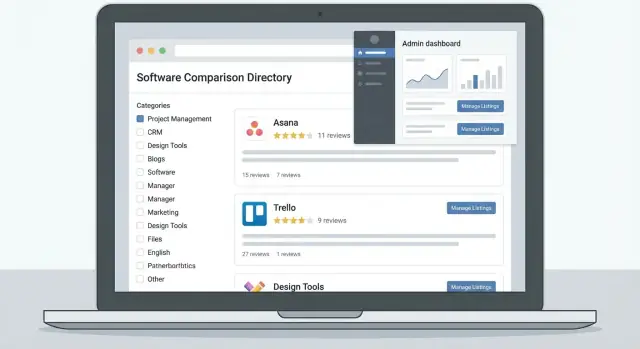
Define Your Directory’s Goal, Niche, and Success Metrics
Before you pick a tool, write a single sentence that describes who the directory is for and what it helps them do. This sentence keeps your MVP from drifting into “everything for everyone.”
1) Define the audience (be specific)
A software alternatives directory can serve very different readers:
- Buyers comparing options before purchasing (need pricing, key differences, and honest tradeoffs)
- Teams switching tools (need migration notes, integrations, and “works with” context)
- Founders and marketers tracking competitors (need positioning, categories, and market maps)
- Researchers collecting product data (need consistent fields and sources)
Pick one primary audience first. You can add secondary audiences later, but the homepage and templates should speak to a single “main” reader.
2) Decide your core promise
Choose the primary action you want users to take:
- “Best alternatives”: curated recommendations and editorial judgment
- “Compare features”: structured data, side-by-side comparisons, and filters
- “Find by use case”: discovery by problem (e.g., “for agencies,” “for HIPAA,” “for startups”)
Your promise determines what data you must collect and what pages you must build. For example, a “compare features” promise requires consistent feature fields more than long-form writeups.
3) Choose scope (niche beats broad for an MVP)
Start with one niche (e.g., CRM, email marketing, customer support). A focused niche helps you:
- cover the top tools quickly
- build meaningful category pages
- earn trust with deeper detail
Broad SaaS directories often feel thin early on because every category is underpopulated.
4) Set success metrics—and non-goals
Pick 3–5 metrics that match your business model: organic traffic, email signups, lead volume, click-outs to vendors, or revenue per listing.
Then list explicit non-goals for the MVP (e.g., “no user accounts,” “no fully automated scraping,” “no reviews yet”). Non-goals are how you ship faster without compromising the promise.
Design the Information Architecture and Data Model
Before you write copy or pick a theme, decide what “things” your directory will store and how they connect. A clean data model prevents messy listings, broken comparisons, and duplicate pages later.
Core entity types (what you’re cataloging)
Start by defining your core entities:
- Product (the software tool itself)
- Alternative set (the “Alternatives to X” page, linking one primary product to its substitutes)
- Category (e.g., CRM, Help Desk)
- Tag (attributes like “Open-source”, “Free plan”, “GDPR-ready”)
- Use case (e.g., “Sales pipeline tracking”, “Customer onboarding”)
- Review (a user’s rating + written feedback)
This keeps your site flexible: categories support browsing, tags support filtering, and alternative sets support comparison intent.
Required product fields (what every listing must have)
Choose a “minimum viable” set of required fields so every product page feels complete:
- Pricing model (free, freemium, trial, subscription, one-time, usage-based)
- Platform (web, iOS, Android, Windows, Mac, Linux)
- Integrations (either a short list or a link to the vendor’s integrations directory)
- Screenshots (at least 2–4, consistently sized)
- Plus basics like name, short description, vendor name, and primary website URL
Relationships and comparison readiness
Plan for real-world complexity: one product can belong to many categories, have many tags, and appear in multiple alternative sets. Your model should support many-to-many relationships so comparisons don’t require manual duplication.
Data standards (so content stays consistent)
Create simple rules: naming conventions, canonical vendor URLs, a last-updated date, and source notes (where you verified pricing or features). Assign unique identifiers (internal ID + normalized vendor domain) to prevent duplicates like “Acme CRM” vs “AcmeCRM.”
Build Taxonomy: Categories, Tags, and Alternative Groups
A software alternatives directory lives or dies by how easily people narrow down options. Your taxonomy should feel natural to a buyer: start broad, then help them filter to a short list.
Primary categories: keep them few, clear, and buyer-friendly
Create primary categories that match how visitors think about tools:
- By function (e.g., Email Marketing, Project Management, CRM)
- By industry (e.g., Healthcare, Ecommerce, Agencies)
- By platform (e.g., iOS, Windows, Shopify, WordPress)
- By company size (e.g., Freelancers, SMB, Enterprise)
Set rules for category depth early. Aim for 2 levels, and only use a third level when it’s genuinely necessary. Deep trees make content harder to find, harder to maintain, and harder to SEO.
Secondary tags: describe the “why” behind each choice
Tags should capture decision criteria that cut across categories:
- Features (automation, SSO, time tracking)
- Compliance (GDPR, HIPAA, SOC 2)
- Deployment (cloud, on‑prem, self‑hosted)
- Integrations (Slack, Google Workspace, Salesforce)
A practical rule: keep tags curated (a fixed list), and require every listing to have a minimum set (e.g., deployment + pricing model + key integrations) so filters don’t feel empty.
“Alternative to X” groups: your strongest navigation pattern
Make “Alternative to X” pages a first-class concept, not an afterthought. Each page should:
- Explain who X is for and why people switch
- Show a ranked or grouped list of alternatives
- Link back to relevant categories and tag hubs
This creates consistent internal pathways: users arrive via a brand query, then discover your broader category structure.
Filters: match real comparison questions
Plan filters that reflect how people decide:
- Price (free, freemium, tier ranges)
- OS / platform
- Deployment
- Rating
- Free trial
- Open-source
Design taxonomy and filters together so every filter is backed by structured fields in your listings.
Plan Core Page Templates and Navigation
Your directory will feel “easy” or “hard” based on two things: whether pages follow predictable templates, and whether people can move between them without thinking. Define a small set of core page types and a simple navigation model that stays consistent across the site.
Homepage: orient, don’t overwhelm
The homepage should answer “What is this directory for?” in seconds, then offer obvious next steps.
Include a prominent search bar, a handful of top categories, and quick entry points like popular alternatives and newest listings. Keep it scannable—think sections that act like doorways, not a full index.
Category pages: browse with confidence
Category pages do the heavy lifting for discovery. Add a short intro (what the category includes and who it’s for), then place filters above the results so users can refine quickly.
A useful pattern is a curated “best for” block (e.g., “Best for freelancers,” “Best for enterprise”) followed by a broader list. Close with a small FAQ to clarify common questions and match search intent.
Product, alternative, and comparison flows
On each product page, standardize the layout: a short summary, pros/cons, pricing, screenshots, key use cases, and links to comparisons.
Your “X alternatives” pages should feel editorial, not autogenerated: a grid of options, a compact comparison table, and a few notes explaining tradeoffs and who each option fits.
Static pages and navigation rules
At minimum, add /about, /contact, /privacy, and /terms. If you plan monetization, include /pricing (and clear disclosure language).
Keep global navigation tight: Categories, Compare, Submit a product, and Search. Use breadcrumbs on category/product pages so users always know where they are and how to go back.
Design Search, Filters, and Comparison UX
Great directories feel “obvious”: visitors can find a tool in seconds, narrow choices without friction, and compare finalists without opening ten tabs. Your UX should make that path predictable.
Site-wide search that understands intent
Search is the fastest route for returning visitors, so make it forgiving.
Support typo tolerance ("zendesk" → "Zendesk") and synonyms ("helpdesk" vs "ticketing", "CRM" vs "customer management"). This can be as simple as a curated synonym list plus fuzzy matching. Also consider:
- Autocomplete that suggests products, categories, and common queries
- “Did you mean” prompts and zero-results guidance (e.g., suggest nearby categories)
- Highlighting why a result matches (category, tag, feature)
Filters that work on mobile—and don’t hurt SEO
Filters should be thumb-friendly: short labels, clear selected states, and an easy “reset” action. On mobile, use a slide-in filter panel with an “Apply” button so users don’t lose their scroll position.
For SEO, avoid creating indexable URLs for every filter combination. Keep dynamic filtering for users, while you intentionally index a small set of high-value pages (like category hubs and alternative pages). If you want search engines to find key filter views (e.g., “Free Helpdesk Software”), create dedicated landing pages for those queries rather than relying on ad-hoc filter URLs.
Sorting that matches real decision-making
Sorting options should be simple and trustworthy:
- Popularity (be clear what it means: clicks, saves, traffic)
- Rating (only if you have enough volume)
- Newest (useful for “new and notable” discovery)
- Pricing (e.g., lowest starting price, or “has free plan” as a filter)
Comparison UX: pick 2–5 tools and see the differences
A comparison table is where users commit. Let visitors select 2–5 products from a category or alternatives page, then compare the fields that matter: pricing model, target team size, core features, integrations, and “best for”.
Keep the table skimmable: show a few headline rows by default and tuck secondary details behind “Show more”. Include clear “Visit website” and “Read details” actions.
Optional: save and share (add later)
If you have the capacity, allow users to save shortlists and share comparisons via a clean URL. It’s a growth lever (people forward links internally), but it can wait until after the MVP proves demand.
Choose a Build Approach and Tech Stack for the MVP
Your MVP’s tech stack should match how often you’ll update listings and how much control you need over search, filters, and pages. A directory that changes weekly can live on a simpler stack than one that ingests new tools daily and needs constant taxonomy tweaks.
Three MVP stack options (pick by update frequency)
- No-code (fastest to launch): good if you’ll manually curate a smaller directory and validate demand first. Limits often show up with advanced filtering, bulk edits, and SEO at scale.
- CMS-first (best balance): WordPress, Webflow CMS, or a headless CMS paired with a static site framework. Strong for editorial workflows, templates, and quick iteration.
- Custom app (most flexible): useful if you need complex ranking, personalized comparisons, or heavy submissions. Higher build cost, but fewer constraints later.
If you want a middle path—custom behavior without building everything from scratch—tools like Koder.ai can be useful for rapidly generating a React-based web app plus a Go/PostgreSQL backend from a chat-driven spec, then exporting source code when you’re ready to take over the codebase.
A practical rule: if your team will edit data more than you’ll edit design, prioritize tooling for content operations over visual polish.
Admin features you’ll want on day one
Directory work is repetitive. Your admin should make “changing 200 listings” feel boring, not painful:
- Bulk edit for categories, tags, pricing labels, and “best for” attributes
- Import/export CSV so you can migrate data and work in spreadsheets when needed
- Image handling (auto-resize, consistent logos, fallback images)
- Revision history (track what changed, and roll back mistakes)
If you can’t do these, your directory will stall as it grows.
Performance and UX basics
Directories can get slow quickly. Build in:
- Caching for listing pages and category hubs
- Image optimization (compressed logos, lazy loading)
- Pagination (or “load more”) so category pages don’t balloon
Make the layout mobile-first, with tap-friendly filters and clear buttons. Meet accessibility basics: labeled form fields, keyboard navigation for filters, and sufficient color contrast for ratings and badges.
Analytics plan (measure what matters)
Set up analytics before launch so you learn what people actually use. Track events like:
- Search performed (query, results count)
- Filter applied (which filter, selected values)
- Listing outbound click (to vendor site, pricing page)
- Comparison started (items added/removed)
- Submission started/submitted (drop-off points)
These signals tell you which categories deserve deeper content, which filters are confusing, and which listings drive the most value.
Create a Content Intake and Editorial Workflow
A software alternatives directory lives or dies on freshness and consistency. The goal of your workflow is to make adding (and maintaining) listings repeatable—so quality doesn’t depend on heroic effort.
Source listings without chaos
You’ll usually blend three inputs:
- Manual research: curated lists, community threads, marketplaces, and vendor sites. Use this for your “seed” inventory and high-value categories.
- User submissions: a form that captures the minimum needed to verify a product (official URL, pricing page, platforms, short description, category).
- Partner feeds (if available): useful for scale, but treat them as leads, not publish-ready data.
Define an editorial pipeline
Keep the stages simple and visible (a kanban board works fine):
Draft → Review → Publish, with a required “Last verified” date shown on the listing.
- Draft: writer compiles facts, screenshots/notes, and candidate alternatives.
- Review: editor checks consistency, tone, category fit, and compliance (claims, disclosures).
- Publish: listing goes live with the “last verified” stamp and an owner assigned for future updates.
Fact-checking rules that prevent disputes
Create rules editors can apply quickly:
- Pricing claims: must link to an official pricing page; store plan names and billing period.
- Feature claims: only list features that appear on the vendor site, docs, or release notes.
- Supported platforms: verify via docs/download pages (e.g., Windows/macOS/Linux, iOS/Android, cloud/on-prem).
Handle vendor updates with change logs
Vendors change fast. Keep a lightweight change log (internal is fine): what changed, source link, and date. Trigger re-verification when pricing, free tiers, or platform support changes.
Prevent spam and duplicates
Require email verification for submissions, block URL shorteners, and auto-check duplicates by canonical domain (normalize www/no-www, http/https). If a submission matches an existing domain, route it to “Update request” instead of creating a new listing.
Set Up Listings, Submissions, and Moderation
Listings are the “inventory” of your software alternatives directory. If submissions are messy, your search results, comparisons, and SEO pages will feel unreliable. The goal is to make adding tools easy for honest submitters—and hard to abuse.
A submission form that produces usable data
Keep the form short, but structured:
- Product name (required)
- Website URL (required, validate format and block URL shorteners)
- Logo (PNG/SVG preferred; enforce size limits)
- Short description (character limit to prevent keyword stuffing)
- Primary category (required; single-select avoids “everything” tools)
- Tags / features (optional; controlled vocabulary where possible)
Add lightweight validation: required fields, max lengths, and “does this already exist?” duplicate checks based on domain.
Moderation queue with clear acceptance criteria
Route every new listing (and major edits) into a queue. Define acceptance rules your team can apply consistently:
- The product is real and accessible (site loads, tool is identifiable)
- Description is factual (no superlatives-only marketing copy)
- Category matches your taxonomy
- No misleading claims (pricing, “official” wording, fake reviews)
If you reject a submission, send a short reason and what to fix.
Vendor ownership and verified edits
Let vendors “claim” their listing to request edits, but verify ownership by:
- Email verification on a company domain, and/or
- Adding a DNS/HTML verification token to the website
Verified owners can update logos, screenshots, pricing, and feature details—while you keep final approval.
Disclosures and user reporting
If a listing is sponsored or uses affiliate links, show a clear label near CTAs and outbound links.
Add a “Report an issue” link on every listing with a simple flow: wrong pricing, broken link, incorrect category, duplicate, or other. Reports should create tickets in the same moderation queue so fixes don’t get lost.
Add Reviews and Ratings (Without Trust Issues)
Reviews can turn a directory into a decision tool—but only if readers believe them. The goal isn’t “more stars.” It’s consistent, accountable feedback that helps someone choose an alternative confidently.
Pick an organic review model
Decide who can review and what you’re asking them to share. Common options:
- Verified user reviews (best for trust): reviewers confirm they used the product (work email, invoice screenshot, or “connected account” if available).
- Open reviews (best for volume): anyone can post, but you’ll need stronger anti-abuse controls.
For the rating itself, consider scored criteria over a single star rating. A 1–5 score for items like “Ease of use,” “Support,” and “Value” creates clearer comparisons. You can still display an overall average, but derive it from those criteria.
Prevent abuse without killing participation
A few light controls go a long way:
- Email verification before publishing
- Rate limiting (per account, per IP, and per listing)
- Flagging workflow (“Report review”) with reasons like spam, harassment, conflict of interest
Keep moderation fast: hide obviously abusive content, then review edge cases.
Combine user reviews with an editorial “our take”
An editorial summary can help when a product has few reviews. Label it clearly as “Our take” vs “User reviews”, and explain your method (hands-on test, documentation review, interviews). This avoids blending opinion sources and protects credibility.
Use structured pros/cons and “best for”
Ask reviewers for specific pros/cons and a “Best for…” prompt (e.g., “best for small teams,” “best for compliance-heavy orgs”). Structured fields reduce vague praise and make alternative pages easier to scan.
Legal-safe wording
Avoid claims that read like accusations. Encourage reviewers to stick to verifiable facts (“Pricing increased from X to Y”) and clearly framed opinions (“In my experience…”). Provide guidelines and remove content that targets individuals or makes unsupported allegations.
Plan SEO for Alternative Pages and Category Hubs
SEO for an alternatives directory is mostly about matching search intent with pages that feel genuinely useful. Your goal is to rank for three high-intent patterns: “alternatives to [tool]”, “[category] software”, and “[tool] vs [tool]”—without generating thousands of near-empty pages.
Map keywords to page types
- Alternatives pages (“Alternatives to Notion”) answer: “What should I use instead, and why?”
- Category hubs (“Project management software”) answer: “What are the best options in this category?”
- Versus pages (“Notion vs Confluence”) answer: “Which fits my use case?”
Keep one primary keyword per page, then use supporting terms in headings (features, pricing, team size, integrations) rather than stuffing synonyms.
Programmatic SEO—use guardrails
Programmatic pages can scale, but only if every page has enough unique value. Create rules such as:
- Don’t publish a page unless it has a minimum number of listings (e.g., 6–10) and at least a few complete profiles.
- Require unique page intros (not template-only text) and visible comparison criteria.
- Merge or “noindex” low-demand or low-content pages instead of letting them dilute quality.
On-page structure that earns clicks
Each alternatives or category page should include:
- A short, unique intro (who it’s for, when to switch)
- Clear comparison criteria (pricing model, best for, key limitations)
- FAQs targeting real questions (“Is there a free alternative?”, “What’s best for small teams?”)
- Schema where appropriate (e.g., Product, Review, FAQPage)—only if it reflects on-page content
Internal linking and indexation control
Design a tight linking loop: product ↔ category ↔ alternatives, plus breadcrumbs that reflect taxonomy. Link from every product to its main category and its /alternatives page; link from hubs back to top products.
For filter URLs, decide what should be indexable. Usually, index only curated “core” pages; set most filter combinations to noindex and use canonicals back to the main hub (or a curated SEO landing page). This prevents thousands of thin variants competing with your best pages.
Monetization Models and Disclosure Basics
A software alternatives directory can earn revenue early, but the fastest way to lose trust is to hide how money influences rankings or visibility. Treat monetization as a product feature: clear, consistent, and easy to understand.
Common monetization models (and what they’re best for)
Affiliate links work well when users already intend to evaluate or buy. Place them on listing pages (e.g., “Visit website”) and comparison pages, and disclose that you may earn a commission.
Sponsored placements (featured spots in category hubs or “Top picks”) can fund growth, but should be visually labeled (e.g., “Sponsored”) and separated from purely editorial sorting.
Paid claims let vendors “claim” and manage a listing (logo, screenshots, pricing, integrations). This scales better than one-off sponsorships because the value is operational.
Lead generation (request demo, request quote) can outperform affiliates for high-ACV SaaS, but only if you’re transparent about where the lead goes.
Ads are easy to add, but can hurt UX. Consider them later, or limit to non-intrusive placements.
Disclosure: keep it factual and consistent
Create a short, plain-language policy page (e.g., /sponsored-policy) that answers:
- What “Sponsored” means on your site
- Whether sponsorship affects rankings, inclusion, or reviews
- How affiliate links are labeled
- How vendors can claim listings and what they can edit
Avoid vague promises. If your “Best of” lists include sponsorship, say exactly how.
Pricing tiers: simple and benefits-based
A clean /pricing page helps vendors self-qualify. Example tier structure:
- Free listing: basic profile, public link
- Claimed profile: edit details, add media, respond to reviews
- Enhanced profile: badges, richer comparisons, category placement rules (non-sponsored), basic analytics
- Sponsored: clearly labeled placement, newsletter inclusion, dedicated CTA
Tie each tier to what’s included, not implied outcomes.
Measure clicks and conversions (without overstating results)
Track outbound clicks, “Request demo” submissions, and affiliate conversions. Report ranges and counts (“120 outbound clicks last month”), not ROI claims you can’t verify. Provide vendors an “Analytics” panel in claimed/enhanced tiers.
CTA flows that don’t feel salesy
Use two paths: a self-serve CTA (“See plans” → /pricing) and a consultative CTA (“Talk to us” → short form). Keep inquiry forms minimal: product name, website, goal (claim/sponsor/leads), and email.
Launch, Promote, and Iterate with a Practical Roadmap
A directory doesn’t “launch” when the code ships—it launches when people can reliably find good alternatives and trust what they see. Treat the first release as a testable baseline, then improve based on real usage.
Pre-launch checklist (don’t skip this)
Before you promote anything, make sure the experience is complete enough to satisfy first-time visitors:
- Content minimums per category: aim for at least 10–20 listings per key category, each with a short description, pricing snapshot (even “unknown”), and 3–5 alternatives.
- Broken link scan: check navigation, outbound links to vendor sites, and internal links across category hubs.
- Speed test: run a quick pass in Lighthouse; fix obvious slowdowns (oversized images, heavy scripts, uncompressed pages).
Seed your initial content first
Marketing an empty directory wastes attention. Seed 50–200 products in your niche before outreach. Focus on the “obvious” tools people already search for, then add alternatives for each so the site feels interconnected.
Outreach that actually works
Start with direct, high-signal channels:
- Vendors: ask them to verify details or provide a quote; it’s an easy reason to share.
- Communities: niche forums, Reddit threads, Slack/Discord groups (post a helpful resource, not an ad).
- Newsletters and partners: offer a curated “Top alternatives to X” page they can link to.
Iterate from data (weekly)
Track:
- Top searches with no results → add those listings or create a new category.
- Low-converting pages (high exits, low clicks to vendors) → tighten copy, improve comparisons, add clearer CTAs.
If you build on a platform like Koder.ai, take advantage of snapshots/rollback and planning mode to ship small UX and taxonomy improvements safely, then export the source code when you want to move to a fully custom pipeline.
Practical roadmap (next)
After the MVP, prioritize:
- Accounts and saved lists
- A lightweight API for partners
- Integrations (e.g., pricing updates, changelogs)
- Localization for high-intent regions
Keep the loop tight: ship small improvements, measure, repeat.
FAQ
How do I define a clear goal for my software alternatives directory before building?
Write one sentence that states who it’s for and what it helps them do (e.g., “Helps SMB IT teams compare help desk tools by pricing, deployment, and integrations”). Then pick 3–5 success metrics (organic traffic, email signups, click-outs, leads, revenue per listing) and list explicit MVP non-goals (no accounts, no reviews, no scraping).
Should I start broad or pick a niche for the MVP?
Start with one niche (e.g., CRM, email marketing) so you can populate categories deeply and publish complete “Alternatives to X” pages faster. Broad directories often look thin early because every category is underfilled, which hurts trust and SEO.
What core data model should a software alternatives directory have?
At minimum, model:
- Product
- Category and Tag
- Alternative set (“Alternatives to X”)
- Optional later: Use case and Review
Design many-to-many relationships (a product in multiple categories/tags and multiple alternative sets) so you don’t duplicate content to power comparisons.
Which fields should every product listing include to avoid “thin” pages?
Require a small, consistent set so every page feels complete:
- Pricing model (free, freemium, trial, subscription, etc.)
- Platform (web, iOS, Android, Windows, Mac, Linux)
- Integrations (short list or link to official integrations)
- 2–4 screenshots (consistent sizing)
- Basics: name, short description, vendor, canonical URL
Also store last verified/updated and source notes for pricing/features to keep entries defensible.
How should I structure categories vs tags so filtering stays usable?
Keep categories buyer-friendly and shallow:
- Aim for 2 levels (use a 3rd only when necessary)
- Use categories for “what it is” (function/industry/platform/size)
- Use tags for cross-cutting criteria (deployment, compliance, key features)
Curate tags as a fixed list and require a minimum set per listing so filters don’t feel empty.
What should an “Alternatives to X” page include to actually help users decide?
Treat each “Alternatives to X” page as editorial, not autogenerated:
- Explain who X is for and why people switch
- Show a ranked/grouped set of alternatives
- Include a compact comparison table and clear tradeoffs
- Link to relevant category and tag hubs
These pages often capture high-intent searches and create strong internal linking paths.
How do I design search and filters without creating SEO problems?
Use forgiving search and mobile-friendly filters:
- Fuzzy matching + curated synonyms (e.g., “helpdesk” vs “ticketing”)
- Autocomplete across products, categories, and common queries
- Thumb-friendly filter UI with reset/apply on mobile
For SEO, avoid indexing every filter combination. Instead, index curated hubs and alternatives pages, and create dedicated landing pages for high-value filter intents (e.g., “Free help desk software”).
What’s the best way to handle submissions and prevent spam or duplicates?
Keep submissions short but structured, and moderate everything:
- Require: product name, official URL (block shorteners), short description, primary category
- Validate lengths, formats, and duplicates by canonical domain
- Use a moderation queue with clear acceptance rules (real product, factual description, correct category)
Add “Report an issue” on every listing to route fixes into the same queue.
How can I add reviews and ratings without damaging trust?
Pick a trust model first:
- Verified reviews (highest trust, lower volume)
- Open reviews (higher volume, stronger anti-abuse needed)
Add basics like email verification, rate limiting, and a report/flag workflow. Consider multi-criteria scoring (ease of use, support, value) to make comparisons clearer than a single star rating.
Which tech stack is best for an MVP alternatives directory, and what admin features matter most?
Choose based on update frequency and operational needs:
- No-code: fastest launch, limited advanced filtering/bulk ops
- CMS-first: strong templates + editorial workflow (often the best MVP balance)
- Custom app: maximum flexibility for complex ranking/comparisons
Prioritize admin capabilities that keep maintenance cheap: bulk edit, CSV import/export, image handling, revision history, caching, and basic analytics events (search, filters, outbound clicks, comparisons).