

Custom domain setup for web apps: DNS, SSL, and cutover
Custom domain setup for web apps with clear DNS record steps, SSL issuance, redirects, and a low-risk cutover plan to avoid downtime and cookie issues.
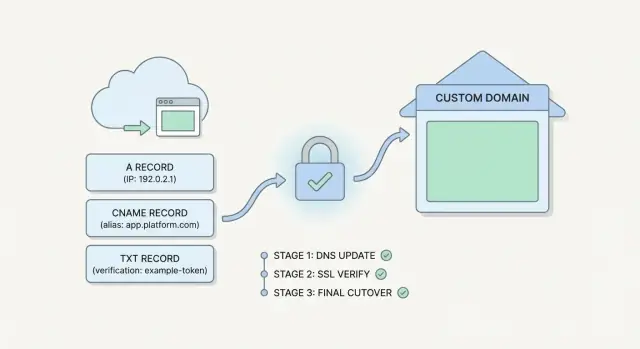
What a custom domain changes (and what can go wrong)
A custom domain is more than a nicer URL. The moment you move from a platform address (for example, an app you built on Koder.ai under a platform subdomain) to your own domain, browsers and networks treat it as a different site. That affects routing, security, and how user sessions behave.
Once you switch to a custom domain, a few things change immediately:
- DNS routing: users stop going to the old hostname and start hitting whatever target your DNS points to.
- TLS/SSL: the certificate must match the new hostname(s), and it needs to be active before real users arrive.
- Redirects: you decide whether users land on
wwwor the apex domain, and you need consistent HTTP to HTTPS rules. - Cookies and sessions: cookies are scoped to a domain. A login cookie for
old-platform.examplewill not automatically work onapp.yourdomain.com. - Caching and propagation: DNS resolvers and browsers cache results, so not everyone switches at the same moment.
Short outages usually come from timing. DNS can start sending traffic to the new host before the SSL certificate is ready, which leads to browser warnings. Or the opposite happens: SSL is ready, but many users still hit the old place because their DNS cache hasn’t expired.
Redirects can also break logins in subtle ways. A redirect that changes the hostname (apex to www, or vice versa) can drop cookies if they were set for the other host. Auth providers can fail if their callback URL is still the old domain.
A low-risk cutover means you plan for overlap: keep the old URL working, bring up the new domain in parallel, switch traffic at a predictable moment, and make rollback as simple as changing DNS back.
Decide your domain and hostnames before touching DNS
Before you change anything, write down exactly which names you want users to type, and which names should quietly redirect. Most “why is this half-working?” moments come from a team never agreeing on the one true hostname.
Start with the big choice: apex (example.com) or www (www.example.com) as the primary. Either can work, but pick one and treat the other as a redirect. This matters later for cookies too: sessions are usually easiest when the app lives on one consistent host.
Next, decide which subdomains you need now, and which can wait. A common pattern is app.example.com for the web app and api.example.com for APIs, with admin.example.com or assets.example.com added later. If you’re setting up a custom domain on a platform like Koder.ai, these choices map directly to what you’ll validate for SSL and what you’ll point in DNS.
Know who actually controls DNS
Many people buy a domain at a registrar, but DNS may be hosted somewhere else. Confirm where records are edited today, who has access, and whether any automation is managing changes (company IT, an agency, or a managed DNS provider). If you can’t log in and see current records, stop and fix that first.
Also audit what already uses the domain. Email is the classic trap: you can break mail delivery by deleting or overwriting records.
Before proceeding, capture these decisions in writing:
- Primary hostname (apex or
www) and the redirect direction - Required subdomains now (app, api, admin) vs later ideas
- Where DNS is hosted and who can publish changes
- Existing critical records (MX, SPF, DKIM, DMARC, verification TXT)
- Cookie and auth expectations (single host vs shared across subdomains)
If marketing already runs email on example.com, keep mail-related records untouched while you add only what the app needs.
DNS records you will use and why they matter
Most of the risk in a custom domain move isn’t the app itself. It’s one wrong DNS change that sends traffic to nowhere, breaks email, or makes SSL validation fail.
The core records (A, CNAME, and friends)
An A record points a name to an IP address. In plain terms: “send people to this server.” It’s common for the apex (example.com) when your provider gives you a fixed IP.
A CNAME record points one name to another name. In plain terms: “treat this name as an alias of that hostname.” It’s common for www.example.com pointing to a platform hostname.
Many DNS providers also offer ALIAS/ANAME at the apex. It behaves like a CNAME but works for example.com. If your provider supports it, it can be easier to manage because the target can move without you touching IPs.
A simple mental model:
- A: name -> IP (direct)
- CNAME: name -> name (alias)
- TXT: name -> text (proof and policy)
- MX: name -> mail servers (don’t touch unless you mean to)
TXT records: verification, SSL, and email safety
You’ll often add TXT records for domain ownership checks (platform verification) and for SSL certificate validation (some CAs validate via a TXT token). TXT is also used for email policy like SPF. Accidentally deleting or replacing an existing SPF TXT can break mail delivery.
TTL: your “change speed” knob
TTL controls how long other systems cache your DNS answer. A day before cutover, lower TTL on the records you plan to change (commonly 300 to 600 seconds). After everything is stable, raise it again to reduce query load.
Avoid clobbering existing records, and document rollback
Before editing, export or screenshot the current zone. Write down each record you will change, its old value, new value, and TTL. If something goes wrong, rollback is restoring the previous values.
This matters most when your domain already has MX, DKIM, or other TXT records for email.
SSL issuance: validation, timing, and coverage
SSL (the lock icon) encrypts traffic between the browser and your app. Modern browsers and many APIs expect HTTPS by default. Without it, you can get warnings, blocked requests, and features like service workers, geolocation, and some payment flows may stop working.
To issue a certificate, the certificate authority must verify you control the domain. The common validation methods are HTTP validation and DNS TXT validation:
- HTTP validation places a temporary file or response at a specific URL on your app.
- DNS TXT validation adds a TXT record to your DNS zone.
DNS validation is often easier when you’re using a CDN or when your app isn’t reachable on the new domain yet.
Where the certificate is issued depends on your setup. Some teams issue certs directly on their hosting stack, some do it at the CDN, and some platforms that support custom domains handle it for you (for example, Koder.ai can manage the certificate during domain setup). What matters is knowing who owns the certificate lifecycle, including renewals.
Timing and retries
Certificate issuance isn’t always instant. DNS propagation, validation checks, and rate limits can slow things down. Plan for retries and avoid scheduling your cutover for the last possible minute.
A practical timing plan:
- Lower DNS TTL a day ahead so changes apply faster.
- Add validation records early (DNS TXT or HTTP token).
- Wait until the certificate shows as issued for all hostnames.
- Only then point traffic to the new target.
Coverage: make sure the right hostnames are included
A certificate must cover every hostname users will hit. Check the SAN list (Subject Alternative Names). If your app will be available on both example.com and www.example.com, the certificate must include both.
Wildcards (like *.example.com) can help for many subdomains, but they don’t cover the apex domain (example.com).
Concrete example: if you only issue a cert for www.example.com, users who type example.com will still see warnings unless you redirect at a layer that already has a valid certificate for example.com.
Redirect rules: www, apex, HTTP to HTTPS, and safe defaults
Redirects sound simple, but most domain problems show up here: loops, mixed content, and users getting logged out because they bounced between hosts.
Pick one canonical host and stick to it: either www.example.com or example.com (apex). The other entry point should redirect to your chosen canonical host so cookies, sessions, and SEO signals stay consistent.
Safe defaults:
- One canonical host, with a single 301 redirect from the other host
- 301 redirect from
http://tohttps://for every request - Preserve the full path and query string during redirects (deep links must keep working)
- Redirect only once (avoid chains like http -> https -> www)
For HTTP to HTTPS, avoid rules that bounce users back and forth. The easiest way to prevent loops is to base the decision on what the request actually was. If your app sits behind a proxy or CDN, configure it to respect forwarded headers (for example, a header that says the original scheme was HTTP). Otherwise, your app may think every request is HTTP and keep redirecting forever.
During a move, keep old paths alive. If you’re changing routes (like /login to /sign-in), add explicit redirects for those paths. Don’t rely on a blanket redirect to the homepage. It breaks bookmarks and shared links.
Hold off on HSTS at first. If you enable it too early and later need to serve HTTP for validation or troubleshooting, browsers may refuse. Wait until HTTPS is stable and you’ve confirmed subdomain coverage.
To test redirects without impacting everyone, use a temporary test hostname, try a few real deep links (including auth pages), and run a command-line request that shows each redirect step and final destination.
Step-by-step low-risk cutover plan (no downtime)
A safe cutover is mostly timing. You want your new domain ready and tested before any real users are sent to it, and you want DNS changes to spread quickly so you’re not stuck waiting during an incident.
1) Prep and test before you touch production DNS
Lower your DNS TTL (for the records you will change) well ahead of time. Do it the day before if you can, then wait out the old TTL window so caches have time to pick up the lower value.
Next, add the custom domain in your hosting/provider and finish whatever verification they require. If you’re using a platform like Koder.ai, add the domain there first so the platform can confirm ownership and prepare routing.
Issue SSL early. Certificates can take minutes or longer depending on validation, and you don’t want that delay during the switch.
Before making the domain public, do a private test: hit the new endpoint in a way that doesn’t depend on public DNS (for example, using a temporary host entry on your own machine) and confirm the site loads over HTTPS with the right certificate.
2) Cut over in small, reversible steps
Use a staged approach so you can stop quickly if anything looks off:
- Reduce TTL ahead of time, then wait until the previous TTL period has fully passed.
- Complete domain verification in your host and confirm the domain points to the correct app internally.
- Confirm SSL is active for every hostname you will serve (apex and/or
www) before switching users. - Change DNS in a controlled way: start with a subdomain, a small region, or a limited audience route if you can.
- Keep the old domain online and redirecting while you watch traffic and error rates stabilize.
If you can’t do a true canary at the DNS level, you can still stage by switching only one hostname first (for example, www) and leaving the apex untouched until you have confidence.
3) Plan the rollback while you are still calm
Write down exactly what you will revert (which records, what values), and who will do it. Rollback is usually putting DNS back the way it was.
Make sure the old setup is still valid (including SSL on the old domain) so users can fall back cleanly while you fix the new path.
Avoid broken cookies, sessions, and auth after the move
A domain change isn’t just a DNS change. For many apps, “being logged in” depends on cookies that browsers tie to a specific hostname. If you switch from one hostname to another, the browser may stop sending the old cookies, and your app looks like it logged everyone out.
Cookie settings are usually the reason:
- Domain decides which hostnames can receive the cookie. A cookie set for
app.old.comwon’t be sent toapp.new.com. A cookie set for.example.comcan work acrossapp.example.comandwww.example.com. - Path limits where the cookie is sent. If it’s too narrow (like
/api), your web UI might not see it. - Secure means the cookie is only sent over HTTPS. After moving to HTTPS-only, any HTTP requests will not include it.
- SameSite affects cross-site redirects and embedded flows.
Laxis often OK, but some SSO or payment redirects may needNoneplusSecure.
To reduce risk, plan a short transition where both domains work. Keep the old hostname answering requests and redirect carefully, but allow sessions to be refreshed on the new domain. If you can, use a shared session store so a user who hits either hostname can be recognized.
If you use SSO or OAuth, update settings before cutover: callback URLs, allowed origins, and any “audience” or redirect URI allowlists. Otherwise logins may succeed at the identity provider but fail when returning to your app.
Test the flows that usually break first: sign up (and email verification), login/logout, password reset, checkout or payment return, and multi-tab sessions.
Example: if you redirect www.example.com to example.com, make sure cookies are set for .example.com (or consistently use one hostname). Otherwise users bounce between hostnames and lose their session.
Common mistakes that cause outages or weird behavior
Most domain problems aren’t “mystery internet issues.” They’re small mismatches between DNS, certificates, and redirect rules that only show up after real users hit the site.
One easy trap is the apex domain (example.com). Many DNS providers don’t allow a true CNAME at the apex. If you point the apex to a CNAME anyway, it may fail silently, resolve inconsistently, or break only on some networks. Use what your DNS host supports (often an A/AAAA record, or an ALIAS/ANAME-style record).
Another frequent cause of downtime is flipping DNS before SSL is ready on the new endpoint. Users arrive, the app loads, and then the browser blocks it because the certificate is missing or only covers part of your hostnames. In practice, you usually want the certificate to cover both example.com and www.example.com, even if you plan to redirect one to the other.
Common mistakes that create outages or strange behavior:
- Changing DNS without lowering TTL ahead of time, then waiting hours for old answers to expire
- Keeping redirect rules that create loops (
wwwto apex, then apex back towww), or forcing HTTP in one place and HTTPS in another - Shipping mixed content by hardcoding
http://assets, which triggers browser warnings and broken features - Forgetting non-web DNS records, especially MX and TXT, which can break email and domain verification
- Testing only one browser and missing cached HSTS or cookie quirks that other users will hit
A quick sanity check: open both hostnames (www and apex) over HTTPS, log in, refresh, and confirm the address bar never flips back to HTTP.
If you’re doing this on a platform like Koder.ai, confirm custom domains are connected and SSL is issued before you touch production DNS, and keep a rollback option ready so a bad redirect or record change doesn’t linger.
Quick checklist before, during, and after cutover
A calm cutover is mostly prep work. The goal is simple: users should keep logging in, cookies should keep working, and you should be able to roll back fast if something looks off.
Before cutover
Do these while traffic is still going to the old domain. Give yourself a day if you can, so DNS changes have time to settle.
- Lower your DNS TTL (for the records you will change) and write down the current values so you can restore them quickly.
- Document every hostname you will serve (apex,
www, api, etc.) and choose your SSL validation method (DNS or HTTP). - Prepare redirect rules and test them in staging: HTTP to HTTPS,
wwwto apex (or the other way), and one canonical host. - Update auth settings that depend on exact URLs: OAuth callback URLs, allowed origins, cookie domain settings, and any SSO config.
- Decide who watches what during cutover (logs, uptime checks, support inbox) and set a short change window.
During and after cutover
When you flip DNS, treat the first hour like an incident drill. Watch real user flows, not just status dashboards.
- During: monitor 4xx/5xx spikes, redirect loops, and login failures (especially “invalid redirect URI” or sudden session drops).
- After: confirm the certificate chain is valid in multiple browsers and that important pages load as HTTPS with no mixed content.
- After: verify canonical host behavior (only one host ends up in the address bar) and that critical cookies are set and sent.
- After: keep the old domain redirecting for a while. Many users will return via old bookmarks, emails, or cached links.
Even if Koder.ai (or another platform) handles custom domains and SSL for you, this checklist still matters. Most issues come from DNS and redirects, not app code.
Example scenario: moving from a platform URL to a custom domain
Your app is running on a temporary platform address like myapp.koder.ai. It works, but you want customers to use example.com, with www.example.com redirecting to the apex, and everything forced to HTTPS.
A simple DNS plan keeps risk low. Before changing anything, note the current working state (take a snapshot if your platform supports it, as Koder.ai does) and reduce DNS TTL to something short a day ahead of time.
Add the new records while leaving the existing platform URL untouched:
example.com: A/ALIAS record pointing to the hosting target your platform provideswww.example.com: CNAME pointing toexample.com(or to the platform target, depending on the provider)- Keep
myapp.koder.aias-is so you always have a known-good fallback
Once DNS is in place, request SSL for both hostnames (example.com and www.example.com). Don’t switch traffic until the certificate is issued and active, otherwise users will hit browser warnings.
Cutover timeline with clear checkpoints:
- T-24h: lower TTL, confirm you can roll back quickly
- T-0: enable domain in the app host, verify SSL is ready
- T+15m: test
example.comin an incognito window (home page, static assets, API calls) - T+30m: enable redirects (HTTP to HTTPS, and
wwwto apex) - Rollback moment: if login or API calls fail, revert DNS to the previous target and keep the platform URL live
After the move, validate cookie behavior. Log in, refresh, and check you stay logged in on both www and apex. If sessions break, it’s often a cookie domain or SameSite setting that still assumes the old host.
Next steps: monitor, document, and make future changes safer
After the cutover works, the job isn’t done. Most domain moves fail later because nobody notices slow drift: a certificate nearing expiry, a rushed DNS change, or a redirect tweak that breaks a login flow.
Set up a small monitoring routine you’ll actually keep. You don’t need an enterprise tool to start, but you do need a few signals you trust: availability checks for key pages (home, login, and one authenticated page), certificate expiry alerts (for example, at 30 days and again at 7 days), error-rate tracking (watch 4xx/5xx spikes, not just uptime), and occasional redirect validation (HTTP goes to HTTPS, and the preferred hostname wins).
Keep a short rollback window, even if everything looks fine. For 24 to 72 hours, keep the previous setup ready (old DNS targets, old hosting config, old TLS settings) so you can revert quickly if a hidden issue appears, like a payment callback or an OAuth provider still pointing at the old domain.
Once you’re confident, raise DNS TTL values back up. Low TTL is useful during change, but it adds load to resolvers and increases the impact of small mistakes later. Pick a normal TTL that matches how often you expect changes (many teams choose 1 to 4 hours).
Finally, document the final state while it’s still fresh: which records exist (type, name, value, TTL), which hostnames are supported, and the exact redirect rules. Include where certificates are issued, what they cover (apex, www, subdomains), and who owns renewals.
If you build and deploy on a platform, it helps when domains are treated as a first-class feature and rollback is simple. On Koder.ai, custom domains sit alongside snapshots and rollback, which can make future domain and redirect changes less stressful when something needs to be undone quickly.
FAQ
Should my main site be on the apex domain or on www?
Default to one canonical hostname and redirect everything else to it.
- Choose either
example.com(apex) orwww.example.comas the “real” one. - Treat the other as a single 301 redirect.
This keeps cookies, sessions, and bookmarks consistent and prevents half-working behavior.
When should I lower DNS TTL before switching domains?
Lower TTL the day before you plan to switch, then wait long enough for the old TTL to age out.
- Common cutover TTL: 300–600 seconds
- After the move is stable: raise TTL back up (often 1–4 hours)
Only lower TTL on the records you’re actually going to change.
What DNS record should I use: A, CNAME, or ALIAS?
For many app setups:
- Use CNAME for subdomains like
www.example.comorapp.example.comwhen you’re pointing to a provider hostname. - Use A (or ALIAS/ANAME if your DNS supports it) for the apex
example.com.
Avoid trying to force a CNAME at the apex if your DNS host doesn’t support an apex alias style record.
Do I need SSL ready before I change DNS?
Don’t switch user traffic until HTTPS is valid on the new hostname(s).
A practical order:
- Add the domain in your host/platform (for example, in Koder.ai custom domain settings)
- Complete domain verification (often via TXT)
- Wait until the certificate is issued for every hostname you’ll serve
- Only then update DNS to send real users there
This avoids browser warnings and blocked requests right at cutover.
How do I avoid breaking email when I add web records to my domain?
Most email breakage happens when people delete or overwrite MX and TXT records.
Before changing anything:
- Identify existing MX, SPF, DKIM, DMARC, and verification TXT records
- Add only the new records you need for the app
- Don’t “replace” an existing SPF TXT unless you know how to merge values
A quick safety step is exporting or screenshotting the current zone so you can restore it fast.
How do I avoid redirect loops when forcing HTTPS and www/apex?
Redirect chains and loops usually come from conflicting rules between your CDN/proxy and your app.
Use these safe defaults:
- Exactly one redirect from non-canonical host → canonical host
- Exactly one redirect from
http://→https:// - Preserve path and query string
If you’re behind a proxy/CDN, make sure your app respects forwarded scheme headers; otherwise it may think every request is HTTP and keep redirecting forever.
Will switching to a custom domain log users out?
Yes, it’s common if cookies were scoped to the old hostname.
What to check:
- Cookie Domain: cookies set for
old-hostwon’t be sent tonew-host - Cookie SameSite: SSO/payment redirects can fail if it’s too strict
- Cookie Secure: cookies won’t be sent over HTTP
A low-risk approach is keeping the old hostname working during a transition so users can refresh sessions on the new domain.
What auth and SSO settings do I need to update after a domain change?
Update identity settings before cutover.
Typical items that must match the new domain exactly:
- OAuth/SSO redirect (callback) URLs
- Allowed origins / CORS settings
- Any allowlisted logout URLs
If these still point to the old domain, sign-in can succeed at the provider but fail when returning to your app.
What’s the simplest rollback plan if the cutover goes wrong?
A rollback is usually just restoring the previous DNS values.
Keep it simple:
- Write down the “old” record values (and TTL) before you edit anything
- Keep the old endpoint live long enough to receive traffic again
- Decide who will revert the records and how you’ll confirm it worked
If your platform supports snapshots/rollback (Koder.ai does), take one before cutover so you can quickly undo related configuration changes too.
What should I test right after the domain cutover?
Focus on real user paths, not just the homepage.
Test these on both the canonical host and the redirecting host:
- Login/logout, password reset, email verification
- A deep link with a query string
- An authenticated page refresh (session stays valid)
- API calls your frontend depends on
Also verify the address bar ends on one hostname and always on HTTPS, with no mixed-content warnings.