

Datadog and the Platform Shift: Telemetry, Integrations, Workflows
See how Datadog becomes a platform when telemetry, integrations, and workflows become the product—and practical ideas you can apply to your stack.
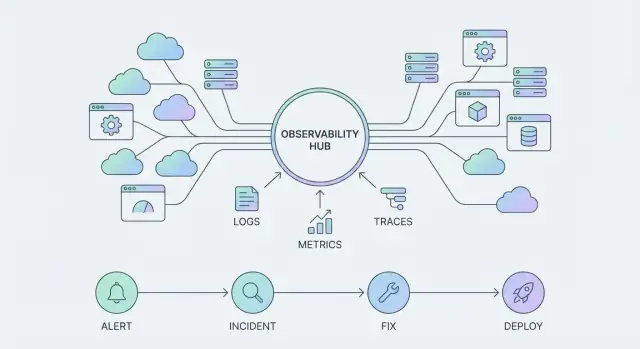
Why Observability Turns Into a Platform
An observability tool helps you answer specific questions about a system—typically by showing charts, logs, or a query result. It’s something you “use” when there’s a problem.
An observability platform is broader: it standardizes how telemetry is collected, how teams explore it, and how incidents are handled end-to-end. It becomes something your organization “runs” every day, across many services and teams.
From charts to outcomes
Most teams start with dashboards: CPU charts, error-rate graphs, maybe a few log searches. That’s useful, but the real goal isn’t prettier charts—it’s faster detection and faster resolution.
A platform shift happens when you stop asking, “Can we graph this?” and start asking:
- Can the on-call engineer find the root cause in minutes, not hours?
- Can we route the right alert to the right team automatically?
- Can we turn repeated incident patterns into repeatable playbooks?
Those are outcome-focused questions, and they require more than visualization. They require shared data standards, consistent integrations, and workflows that connect telemetry to action.
The three pillars you’re really buying
As platforms like the Datadog observability platform evolve, the “product surface” isn’t only dashboards. It’s three interlocking pillars:
- Telemetry: logs, metrics, and traces that are collected consistently and labeled well enough to be trusted.
- Integrations: pre-built connections that make adoption easy and expand coverage without custom glue.
- Workflows: incident response, alert routing, ownership, and follow-up—so learning compounds.
Platform value compounds
A single dashboard can help a single team. A platform gets stronger with each service onboarded, each integration added, and each workflow standardized. Over time, this compounds into fewer blind spots, less duplicated tooling, and shorter incidents—because every improvement becomes reusable, not one-off.
Telemetry Becomes the Product Surface
When observability shifts from “a tool we query” to “a platform we build on,” telemetry stops being raw exhaust and starts acting like the product surface. What you choose to emit—and how consistently you emit it—determines what your teams can see, automate, and trust.
The core telemetry types (and what they’re for)
Most teams standardize around a small set of signals:
- Metrics: numeric trends over time (latency, error rate, saturation).
- Logs: detailed, human-readable records for investigation and audit.
- Traces: request paths across services to find where time and failures happen.
- Events: discrete “something changed” records (deploys, feature flags, incidents).
- Profiles: CPU/memory behavior to pinpoint expensive code paths.
Individually, each signal is useful. Together, they become a single interface to your systems—what you see in dashboards, alerts, incident timelines, and postmortems.
Consistency beats volume
A common failure mode is collecting “everything” but naming it inconsistently. If one service uses userId, another uses uid, and a third logs nothing at all, you can’t reliably slice data, join signals, or build reusable monitors.
Teams get more value by agreeing on a few conventions—service names, environment tags, request IDs, and a standard set of attributes—than by doubling ingestion volume.
What high-cardinality really means (and why it matters)
High-cardinality fields are attributes with many possible values (like user_id, order_id, or session_id). They’re powerful for debugging “only happens to one customer” issues, but they can also increase cost and make queries slower if used everywhere.
The platform approach is intentional: keep high-cardinality where it provides clear investigative value, and avoid it in places meant for global aggregates.
Unified context reduces correlation work
The payoff is speed. When metrics, logs, traces, events, and profiles share the same context (service, version, region, request ID), engineers spend less time stitching evidence together and more time fixing the actual problem. Instead of jumping between tools and guessing, you follow one thread from symptom to root cause.
From Data Collection to a Telemetry Strategy
Most teams start observability by “getting data in.” That’s necessary, but it’s not a strategy. A telemetry strategy is what keeps onboarding fast and makes your data consistent enough to power shared dashboards, reliable alerts, and meaningful SLOs.
Common ingestion paths (and what they’re good at)
Datadog typically gets telemetry through a few practical routes:
- Agents on hosts/VMs: the fastest way to collect infrastructure metrics, logs, and APM with minimal code changes.
- Collectors and gateways (e.g., OpenTelemetry Collector): useful when you want central control, multi-destination routing, redaction, or standard processing.
- APIs and direct SDKs: helpful for custom events, business metrics, or when an agent isn’t feasible.
- Serverless integrations: convenient for managed runtimes where you don’t control the underlying host, but you’ll want to be deliberate about what you emit.
Speed vs. standardization: decide what you optimize for
Early on, speed wins: teams install an agent, turn on a few integrations, and immediately see value. The risk is that every team invents its own tags, service names, and log formats—making cross-service views messy and alerts hard to trust.
A simple rule: allow “quick start” onboarding, but require “standardize within 30 days.” That gives teams momentum without locking in chaos.
A lightweight naming and tagging convention
You don’t need a huge taxonomy. Start with a small set that every signal (logs, metrics, traces) must carry:
service: short, stable, lowercase (e.g.,checkout-api)env:prod,staging,devteam: owning team identifier (e.g.,payments)version: deploy version or git SHA
If you want one more that pays off quickly, add tier (frontend, backend, data) to simplify filtering.
Sampling, retention, and cost-aware defaults
Cost issues usually come from defaults that are too generous:
- Traces: start with head-based sampling for high-volume endpoints; keep 100% for critical flows.
- Logs: default to “error + important business events,” then selectively add info/debug with time-boxed retention.
- Retention: keep high-resolution data shorter (days), roll up or retain key aggregates longer (weeks/months).
The goal isn’t to collect less—it’s to collect the right data consistently, so you can scale usage without surprises.
Integrations as the Real Distribution Channel
Most people think of observability tools as “something you install.” In practice, they spread through an organization the way good connectors spread: one integration at a time.
What an “integration” actually means
An integration isn’t just a data pipe. It usually has three parts:
- Data sources: pulling metrics, logs, traces, events, and topology from systems you already run (cloud services, Kubernetes, databases, CI/CD, SaaS tools).
- Enrichment: adding context so telemetry is immediately usable—service names, environments, ownership tags, team routing, deployment versions, and cloud metadata.
- Actions: doing something with what you learn—creating tickets, paging on-call, annotating deploys, scaling resources, or triggering runbooks.
That last part is what turns integrations into distribution. If the tool only reads, it’s a dashboarding destination. If it also writes, it becomes part of daily work.
Why integrations accelerate adoption
Good integrations reduce setup time because they ship with sensible defaults: prebuilt dashboards, recommended monitors, parsing rules, and common tags. Instead of every team inventing its own “CPU dashboard” or “Postgres alerts,” you get a standard starting point that matches best practices.
Teams still customize—but they customize from a shared baseline. This standardization matters when you’re consolidating tools: integrations create repeatable patterns that new services can copy, which keeps growth manageable.
Prioritize bidirectional integrations
When evaluating options, ask: can it ingest signals and take action? Examples include opening incidents in your ticketing system, updating incident channels, or attaching a trace link back into a PR or deploy view. Bidirectional setups are where workflows start to feel “native.”
A simple shortlist method
Start small and predictable:
- Critical infrastructure first (cloud provider, Kubernetes, load balancers, core databases).
- Then the deploy pipeline (CI/CD, feature flags, release tracking) so telemetry lines up with changes.
- Add team-by-team SaaS (queues, caches, auth, payments) once tagging and ownership conventions are stable.
If you want a rule of thumb: prioritize integrations that immediately improve incident response, not the ones that merely add more charts.
Standard Views: Services, Dashboards, and Monitors
Standard views are where an observability platform becomes usable day to day. When teams share the same mental model—what a “service” is, what “healthy” looks like, and where to click first—debugging gets faster and handoffs get cleaner.
Start with golden signals (and make them visible)
Pick a small set of “golden signals” and map each one to a concrete, reusable dashboard. For most services, that’s:
- Latency (p95/p99 for key endpoints)
- Traffic (requests per second, jobs processed)
- Errors (rate and top error types)
- Saturation (CPU, memory, queue depth, DB connections)
The key is consistency: one dashboard layout that works across services beats ten clever bespoke dashboards.
Service catalogs create shared ownership
A service catalog (even a lightweight one) turns “someone should look at this” into “this team owns it.” When services are tagged with owners, environments, and dependencies, the platform can answer basic questions instantly: Which monitors apply to this service? What dashboards should I open? Who gets paged?
That clarity reduces Slack ping-pong during incidents and helps new engineers self-serve.
The building blocks that scale
Treat these as standard artifacts, not optional extras:
- Dashboards for golden signals and key dependencies
- Monitors tied to SLOs or user-impacting symptoms
- Notebooks for investigations and post-incident timelines
- Runbooks (linked from monitors) for the first 5–10 minutes of response
Anti-patterns to avoid
Vanity dashboards (pretty charts with no decisions behind them), one-off alerts (created in a hurry, never tuned), and undocumented queries (only one person understands the magic filter) all create platform noise. If a query matters, save it, name it, and attach it to a service view others can find.
Workflows: Where Observability Delivers Business Value
Observability only becomes “real” for the business when it shortens the time between a problem and a confident fix. That happens through workflows—repeatable paths that take you from signal to action, and from action to learning.
The incident journey: alert → triage → communicate → mitigate → learn
A scalable workflow is more than paging someone.
An alert should open a focused triage loop: confirm impact, identify the affected service, and pull the most relevant context (recent deploys, dependency health, error spikes, saturation signals). From there, communication turns a technical event into a coordinated response—who’s owning the incident, what users are seeing, and when the next update is due.
Mitigation is where you want “safe moves” at your fingertips: feature flags, traffic shifting, rollback, rate limits, or a known workaround. Finally, learning closes the loop with a lightweight review that captures what changed, what worked, and what should be automated next.
Incident tooling + ChatOps = collaboration, not heroics
Platforms like the Datadog observability platform add value when they support shared work: incident channels, status updates, handoffs, and consistent timelines. ChatOps integrations can turn alerts into structured conversations—creating an incident, assigning roles, and posting key graphs and queries directly in the thread so everyone sees the same evidence.
What a good runbook actually contains
A useful runbook is short, opinionated, and safe. It should include: the goal (restore service), clear owners/on-call rotations, step-by-step checks, links to the right dashboards/monitors, and “safe actions” that reduce risk (with rollback steps). If it’s not safe to run at 3 a.m., it’s not done.
Link incidents to deploys and changes
Root cause is faster when incidents are automatically correlated with deploys, config changes, and feature flag flips. Make “what changed?” a first-class view so triage starts with evidence, not guesswork.
SLOs and Error Budgets as a Team Operating System
What an SLO is (and why it beats “green dashboards”)
An SLO (Service Level Objective) is a simple promise about user experience over a time window—like “99.9% of requests succeed over 30 days” or “p95 page loads are under 2 seconds.”
That beats a “green dashboard” because dashboards often show system health (CPU, memory, queue depth) rather than customer impact. A service can look green and still be failing users (for example, a dependency is timing out, or errors are concentrated in one region). SLOs force the team to measure what users actually feel.
Error budgets: a shared way to talk about risk
An error budget is the allowed amount of unreliability implied by your SLO. If you promise 99.9% success over 30 days, you’re “allowed” about 43 minutes of errors in that window.
This creates a practical operating system for decisions:
- Budget healthy: ship features, run experiments, take reasonable risk.
- Budget burning: slow releases, focus on reliability work, reduce change.
- Budget exhausted: pause risky deploys and address the top sources of failure.
Instead of debating opinions in a release meeting, you’re debating a number everyone can see.
Alert on burn rate, not every spike
SLO alerting works best when you alert on burn rate (how quickly you’re consuming the error budget), not on raw error counts. That reduces noise:
- A brief spike that self-recovers may not page anyone.
- A sustained issue that would exhaust the budget soon triggers a clear, actionable alert.
Many teams use two windows: a fast burn (page quickly) and a slow burn (ticket/notify).
A lightweight SLO starter set for a typical web service
Start small—two to four SLOs you’ll actually use:
- Availability: % of successful requests (e.g., HTTP 2xx/3xx) over 30 days.
- Latency: p95 request latency under a threshold (separate for read vs write if needed).
- Checkout / critical endpoint: success rate for the one path the business cares about most.
- Freshness (if applicable): background jobs complete within X minutes.
Once these are stable, you can expand—otherwise you’ll just build another dashboard wall. For more, see /blog/slo-monitoring-basics.
Alerting That Scales Without Burning People Out
Alerting is where many observability programs stall: the data is there, the dashboards look great, but the on-call experience becomes noisy and untrusted. If people learn to ignore alerts, your platform loses its ability to protect the business.
Why alert fatigue happens (and why signals get duplicated)
The most common causes are surprisingly consistent:
- Too many “FYI” alerts that don’t require action.
- Thresholds copied across services without context (the same CPU rule for very different workloads).
- Multiple tools or teams alerting on the same symptom—for example, an APM error-rate monitor and a log-based error monitor both paging for the same incident.
- Noisy metrics (spiky latency percentiles, autoscaling effects) that trigger fluctuations rather than real problems.
In Datadog terms, duplicated signals often appear when monitors are created from different “surfaces” (metrics, logs, traces) without deciding which one is the canonical page.
Routing: ownership, severity, and quiet hours
Scaling alerting starts with routing rules that make sense to humans:
- Ownership: every monitor should have a clear owner (service/team) and an escalation path.
- Severity: reserve paging for urgent, user-impacting issues; use tickets or chat notifications for lower severity.
- Maintenance windows: planned deploys, migrations, and load tests should not generate pages.
Simple rules that keep alerts actionable
A useful default is: alert on symptoms, not every metric change. Page on things users feel (error rate, failed checkouts, sustained latency, SLO burn), not on “inputs” (CPU, pod count) unless they reliably predict impact.
A review cadence that actually works
Make alert hygiene part of operations: monthly monitor pruning and tuning. Remove monitors that never fire, adjust thresholds that fire too often, and merge duplicates so each incident has one primary page plus supporting context.
Done well, alerting becomes a workflow people trust—not a background noise generator.
Governance: How Platforms Stay Usable as They Grow
Calling observability a “platform” isn’t just about having logs, metrics, traces, and a lot of integrations in one place. It also implies governance: the consistency and guardrails that keep the system usable when the number of teams, services, dashboards, and alerts multiplies.
Without governance, Datadog (or any observability platform) can drift into a noisy scrapbook—hundreds of slightly different dashboards, inconsistent tags, unclear ownership, and alerts nobody trusts.
Governance is a people-and-process problem
Good governance clarifies who decides what, and who is accountable when the platform gets messy:
- Platform team: defines standards (tagging, naming, dashboard patterns), provides shared components, and maintains integrations.
- Service owners: own telemetry quality for their services and keep monitors meaningful.
- Security & compliance: sets data handling rules (PII, retention, access boundaries) and reviews high-risk integrations.
- Leadership: aligns governance with business priorities (reliability targets, incident response expectations) and funds the work.
Practical controls that prevent “observability sprawl”
A few lightweight controls go further than long policy docs:
- Templates by default: starter dashboards and monitor packs per service type (API, queue worker, database) so teams begin consistent.
- Tagging policy: a small required set (e.g.,
service,env,team,tier) plus clear rules for optional tags. Enforce in CI where possible. - Access and ownership: use role-based access for sensitive data and require an owner for dashboards and monitors.
- Approval flows for high-impact changes: monitors that page people, log pipelines that affect cost, and integrations that pull sensitive data should have review steps.
Reuse beats reinvention
The fastest way to scale quality is to share what works:
- Shared libraries: internal packages or snippets that standardize logging fields, trace attributes, and common metrics.
- Reusable dashboards and monitors: a central catalog of “golden” dashboards and monitor templates teams can clone and adapt.
- Versioned standards: treat key assets like code—document changes, deprecate old patterns, and announce updates in one place.
If you want this to stick, make the governed path the easy path—fewer clicks, faster setup, and clearer ownership.
Cost, Value, and the Platform Flywheel
Once observability behaves like a platform, it starts to follow platform economics: the more teams that adopt it, the more telemetry gets produced, and the more useful it becomes.
That creates a flywheel:
- More services onboarded → better cross-service visibility and correlation
- Better visibility → faster diagnosis, fewer repeat incidents, more trust in the tool
- More trust → more teams instrument and integrate → even more data
The catch is that the same loop also increases cost. More hosts, containers, logs, traces, synthetics, and custom metrics can grow faster than your budget if you don’t manage it deliberately.
Practical cost levers (without killing signal)
You don’t have to “turn it all off.” Start by shaping data:
- Sampling: keep high-fidelity traces for critical endpoints, sample more aggressively elsewhere.
- Retention tiers: short retention for raw, high-volume logs; longer retention for curated security/audit streams.
- Log filtering and parsing: drop obvious noise early (health checks, static asset requests) and standardize parsing so you can route by attributes.
- Metric aggregation: prefer percentiles, rates, and rollups over unbounded cardinality (e.g., per-user IDs).
KPIs that connect cost to outcomes
Track a small set of measures that show whether the platform is paying back:
- MTTD (mean time to detect)
- MTTR (mean time to resolve)
- Incident count and repeat incidents (same root cause)
- Deploy frequency (and change failure rate if you track it)
Running a quarterly “value vs cost” review (no blame)
Make it a product review, not an audit. Bring platform owners, a few service teams, and finance. Review:
- Top cost drivers by data type (logs/metrics/traces) and by team
- Top wins: incidents shortened, outages avoided, toil removed
- 2–3 agreed actions (e.g., adjust sampling rules, add retention tiering, fix a noisy integration)
The goal is shared ownership: cost becomes an input to better instrumentation decisions, not a reason to stop observing.
What This Means for Your Observability Tool Stack
If observability is turning into a platform, your “tool stack” stops being a collection of point solutions and starts acting like shared infrastructure. That shift makes tool sprawl more than an annoyance: it creates duplicated instrumentation, inconsistent definitions (what counts as an error?), and higher on-call load because signals don’t line up across logs, metrics, traces, and incidents.
Consolidation doesn’t mean “one vendor for everything” by default. It means fewer systems of record for telemetry and response, clearer ownership, and a smaller set of places people have to look during an outage.
What consolidation can actually solve
Tool sprawl typically hides costs in three places: time spent hopping between UIs, brittle integrations you have to maintain, and fragmented governance (naming, tags, retention, access).
A more consolidated platform approach can reduce context switching, standardize service views, and make incident workflows repeatable.
A decision checklist (quick but practical)
When evaluating your stack (including Datadog or alternatives), pressure-test these:
- Must-have integrations: cloud provider, Kubernetes, CI/CD, incident management, paging, and key data stores—plus any “we can’t ship without it” business systems.
- Workflows: can you go from alert → owner → runbook → timeline → postmortem without manual copy/paste?
- Governance: tagging standards, access controls, retention, and guardrails for dashboard/monitor sprawl.
- Pricing model: what drives cost (hosts, containers, ingested logs, indexed traces)? Can you forecast growth without surprises?
Run a pilot with a clear success metric
Pick one or two services with real traffic. Define a single success metric like “time to identify root cause drops from 30 minutes to 10” or “reduce noisy alerts by 40%.” Instrument only what you need, and review results after two weeks.
Keep internal docs centralized so learning compounds—link the pilot runbook, tagging rules, and dashboards from one place (for example, /blog/observability-basics as an internal starting point).
A Practical Adoption Plan You Can Copy
You don’t “roll out Datadog” once. You start small, set standards early, then scale what works.
30/60/90-day rollout
Days 0–30: Onboard (prove value fast)
Pick 1–2 critical services and one customer-facing journey. Instrument logs, metrics, and traces consistently, and connect the integrations you already rely on (cloud, Kubernetes, CI/CD, on-call).
Days 31–60: Standardize (make it repeatable)
Turn what you learned into defaults: service naming, tagging, dashboard templates, monitor naming, and ownership. Create “golden signals” views (latency, traffic, errors, saturation) and a minimal SLO set for the most important endpoints.
Days 61–90: Scale (expand without chaos)
Onboard additional teams using the same templates. Introduce governance (tag rules, required metadata, review process for new monitors) and start tracking cost vs. usage so the platform stays healthy.
Where Koder.ai fits (pragmatically)
Once you treat observability as a platform, you’ll usually end up wanting small “glue” apps around it: a service catalog UI, a runbook hub, an incident timeline page, or an internal portal that links owners → dashboards → SLOs → playbooks.
This is the kind of lightweight internal tooling you can build quickly on Koder.ai—a vibe-coding platform that lets you generate web apps via chat (commonly React on the frontend, Go + PostgreSQL on the backend), with source code export and deployment/hosting support. In practice, teams use it to prototype and ship the operational surfaces that make governance and workflows easier without pulling a full product team off roadmap.
Quick wins to ship in week one
- Top 10 monitors for availability, error rate, latency, saturation, and key dependencies
- Deployment markers (from CI/CD) on dashboards and traces for instant change correlation
- Incident template: what happened, impact, timeline, owners, links to dashboards/queries, next actions
Training that actually sticks
Run two 45-minute sessions: (1) “How we query here” with shared query patterns (by service, env, region, version), and (2) “Troubleshooting playbook” with a simple flow: confirm impact → check deploy markers → narrow to service → inspect traces → confirm dependency health → decide rollback/mitigation.
Copy/paste checklist
- Service naming + tagging rules documented
- Dashboard + monitor templates published
- Top 10 monitors enabled and owned
- 1–3 SLOs defined for critical paths
- Incident template and workflow agreed
- Two training sessions delivered + recording shared
- Monthly governance review (tags, monitors, cost) scheduled
FAQ
What’s the difference between an observability tool and an observability platform?
An observability tool is something you consult during a problem (dashboards, log search, a query). An observability platform is something you run continuously: it standardizes telemetry, integrations, access, ownership, alerting, and incident workflows across teams so outcomes improve (faster detection and resolution).
Why do teams outgrow “just dashboards”?
Because the biggest wins come from outcomes, not visuals:
- finding root cause quickly
- routing the right alert to the right owner
- turning repeat incidents into repeatable playbooks
Charts help, but you need shared standards and workflows to consistently reduce MTTD/MTTR.
What telemetry tags should we standardize first?
Start with a required baseline that every signal carries:
serviceenv(prod,staging,dev)teamversion(deploy version or git SHA)
Add tier (frontend, backend, data) if you want a simple extra filter that pays off quickly.
What does high-cardinality mean, and when should we use it?
High-cardinality fields (like user_id, order_id, session_id) are great for “only one customer is broken” debugging, but they can raise cost and slow queries if used everywhere.
Use them intentionally:
- keep them in logs/traces where you investigate individual requests
- avoid them in global metrics meant for aggregates and dashboards
Which telemetry types matter most in a Datadog-style platform approach?
Most teams standardize on:
- metrics for trends (latency, error rate, saturation)
- logs for detailed investigation and audit
- traces to see request paths across services
- events for “something changed” (deploys, feature flags)
- profiles to find expensive code paths
The key is making these share the same context (service/env/version/request ID) so correlation is fast.
What are the common ingestion paths, and how do we choose between them?
A practical default is:
- agents on hosts/VMs for fast infrastructure + APM/log collection
- an OpenTelemetry Collector (or gateway) when you need central control, redaction, or multi-destination routing
- SDKs/APIs for custom business events/metrics
- serverless integrations for managed runtimes, with deliberate sampling/volume controls
Pick the path that matches your control needs, then enforce the same naming/tagging rules across all of them.
How do we balance fast onboarding with long-term standardization?
Do both:
- allow a quick start so teams get value fast
- require standardization within 30 days (service naming, tags, log formats, core dashboards/monitors)
This prevents “every team invents its own schema” while keeping adoption momentum.
Why do integrations act like a distribution channel for observability?
Because integrations are more than data pipes—they include:
- enrichment (ownership tags, cloud metadata, versions)
- defaults (dashboards, monitors, parsing rules)
- actions (tickets, paging, incident creation, annotations)
Prioritize bidirectional integrations that both ingest signals and trigger/record actions, so observability becomes part of daily work—not just a destination UI.
What should “standard views” include so engineers can debug quickly?
Anchor on consistency and reuse:
- one “golden signals” layout per service type (latency, traffic, errors, saturation)
- a service catalog with clear ownership
- monitors tied to user impact or SLOs, with runbooks linked
Avoid vanity dashboards and one-off alerts. If a query matters, save it, name it, and attach it to a service view others can find.
How do SLOs and burn-rate alerting reduce noise compared to traditional alerts?
Alert on burn rate (how fast you’re consuming the error budget), not every transient spike. A common pattern:
- fast burn window: page quickly for severe, sustained issues
- slow burn window: notify or ticket for degrading reliability
Keep the starter set small (2–4 SLOs per service) and expand only after teams actually use them. For basics, see /blog/slo-monitoring-basics.