

Digitize or Rebuild a Process? A Simple Framework
Not sure whether to digitize or rebuild a process? Use this simple framework to spot useful manual work, remove waste, and choose safer software changes.
Why this decision is harder than it looks
When a team spots a manual workflow, the obvious move is to put it into software and make it faster. That sounds sensible, but it can lock in bad decisions. Software repeats what you tell it to repeat. If the process includes extra approvals, duplicate data entry, or old workarounds, the tool can make those problems feel official.
So the real question is not just whether to automate. It is whether to digitize the process as it is, or rebuild it first.
Teams often skip that pause because the current process has been around for years, so it feels tested. In practice, age hides both useful controls and outdated habits. A long-standing process can contain one step that protects quality and another that exists only because an old system was clumsy.
Manual work is tricky for exactly that reason. One step can contain both value and waste. A manager reviewing every customer refund might catch unusual cases, which is useful. But if that same manager is also copying the same notes into a second system, that part adds nothing. If you turn the whole step into software as-is, you preserve the good part and the bad part together.
Timing matters too. Before a tool is built, changing a process is mostly a conversation. After a tool is built, changes affect forms, rules, permissions, reports, training, and daily habits. Even a small fix can become testing, meetings, and expensive rework.
Faster is not always better. Speed helps only when the process is already making good decisions. If a poor approval rule is automated, you just get poor approvals sooner. The team may feel more efficient while errors, delays, and customer frustration keep growing underneath.
That matters even more now that software can be built quickly. Fast tools are useful, but they raise the cost of skipping the thinking step. A quick build around a messy workflow is still a messy workflow, just with a nicer interface.
What to keep, simplify, or remove
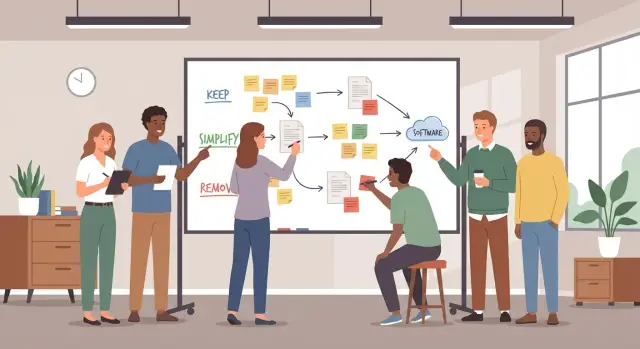
Not every manual step is waste. Some steps protect quality, catch risk, or build trust. Before you digitize or rebuild a process, separate work that needs human judgment from work that only exists to keep a weak system running.
A simple rule helps: keep steps where a person adds meaning, not just motion. If a manager reviews an unusual refund, that may be worth keeping because context matters. If three people copy the same refund details from an email into a spreadsheet and then into a form, that is just information moving around.
Most steps fall into one of four buckets:
- Keep it if someone is making a real decision.
- Simplify it if the goal matters but the check happens too often.
- Remove it if it only copies, forwards, or reformats data.
- Question it hard if nobody remembers why it exists.
Many teams carry extra tasks because their current tools are poor. People chase approvals in chat, update two trackers, or save files with special names so others can find them later. Those are not business needs. They are workarounds.
If you build every workaround into the new system, you lock old pain into a cleaner screen. That is why some software projects feel slow and frustrating on day one.
Old habits are another trap. Some rules were created for paper forms, old audit concerns, or a manager who left years ago. A weekly sign-off, a duplicate report, or a mandatory printout may once have made sense. If the risk is gone, the rule should go too.
Picture a sales team that enters lead details into a CRM, then emails the same details to finance, then waits for manual approval before sending a quote. The approval may still be needed when pricing is unusual. The duplicate entry and email should disappear.
If you plan to build the workflow in a tool like Koder.ai, this sorting step saves time. Software should support the valuable parts of the process, not preserve the parts people only tolerate.
A simple framework for deciding
Do not start with the current flowchart. Start with the purpose of each step. A process can have many steps and still do very little. Another step may feel slow, but it may be the one thing preventing expensive mistakes.
A practical way to judge each step is to ask four questions:
- What result is this step protecting?
- Who uses the output, and what do they do with it?
- How often does it change a real decision?
- Does it reduce risk, or mostly create waiting time?
The answers usually point to one of four choices. Keep the step if it clearly protects quality, money, compliance, or customer trust. Simplify it if the goal matters but the current method is clumsy. Remove it if no one really uses the output or if it almost never changes what happens next. Rebuild it if the purpose is valid but the whole sequence is built around old limits.
A strong warning sign is delay without protection. If a step adds a day of waiting but does not catch mistakes, prevent fraud, or improve the outcome, it is weak. It may feel important because people touch it often, not because it changes anything.
Take customer refunds. If every small refund needs manager approval and the manager approves 99 out of 100 without changes, that step is not improving decisions. It is mostly adding queue time. A better rule might be automatic approval under a set amount, with review only for unusual cases.
This is the heart of process digitization. Do not ask, "Can software copy this?" Ask, "Should this still exist once software makes change easier?" That shift helps you avoid locking old habits into a new system.
How to review a process step by step
Start with the real process, not the policy version. Watch how the work happens today, who touches it, what tools they use, and where people pause, wait, or fix mistakes. A whiteboard, shared document, or simple table is enough.
Keep the map plain. For each step, note four things: what triggers it, who does it, what input it needs, and what output it creates. If two people describe the same step differently, that usually means the process is already drifting.
Then ask one question for every step: why does this exist?
Most answers fall into three groups:
- Value - it helps create the result the customer or team actually needs.
- Control - it reduces risk, checks quality, or keeps records.
- Waste - it adds delay, duplication, or busywork without a clear benefit.
Many manual steps feel important only because people are used to them. Copying data from one spreadsheet to another can look like careful work, but it is often just a workaround for missing systems.
Once each step has a label, test what happens if you merge it, shorten it, or remove it. If nothing breaks, the step was probably not needed. If a control step matters, see whether it can happen later, happen once instead of twice, or be triggered only for exceptions.
It also helps to decide what should stay manual for now. Not every judgment call should become software on day one. If a step depends on context, trust, or a rare edge case, keep it manual until the new process proves stable.
Before any build starts, write down the new flow in simple language. Include the main path, the exceptions, who approves what, and what counts as done. A one-page version is often enough. It becomes the source of truth for everyone.
That kind of plain-language outline also works well when you use a chat-based builder. It gives the tool something clear to build from, instead of forcing it to mirror a messy process.
A realistic example: approval work before software
A sales team handles customer approvals through email. A rep builds a quote, sends it to a manager, waits for a reply, then forwards the same quote to finance. Sometimes the quote also goes to a sales director before it reaches the customer.
On paper, that looks careful. In practice, it creates delay, inbox clutter, and repeated checking.
The useful part is finance. That review catches real pricing errors, especially when discounts are entered by hand or a rep uses an old price sheet. Finance also spots cases where payment terms do not match company policy. That step protects margin and avoids embarrassing corrections later.
The problem is the other approval loops. The manager and sales director are often checking the same fields finance already checks: discount level, total value, and basic customer details. They rarely add a different decision. Most of the time, they just reply with "approved" after reading the same numbers.
What changed
Instead of copying the old email chain into software, the team redraws the flow around one real control:
- Standard quotes within pricing rules go out without extra approval.
- Quotes with unusual discounts or payment terms go to finance.
- Finance approves, corrects, or sends them back once.
That keeps the check that matters and removes the loops that only slow people down.
The software should reflect that cleaner flow, not the old mess. If the team builds this in an internal tool, the quote form can validate prices automatically, flag exceptions, and route only risky cases for review. The rep sees status in one place instead of searching email threads.
That is the key test: does a step change the outcome, or does it only repeat a check someone else already made?
In this example, one manual review stays because it prevents costly mistakes. The other approvals go away because they do not add new judgment. Good process work keeps the control, removes the noise, and then builds software around the simpler path.
Common mistakes that cause expensive rework
The costliest mistakes usually happen before a tool is chosen. A team maps the current process, sees a long list of steps, and decides to copy all of them into software because that is how people work today. But habit is not the same as value. If a step exists only because paper forms got lost, or because someone once made a mistake five years ago, baking it into a system just makes the waste faster.
The opposite mistake is just as risky. A team spots delays and removes approvals or checks without asking what risk those controls were managing. Some controls are needless, but some protect money, compliance, customer data, or service quality. When those safeguards disappear, the process may look cleaner for a week and then create bigger problems.
Another common trap is automating exceptions before fixing the main path. Unusual cases are painful and memorable, so teams focus on them first. The result is a complex workflow built around edge cases while the 80 percent of routine work is still slow and confusing. Design for the normal case first. Then add simple handling for exceptions that truly matter.
Teams also get into trouble when one loud stakeholder becomes the voice of the whole process. The manager may care about reporting, the finance lead may care about approval rules, and front-line staff may care about speed. If only one of those views shapes the design, the software fits one person and frustrates everyone else.
A short trial run catches a lot of this early, yet many teams skip it because they want to move fast. Even a simple test with real users often reveals problems such as steps in the wrong order, missing information at handoff points, approvals that create delay but add no protection, rare cases that are not actually common, and screens that make sense only to the project team.
This matters even more in fast-build environments. Koder.ai, for example, lets teams create web, server, and mobile apps through a chat-based interface. That speed is useful, but only if the workflow has already been challenged and cleaned up.
A quick checklist before you digitize
Before you decide whether to digitize or rebuild a process, stop and run one short review. A process can feel important because it has many steps, handoffs, and approvals. That does not mean each part is useful.
Use this checklist with the people who do the work every day. Walk through one real case from start to finish, not the ideal version written in a policy file.
- Can someone explain the purpose of the step in one clear sentence?
- Does the step actually change the outcome, reduce risk, or improve quality?
- If this step disappeared tomorrow, would the process still work?
- If the step adds waiting time, what protection does that delay create?
- Has the simpler version been tested on one small, low-risk case?
A small example makes this real. Imagine a team where every small customer refund needs a manager sign-off. If almost every refund gets approved anyway, that step may only document authority instead of improving the decision. In that case, a refund limit with spot checks may protect the business just as well with less delay.
The rule is simple: keep the steps that change results, simplify the ones that protect quality, and remove the ones that only make the work feel official. If a step cannot justify its time, it should not be locked into software.
How to turn the new process into software
Once you have cleaned up the process, do not jump straight into screens, forms, and automations. Start by writing the process as a small set of clear rules: what starts the work, who owns each step, what information must be passed along, and what counts as complete.
A useful test is this: could a new teammate follow the flow without stopping to ask extra questions? If not, the software will be confusing too.
Write the default path first
Most work follows the same basic route. Build that route before anything else. For each handoff, define:
- what triggers the step
- who is responsible
- what information is required
- when a response is due
- what happens next after approval, rejection, or no response
This keeps the system focused on normal work instead of rare edge cases.
Then mark the points where human judgment still matters. A rule can route a request, send a reminder, or check whether a field is missing. But some decisions still need a person. Maybe a manager reviews unusual spending, or a support lead decides whether a customer request should break policy. Name those moments clearly so they do not get buried inside vague labels like "special review."
After that, define the few exceptions that deserve special handling now. Keep the list short. If something happens once every few months, it can stay manual at first. That is usually better than building extra logic nobody uses.
Keep version notes from the start. A short record of what changed, when, and why makes later updates easier. It also helps when the team asks why the system behaves a certain way.
If you are using a platform like Koder.ai, those notes can double as a plain-language spec. The clearer the rules, the cleaner the first build.
Treat the first version as the common path done well. Do not overbuild for unusual cases. Start with the flow people use every day, keep human judgment visible, and add more only when real usage proves it is needed.
Next steps for a small and safe rollout
Start small. Pick one process that hurts enough to matter, but is contained enough that a mistake will not disrupt the whole business.
A good pilot usually has a clear owner, a small group of users, and a lot of repeated manual work. Expense approvals for one department, lead handoff for one sales team, or customer intake for one service line are good examples.
If you are still weighing whether to digitize or rebuild a process, the safest move is not a company-wide launch. Test the cleaned-up version first with a narrow group and watch what happens in real work.
What to test first
Run a short pilot with a few real users. Give it a fixed window, such as two to four weeks, so everyone knows it is a test and not the final version.
Focus on a few simple signals:
- time saved per task or case
- errors, rework, or missed handoffs
- user feedback about confusion or friction
- exceptions that still need manual handling
- whether managers can see status more clearly
Do not treat the first version as finished. Early feedback is the point. If people keep working around a step, that usually means the step is unclear, unnecessary, or missing something important.
For example, a team moves a paper-based approval flow into a simple app. The pilot shows that approvals are faster, but staff still call each other to explain missing details. That is a useful result. It means the workflow needs a better request form before a wider rollout.
Once the process works for the pilot group, expand in stages. Add one team, then another. Keep measuring the same few numbers so you can compare results instead of relying on opinions.
If you want to test ideas quickly, Koder.ai can be a practical option for turning a cleaned-up workflow into a web or mobile app from natural language. The important part is the order: fix the process first, prove it on a small scale, and only then roll it out wider.
FAQ
When should I digitize a process instead of rebuilding it?
Digitize a process as-is only when its steps still produce good decisions and the main problem is manual effort. Rebuild it first when people copy data, chase approvals, or follow rules nobody can explain.
How do I find out which steps matter?
Start with the people who do the work. For each step, ask what triggers it, who uses its output, and whether it changes a decision, reduces risk, or improves quality.
What work should stay manual?
Keep human review where context affects the outcome, such as unusual refunds, nonstandard pricing, or sensitive customer cases. Let software handle repeatable checks, routing, reminders, and data movement.
How can I spot workarounds in a workflow?
A workaround exists because a tool or system makes normal work harder than it should be. Common signs include entering the same information twice, emailing records between teams, and using special file names so people can find things.
What if an approval step protects the business?
Do not remove it automatically. Identify the risk it manages, then test a simpler control, such as approval only above a set amount or review only for exceptions.
How should a team review a process before building software?
Use real examples, not only the written policy. Map each step with its trigger, owner, input, and output, then ask why it exists and what would happen if you removed it.
Should we build exception handling first?
Build the normal route first. Write clear rules for ownership, required information, approvals, deadlines, and completion, then add only the exceptions that happen often enough to justify software.
What makes a good pilot process?
Begin with one contained workflow, such as one department's expense approvals or a single sales team's lead handoff. Choose a process with repeated work, a clear owner, and limited risk if the first version needs changes.
What should we measure during a pilot?
Track time per task, errors, rework, missed handoffs, manual exceptions, and user feedback. Compare those results with the old process so the team can see whether the new flow actually improves work.
How can Koder.ai help after we simplify the process?
Koder.ai can turn a plain-language workflow into a web, server, or mobile application. Describe the cleaned-up default flow, the people involved, the required information, and the few decisions that still need human review.