

Discovery Call to Build-Ready Prompts That Teams Can Use
Learn how to turn a discovery call to build-ready prompts by capturing users, tasks, limits, examples, and non-goals before build starts.
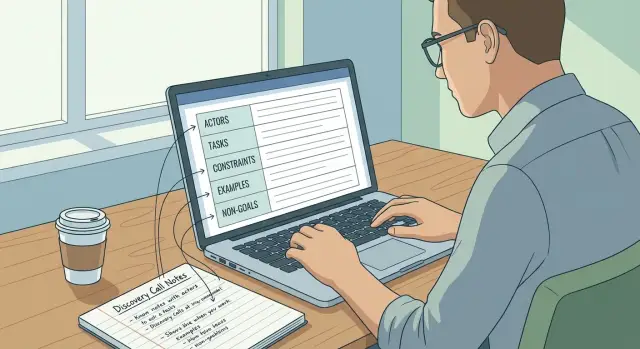
Why discovery calls often fail at handoff
The break usually happens after the meeting, not during it. Everyone leaves the discovery call feeling aligned, but the notes are too thin to build from. Teams write down phrases like "needs approvals," "admin view," or "customer portal" and assume that is enough. It rarely is.
What gets lost is the day-to-day reality of the business. A call might cover features, but miss who does the work, what order things happen in, which rules cannot be broken, and what success looks like in a normal week. When that context disappears, the first version gets built on guesses.
Those guesses lead to weak first versions. A screen can look polished and still miss the point because it solves the wrong problem. "Users submit requests" sounds useful, but it does not say whether the user is a customer, a field worker, or a manager, or what should happen after submission.
That is why a good prompt needs business context, not just a feature list. A stronger handoff sounds more like this: "Field staff submit service requests from mobile, supervisors review them the same day, urgent jobs skip the normal queue, and every change must be logged." That gives a builder something real to work from.
This matters even more when a team can move from prompt to working product quickly. With a platform like Koder.ai, speed is a real advantage, but only if the prompt carries the business logic with it.
The goal is simple. After the call, one person should be able to read the prompt and start building right away. They should not have to decode a transcript or chase missing details.
Start with actors and their real jobs
A good handoff starts with people, not features. Skip that step and the first build often turns into a pile of screens with no clear owner. The fastest way to make discovery notes useful is to ask: who will open this product, and what are they trying to get done?
Name every type of user, even if the groups seem obvious. A founder, sales rep, manager, finance lead, and support agent may all touch the same system for completely different reasons. When those roles get blurred together, the prompt gets vague and the first version tries to serve everyone at once.
Keep each actor tied to real work. A sales rep might update deal stages, log call notes, and check next actions. A manager might review pipeline numbers, approve discounts, and export weekly reports. Those differences shape what each person should see first and what they should be allowed to change.
A simple split helps:
- Daily users repeat the same core actions.
- Managers review, approve, and correct.
- Admins handle settings, permissions, and system rules.
- View-only users check status without editing.
- Finance or operations users often need exports and reporting.
This avoids a common mistake: building every user like an admin. Most people do not need full control. They need the shortest path to their usual task.
That detail changes the quality of the first prompt. "Build a CRM" is vague. "Sales reps update leads, managers approve quote changes, support can view account history, and finance exports closed deals" gives the product real shape.
Turn the conversation into clear tasks
A useful prompt breaks work into actions people actually take. That is the point where discovery notes become buildable.
If someone says, "We need a better way to manage orders," keep going until the steps are clear. "Manage orders" is not a task. "Create an order, review payment status, approve shipment, and send a confirmation" is.
A short set of action words helps clean up fuzzy notes:
- Create
- Review
- Approve
- Send
- Update
Use those verbs to rewrite broad statements into task lines. A clinic owner might say, "I want staff to handle bookings faster." A build-ready version is clearer: "Receptionist creates an appointment, reviews doctor availability, confirms the slot, and sends a reminder to the patient."
Each task also needs a before and after state. What triggers it? What should happen next? If a manager approves a refund, what must already exist, and what changes after approval? Small details like that shape screens, buttons, status labels, and notifications.
A simple chain works well: trigger, action, result. For example: "When a new lead comes in, the sales rep reviews the details, updates the priority, and sends a first reply." That is much easier to turn into a first build.
It also helps to mark which tasks matter on day one. If three actions happen every day and two happen once a month, build the daily ones first. That keeps the first release focused and useful.
Capture constraints before they become surprises
A good prompt is not just a list of features. It also needs the limits the team has to work within. If those limits stay vague during the call, the first version can look right and still fail in practice.
Start by writing business rules in plain language. Skip technical or legal wording unless the team already speaks that way. Instead of "role-based approval matrix," say "sales reps can draft discounts, but only managers can approve them."
Some constraints shape the whole build and need to be captured early. That includes privacy rules, data location needs, and industry requirements. If customer data must stay in a certain country or region, say that clearly.
It also helps to record what cannot be replaced. Many teams want a new app, but still rely on a few existing tools or manual steps. Finance may need the same accounting system. Support may need tickets to stay in the current help desk. Those limits matter just as much as the new features.
Keep a short section for practical constraints such as:
- fixed launch date
- budget cap or spending range
- team size and available reviewers
- tools that must stay in the workflow
- legal, privacy, or location requirements
These details protect the first build from bad assumptions. They also help the builder make better trade-offs.
Use examples to make the prompt concrete
Examples turn vague notes into something a team can actually build. Broad phrases like "manage orders" or "review leads" do not show the real input, the expected output, or the quality bar.
Start with one normal example from recent work. Choose something common, not a rare edge case. If a team says they want an app to qualify leads, ask them to show one real lead record, what details came in, and what the finished result should look like after review.
A useful example usually includes four things:
- the sample input
- the steps or decision the app should make
- the expected output
- what makes that output good enough
Then ask for one messy case that happens all the time. That is where hidden rules appear. Maybe a form is missing a phone number. Maybe the same customer appears twice. Maybe the request is vague. If you capture that now, the first prompt can say whether the app should flag it, skip it, or ask for more information.
Be specific about quality. "It should work" is not a useful target. "It should group duplicates, keep the newest contact details, and mark low-confidence matches for review" is something a builder can act on.
In practice, two pasted examples often help more than a long abstract description. One clean case and one messy case give the builder a pattern to follow.
Define non-goals to protect the first build
A strong first prompt needs clear limits. Without them, version one fills up with extra ideas and the result gets messy, slow, or unfocused.
Write down what the product should not do yet. This protects the core workflow you actually need to test.
Nice-to-have ideas are usually easy to spot. They sound useful, but they are not required to prove the app works. A custom dashboard, advanced roles, deep reporting, or polished notifications may matter later. They should not compete with the must-have flow in version one.
A few questions help here:
- What can users live without for the first 1 to 2 weeks?
- What can the team handle manually at first?
- What sounds useful, but is not tied to the main outcome?
- Which integrations can wait until the core flow is stable?
Manual work is often the right temporary choice. If leads can be reviewed once a day by hand, you may not need auto-routing yet. If invoices can be exported and sent manually, full billing automation can wait. That is not failure. It is focus.
The same applies to integrations. Teams often ask for payment tools, email platforms, calendar sync, and CRM connections right away. If the first build is meant to validate one workflow, note which systems stay outside version one.
For example, an internal CRM might start with contact capture, status updates, and a basic task list. Non-goals could include multi-team permissions, advanced analytics, mobile push alerts, and live sync with outside tools.
"Not included in version one" is often enough. Clear limits make the first build faster to ship and easier to test.
A simple step-by-step prompt template
A useful prompt should read like a short brief, not a pile of notes. Using the same structure every time makes handoff much easier.
- Start with a one-line product summary. Say what it is, who it serves, and the main result it should deliver.
- Name the actors. List the people who will use it.
- Describe the key tasks. Focus on the few actions that matter most in version one.
- Add constraints and examples. Include rules, limits, data needs, and one or two real cases.
- End with success criteria. Define what the first version must do well enough to be useful.
Keep the wording plain and specific. Do not write "manage projects better" if you really mean "team leads can create a project, assign tasks, and mark work complete."
Simple sentences work best. For example: "Build a small CRM for a sales team. Actors: sales reps and a manager. Tasks: add leads, update deal stage, and view follow-ups. Constraints: mobile-friendly, simple dashboard, CSV export. Example: a rep should log a call in under 30 seconds. Success: the team can track active deals without using spreadsheets."
That is enough to give a builder a clear starting point without trying to describe the whole product.
Example: turning one call into one usable prompt
Imagine a small service business like a local cleaning company. On the call, the owner says, "Customers need to book online, pay easily, and my staff need a simple way to manage appointments." That is useful, but it is still too loose for a first build.
A build-ready version turns that conversation into something clear enough to use right away:
Build a mobile-friendly booking app for a small cleaning service.

Actors:
- Customer: browse services, choose a time, pay, and get a confirmation.
- Staff: view bookings, block unavailable times, and manage refunds.

Rules and constraints:
- Bookings are available only during business hours: Monday to Friday, 9am to 5pm.
- Same-day bookings close at 2pm.
- Refunds are allowed only if the customer cancels at least 24 hours before the appointment.
- The main use case is mobile, so booking and payment screens must be simple on a phone.

Version 1 should include:
- service list with prices
- available time slots
- online payment at checkout
- booking confirmation for customers
- a basic staff view for upcoming jobs

Version 1 should not include:
- loyalty rewards
- advanced reporting
- multi-location support
- live chat
This works because it names the actors clearly and turns vague requests into real tasks. The constraints matter just as much. Limited hours stop the system from offering impossible time slots. Refund rules prevent confusion later. Mobile use shapes the layout from the start.
The non-goals protect the build. Without them, a simple booking app can quickly turn into a much bigger project.
Common mistakes that weaken the first version
A weak first version usually does not fail because the team cannot build it. It fails because the prompt was too blurry.
One common mistake is mixing feature ideas with business rules. A founder might say, "We need a dashboard, filters, and alerts," but the real rule is "Only managers can approve refunds above a set amount." If that rule is buried inside a wish list, the first build may look polished and still be wrong.
Another problem is writing only from the founder's point of view. Founders often describe what they want to see, not what each user needs to do. A sales rep, an operations manager, and a support agent may all touch the same app in different ways. If the prompt reflects leadership goals only, daily work gets missed.
The most common mistakes are:
- treating ideas, rules, and assumptions as if they are the same thing
- describing the app for one person instead of all key users
- skipping edge cases like partial payments, late approvals, or duplicate records
- leaving approval steps vague, with no trigger, owner, or deadline
- trying to squeeze the full roadmap into version one
Take "order approval" as an example. It sounds clear, but it is not. Who approves it? What happens if the approver is away? Does every order need approval, or only orders above a threshold? Those details change the build.
When teams use fast app-building tools, these gaps show up quickly. A cleaner prompt gives you a first version people can actually test instead of just react to.
Quick checklist before you start building
Before you send a prompt into a builder, do one quick review. This is where weak notes become clear instructions.
What to confirm first
- Actors are easy to name. You should be able to list every user type quickly.
- Each actor has real tasks. Every actor should have 2 to 5 clear actions.
- Limits are written down. Include rules like approval steps, privacy needs, mobile use, or required tools.
- Examples make it concrete. Add one normal case and one edge case.
- Non-goals are visible. Make it clear what version one will not do.
A quick example makes the difference obvious. "Staff creates bookings" is thin. A stronger prompt says staff can create, edit, and cancel bookings, managers can approve exceptions, double-booking must be blocked, and version one will not include invoicing.
If any of these pieces are missing, pause and fix them. A short, complete prompt almost always beats a long prompt full of gaps.
Next steps for a smoother first build
Once the call is done, do not leave the notes scattered across chat, docs, and memory. Turn them into one shared build brief that someone can read in a few minutes. That brief should capture the users, key tasks, rules, examples, and non-goals in plain language.
Then get sign-off on the first version's scope. Not approval for the whole product. Just agreement on what version one will and will not do. That small step prevents the common problem where one person expects a demo and another expects something close to finished.
A good first-version scope should answer four things:
- Who is this for right now?
- What are the 3 to 5 actions that must work first?
- What constraints cannot be broken?
- What is intentionally out of scope for this round?
Before generating anything, run a planning pass. Turn raw notes into a usable build prompt, check for missing details, and remove vague words like "simple," "fast," or "user-friendly." Those words sound helpful, but they rarely tell a builder what to make.
For example, instead of saying "make client onboarding easy," write: "A new client can submit their business name, contact details, project type, and budget in one form, then receive a confirmation screen."
If you are working in Koder.ai, that planning step fits naturally with planning mode. It helps teams shape the app before generation starts, and snapshots make it easier to test prompt changes without losing a working version.
The goal is not a perfect prompt on day one. It is a shared, approved prompt that gives the first build the right direction. When the brief is clear, the first version is easier to review, easier to improve, and far less likely to miss the real business need.
FAQ
What makes a discovery-call prompt build-ready?
A build-ready prompt names the users, their tasks, the rules they must follow, examples of normal and messy cases, and what version one will leave out. It gives the builder enough detail to start without chasing missing information.
Why should I name user roles before listing features?
Start with the people who use the product because their jobs shape the screens, permissions, and workflow. For each role, write what they need to do most often, such as updating a lead, approving a refund, or checking a booking.
How do I turn vague feature requests into clear tasks?
Rewrite broad requests as actions with a trigger and result. Instead of "manage orders," write who creates an order, who reviews payment, who approves shipment, and what the customer receives afterward.
Which constraints should I capture during discovery?
Include rules that change what users can do or what the app must protect. Examples include approval limits, business hours, cancellation deadlines, required tools, privacy requirements, and where data must stay.
How many examples should a prompt include?
Use one common real case and one messy case. Show the information that comes in, the decision someone makes, the result they expect, and what the app should do when information is missing or duplicated.
What are non-goals, and why do they matter?
Non-goals stop version one from filling up with ideas that can wait. State features, integrations, reports, or permissions that the team will handle later so the first build stays focused on the main workflow.
Should I say whether the app needs to work on mobile?
Yes, if people will use it on phones. Say which tasks must work well on mobile, such as booking, submitting a request, or checking a schedule. That directs the build toward simpler layouts and shorter forms.
What is a simple format for describing a workflow?
Write the actor, the trigger, the action, and the expected result. For example: "When a lead arrives, a sales rep reviews it, sets the priority, and sends a first reply." This format makes workflow gaps easier to spot.
How much should version one include?
A strong first version usually covers the three to five actions people do most often. Leave monthly reports, advanced automation, and less common edge features for later unless they block the main workflow.
How do I describe approval steps clearly?
Ask who owns each approval, when it starts, what information they need, how long they have to decide, and what happens if they reject it or do not respond. Those details prevent unclear handoffs in the app.