

Distributed SQL: When to Use Spanner, CockroachDB, YugabyteDB
See when distributed SQL justifies its cost, how Spanner, CockroachDB, and YugabyteDB compare, and how to plan multi-region workloads safely.
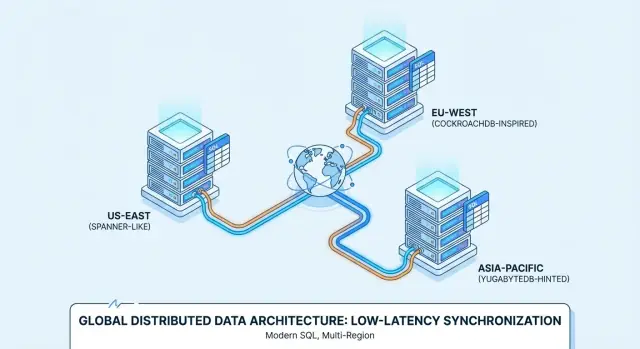
What distributed SQL means
Distributed SQL is a relational database architecture that spreads data and transaction processing across multiple machines while presenting one logical SQL database to applications. It retains tables, joins, indexes, constraints, and ACID transactions, then adds automatic partitioning, replication, and failure recovery.
A system generally belongs in this category when it combines these properties:
- A relational schema and SQL query interface
- Horizontal scaling across database nodes
- Transactional consistency across partitions
- Automatic replication and failover
- Coordinated operation as one logical database
The definition matters because a database does not become distributed SQL merely by adding read replicas to PostgreSQL or MySQL. A primary with replicas still sends writes through one main server. Application-managed sharding distributes writes, but it forces the application to decide where records live and how cross-shard work behaves. Distributed SQL moves much of that responsibility into the database.
The position between a conventional RDBMS and NoSQL
Distributed SQL combines the relational programming model of a conventional RDBMS with the scale-out design associated with distributed data stores. Traditional PostgreSQL and MySQL deployments work well when a primary instance can handle the write load and a regional failure does not require continuous writes elsewhere. Read replicas, caching, connection pooling, and better indexes can extend that model for years.
Many NoSQL databases chose easier distribution by limiting joins, transactions, or consistency guarantees. Those choices remain sensible for workloads such as large event streams, disposable caches, and records that rarely participate in multi-row transactions. A relational cluster takes on more coordination because applications expect constraints and transactions to remain valid after data is divided among nodes.
The practical distinction is ownership of complexity. With manual sharding, application teams implement routing, rebalance data, coordinate schema changes, and handle operations that touch several shards. With distributed SQL, the database supplies those mechanisms, though engineers still have to design schemas and queries for a networked system.
The problems it is designed to solve
Distributed SQL is designed for applications whose availability, geographic placement, or write growth has exceeded a single-primary architecture. Common examples include a global SaaS service, a reservation system that cannot oversell, and a financial ledger whose invariants must survive node failures.
It can remove the need for application-level sharding and reduce dependence on a single write location. It can also place data near users or inside approved jurisdictions. These benefits carry a price: more replicas, more network traffic, more coordination, and failure modes that do not exist on one server.
A conventional managed relational database remains the better default when the workload fits comfortably in one region. Distributed SQL earns its cost when custom sharding, regional failover, or geographic data controls would otherwise become a major engineering system of their own.
How distributed SQL works under the hood
Distributed SQL works by dividing data into replicated partitions and coordinating changes through consensus and distributed transaction protocols. The database hides much of this machinery behind SQL, but its behavior still shapes latency, throughput, schema design, and incident response.
Partitions determine where records live
A cluster divides its logical tables into smaller units that can move independently between nodes. Spanner commonly describes these units as splits, CockroachDB uses ranges, and YugabyteDB uses tablets. Each unit covers part of a table or index keyspace.
Partition boundaries may follow ranges, hashes, or explicit geographic rules. A range ordered by customer identifier makes related records easy to scan, but a monotonically increasing identifier can direct new writes toward one partition. Hash distribution spreads writes more evenly, though it can make ordered scans or tenant placement harder. Many production schemas combine a tenant identifier with another value so that related data stays accessible without concentrating every write on one location.
Secondary indexes require their own distributed storage. A write to one row may therefore update the base table and several index entries on different partitions. An index that was cheap on a single server can create extra consensus work and network traffic in a cluster.
Replication and consensus protect each partition
Each partition normally has several replicas, and a consensus group decides the accepted sequence of changes. CockroachDB and YugabyteDB use Raft-based replication. Spanner uses Paxos-based replication together with its time infrastructure.
A leader or leaseholder coordinates writes for a replica group. The system records a change on enough replicas to form a quorum before treating it as committed. If a node disappears, the surviving members can elect or designate another coordinator as long as a quorum remains available.
Quorum is a mathematical requirement, not a promise that every failure is harmless. A three-replica group can generally tolerate one unavailable replica. Losing two members means the remaining copy cannot safely accept writes because it cannot prove that another majority has not made progress elsewhere. Placement across failure domains matters as much as the replica count.
Distributed transactions coordinate several partitions
A transaction that touches one partition can often finish with relatively little coordination. A transaction involving several partitions needs a common commit decision so that every participant either applies its writes or aborts them.
The exact protocol differs by product, but the work usually includes reading or locking relevant versions, validating concurrent changes, replicating intents or provisional records, and finalizing the commit. Long transactions increase the window for conflicts. Large batches can involve many consensus groups and produce latency spikes even when each individual statement looks simple.
This is why network-aware transaction design matters. Group related rows under compatible partition prefixes when the database supports that strategy. Keep transactions short, avoid waiting for external services while a transaction is open, and do not load thousands of unrelated records into one atomic unit without measuring the effect.
Time and ordering require explicit mechanisms
Distributed nodes do not share a perfectly synchronized wall clock, so each product needs a way to order transactions. Spanner uses TrueTime uncertainty bounds and commit waiting to provide external consistency. Other systems can combine physical clocks with logical components, dependency tracking, and transaction protocols.
Clock coordination affects operations such as serializable execution, follower reads, and snapshots. Applications should use database transaction timestamps instead of assuming that timestamps generated by separate application servers establish a reliable global order.
Locality controls the network path
Locality configuration decides where replicas sit and which region coordinates a record's writes. Reads can be fast when a suitable replica is near the caller. A strongly ordered write still has to reach the replicas needed for quorum, so its latency reflects the selected topology.
Good placement follows the workload rather than a diagram of the company. If most writes for an EU tenant originate in Europe, placing that tenant's write coordinator there avoids an intercontinental trip at the start of every transaction. A globally shared record, such as one counter updated by all regions, cannot be local to every writer and may become a contention point.
When distributed SQL is the right choice
Distributed SQL is the right choice when geographic resilience, horizontal write capacity, or cross-partition correctness matters enough to justify continual coordination costs. A large company does not automatically need it, and a small product can need it if the business promise includes strict regional availability.
Conditions that justify an evaluation
A serious evaluation is appropriate when several of these conditions apply:
- The service must continue through a zone or regional outage
- Write demand is approaching the practical limit of one primary database
- Manual sharding would consume substantial application engineering time
- Transactions must remain correct across nodes or locations
- Records require enforceable geographic placement
These conditions should be backed by numbers. Define the required recovery time objective, recovery point objective, transaction latency, peak write rate, and failure domains. A vague request for global scale is not enough to select an architecture.
Regional users alone are not a decisive reason. A content-heavy application may place web servers and caches close to users while retaining one database region. Read replicas can support regional browsing if slightly old results are acceptable. The case becomes stronger when users in several locations must perform low-latency writes against related data.
Conditions that favor a simpler database
A conventional relational service is usually preferable when traffic is moderate, writes originate in one region, and recovery can involve a planned database promotion. It offers mature tooling, broad extension compatibility, familiar debugging, and a smaller infrastructure bill.
Tight latency requirements may favor one regional primary as well. A local durable write can complete much faster than a quorum write crossing distant regions. Analytics-heavy systems should usually separate operational transactions from long scans instead of expecting the same cluster to excel at both.
Team capacity matters. Managed services reduce work on hardware, patching, and control-plane operation, but they do not remove schema contention, transaction retries, query planning, capacity management, or application-side incident handling. If a team has no time to test failure behavior, adopting a distributed database can increase risk.
A decision threshold based on alternatives
The strongest justification appears when the alternative is already complicated. If engineers are about to build tenant routing, shard maps, cross-shard transaction rules, regional promotion procedures, and separate migration tooling, a database that supplies those functions deserves close evaluation.
If the alternative is one managed PostgreSQL instance with a read replica and tested backups, migration should require clear evidence. Benchmark the existing system first. CPU saturation may actually be an inefficient query, poor connection management, excessive indexes, or a missing cache rather than a need for horizontal writes.
Consistency, availability, and latency
Distributed SQL usually preserves transactional consistency during failures by refusing operations that cannot reach the required quorum. This behavior protects committed state, but it means some requests can fail or wait during a network partition.
CAP describes failure behavior
The CAP theorem applies when communication between parts of the cluster is interrupted. For the affected data, a system cannot guarantee both linearizable consistency and successful responses from every isolated side. A consistency-oriented database permits the side with quorum to continue and rejects unsafe writes elsewhere.
CAP does not explain normal-operation latency. Even when every link works, replicas must communicate. The broader engineering decision includes what happens during a partition and how much coordination the application accepts during healthy operation.
An application must handle unavailable outcomes explicitly. Timeouts, retryable transaction errors, and temporary loss of a write region are normal possibilities. Returning success from both isolated regions would be worse for a balance or reservation because reconciliation might not have a valid automatic answer.
Strong reads and intentionally stale reads differ
A strong read observes a database state consistent with the requested ordering guarantee. Some products also expose follower or bounded-staleness reads that trade freshness for lower latency and less work on the write coordinator.
That choice should follow the field being read. A product description can often tolerate a slightly old replica. A newly changed password, current account balance, or remaining inventory should use an appropriate strong or session-consistent path. Applications should not label every read as stale for speed and then rebuild correctness in service code.
Read-your-writes behavior needs testing with the actual driver and routing layer. After an update, the next request may reach a different application server or database endpoint. Session tokens, transaction boundaries, or a strong read setting may be necessary to guarantee that the user sees the accepted change.
Isolation controls concurrent outcomes
Transaction isolation determines which anomalies concurrent transactions can produce. Serializable isolation aims to make completed transactions appear as if they ran one at a time, even when the database executes them concurrently.
Serializable execution can abort one participant when concurrent operations cannot be ordered safely. That abort is protection against a bad result, not database corruption. Applications need bounded retries around the whole transaction, including every read that influenced its writes.
Retries must be idempotent outside the database. If code sends an email or calls a payment provider before the transaction has definitely committed, a retry can repeat the side effect. Record an outbox event in the database transaction, commit it, and let a separate worker deliver the external action.
Distance places a floor under write latency
A cross-region transaction cannot complete faster than the messages required by its protocol. An 80 millisecond round-trip between quorum members contributes real time before query execution, index maintenance, application work, and queueing are counted.
The expensive pattern is often several sequential transactions in one user action. If checkout performs an order insert, inventory reservation, payment-state update, and audit write as four blocking commits, the network cost accumulates. Combining database changes that share one atomic outcome can remove unnecessary round trips, while external payment calls should remain outside an open transaction.
Measure percentile latency instead of averages. Leadership movement, contention, storage stalls, and retries appear in the tail. A design that meets its median target but misses the 99th percentile during ordinary rebalancing can still produce visible user failures.
Spanner, CockroachDB, and YugabyteDB compared
Spanner, CockroachDB, and YugabyteDB solve similar distribution problems but differ in deployment model, compatibility, transaction implementation, and operational assumptions. Choosing among them requires testing application behavior rather than selecting on the shared SQL label.
| Area | Google Spanner | CockroachDB | YugabyteDB |
|---|---|---|---|
| Primary SQL interface | GoogleSQL or PostgreSQL dialect | PostgreSQL-compatible SQL over the PostgreSQL wire protocol | YSQL for PostgreSQL-compatible SQL, plus YCQL for Cassandra-style access |
| Replication foundation | Paxos groups with TrueTime-based ordering | Raft replication over ranges | Raft replication over tablets |
| Typical delivery | Managed Google Cloud database | Managed cloud service or self-managed deployment | Managed cloud service or self-managed deployment |
| Portability concern | Dialect and platform-specific behavior | Gaps in PostgreSQL features, extensions, and semantics | Version and feature differences between YSQL and PostgreSQL |
| Natural evaluation case | Google Cloud systems needing global transactional placement | Teams seeking PostgreSQL-oriented development with distributed operation | Teams wanting PostgreSQL-oriented access or a choice of SQL and Cassandra-style APIs |
Spanner fits a managed Google Cloud strategy
Spanner fits organizations prepared to use a managed Google Cloud database and design around its dialect, topology, and operating model. TrueTime supports externally consistent transactions, which means committed transactions respect real-time ordering within the documented semantics.
Its PostgreSQL dialect can reduce SQL syntax differences, but a dialect is not complete PostgreSQL equivalence. Extensions, administrative functions, system catalogs, data types, drivers, and ORM assumptions still require verification. Teams should inventory every database dependency before treating an existing application as portable.
Spanner deserves particular attention when the desired system already depends on Google Cloud identity, networking, observability, and regional controls. The managed model removes database-node administration, though schema design, query tuning, quotas, cost management, and application recovery remain customer responsibilities.
CockroachDB fits PostgreSQL-oriented distributed applications
CockroachDB fits teams that want PostgreSQL-style application access while distributing transactional data across ranges. It defaults to serializable isolation, so applications must correctly retry transactions rejected because of contention or ordering conflicts.
Compatibility should be tested at the migration, driver, and ORM layers. PostgreSQL extensions and specialized behavior may be absent or different. Queries that rely on one-node execution plans can also behave differently after tables and indexes are divided across ranges.
Range movement and automatic rebalancing simplify capacity changes, but a poor primary-key choice can still produce hot ranges. Multi-region abstractions help express table locality, yet developers must decide which records are regional, which are global, and where writes should be coordinated.
YugabyteDB fits YSQL and mixed API requirements
YugabyteDB fits applications that value a PostgreSQL-compatible relational interface and may benefit from its separate Cassandra-compatible API. YSQL provides relational tables and distributed transactions, while YCQL follows a different data model and should not be treated as another route into every YSQL operation.
Its storage layer distributes data through tablets. Table design, tablet splitting, index placement, and transaction scope influence how work spreads across the cluster. PostgreSQL applications still need compatibility testing for extensions, functions, tooling, and planner behavior.
The availability of different deployment approaches can suit infrastructure policies that require control over placement. That control transfers operational responsibility to the customer when self-managed: upgrades, repair procedures, capacity, observability, certificates, backups, and failure testing all need owners.
A useful product test uses application evidence
A useful comparison runs the same representative workload against each viable product. Test schema creation, migrations, ORM-generated SQL, transaction retries, backup restoration, failover, scaling events, and the highest-volume queries.
Do not compare only peak transactions per second. Record p50, p95, and p99 latency; conflict and retry rates; bytes transferred between regions; storage amplification; time to restore; and operator effort during a simulated incident. The best choice is the one that meets correctness and recovery targets with acceptable cost and operational burden.
Global SaaS with regional users
A global SaaS application benefits from distributed SQL when tenants need regional data placement and transactional access without separate database stacks for every geography. The design works best when tenancy is explicit in the schema and most transactions stay within one tenant.
Tenant locality should follow contracts and traffic
A tenant identifier can drive placement so that European records remain in approved European locations while another customer's records stay in its contracted country or region. This keeps one logical schema while allowing different physical policies.
Placement rules must cover more than the base table. Index entries, change streams, temporary data, backups, and exported records can contain regulated information. A policy that pins rows but sends a global secondary index elsewhere may violate the intended boundary.
Tenant isolation affects performance too. A large tenant can overwhelm a shared partition or dominate a node. Hashing or subpartitioning within that tenant may be necessary, but it should preserve efficient access to tenant-scoped transactions.
Regional reads need an explicit freshness policy
Read-heavy dashboards can use nearby replicas when slightly delayed data is acceptable. Account changes, authorization decisions, and post-transaction confirmation screens need stronger behavior. Classify query paths by freshness requirement instead of adopting one global setting.
Write placement should follow the normal writer for each tenant. If a customer's staff primarily works in Singapore, coordinating its writes in another continent creates avoidable latency. A tenant migration procedure should update placement without losing writes, violating residency, or leaving application caches pointed at old locations.
Global application code must tolerate movement
Leaders move, nodes restart, and routing changes during maintenance. Drivers need sensible timeouts, retry policies, connection renewal, and transaction restart logic. Retries should use jitter and a limit so that an overloaded cluster does not receive an immediate synchronized wave of repeated requests.
Monitoring should separate user latency by region and tenant class. A global average can conceal one distant customer group paying several extra network trips. Trace identifiers that connect API spans to database statements make locality mistakes easier to find.
Financial workflows and ledgers
Financial workflows benefit when database constraints and transactions enforce ledger invariants across failures and concurrent requests. Distribution does not create correct accounting by itself, so the schema must encode the rules that cannot be violated.
A ledger should preserve an auditable sequence of entries
An append-oriented ledger records each movement as entries rather than repeatedly replacing one balance value without history. Every posting should have a stable transaction identifier, accounts, amounts, currency, business timestamp, and creation metadata. Double-entry rules should be checked before commit so debits and credits balance for the posting unit.
A cached balance can speed reads, but it must change in the same transaction as the entries or be clearly treated as derived data. Reconciliation jobs should compare derived totals with source entries and report differences without silently rewriting history.
Global ordering is rarely required for every account. Transactions affecting one account or transfer pair need a consistent order, while unrelated accounts can proceed concurrently. Designing around that boundary reduces contention compared with one global sequence or settlement row.
Idempotency makes retries safe
Payment APIs, queues, and webhooks retry after timeouts, so each business operation needs a stable idempotency key. Enforce uniqueness within the correct scope, such as one merchant or account, then create the payment record and ledger entries in one database transaction.
CREATE TABLE payment_attempts (
    account_id UUID NOT NULL,
    idempotency_key TEXT NOT NULL,
    provider_reference TEXT,
    status TEXT NOT NULL,
    created_at TIMESTAMPTZ NOT NULL,
    PRIMARY KEY (account_id, idempotency_key)
);
If two workers submit the same operation, the unique constraint decides which insert succeeds. The losing worker should read the existing record and return its established result. It must not create a second provider charge merely because a database transaction was retried.
External calls require a transaction boundary
A database cannot atomically commit with an unrelated payment provider unless both participate in a specialized coordination protocol, which most public APIs do not. Keep the network call outside the database transaction and model the workflow as explicit states such as pending, authorized, captured, failed, and reversed.
A transactional outbox can publish committed changes to downstream workers. Consumers should deduplicate by event identifier because message delivery may occur more than once. This provides recoverable processing without claiming an impossible single transaction across every service.
Hot accounts need workload-specific design
Payroll runs, marketplace settlements, and large merchants can concentrate writes on one account. Adding database nodes does not divide a single conflicting row among them. Options include immutable entry partitions, per-period accumulators, queued posting for one account, or a carefully defined hierarchy of subaccounts.
Test the actual skew distribution. Uniform synthetic traffic can make a cluster appear ready while one production merchant creates repeated serializable conflicts. Correctness comes first, but the data model should expose safe concurrency where the accounting rules permit it.
Inventory, booking, and reservations
Inventory and booking systems need an authoritative allocation transaction when several users can claim the same scarce item. Fast availability reads improve browsing, but only the commit path can decide who receives the final unit.
Conditional writes prevent overselling
A conditional update can reserve stock only when enough remains. The affected-row count tells the application whether allocation succeeded.
UPDATE inventory
SET available = available - 1
WHERE sku = $1
  AND available > 0;
This statement should share a transaction with the reservation record. Reading availability first and decrementing later creates a race unless the isolation level and predicate handling protect the decision. Database constraints should reject negative quantities as another safety layer.
For assigned seating, a unique constraint on the performance and seat identifier gives one winning reservation. Hotel inventory is often modeled by room-night or inventory-pool date so that overlapping stays cannot claim the same capacity. The correct unit of contention comes from the business rule.
Holds separate allocation from payment
A temporary hold reserves inventory while payment or user confirmation proceeds. Store its expiration time and status, then convert it to a confirmed reservation through a conditional transaction. An expiration worker should release only holds that are still active, since confirmation and expiration can race.
Wall-clock delay is not enough to guarantee release. Workers can stop, queues can lag, and regions can fail. Queries that calculate sellable inventory should account for expired status consistently, while repair jobs reclaim missed holds.
The hold duration is a product and capacity decision. A ten-minute hold may be reasonable for checkout, but it can lock a meaningful share of scarce inventory during a rush. Measure abandonment and payment completion time before setting it.
Extreme contention does not scale linearly
Thousands of buyers competing for one row cannot be made parallel by adding replicas. Every successful decrement must be ordered against the others. Admission controls, a queue, stock buckets, or preallocated regional quotas can protect the database during a release.
Regional quotas reduce coordination but change semantics. If Europe has unused units while another region sells out, the system needs a safe way to transfer quota or accept temporary imbalance. Use this pattern only when the business can define how regional capacity is reconciled.
High availability and disaster recovery
Distributed SQL can maintain service through selected infrastructure failures when replica placement, spare capacity, and application behavior match a defined service objective. Replication alone does not establish that outcome.
SLOs should specify failure domains
An uptime target needs a workload and a failure scenario. Define whether the service must survive one node, one availability zone, or an entire region. State acceptable error rate and latency during the event, not just after recovery.
A three-replica cluster placed in one building has a different risk profile than three replicas across independent zones. A multi-region topology protects against a wider event but introduces longer quorum paths and requires enough remaining capacity to absorb traffic after a location disappears.
Recovery time objective defines how quickly service must return. Recovery point objective defines how much committed data may be lost. Synchronous quorum replication can support a zero committed-data-loss goal for covered failures, but only while the required replicas and application path behave as designed.
Failover creates visible application events
Leadership changes can interrupt in-flight transactions, close connections, and increase latency. Applications must distinguish retryable database outcomes from permanent business errors. A failed transaction should restart as a unit instead of replaying only its final statement.
Connection pools may retain dead endpoints after a failure. Health checks, DNS behavior, load balancers, certificate validation, and driver topology discovery belong in the test plan. The database can be healthy while the application still cannot find it.
Capacity after failure deserves explicit calculation. If three regions normally run near 70 percent utilization, losing one leaves insufficient room for its share of work. Reserving headroom costs money, but a topology without failover capacity does not meet its stated goal.
Game days validate the design
Failure exercises should disable one node, isolate a zone, interrupt regional connectivity, and remove an application endpoint. Measure error duration, transaction retry rate, latency percentiles, queue growth, and operator response.
Run these exercises after meaningful topology, driver, or schema changes. A procedure proved against last year's traffic may fail after data volume doubles or one tenant becomes dominant. Automate safe portions of the exercise so evidence does not depend on an annual manual event.
Replication is not a backup
Replicas faithfully copy accidental deletes, defective migrations, and harmful application writes. Backups and point-in-time recovery protect against logical damage that replication cannot detect.
Restore drills should build a separate clean environment, verify checksums or application invariants, and measure total recovery time. Include encryption keys, access policies, schema versions, and dependent configuration. A backup that exists but cannot be restored within the objective is not an adequate recovery system.
Data residency and compliance-driven architecture
Distributed SQL can place tenant or record groups in approved regions, but compliance depends on every copy, access path, and operational process. Database locality is one control inside a broader program.
Residency rules need precise definitions
A requirement that data remain in a country may refer to storage, processing, support access, backups, encryption keys, or all of them. These interpretations produce different topologies. Legal counsel and auditors should translate regulation and contracts into testable technical controls.
Teams need an inventory of regulated fields and derived data. Logs, traces, search indexes, analytics exports, support attachments, and message queues may contain the same personal information as the primary table. Restricting the database while exporting raw payloads globally does not meet the intended policy.
Data minimization can simplify the design. If a global service needs only an account identifier and aggregate status, keep sensitive details in the approved region and expose the smallest permitted representation elsewhere.
Placement policies must include lifecycle operations
Policies should state where live replicas, temporary replicas, backups, snapshots, change records, and restore environments may exist. Rebalancing and maintenance must obey the same boundary. An emergency procedure should not copy regulated data into an unapproved region for convenience.
Access control needs geographic and organizational limits. Service identities should receive only the tables and operations they require. Human production access should be logged, time-bound where practical, and reviewed. Region-bound encryption keys can add control, though key availability and disaster recovery then need their own design.
Tenant relocation deserves a documented workflow. Contract changes, customer migration, or corporate restructuring may require moving records between jurisdictions. The process should identify when the old copies disappear, how backups age out, and what evidence proves completion.
Global reporting may need derived datasets
A global dashboard can conflict with strict placement if it scans raw customer data across regions. Regional processing can calculate approved aggregates locally, then publish non-sensitive results to a central reporting store.
The aggregation rules should prevent reconstruction of restricted records. Small groups, free-text fields, and detailed dimensions can expose personal information even when direct identifiers are removed. Analytics governance therefore belongs in the architecture review, not in a later reporting project.
Operational and analytical workloads often deserve separate systems. The transactional database protects current product state, while region-scoped pipelines produce governed datasets for reports. This separation keeps long analytical scans away from latency-sensitive transactions.
Cost and performance planning
Distributed SQL costs more than a basic single-region database because it maintains redundant capacity and coordinates work across a network. The investment can still be justified when it replaces costly sharding work or prevents losses that exceed the operating premium.
Compute and storage include replication overhead
A logical 2 TB dataset with three full replicas starts near 6 TB of replicated data before secondary indexes, temporary compaction space, backups, and metadata. Actual billing and compression vary by product, so estimates should use measured physical storage rather than logical table size alone.
Compute must cover normal work, consensus processing, rebalancing, backup activity, and failure headroom. Nodes are not interchangeable units of throughput when one partition is hot. Adding capacity helps only if the workload can spread across it.
Indexes multiply write work and storage. Review every secondary index by query value, update frequency, and geographic placement. An unused index in a distributed cluster wastes disk and makes each affected write more expensive.
Network charges can become material
Replication sends writes between replica locations. Cross-region queries, change feeds, backups, and application traffic add more transfer. Active traffic in several regions can produce a bill that a single-region benchmark never reveals.
Estimate bytes per transaction, replication factor, write rate, index amplification, and the direction of transfers. Then test with provider billing data during a representative load run. Request counts alone miss large payloads and background movement.
Locality mistakes raise both cost and latency. A service deployed in one region may repeatedly query a coordinator in another because of endpoint selection or tenant placement. Distributed tracing and regional cost breakdowns can expose that pattern.
User journeys reveal accumulated latency
Model complete user actions rather than isolated statements. For checkout, count every sequential database commit, strong read, external API call, and queue handoff. Apply measured regional round-trip times and query execution percentiles to the critical path.
Suppose one journey contains two sequential quorum writes, each adding 90 milliseconds of network coordination. That contributes about 180 milliseconds before application processing. Combining changes that share one atomic decision may remove a commit, while parallelizing independent reads may shorten the path.
Load tests should include realistic contention and payload sizes. A benchmark with random identifiers can distribute perfectly even though production writes target a few popular tenants. Include leader changes and rebalancing so tail latency reflects ordinary cluster operation.
Compare total ownership with realistic alternatives
The relevant comparison is not distributed SQL against an imaginary database with no operations cost. Compare it with a specific alternative: managed PostgreSQL, replicas, sharding services, regional recovery, application routing, and the engineers needed to maintain them.
Include migration work, training, observability, incident response, support plans, and exit costs. Managed operation can reduce infrastructure labor, while self-management may satisfy control requirements at the cost of deeper staffing.
A simple financial model can compare annual platform premium with expected outage loss, delayed engineering work, compliance exposure, and revenue affected by regional latency. Use ranges for uncertain inputs and identify which assumption changes the decision. If the result depends on an implausibly large outage estimate, the simpler system probably remains appropriate.
Schema and application design patterns
A distributed SQL schema performs well when its access paths spread independent work while keeping related transactions close together. Porting a single-node schema unchanged can preserve correctness yet produce poor latency or severe contention.
Primary keys influence distribution
A monotonically increasing primary key can direct new rows toward the end of one range. Random identifiers spread inserts, but completely random distribution may make tenant scans or regional placement expensive. Composite keys often balance these goals by starting with a tenant or bucket identifier and retaining a sortable value within that group.
Choose the prefix according to transaction boundaries. If nearly every operation is tenant-scoped, grouping by tenant can reduce distributed work. A very large tenant may require buckets inside its namespace so several partitions can accept writes concurrently.
Changing a primary key after a table grows can require a major data rewrite. Test candidate layouts with realistic skew before migration. Examine partition heat, transaction fan-out, index locality, and scan behavior rather than judging only total throughput.
Contention requires redesign before capacity
A global counter, singleton configuration row, or one merchant balance can serialize otherwise independent requests. More nodes cannot remove a logical requirement that every transaction update the same value.
Replace exact global counters with partitioned counters when temporary aggregation is acceptable. Version configuration rather than updating one row at high frequency. For monetary state, preserve the accounting invariant and find concurrency in append-only entries or independent subaccounts instead of weakening correctness.
Long read-modify-write transactions make conflicts worse. Read the smallest necessary set, avoid user interaction inside a transaction, and commit promptly. If business work takes minutes, represent it as a state machine across several short transactions.
Retry behavior belongs in the application contract
Drivers may retry individual statements or expose a retryable error to application code. Understand which layer owns the full transaction replay. Partial replay can use stale decisions or omit earlier reads.
A retry loop should have a maximum attempt count, randomized backoff, and instrumentation. Record conflict type, affected operation, attempt count, and final outcome. Unlimited retries convert contention into hidden latency and can overload the cluster.
Business requests need stable identifiers so an uncertain client response can be checked safely. If the database commits but the response is lost, the client should query the established operation rather than submit a semantically new one.
Schema changes need production-scale rehearsal
Distributed schema changes may update metadata quickly while backfills and index creation continue in the background. Those jobs consume storage, network, and CPU, and they can interact with live writes.
Use expand-and-contract migrations. Add compatible fields or tables first, deploy code that can work with both forms, backfill in controlled batches, switch reads, then remove the old form after verification. Rollback planning should account for data written by the new version.
Test large migrations with production-like volume and regional topology. A change that finishes quickly on a small staging cluster may take hours in production and compete with customer traffic. Monitor progress, pause controls, disk headroom, and retry behavior before beginning.
Adoption checklist and proof of concept
A useful proof of concept tests one representative workload against explicit correctness, latency, resilience, and cost targets. Generic benchmarks cannot determine whether a particular schema and application will behave well.
Select a workload with real constraints
Choose a workflow such as booking a scarce item, posting a ledger transfer, or provisioning a tenant in a required region. Reuse its production-style schema, queries, transaction boundaries, payload sizes, and traffic skew.
Define success before running the test:
- Correct outcomes under concurrency and retries
- p50, p95, and p99 latency by region
- Sustained peak throughput with failure headroom
- Recovery behavior during node and regional faults
- Measured compute, storage, and network cost
A safety margin should come from expected growth and failure capacity rather than an arbitrary multiplier. If losing one region is within scope, the remaining locations must handle the redirected load during the test.
Build a realistic application surface
An API and small user interface expose transaction sequencing, driver behavior, and user-perceived latency that a database-only tool can miss. Koder.ai can create a React interface, Go backend, and PostgreSQL baseline through chat. Its planning mode can help define the workflow before generation, and source code export lets engineers adapt the data layer for a candidate database.
Use that generated application as test scaffolding, not proof of database compatibility. Run migrations, inspect generated SQL, configure the official driver, and implement transaction retries deliberately. Koder.ai snapshots and rollback can protect application iterations, but they do not replace database backups or restore drills.
Koder.ai also supports deployment and hosting, which can place test application instances near the database regions. That makes it possible to measure the full request path instead of issuing every benchmark from one location. Keep test data synthetic unless the environment has the controls required for production records.
Exercise normal operation and failure
The test should cover steady traffic, bursts, hot partitions, long-running queries, schema changes, backup work, and node replacement. Then interrupt connectivity and remove a failure domain within the approved test environment.
Capture transaction aborts, retry attempts, unavailable responses, leader movement, queue depth, disk use, and regional transfer. Record what an operator had to do. Automatic recovery that requires an undocumented manual step is not yet production-ready.
Restore a backup into a separate environment and verify application invariants. For inventory, confirm that allocations do not exceed stock. For a ledger, recalculate balances and verify balanced postings. For SaaS tenancy, confirm that placement and access policies survived restoration.
Validate compatibility before migration
Inventory database extensions, stored procedures, triggers, data types, isolation assumptions, ORM features, reporting queries, backup tools, and administrative scripts. Classify each item as compatible, replaceable, or blocking.
Run representative migrations on a full-size copy or generated dataset. Measure backfill duration, change-data-capture lag, dual-running cost, and cutover time. If the migration uses dual writes, define how discrepancies are detected and which system remains authoritative at each phase.
Shadow reads can compare results without changing production state. Account for timing differences and intentionally stale queries so the comparison does not flag expected variation as corruption. Any unexplained difference in transactional data needs resolution before cutover.
Review production readiness
A production review should assign owners for database operation, application retries, security, residency policy, cost, and incident response. It should include dashboards, alerts, runbooks, capacity thresholds, restore evidence, and a rollback decision point.
The final decision can still be to remain on PostgreSQL or MySQL. A proof of concept has succeeded when it produces reliable evidence, even if that evidence shows the distributed option costs more than the current requirements justify. When the requirements do support adoption, migrate gradually, measure each stage, and preserve a tested route back until the new system has proved itself under real load.
FAQ
What is a “distributed SQL” database in plain terms?
A distributed SQL database provides a relational, SQL interface (tables, joins, constraints, transactions) but runs as a cluster across multiple machines—often across regions—while acting like one logical database.
In practice, it’s trying to combine:
- Familiar SQL/ACID behavior
- Horizontal scale (add nodes)
- High availability and failure tolerance without manual sharding
How is distributed SQL different from a traditional PostgreSQL/MySQL setup?
A single-node or primary/replica RDBMS is often simpler, cheaper, and faster for single-region OLTP.
Distributed SQL becomes compelling when the alternative is:
- Application-managed sharding
- Complex multi-region failover
- Strong consistency requirements across zones/regions
- Data residency needs with one operational model
Why do distributed SQL systems use consensus protocols like Raft or Paxos?
Most systems rely on two core ideas:
- Replication: each data shard/partition is stored on multiple nodes.
- Consensus (e.g., Raft or Paxos): replicas agree on the order of writes; commits typically require a majority to acknowledge.
This is what enables strong consistency even when nodes fail—but it adds network coordination overhead.
How is data partitioned and placed across nodes/regions?
They split tables into smaller chunks (often called partitions/shards, or vendor-specific names like ranges/tablets/splits). Each partition:
- Has its own replica group
- Can be placed on specific nodes/regions
- Can move as the cluster rebalances
You usually influence placement with policies so “hot” data and primary writers stay close, reducing cross-network trips.
Why can transactions be slower in distributed SQL, especially across regions?
Distributed transactions often touch multiple partitions, potentially on different nodes (or different regions). A safe commit may require:
- Locks/validation across participants
- Replication acknowledgements (quorum)
- A coordinated commit decision
Those extra network round trips are the main reason write latency can increase—especially when consensus spans regions.
What are the clearest signs I actually need distributed SQL?
Consider distributed SQL when two or more are true:
- You have meaningful users in multiple regions and want consistent data
- You need automatic failover across zones/regions (tight RTO/RPO)
- Vertical scaling is no longer enough for writes
- You need strong consistency for core transactions (money, inventory, reservations)
- Compliance requires geographic placement of data
If your workload fits in one region with replicas/caching, a conventional RDBMS is often the better default.
What does “strong consistency” buy me, and what does it cost?
Strong consistency means once a transaction commits, reads won’t see older data.
In product terms, it helps prevent:
- Double-spend / incorrect balances
- Overselling the last item
- Two users booking the same seat
The tradeoff is that during network partitions, a strongly consistent system may block or fail some operations rather than accept divergent truths.
How do I handle retries safely (idempotency) with distributed SQL?
Rely on database constraints + transactions:
- Store an
idempotency_key(or similar) per request/attempt - Add a unique constraint such as
(account_id, idempotency_key) - In one transaction, write the business record + any ledger/outbox rows
This turns retries into no-ops instead of duplicates—critical for payments, provisioning, and background job reprocessing.
How should I choose between Spanner, CockroachDB, and YugabyteDB?
A practical separation:
- Spanner: typically managed on GCP; strong multi-region design heritage; SQL dialect choice affects portability.
- CockroachDB: Postgres-like experience and wire protocol; managed or self-hosted; not 100% Postgres-compatible.
- YugabyteDB: Postgres-compatible SQL API (YSQL) plus optional Cassandra-style API (YCQL); managed or self-hosted.
Before choosing, test your actual ORM/migrations and any Postgres extensions you rely on—don’t assume drop-in replacement.
What’s a good proof-of-concept plan before committing to distributed SQL?
Start with a focused PoC around one critical workflow (checkout, booking, ledger posting). Validate:
- Correctness (no double booking/lost updates)
- p50/p95 latency for top queries (include cross-region targets)
- Failure behavior (node loss, zone loss, and—if relevant—region loss)
- Operational basics (monitoring, backups, restore drills)
If you need help scoping cost/tiers, see /pricing. For related implementation notes, browse /blog.