

DIY Branding: Build a Logo, Colors, and a Matching Website
Learn a practical DIY branding workflow to design a simple logo, choose a color palette and fonts, and build a website that looks consistent everywhere.
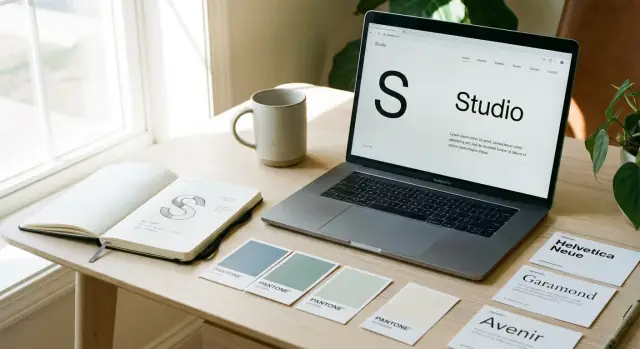
What “Matching Branding” Looks Like (and Why It Matters)
“Matching branding” doesn’t mean everything looks identical. It means everything follows the same set of visual rules—so your logo, colors, fonts, and website layout feel like they belong to one brand.
When those rules are consistent, people recognize you faster, trust you sooner, and move through your site with less friction. When they’re not, your business can feel scattered—even if each individual piece looks “nice.”
What “matching” actually means
At a practical level, matching branding is consistency across a few core elements:
- Logo system: the same logo versions used repeatedly (not a different logo for every page or platform).
- Color rules: a small palette with clear roles (primary, accent, background, text) used the same way across pages.
- Typography: one or two font families with a simple hierarchy (headings, body, buttons/labels).
- Layout patterns: repeated spacing, alignment, and UI styles (buttons, cards, form fields) so pages feel connected.
If you can take a screenshot of your homepage, an email, and an Instagram post—and they clearly look like the same company—you’re doing it.
Set realistic DIY goals (simple, clear, repeatable)
DIY branding works best when you aim for clarity over complexity. Your goal isn’t to build an endless “creative” system—it’s to build something you can repeat without guessing.
A good DIY target is:
- 1 logo concept with a few usable variations
- 1 color palette that’s readable on screens
- 1–2 fonts with a basic type scale
- A small set of reusable components (buttons, headings, image style)
The assets you’ll create (so everything stays consistent)
Think of your brand as a kit you’ll reuse everywhere. By the end, you should have:
- Logo files (SVG/PNG) in full color, one-color, and icon mark (if needed)
- Brand color palette with hex codes and usage notes
- Typography rules (font choices, sizes, weights for headings/body/buttons)
- UI basics: buttons, links, form fields, simple icons
- Image rules (photo style or illustration style, filters, backgrounds)
- Page templates for key pages (homepage sections, product/service page, contact)
Decide where your brand needs to “match”
Before designing, list where people will encounter you. Most small businesses need consistency across:
- Website (especially homepage, pricing/services, contact)
- Email (newsletter templates, signatures)
- Social (profile images, post templates, story covers)
- Invoices/quotes and PDFs
- Packaging or print (if you ship products or do in-person work)
The point: matching branding reduces decision fatigue. Once your rules are set, you can create new pages and posts faster—and everything still looks like you.
Start with a Clear Brand Direction (Before Design)
Before you open a logo tool or browse color palettes, decide what your brand is trying to signal. If you skip this step, you end up designing by personal taste—and later wondering why the website, logo, and socials feel like they belong to different businesses.
1) Write a one-sentence brand promise
Keep it plain and specific enough that a customer would nod and say, “Yes, that’s what you do.”
Example formula:
“We help [audience] get [result] by [how], without [common frustration].”
This sentence becomes your filter: if a design choice doesn’t support that promise, it’s decoration.
2) Pick 3–5 brand adjectives (your design guardrails)
Choose words that describe the feeling you want people to have after seeing your brand.
Try a mix like:
- friendly, calm, practical
- premium, minimal, confident
- bold, playful, energetic
If your adjectives fight each other (e.g., “luxury” + “cheap”), your visuals will struggle too.
3) Identify your audience—and what they care about most
Don’t stop at demographics. Write down what matters in the moment they’re choosing you:
- Are they trying to save time, reduce risk, look good to their boss, or stay within budget?
- What would make them trust you faster?
This will influence everything later: typography (formal vs. casual), spacing (calm vs. punchy), and even button labels.
4) Collect 10–15 inspiration examples (screenshots, not just links)
Grab screenshots of homepages, logos, packaging, and social posts. Screenshots are stable, easy to compare, and force you to notice patterns.
5) Annotate what you like
For each example, note why it works for you:
- colors (muted vs. bright)
- spacing (airy vs. dense)
- photo style (real people vs. product-only)
- logo style (wordmark vs. icon)
You’ve now created a clear direction—so your logo, colors, and website can match on purpose.
Logo Basics: Choose a Simple Logo System
A DIY logo doesn’t need to be complicated to look professional. What matters is that it’s clear, repeatable, and works in the places you’ll actually use it—your website header, social profile, invoices, and a tiny favicon.
Pick a logo type that fits your name
Start by choosing one of these common logo types:
- Wordmark: your business name in a distinctive type style. Great if your name is short and easy to read.
- Lettermark: initials (like “AB”). Helpful if your name is long or hard to pronounce.
- Icon + wordmark: a simple symbol paired with your name. Useful if you want an app-style icon or plan to use an icon alone sometimes.
If you’re unsure, a wordmark is usually the safest and easiest DIY option.
Choose one “default” version
A simple logo system starts with one primary version you use most of the time—typically a horizontal logo in one color.
Decide now what your default is, such as:
- Horizontal wordmark (best for website headers)
- Stacked wordmark (nice for square spaces)
- Icon + wordmark (if you truly need the icon)
The goal: you shouldn’t be redesigning your logo for every new use.
Keep it readable at small sizes (do the favicon test)
Shrink your logo down to about 16–32 px (favicon size). If it turns into a blur, simplify.
Common fixes:
- Remove thin lines and tiny gaps
- Reduce the number of elements
- Increase spacing between letters
- Avoid long taglines inside the logo (keep those separate)
A logo that survives the favicon test will usually work everywhere else.
Avoid details and effects—prioritize clean shapes
DIY logos often go wrong by adding too much:
- Gradients, shadows, outlines, textures
- Intricate icons with tiny parts
- Overly decorative fonts that hurt readability
Instead, aim for clean shapes and strong contrast. A logo should still look good in a single color on a plain background.
Decide on safe variations (so you stay consistent)
You’ll need a few predictable variations for different spaces. Keep it limited and intentional:
- Horizontal (primary)
- Stacked (for narrow layouts)
- Icon-only (only if it’s truly recognizable)
Also decide acceptable color versions:
- 1-color dark
- 1-color light (for dark backgrounds)
When these variations are defined upfront, your website, social profiles, and documents will automatically feel more consistent—even if you’re building everything yourself.
A Practical DIY Logo Workflow (Sketch to Final)
You don’t need to be “artistic” to make a usable logo—you need a repeatable process that gets you to a clean, consistent mark. The goal here isn’t to create a masterpiece. It’s to build a logo you can place on a website header, social profile, invoice, and packaging without it falling apart.
Step 1: Do a 10-minute sketch sprint
Set a timer for 10 minutes and sketch 20 tiny ideas. Keep them thumbnail-sized (small boxes on paper).
Quantity matters more than quality because it stops you from obsessing over the first decent idea. Most of these sketches will be bad—and that’s the point.
Step 2: Explore 2–3 clear directions
Pick a few sketches and deliberately test different “types” of logo directions:
- Text-only: your name in a distinctive wordmark (often the simplest to use)
- Monogram: initials in a compact shape (good for icons and favicons)
- Simple symbol: one recognizable shape paired with your name (best when you can keep it extremely simple)
Keep each direction consistent for a few variations so you can compare them fairly.
Step 3: Simplify using geometry + strong silhouettes
Before adding details, make the logo work as a bold silhouette. Ask:
- Would it still be recognizable if it were one solid color?
- Does it stay clear at small sizes (like a browser tab icon)?
Use basic geometry—circles, squares, straight lines—to clean up shapes. This is where DIY logos often improve fast: less detail, cleaner edges, better balance.
Step 4: Do a quick uniqueness check
Once you have a direction you like, do a fast search to avoid near-copies:
- Search your business name + “logo”
- Search for similar symbols in your industry
- Do a quick image search on the symbol concept
You’re not doing legal clearance here—just avoiding something obviously too close.
Step 5: Choose 1–2 finalists and refine alignment
Now switch from “idea mode” to “polish mode.” Pick one main option (and one backup) and refine:
- Spacing between letters
- Alignment between symbol and text
- Consistent line thickness
- Clear safe space around the logo
Export a simple set of files you’ll actually use: a full logo (symbol + name), an icon version, and a one-color version for flexibility later.
Pick Brand Colors That Work on Screens (and Together)
Color is where “matching branding” either clicks instantly—or quietly falls apart. On screens, your palette needs to do two jobs at once: feel like you and stay readable across phones, laptops, and different lighting conditions.
Start with a simple palette structure
Keep it tight. A small set of well-defined colors is easier to apply consistently across your logo, website, social posts, and documents.
- Primary color: your main brand signal (often used for buttons, links, key highlights)
- 1–2 secondary colors: support the primary (for sections, badges, illustrations, categories)
- Neutral grays: your workhorse set for text, backgrounds, borders, and subtle UI elements
If you’re unsure which color should be “primary,” pick the one you want people to associate with you after a quick glance—then commit to using it in the same places every time.
Plan for readability (contrast first)
A beautiful palette isn’t useful if your text and buttons are hard to read. Before you fall in love with a shade, test it in real UI situations:
- Body text on background (long paragraphs)
- Buttons and their labels (especially on mobile)
- Links inside text (clear without shouting)
A practical rule: if you have to squint, it’s not your final color. When in doubt, make text darker, backgrounds lighter, and reserve bright/saturated colors for accents.
Define color “roles” (so the website stays consistent)
Instead of thinking “blue, green, gray,” think in jobs your colors do:
- Background: page and section fills
- Text: headings, body, muted text
- Accents: icons, link color, small UI pops
- Highlights: callouts, badges, selected states
- Borders: dividers, input outlines, subtle frames
This is how you avoid the common DIY problem where every page uses the same colors—but in totally different ways.
Decide your light vs. dark feel (and whether you need both)
Most small business sites work best with a light default (white/near-white background, dark text) because it reads cleanly and feels familiar.
If your brand naturally leans dark (premium, nightlife, tech), design one strong dark version intentionally—don’t just invert colors. You don’t need both light and dark modes unless your product is software-heavy or your audience expects it.
Write down usable color specs
Don’t leave color choices trapped in your design tool. Store your palette in your mini style guide with:
- HEX (web default)
- RGB (useful for digital exports)
- Optional CMYK (only if you’ll print)
Example format:
- Primary: #2F6BFF | RGB 47, 107, 255 | CMYK 82, 58, 0, 0
- Secondary: #19B37A | RGB 25, 179, 122
- Neutral 900 (text): #111827 | RGB 17, 24, 39
Once these are set, your logo, website buttons, and marketing materials stop feeling like separate projects—and start looking like one brand.
Choose Fonts and Set a Simple Type Hierarchy
Typography is one of the fastest ways to make your brand feel intentional. When your headings, body text, and buttons follow a clear pattern, your logo and colors automatically look more polished—especially on a website.
1) Pick your two fonts (or one flexible family)
Start with one primary typeface for headings and a secondary typeface for body text. Keep it simple: two fonts max, or choose one font family with multiple weights (Regular, Medium, Bold) and use it everywhere.
A practical pairing rule: pick a heading font with personality (slightly distinctive), and a body font optimized for reading (clean, neutral). If you’re unsure, use a well-designed workhorse family for both and rely on weight/size to create contrast.
2) Define a small type scale you’ll repeat
You don’t need a huge system—just a consistent one. Define:
- H1 (page title)
- H2 (section titles)
- H3 (subsections)
- Body (main paragraphs)
- Small (captions, helper text)
Write these sizes down in your mini style guide so your homepage, product pages, and blog don’t drift.
3) Set line height and spacing rules for readability
Good spacing makes even basic fonts look premium. As a starting point:
- Body text line height: 1.5–1.7
- Headings line height: 1.1–1.3
- Keep paragraph spacing consistent (don’t mix big gaps and tight blocks randomly)
If your text feels hard to read, it’s often spacing—not the font.
4) Confirm the font supports what you need
Before you commit, check that your fonts include the characters you’ll actually use: currency symbols, punctuation, accents/diacritics, and any special characters for names or locations. This avoids ugly substitutions later.
Lock these choices into your /brand-guidelines so every new page stays visually consistent.
Build Your Mini Style Guide (UI + Visual Rules)
A mini style guide is a one-page rulebook you can follow every time you touch your website, social posts, or printed materials. The goal isn’t to document every possibility—it’s to prevent accidental inconsistency.
1) Choose one shape style (and stick to it)
Pick a default corner radius for your UI and keep it consistent.
- Rounded feels friendly and modern.
- Sharp feels crisp, traditional, or technical.
Write it down as a rule, for example: “All cards, inputs, and buttons use 8px rounded corners.” If your logo is very geometric and sharp, matching sharp corners often looks more intentional.
2) Define button styles: primary, secondary, and text links
Buttons are where brands get messy fast. Decide these three styles and reuse them everywhere:
- Primary button: your main action color (usually your strongest brand color), solid fill.
- Secondary button: a quieter option (outline or light fill).
- Text link button: looks like a link, used for low-priority actions.
Add one line for each: background color, text color, border (if any), and hover behavior (slightly darker fill, underline, etc.).
3) Pick an icon style you can actually maintain
Choose outline or filled icons—don’t mix. If you use outline icons, set a consistent stroke width (e.g., 2px) and corner style (rounded vs square). This tiny decision makes your pages feel designed, even with simple layouts.
4) Set spacing rules (the easiest way to look polished)
Use a simple spacing scale so margins and padding look intentional. A common choice is an 8px system:
- Spacing steps: 8, 16, 24, 32, 48
Rule of thumb: don’t use random values unless you must. Consistent spacing creates instant cohesion.
5) Decide photo/illustration style + basic editing rules
Pick one visual direction:
- Photography: bright and airy, or moody and contrasty?
- Illustrations: flat, hand-drawn, or 3D?
Then set quick editing rules like: “Warm tone, medium contrast, natural skin tones, no heavy filters.” This prevents your homepage and About page from feeling like different brands.
Put all of this in a single document titled “Style Guide v1.” When you update anything, update the doc first—then apply changes consistently.
Map the Website: Pages, Navigation, and Layout Consistency
Branding doesn’t stop at the logo and colors—the website is where people actually experience your brand. A simple site map and a repeatable layout system will make your website feel designed even if you’re building it yourself.
Plan the core pages (start small)
Most small businesses don’t need a huge menu. You want a few clear pages that answer the main questions: what you do, who it’s for, why it’s worth it, and how to buy/contact.
A solid starting set:
- Home: the fastest explanation of what you do + your primary call to action
- About: your story, values, and credibility (keep it customer-focused)
- Services/Products: what you offer, what it includes, starting prices or “from” ranges if possible
- Contact: a simple form + email/phone + location/service area
- FAQ (optional but powerful): handles objections and reduces back-and-forth
If you offer multiple services, consider one main Services page plus individual service pages later—don’t force it on day one.
Outline a homepage structure that matches your brand
A homepage works best when it follows a predictable flow. You’re not copying other sites—you’re using a pattern people already understand.
A practical structure:
- Headline + subheadline (what you do, for whom, and the outcome)
- Benefits (3–5 clear points, written in plain language)
- Proof (testimonials, logos, before/after, stats, short case study)
- Primary CTA (book, buy, request a quote, join, etc.)
- FAQs (answer the top 4–6 questions)
Keep the CTA consistent across the site. If your main action is “Book a call,” don’t switch to “Get started” randomly on other pages.
Use plain-language navigation labels
Your navigation should describe what users get, not what you call it internally. “Services” usually beats “Solutions.” “Work” can be unclear; “Portfolio” may be clearer depending on your audience.
Tip: keep the top nav to 4–6 items. If you have more, use one dropdown (sparingly) or move secondary pages to the footer.
Make consistency a design rule, not a hope
This is where your mini style guide pays off. Pick a few layout decisions and repeat them everywhere:
- Same header and footer on every page
- Same type scale (H1, H2, body, small text)
- Same button styles (primary vs secondary, padding, corner radius)
- Same spacing rhythm (e.g., section padding and gaps between elements)
When each page shares the same grid, spacing, and components, your brand feels cohesive—even if the content changes.
If you’re building your site quickly, tools that turn your rules into reusable components can help prevent drift. For example, with Koder.ai, you can describe your style guide (colors, typography, button variants, spacing scale) and generate consistent React-based pages and components via chat—then iterate without reinventing the UI each time.
Make Copy Match the Visual Brand (Tone + Microcopy)
Your visuals set expectations before anyone reads a word. A clean, minimalist site paired with jokey copy feels off; bright, energetic colors with stiff corporate language feels equally confusing. Matching copy to your visual identity is one of the fastest ways to look put together, even on a DIY budget.
Pick one brand voice (and commit)
Choose a single default voice for your brand—then write everything through that lens. Pick one:
- Friendly (warm, helpful, human)
- Direct (clear, no-nonsense, fewer adjectives)
- Expert (confident, specific, guided)
- Playful (light, witty, casual)
A simple rule: if your design is bold (high-contrast colors, big type, sharp shapes), your voice should usually be confident and decisive. If your design is soft (muted palette, lots of white space, rounded shapes), your voice can be calm and supportive.
Write two reusable “core lines”
Create these early, so every page stays consistent:
- Tagline (short): 4–8 words that say what you deliver.
- What we do (long): one sentence: “We help [who] get [outcome] by [how].”
Example: “We help local clinics get more appointments through clear, compliant websites.”
Build microcopy you can reuse everywhere
Microcopy is the small text that quietly defines your brand: buttons, form hints, empty states, and error messages.
Write a small set once, then reuse it:
- Buttons: “Get a quote,” “See plans,” “Book a call” (choose one main verb style)
- Forms: “Work email” vs “Email address” (pick one and stick to it)
- Errors: “That email doesn’t look right—try again.” (same tone across the site)
Define your writing rules (mini style guide)
Make a short checklist: sentence case vs Title Case, exclamation marks (yes/no), contractions (we’re vs we are), and how you refer to your product (feature names capitalized or not). Consistent writing makes your brand feel intentional—just like consistent colors and typography.
Prepare Brand Assets You’ll Reuse Everywhere
Once your logo, colors, and type are decided, the fastest way to stay consistent is to package them into a small brand kit you can grab anytime. This saves you from redesigning (or guessing) every time you post on social, update your site, or print something.
Export the right logo files (so you’re never stuck)
Create a tiny set of logo exports that covers most real-life uses:
- SVG for web and UI (crisp at any size)
- PNG (transparent) for quick drag-and-drop into docs and tools
- Black and white versions (for invoices, stamps, simple merch, or high-contrast needs)
Keep sizes practical: for PNG, export a couple common widths (like 512px and 2048px) so you have both small and large ready.
Name and organize files like you’ll forget later (because you will)
Good naming prevents the “final_FINAL2.png” problem and makes it easy to share with a freelancer or teammate.
Suggested structure:
/brand/logo/logo-primary.svglogo-primary.pnglogo-mark.svg(icon-only, if you have one)logo-horizontal.svg(if you use it)logo-black.svg,logo-white.svg
Add a quick README.txt in the folder with one sentence on when to use each version.
Create a simple color token list
Instead of “blue” and “gray,” use repeatable names that work across your website and templates.
Example tokens:
- Primary 600 (main buttons, links)
- Primary 700 (hover states)
- Neutral 900 (headings)
- Neutral 600 (body text)
- Neutral 100 (background)
- Accent 500 (highlights, badges—use sparingly)
Include the HEX codes and, if you can, the RGB equivalents for tools that don’t accept HEX.
Document fonts and basic rules on one page
You don’t need a huge brand book—just a one-page style guide that answers:
- What font is used for headings vs body
- Default sizes (e.g., H1/H2/body) and line spacing
- A rule for emphasis (e.g., “use bold, not italics”)
This prevents your website from drifting over time as new pages get added.
Save a few reusable templates
Make 3–5 templates you’ll actually use:
- Social post (square + story size)
- Simple flyer (one-page)
- Email header (or signature banner)
Keep them minimal and based on your real website styles. The goal is speed and consistency, not endless variations.
Quality Checks: Contrast, Mobile, and Real-World Testing
You can have great colors, a clean logo, and nice fonts—and still end up with a brand that feels off in real use. A quick quality pass helps you spot issues before you print anything, publish pages, or order merch.
1) Readability first: contrast and sizing
If people can’t read it, it doesn’t matter how good it looks.
- Check contrast: Place your text on every key background (primary color, white, dark, photo overlay). If you have to squint, it’s a fail.
- Confirm font sizes: Body text should feel easy on a phone. Headlines should look clearly different from body text.
- Button clarity: Buttons need enough contrast and padding so they look tappable—not like plain text.
Tip: Test your palette with a simple “worst case” screen—low brightness, sunlight, or an older laptop.
2) Stress-test your logo at tiny sizes
A logo that only works when it’s big isn’t a usable logo.
- View it at 16–32px (favicon/social profile scale).
- Try it on light, dark, and brand-color backgrounds.
- Look for details that disappear (thin lines, small gaps, tiny text). If something vanishes, simplify.
3) Mobile-first website checks
Open your site on a phone before you adjust anything on desktop.
Focus on:
- Spacing: Are sections breathing, or does everything feel crowded?
- Navigation: Can you find key pages in one tap?
- CTAs: Is the main action obvious (and visible without hunting)?
4) “What does it feel like?” feedback
Ask 3–5 people (not just friends who will be polite): “What 3 adjectives describe this brand?” Compare their words to your intended direction. If they don’t match, adjust.
5) Iterate with small changes
Aim for small tweaks—contrast adjustments, font weight changes, button color updates—rather than a full redesign. Consistency builds faster when you refine instead of restart.
Maintain Consistency as You Grow (Without Rebranding)
Consistency isn’t a one-time project—it’s what keeps your brand feeling real as you add pages, products, and people. The goal is to make small, controlled improvements without accidentally creating three different versions of your brand.
Create a one-page brand guideline (and actually use it)
Keep a simple, editable doc (Google Doc, Notion, or a single PDF) that answers the everyday questions:
- Logo usage: full logo vs. icon, minimum size, clear space, background rules
- Colors: HEX codes, 1 primary + 1 accent + neutrals, where each is used (buttons, links, headers)
- Typography: heading font, body font, sizes, line spacing, and examples
- UI components: buttons (primary/secondary), form fields, cards, and link style
This isn’t corporate brand guidelines. It’s a cheat sheet that prevents drift.
A simple rule for every new page
Before designing anything new, use existing components first. If a new page needs a hero, a CTA, or a testimonial block, pull from what you already have and only create a new component if you truly can’t.
This applies even more when you’re moving fast with AI-assisted building: whether you’re working with a developer or generating pages in a platform like Koder.ai, you’ll get better results by reusing a defined set of components and tokens (colors/type/spacing) rather than prompting from scratch every time.
Keep a change log
Any time you tweak colors or fonts, log it (date + what changed + why). This helps you avoid random edits that slowly break your look.
Plan upgrades without starting over
Give yourself a future path:
- Pro logo polish (vector cleanup, spacing, alternate lockups)
- A small photo shoot (even 10 consistent photos can elevate the site)
- Expanded templates (more page layouts, more reusable sections)
If you want next steps, see /pricing for support options or browse /blog for practical tutorials you can implement quickly.
FAQ
What does “matching branding” actually mean?
It means your visuals follow the same rules everywhere—logo versions, colors, fonts, spacing, and UI components—so everything looks like it belongs to one brand.
You’re aiming for consistency, not identical layouts on every platform.
Why does matching branding matter for a small business website?
Inconsistent visuals create friction: people hesitate, trust you less, and your business feels “scattered” even if each piece looks good on its own.
Consistent rules help people recognize you faster and move through your site with less confusion.
What’s a realistic DIY branding goal if I’m not a designer?
A practical DIY baseline is:
- 1 logo concept with a few variations (horizontal/stacked/icon-only if needed)
- 1 screen-friendly palette (primary, 1–2 secondary, neutrals)
- 1–2 fonts with a simple hierarchy
- A small set of reusable UI components (buttons, forms, cards)
If you can repeat it without guessing, it’s working.
How do I choose a clear brand direction before designing anything?
Start with a one-sentence brand promise:
“We help [audience] get [result] by [how], without [common frustration].”
Then pick 3–5 brand adjectives (e.g., calm, practical, modern) and use those as your filter for every design choice.
What logo type should I choose for a DIY brand?
If you’re unsure, a wordmark (your business name as text) is usually the safest DIY option because it’s simple, flexible, and easy to keep readable.
Choose a type that fits your name and usage:
- Wordmark (short, readable names)
- Lettermark (long names)
- Icon + wordmark (only if you truly need an icon)
How do I know if my logo will work at small sizes (like a favicon)?
Shrink it to 16–32px (favicon size). If it blurs, simplify.
Quick fixes:
- Remove thin lines and tiny gaps
- Increase spacing between letters
- Avoid taglines inside the logo
- Ensure it works in one color on a plain background
How many brand colors do I actually need?
Use a simple structure:
- Primary (main buttons/links)
- 1–2 secondary (supporting sections/badges)
- Neutral grays (text, backgrounds, borders)
Assign roles (text, background, borders, accents) and reuse them consistently so each page doesn’t “reinterpret” the palette.
How can I make sure my colors are readable and accessible?
Prioritize contrast and legibility in real UI situations:
- Body text on backgrounds
- Buttons + button labels (especially on mobile)
- Links within paragraphs
If you have to squint, adjust: darker text, lighter backgrounds, and reserve bright colors for small accents.
What’s the simplest way to choose fonts and create a type hierarchy?
Keep it simple:
- Use one flexible font family (multiple weights) or two fonts max
- Define H1/H2/H3, body, and small text sizes
- Set line height roughly 1.5–1.7 for body and 1.1–1.3 for headings
Most “messy typography” problems are inconsistent sizes/spacing, not the font choice itself.
How do I keep everything consistent as my website and marketing grow?
Make a one-page “Style Guide v1” that includes:
- Logo versions + when to use each
- Color hex codes + roles (primary, neutral text, background, accent)
- Fonts + sizes for headings/body/buttons
- UI rules (button styles, corner radius, spacing scale like 8/16/24/32)
- Photo/illustration rules
When you update anything, update the guide first—then apply it everywhere (site, email, social, PDFs).