

Feature flags for AI-built apps: ship risky changes safely
Learn feature flags for AI-built apps with a simple model, cohort targeting, and safe rollouts so you can ship risky changes fast without breaking users.
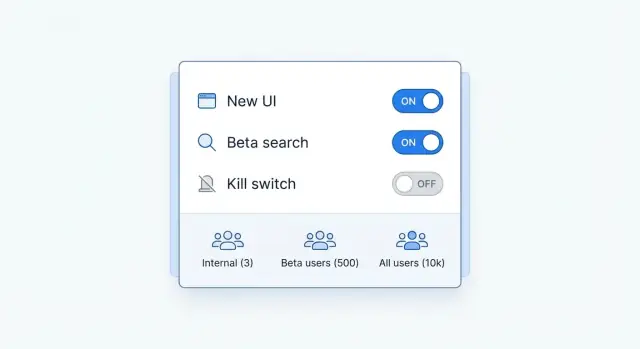
Why feature flags matter when you build fast with AI
A feature flag is a simple switch in your app. When it’s on, users get the new behavior. When it’s off, they don’t. You can ship the code with the switch in place, then choose when (and for whom) to turn it on.
That separation matters even more when you’re building quickly with AI. AI-assisted development can produce big changes in minutes: a new screen, a different API call, a rewritten prompt, or a model change. Speed is great, but it also makes it easier to ship something that’s “mostly correct” and still break a core path for real users.
Feature flags split two actions that are often mixed up:
- Releasing code: deploying a new version.
- Enabling a feature: letting users actually use what you deployed.
The gap between those two is your safety buffer. If something goes wrong, you flip the flag off (a kill switch) without scrambling to roll back a full release.
Flags save time and stress in predictable places: new user flows (signup, onboarding, checkout), pricing and plan changes, prompt and model updates, and performance work like caching or background jobs. The real win is controlled exposure: test a change with a small group first, compare results, then expand only when metrics look good.
If you build on a vibe-coding platform like Koder.ai, that speed gets safer when every “fast change” has an off switch and a clear plan for who sees it first.
A simple flag model you can actually maintain
A flag is a runtime switch. It changes behavior without forcing you to ship a new build, and it gives you a fast way back if something goes wrong.
The easiest rule for maintainability: don’t scatter flag checks everywhere. Pick one decision point per feature (often near routing, a service boundary, or a single UI entry) and keep the rest of the code clean. If the same flag shows up across five files, it usually means the feature boundary isn’t clear.
It also helps to separate:
- Can be enabled (eligibility): plan, region, device type, account age, internal testers.
- Should be enabled (rollout and safety): 0%, 10%, 50%, 100%, plus pause or instant-off controls.
Keep flags small and focused: one behavior per flag. If you need multiple changes, either use multiple flags with clear names, or group them behind a single version flag (for example, onboarding_v2) that selects a full path.
Ownership matters more than most teams expect. Decide upfront who can flip what, and when. Product should own rollout goals and timing, engineering should own defaults and safe fallbacks, and support should have access to a true kill switch for customer-impacting issues. Make one person responsible for cleaning up old flags.
This fits well when you build quickly in Koder.ai: you can ship changes as soon as they’re ready, but still control who sees them and roll back fast without rewriting half the app.
Types of flags you’ll use most often
Most teams only need a few patterns.
Boolean flags are the default: on or off. They’re ideal for “show the new thing” or “use the new endpoint.” If you truly need more than two options, use a multivariate flag (A/B/C) and keep the values meaningful (like control, new_copy, short_form) so logs stay readable.
Some flags are temporary rollout flags: you use them to ship something risky, validate it, then remove the flag. Others are permanent configuration flags, like enabling SSO for a workspace or choosing a storage region. Treat permanent config like product settings, with clear ownership and documentation.
Where you evaluate the flag matters:
- Server-side flags are safer because the decision happens in your backend (for example, a Go API) and the client only receives the result.
- Client-side flags (React or Flutter) are fine for low-risk UI changes, but assume users can inspect and tamper with the client.
Never put secrets, pricing rules, or permission checks behind client-only flags.
A kill switch is a special boolean flag designed for fast rollback. It should disable a risky path immediately without a redeploy. Add kill switches for changes that could break logins, payments, or data writes.
If you’re building quickly with a platform like Koder.ai, server-side flags and kill switches are especially useful: you can move fast, but still have a clean “off” button when real users hit edge cases.
How to target cohorts without overcomplicating it
Cohort targeting limits risk. The code is deployed, but only some people see it. The goal is control, not a perfect segmentation system.
Start by picking one unit of evaluation and stick to it. Many teams choose user-level targeting (one person sees the change) or workspace/account-level targeting (everyone on a team sees the same thing). Workspace targeting is often safer for shared features like billing, permissions, or collaboration because it avoids mixed experiences inside the same team.
A small set of rules covers most needs: user attributes (plan, region, device, language), workspace targeting (workspace ID, org tier, internal accounts), percent rollouts, and simple allowlists or blocklists for QA and support.
Keep percent rollouts deterministic. If a user refreshes, they shouldn’t flip between the old and new UI. Use a stable hash of the same ID everywhere (web, mobile, backend) so results match.
A practical default is “percent rollout + allowlist + kill switch.” For example, in Koder.ai you might enable a new Planning Mode prompt flow for 5% of free users, while allowlisting a few Pro workspaces so power users can try it early.
Before adding a new targeting rule, ask: do we really need this extra slice, should it be user-level or workspace-level, what’s the fastest way to turn it off if metrics drop, and what data are we using (and is it appropriate to use it for targeting)?
A step-by-step rollout plan for risky changes
Risky changes aren’t just big features. A small prompt tweak, a new API call, or a change in validation rules can break real user flows.
The safest habit is simple: ship the code, but keep it off.
“Safe by default” means the new path is behind a disabled flag. If the flag is off, users get the old behavior. That lets you merge and deploy without forcing a change on everyone.
Before you ramp anything, write down what “good” looks like. Pick two or three signals you can check quickly, like completion rate for the changed flow, error rate, and support tickets tagged to the feature. Decide the stop rule upfront (for example, “if errors double, turn it off”).
A rollout plan that stays fast without panic releases:
- Ship with the flag off, then verify the old path still works in production.
- Enable it for the internal team first, using real accounts and real data patterns.
- Open a small beta cohort (often 1-5%) and watch your success signals.
- Ramp gradually (10%, 25%, 50%, 100%), pausing long enough to see trends.
- Keep a kill switch ready so you can disable the feature immediately if anything looks wrong.
Make rollback boring. Disabling the flag should return users to a known-good experience without a redeploy. If your platform supports snapshots and rollback (Koder.ai does), take a snapshot before first exposure so you can recover quickly if you need to.
Instrumentation: know what changed and who saw it
Flags are only safe if you can answer two questions quickly: what experience did a user get, and did it help or hurt? This gets even more important when small prompt or UI changes can cause big swings.
Start by logging flag evaluations in a consistent way. You don’t need a fancy system on day one, but you do need consistent fields so you can filter and compare:
- Flag key and a flag version (or config hash)
- Variant (on/off or A/B value)
- Cohort identifier (the rule that matched)
- User/workspace ID (pseudonymous is fine), plus environment (prod, staging)
- Timestamp and request ID (so you can join logs to errors)
Then tie the flag to a small set of success and safety metrics you can watch hourly. Good defaults are error rate, p95 latency, and one product metric that matches the change (signup completion, checkout conversion, day-1 retention).
Set alerts that trigger a pause, not chaos. For example: if errors rise 20% for the flagged cohort, stop the rollout and flip the kill switch. If latency crosses a fixed threshold, freeze at the current percentage.
Finally, keep a simple rollout log. Each time you change percentage or targeting, record the who, what, and why. That habit matters when you iterate fast and need to roll back with confidence.
Realistic example: shipping a new onboarding flow safely
You want to ship a new onboarding flow in an app built with a chat-driven builder like Koder.ai. The new flow changes the first-run UI, adds a “create your first project” wizard, and updates the prompt that generates starter code. It could boost activation, but it’s risky: if it breaks, new users are stuck.
Put the entire new onboarding behind one flag, for example onboarding_v2, and keep the old flow as the default. Start with a clear cohort: internal team and invited beta users (for example, accounts marked beta=true).
Once beta feedback looks good, move to a percentage rollout. Roll out to 5% of new signups, then 20%, then 50%, watching metrics between steps.
If something goes wrong at 20% (say support reports an infinite spinner after step 2), you should be able to confirm it quickly in dashboards: higher drop-offs and elevated errors on the “create project” endpoint for flagged users only. Instead of rushing a hotfix, disable onboarding_v2 globally. New users fall back to the old flow immediately.
After you patch the bug and confirm stability, ramp back up in small jumps: re-enable for beta only, then 5%, then 25%, then 100% after a full day with no surprises. Once it’s stable, remove the flag and delete dead code on a scheduled date.
Common mistakes and traps to avoid
Feature flags make fast shipping safer, but only if you treat them like real product code.
One common failure is flag explosion: dozens of flags with unclear names, no owner, and no plan to remove them. That creates confusing behavior and bugs that only show up for certain cohorts.
Another trap is making sensitive decisions on the client. If a flag can affect pricing, permissions, data access, or security, don’t rely on a browser or mobile app to enforce it. Keep enforcement on the server and send only the result to the UI.
Dead flags are a quieter risk. After a rollout reaches 100%, old paths often stick around “just in case.” Months later, nobody remembers why they exist, and a refactor breaks them. If you need rollback options, use snapshots or a clear rollback plan, but still schedule code cleanup once the change is stable.
Finally, flags don’t replace tests or reviews. A flag reduces blast radius. It doesn’t prevent bad logic, migration issues, or performance problems.
Simple guardrails prevent most of this: use a clear naming scheme (area-purpose), assign an owner and expiry date, keep a lightweight flag register (experimenting, rolling out, fully on, removed), and treat flag changes like releases (log, review, monitor). And don’t put security-critical enforcement in the client.
Quick checklist before you enable a flag
Speed is great until a small change breaks a core path for everyone. A two-minute check can save hours of cleanup and support.
Before you enable a flag for real users:
- Name it clearly so it stays readable later (for example,
onboarding_new_ui_weborpricing_calc_v2_backend). - Assign an owner and an expiry date so temporary flags don’t live forever.
- Write down the default state and safe fallback so “off” still works and stays tested.
- Define rollout rules in one sentence (internal users, then 5% of new signups, then 25%, then everyone).
- Prepare a kill switch for high-risk paths and confirm who has permission to flip it.
A practical habit is a quick “panic test”: if error rates jump right after enabling this, can we turn it off quickly, and will users land safely? If the answer is “maybe,” fix the rollback path before you expose the change.
If you’re building in Koder.ai, treat flags as part of the build itself: plan the fallback, then ship the change with a clean way to undo it.
Security, privacy, and compliance basics for cohort targeting
Cohort targeting lets you test safely, but it can also leak sensitive info if you’re careless. A good rule is that flags shouldn’t require personal data to work.
Prefer boring targeting inputs like account ID, plan tier, internal test account, app version, or a rollout bucket (0-99). Avoid raw email, phone number, exact address, or anything you’d consider regulated data.
If you must target something user-related, store it as a coarse label like beta_tester or employee. Don’t store sensitive reasons as labels. Also watch for targeting that users can infer. If a setting toggle suddenly reveals a medical feature or a different price, people can guess what cohorts exist even if you never show the rules.
Region-based rollouts are common, but they can create compliance obligations. If you enable a feature only in a country because the backend is hosted there, make sure the data really stays there. If your platform can deploy per country (Koder.ai supports this on AWS), treat it as part of the rollout plan, not an afterthought.
Keep audit trails. You want a clear record of who changed a flag, what changed, when it changed, and why.
Next steps: build a lightweight flag workflow and keep moving fast
A lightweight workflow keeps you moving without turning feature flags into a second product.
Start with a small set of core flags you’ll reuse: one for new UI, one for backend behavior, and one emergency kill switch. Reusing the same patterns makes it easier to reason about what’s live and what’s safe to disable.
Before you build anything risky, map where it can break. In Koder.ai, Planning Mode can help you mark sensitive spots (auth, billing, onboarding, data writes) and decide what the flag should protect. The goal is simple: if it goes wrong, you disable the flag and the app behaves like yesterday.
For each flagged change, keep a tiny, repeatable release note: flag name, who gets it (cohort and rollout %), one success metric, one guardrail metric, how to disable it (kill switch or set rollout to 0%), and who’s watching it.
When the change proves stable, lock in a clean baseline by exporting the source code, and use snapshots before major ramps as an extra safety net. Then schedule cleanup: when a flag is fully on (or fully off), set a date to remove it so your system stays understandable at a glance.
FAQ
What is a feature flag?
A feature flag is a switch that controls whether people use a new app behavior. You can deploy the code first, then turn the feature on for selected users when you are ready.
Why use feature flags in an AI built app?
AI tools let teams make large changes quickly, including prompts, screens, and API calls. A flag limits who sees a change, so you can test it with real users before giving it to everyone.
What is the safest default state for a new flag?
Deploy the new code with the flag off and keep the existing path as the default. Turn the flag on only after you confirm that the old path still works in production.
When do I need a kill switch?
Use a kill switch for any feature that could interrupt logins, payments, onboarding, or data writes. It lets your team disable that path immediately without waiting for a new deployment.
How should I roll out a risky feature?
Start with internal accounts, then invite a small beta group. After that, use a small percentage rollout, such as 1% to 5%, and increase it only when your metrics remain healthy.
How do I keep percentage rollouts consistent?
Choose one stable identifier, such as a user ID or workspace ID, and use it everywhere. A stable hash keeps the same person or workspace in the same rollout bucket after refreshes and across devices.
Should I target users or workspaces?
Use workspace targeting when everyone in a team needs the same experience, especially for billing, permissions, and collaboration. User targeting works well for personal UI tests and early feedback.
Which flags belong on the server?
Keep pricing, permissions, secrets, and data access rules on the server. Client flags can control low risk interface changes, but users can inspect or alter code running in a browser or mobile app.
What should I measure during a flag rollout?
Track the flag name, selected variant, cohort, environment, time, and request ID. Compare error rate, latency, and one product measure such as signup completion for users who saw the feature.
How do I prevent too many old flags?
Give every temporary flag an owner and a removal date. Once a rollout reaches a stable outcome, remove the old path and the flag so future changes do not create confusing combinations.