

From CDN to Platform: How Cloudflare’s Edge Expanded
Learn how Cloudflare’s edge grew from CDN caching to security and developer services as more traffic shifts to the network perimeter.
What an Edge Network Is (and Why It Matters Now)
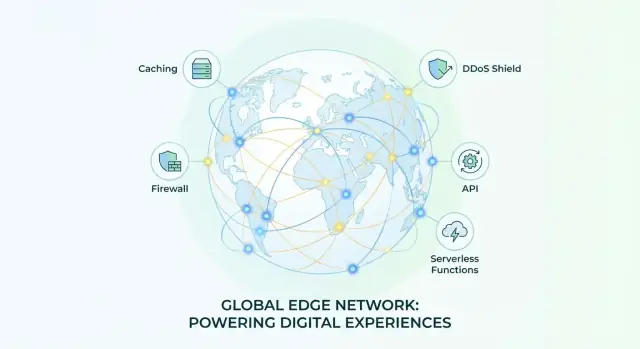
An edge network is a set of servers distributed across many cities that sit “close” to end users. Instead of every request traveling all the way back to your company’s origin servers (or cloud region), the edge can answer, inspect, or forward that request from a nearby location.
Think of it like placing helpful staff at the entrances of a venue rather than handling every question at the back office. Some requests can be handled immediately (like serving a cached file), while others are safely routed onward.
What “perimeter” means—and why traffic concentrates there
The perimeter is the boundary where outside internet traffic first meets your systems: your website, apps, APIs, and the services that protect and route them. Historically, many companies treated the perimeter as a thin doorway (DNS and a load balancer). Today it’s where the busiest and riskiest interactions happen—logins, API calls, bots, scraping, attacks, and sudden spikes.
As more work moves online and more integrations rely on APIs, it’s increasingly practical to funnel traffic through the perimeter so you can apply consistent rules—performance optimizations, security checks, and access controls—before requests hit your core infrastructure.
What to expect in this guide
This article follows a progression: performance first (CDN), then security at the edge (DDoS, WAF, bot controls, Zero Trust), and finally developer tooling (running code and handling data closer to users).
It’s written for non-technical decision-makers—buyers evaluating vendors, founders making trade-offs, and PMs who need the “why” and “what changes,” without needing to read networking textbooks.
CDN Basics: The Starting Point
A traditional CDN (Content Delivery Network) started with a simple promise: make websites feel faster by serving content from a location closer to the visitor. Instead of every request traveling back to your origin server (often a single region or data center), the CDN keeps copies of static files—images, CSS, JavaScript, downloads—at many points of presence (PoPs). When a user asks for a file, the CDN can respond locally, reducing latency and taking pressure off the origin.
What a classic CDN does
At its core, a “CDN-only” setup focuses on three outcomes:
- Caching: Store content at the edge so repeat requests don’t have to hit the origin.
- Reduce latency: Shorten the physical distance (and network hops) between user and content.
- Offload the origin: Handle a large share of traffic so the origin serves fewer bytes and fewer requests.
This model is especially effective for static sites, media-heavy pages, and predictable traffic patterns where the same assets are requested over and over.
Early CDN success metrics
In the early days, teams evaluated CDNs with a handful of practical metrics:
- Cache hit rate: What percentage of requests were served from cache rather than forwarded to the origin.
- Bandwidth savings: How many GB/TB the CDN delivered instead of your infrastructure.
- Page load time improvements: Often tracked as time-to-first-byte (TTFB) and overall page rendering speed.
These numbers mattered because they translated directly into user experience and infrastructure cost.
Where the CDN sits in the request path
Even a basic CDN affects how requests reach your site. Most commonly, it’s introduced through DNS: your domain is pointed to the CDN, which then routes visitors to a nearby PoP. From there, the CDN may act as a reverse proxy—terminating the connection from the user and opening a separate connection to your origin when needed.
That “in the middle” position matters. Once a provider is reliably in front of your origin and handling traffic at the edge, it can do more than cache files—it can inspect, filter, and shape requests.
The limits of “CDN only” for modern apps
Many modern products aren’t mostly static pages anymore. They’re dynamic applications backed by APIs: personalized content, real-time updates, authenticated flows, and frequent writes. Caching helps, but it can’t solve everything—especially when responses vary per user, depend on cookies or headers, or require immediate origin logic.
That gap—between static acceleration and dynamic application needs—is where the evolution from “CDN” to a broader edge platform begins.
Why Traffic Concentrates at the Perimeter
A big shift in how the internet is used has pushed more requests to “the edge” (the network perimeter) before they ever touch your origin servers. It’s not just about faster websites anymore—it’s about where traffic naturally flows.
The forces pulling traffic outward
HTTPS everywhere is a major driver. Once most traffic is encrypted, network middleboxes inside a corporate network can’t easily inspect or optimize it. Instead, organizations prefer to terminate and manage TLS closer to the user—at an edge service built for that job.
APIs have also changed the shape of traffic. Modern apps are a constant stream of small requests from web frontends, mobile clients, partner integrations, and microservices. Add bots (good and bad), and suddenly a large portion of “users” aren’t humans at all—meaning traffic needs filtering and rate controls before it hits application infrastructure.
Then there’s the everyday reality of mobile networks (variable latency, roaming, retransmits) and the rise of SaaS. Your employees and customers are no longer “inside” a single network boundary, so security and performance decisions move to where those users actually connect.
Distributed systems mean fewer choke points
When applications, users, and services are spread across regions and clouds, there are fewer reliable places to enforce rules. Traditional control points—like a single data center firewall—stop being the default path. The edge becomes one of the few consistent checkpoints that most requests can be routed through.
The edge as a policy and protection checkpoint
Because so much traffic passes through the perimeter, it’s a natural place to apply shared policies: DDoS filtering, bot detection, WAF rules, TLS settings, and access controls. This reduces “decision-making” at each origin and keeps protections consistent across apps.
Operational trade-offs
Centralizing traffic at the edge can hide origin IPs and reduce direct exposure, which is a meaningful security win. The trade-off is dependency: edge availability and correct configuration become critical. Many teams treat the edge as part of core infrastructure—closer to a control plane than a simple cache.
For a practical checklist, see /blog/how-to-evaluate-an-edge-platform.
From Caching to Full Proxy: The Key Architectural Shift
A traditional CDN started as “smart caching”: it stored copies of static files closer to users and fetched from the origin when needed. That helps performance, but it doesn’t fundamentally change who “owns” the connection.
The big shift happens when the edge stops being just a cache and becomes a full reverse proxy.
Reverse proxy, in plain terms
A reverse proxy sits in front of your website or app. Users connect to the proxy, and the proxy connects to your origin (your servers). To the user, the proxy is the site; to the origin, the proxy looks like the user.
That positioning enables services that aren’t possible with “cache-only” behavior—because every request can be handled, modified, or blocked before it reaches your infrastructure.
What changes when the edge terminates TLS
When the edge terminates TLS (HTTPS), the encrypted connection is established at the edge first. That creates three practical capabilities:
- Visibility: the edge can actually read HTTP requests and responses (headers, paths, methods) instead of just passing encrypted bytes through.
- Routing control: the edge can make decisions per request—send traffic to different origins, steer around outages, or apply rules by geography, device, or URL.
- Inspection and enforcement: since the edge can interpret the request, it can run security checks (like filtering suspicious payloads or validating bots) and performance logic (compression, image transformations, request shaping).
Here’s the mental model:
user → edge (reverse proxy) → origin
The tradeoffs: more control, more dependency
Putting the edge in the middle centralizes control, which is often exactly the goal: consistent security policies, simpler rollouts, and fewer “special cases” at each origin.
But it also adds complexity and dependency:
- Operational coupling: if edge configuration breaks, everything breaks quickly.
- Vendor dependency: features may rely on proprietary rules, logs, or APIs that aren’t portable.
- Debugging overhead: you now troubleshoot a multi-hop path (user ↔ edge ↔ origin), not a direct connection.
This architectural shift is what turns a CDN into a platform: once the edge is the proxy, it can do far more than cache.
Security Step 1: DDoS Protection at the Edge
A DDoS (Distributed Denial of Service) attack is simply an attempt to overwhelm a site or app with so much traffic that real users can’t get through. Instead of “hacking in,” the attacker tries to clog the driveway.
Why volumetric attacks favor edge mitigation
Many DDoS attacks are volumetric: they throw huge amounts of data at your IP address to exhaust bandwidth or overload network devices before a request ever reaches your web server. If you wait to defend at your origin (your data center or cloud region), you’re already paying the price—your upstream links can saturate, and your firewall or load balancer can become the bottleneck.
An edge network helps because it puts protective capacity closer to where the traffic enters the internet, not just where your servers live. The more distributed the defense, the harder it is for attackers to “pile up” on a single choke point.
What “absorb and filter” means at the edge
When providers describe DDoS protection as “absorbing and filtering,” they mean two things happening across many points of presence (PoPs):
- Absorb: accept and terminate a flood of incoming connections without falling over, spreading the load across global capacity.
- Filter: separate legitimate requests from junk traffic (for example, malformed packets, suspicious patterns, or obvious amplification traffic) and forward only clean traffic to your origin.
The key benefit is that the worst of the attack can be handled upstream of your infrastructure, reducing the chance your own network—or cloud bill—becomes the casualty.
Rate limiting: the control non-specialists can understand
Rate limiting is a practical way to prevent any single source—or any single behavior—from consuming too many resources too quickly. For example, you might limit:
- Requests per minute to a login endpoint
- API calls per token
- Expensive pages per IP
It won’t stop every kind of DDoS on its own, but it’s an effective pressure valve that reduces abusive spikes and keeps critical routes usable during an incident.
What to verify before you rely on it
If you’re evaluating edge-based DDoS protection, confirm:
- Coverage: which traffic types are protected (HTTP/S, TCP/UDP, DNS), and whether it applies automatically to all your domains and apps.
- SLA and commitments: what the provider guarantees (uptime, mitigation expectations, support response), and any limits or exclusions.
- Reporting: clear dashboards and logs that show attack size, duration, mitigations applied, and what reached your origin—so you can explain incidents internally and tune controls over time.
Security Step 2: WAF and Bot Management
Once basic DDoS filtering is in place, the next layer is protecting the application itself—especially the “normal-looking” requests that carry malicious intent. This is where a Web Application Firewall (WAF) and bot management become the day-to-day workhorses at the edge.
WAF: rules that stop common web attacks
A WAF inspects HTTP/S requests and applies rules designed to block common patterns of abuse. The classic examples are:
- SQL injection (SQLi): attackers try to smuggle database commands through form fields, URLs, or API parameters.
- Cross-site scripting (XSS): attackers inject scripts into pages that then run in a real user’s browser.
Instead of relying on your app to catch every bad input, the edge can filter many of these attempts before they reach origin servers. That reduces risk and also cuts down noisy traffic that wastes compute and logs.
Bot management: not all traffic is “users”
Bots can be helpful (search engine crawlers) or harmful (credential stuffing, scraping, inventory hoarding, fake sign-ups). The key difference isn’t just automation—it’s intent and behavior. A real user’s session tends to have natural timing, navigation flow, and browser characteristics. Malicious bots often generate high-volume, repetitive requests, probe endpoints, or mimic user agents while behaving unnaturally.
Edge signals that power decisions
Because the edge sees huge volumes across many sites, it can use broader signals to make smarter calls, such as:
- IP reputation and historical abuse patterns
- Request headers (including inconsistencies typical of automation)
- Behavior patterns like request rate, path traversal, and session anomalies
Best practice: start by observing, then enforce
A practical rollout is to begin in monitor (log) mode to see what would be blocked and why. Use that data to tune exceptions for known tools and partners, then gradually tighten policies—moving from alerting to challenges and finally to blocks for confirmed bad traffic. This reduces false positives while still improving security quickly.
Security Step 3: Zero Trust Access for Apps and Teams
Zero Trust is easier to understand when you drop the buzzwords: don’t trust the network—verify each request. Whether someone is in the office, on hotel Wi‑Fi, or on a home network, access decisions should be based on identity, device signals, and context—not on “where” the traffic originates.
What it looks like in practice
Instead of putting internal apps behind a private network and hoping the perimeter holds, Zero Trust access sits in front of the application and evaluates every connection attempt. Typical uses include:
- Protecting admin panels (e.g., /admin) by requiring login, MFA, and limiting access to specific groups.
- Securing internal tools (dashboards, wikis, ticketing systems) without exposing them publicly.
- SSH/RDP via the browser, which can reduce the need to open inbound ports and makes access easier to audit.
Identity is the new “gate”
A key shift is that access decisions tie directly to your identity provider: SSO for centralized logins, MFA for step-up verification, and group membership for simple policy rules (“Finance can access the billing tool; contractors cannot”). Because these checks happen at the edge, you can enforce them consistently across locations and apps.
Pitfalls to avoid
A common mistake is treating Zero Trust as a one-to-one VPN replacement and stopping there. Removing the VPN can improve usability, but it doesn’t automatically fix weak identity practices, over-broad permissions, or missing device checks.
Another pitfall is “approve once, trust forever.” Zero Trust works best when policies stay specific (least privilege), sessions are time-bound, and logs are reviewed—especially for privileged tools.
API Traffic: Where Performance and Security Meet
APIs changed the game for edge networks because they multiplied the number of “doors” into a business. A single website might have a few pages, but a modern app can expose dozens (or hundreds) of API endpoints used by mobile clients, partner integrations, internal tools, and automated jobs. More automation also means more machine-driven traffic—legitimate and abusive—hitting the perimeter constantly.
Why APIs attract both users and attackers
APIs are predictable, high-value targets: they often return structured data, power logins and payments, and are easy to call at scale. That makes them a sweet spot where performance and security need to work together. If the edge can route, cache, and filter API traffic close to the requester, you reduce latency and avoid wasting origin capacity on junk requests.
Common edge controls for APIs
Edge platforms typically offer API gateway-style functions such as:
- Authentication checks (validating tokens, enforcing required scopes/claims)
- Schema validation concepts (rejecting requests that don’t match expected fields, types, or sizes)
- Method and path rules (only allowing the verbs and routes you intend)
- Request normalization (consistent handling of headers and query strings)
The goal isn’t to “lock everything down” at once—it’s to stop obviously bad traffic early, and make the rest easier to observe.
Abuse patterns you should plan for
API abuse often looks different from classic website attacks:
- Scraping of product catalogs, content, or pricing data
- Credential stuffing against login endpoints
- Token replay where stolen tokens are reused from new devices or locations
- Excessive calls that inflate costs or degrade service (intentional or accidental)
What to look for in an edge platform
Prioritize three practical features: good logs, rate limits by token (not just by IP), and clear, consistent error responses (so developers can fix clients quickly, and security teams can distinguish failures from attacks). When these are built into the edge, you get faster APIs and fewer surprises at the origin.
Developer Platform Step 1: Compute at the Edge
Edge compute means running small pieces of code on servers close to your users—before a request travels all the way back to your origin application. Instead of only caching responses (the classic CDN job), the edge can now make decisions, transform requests, and even generate responses on the spot.
What teams use edge compute for
Most early wins come from “thin logic” that needs to happen on every request:
- Authentication checks and token validation
- Redirects and URL normalization
- Personalization (e.g., country/language-based routing)
- A/B routing and feature flags at the request level
- Request/response rewriting (headers, cookies, query params)
Because this happens near the user, you cut round trips to the origin and reduce load on core systems—often improving both speed and reliability.
When edge compute is the right tool (and when it isn’t)
Edge compute helps most when the logic is lightweight and time-sensitive: routing, gating access, shaping traffic, and enforcing rules consistently across regions.
Your origin (or a central backend) is still the better place for heavy application work: complex business logic, long-running jobs, large dependencies, or anything that needs deep database access and strong consistency across users.
Constraints to plan for
Edge runtimes are intentionally constrained:
- Runtime limits: code is expected to finish quickly.
- Cold starts: the first request may be slower if the runtime needs to spin up.
- State management: edge functions are typically stateless; durable state usually lives elsewhere (KV/storage/DB), which affects design.
The practical approach is to treat edge compute as a fast “front desk” for your application—handling checks and decisions early—while leaving the “back office” work to the origin.
Developer Platform Step 2: Storage and Data at the Edge
Edge compute is only half the story. If your function runs close to users but has to fetch data from a far-away region on every request, you lose most of the latency benefit—and you may introduce new failure points. That’s why edge platforms add data services designed to sit “near” compute: key-value (KV) stores, object storage for blobs, queues for async work, and (in some cases) databases.
Data near compute: what you actually store
Teams typically start with simple, high-read data:
- Static assets (images, bundles) in object storage + caching
- Caching API responses to avoid repeated origin calls
- Feature flags and configuration in KV for fast reads everywhere
- Session-ish data (carefully) when you can tolerate replication delays
The pattern is: reads happen at the edge, writes flow back into a system that replicates.
Consistency vs. latency (and what “eventual” means)
“Eventual consistency” usually means: after a write, different locations might temporarily see different values. For product teams, this shows up as “Why did one user see the old flag for 30 seconds?” or “Why did a logout not invalidate everywhere instantly?”
Practical mitigations include:
- Designing flags so brief staleness is acceptable
- Using short TTLs and versioned keys
- Keeping sensitive, write-heavy workflows on a strongly consistent store
How to evaluate edge data services
Look beyond speed claims:
- Durability and SLAs: What happens during a regional outage? How are writes protected?
- Pricing model: Requests, stored GB, and operation types can change unit economics quickly.
- Egress considerations: If data frequently leaves the platform (to your cloud, analytics, backups), egress and cross-region fees can dominate costs.
Edge storage works best when you’re explicit about what must be correct now versus what can be correct soon.
Platform Effects: Consolidation, Control, and Risk
As an edge network grows beyond caching, a predictable pattern appears: consolidation. Instead of stitching together separate providers for DNS, CDN, DDoS protection, WAF, bot controls, and app access, organizations move toward a single control plane that coordinates how traffic enters and moves through the perimeter.
Why consolidation happens
The practical driver is operational gravity. Once most inbound traffic already passes through one edge, it’s simpler to attach more decisions to that same path—routing, security policies, identity checks, and application acceleration—without adding extra hops or more vendors to manage.
The upside: fewer vendors, simpler operations
Consolidation can make teams faster and calmer:
- Fewer contracts and integrations: less time spent on renewals, connectors, and overlapping features.
- Simpler routing: one place to steer traffic (DNS + proxy) reduces “which box is in front?” confusion.
- Shared analytics: performance and security data in one view makes incident response and tuning easier.
The downside: concentration risk and org friction
The same centralization introduces real tradeoffs:
- Single point of failure (or failure domain): outages, misconfigurations, or policy mistakes can have broader blast radius.
- Harder migrations: the more features you adopt, the more dependencies you accumulate—leaving can feel like unwinding a tightly packed ball of string.
- Unclear ownership: network, security, and app teams may all “own” parts of the edge, which can slow decisions or create conflicting policies.
Governance tips that keep the benefits without the chaos
Treat the edge like a platform, not a tool:
- Define clear roles (who can change DNS, WAF rules, access policies, and routing).
- Use change management: reviews, runbooks, and audit trails for high-impact settings.
- Prefer staged rollouts: test in lower-risk zones or paths before broad enablement, and keep rollback plans explicit.
Done well, consolidation reduces complexity day-to-day—while governance keeps that convenience from turning into hidden risk.
How to Evaluate an Edge Platform for Your Organization
Choosing an edge platform isn’t just picking “a faster CDN.” You’re selecting where critical traffic is inspected, accelerated, and sometimes executed—often before it reaches your apps. A good evaluation ties platform features to your real constraints: user experience, risk, and developer velocity.
A practical checklist
Start by writing down what you actually need in three buckets:
- Performance needs: Which endpoints must be fast globally (marketing site, checkout, APIs)? Do you need dynamic acceleration, image optimization, TCP/UDP support, or only static caching?
- Threat model: What hurts most—volumetric DDoS, credential stuffing, API abuse, account takeover, supply-chain risks? Map each threat to a control you expect at the edge.
- Developer requirements: Do teams need edge compute, programmable routing, CI/CD integration, environment isolation, preview deploys, or custom security rules without opening tickets?
If you can’t connect a “must-have” to a measurable outcome (e.g., fewer incidents, lower latency, reduced origin load), treat it as optional.
If you’re building new apps while you modernize the perimeter, also evaluate how your development workflow connects to this edge posture. For example, teams using Koder.ai to vibe-code and ship React web apps (with Go + PostgreSQL backends, or Flutter mobile clients) can take advantage of an edge platform for consistent TLS termination, WAF policies, and rate limiting in front of rapidly iterated releases—while still keeping the option to export source code and deploy where they need.
Questions to ask vendors
Ask for specifics, not feature names:
- Visibility: What dashboards exist for origin health, cache behavior, API errors, and bot decisions?
- Auditability: Are configuration changes and security events captured in immutable audit logs? How long is retention, and can logs be exported to your SIEM?
- Support: What are response-time SLAs during an incident? Is DDoS/security support 24/7 on your plan?
- Compliance: Which certifications and data residency options are available, and what controls are customer-managed vs vendor-managed?
A pilot plan that won’t backfire
Pick one app (or one API) with meaningful traffic. Define success metrics like p95 latency, error rate, cache hit ratio, blocked attacks, and time-to-mitigate. Run in phased mode (monitor → enforce), and keep a rollback plan: DNS switch-back, bypass rules, and a documented “break glass” path.
Suggested next steps
Once you have results, compare plan tradeoffs on /pricing and review related explainers and deployment stories in /blog.
FAQ
What is an edge network in simple terms?
An edge network is a distributed set of servers (points of presence) placed in many cities so requests can be handled closer to users. Depending on the request, the edge might:
- Serve a cached asset immediately
- Inspect and filter traffic (security)
- Route the request to the right origin or region
The practical result is lower latency and less load and exposure on your origin infrastructure.
What does “perimeter” mean, and why does it matter?
The perimeter is the boundary where internet traffic first reaches your systems—your website, apps, and APIs—often through DNS and an edge reverse proxy. It matters because that’s where:
- Logins and sensitive API calls happen
- Bots, scraping, and abuse show up
- Spikes and attacks hit first
Centralizing controls at the perimeter lets you apply consistent performance and security rules before traffic reaches your core services.
How is a classic CDN different from a modern edge platform?
A classic CDN focuses on caching static content (images, CSS, JS, downloads) at edge locations. It improves speed mainly by reducing distance and offloading your origin.
A modern edge platform goes further by acting as a full reverse proxy for most traffic, enabling routing, security inspection, access controls, and sometimes compute—whether or not the content is cacheable.
How does DNS usually fit into deploying a CDN or edge service?
DNS is often the simplest way to put a CDN/edge provider in front of your site: your domain points to the provider, and the provider routes users to a nearby PoP.
In many setups the edge also acts as a reverse proxy, meaning users connect to the edge first, and the edge connects to your origin only when needed. That “in the middle” position is what enables caching, routing, and security enforcement at scale.
What changes when the edge terminates TLS (HTTPS)?
When the edge terminates TLS, the encrypted HTTPS connection is established at the edge. That enables three practical capabilities:
- Visibility: the edge can read HTTP paths, headers, and methods
- Enforcement: WAF rules, bot checks, rate limits, and access policies can be applied
- Routing decisions: requests can be steered by URL, geography, device, or origin health
It increases control—but also means edge configuration becomes mission-critical.
What are the most useful metrics to evaluate CDN performance?
You should evaluate a CDN using metrics that tie to user experience and infrastructure cost, such as:
- Cache hit rate (how often requests are served from cache)
- Bandwidth savings (how much traffic is offloaded from origin)
- Latency improvements (often TTFB and p95 page/API response times)
Pair these with origin-side metrics (CPU, request rate, egress) to confirm the CDN is actually reducing pressure where it matters.
Why is DDoS protection usually better at the edge than at the origin?
Edge mitigation is effective because many DDoS attacks are volumetric—they try to saturate bandwidth or network devices before requests reach your application.
A distributed edge can:
- Absorb connection floods across many PoPs
- Filter junk traffic before forwarding clean requests
Defending only at the origin often means you pay the price (saturated links, overloaded load balancers, higher cloud bills) before mitigation kicks in.
What is rate limiting, and when should I use it?
Rate limiting caps how many requests a client (or token) can make in a time window so one source can’t consume disproportionate resources.
Common edge use cases include:
- Limiting login attempts to reduce credential stuffing
- Throttling expensive endpoints (search, export, checkout)
- Enforcing per-token API quotas (more useful than IP-only limits)
It won’t solve every DDoS, but it’s a strong, easy-to-explain control for abusive spikes.
What do a WAF and bot management actually do?
A WAF inspects HTTP requests and applies rules to block common application attacks (like SQLi and XSS). Bot management focuses on identifying and handling automated traffic—both good bots (e.g., search crawlers) and harmful ones (scraping, fake sign-ups, credential stuffing).
A practical rollout is:
- Start in monitor/log mode
- Review false positives and add exceptions for known tools
- Gradually move to challenges and then blocks for confirmed abuse
What is Zero Trust access, and what mistakes should we avoid?
Zero Trust means access decisions are based on identity and context, not on being “inside the network.” At the edge, it commonly looks like:
- Putting internal apps or admin paths behind SSO + MFA
- Enforcing group-based access (least privilege)
- Auditing access with centralized logs
A common pitfall is treating it as a simple VPN replacement without tightening permissions, session duration, and device checks—those are what make it safer over time.