

From Messy Ideas to Shippable Products with AI Tools
See how AI turns rough notes into clear problem statements, user insights, prioritized features, and ready-to-build specs, roadmaps, and prototypes.
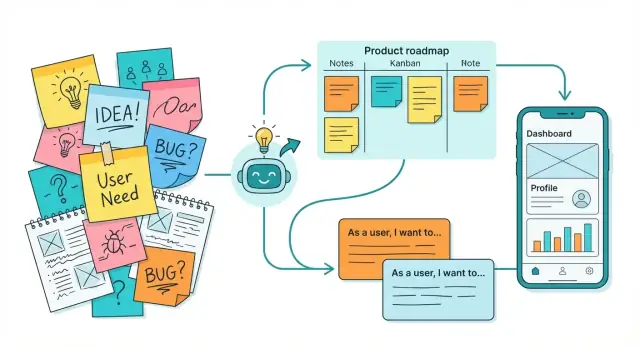
Why messy ideas stall products (and how AI helps)
Most product work doesn’t start with a neat brief. It starts as “messy ideas”: a Notion page full of half-sentences, Slack threads where three different problems get mixed together, meeting notes with action items but no owner, screenshots of competitor features, voice memos recorded on the way home, and a backlog of “quick wins” that no one can explain anymore.
The mess isn’t the problem. The stall happens when the mess becomes the plan.
Why structure matters
When ideas stay unstructured, teams spend time re-deciding the same things: what you’re building, who it’s for, what success looks like, and what you’re not doing. That leads to slow cycles, vague tickets, misaligned stakeholders, and avoidable rewrites.
A small amount of structure changes the pace of work:
- Speed: fewer meetings to “get on the same page.”
- Clarity: decisions are based on shared wording and assumptions.
- Alignment: design, engineering, and business hear the same problem.
- Quality: better requirements mean fewer surprises during build.
What AI can (and cannot) do
AI is good at turning raw inputs into something you can work with: summarizing long threads, extracting key points, grouping similar ideas, drafting problem statements, and proposing first-pass user stories.
AI cannot replace product judgment. It won’t know your strategy, constraints, or what your customers truly value unless you provide context—and you still need to validate outcomes with real users and data.
The promise of this guide
No magic prompts. Just repeatable steps to move from scattered inputs to clear problems, options, priorities, and shippable plans—using AI to reduce busywork while your team focuses on decisions.
Step 1: Capture everything without losing context
Most product work doesn’t fail because ideas are bad—it fails because evidence is scattered. Before you ask AI to summarize or prioritize, you need a clean, complete input stream.
Collect from the places ideas actually live
Pull raw material from meetings, support tickets, sales calls, internal docs, emails, and chat threads. If your team already uses tools like Zendesk, Intercom, HubSpot, Notion, or Google Docs, start by exporting or copying the relevant snippets into one workspace (a single doc, database, or inbox-style board).
Quick ways to capture without slowing people down
Use whatever method matches the moment:
- Copy/paste key quotes (especially customer wording)
- Voice-to-text for hallway ideas or post-call notes
- Screenshots with a one-line caption (what’s happening and why it matters)
AI is helpful even here: it can transcribe calls, clean up punctuation, and standardize formatting—without rewriting meaning.
Tag the context so the insight stays usable
When you add an item, attach lightweight labels:
- Who said it (customer name or segment, internal role)
- When (date + touchpoint like “Q4 renewal call”)
- Customer type (plan, industry, company size)
- Urgency (blocked now vs “nice to have”)
Basic hygiene that saves hours later
Keep originals (verbatim quotes, screenshots, ticket links) alongside your notes. Remove obvious duplicates, but don’t over-edit. The goal is one trustworthy workspace that your AI tool can reference later without losing provenance.
Step 2: Summarize and cluster into themes
After you’ve captured raw inputs (notes, Slack threads, call transcripts, surveys), the next risk is “infinite rereading.” AI helps you compress volume without losing what matters—then group the signal into a few clear buckets your team can act on.
Create short briefs from long notes
Start by asking AI to produce a one-page brief per source: the context, the top takeaways, and any direct quotes worth keeping.
A helpful pattern is: “Summarize this into: goals, pains, desired outcomes, constraints, and verbatim quotes (max 8). Keep unknowns.” That last line prevents AI from pretending everything is clear.
Cluster into themes (and surface the gaps)
Next, combine multiple briefs and ask AI to:
- Extract recurring themes (e.g., onboarding friction, reporting accuracy, pricing confusion)
- List key questions to validate
- Highlight unknowns and contradictions (who said what, and why it conflicts)
This is where scattered feedback becomes a map, not a pile.
Turn feedback into a problem list
Have AI rewrite themes into problem-shaped statements, separated from solutions:
- “Users can’t verify results quickly” (problem)
- not “Add an export button” (solution)
A clean problem list makes the next steps—user journeys, solution options, and prioritization—much easier.
Build a shared glossary
Teams stall when the same word means different things (“account,” “workspace,” “seat,” “project”). Ask AI to propose a glossary from your notes: terms, plain-language definitions, and examples.
Keep this glossary in your working doc and link it from future artifacts (PRDs, roadmaps) so decisions stay consistent.
Step 3: Turn themes into crisp problem statements
After you’ve clustered raw notes into themes, the next move is to turn each theme into a problem statement people can agree on. AI helps by rewriting vague, solution-shaped ideas (“add a dashboard”) into user-and-outcome language (“people can’t see progress without exporting data”).
A simple problem-statement template
Use AI to draft a few options, then pick the clearest one:
For [who], [what job] is hard because [current friction], which leads to [impact].
Example: For team leads, tracking weekly workload is hard because data lives in three tools, which leads to missed handoffs and overtime.
Define measurable success
Ask AI to propose metrics, then choose ones you can actually track:
- Time saved per workflow (e.g., “reduce reporting from 20 min to 5 min”)
- Fewer steps/clicks (e.g., “from 12 steps to 6”)
- Fewer errors or rework (e.g., “cut duplicate entries by 50%”)
- Faster cycle time (e.g., “approve requests within 24 hours”)
Make assumptions, risks, and boundaries explicit
Problem statements fail when hidden beliefs sneak in. Have AI list likely assumptions (e.g., users have consistent data access), risks (e.g., incomplete integrations), and unknowns to validate in discovery.
Finally, add a short “not in scope” list so the team doesn’t drift (e.g., “not redesigning the entire admin area,” “no new billing model,” “no mobile app in this phase”). This keeps the problem crisp—and sets up the next steps cleanly.
Step 4: Clarify users, jobs, and journeys
If your ideas feel scattered, it’s often because you’re mixing who it’s for, what they’re trying to achieve, and where the pain actually happens. AI helps you separate those threads quickly—without inventing a fantasy customer.
Draft lightweight personas from real inputs
Start with what you already have: support tickets, sales call notes, user interviews, app reviews, and internal feedback. Ask AI to draft 2–4 “light personas” that reflect patterns in the data (goals, constraints, vocabulary), not stereotypes.
A good prompt: “Based on these 25 notes, summarize the top 3 user types. For each: primary goal, biggest constraint, and what triggers them to look for a solution.”
Write Jobs To Be Done (JTBD) in plain language
Personas describe who; JTBD describes why. Have AI propose JTBD statements, then edit them to sound like something a real person would say.
Example format:
When [situation], I want to [job], so I can [outcome].
Ask AI to produce multiple versions per persona and highlight differences in outcomes (speed, certainty, cost, compliance, effort).
Map a simple journey: before, during, after
Create a one-page journey that focuses on behavior, not screens:
- Before: what prompts the need, what they try first, what “good enough” looks like
- During: steps they take, decisions, where they hesitate
- After: how they measure success, what follow-up work remains
Then ask AI to identify friction points (confusion, delays, handoffs, risk) and moments of value (relief, confidence, speed, visibility). This gives you a grounded picture of where your product can genuinely help—and where it shouldn’t try to.
Step 5: Expand solution options and constraints
Once your problem statements are clear, the fastest way to avoid “solution lock-in” is to deliberately generate multiple directions before you pick one. AI is useful here because it can explore alternatives quickly—while you keep the judgment.
Ask for options, not answers
Prompt the AI to propose 3–6 distinct solution approaches (not variations of the same feature). For example: self-serve UX changes, automation, policy/process changes, education/onboarding, integrations, or a lightweight MVP.
Then force contrast by asking: “What would we do if we couldn’t build X?” or “Give one option that avoids new infrastructure.” This produces real trade-offs you can evaluate.
Generate constraints and edge cases early
Have AI list constraints you might miss:
- Mobile limitations (small screens, offline moments, slow networks)
- Accessibility needs (keyboard-only, screen readers, color contrast)
- Data limits (latency, missing fields, retention rules, PII)
- Internationalization (dates, currencies, right-to-left layouts)
- Operational realities (support load, moderation, abuse cases)
Use these as a checklist for later requirements—before you’ve designed yourself into a corner.
Write “how it works” narratives
For each option, ask AI to produce a short narrative:
- Trigger (what the user does)
- System response (what happens)
- Outcome (what success looks like)
- Failure path (what if it goes wrong)
These mini-stories are easy to share in Slack or a doc and help non-technical stakeholders react with concrete feedback.
Surface dependencies and approvals
Finally, ask AI to map likely dependencies: data pipelines, analytics events, third-party integrations, security review, legal approval, billing changes, or app-store considerations. Treat the output as hypotheses to validate, but it will help you start the right conversations before timelines slip.
Step 6: Convert ideas into requirements and user stories
Once your themes and problem statements are clear, the next step is turning them into work the team can build and test. The goal isn’t a perfect document—it’s a shared understanding of what “done” looks like.
Translate ideas into deliverables
Start by rewriting each idea as a feature (what the product will do), then break that feature into small deliverables (what can ship in a sprint). A useful pattern is: Feature → capabilities → thin slices.
If you’re using AI product planning tools, paste your clustered notes and ask for a first pass breakdown. Then edit it with your team’s language and constraints.
Generate consistent user stories
Ask AI to convert each deliverable into a consistent user story format, such as:
- As a [user]
- I want [action]
- So that [outcome]
A good prompt: “Write 5 user stories for this feature, keep them small enough for 1–3 days each, and avoid technical implementation details.”
Add acceptance criteria (with examples)
AI is especially helpful for proposing acceptance criteria and edge cases you might miss. Ask for:
- 3–7 acceptance criteria per story
- At least 2 concrete examples (happy path + one tricky case)
Agree on a simple Definition of Done
Create a lightweight checklist the whole team accepts, for example: requirements reviewed, analytics event named, error states covered, copy approved, QA passed, and release notes drafted. Keep it short—if it’s painful to use, it won’t be used.
Step 7: Prioritize without endless debate
Once you have a clean set of problem statements and solution options, the goal is to make trade-offs visible—so decisions feel fair, not political. A simple set of criteria keeps the conversation grounded.
Define criteria everyone can score
Start with four signals most teams can agree on:
- Impact: How much will this move the user or business outcome?
- Effort: How hard is it to ship (time, complexity, dependencies)?
- Confidence: How sure are we about impact and feasibility?
- Risk: What could go wrong (security, compliance, reputation, operational load)?
Write one sentence per criterion so “impact = revenue” doesn’t mean one thing to Sales and another to Product.
Use AI to draft a scoring table from your inputs
Paste your idea list, any notes from discovery, and your definitions. Ask AI to create a first-pass table you can react to:
| Item | Impact (1–5) | Effort (1–5) | Confidence (1–5) | Risk (1–5) | Notes |
|---|---|---|---|---|---|
| Passwordless login | 4 | 3 | 3 | 2 | Reduces churn in onboarding |
| Admin audit export | 3 | 2 | 2 | 4 | Compliance benefit, higher risk |
Treat this as a draft, not an answer key. The win is speed: you’re editing a starting point instead of inventing structure from scratch.
Split “must have” vs “nice to have” (with rationale)
Ask: “What breaks if we don’t do this in the next cycle?” Capture the reason in one line. This prevents “must-have inflation” later.
Identify quick wins vs longer bets
Combine high impact + low effort for quick wins, and high impact + high effort for longer bets. Then confirm sequencing: quick wins should still support the larger direction, not distract from it.
Step 8: Build a roadmap people can trust
A roadmap isn’t a wish list—it’s a shared agreement about what you’re doing next, why it matters, and what you’re not doing yet. AI helps you get there by turning your prioritized backlog into a clear, testable plan that’s easy to explain.
Turn priorities into milestones
Start with the items you already prioritized (from the previous step) and ask an AI assistant to propose 2–4 milestones that reflect outcomes, not just features. For example: “Reduce onboarding drop-off” or “Enable teams to collaborate” is more trustworthy than “Ship onboarding revamp.”
Then pressure-test each milestone with two questions:
- What user problem does this milestone solve?
- What evidence will tell us we’re done (or wrong)?
Draft release goals (and boundaries)
For each milestone, generate a short release definition:
- Goal: the user outcome you’re aiming for
- Included: the minimum set of capabilities to hit the goal
- Excluded: tempting add-ons that can wait
This “included/excluded” boundary is one of the fastest ways to reduce stakeholder anxiety, because it prevents silent scope creep.
Create a one-page narrative stakeholders can repeat
Ask AI to turn your roadmap into a one-page narrative with:
- the customer problem and who it affects
- the approach (milestones)
- the trade-offs (what you’re delaying)
- how you’ll measure progress
Keep it readable—if someone can’t summarize it in 30 seconds, it’s too complicated.
Keep it flexible: define triggers for change
Trust increases when people know how plans change. Add a small “change policy” section: what triggers a roadmap update (new research, missed metrics, technical risk, compliance changes) and how decisions will be communicated. If you share updates in a predictable place (e.g., /roadmap), the roadmap stays credible even when it evolves.
Step 9: Prototype faster with AI support
Prototypes are where vague ideas get honest feedback. AI won’t magically “design the right thing,” but it can remove a lot of busywork so you can test sooner—especially when you’re iterating on multiple options.
Turn rough concepts into clear screen flows
Start by asking AI to translate a theme or problem statement into a screen-by-screen flow. Give it the user type, the job they’re trying to do, and any constraints (platform, accessibility, legal, pricing model). You’re not looking for pixel-perfect design—just a coherent path that a designer or PM can sketch quickly.
Example prompt: “Create a 6-screen flow for first-time users to accomplish X on mobile. Include entry points, main actions, and exit states.”
Draft microcopy (including the awkward parts)
Microcopy is easy to skip—and painful to fix late. Use AI to draft:
- Button labels, helper text, and confirmation messages
- Empty states (what to do when there’s no data yet)
- Error states with recovery steps (what happened, why, what to do next)
Provide your product tone (“calm and straightforward,” “friendly but brief”) and any words you avoid.
Prepare a usability test kit in minutes
AI can generate a lightweight test plan so you don’t overthink it:
- Tasks that map to your top assumptions
- Neutral follow-up questions (“What did you expect here?”)
- A script for intro, consent, and wrap-up
Create a “validate first” checklist
Before building more screens, ask AI for a prototype checklist: what must be validated first (value, comprehension, navigation, trust), what signals count as success, and what would make you stop or pivot. This keeps the prototype focused—and your learning fast.
Where vibe-coding platforms help (when you’re ready to move past prototypes)
Once you’ve validated a flow, the next bottleneck is often turning “approved screens” into a real, working app. This is where a vibe-coding platform like Koder.ai can fit naturally into the workflow: you can describe the feature in chat (problem, user stories, acceptance criteria), and generate a working web, backend, or mobile build faster than a traditional handoff-heavy process.
In practice, teams use it to:
- Spin up a functional MVP with modern defaults (React for web, Go + PostgreSQL for backend, Flutter for mobile)
- Iterate quickly with planning mode (so changes stay intentional, not accidental)
- Use snapshots and rollback to experiment safely
- Export source code when you need full control, or deploy with hosting and custom domains
The key idea is the same as this guide: reduce busywork and cycle time, while keeping human decisions (scope, trade-offs, quality bar) firmly in your team’s hands.
Step 10: Package outputs into shareable documents
By this point you likely have themes, problem statements, user journeys, options, constraints, and a prioritized plan. The last step is making it easy for other people to consume—without sitting through another meeting.
AI is useful here because it can turn your raw notes into consistent documents with clear sections, sensible defaults, and obvious “fill this in” placeholders.
Turn the plan into a PRD/spec (with placeholders)
Ask your AI tool to draft a PRD from your inputs, using a structure your team recognizes:
- Overview (one-paragraph summary)
- Problem & goals (what success looks like, non-goals)
- Users & scenarios (primary users, key journeys)
- Scope (in/out, assumptions, dependencies)
- Requirements (functional + non-functional)
- Risks & open questions (clearly marked)
Keep placeholders like “TBD metric owner” or “Add compliance review notes” so reviewers know what’s missing.
Draft FAQs for support and internal enablement
Have AI generate two FAQ sets from the PRD: one for Support/Sales (“What changed?”, “Who is this for?”, “How do I troubleshoot?”) and one for internal teams (“Why now?”, “What’s not included?”, “What should we avoid promising?”).
Create a launch checklist
Use AI to produce a simple checklist covering: tracking/events, release notes, docs updates, announcements, training, rollback plan, and a post-launch review.
When you share, link people to the next steps using relative paths like /pricing or /blog/how-we-build-roadmaps, so the docs stay portable across environments.
Pitfalls, quality checks, and privacy basics
AI can speed up product thinking, but it can also quietly steer you off course. The best teams treat AI output as a first draft—useful, but never final.
Common failure modes to watch for
The biggest problems usually start with inputs:
- Vague prompts: “Give me requirements for my app” produces generic templates. Add the user, situation, and success metric.
- Bad inputs: messy notes are fine, but mixed goals and audiences will produce mixed summaries. Split the source first.
- Over-trusting output: AI can sound certain even when it’s guessing. Confidence is not accuracy.
A practical review checklist
Before you copy anything into a PRD or roadmap, do a quick quality pass:
- Facts: Are claims grounded in your notes, research, or data? If not, mark them as assumptions.
- Consistency: Do problem statements, users, and requirements align (same audience, same objective)?
- Edge cases: What happens with new users, failed payments, slow connections, accessibility needs, or admin roles?
- Tone and clarity: Is it written for your audience (leaders vs. engineers vs. support)? Remove buzzwords and define acronyms.
If something feels “too neat,” ask the model to show support: “Which lines in my notes justify this requirement?”
Privacy basics (when you’re unsure)
If you don’t know how a tool stores data, don’t paste sensitive information: customer names, tickets, contracts, financials, or unreleased strategy. Redact details, or replace them with placeholders (e.g., “Customer A,” “Pricing Plan X”).
When possible, use an approved workspace or your company’s managed AI. If data residency and deployment geography matter, favor platforms that can run workloads globally to meet privacy and cross-border transfer requirements—especially when you’re generating or hosting real application code.
When to switch back to human decisions
Use AI to generate options and highlight trade-offs. Switch to people for final prioritization, risk calls, ethical decisions, and commitments—especially anything that affects customers, budgets, or timelines.
A repeatable workflow your team can adopt
You don’t need a “big process” to get consistent outcomes. A lightweight weekly cadence keeps ideas flowing while forcing decisions early.
A simple weekly loop (60–90 minutes total)
Capture → cluster → decide → draft → test
- Capture: Collect raw inputs from chats, calls, tickets, and notes in one place (verbatim when possible).
- Cluster: Ask AI to group items into themes and name each theme in plain language.
- Decide: Pick 1–2 themes to pursue this week and write a clear “not now” list for everything else.
- Draft: Generate a one-page spec (problem, who it’s for, success metric, constraints, risks).
- Test: Validate the draft with 3–5 user conversations, support logs, or quick prototypes—then update the spec.
Prompts checklist (what to include)
When prompting AI, paste:
- Source snippets (quotes, tickets, call notes) and where they came from
- Target user segment and context (device, workflow, frequency)
- Business goal and success metric (e.g., reduce time-to-complete by 20%)
- Constraints (security, performance, timelines, dependencies)
- What you’ve already tried (to avoid recycled answers)
Recommended roles
Keep it small: PM owns decisions and documentation, designer shapes flows and testing, engineer flags feasibility and edge cases. Add support/sales input weekly (15 minutes) to keep priorities grounded in real customer pain.
How to measure improvement
Track fewer recurring alignment meetings, shorter time from idea → decision, and fewer “missing details” bugs. If specs are clearer, engineers ask fewer clarifying questions—and users see fewer surprise changes.
If you’re experimenting with tools like Koder.ai in the build phase, you can also track delivery signals: how quickly a validated prototype becomes a deployed app, how often you use rollback/snapshots during iteration, and whether stakeholders can review working software earlier in the cycle.
As a practical bonus, if your team publishes learnings from your workflow (what worked, what didn’t), some platforms—including Koder.ai—offer ways to earn credits through content creation or referrals. It’s not the point of the process, but it can make experimentation cheaper while you refine your product system.
FAQ
What does it mean for “messy ideas” to stall product work?
Messy inputs become a problem when they’re treated as the plan. Without structure, teams keep re-litigating basics (who it’s for, what success is, what’s in/out), which creates vague tickets, misalignment, and rework.
A small amount of structure turns “a pile of notes” into:
- a clear problem list
- comparable options
- measurable goals
- shippable requirements
What’s the fastest way to capture ideas without losing context?
Start by centralizing raw material into one workspace (single doc, database, or inbox board) without over-editing.
Minimum capture checklist:
- verbatim customer quotes (copy/paste)
- source + date (e.g., “Q4 renewal call”)
- who said it (segment/role)
- urgency (blocked now vs nice-to-have)
Keep originals nearby (screenshots, ticket links) so AI summaries remain traceable.
How should I ask AI to summarize long notes without it making things up?
Ask for a structured summary and force the model to preserve uncertainty.
Example instruction pattern:
- Context
- Goals
- Pains
- Desired outcomes
- Constraints
- Verbatim quotes (max 8)
- Unknowns / open questions
That last bullet prevents “confident hallucinations” from becoming assumed truth.
How do I turn scattered feedback into clear themes and gaps?
Combine multiple source briefs, then ask AI to:
- extract recurring themes (with example quotes per theme)
- call out contradictions (“X said A, Y said B”)
- list gaps to validate
A practical output is a short theme table with: theme name, description, supporting evidence, and open questions. That becomes your working map instead of rereading everything.
What’s a simple way to write a crisp problem statement and success metrics?
Rewrite each theme into a problem-shaped statement before discussing solutions.
Template:
- For [who], [what job] is hard because [friction], which leads to [impact].
Then add:
- 1–2 measurable success metrics you can actually track
- assumptions, risks, and unknowns (explicitly labeled)
- a short “not in scope” list to prevent drift
How can AI help clarify users, Jobs To Be Done, and journeys without inventing personas?
Use real inputs (tickets, calls, interviews) to draft 2–4 lightweight personas, then express motivation as Jobs To Be Done.
JTBD format:
- “When [situation], I want to [job], so I can [outcome].”
Finally, map a simple journey (before/during/after) and mark:
- friction points (confusion, delays, handoffs)
- moments of value (relief, speed, confidence)
How do I use AI to expand solution options instead of jumping to one feature?
Generate multiple distinct approaches first to avoid solution lock-in.
Ask AI for 3–6 options across different levers, such as:
- UX/self-serve changes
- automation
- education/onboarding
- integrations
- process/policy changes
Then force trade-offs with prompts like: “What would we do if we couldn’t build X?” and “Give one option that avoids new infrastructure.”
How do I convert themes into actionable requirements, user stories, and acceptance criteria?
Start with Feature → capabilities → thin slices so work can ship incrementally.
Then have AI draft:
- small user stories (1–3 days each)
- 3–7 acceptance criteria per story
- at least two examples (happy path + tricky edge case)
Keep stories outcome-focused and avoid baking in implementation details unless the team needs them for feasibility.
How can AI help prioritize without endless debate?
Define scoring criteria everyone understands (e.g., Impact, Effort, Confidence, Risk) with one sentence each.
Use AI to draft a scoring table from your backlog and discovery notes, but treat it as a starting point. Then:
- separate “must have” vs “nice to have” with a one-line rationale
- identify quick wins (high impact/low effort) vs longer bets
- confirm sequencing supports the bigger direction, not distractions
What are the key pitfalls (quality and privacy) when using AI in product planning?
Use AI for first drafts, but apply a short quality and privacy gate before sharing or committing.
Quality checks:
- mark anything not grounded in sources as an assumption
- verify consistency (same user, same objective across artifacts)
- add edge cases (new users, failures, accessibility, slow networks)
Privacy basics:
- don’t paste sensitive info if storage/usage is unclear
- redact names/contracts/financials
- use placeholders (e.g., “Customer A”) and approved workspaces when possible